



“Every writer you know writes really terrible first drafts, but they keep their butt in the chair.”
To produce music, take one idea through seven steps in order: set up your DAW, write chords and a melody, build the drums and arrange the song, then mix it, add vocals, master it and release it. You don’t need music theory to start. A computer, headphones and FL Studio’s free trial are enough, and its Piano Roll lights up the notes that fit your key.
Learning how to produce music starts with a hard truth: your first song probably won’t sound like the ones on your playlist, and that’s normal. What matters is getting one idea all the way to the end, because finishing is the skill that makes every song after it better. This guide walks through each step the way Max, the founder of Mix Elite, teaches it in Mix Elite’s free 4.5-hour FL Studio course (embedded below), with the real settings and the exact clicks, so you always know what comes next.
Table of Contents
How to produce music: the 7 steps in order
Every track goes through the same stages, and each one builds on the one before it. Here’s the whole map before the details:
- Set up: a computer, headphones and a DAW. Everything else can wait.
- Write the idea: chords, a melody and a bassline.
- Build the beat: program the drums, then arrange the loop into a full song.
- Mix: balance the sounds so each one is clear.
- Add vocals: record and mix them, if your song has any.
- Master: the final polish that makes the song loud and clean.
- Release: put it out and get feedback.
The steps aren’t the same size. Mixing is the biggest and most technical one: an average mix takes about 5 to 10 hours, more if the track is complicated. Mastering is quick by comparison, the final 5% of preparing a track for release. If you’re wondering where the producer fits into all of this, read what a music producer does.
Step 1: Set up your gear and your DAW
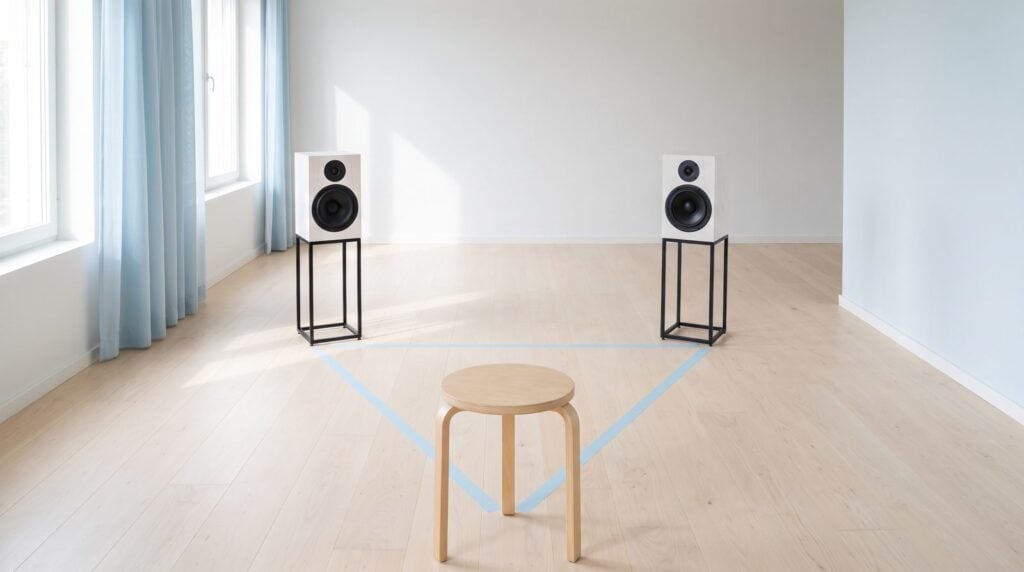
What equipment do you need to produce music at home?
You need three things: a computer, a pair of headphones with a flat sound and a DAW, the program you make music in. The computer you already own is usually fine for your first months, and FL Studio’s free trial costs nothing. An audio interface, studio monitors and a MIDI keyboard can all wait.
Headphones are the one thing worth buying. A flat sound means no boosted bass or treble, so your music sounds right on other speakers too. Max says: “That’s all the necessary hardware you need to make music. Believe it or not, everything else is totally optional.”
The optional extras, in the order you’ll probably want them:
- An audio interface: the box that connects a microphone or speakers to your computer. You only need one to record vocals or use studio monitors. Here are audio interfaces for every budget.
- Studio monitors: speakers made for mixing. Placement matters even more than the gear: tweeters at ear level, with your head and the two speakers forming an equal triangle. Compare the best studio monitors and the best studio headphones.
- Some room treatment: bass builds up in a bare room and can make you think your mix sounds bad. Bookshelves, a sofa or even an old mattress against the wall helps, and our DIY acoustic treatment guide shows more.
- A MIDI keyboard: nice to have, but your computer keyboard can play notes. You don’t need to play any instrument, either.
When you’re ready to put it all together, follow our home studio setup guide.
Which DAW should you use?
Start with FL Studio, the DAW Mix Elite teaches in. It’s easy to start, its free trial includes every feature with no time limit, and every DAW is built from the same parts, so switching later takes days, not months.
A DAW (digital audio workstation) is the one program you build the whole song in. The big four are Pro Tools, the standard for recording; Logic Pro, a Mac-only favorite of songwriters; Ableton Live, popular for live shows; and FL Studio, which is easy to start, hard to master, and popular with beginners and pros alike.
The trial has one catch: it can’t reopen saved projects, so export your work before you close it. If you buy FL Studio later, get the Producer Edition. To learn the five windows you’ll use, start with our beginner’s guide to FL Studio.
Still choosing a program? Here is the best DAW for beginners, with prices checked on each maker’s site.
Step 2: Write chords, a melody and a bassline
Every song starts as an idea, and chords are the easiest place to start. The chord progression is the backbone of a song. A chord is three or more notes played together, and a progression is a few chords in a row. Most songs loop just four of them. Write yours on a plain piano sound first, because it’s easy to hear, and swap in a fancier sound later.
Can you make music without knowing music theory?
Yes. You only need one idea from theory: the scale, the seven notes your song uses. Pick a scale in FL Studio’s Piano Roll and the notes that fit light up, so every chord and melody you draw stays in key. Drums need no theory at all, and the bass simply follows your chords.
You don’t need to play an instrument, either. Your computer keyboard can play notes, and every instrument you can think of exists as a virtual instrument inside your DAW.
Pick a key and a scale
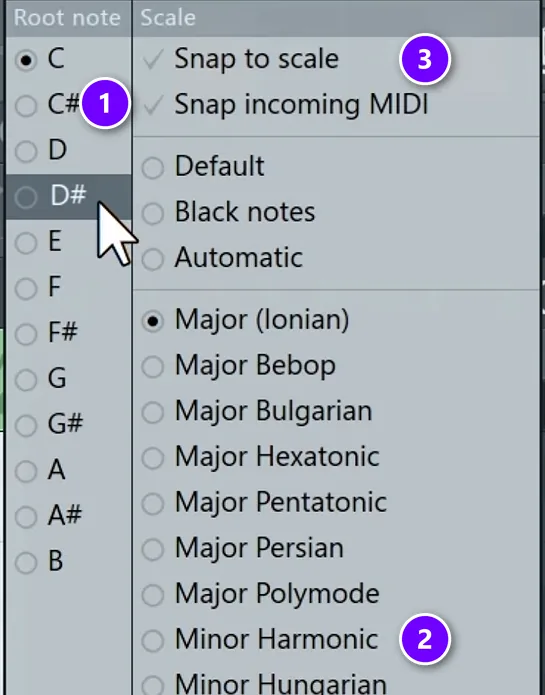
A scale is the set of seven notes your song uses, and the root note is the one that feels like home. Together, the root and the scale make your key, like C# minor. Major scales sound bright and happy, while minor scales sound darker or more serious. Minor is the more popular choice in today’s pop, hip-hop, R&B and electronic music.
Open the Piano Roll (right-click a channel and choose Piano roll), then right-click the note icon in its toolbar.
- Pick a root note (1).
- Pick a scale (2), and the notes of that scale light up on the grid.
- Tick Snap to scale (3) if you want every note you draw to land on the scale.
Our guide to music theory for producers explains scales in more depth.
Build your chords
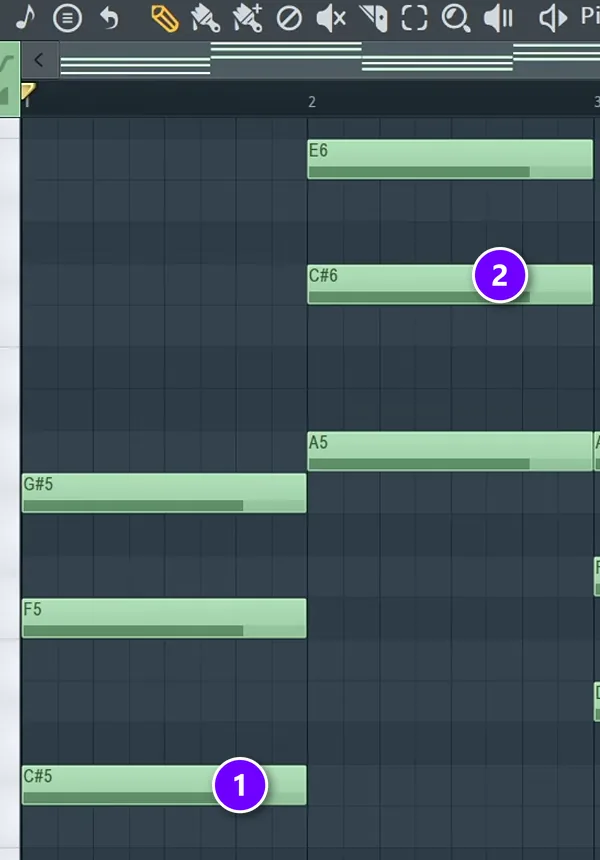
Now build the progression, one chord at a time.
- Place one root note for each chord (1). Name them by counting up the scale from the song’s root: the root itself is I, the next scale note is ii, and so on. The course’s first example, in C major, is I-V-vi-IV.
- Stack two more notes on every root: skip one scale note, place one, skip one, place one (2). That’s a chord.
- If the top notes jump around between chords, move some down an octave (select them and press Ctrl + Down arrow) so the chords flow.
- For a fuller sound, copy each root note an octave lower.
Max says: “If you stick to the scale and just build first the progression, and then build basic chords out of that … there’s just no way you’ll write a bad sounding chord progression.” More in our guide to making chords in FL Studio.
Write a melody
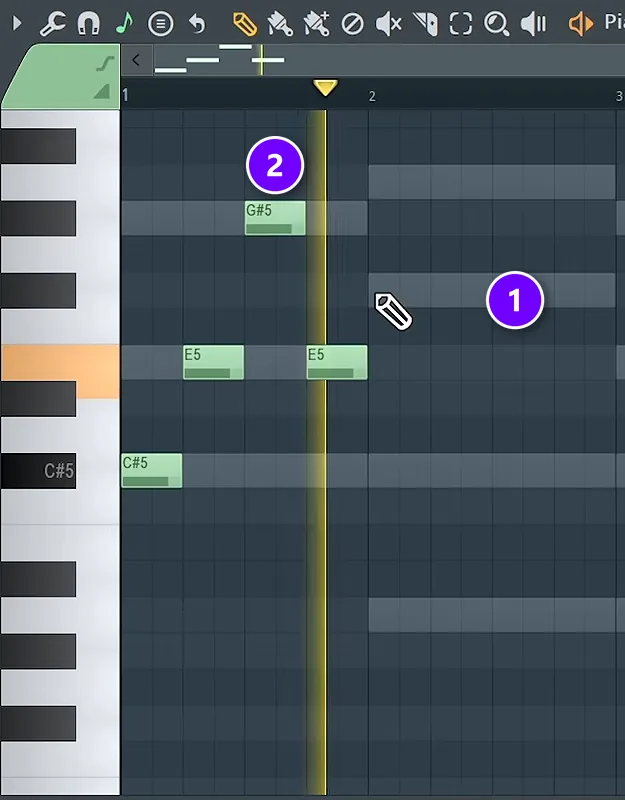
Mix Elite’s free course shows four ways to write a melody. The easiest is to use only notes that are already in your chords.
- In your melody instrument’s Piano Roll, show the chords as grey ghost notes with View > Ghost channels (Alt + V) (1).
- Draw your melody on top of those notes (2), and step to a neighboring note now and then.
- Change the rhythm in every bar, too, so the same rhythm never runs all the way through.
If you’d rather play than draw, right-click the typing-keyboard-to-piano button in the toolbar and set it to the same root and scale as your chords. Every key on your computer keyboard now plays a note in your scale.
Forgot to press record while you were jamming? Tools > Dump score log to selected pattern brings back what you played in the last few minutes.
Add a bassline
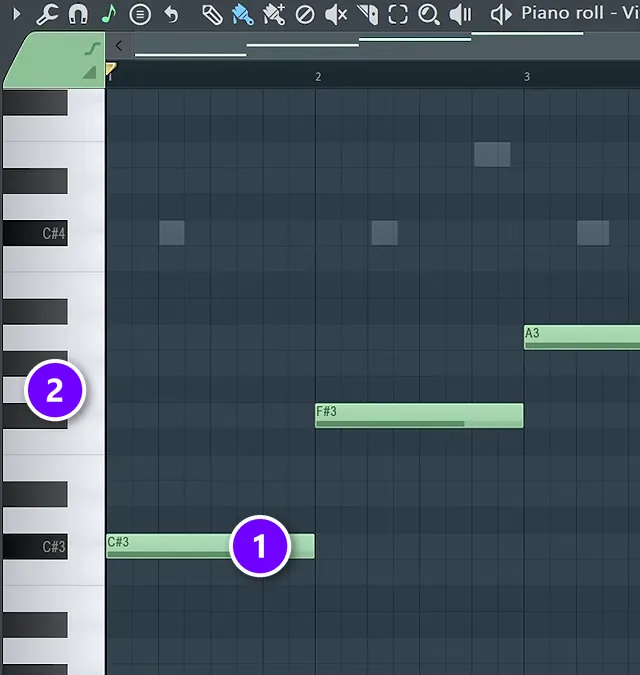
For the bass, load a bass sound on a new channel (the course uses a bass preset in Vital, a free synth) and open its Piano Roll. Play the root note of each chord (1), one or two octaves under the chords (2). If you lose track of the root, find the note that sounds like home. Humming it helps.
Don’t go any lower than that, or the bass starts to sound weak. For a darker feel, hold the first root note while the chords change above it.
Step 3: Build the drums and arrange the song
Drums keep the rhythm going, and arranging turns your 8-bar loop into a song with a beginning, a middle and an end. They belong together, because the arrangement is built from the patterns you make here.
Program the drums
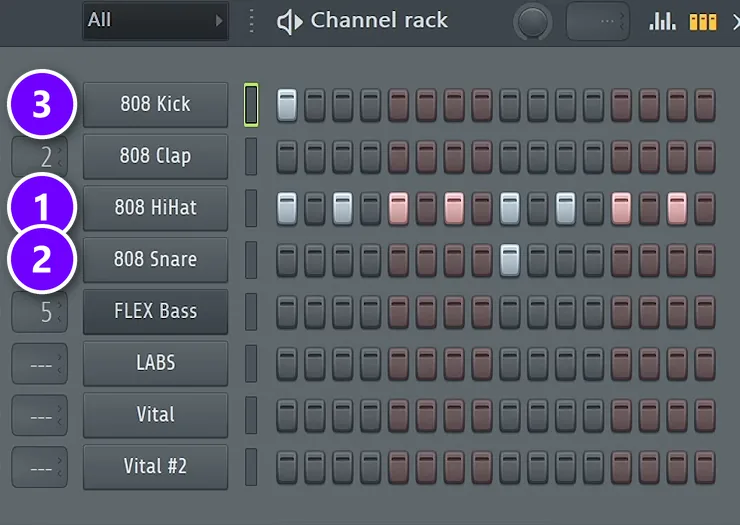
Make a new pattern for the drums and open the Channel Rack. Each row is one sound, and each box is a step: left-click a box to add a hit, right-click to remove it, and press Space to play. A simple trap starting point looks like this:
- A hi-hat on every 2nd step (1). Right-click the hat channel and choose Fill each 2 steps.
- A snare on beat 3 (2), which is step 9 of 16.
- A kick on the first step (3), then wherever it feels good, on a beat or half a beat.
Make the pattern, and especially the kick, at least two bars long. Then turn down the velocity (how hard a note hits) of every other hi-hat, so the groove sounds less robotic. For house, the recipe changes: a kick on every beat (producers call it four on the floor), a clap on beats 2 and 4, and a hi-hat on every off-beat, with the Channel Rack’s swing knob around 40%. Set the tempo while you’re here: most styles sit between 90 and 160 BPM (beats per minute), and trap is usually around 140.
Why do my drums sound weak and thin?
Usually it’s the samples, not the pattern. A simple beat with great drum sounds beats a busy beat with weak ones, which is why Mix Elite’s rule for drums is “gold in equals gold out.” Swap in better kicks and snares first, then fix the rest in the mix.
- Layer the snare or clap, never the kick. A second clap or snare adds punch. Pan the two layers slightly left and right.
- Shape the kick with a gentle EQ bell. Boosting the high mids and presence helps it cut through, and a little more bass adds punch. If it needs a big boost, pick a different kick.
- Compress the drums as one group. Route them to one bus and compress lightly, about 2:1 with 3 to 4 dB of reduction, instead of compressing each hit.
- Sidechain the bass to the kick. The bass ducks each time the kick hits, so the kick punches through. Never cut the sub out of the kick itself.
Here’s how to install sample packs in FL Studio, and our beat-making guide goes deeper on drums.
How do you turn a loop into a full song?
Copy your loop across about two minutes, mute everything, then bring the parts back in one at a time. Lay the song out in 16-bar sections (intro, hook, verse, hook and outro), add something new every 4 to 8 bars, tease one drum sound just before the hook, and ease out at the end.
Arrange the loop in FL Studio
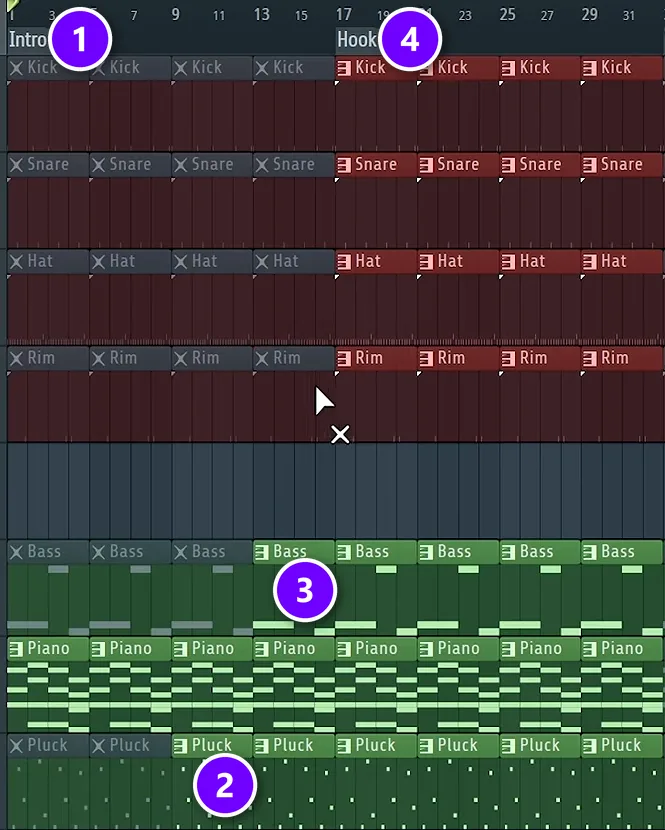
This is called additive arrangement. It leads the listener into the song instead of hitting them with everything at once. In FL Studio it takes four moves:
- Split every sound into its own pattern (Patterns > Split by channel) and color-code the Playlist tracks.
- Select everything and press Ctrl + B until the song is about two minutes long, then mute it all with the Mute tool.
- Add time markers (Alt + T) for 16-bar sections: intro, hook, verse, hook and outro.
- Unmute parts one at a time. Start the intro (1) with the core sound, add the pluck at bar 9 (2) and the bass at bar 13 (3), and let everything play from the hook (4).
To stop the song from sounding like one long loop, change something small every 4 beats in the drums, like a hi-hat roll or an extra kick, and give the verse a different mix of parts than the hook. Most songs repeat the same four chords from start to finish, so these small changes are what keep it moving.
Our full guide on how to turn a loop into a full song shows every click, plus a trick for copying the layout of a song you love. For the bigger picture, read the art of arrangement, and see EDM song structure for typical section lengths in dance music. When the song is laid out, our guide on how to finish a song gets it over the line.
Step 4: Mix it with the Holy Quad
Mixing means balancing your sounds so each one is clear and has its own space. The Holy Quad, Mix Elite’s mixing formula, does it in four steps: volume, EQ, dynamics and space, always in that order. Mixing is about managing focus. Whatever is loudest gets the listener’s attention, so volume comes first. Our full guide on how to mix a song walks through every step with screenshots.
Before you start, check the Master track. If you began from FL Studio’s default template, it comes with a limiter on the master, which hides what your mix really sounds like. Keep the master empty while you mix.
1. Volume: turn things down first
Play the part where everything is going and turn down whatever is too loud first. Your drums and your main sound should be the loudest things in the song. Then mute each part for a moment. If the song sounds better without it, delete it.
2. EQ: cut before you boost
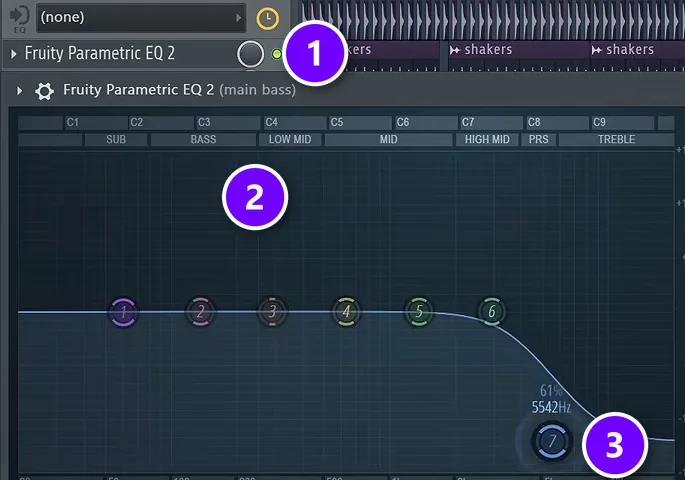
EQ (short for equalization) turns certain frequencies up or down so sounds stop fighting over the same space. First send every channel to its own mixer track: select all the channels in the Channel Rack and press Ctrl + L. Then right-click an empty effect slot on a mixer track, type EQ and pick Fruity Parametric EQ 2 (1).
The labels along its top (2) name each zone, from sub and bass up to presence and treble. Drag a numbered band (3) down to cut or up to boost, and scroll on it to make it narrower or wider. Start with the low end, let only one sound own the sub, and prefer cuts to boosts. Never boost anything more than about 6 dB, because cutting what’s wrong leaves a cleaner mix than boosting what’s good. Judge every change with the full mix playing, because nobody will ever hear your sounds alone.
3. Compression: the two knobs that matter
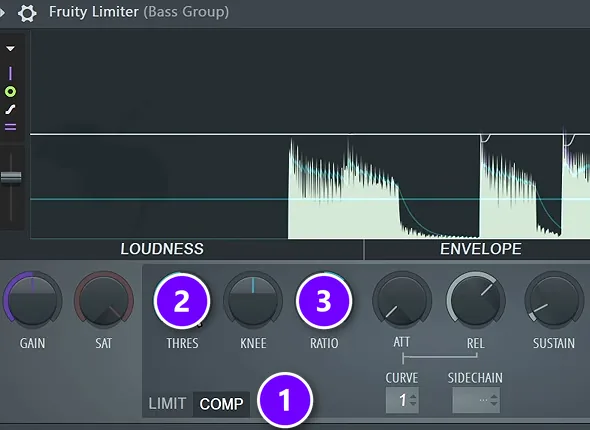
A compressor turns down the loud moments of a sound so it stays even. Use Fruity Limiter switched to COMP mode (1), because it shows you the waveform. For now, only two knobs matter: the threshold (2), the level where it starts working, and the ratio (3), how hard it pushes down. Start with a ratio between 2 and 4, then lower the threshold until you hear it work.
Don’t compress the kick, snare and hats one by one. Route the drums to one mixer track, called a bus, and compress the whole group lightly. Then set up sidechain, so the kick ducks the bass by about 7 to 10 dB each time it hits. Here are three ways to sidechain in FL Studio.
4. Space: reverb and panning
Space comes last: reverb for depth, and panning to spread sounds left and right. Keep both light: pan a shaker about 10% left and a hi-hat about 10% right, and cut the low end out of your reverbs so they don’t muddy the mix. For the errors that sink most first mixes, read the top 10 newbie mixing mistakes.
How do you fix a muddy, crowded mix?
A muddy mix has too many sounds fighting over the same frequencies, most often the low end. Let only one sound play the sub and low-cut the rest, delete parts the song doesn’t need, and cut instead of boosting. Then judge every change with the full mix playing, not in solo.
Reverb is a common hidden cause. Raise the reverb’s low cut, to about 700 Hz on a clap or a vocal, so the echo stays out of the bass. And remember that more sounds mean more problems: if muting a part makes the song sound better, delete it.
Step 5: Record and mix your vocals
If your song has vocals, record them over the rough arrangement, since the singer or rapper often decides the final length anyway. Great vocals start with the performance and a quiet room. A small space with no echo is perfect. Even a closet works. Use a condenser microphone on a stand, with a pop filter, one or two fists away from your mouth.
- In FL Studio, choose your audio interface’s ASIO driver under Options > Audio settings.
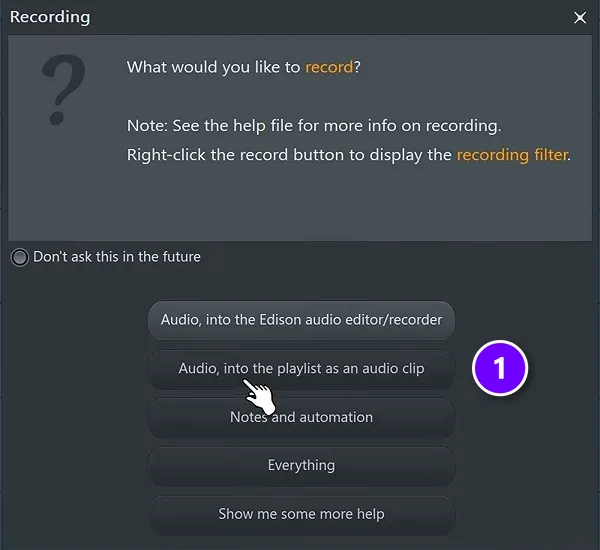
- Click the record button at the top of the screen and choose Audio, into the playlist as an audio clip (1).
- Record the vocal raw, with no effects, and always record a few takes, even when the first one feels perfect.
Then mix the vocal with V.O.C.A.L., Mix Elite’s vocal chain, in this order:
- Volume: even out the quiet and loud words first.
- Optimize: EQ out the low rumble and any harsh spots.
- Compression: about 4:1, until every word is equally clear.
- Attenuate harshness: tame sharp S sounds with a de-esser.
- Layer effects: add reverb and delay, kept light so the words stay clear.
Our full guide on how to mix vocals walks through each step, and here’s how to mix vocals with FL Studio’s stock plugins. If you’re writing the words too, start with how to write a great chorus and how to write a pop song.
Step 6: Master and export your song
Mastering is the final polish that makes a finished mix loud and clean enough to play anywhere, like giving a car its final polish before it hits the showroom. It can’t rescue a weak mix, though. Max says: “Whatever your mix is, if it’s good, it will only be better. If it’s bad, then, well, let’s put it that way, mastering will not fix this.” So fix problems in the mix first.
Export your mix
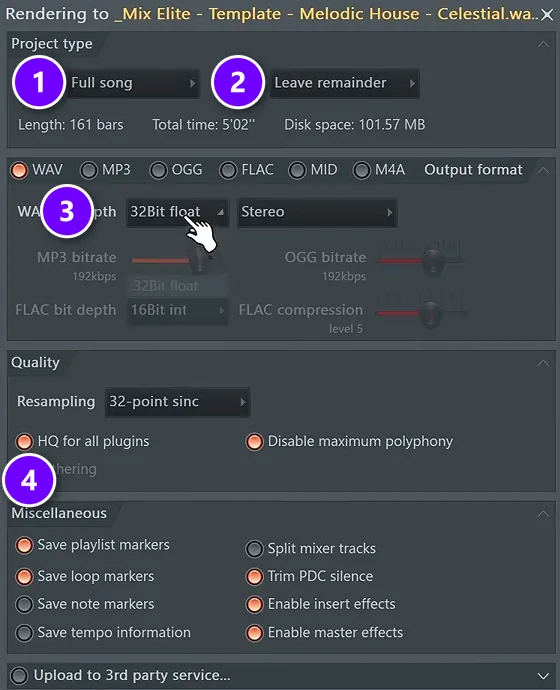
Empty the Master track, then go to File > Export > Wave file.
- Set the mode to Full song (1).
- Set the tail to Leave remainder (2), so reverb tails at the end don’t get cut off.
- Pick 32Bit float as the WAV bit depth (3), which lets you recover any peaks that went too loud.
- Turn on HQ for all plugins (4).
Then open a new, empty project and drag the WAV in to master it.
The 3-step mastering chain
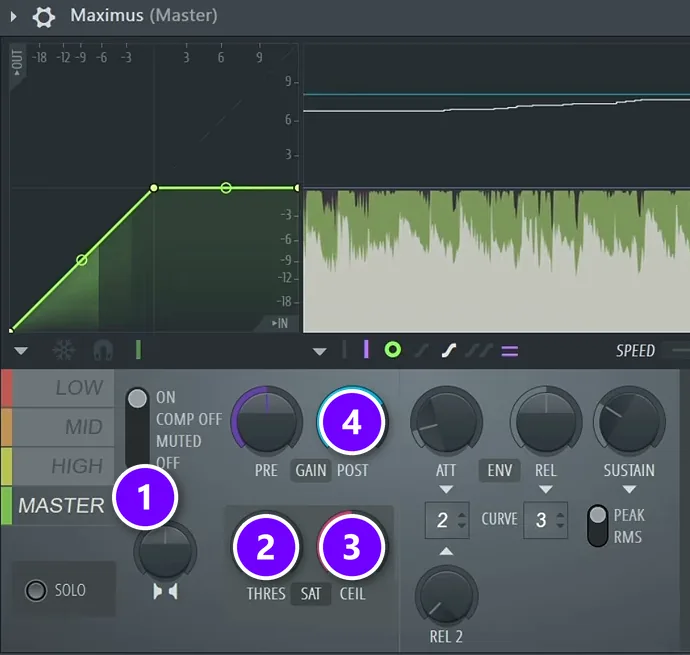
Mix Elite’s 3-step mastering chain uses only plugins that come with FL Studio. First, an EQ: one Parametric EQ 2 that cuts everything under 30 Hz and above 18 kHz, and a second one for small moves, 2 dB at most. Second, multiband compression in Maximus, taking off about 2 to 4 dB at most in each band.
Third, loudness. In Maximus:
- Click the MASTER band (1).
- Nudge the threshold (2) only barely to the left.
- Set the ceiling (3) to -0.3 dB.
- Raise the post gain (4) until you hear distortion, then back it off by 0.5 to 1 dB.
Measure the result with the free Youlean Loudness Meter. For the track in the video, the target is about -8 to -7 LUFS (LUFS measures how loud a song feels).
Export the final master as a 24-bit WAV, plus an MP3 at the highest bitrate. Our guide to mastering in FL Studio covers every setting, and LUFS vs RMS explains how loud your master should be.
Step 7: Release it and get feedback
A song isn’t really finished until someone else hears it. There are two ways to release music: through a label or a manager, or by yourself on Spotify and YouTube. Our guide on how to release music covers the details.
Before you release, play the master on every speaker you can find: headphones, a laptop, a car stereo, a Bluetooth speaker. Fix anything that jumps out. Then play it for one person whose taste you trust, and save their notes for your next song instead of reworking this one forever. Once a few songs are done, you can think bigger, like how to make an album.
How long does it take to produce a song?
A rough first song can come together in about a week if you work through one step per evening, each building on the one before. Mixing takes the longest: an average mix takes 5 to 10 hours, more for a complicated track. Mix Elite teaches the steps the same way, one topic a day.
Learning the software itself runs on a separate clock. Our guide on how long it takes to learn FL Studio breaks it down stage by stage. Starting later in life? Here’s why it’s not too late to learn music production. Prefer to learn with a teacher? We compared the best online music production courses by price, feedback and hours per week. On a tight budget, start with the best courses under $50, and if FL Studio is your program, see the best FL Studio courses. Want to start for free? These are the best free music production courses.
What should you learn first if you only have an hour a day?
Learn the steps in the order a song is made, one per session: the main windows of your DAW, then chords and melody, then drums and arrangement, then mixing, vocals and mastering. Ignore everything else in the software until a step needs it. Mix Elite’s 7-Day Music Producer Course follows this order at about 45 minutes a day.
For a full plan, week by week, read how to learn music production.
Most of FL Studio’s buttons won’t matter to you for months. Max says he doesn’t even use 90% of the top toolbar, and he made music for a long time before he even looked at the mixer. So write first and polish later. Give each evening one small job, like a chord loop tonight and a drum pattern tomorrow, and finish it.
Beginner mistakes that ruin a first song
The same beginner mistakes come up again and again. These are the ones Mix Elite’s free course warns about most, with the fix for each:
- Starting with weak sounds. Better samples and instruments make every later step easier. Free plugins like LABS and Vital are a big step up from bare stock sounds.
- Writing the bass too low. Keep it one or two octaves under the chords, and no lower.
- Busy drums. In trap, the drums keep the rhythm going and don’t need to be the highlight. Keep the pattern simple and change something every 4 beats.
- Bringing everything in at once. Add a part every 4 to 8 bars so the song builds.
- Too many sounds. Every extra layer is one more thing to fix in the mix. Mute each part, and if the song sounds better without it, delete it.
- A limiter on the master while mixing. Keep the Master track empty until you master.
- Hoping mastering will save the mix. It won’t. Fix balance and harshness in the mix, then master.
Your first song won’t be perfect, and it doesn’t need to be. Finish it, export it, and start the next one. The second song is where the lessons from the first one pay off. Wondering who’s behind these lessons? Here’s whether Mix Elite is legit.
THE 7-DAY MUSIC PRODUCER COURSE
Make your first finished song in 7 days
The 7-Day Music Producer Course follows the same order as this guide, one step a day, from setup to release. Each day takes about 45 minutes, and every sound and template you need is handed to you. It’s taught in FL Studio (the free trial works), and on day 7 a pro gives you personal feedback on your track. It’s $27, with a 60-day money-back guarantee.
Frequently asked questions
Can I make music without knowing music theory?
Yes. Pick a scale in FL Studio’s Piano Roll and the notes that fit light up, so your chords and melodies stay in key. Build chords by stacking every other note of the scale on each root. Max says that if you build the progression first and the chords second, there’s no way you’ll write a bad-sounding progression. You don’t need to play an instrument, either.
How do I structure a song so it doesn’t sound like a repeating loop?
Lay it out in sections, like intro, hook, verse, hook and outro, about 16 bars each, and give each section a different mix of parts. Add or remove something every 4 to 8 bars, change a small drum detail every 4 beats, and tease a drum sound just before the hook. Or copy the section layout of a song you love.
Why do my drums sound weak compared to professional songs?
Most of the time it’s the samples. Pro songs often use simple patterns with great sounds, so swap in better kicks and snares first. Then layer a second clap or snare (never a kick), vary the hi-hat velocity, compress the drums together on one bus, and sidechain the bass so the kick punches through.
What equipment do I need to start producing music on a budget?
A computer, headphones with a flat sound and a DAW. The computer you already own is usually fine to start, and FL Studio’s free trial includes every feature, though it can’t reopen saved projects. Free plugins like LABS and Vital add great instruments. Buy an audio interface, a microphone or studio monitors only when you need them.
What should I learn first if I only have an hour a day?
Learn one step of a song per session, in order: the DAW basics, chords and melody, drums and arrangement, then mixing, vocals and mastering. Skip the rest of the software for now. Finishing one small job each evening keeps you moving, and a rough first song can come together in about a week.





