



“Mise en place is the religion of all good line cooks.”
To add a sample pack to FL Studio, unzip it, move the folder somewhere you won’t change, and drag that folder from File Explorer (Finder on a Mac) onto the FL Studio Browser on the left, where it shows up right away. You can also add the folder under Options > File settings > Browser extra search folders.
You grab a new sample pack, and it lands in your Downloads as a single zip file. Knowing how to add sample packs to FL Studio sounds like a tiny thing. But when those fresh kicks and 808s are nowhere in the Browser, it can eat the first hour of a session before you’ve made a single beat.
A sample pack, also sold as a sound pack or drum kit, is a folder of short audio files called samples: kicks, snares, 808s, loops and effects. Below are both ways to add one, with screenshots from Mix Elite’s free 4.5-hour FL Studio course, plus the Mac steps, a fast way to swap sounds, and how to keep your library tidy.
Table of Contents
What’s inside a sample pack?
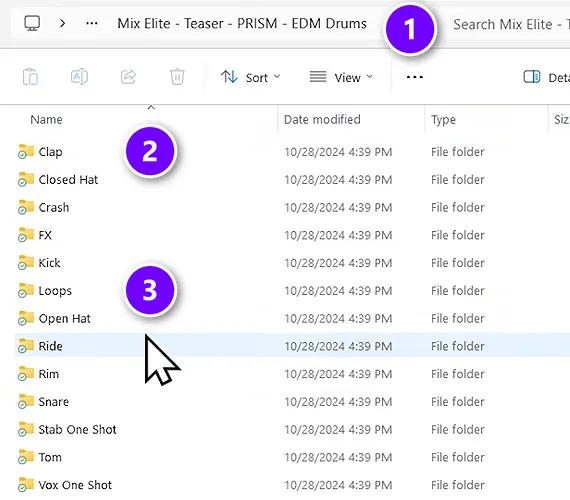
Most packs come as one download, usually a .zip file. Inside is a main folder named after the pack (1), with a subfolder for each type of sound (2), like Clap, Kick, Snare and Open Hat. Many packs also have a Loops folder (3) with longer patterns that already play in time.
The single hits are called one-shots. You place them yourself, step by step, to build your own beat. Loops are ready-made bars of drums or music that you drop in and repeat. Almost every pack uses WAV files, which FL Studio loads natively, so a normal pack works the moment it’s unzipped.
Why bother with packs at all? The sounds you start with shape the whole song. Max, the founder of Mix Elite, swaps the stock drums for a pack early in the free course, before he adds anything else, and the same simple pattern instantly sounds better.
How to add sample packs to FL Studio, step by step
This is the method from Mix Elite’s free FL Studio course on YouTube. It takes about a minute per pack:
- Unzip the pack.
- Give your packs one permanent home.
- Drag the folder onto the FL Studio Browser.
- Open the pack and pick a sound.
- Drag the sample onto a channel.
The sample-pack part of the video starts at 1:08:22.
Step 1: Unzip the pack
FL Studio can’t look inside a .zip or .rar file, so extract it first. On Windows, right-click the .zip and choose Extract All. On a Mac, double-click it. For a .rar file, use a free tool such as 7-Zip on Windows or The Unarchiver on a Mac.
When you’re done, you should see a normal folder with the sounds inside. Delete the .zip afterwards. Two copies only make the next step confusing.
Step 2: Give your packs one permanent home
Pick one folder for all your sounds, like C:\Samples on Windows or a Samples folder on your Mac, and move the pack into it. This step matters more than it looks. Max’s advice is to place packs “somewhere on your computer where you know you’ll not be touching them anymore, because if you do change the path, FL will not know where to look for them.”
The path is the folder’s address on your computer. Projects remember each sample by that address. Move or rename the folder later, and old projects open with missing sounds.
Keep the folder on your own drive, not in a folder that OneDrive or iCloud syncs. Image-Line’s manual says FL Studio’s own user data has to stay on a local drive, and your samples are safer there too.
Step 3: Drag the folder onto the FL Studio Browser
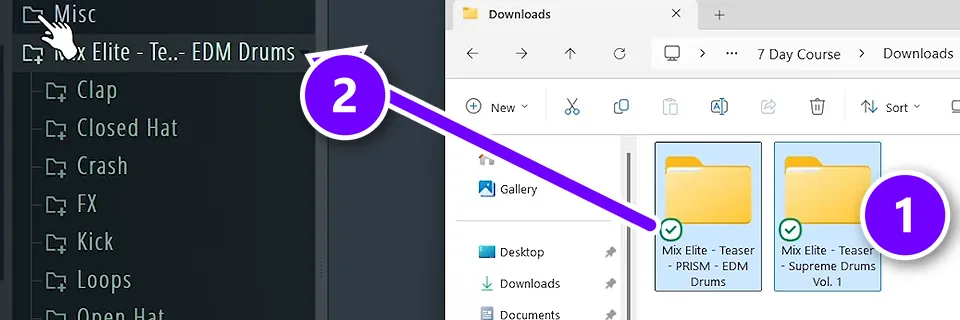
Open File Explorer next to FL Studio. If you can’t see the Browser on the left, press Alt + F8 (Option + F8 on a Mac). Now drag the pack folder (1) onto the Browser and let go. It appears in the list straight away (2), with all of its subfolders.
The free course adds packs one by one. If you keep every pack inside one Samples folder, you can also drag that parent folder in once, because FL Studio searches all the folders inside it. If the Browser and Channel Rack are new to you, our beginner’s guide to FL Studio gives you a quick tour.
Step 4: Open the pack and pick a sound
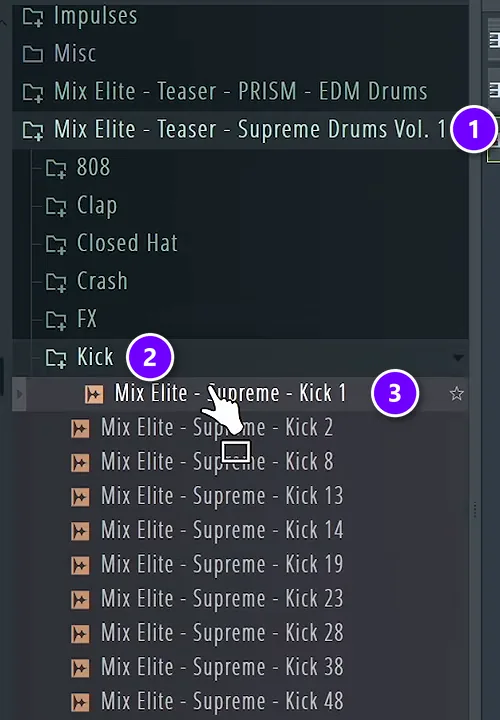
Click the pack’s name in the Browser (1) to open it, then open a folder such as Kick (2). Click any sample to hear it (3). Scroll with the Down Arrow key, which plays each kick in turn, so you can audition a whole folder in seconds.
Step 5: Drag the sample onto a channel
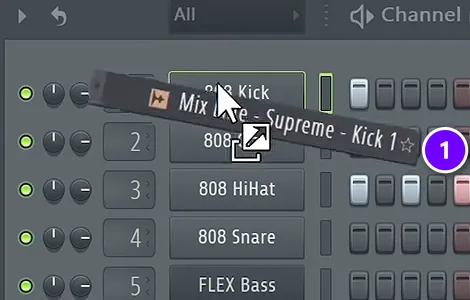
Drag the sample onto a channel in the Channel Rack (1). FL Studio swaps the old sound for the new one and keeps every step you already programmed. The free course replaces the stock kick, snare and hat this way, one at a time.
Drop a sample on the empty space below the channels and you get a brand-new channel instead. Drop it in the Playlist and it becomes an audio clip, which is how loops and effects usually go in.
How to add a sample pack in File settings
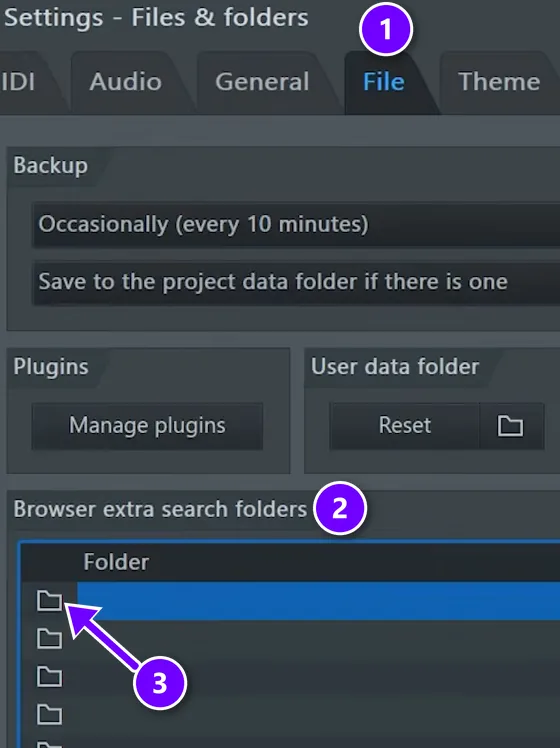
This is the other way to add a pack. It does exactly the same thing as dragging, and it’s handy when you want to give a folder its own short name in the Browser.
- Click OPTIONS in the menu at the top, then File settings. (F10 opens the same window.)
- Make sure the File tab (1) is open, and find Browser extra search folders (2).
- Click the folder icon at the start of an empty row (3) and choose your pack’s folder.
- Optional: type a short name in the Browser name column. That’s the name the Browser shows.
- Close the window. The folder now sits in the Browser with your other folders.
There’s room for around 30 folders here. One warning from Image-Line: don’t add the root of a whole drive, like C:\ or D:\. FL Studio scans every extra folder when a project loads, so a whole drive makes load times very long. Plugins are a different story, by the way. They go through the Plugin Manager, which our guide on how to add VSTs to FL Studio walks through.
How to add sample packs to FL Studio on a Mac
It works the same way on a Mac. Open Finder next to FL Studio, show the Browser with Option + F8, and drag the pack folder onto it. Or use OPTIONS > File settings > Browser extra search folders, exactly as above. The menus look the same on both systems, and most shortcuts use Command where Windows uses Ctrl.
Unzip packs with a double-click, and keep them on your Mac’s own drive or on an external drive. If they live on an external drive, plug it in before you open FL Studio, or projects that use those sounds will open without them.
How do you swap sounds fast while the beat plays?
- Select a channel in the Channel Rack and start playback.
- Click a sample in the Browser.
- Press Shift + Down Arrow or Shift + Up Arrow. FL Studio sends the next or previous sample in that folder to the selected channel, so you hear each new kick inside your beat, not on its own.
Do this while the loop plays, so you hear every option in context. To load one exact sample instead, select it and press Enter, and it replaces the selected channel’s sound.
Use your ears and take your time. When Max picks between a snare and a clap, he points out that “claps are more high-end focused, so a little bit more bright, and snares are a little bit more punchy.” Try both in your loop and keep whichever fits. If the audio starts to crackle while you audition sounds, here’s how to fix FL Studio crackling.
Where are FL Studio’s own samples?
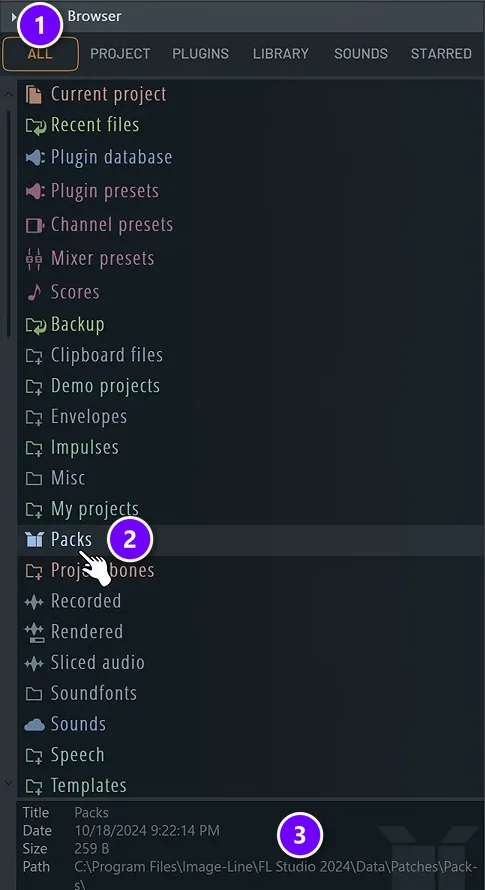
FL Studio comes with its own sounds. By default the Browser opens on FL Cloud, Image-Line’s subscription service, which you don’t need right now. Click All (1) at the top of the Browser, then open Packs (2). As a beginner, you can ignore the other folders for now.
The info panel at the bottom of the Browser shows where a folder lives on disk (3). In FL Studio 2024 on Windows, the version used in the course, that’s C:\Program Files\Image-Line\FL Studio 2024\Data\Patches\Packs.
Should you copy new packs into that folder? It works, but there’s a better habit. Image-Line’s manual points out that folders outside the program keep your sounds separate from the FL Studio install, so they stay safe if you ever reinstall it. Keep packs in your own Samples folder and add that to the Browser.
Can you drag samples straight into the Playlist?
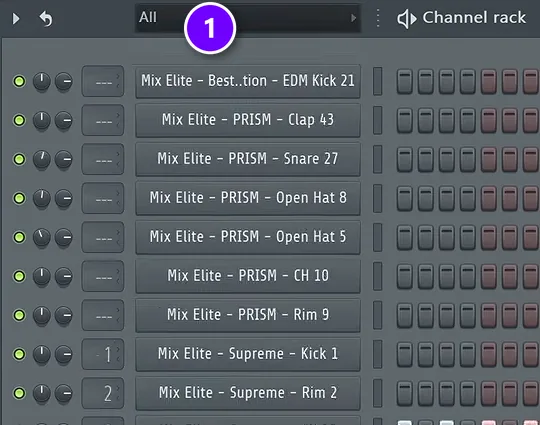
Yes. Drag a single sample from File Explorer, Finder or the Browser right into the Playlist, and it becomes an audio clip. The free course does this with crashes and sweeps while arranging a song, dropping each one where a new section starts.
One thing confuses people here. After you drop audio into the Playlist, the Channel Rack can switch its filter to show only audio, and your other channels seem to vanish. Set the filter at the top back to All (1) and everything comes back, including a volume knob for each new clip.
Dragging single files is fine for one sound. For a whole pack, add the folder to the Browser, so you can preview and swap sounds without leaving FL Studio.
What’s the best way to organize your sample library?

Keep every pack in one Samples folder that never moves, add only that folder to the FL Studio Browser, and never rename or move a pack once a song uses it. FL Studio finds each sample by its path, so a fixed home means no missing sounds.
Packs pile up fast, especially free ones, and a tidy library saves you more time than any shortcut. Here’s a simple system:
- One parent folder. Keep every pack inside one Samples folder, never in Downloads or on the Desktop, and add only that folder to the Browser.
- One way of sorting. Leave packs as they come, or sort them into Drums, 808s, Loops and FX. Pick one way and stick to it.
- Clear names. Rename long pack folders, or set a short Browser name in File settings.
- Stars for favorites. Right-click a sample and choose Favorite, and it shows up in the Browser’s Starred tab.
- Tags for what you use. Right-click a sample, choose Add a tag and type tags separated by commas, like Kick,808,C#. The Browser’s Tags filter then finds them in any pack.
- A zip for finished songs. File > Export > Zipped loop package saves a project together with every sample it uses, so the song still opens if your library changes later.
- Fewer, better sounds. Delete what you know you’ll never use.
That last point is Max’s view too: “It’s much better to have a few great sounds than lots of okay ones.” He also says reusing the same drums from song to song is not a bad practice, and some producers reuse the same drum samples across whole albums.
To find a sound fast, press Ctrl + F for Browser find, type a word like snare, and press F3 to jump to the next match.
Sample pack not showing up in FL Studio? Try these fixes
If a new pack isn’t in the FL Studio Browser, it’s usually still zipped, its folder was never added, or FL Studio was open when you copied it. Extract it, drag the folder onto the Browser and choose Reread structure in the Browser menu.
Here are all seven causes and their fixes:
- It’s still zipped. FL Studio can’t open .zip or .rar files. Extract the pack, then add the folder.
- The folder was never added. The Browser only shows FL Studio’s own folders and the ones you add, not your whole computer or your Downloads folder. Drag the pack folder onto the Browser, or add it in File settings.
- FL Studio was open when you copied it. New files don’t always appear right away. In the Browser menu, choose Reread structure (Ctrl + R) to refresh the list.
- The sounds sit one level deeper. Many packs put a folder inside a folder. Keep opening subfolders until you see the audio files.
- You moved or renamed the folder. Projects look for each sample at its old address. Move the folder back, or add its new location as a Browser extra search folder and reopen the project.
- The Browser is on the wrong tab. On Sounds or Starred you won’t see your folders. Click All.
- The files use an unusual format. The Browser previews WAV, MP3, M4A and OGG files with a click. If a pack won’t load, ask the seller for a WAV version.
FL Studio scans your extra folders for missing samples whenever a project loads. That’s why adding the new location usually fixes old projects in one go.
Where can you download sample packs for FL Studio?
Start with what you already have: FL Studio’s own Packs folder is free and installed. Then download packs from sample stores and producers, who offer free and paid packs made for one style, like trap or house. The Sounds tab also opens Image-Line’s FL Cloud library, a subscription product.
The pack added in the screenshots above is Mix Elite’s own Supreme Drums, with 509 one-shots and 40 drum loops as royalty-free WAV files.
Buying packs made for a specific style is pretty common, and a great pack plus lots of comparing your music to finished songs is how you learn to hear a good sound. Whatever you choose, download the WAV version, then follow the five steps above. When your drums are in, our beat-making guide shows what to build with them.
THE 7-DAY MUSIC PRODUCER COURSE
Turn those sounds into your first real beat
Day 3 of Mix Elite’s 7-Day course is drums and arranging. You download the ‘2025 Producer Toolkit’ of sounds, learn how to pick the ones that hit, build drum patterns fast and turn your loop into a full song. It’s taught in FL Studio, and the free trial works. Each day takes about 45 minutes, and on Day 7 a pro gives you feedback on your finished track. It’s $27, with a 60-day money-back guarantee.
Frequently asked questions
Where should I put sample packs for FL Studio?
Anywhere you won’t move them later. One Samples folder on your main drive works well, or an external drive that’s always plugged in. Then drag that folder onto the FL Studio Browser, or add it under Options > File settings > Browser extra search folders. Avoid cloud-synced folders, and never add a whole drive.
Do I need to unzip a sample pack before adding it to FL Studio?
Yes. FL Studio can’t read sounds inside a .zip or .rar file. On Windows, right-click the .zip and choose Extract All. On a Mac, double-click it. For .rar files, use a free tool such as 7-Zip or The Unarchiver. Then add the extracted folder to the Browser.
Can I add sample packs to the FL Studio free trial?
Yes. The free trial has every feature, including the Browser, so adding packs works exactly the same. The catch is projects: the trial can’t reopen a saved project, so finish and export your beat in one session, or buy an edition to keep working on it later.
Why are my samples not showing up in FL Studio?
Usually the pack is still zipped, the folder was added while FL Studio was open, or the sounds sit in a subfolder. Extract the pack, choose Reread structure (Ctrl + R) in the Browser menu, and open the subfolders. Also check that the Browser is on the All tab, not Sounds or Starred.
How do I add samples to FL Studio?
Drag a single file from File Explorer or Finder onto the Channel Rack for a new channel, onto an existing channel to replace its sound, or into the Playlist as an audio clip. For a whole pack, add its folder to the Browser instead, so you can preview and swap sounds without leaving FL Studio.





