“When I graduated from high school in 1938, I began going to the library three nights a week.”
The best free music production course for beginners is Mix Elite’s free 4.5-hour FL Studio course on YouTube: one self-paced class that takes you from setup through chords, drums, arranging, mixing, vocals and mastering, in order. On a tight schedule, give it 45 minutes a night, and try Ableton’s free Learning Music site first as a warm-up in your browser.
Free is the right price for finding out if this is for you. You’ve wanted to make music for years, and you don’t want to pay for something you might quit in a month.
But free has a cost. It’s your time. Search YouTube for a free course and the list of videos never ends, most of them one trick out of order. With 45 minutes a night, you can’t spend a week on the wrong one. So we checked the best free music production courses on their own sites on October 11, 2026, and sorted out what’s really free, what’s only a preview and what each one teaches.
Table of Contents
What’s the best free music production course?
Mix Elite’s free 4.5-hour FL Studio course on YouTube is the best free music production course for beginners, because it teaches every step of a song in order: setup, chords, drums, arranging, mixing, vocals and mastering. It’s self-paced, the video needs no sign-up, and every part ends with homework.
Max, the founder of Mix Elite, teaches it himself on the Mix Elite | FL Studio Tips channel, under the title FL Studio Tutorial – Complete Music Producer 4h+ Course. It’s taught in FL Studio, went up in November 2024 and had 1,561,465 views on October 11, 2026.
What makes it the best free option is the order. Most free videos teach one trick at a time. This one follows the way a song really gets made: ideas first, then drums and bass, the arrangement, the mix and the master. It’s split into six “days”, and each one ends with homework, so you always know what to practice before you move on.
Full disclosure: Mix Elite makes this page and this class. That’s why every other option below was checked on its own site on the same day, and why we tell you what each one is best for.
Best for: complete beginners who use FL Studio, or who haven’t picked a music program yet and want one clear place to start. It’s also our pick for the best free FL Studio course. If you’re set on FL Studio, our guide to the best FL Studio courses compares the free and paid options side by side.
Is there a free course that takes you step by step through a full song?
Yes. Mix Elite’s free 4.5-hour FL Studio course builds one song from an empty project: you write chords and a melody, program the drums, arrange the loop into a song of about two minutes, then mix it, add vocals and master it. Each part builds on the one before, so nothing is a random trick.
That order is the point. As Max puts it at the start of the class, “every day we cover the next topic that builds on top of the previous one step by step.” Here’s what each day covers, with a real screenshot from the video. The links jump to the right moment, so you can pick up where you left off.
Day 1: the gear you need and FL Studio’s main windows
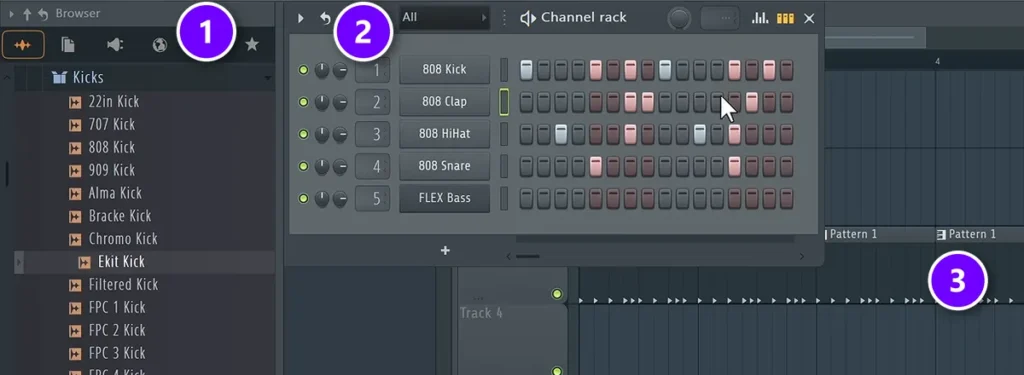
Day 1 starts with what to buy, and the answer is less than most people think: a computer and a pair of headphones. That’s the whole list. Then the class opens FL Studio and shows you the few windows you’ll use in every song.
On the left is the Browser (1), where your sounds live. You build patterns step by step in the Channel rack (2), and the Playlist (3) is where those patterns get laid out into a song. The FL Studio tour starts at 10:30.
Day 2: notes, chords, melodies and basslines
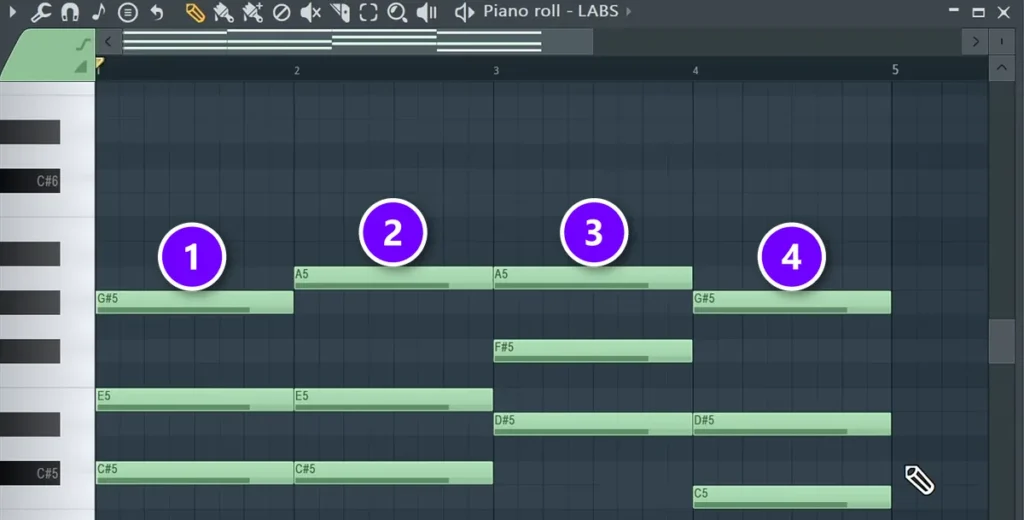
Day 2 is music theory without the school feel. You learn what notes and scales are, then build chords in the Piano roll by stacking every other note of the scale.
In the screenshot, four chords (1 to 4) sit one per bar, all taken from the C# harmonic minor scale. The lesson also shows four ways to write a melody and how to find a bassline by ear. Its promise is simple: stick to the scale, build the progression first, and you won’t write a bad-sounding chord progression. Day 2 starts at 24:39.
Day 3: drums and a full arrangement
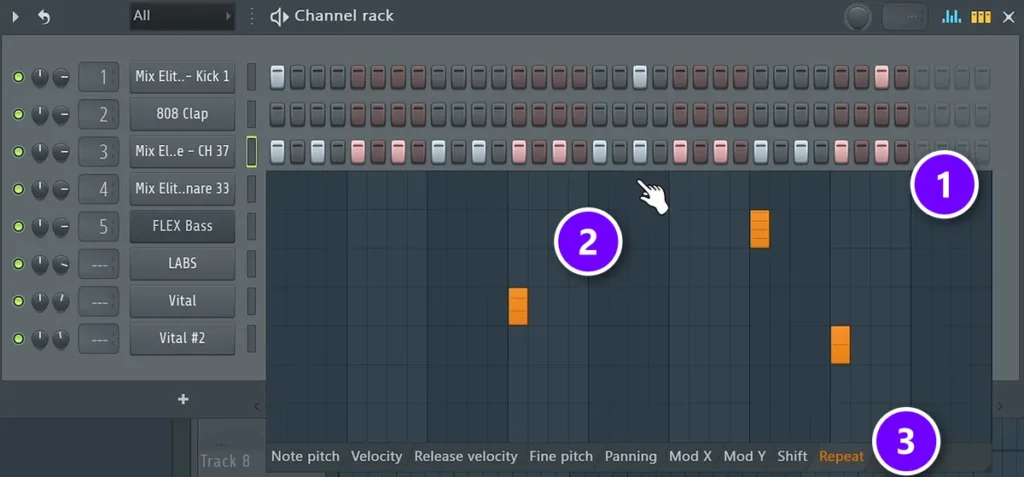
Day 3 turns the loop into a song. You program trap drums in the Channel rack, add hi-hat rolls and build a house beat with a kick on every beat, then arrange it all into a track of about two minutes.
For the rolls, pick the hi-hat row (1), set the graph editor under it to Repeat (3) and raise a few single steps (2). Each of those hits turns into a fast roll. The rule of thumb in the class is to change something every four beats. Day 3 starts at 1:01:47.
Day 4: mixing with the Holy Quad
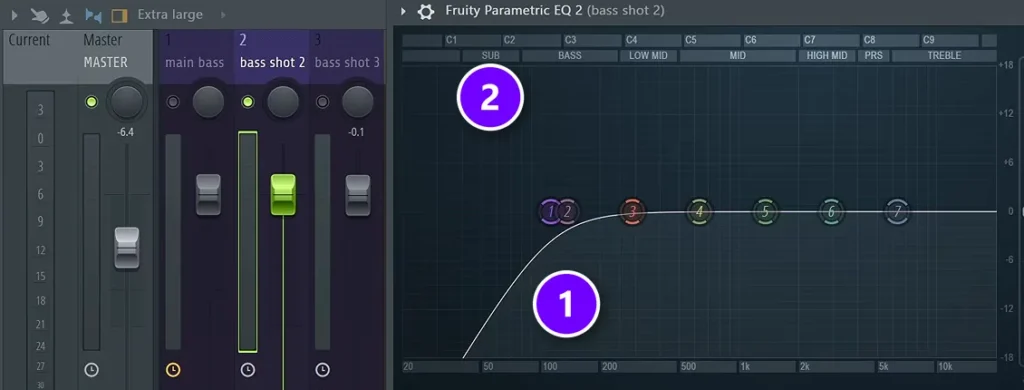
Day 4 is the longest part. It runs about an hour and a half. You mix a simple house track from the free downloads with the Holy Quad, Mix Elite’s mixing formula: volume, EQ, dynamics (compression) and space (reverb, delay and panning).
Here a low cut (1) goes on a second bass layer with Fruity Parametric EQ 2, so only one sound fills the SUB range (2). The rule: never stack two sounds in the sub frequencies. Day 4 starts at 1:41:50.
Day 5: recording and mixing vocals
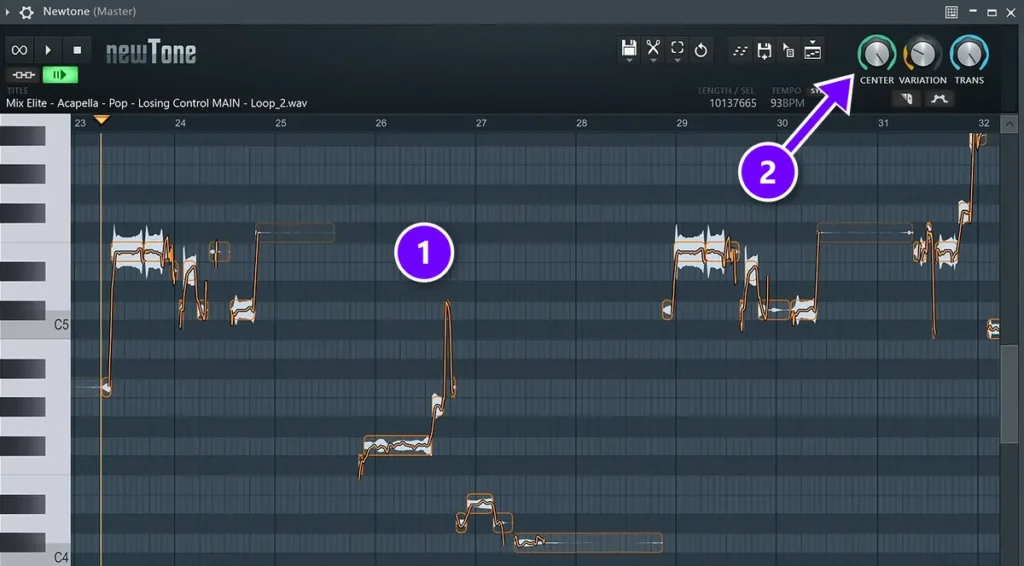
Day 5 takes a vocal from the mic to the mix. You learn where to record, how to set the input level and how to record clean takes, then Mix Elite’s V.O.C.A.L. chain: volume, EQ, compression, de-essing and effects.
For pitch correction, load a practice acapella (1) into Newtone, FL Studio’s pitch editor, and turn up Center first (2), then Variation. Never leave Variation at 0%, because that sounds robotic. The class also shows a free tuning plugin, Graillon, for anyone whose FL Studio version doesn’t include Newtone. Day 5 starts at 3:09:41.
Day 6: mastering and the final export
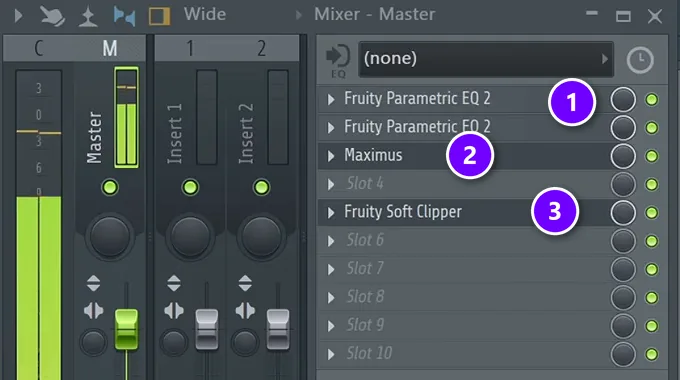
Day 6 explains decibels, LUFS (the unit for how loud a song feels) and soft clipping. Then a finished mix gets mastered in three steps.
On the Master track you can see the chain: two EQs that clean and shape the sound (1), Maximus for multiband compression (2) and a soft clipper for loudness (3). Then you export a WAV and an MP3 and test the song on every speaker you can find. Day 6 starts at 3:52:26.
What do you need to follow along for free?
Apart from the computer and headphones, you need very little. You can tap in notes on your computer keyboard, so a MIDI keyboard can wait. No real instrument needed.
For software, the class uses the free FL Studio trial. Image-Line says it has every feature, never expires and exports finished songs as WAV or MP3. The one catch is that you can’t reopen a saved project until you buy FL Studio.
The plugins the class adds are free too. Vital, the synth used for melodies and bass, has a free Basic plan. The LABS instruments it installs on Day 2 have since moved into Splice INSTRUMENT, which you download for free with a free Splice account.
The samples, presets, e-books and cheat sheets that go with the class are free as well. You get them from the course downloads page by entering your email.
What’s the best free mixing course for beginners?
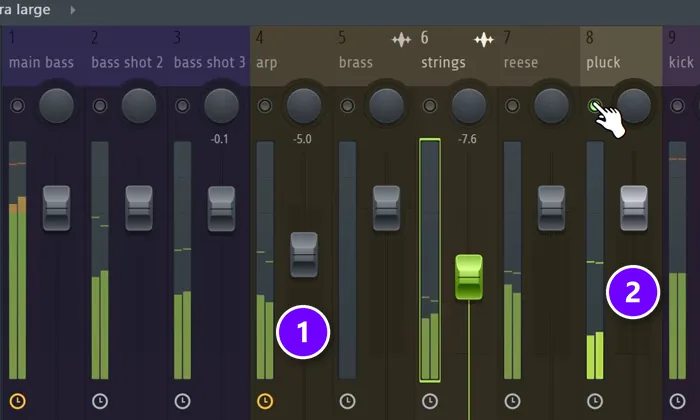
The best free mixing course for beginners is Mix Elite’s free 1-hour mixing course, How To Mix For Beginners on YouTube: an 84-minute video that mixes a full house track step by step with the Holy Quad, using FL Studio’s own plugins.
It teaches the same method as Day 4 of the big class, as its own video: balancing volumes, the Mixer, EQ, compression, sidechain, reverb and delay, then automation. That makes it the best free next step when your own first song needs mixing. Open it next to your project and work through it one chapter at a time.
Here the arp (1) and pluck (2) have become too loud after the EQ fixes, so their faders come down. Max’s rule: “Keep your eye on the volumes at all times because the volumes are the biggest factors in how your mix sounds.” That moment is at 36:39.
Best for: a first song that sounds muddy, messy or too quiet. For the written version, with a screenshot for every step, read our guide on how to mix a song.
What other free music production courses are worth it?
After Mix Elite’s two free classes, the best free options are Ableton’s Learning Music for trying ideas in your browser, Image-Line’s 13 free FL Studio lessons, the free first module of Berklee’s classes on Coursera, SoundGym for ear training and Udemy’s short free courses. We checked each one on its own site in October 2026.
They’re listed roughly in the order a beginner needs them. For paid schools and courses, see our full guide to the best online music production courses.
Ableton Learning Music: free lessons in your browser
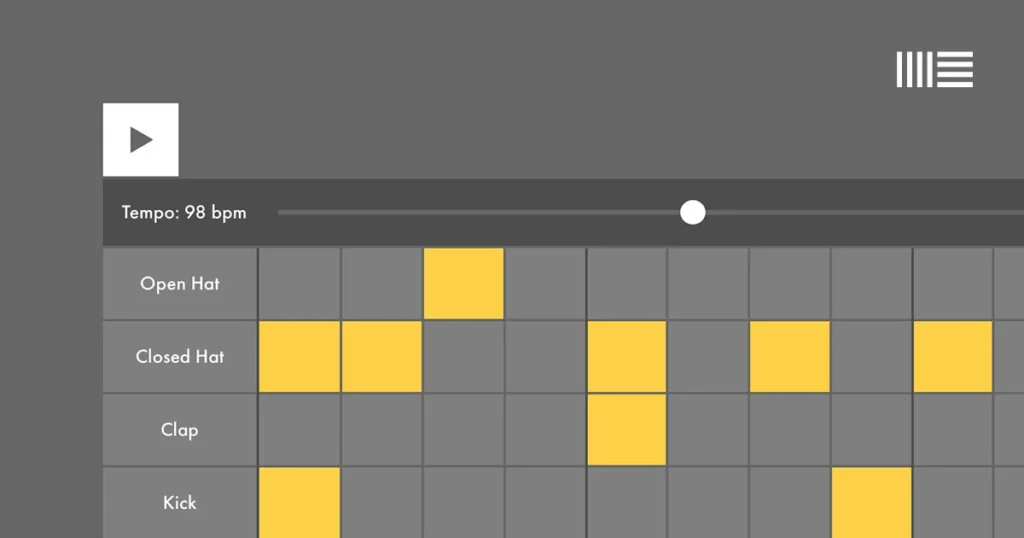
Best for: trying beats, chords and melodies tonight, before you install anything.
Learning Music is a free site from Ableton, the company behind Ableton Live. You click squares on and off to build a beat, then move on to notes and scales, chords, basslines, melodies and song structure. Ableton says you need no experience and no gear, everything runs in your web browser, and you can export what you make as an Ableton Live Set.
Its sister site, Learning Synths, is free too. It teaches how a synthesizer makes sound, starting from the very basics.
The limit: it teaches the building blocks, not how to finish a song in a music program. That’s fine. Starting in Ableton’s browser lessons and moving to FL Studio later isn’t wasted time, because every music program is built from the same parts. If you ever switch programs, it’s a matter of days, not months.
Image-Line: FL Studio’s own free lessons
Best for: learning FL Studio’s buttons from the company that makes it.
Image-Line’s Learn page has 13 free video lessons. They run from finding your way around FL Studio to making a beat, writing melodies in the Piano roll, arranging, adding effects, recording and exporting your track. The full FL Studio manual is free online too, and F1 in FL Studio opens the manual for the window you’re in. Its older Getting Started series on YouTube covers installing and setting up FL Studio.
Use the manual to look things up, not to read from start to finish. Reading it front to back is the fastest way to get lost.
Coursera: can you still audit Berklee’s classes for free?
Not in full anymore. In August 2025 Coursera replaced auditing with a free preview: you get the first module of nearly every class, graded assignments included. To keep going you pay or apply for financial aid, so ignore older guides that still tell you to audit a class for free.
Best for: trying a university-style class from Berklee College of Music before you pay.
Berklee teaches several music production classes on Coursera. The Technology of Music Production with Loudon Stearns is a beginner class in 6 modules, rated 4.8 from 1,087 reviews. For FL Studio users there’s also Berklee’s FL Studio Basics, 4 modules long, which Coursera marks as intermediate.
A Coursera Plus plan costs $59 a month after a free trial, or $399 a year.
Udemy: short free courses
Best for: a quick, free intro to one tool or one program.
Udemy keeps a list of free music production courses. On October 11, 2026 the top three were a 4-hour Ableton Live class for beginners, a 33-minute class on the compressor and a 33-minute class on BandLab, a free music app that runs in your browser.
Free classes on Udemy are cut-down versions. Udemy’s help center says they come without a certificate, Q&A or direct messages. Its rules for teachers also keep every free class published since March 17, 2020 under 2 hours of video.
musictheory.net: free music theory lessons
Best for: understanding why chords and scales work, one small lesson at a time.
musictheory.net has free lessons that run from notes and rhythm through scales, key signatures, intervals, chords and common chord progressions. The paid apps are optional; the lessons on the website cost nothing.
It’s built around sheet music, which most producers never read. Treat it as a side dish. It’s still worth an evening or two, because the chord progression is the backbone of a song, as Day 2 of Mix Elite’s free class puts it.
SoundGym: free ear training and audio courses
Best for: training your ears for mixing in a few minutes a day.
SoundGym is an ear-training app for producers. Its free plan gives you a short daily workout of 3 games, and the paid Pro plan opens all 21 games and full 5-game workouts.
Its Audio School is free too. It collects free videos from sound experts into five programs: Recording & Audio Engineering (18 hours 23 minutes), Electronic Music Production (17 hours 41 minutes), Mix & Mastering (13 hours 6 minutes), Synthesis & Sound Design (12 hours) and Live Sound (8 hours 16 minutes).
Free beginner videos from other YouTube teachers
Best for: a second voice on one topic, once you know which program you’re using.
- In The Mix: Michael Wynne’s channel, with 1.2 million subscribers. Its FL Studio – Complete Beginner Basics Tutorial tours FL Studio in 17 minutes and has more than 11 million views. Most of its videos teach one topic each.
- Busy Works Beats: its FL Studio 21 Beginner’s Course is 6 free lessons on the workflow, Piano roll shortcuts, drum patterns and music theory. You enter your email to open it.
- Mastering.com: its free Music Production For Beginners (9-Hour Course) runs just under 10 hours in 27 chapters, from setup and chords to beats, arrangement, sound design and producing a song from scratch.
Can you learn music production for free on YouTube?
Yes. Everything you need for a first song is free on YouTube, and Mix Elite’s free 4.5-hour FL Studio course already puts it in order for you. Finding videos isn’t the hard part. The order is.
One video teaches a kick drum, the next one a mastering trick, and you’re left to work out everything in between. That’s how people end up with a folder full of loops and no finished song. A few habits keep free learning on track:
- Pick one music program and stay with it until your first song is done.
- Watch one full class in order before you search for single tips.
- Copy the layout of a song you love, section by section.
- Skip the plugin shopping. FL Studio’s own plugins and a few free ones will carry your first songs.
The third habit, copying the layout of a song you love, is also the easiest way to learn song structure for free. The next section shows how.
How can you teach yourself music software and song structure for free?
Pick one free music program, learn its main windows from one ordered course, and learn song structure by copying the sections of a song you love. Mix Elite’s free 4.5-hour FL Studio course does all three on the FL Studio trial, including a simple reference-track method for mapping out a song.
Which free music software can you learn on?
The FL Studio trial is the one the free class uses. It has every feature and never expires; the catch is that saved projects won’t reopen until you buy. On a Mac, GarageBand is free on the App Store.
Don’t spend weeks choosing. The skills carry over from one program to the next, and our step-by-step guide on how to produce music follows the same steps as the free class, in writing.
How do you learn song structure for free?
Copy the map of a song you love. Max calls a reference track “one of the most powerful strategies to level up quickly”, and Day 3 of the free class shows how to use one in FL Studio. That part starts at 1:34:34.
- Pick a song you like in the same style as yours and drag it into the Playlist.
- Match the tempo: look up the song’s BPM, or tap along with FL Studio’s tempo tapper.
- Play it and add a marker wherever something changes, like the intro, the moment more hi-hats come in, or the hook with all the drums and bass.
- Mute the reference and build your own song section by section, following your markers.
It works for any style, and it’s how you learn arranging without a teacher. Your song won’t copy the reference, because the sounds and ideas are yours.
How can you learn music production for free on a tight schedule?
Give one free course 45 minutes a night instead of hopping between videos. Mix Elite’s free 4.5-hour FL Studio course fits into about two weeks of evenings with its homework, and you finish with a short, mastered song.
The class is four and a half hours long. At 45 minutes a night, that’s six evenings just to watch it once, and the homework takes longer. Here’s one way to fit it around a job:
- Night 1: Ableton’s Learning Music. Do the beats and chords chapters in your browser.
- Night 2: install the FL Studio trial and watch Day 1, about 25 minutes. Build one pattern.
- Nights 3 and 4: Day 2, about 37 minutes. Write your own four-chord loop.
- Nights 5 and 6: Day 3, about 40 minutes. Turn the loop into a short song.
- Nights 7 to 9: Day 4, mixing. It runs about an hour and a half, so split it.
- Nights 10 and 11: Day 5, vocals, about 43 minutes. Use the practice acapellas if you don’t sing.
- Nights 12 and 13: Day 6, mastering, about 38 minutes. Then play your song in the car.
Keep the first song short: the class arranges its loop into a track of about two minutes. When a step gets you stuck, look up that one thing in Image-Line’s free lessons, and save Coursera’s free module for a weekend when you want the theory behind it.
Worried you’re starting late? Our answer to is it too late to learn music production is no. A steady evening habit counts for far more than the age you start at.
What do free courses leave out?
Feedback. Free courses can teach every step, but they can’t listen to your song: nobody tells you that your kick is too loud, that your chorus needs a lift, or which of your three ideas is the one to finish.
The free versions also drop the extras. Udemy’s free classes have no Q&A, Coursera’s free preview stops after the first module, and none of the free options on this page include a teacher’s feedback on your own tracks or a live call. That matters most once you’ve finished a song or two and your questions get specific to your music.
When you want a pro to hear your music
That’s what Mix Elite Academy is for. You send in your songs and get unlimited 1:1 feedback from a pro, with written reviews and homework. You can also join live coaching calls in small groups, one to three times a week, and ask your questions out loud.
It’s 3 payments of $137 for lifetime access to all of that plus 600+ trainings, with a 60-day money-back guarantee. It also fits the free route: Mix Elite Academy says everything inside can be finished with $0 in software and the trial version of your music program. If you’d rather start with a smaller step, see our pick for the best music production course under 50 dollars.
MIX ELITE ACADEMY
When free videos stop being enough
Get a pro’s ears on your own songs: unlimited 1:1 feedback, weekly live coaching calls and 600+ trainings, with lifetime access. It’s 3 payments of $137, with a 60-day money-back guarantee.
The best free music production courses, side by side
Here’s the whole check in one place, as of October 12, 2026.
| Option | What you learn | What’s free | Best for |
|---|---|---|---|
| Mix Elite’s free FL Studio class. | Setup, chords, drums, arranging, mixing, vocals and mastering in FL Studio. | All of it, plus the downloads by email. | Complete beginners. |
| Mix Elite’s free mixing class. | Volume, EQ, compression, sidechain, reverb, delay and automation in FL Studio. | All of it. | Your first mix. |
| Ableton Learning Music. | Beats, chords, melodies and song structure in your browser. | All of it. | Your first evening. |
| Image-Line Learn. | FL Studio’s windows and tools, from its maker. | All 13 lessons and the manual. | Looking things up. |
| Coursera (Berklee). | University-style production classes. | The first module of most classes. | Trying Berklee before you pay. |
| Udemy free classes. | One tool or program at a time. | Classes under 2 hours, without a certificate or Q&A. | A quick intro. |
| musictheory.net. | Notes, scales, chords and progressions. | All the web lessons. | Theory in small bites. |
| SoundGym. | Ear training, plus free audio courses. | A daily 3-game workout and the Audio School. | Training your ears. |
| Other YouTube teachers. | In The Mix, Busy Works Beats and Mastering.com beginner videos. | The videos (Busy Works Beats asks for your email). | A second voice on one topic. |
Frequently asked questions
What are the best free music production courses for beginners?
Start with Mix Elite’s free 4.5-hour FL Studio course on YouTube. It teaches setup, chords, drums, arranging, mixing, vocals and mastering in order, with homework after each part. Next comes Mix Elite’s free 1-hour mixing course. The best of the rest are Ableton’s Learning Music in your browser, Image-Line’s 13 free FL Studio lessons and the free first module of Berklee’s classes on Coursera.
Is there a free course that teaches you to make a full song step by step?
Yes. Mix Elite’s free 4.5-hour FL Studio course builds one song from an empty project: chords and a melody, drums, an arrangement of about two minutes, then mixing, vocals and mastering. Each part builds on the one before and ends with homework. It runs on the free FL Studio trial, and the practice files are free by email.
How can I teach myself music production software for free?
Pick one program, follow one ordered course instead of random tips, and learn song structure by copying the sections of a song you like. The FL Studio trial has every feature and never expires, though it can’t reopen saved projects, and GarageBand is free on the Mac App Store. Finish one short song before you start a second program or course.
Can you still audit Berklee’s music production courses on Coursera for free?
Not in full. Since August 2025, Coursera gives you the first module of nearly every class for free, graded assignments included, instead of the old free audit. To finish a Berklee class such as The Technology of Music Production, you pay, use a Coursera Plus plan ($59 a month after a free trial, or $399 a year) or apply for financial aid.
Is there a free FL Studio course?
Yes. Mix Elite’s free FL Studio class on YouTube runs four and a half hours and takes you from your first pattern to a mastered track, with free downloads by email. Image-Line, the company that makes FL Studio, has 13 free video lessons and a free online manual. FL Studio’s free trial has every feature and never expires, but it won’t reopen projects you’ve saved.