


“You may as well get it over with. Just make it as good as you can.”
To release music on Spotify, Apple Music and the other streaming platforms, you upload it to a distributor such as DistroKid, TuneCore, CD Baby or RouteNote, because the apps don’t take uploads from artists directly. First master the song, export a 24-bit WAV and make a square 3000 x 3000 pixel cover. Then set the release date 3 to 4 weeks out and pitch the song to Spotify’s editors at least 7 days before it goes live.
You did the hard part. The song is finished, it plays from start to end, and it lives in a folder with a name like final_v7_REAL. Then the questions start. Is it loud enough for Spotify? Which distributor won’t take a cut forever? And what on earth is an ISRC?
Most guides on how to release music jump straight to picking a distributor. This one starts a step earlier, with the files you hand over, because a release can only be as good as what you upload. You’ll get the 7 steps in order, real prices checked on each distributor’s own site on October 12, 2026, and the export settings from Mix Elite’s free 4.5-hour FL Studio course.
Table of Contents
How to release music on streaming platforms in 7 steps
Here’s the whole release laid out like a playlist in your DAW. Tap any step to jump to it.
Steps 1 to 4 happen in your own studio, so take as long as you need. From step 5 on, dates start to matter, which is why the smart move is to plan backwards from the day you want the song out.
Step 1: Finish the song and get honest ears on it
A song is ready to release when nothing about it bugs you on a fresh listen. The arrangement is done, every part is in, and the mix is balanced. If you’re still looping eight bars, start with how to finish a song, or go back to how to produce music for the whole process. If the parts fight each other, how to mix a song walks you through a clean balance.
Then get honest ears on it. Play it for two or three people who will tell you the truth, and compare it with a released song in the same style at the same volume. Inside Mix Elite’s 7-Day Music Producer Course, Day 7 gives you in-depth personal feedback on your course track from our team, which is exactly this check.
Last, decide what you’re putting out. For a first release, one single is the easy choice: one song, one cover, one pitch to Spotify. An EP or album means more songs to finish and put in order, so save it for later and read how to make an album when you get there.
Own everything in it. If you used a sample, a loop or a beat you didn’t make, check that its license allows a commercial release before you upload. A song built on an uncleared sample can be taken down after it’s live, and every stream it had goes with it.
Step 2: Master it for Spotify and other streaming apps
Why does my exported song sound quieter than released songs?
Because released songs are mastered, and a raw export isn’t. Mastering ends with a limiter that shaves off the loudest peaks so the whole song can be turned up, which makes the quiet parts louder. Master your mix first, then check its loudness with a free LUFS meter.
Mastering is the final polish: one last pass over the whole mix so it sounds loud, clear and even on every system. Our step-by-step guide on how to master a song shows the full chain. For a release, though, everyone asks the same extra question. How loud should it be for Spotify?
Spotify plays every song at about the same volume. Its loudness normalization page says it adjusts tracks to -14 dB LUFS during playback and doesn’t change your file, so a louder master is simply turned down. LUFS is how a loudness meter measures the volume you actually hear, and LUFS vs RMS explains it in plain words.
Spotify’s own tip is to aim for -14 LUFS and keep true peaks below -1 dB. If your master is louder than that, it asks for true peaks below -2 dB. Max, the founder of Mix Elite, sees it differently in the video below. Spotify only lowers the volume of a loud song and doesn’t squash it, so he masters as loud as the song still sounds good, ideally around -8 to -6 LUFS for electronic music. Going loud is fine. Just leave the peaks extra room, because loud masters distort more easily when they’re converted for streaming.
To read your own number, put a free meter like Youlean Loudness Meter last on the master, play the song through and check the Integrated value.
Check the streaming version for clipping
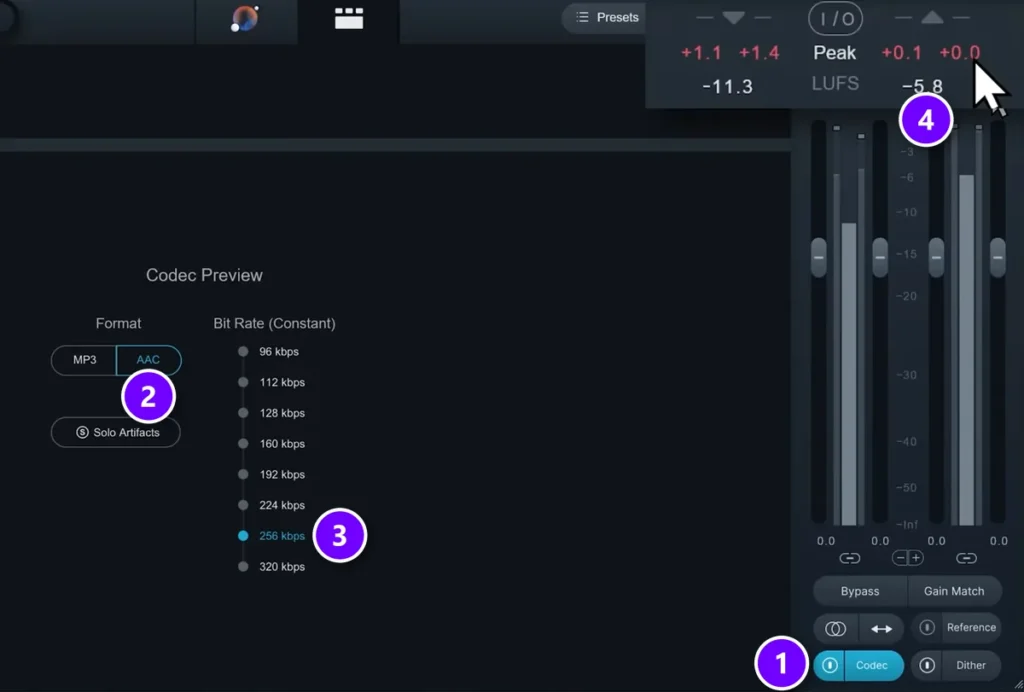
Your WAV isn’t what most people will hear. Max puts it bluntly: “Everybody will be listening to something like MP3 versions of your file”. That conversion can push peaks over 0 dB and add distortion your DAW never showed you.
In iZotope Ozone, turn on Codec (1), choose AAC (2) at 256 kbps (3) and watch the output Peak (4). Here it reads +0.1 dB, so the streaming copy would clip. Lower the ceiling or the gain until it stays under 0.
Step 3: Export the release files from FL Studio
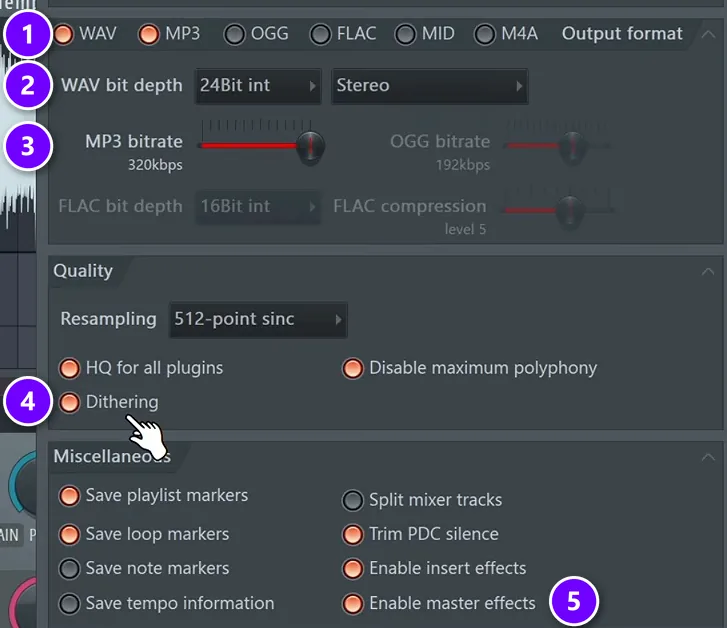
In FL Studio, open File > Export > Wave file (Ctrl + R). Tick WAV and MP3 (1), set WAV bit depth to 24Bit int (2), push the MP3 bitrate to 320kbps (3), turn on Dithering (4) and leave Enable master effects on (5). Then click Start.
Max’s reason for 24-bit is simple: “We enable the 24-bit version of the wave file because this is the most popular one when it comes to releasing music online”. The WAV is the file you upload, and the MP3 is a smaller copy for sending to friends. If the song ends abruptly, add a short fade at the end before you export.
This also matches what Spotify asks for its own deliveries: one stereo master at 44.1 kHz or higher, kept at 24-bit if that’s how it was made, with nothing changed after mastering.
- WAVSong title (master).wav24-bit, stereo
- JPGCover.jpg3000 x 3000 px
- TXTCredits.txtwriters and producer
- TXTLyrics.txtif it has vocals
- MP3Song title.mp3320 kbps, to share
Then test the master before anyone else hears it. Max’s rule: “Go listen to your track on different headphones, on laptops, in different cars, on Bluetooth mono speakers. Try everywhere and find if there are some audible issues with the track”. A bass that vanishes on a phone is easy to fix now and impossible to fix after release.
Step 4: Make cover art that every store accepts
Your cover is the first thing people see, usually as a tiny square on a phone. Every store has its own rules, but they overlap, so one file can pass all of them.
Why 3000? DistroKid accepts 1000 x 1000 but asks for 3000 x 3000 ideally. TuneCore wants at least 1600 and notes that iTunes recommends 3000, and CD Baby takes 1400 to 3000. Spotify accepts anything from 640 to 10,000 pixels, so a 3000-pixel square works everywhere. Don’t blow up a small image to get there, though; Spotify asks you not to upscale.
Stores reject covers that show any of these:
- A website address, a QR code or a social media handle.
- Store or social media logos, prices, or words like “CD”.
- Blurry, pixelated or stretched images.
- A photo or artwork you don’t have the rights to use.
- Text that doesn’t match your artist name and song title exactly.
- The same artwork as one of your other releases.
No designer? TuneCore’s Breakout plan includes a cover art creator, or you can shoot your own photo or hire an artist. Keep it simple enough to read at the size of a stamp.
Step 5: Pick a distributor (and what each one costs)
Why can’t you upload your music straight to Spotify?
Because Spotify, Apple Music and the other big apps only take music from distributors. A distributor checks your files, adds the ID codes stores use to track plays, delivers the song to every app at once and pays you the royalties.
Spotify’s help page says distributors handle music distribution and pay streaming royalties, and that most of them charge a fee or a commission. Spotify did test direct uploads with independent artists, but it closed that test in July 2019 and asked those artists to move their music to a distributor. One upload to a distributor reaches Apple Music, Amazon Music, YouTube Music, TikTok and the rest.
Which distributor is best for a first single on a budget?
For one song and no money down, RouteNote‘s Free plan costs $0 and keeps 15% of your streaming income. CD Baby charges $9.99 once per single, with no yearly fee, and keeps 9%. Releasing several songs a year? A yearly plan from Amuse ($23.99), DistroKid or TuneCore ($24.99) gets cheaper with every song.
Every company below is on Spotify’s list of preferred and recommended providers. The prices come from each company’s own site, checked on October 12, 2026. They change, so look again before you pay.
Musician plan. You keep 100% of your earnings. Your own release date needs Musician Plus ($44.99 a year), and every upload gets a free HyperFollow pre-save page. If you stop paying, your releases may be removed unless you add the Leave a Legacy extra to them.
Rising Artist plan. You can schedule your own release date on every plan. TuneCore takes a 20% fee on money from TikTok, Facebook, Instagram and YouTube, and its cover art creator comes with Breakout Artist ($44.99 a year).
Paid once, with no yearly fee ($14.99 for an album). CD Baby keeps 9% of your streaming and download income, and Spotify pre-saves run through Show.co.
Artist plan. You keep 100% of your royalties, except for a 15% fee on YouTube Content ID on this plan. You can set a release date 14 or more days out, and ISRC codes, UPC codes and pre-saves are free on every plan.
Free plan. RouteNote keeps 15% of your streaming and download income, uploads are unlimited, and the plan is free forever. Premium costs $10 per single plus $9.99 a year, and then you keep 100%. You pick the plan for each release.
How to choose, in plain terms:
- One song, no yearly bill: CD Baby ($9.99 once per single) or RouteNote Free ($0, and it keeps 15% of what you earn).
- A few songs a year: a yearly plan from DistroKid, TuneCore or Amuse gets cheaper with every release.
- Your own release date on the cheapest plan: TuneCore and Amuse let you schedule one. DistroKid needs Musician Plus for that.
- A pre-save link for your fans: DistroKid makes a free HyperFollow page for every upload, and Amuse includes pre-saves on all its plans.
- Songs that stay up for good: CD Baby and RouteNote Free charge nothing to keep a song live. On DistroKid, add Leave a Legacy to each release you’d want to keep up if you ever stop paying.
Step 6: Upload, fill in the details and set a date
The upload form is mostly typing, but Spotify shows your music exactly as it’s delivered, typos and all. Get these right the first time:
- The song title, spelled like it is on the cover. Never put artist names in it; a featured singer goes in the featured artist field.
- Your artist name, written the same way on every release, and every person who wrote or produced the song in the credits.
- Genre, language and the explicit tag, so the song lands in the right place and gets the E icon if it needs one.
- A release date 3 to 4 weeks away. The next paragraph explains why.
Stores need time to check and process your release. TuneCore recommends uploading 3 to 4 weeks ahead. DistroKid says to pick a date at least four weeks out if the song must land on a set day, and CD Baby calls 4 to 6 weeks ideal. That buffer is also what gives you time to pitch to Spotify’s editors in step 7.
You can pick ASAP instead, and the song usually goes live within days. DistroKid estimates 2 to 5 days for Spotify once it’s approved. The catch is that you’ll probably miss Spotify’s 7-day pitch window.
What are ISRC and UPC codes?
An ISRC is a permanent ID code for one recording, and a UPC is the code for the whole release, whether that’s a single, an EP or an album. Stores use them to track plays and pay royalties. Your distributor makes both for free, so you don’t need to buy them for a first release.
The US ISRC Agency calls the ISRC the international identification tool for sound recordings. DistroKid creates a free ISRC for every song and a UPC for every release, and Amuse includes both free on all its plans. Codes for use outside your distributor come from GS1 (UPCs) and your country’s ISRC agency.
An ISRC stays with a recording for life. If you ever move a song to a new distributor, reuse its old ISRC instead of letting the new one create another code, so its play history stays in one place.
Step 7: Pitch your song to Spotify’s editors
Once your distributor delivers the song, it shows up as an upcoming release in Spotify for Artists, Spotify’s free app for managing your artist profile. That’s where you pitch it to Spotify’s playlist editors:
- Log in at artists.spotify.com.
- Go to Music, then Upcoming.
- Choose the song and fill in the pitch form. Spotify says more detail gives your song a better chance.
- Submit it at least 7 days before release day.
That last step pays off even if no editor picks the song. According to Spotify’s pitching guide, a song pitched at least 7 days before release goes onto your followers’ Release Radar, the new-music playlist Spotify makes for each listener.
Write the pitch like you’re telling a friend about the song. Say what it’s about, how it feels, the genre in plain words and the main instruments, and mention anything planned around the release, like a video or a show.
Three of Spotify’s rules catch first-timers:
- You can pitch one song at a time. Once it goes live, you can pitch the next.
- You can’t pitch a song you’re only featured on.
- Once a song is live, it can’t be pitched anymore.
How far ahead should you pitch to Spotify playlists?
Pitch at least 7 days before release. That’s Spotify’s cut-off for Release Radar and the least time its editors need to listen. Earlier is better. TuneCore says a release should be approved and processed by the stores at least two weeks before release day if you want playlist consideration. That’s why uploading about 4 weeks out works so well.
You can edit your pitch up to release day, but Spotify warns there’s no guarantee its editors will see the changes. Send your best version the first time.
How do you get your song on Spotify playlists?
There are three ways in: pitch each new song to Spotify’s editors before it comes out, grow your followers so your songs reach their Release Radar, and send short, personal notes to independent curators in your genre. Each kind of playlist has its own way in.
- Editorial playlists are picked by Spotify’s editors. The pitch from step 7 is the way in, and even a great pitch is no promise.
- Personal playlists like Release Radar are built for each listener. Your followers get your pitched song there, so every new follower helps your next release.
- Listener and curator playlists are made by people. Find curators in your genre, listen to what they add, and send a short, personal note about why your song fits.
Never pay for streams or playlist spots. Spotify says paid services that guarantee streams aren’t legitimate, that selling guaranteed playlist placement breaks its rules, and that using these services could get your music removed.
To see where your song landed, open the Music > Playlists tab in Spotify for Artists after release. Don’t be surprised by what you find there; Spotify notes that its editors might pick a different song than the one you pitched.
Your song release checklist, week by week

Here’s a release checklist that fits around a day job. Each row is one small task, and none of them takes more than an evening.
Spotify also has its own pre-save tool, Countdown Pages. It only works for albums and EPs from artists with at least 3,000 monthly active listeners, so for a first single, your distributor’s pre-save link is the way to go. DistroKid’s HyperFollow page is ready the moment you finish uploading.
DAY 7 OF THE 7-DAY MUSIC PRODUCER COURSE
Finish your first song, then release it the right way
The 7-Day Music Producer Course takes you from setup to a mastered track, one step a day, taught in FL Studio (the free trial works). Day 6 covers the best export settings for streaming platforms. Day 7 is about releasing: the best way to put your music on all streaming platforms for free, which platforms to avoid, and in-depth personal feedback on your track from our team. It’s $27, and you get 60 days to decide if it was worth it.
Frequently asked questions
Can I upload my music to Spotify myself?
Not directly. Spotify only takes music from distributors, which deliver it and pay your streaming royalties. It tested direct uploads with independent artists, then closed that test in July 2019. So you upload to a distributor, then manage your profile and pitch new songs in Spotify for Artists, which is free.
What is the best music distributor for beginners?
It depends on how often you’ll release. For a first single with no budget, RouteNote‘s Free plan costs $0 and keeps 15% of your earnings. CD Baby charges $9.99 once per single and keeps 9%. If you’ll put out several songs a year, a yearly plan covers unlimited releases: $23.99 at Amuse and $24.99 at DistroKid or TuneCore. Prices checked on each company’s site on October 12, 2026.
Can I release music for free?
Yes. RouteNote‘s free plan sends your music to the big streaming services for $0 and keeps 15% of what you earn there. You can also upload straight to SoundCloud or your own YouTube channel without any distributor. For Spotify, though, you’ll always go through a distributor, free or paid.
Do I need a record label to release music?
No. In Mix Elite’s free 4.5-hour FL Studio course, Max describes both paths: a label takes care of publishing and promoting the track for you, or you release it on Spotify, YouTube and every other platform yourself through a distributor. Releasing it yourself means nobody has to say yes first.
Will I get paid when people stream my song?
Your distributor collects what the stores pay and passes it on, minus any commission. On Spotify, a track needs at least 1,000 streams in the previous 12 months to earn recorded-music royalties, so a first single may earn very little. If you wrote the song, also join a performing rights group such as ASCAP or BMI (US), SOCAN (Canada) or APRA AMCOS (Australia) to collect songwriter royalties.





