“Nowadays people know the price of everything and the value of nothing.”
The best beginner music production course under 50 dollars is Mix Elite’s FL Studio Beginner Accelerator: $47, paid once, with lifetime access and a 60-day money-back guarantee. Its 52 video lessons take you from an empty FL Studio project to a finished, mastered song, vocals included. The best free option is Mix Elite’s free 4.5-hour FL Studio course on YouTube.
Fifty dollars is an awkward budget for learning music. It’s too much to throw at something you’ll quit in a week, and nowhere near the price of the big-name schools at the top of most lists.
So you end up with ten tabs open. A free trial that turns into a yearly bill. A class whose price depends on the week you look. A playlist with more videos than you’ll ever watch. Below, we cut all of that down to the few options worth your money and your evenings, with every price checked on October 11, 2026.
Table of Contents
What’s the best music production course under 50 dollars?
Mix Elite’s FL Studio Beginner Accelerator is our pick, at $47 paid once. It’s built for complete beginners: 52 video lessons follow one song from an empty FL Studio project to a finished master, vocals included, and you keep the course and its project files for life.
It’s made by Mix Elite, the school behind the Mix Elite | FL Studio Tips YouTube channel. There’s no monthly fee. A 60-day money-back guarantee covers it, so you can try the lessons before you decide.
What sets it apart at this price is its shape. Plenty of classes teach FL Studio’s tools one by one. This one is built around a single song. You start with an empty project and end with a mixed and mastered track, vocals included, and every step is explained so you know why you do it, not only what to click.
Full disclosure: Mix Elite makes this page and the course. That’s why every other price below comes from the seller’s own site, checked on the same day.
Best for: complete beginners who use FL Studio, or want to, and would rather finish one real song than collect another playlist.
Which cheap course takes a beginner step by step through a full song?
Mix Elite’s FL Studio Beginner Accelerator does. Its 52 lessons sit in 7 modules that follow one song in order: setup, then drums, piano, plucks and bass, then the arrangement, mixing, vocals and mastering. You also get the finished project files, so you can check your work against the real thing.
Each module builds on the one before:
- Getting started (2 lessons): what you need before you open FL Studio, so you don’t waste money on gear you won’t use.
- FL Studio setup (6 lessons): how a song gets made, then the four windows you use in every song: the Channel rack, Mixer, Piano roll and Playlist.
- Your first song (9 lessons): the sampler, piano, two plucks, the bass and bassline, color coding, a first arrangement and transitions with ear candy (small extra sounds that keep it interesting).
- Mixing basics (9 lessons): the Mixer and volumes, automation clips, compression and EQ, all with FL Studio’s own plugins.
- Advanced mixing (11 lessons): surgical EQ, a layered snare, panning and stereo width, and sidechain compression, so the drums punch through.
- Vocals (11 lessons): recording, cleaning and tuning with auto-tune, then EQ, reverb and delay until the vocal sits in the track.
- Mastering (4 lessons): a simple mastering chain, a few tricks for a drop that hits hard, and then you play back your finished song.
What you get for 47 dollars
- 52 video lessons, 4.5+ hours in total, plus 16 short quizzes
- The finished project files: the exact FL Studio projects, sounds and MIDI from the lessons
- An e-book and infographics with production basics, PC setups and a producer dictionary
- The 14-Night Finish Plan, with about 45 minutes of work per night
- Lifetime access on your phone, tablet or computer
- A 60-day money-back guarantee: email support or use live chat and you get every cent back
You’ll need FL Studio 20 or newer, and that’s it. The lessons use FL Studio’s own plugins plus a couple of free ones, so there’s nothing else to buy.
Which course under $50 is best if you only have an hour a night?
Mix Elite’s FL Studio Beginner Accelerator, because it comes with the 14-Night Finish Plan. The plan splits the lessons into evenings of about 45 minutes, in order, so you always know tonight’s job: night 1 is setup, night 2 is the main windows, and by night 3 you’re writing your first beat and melody.
If you have a job and a family, this is the part that matters. Short lessons in a set order are easier to keep up after work than a three-hour video. Got a full hour? Use the extra 15 minutes to rebuild that night’s step in a project of your own, without the video.
Worried you’ve started too late? Our answer to is it too late to learn music production is no: a steady evening habit counts for far more than the age you start at. For a realistic timeline, read our guide on how long it takes to learn FL Studio.
What’s the best free music production course?
Mix Elite’s free 4.5-hour FL Studio course on YouTube is the best free music production course for beginners. It’s a complete class, not a teaser, and it covers every step of a song in order: setup, chords and melodies, drums, arranging, mixing, vocals and mastering.
You can watch the whole thing right here. It’s taught by Max, the founder of Mix Elite.
The class starts with the gear you need and how to pick a music program. Then it walks through FL Studio’s windows, notes and scales, chords, melodies and basslines. After that come trap and house drums and turning a loop into a full song. The last parts cover the Holy Quad, Mix Elite’s mixing formula, then recording and mixing vocals, and mastering.
How the free class compares with the paid one
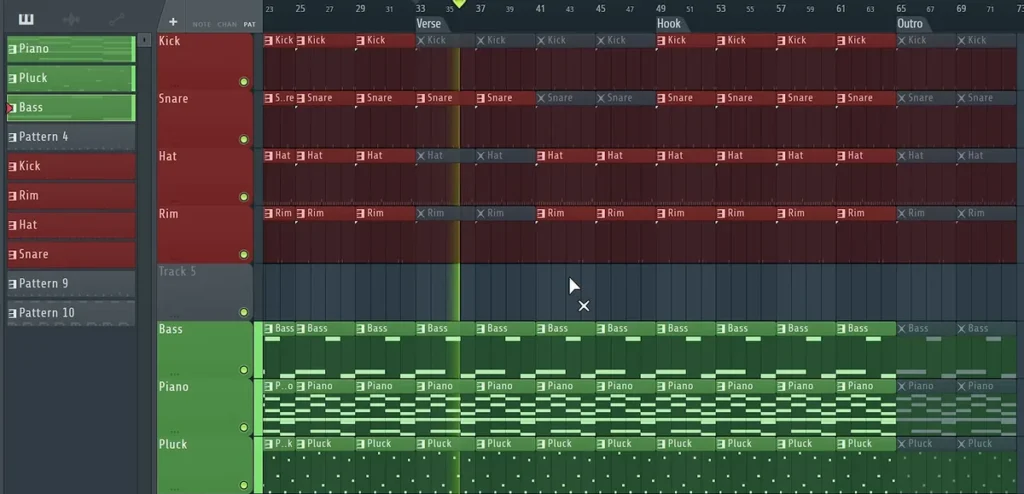
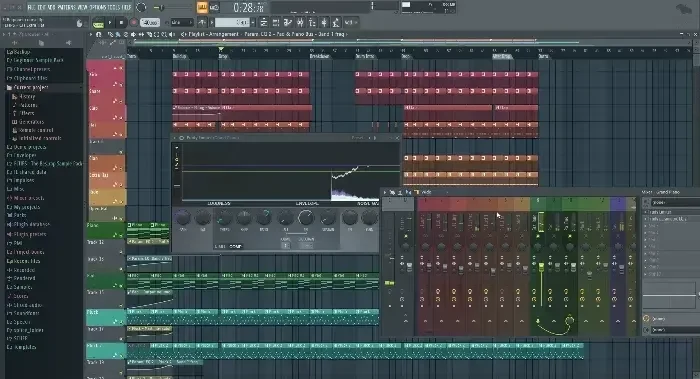
The free class covers the same stages in a different way. You build a trap loop and arrange it into a song of about two minutes, like the Playlist above: you copy the patterns across, mute them, and bring parts back in under Verse, Hook and Outro markers. Then you practice mixing, vocals and mastering on separate projects.
In the $47 course, one song goes through every stage, from the first beat to the master, and you get its project files. Not sure yet? Start with the free class. You can move up whenever you’re ready.
What other music production courses are under 50 dollars?
After Mix Elite’s two picks, the best cheap options are free: Image-Line’s own FL Studio videos and manual, and Ableton’s Learning Music site. Berklee’s classes on Coursera and Skillshare’s classes come with a monthly plan, and the Udemy classes we checked cost more than 50 dollars when no sale was running.
Read the price lines closely. For schools, degrees and pricier picks, see our full guide to the best online music production courses.
Image-Line: FL Studio’s free videos and manual
Best for: learning FL Studio’s buttons and menus from the company that makes it.
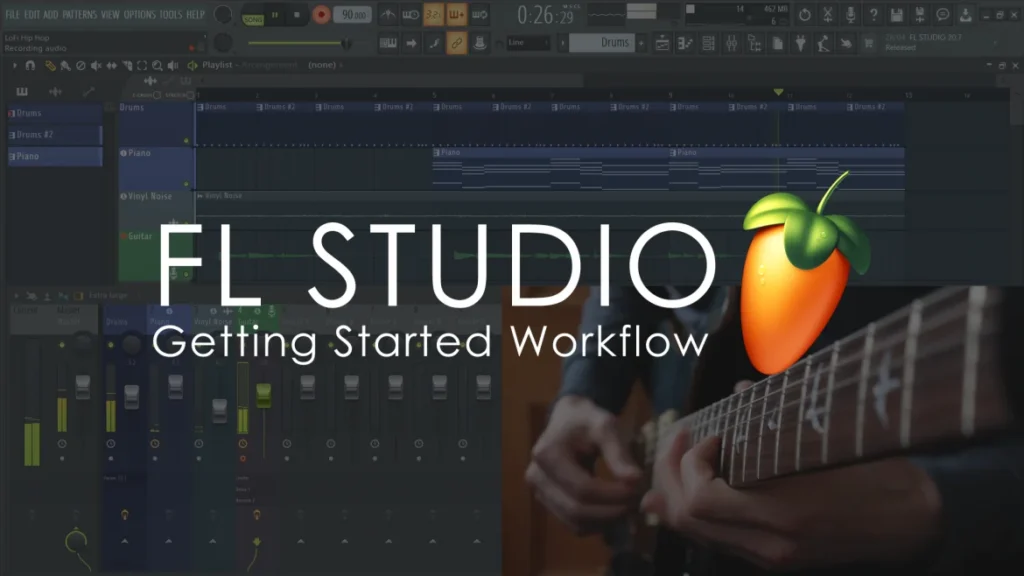
Image-Line keeps its free lessons on the FL Studio learning page. There’s a Getting Started video series on installing, setting up and using FL Studio, the FL Studio Guru series on features and plugins, and the online manual, which explains every window and setting.
It’s a reference more than a lesson plan. Use it next to a class that tells you what to learn first.
Price: free. The FL Studio trial is free too, and Image-Line says it never expires.
Ableton Learning Music: free lessons in your browser
Best for: getting the basics of beats, chords and melodies before you choose a music program.
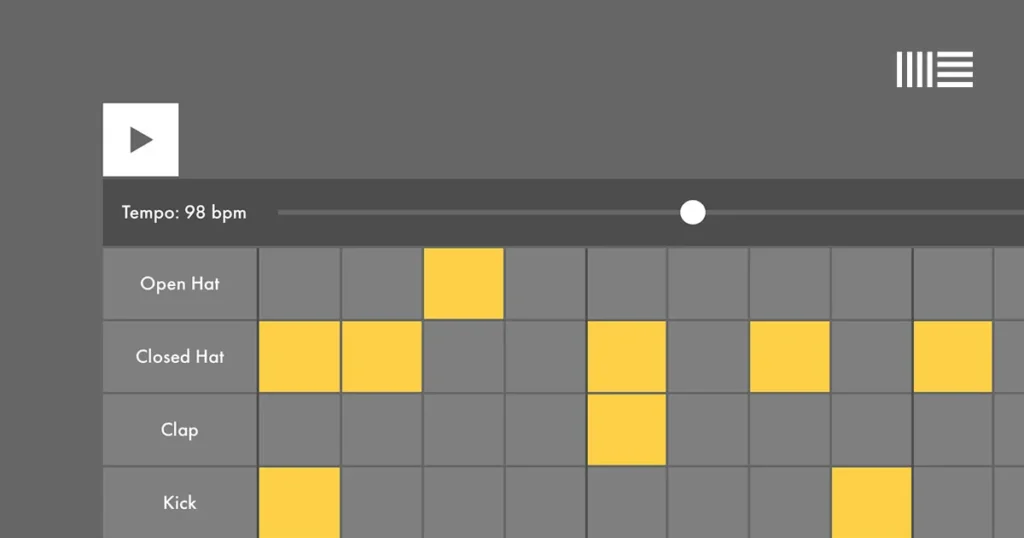
Learning Music is a free site from Ableton. You click boxes on and off to build a beat, then move on to notes and scales, chords, basslines, melodies and song structure. Ableton says no experience or gear is needed, and it all runs in your web browser.
Price: free. It teaches the building blocks rather than a full song in a music program, so pair it with lessons in the software you’ll use.
Coursera: Berklee’s music production classes
Best for: people who like a university-style class from a famous music school.
Berklee teaches several music production classes on Coursera. The Technology of Music Production with Loudon Stearns has 6 modules and a 4.8 rating from 1,087 reviews. It’s one of four classes in Berklee’s Music Production Specialization, along with The Art of Music Production, Pro Tools Basics and a capstone project that runs from pre-production through recording, mixing and mastering.
The free “audit” that older guides talk about has mostly changed. The class page says some courses offer a free “Full Course, No Certificate” option, and Coursera’s help center describes a free preview of the first module on most others.
Price: single classes and programs cost $49 to $79 a month. Its Plus plan, which opens 10,000+ classes, costs $59 a month after a one-week free trial, or $399 a year.
Skillshare: Riley Weller’s FL Studio beginners class
Best for: beat makers who’d also use other creative classes on the same plan.
On Skillshare, FL Studio trainer Riley Weller teaches an FL Studio beginners class on making beats. It has 21 lessons and runs about 4 hours 17 minutes, made in FL Studio 20.
Price: $13.99 a month on Skillshare’s pricing page, billed as one payment of $167.88 for the year once the free trial ends. That opens every class on the site, not just this one.
Udemy: big classes you pay for once
Best for: people who want a long reference library they own, and who don’t mind waiting for a sale.
Udemy sells each class on its own. For FL Studio, FL Studio Music Production + Mixing Music by Tomas George, Ian Alexander and Digital Music Masters has 229 lectures and about 25 hours of video. It’s rated 4.6 from 6,024 ratings, it was updated in September 2026, and it asks for FL Studio Producer Edition or higher.
Price: $99.99 on October 11, 2026, with no sale running. Tomas George’s Logic Pro class was $149.99 the same day. Udemy’s pricing FAQ explains that promotions change its prices by region and over time, and its refund policy gives you 30 days on most purchases.
Is a cheap music production course worth it, or are free videos enough?
A cheap course is worth it once free videos stop moving you forward. YouTube is plenty to get started, but its videos come in no set order. A good course gives you three things a playlist doesn’t: a set order, the project files to follow along with, and a finished song at the end.
Where free videos fall short is order: one video teaches a kick drum, the next one a mastering trick, and it’s up to you to work out everything in between. If a course keeps you going past week two, it has paid for itself. Want to see the whole process first? Our guide on how to produce music walks through it step by step.
Free videos are still the right call in two cases: while you’re testing whether you enjoy making music at all, and when you only need the answer to one small problem, like how to sidechain a bass.
Watch the billing, not just the monthly price. Skillshare lists $13.99 a month, but once the trial ends it charges $167.88 for the whole year in one go.
A big library has its own catch. Twenty-five hours of video is great for looking things up, but it’s a lot to finish when you have 45 minutes a night.
How do you learn music software from scratch without spending hundreds?
Pick one music program, start on its free trial, and learn it with one course made for that program before you buy anything else. FL Studio’s trial has every feature and never expires, and both Mix Elite picks on this page use FL Studio’s own plugins plus a few free ones.
The hardware list is short too. As Max puts it in his free class: “That’s all the necessary hardware you need to make music. Believe it or not, everything else is totally optional.” He means a computer and a good pair of headphones.
The catch with the FL Studio trial is that it won’t reopen project files you’ve saved, though you can still export your songs as audio. Buy a license once you know you’ll stick with it.
When you do buy, Max says to get Producer Edition: “It’s much better to keep the difference you’ll spend on other versions and spend it on your knowledge and skills.” On Image-Line’s pricing page, Fruity Edition was $99, Producer Edition $179, Signature Bundle $269 and All Plugins Edition $449, all with free lifetime updates.
Plugins can wait. And if you move to Ableton or Logic one day, you won’t be starting over. Max’s view: “Each DAW is made out of the same elements that just basically look different.” Switching takes days, not years.
How can you tell if a cheap music production course is worth the money?
Check five things before you pay: it ends in a finished song, it’s made for a recent version of the program you’ll use, it includes the project files, it needs no paid plugins, and its refund window is long enough to try a few lessons. Then add up the real total, not the first month’s price.
Seven questions to ask, in order:
- Does it end in a finished song? One simple track you finish teaches you more than ten you start.
- Is it made for your program, and is it up to date? FL Studio lessons fit FL Studio best, and the version on screen should match yours, or come close. Mix Elite’s FL Studio Beginner Accelerator, for example, is made for FL Studio 20 or newer. If you’re set on FL Studio, compare the best FL Studio courses at every price.
- Can you watch the teaching first? A free lesson from the same school shows you the teaching style before you pay. For Mix Elite, that’s the free 4.5-hour FL Studio course above.
- What’s the real total? Add up three months of a monthly plan, or the full yearly bill, before you compare it with a one-time price.
- Can you get your money back? Look for a refund window long enough to try a few lessons.
- Do you get the project files? Following along with the teacher’s own sounds and settings saves hours of guessing.
- Does it need paid plugins? A beginner course should work with the plugins that come with the program, plus free ones. Paid plugins can wait until you know what you’re missing.
When is it worth spending more than 50 dollars?
It’s worth it when you want a pro to listen to your music. Lessons teach the steps, but a trained ear on your own song tells you what to fix next, and that’s what Mix Elite Academy is for.
The Academy isn’t under 50 dollars. It’s 3 payments of $137, for lifetime access to 600+ trainings, weekly live coaching calls in small groups, unlimited 1:1 feedback on your music with written reviews from a pro, and a private community. It also comes with a 60-day money-back guarantee.
The FL Studio Beginner Accelerator is included in the Academy. If you buy the course first and want to move up later, its page says to ask support for your personal discount.
Every option side by side
Here’s the whole price check in one place, as of October 11, 2026.
| Option | What it is | Price | How you pay |
|---|---|---|---|
| Mix Elite’s FL Studio Beginner Accelerator | 52 FL Studio lessons that build one full song. | $47 | Once, lifetime access. |
| Mix Elite’s free 4.5-hour FL Studio course | A 4.5-hour beginner class on YouTube. | Free | Free. |
| Image-Line | FL Studio’s official videos and manual. | Free | Free. |
| Ableton Learning Music | Beats, chords and melodies in your browser. | Free | Free. |
| Coursera (Berklee) | Classes from Berklee, including Pro Tools Basics. | $49 to $79 a month | Monthly, or $59 a month ($399 a year) for the Plus plan. |
| Skillshare (Riley Weller) | A 21-lesson FL Studio beat-making class. | $13.99 a month | $167.88 a year, billed up front. |
| Udemy (Tomas George and team) | A 25-hour FL Studio library. | $99.99 (no sale on) | Once. |
FL STUDIO BEGINNER ACCELERATOR
Finish your first full song in FL Studio
52 video lessons take you from an empty project to a finished master, vocals included, with the project files, sounds and MIDI from every lesson. It’s $47, paid once, with lifetime access and a 60-day money-back guarantee.
Frequently asked questions
What is the best beginner music production course under 50 dollars?
Mix Elite’s FL Studio Beginner Accelerator. It costs $47, paid once, with lifetime access and a 60-day money-back guarantee. In 52 video lessons you build one song from an empty FL Studio project to a finished master, vocals included, and you get the project files, sounds and MIDI from the lessons. If you’d rather spend nothing yet, start with Mix Elite’s free 4.5-hour FL Studio course on YouTube.
Is a cheap music production course worth it, or should I stick to free videos?
Start with free videos, and pay once they stop moving you forward. YouTube teaches single tricks in no set order, while a good cheap course gives you a set order, the project files and one finished song at the end. Mix Elite’s free 4.5-hour FL Studio course sits in between: a full class, in order, for free.
How can I tell if a cheap music production course is up to date?
Check which version of the program it was made for and compare it with yours. Mix Elite’s FL Studio Beginner Accelerator, for example, is made for FL Studio 20 or newer. Then check that it includes the project files, needs no paid plugins and has a refund window long enough to try a few lessons.
Which cheap music production course is best if I only have an hour a night?
Mix Elite’s FL Studio Beginner Accelerator, at $47. It comes with the 14-Night Finish Plan, which splits the lessons into evenings of about 45 minutes, in order. Night 1 is setup, night 2 is the main windows, and by night 3 you’re writing your first beat and melody.
Are Udemy music production courses under 50 dollars?
Not the ones we checked, at full price. On October 11, 2026, with no sale running, Tomas George’s FL Studio class on Udemy was $99.99 and his Logic Pro class was $149.99. Udemy’s promotions change prices by region and over time, so check the price shown to you before you buy. Its refund policy gives you 30 days on most purchases.