“You don’t learn to walk by following rules, you learn by doing and by falling over.”
To learn music production with a full-time job, follow the order a song is made: your DAW first, then chords and melody, drums and arrangement, then mixing and mastering. Practice 45 to 60 minutes most evenings on your own song with one short lesson per session, and finish short, simple tracks instead of collecting tutorials.
You’ve watched hours of tutorials. You know roughly what a compressor does, your browser is full of beginner tips, and FL Studio still opens on the same 8-bar loop you started three weeks ago. You’re not short on talent, and you’re not short on videos.
What’s missing is a plan: what to learn tonight, what to ignore for months, and when a song counts as done. Here it is, built on the way Max, the founder of Mix Elite, teaches beginners in Mix Elite’s free 4.5-hour FL Studio course. You’ll get the order, a 45-minute practice routine, the habits that end tutorial hell, honest ways to get feedback, and when free lessons are enough.
Table of Contents
What do you need to start music production?
Less than you think: a computer, a pair of headphones with a flat sound, and one DAW (digital audio workstation), the program you build songs in. The FL Studio free trial is enough to start, and everything else can wait until you’ve finished a few songs.
Mix Elite’s gear video names only two pieces of hardware you really need. One is the computer. The other is the headphones, and flat means they don’t boost the bass or the treble, so what you hear is what people will hear in a car or on earbuds. Max says: “That’s all the necessary hardware you need to make music. Believe it or not, everything else is totally optional.”
The computer you have now will most likely do for the first few months. If you upgrade later, get a fast processor and at least 16 GB of RAM, or a Mac with an M-series chip. Keep your projects on an SSD so they load fast. An audio interface, studio monitors and a MIDI keyboard can all wait. Your computer keyboard can play drums and simple melodies. And you don’t need to play a real instrument at all, because every instrument you can think of exists as a virtual one.
For the DAW, Mix Elite teaches in FL Studio because it’s easy to start and works for hip-hop, trap, house, EDM and film music. Its free trial gives you every feature with no time limit, but it can’t reopen a saved project. That’s fine while you follow lessons. Once you want to come back to the same song night after night, you’ll need a paid edition, and the one Mix Elite recommends is the Producer Edition.
Already have Ableton Live, Logic Pro or GarageBand? Keep it. Every DAW is made of the same parts that just look different, so switching later takes days, not months. Our guide to the best DAW for beginners compares them, and here’s that 7-minute video on what to buy and what to skip:
How to learn music production in the right order
Learn the skills in the order you use them to make a song. Each one sits on top of the last. Chords are hard to judge without a sound you like, drums need a loop to play against, and mixing means nothing until there’s a song to mix. Mix Elite’s free 4.5-hour FL Studio course is built the same way, one topic per day, each one building on the day before.
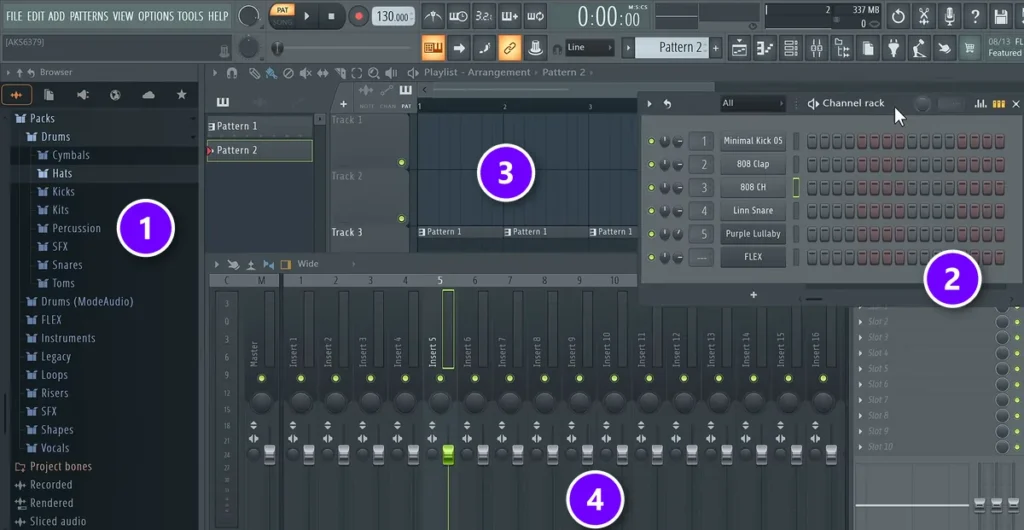
Here’s the order, with the free chapter that teaches each step.
- Your DAW’s main windows. The Browser (1), Channel Rack (2), Playlist (3) and Mixer (4), plus the Piano roll and the tempo. The FL Studio tour in Day 1 of the free course, about 15 minutes, or read our FL Studio beginner’s guide.
- Chords, melody and bass. One scale, a four-chord progression, a simple melody and a bassline that follows the chords. Day 2, about 35 minutes, or read music theory for producers.
- Drums and arrangement. A drum pattern at least 2 bars long, then your loop laid out as a song with an intro, hooks, a verse and an outro. Day 3, about 40 minutes, or read how to make beats.
- Mixing. Volume first, then EQ, compression and space (reverb and panning), the order of the Holy Quad, Mix Elite’s mixing formula. Day 4, about 90 minutes, or read how to mix a song.
- Vocals, if your songs have them. Clean takes first, then a simple vocal chain. Day 5, about 45 minutes, or read how to mix vocals.
- Mastering and export. The final polish, the last 5% of preparing a track, and the right export settings. Day 6, about 40 minutes, or read our guide to mastering in FL Studio.
- Release and feedback. Put the song out, play it for people and learn from what they say. Feedback is further down this page, and how to release music covers putting it out.
Every stage has a full how-to, with screenshots, in our step-by-step guide to producing your first song. This page is about learning it without stalling.
What music production skills should you learn first?
Learn the basics your next song needs first: finding your way around your DAW, picking good sounds, a simple chord loop with a melody, a drum pattern, and balancing the volume of each part. Extra plugins, new gear, sound design and deep music theory can wait, because none of them will finish a song for you.
Knowing what to ignore saves more time than any shortcut. All of these can wait until you’ve finished a few songs:
- The manual. Look up one thing at a time instead (more on that below).
- Most of the buttons. Max says he doesn’t use 90% of what sits in FL Studio’s top bar.
- Most of the mixer. In Max’s words: “I’ve been making music for a very long time before I even started to look into the mixer.”
- Sound design. Start from presets in free instruments like LABS and Vital, both used in the free course.
- Deep music theory. One scale and the basic way to stack a chord will carry your first songs.
- Plugin shopping. Learn the effects that came with your DAW before you buy more.
- Gear upgrades. Better speakers won’t fix a song that isn’t finished yet.
- Loudness targets. Mastering comes last, so leave loudness meters alone until you have a mix worth mastering.
Teach yourself FL Studio with the hint bar
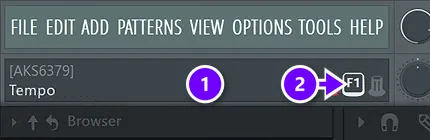
When a button confuses you, don’t open another tutorial. Hover over it and read the hint bar (1) at the top left, which names whatever sits under your mouse. Here the mouse is on the tempo, so it says Tempo. If you need more, press F1 (2) to open the manual page for the window you’re in. Just don’t read the manual cover to cover. It’s easy to get lost in it, so use it to look up one specific feature at a time.
How do you learn music production in an hour a day?
Work on your own song most evenings, and give each session the same shape: 5 minutes listening to last night’s version, 10 learning one thing, 25 using it on your song and 5 saving and noting tomorrow’s first task. That’s 45 minutes. If you have a full hour, give the extra 15 minutes to the song, not to more lessons.
Short sessions on most nights beat one long Saturday, because the song stays fresh in your head and you never lose an evening working out where you left off. It fits around a full-time job, too, as long as every session ends with something changed in your song. Here’s the split:
- Listen (5 minutes). Play last night’s version once without touching anything. Write down the one thing that bugs you most.
- Learn one thing (10 minutes). Watch one short lesson, or one part of a chapter, with FL Studio open. One lesson, not three.
- Use it on your song (25 minutes). Do what the lesson showed on your own track, not on the teacher’s example. This is the part that makes you better.
- Save and leave a note (5 minutes). Press Ctrl + N (File, then Save new version) so every night gets its own copy, and write down tomorrow’s first task.
It’s the same rhythm as the free course, where each day ends with homework on your own track. Short on evenings? Watch the lesson on your lunch break and give the whole session to the song. And on nights when nothing sounds right, don’t start over: keep what you have and change one thing at a time until you like it.
What if you only have a few hours a week?
One song, four jobs. Give each session a single job, and don’t start a new idea until the song is done. Moving on to the next job when time’s up is what gets you past the loop.
- Make the loop. Chords, a melody, a bassline and drums, about 8 bars. Stop as soon as it sounds decent.
- Arrange it. Copy the loop across about 2 minutes and shape an intro, hooks, a verse and an outro (the finishing section below shows how).
- Add the changes. Something new every 4 or 8 bars: a hat coming in, a drum fill, a part dropping out.
- Balance and export. Set the volumes, export the song and call it done, then start the next one.
Starting as an adult with a job and a family? Our honest answer to is it too late to learn music production? covers what to expect.
Play first, keep the best part later
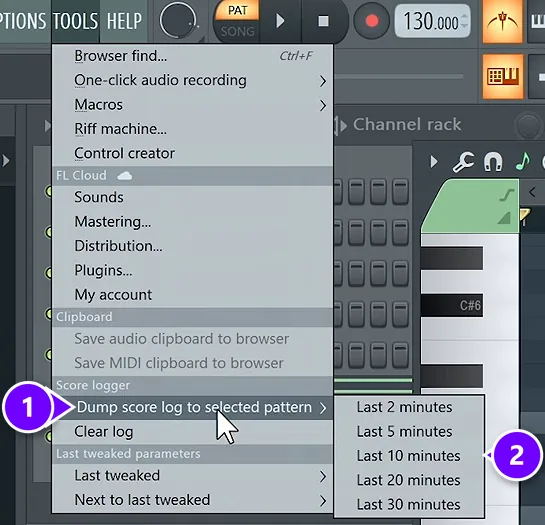
Some nights the best thing you make is ten minutes of playing around on your computer keyboard. You don’t even have to remember to hit record. FL Studio keeps a running log of the notes you play. Open the TOOLS menu, choose Dump score log to selected pattern (1) and pick how far back to go (2), from the last 2 to the last 30 minutes. The free course’s melody lesson rescues an improvised idea this way, then keeps only the best few bars.
How do you get out of tutorial hell?

Tutorial hell is watching lesson after lesson without ever finishing a song. You get out by following one course in order, using each lesson on your own track before you watch the next one, and counting finished songs instead of hours watched.
It feels like progress. You keep learning new words, but the skill only grows when you use it on your own music. These habits help:
- Follow one course, in order. Pick one teacher and one sequence, and finish it before you start another. The YouTube sidebar is not a plan.
- One lesson, then homework. Before you watch the next video, use the last one on your own track.
- Watch with FL Studio open. Pause, copy the move, then do it once more without the video.
- Learn things when your song needs them. If tonight’s job is a bassline, the mastering video can wait.
- Count songs, not hours. Your real progress is the number of finished tracks, even short and rough ones.
- Use the sounds you have. One good drum kit and a couple of free instruments will last you months. A few great sounds beat lots of okay ones.
Give every lesson a job before you press play. Say what you’ll make with it tonight: “a bassline for my loop,” not “learn about bass.” If you can’t name the job, you probably don’t need that lesson yet.
How do you finish a song instead of getting stuck on an 8-bar loop?
Copy your loop across about 2 minutes of the timeline, mute everything, then bring parts back in every 4 to 8 bars to build an intro, hooks, a verse and an outro, using a song you love as the map. Arrange before you mix. Give each song a deadline of one or two weeks, and export it when time’s up.
Finishing is its own skill, and you only learn it by finishing. So set the bar low on purpose. A 2-minute song with an intro, a hook, a verse, another hook and an outro is a finished song. That’s about the length of the song arranged in the free course.
- Copy a map. Pick a song you love in the same style and copy where its sections change. A reference track is one of the quickest ways to level up.
- Build it by adding. Copy your loop across the whole song, mute everything, then bring parts back in every 4 to 8 bars.
- Arrange before you mix. Leave EQ and compression alone until the whole song is laid out. The free course arranges on Day 3 and only mixes on Day 4.
- Give it a deadline. One or two weeks per song. When time’s up, export it as it is.
- Start the next one. A finished rough song teaches you things a perfect 8-bar loop never will: transitions, endings and how to keep someone listening.
For the whole method, with a screenshot for every step in FL Studio, read how to finish a song, and for more ways to stretch a loop, see how to arrange loops into a full song.
How to get feedback on your music
After you’ve heard your song 200 times, you can’t really hear it anymore. Feedback fixes that, and most of it is free.
- Compare it with a pro track. Play a released song in the same style right after yours, at the same volume, and note what sounds different.
- Play it on other speakers. Try a car, cheap earbuds, a laptop and a phone. The last step of the free course’s mastering lesson is exactly this: play the finished track everywhere and listen for problems.
- Ask one person a specific question. Not “is it good?” but “where did you get bored?” or “what was too loud?”
- Post it where producers trade feedback. r/WeAreTheMusicMakers on Reddit runs a weekly feedback thread, and you’re expected to comment on other people’s tracks too.
- Get notes from a pro. The 7-Day course ends with personal feedback on your track from the Mix Elite team, and Mix Elite Academy includes unlimited 1:1 feedback on your music.
Comparing is how your ears learn. Max says: “The more you practice and compare your music to professional productions, the better you’ll become at choosing the right sounds.” When two people point at the same problem, fix it. When one person just doesn’t like your genre, let it go.
Can you learn music production for free?
Yes. The FL Studio free trial, Mix Elite’s free 4.5-hour FL Studio course on YouTube and free instruments like LABS and Vital cover every step in the order above, without paying a cent.
- The DAW: the FL Studio free trial, with every feature and no time limit (it just can’t reopen saved projects).
- The lessons: the free 4.5-hour FL Studio course on YouTube, a complete music production course for beginners in the same day-by-day order as this page, with more than 1.5 million views.
- The instruments: LABS by Spitfire Audio for real instruments and Vital for synths, both free.
- The files: the free downloads that go with each day of that video.
- The feedback: reference tracks, other speakers and community feedback threads.
What free can’t give you is a plan you’re held to, files made for each lesson, and a pro who listens to your song. If you’ve started and stopped before, that’s usually what was missing, not information. For more options, see our list of the best free music production courses.
Are music production courses worth it?
A course is worth it when it gives you what free videos don’t: an order, the files for each step, a finish line and someone who listens to your song. Put money into skills before gear, too. A bigger FL Studio edition or new speakers won’t teach you to finish a song.
There are three paid paths worth knowing about.
- A short starter course. Mix Elite’s 7-Day Music Producer Course turns this learning order into one week of 45-minute sessions, ending with a finished track and personal feedback from a pro.
- A full program with coaching. Mix Elite Academy gives you lifetime access to 600+ trainings, weekly live coaching calls and unlimited 1:1 feedback on your music, for three payments of $137.
- A degree. Several years of study and a much bigger bill. It’s worth it if you want the degree itself, but you don’t need one to make songs you’re proud of.
Want to compare courses from other schools too? See our guide to the best online music production courses.
Whatever you choose, start tonight with night one: open FL Studio, watch Day 1 of the free course with it running, and make one pattern you like. Tomorrow, Day 2.
THE 7-DAY MUSIC PRODUCER COURSE
Follow this whole plan in 7 days, with everything handed to you
The 7-Day course is this learning order as a daily routine: each day you finish one step of a real track, from setup and chords to mixing, mastering and release, in about 45 minutes. Every sound and template is handed to you, no prior knowledge is needed, and on Day 7 our team gives you personal feedback on your track. It’s $27, paid once, with a 60-day money-back guarantee.
Frequently asked questions
How should I structure a 1-hour music production session after work?
Spend about 5 minutes listening to last night’s version, 10 minutes learning one thing, 25 minutes using it on your own song and 5 minutes saving a new version with a note for tomorrow. If you have a full hour, give the extra time to the song. Watching the lesson on your lunch break leaves the whole evening for making music.
What music production skills should I learn first?
Learn what your next song needs, in the order a song is made: your DAW’s main windows, picking good sounds, a simple chord loop and melody, a drum pattern and arrangement, then balancing volume. Plugins, new gear, sound design and deep music theory can wait until you’ve finished a few songs.
How do I stop getting stuck on 8-bar loops and finish a song?
Copy the loop across about 2 minutes, mute everything, then bring parts back in every 4 to 8 bars to build an intro, hooks, a verse and an outro. Use a song you love as the map, arrange before you mix, and give each song a deadline of one or two weeks. When time’s up, export it and start the next one.
Can you teach yourself music production?
Yes. You don’t need a degree or a teacher in the room to make good music: a DAW, headphones and free lessons are enough to start. What self-taught beginners usually lack is an order to learn things in, a finish line for each song and honest feedback. Add those on purpose, with a structured course or a plan like the one on this page, and teaching yourself works.
How long does it take to learn music production?
With a day-by-day plan and about 45 minutes a day, a simple first song takes about a week, which is how Mix Elite’s 7-Day Music Producer Course is built. Getting good takes months of finishing songs. For a stage-by-stage timeline, see how long it takes to learn FL Studio.