



“Grit is living life like it’s a marathon, not a sprint.”
Most beginners learn FL Studio’s basics in a week or two of short daily sessions: enough to find their way around and build a simple beat. A first finished song can come in that first week if you learn in the order a song is made, while mixes that sound like releases take months to years.
How long does it take to learn FL Studio, when the Channel Rack, the Piano Roll, the Mixer and hundreds of tiny buttons all stare back at you at once? It’s a lot. Below is a realistic timeline, how many hours a week it takes, what actually slows people down, and a 7-day roadmap you can follow even if you only have 45 minutes a night.
Table of Contents
How long does it take to learn FL Studio?
It depends on what you mean by learning it. Finding your way around takes a few sessions, a simple beat takes a week or two, and a first full song can happen in your first week if you work in a clear order. Getting fast, and making mixes that sound like releases, takes months to years, the same as in any DAW.
How long it takes, stage by stage

“Learning FL Studio” means different things at different stages. Here’s a rough guide, assuming you practice for under an hour on most days:
- Finding your way around: your first few sessions. You learn the four main windows (Channel Rack, Piano Roll, Playlist, Mixer) and how to load sounds.
- Making a simple beat: the first week or two. Drums, a chord progression and a melody looping together.
- Finishing a full song: this is where most people stall for months. With a clear order to work in, it can happen in your first week.
- Songs that sound like releases: months to years of finishing songs, getting feedback and fixing the same few mistakes.
Notice that the big jump isn’t between knowing the buttons and making a beat. It’s between a beat and a finished song. That gap is about order and habits, not talent.
How many hours a week do you need to learn FL Studio?
About 45 minutes a night on most nights is enough, which adds up to roughly 4 to 5 hours a week. At that pace you can learn the basics in a week or two and finish a simple first song in about a week, as long as every session follows a plan instead of a random tutorial.
Short sessions fit around a job, and they stack up when each one builds on the last. That’s how Mix Elite’s free 4.5-hour FL Studio course is laid out: a 7-day experience with homework every day, where each day builds on the one before. Mix Elite’s 7-Day Music Producer Course uses the same rhythm, about 45 minutes a day, with one finished track at the end of the week.
Getting good takes far more hours than getting started, so don’t judge your progress by the first month. The basics come fast. Taste, speed and mixing skills come from finishing song after song.
How long does it take to master FL Studio?
Years. That’s true of every DAW, not just FL Studio. The software part comes quickly: the windows, the shortcuts, where everything lives. What takes years is the music you make with it, and mixing most of all.
Max, the founder of Mix Elite, calls mixing an in-depth process that takes years to master. A well-balanced mix takes about 5 to 10 hours on average, he says, and more if the track is complicated. Mastering, the final polish before release, is only the last 5% of preparing a track. You can finish plenty of songs long before either one is good, and you should.
Is FL Studio hard to learn?
No, but it can feel that way for the first few days. In the video above, Max sums it up: “It’s easy to start, hard to master, popular with beginners and pros.” People use it for hip-hop, house, trap, EDM and film music, and it’s the program Mix Elite recommends to beginners.
If you switch programs later, it’s not a fresh start either. Every DAW is built from the same parts that just look different, so moving to another one takes days, not months.
Why does learning FL Studio feel so overwhelming?
Because you meet everything at once. FL Studio shows you hundreds of buttons on day one, and a beginner is learning several skills together: the software itself, chords and melodies, drums, arranging and mixing. Most tutorials then teach those skills in random order, so nothing connects.
You learn a compressor trick on Monday and a melody trick on Wednesday, but nobody shows you what to do first, second and third. That’s the real problem, and the fix is simple: one skill per session, in the order you’d make a song. Color-coding your patterns and clips helps too, because you can see at a glance which parts are drums and which are melody.
What you can skip for now
You can ignore most of FL Studio at first. Most of the settings in the top toolbar won’t be any use to a beginner, and Max says he personally doesn’t use 90% of them.
Treat the manual the same way. Reading it cover to cover is how people get lost, so press F1 over a window, like the Channel Rack, to jump straight to its page when you need it.
Even mixing gets smaller once you know what matters. On the compressor, Max’s advice is blunt: “Only those two knobs will matter for now and for many, many weeks to come.” He means threshold and ratio. Everything else on it can wait.
What slows beginners down
After going through hundreds of projects one-on-one with Mix Elite Academy members, Max noticed the same few mistakes coming up again and again. Most of them weren’t about skill at all. They were a handful of settings and habits you can avoid just by knowing about them. The ones that cost beginners the most time:
- Learning out of order. Mixing tricks before you can finish a song is like learning to park before you can drive.
- Collecting instead of making. Plugins, sample packs and tutorials feel like progress, but only finished songs teach you how songs work.
- Polishing one loop forever. It’s the most common way to spend months without a single finished track. Here’s how to finish a song instead.
- Fighting the software. A few minutes spent on the right shortcuts and settings saves hours later. Start with these FL Studio tips for beginners.
- Never getting feedback. If nobody ever hears your music, you can repeat the same mistake for a year without knowing it.
- Giving up too early. Max calls it the worst mistake of all, worse than any wrong setting. Your first songs are supposed to sound like first songs.
What are realistic goals for your first few months?
Aim to finish songs, not to sound like a release. A realistic first goal is one simple finished song in your first week or two. For the next few months, keep finishing songs, remake a track you love, and get feedback on each one. Polished, release-ready mixes come later.
- Weeks 1 and 2: finish one simple song from start to end. The roadmap below shows the order.
- The rest of month 1: keep finishing songs. Reuse drums and settings you like instead of starting from scratch. Max points out that pro artists often reuse whole projects and only swap the instruments and melodies.
- Months 2 and 3: remake songs you love, slowly, and drop a reference track in the same style into your project to compare against. A reference track is one of the most powerful ways to level up quickly.
- Every month: play your finished songs for someone and fix one thing in the next one.
Notice what’s missing from that list: buying plugins, collecting sample packs and perfecting one loop. They feel like progress, but finished songs are what teach you how songs work.
The fastest way to learn FL Studio
Learn it in the same order you’d make a song, and finish one song as early as you can. Every step then has a reason, and you remember what you used. Mix Elite’s free 4.5-hour FL Studio course on YouTube is built exactly this way: it’s split into seven days, each one building on the day before, and it needs no prior knowledge.
You also don’t need to buy anything to start. The FL Studio free trial has every instrument, effect and feature with no time limit, and you can export your songs as WAV or MP3. You don’t need a MIDI keyboard or any instrument either, because your computer keyboard can play notes and FL Studio comes with virtual instruments.
The trial can’t reopen saved projects, so export your work before you close it.
Once you’ve finished a song or two, start remaking the songs you love. Max’s fastest way to improve: “If you want to improve the fastest, by all means, you want to take a song you really like and remake it slowly.” Get as close as you can, then pick another track and do it again. He says the better the producers he talks to, the more often they remake tracks. Just don’t release the copies.
Learn a few shortcuts and start from a template
Speed in FL Studio is mostly about your hands. These shortcuts from Mix Elite’s free course cover the jobs you’ll do most:
- Ctrl + B duplicates whatever you’ve selected, like a loop you want to repeat.
- Ctrl + L sends the selected channel to its own Mixer track.
- Alt + V shows your other channels as gray ghost notes in the Piano Roll, so you can write a melody over your chords.
- F9 opens the Mixer, and F1 opens the manual page for the window you’re in.
Then save a starting template: a project with your mixer tracks, groups and colors already set up, so a new song starts ready to go. It sounds small, but pro artists start every track from one.
Can you teach yourself FL Studio?
Yes. Everything you need to start is free: the FL Studio trial, Mix Elite’s free FL Studio course on YouTube, and the manual for looking things up. What’s hard to do alone is hear your own mistakes.
After a few hours on a song, your ears get used to it, and problems start to sound normal. Play your finished songs for someone whose taste you trust, and compare them with a reference track in the same style. Then fix one thing in the next song. Small fixes add up. Or get a pro to listen: we compared the best online music production courses on price, feedback and hours per week, and the best FL Studio courses if FL Studio is the only program you want to learn.
Step-by-step roadmap: from opening FL Studio to a finished song
Work in the order a song is made, one step a day: set up and learn the four main windows, write chords and a melody, program drums and arrange, mix, add vocals, master and export, then release and get feedback. At about 45 minutes a day, that’s a finished track in a week.
It’s the same order Mix Elite’s 7-Day course follows. The screenshots below come from Mix Elite’s free FL Studio course on YouTube, which teaches the steps in that order too.
Day 1: Setup and the four main windows
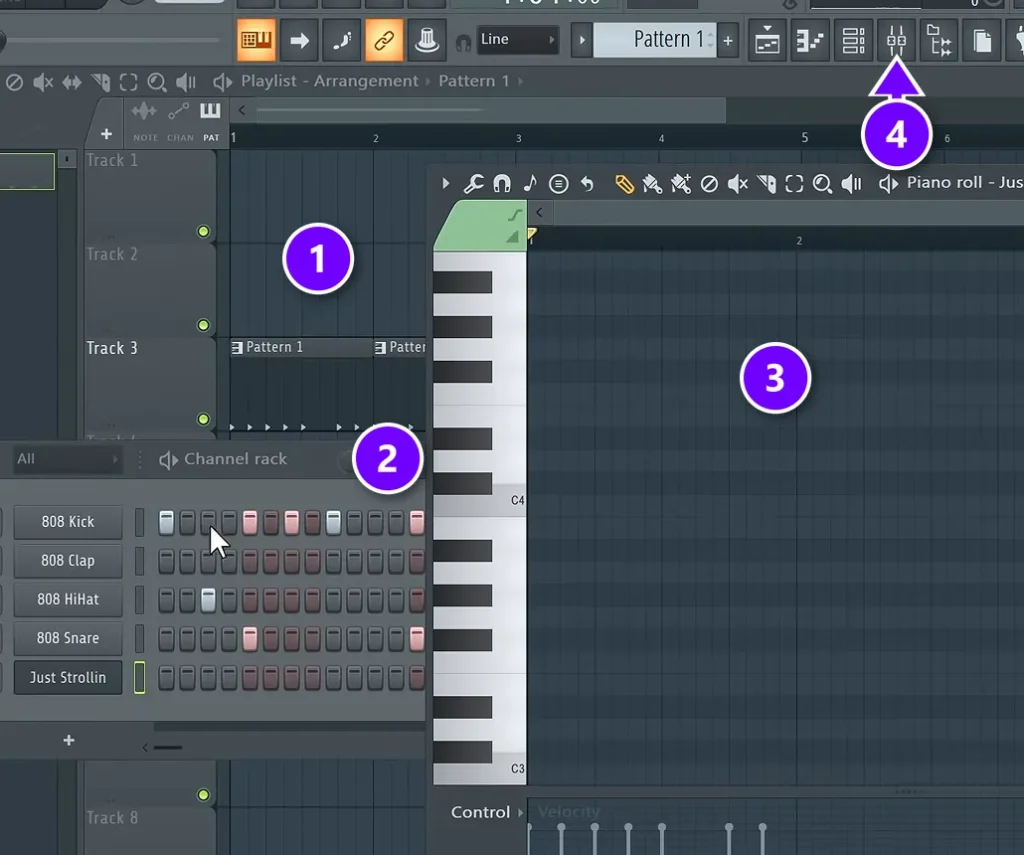
Install FL Studio, check your audio settings, and learn the four main windows. The Playlist (1) is where you lay out the whole song, and the Channel Rack (2) holds your sounds and drum patterns. The Piano Roll (3) is where you write notes. The Mixer opens from its button in the toolbar (4), or press F9.
Day 2: Chords and a melody in the Piano Roll
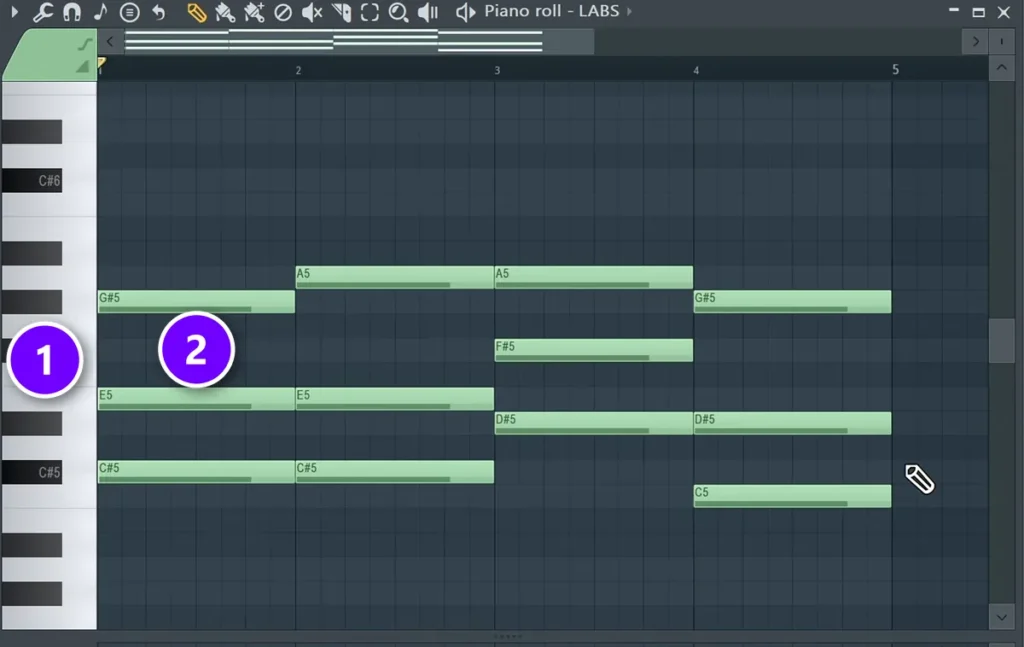
Write a chord progression and a simple melody over it. No theory degree needed, just a scale to stay inside. The keyboard on the left of the Piano Roll (1) shows which note each row plays, and a chord is three or more notes stacked on top of each other (2). In the free course, the Day 2 loop is four chords like this in C# harmonic minor, one per bar.
Day 3: Drums in the Channel Rack, then the arrangement
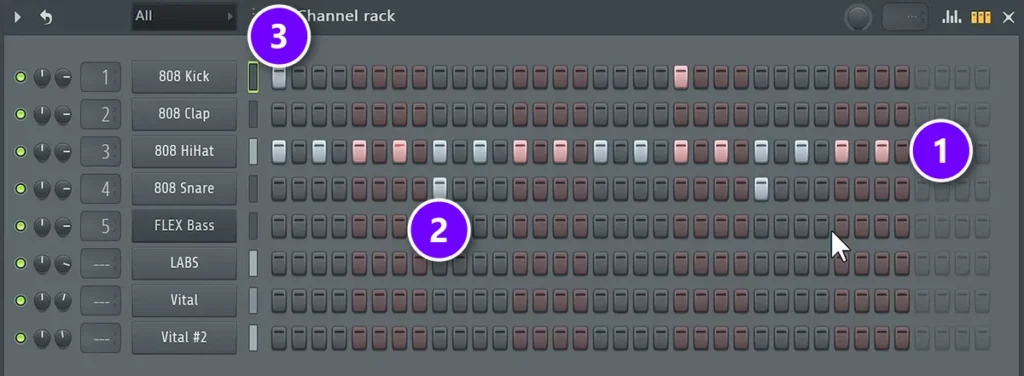
Program a drum pattern, then stretch your loop into a full song structure. In the Channel Rack, every row is one drum sound and every box is a step you click to add a hit. The course’s trap pattern starts with hi-hats on every second step (1), a snare on beat 3 of each bar (2) and a kick on beat 1 (3). Then copy the loop until the song runs about 2 minutes, and mute and unmute parts to shape the intro, hook and verse.
Day 4: Mixing in the Mixer
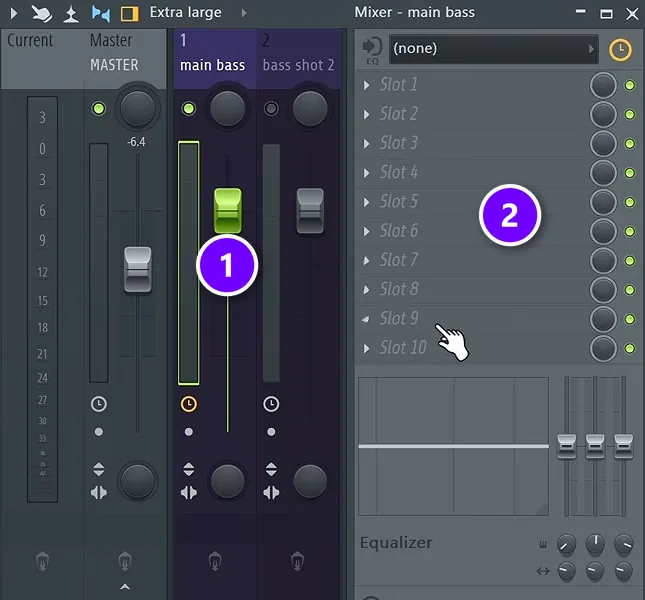
Balance the levels, then clean things up with EQ and compression. Every sound gets its own mixer track with a volume fader (1), and every track has ten effect slots (2) for plugins like an EQ or a compressor. Fill them in order: EQ first, then compression, then reverb, and only when the sound needs it.
Day 5: Vocals
Record a vocal or add one. Then make it sit in the mix.
Day 6: Mastering and export
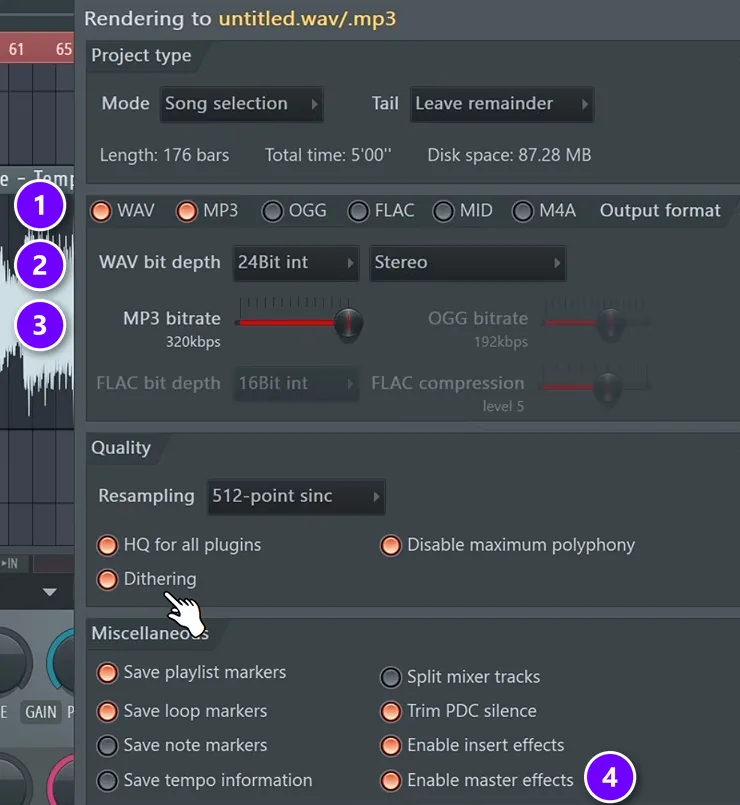
Make it loud and clean, then export it with the right settings. For the final file, use the course’s export settings:
- Tick both WAV and MP3 (1).
- Set the WAV bit depth to 24-bit (2).
- Push the MP3 bitrate all the way up (3).
- Switch on Enable master effects (4) and click Start.
Day 7: Release and feedback
Put it out, and get someone who knows what they’re doing to tell you what to fix next time.
Your first song won’t be perfect, and it doesn’t need to be. Finish it anyway. Once you’ve finished one, every new technique you learn has somewhere to go. If you’re still deciding whether FL Studio is the right program for you, start with our beginner’s guide to FL Studio.
THE 7-DAY MUSIC PRODUCER COURSE
Learn FL Studio in the right order, in 7 days
The 7-Day course is that plan with everything handed to you: step-by-step videos, sounds, templates and cheat sheets, one step a day for about 45 minutes. It’s taught in FL Studio, and the free trial works. On day 7 a pro gives you feedback on your finished track. It’s $27, and you get 60 days to decide if it was worth it.
Frequently asked questions
How long does it take to learn FL Studio?
Most beginners learn the basics, the four main windows and a simple beat, within a week or two of short daily sessions. A first finished song can come in your first week if you learn in the order a song is made. Mixes that sound like releases take months to years of practice.
How many hours a week should I practice FL Studio?
About 45 minutes a night on most nights, roughly 4 to 5 hours a week, is enough to learn the basics and finish a first song in about a week. Short sessions fit around a job, and each one builds on the last as long as you follow a plan instead of random tutorials.
Why does FL Studio feel so overwhelming at first?
You see hundreds of buttons on day one while learning several skills at once: the software, chords and melodies, drums, arranging and mixing. Tutorials that teach them in random order make it worse. Learning one skill per session, in the order you’d make a song, removes most of that feeling.
Is FL Studio hard to learn?
FL Studio is easy to start and hard to master. The first few days can feel overwhelming because of how many buttons there are, but the core workflow of patterns, a piano roll, a playlist and a mixer is quick to pick up. Learning things in a clear order matters more than the program itself.
Can I learn FL Studio for free?
Yes. The FL Studio trial includes every instrument, effect and feature with no time limit and lets you export WAV or MP3 files. It can’t reopen saved projects, so export before you close. Mix Elite’s free 4.5-hour FL Studio course on YouTube covers the fundamentals in a seven-day order.





