



“I often say that when you can measure what you are speaking about, and express it in numbers, you know something about it…”
RMS measures the raw average power of your audio and treats every frequency the same, while LUFS measures loudness the way human ears hear it. When you finish a track, read integrated LUFS: Spotify sets playback volume in LUFS, so it tells you how loud your song really is.
LUFS vs RMS matters because two meters can look at the same song and show you two different numbers. Trust the wrong one and you can spend hours chasing a loudness target that has little to do with what your listeners actually hear. Below you’ll find what each one means in plain words, the key differences, how loud your master should be for Spotify and YouTube using only the numbers they publish, and how Max, the founder of Mix Elite, makes a master loud without wrecking it.
Table of Contents
What is RMS in audio?
RMS stands for root mean square. It’s a way to average the level of a sound wave over a short window of time, usually a fraction of a second, and around 300 milliseconds on many meters. A peak meter only shows the single highest point of the wave. RMS shows the average power, which is much closer to how loud a sound feels.
So does a higher RMS mean louder? Usually, as long as you compare similar sounds. RMS has two weak spots, though. It treats all frequencies the same, but your ears don’t: we hear the upper mids, where vocals and snares live, far more easily than deep bass. A bass-heavy mix can show a high RMS number and still sound quieter than that number suggests. And RMS meters don’t all follow one standard, so two meters can show different numbers for the same song.
The gap between the peak level and the RMS level has a name, too. It’s called the crest factor. A big gap means punchy, dynamic audio. A tiny gap means the peaks have been squashed flat.
What is LUFS?
LUFS stands for loudness units relative to full scale. Full scale is the very top of a digital meter, 0 dB, so LUFS readings for music are negative numbers, and closer to zero means louder. One LU is the same size as one decibel. A song at -9 LUFS is 5 dB louder than one at -14 LUFS. You’ll also see LKFS, which is the same unit under the name the ITU standard uses.
Before it measures anything, a LUFS meter runs your audio through a filter called K-weighting. It turns the deep bass down and gives the highs a small lift, to match how people hear. That filter is the big thing RMS doesn’t have. LUFS comes from a broadcast standard, ITU-R BS.1770, which European broadcasters use as EBU R 128, so every meter that follows it shows the same number.
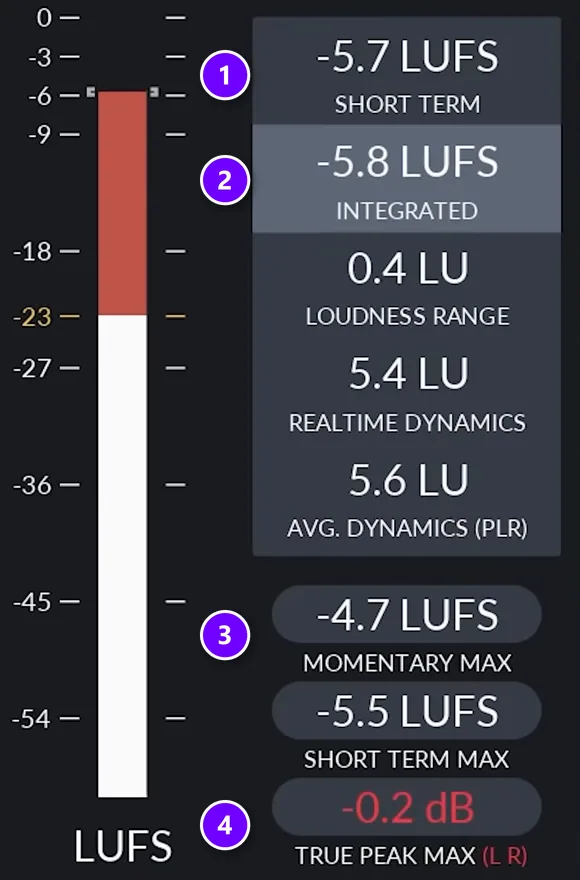
A LUFS meter such as the free Youlean Loudness Meter shows several readings at once. In this frame from Mix Elite’s loudness video, short-term (1) covers the last 3 seconds and integrated (2) covers the whole song so far. Momentary max (3) is the loudest 0.4-second moment. True peak max (4) is the real highest point of the wave, including the bits between samples. The integrated reading skips silence and very quiet parts, so a long fade-out doesn’t drag it down. Loudness targets, like Spotify’s, use integrated LUFS.
LUFS vs RMS: the key differences
Here’s the short version:
- What it measures: LUFS measures loudness as people hear it. RMS measures average signal power.
- Frequencies: LUFS weights them like the ear, with less deep bass and a little more top. RMS treats them all the same.
- Time window: LUFS uses 0.4 s, 3 s, or the whole song (integrated). RMS uses a short window that varies by meter.
- Silence: LUFS skips it in the integrated reading. RMS counts it.
- Standard: LUFS follows ITU-R BS.1770 and EBU R 128. RMS has no single standard for music meters.
- Spotify: it uses LUFS to set playback volume, not RMS.
- Best for: LUFS is best for setting and comparing how loud masters are. RMS gives a rough feel for average level.
Max makes the same point in Mix Elite’s loudness video: “the peak you see on the meter inside your DAW has nothing to do with how loud your music is actually perceived”. RMS gets closer than a peak meter does. But LUFS is built for the question you’re really asking, which is how loud your song sounds.
Can you convert RMS to LUFS?
Not with a formula. Because LUFS weights frequencies and RMS doesn’t, the same RMS reading can mean different LUFS readings. A bass-heavy song and a bright song can share an RMS number and still land at different LUFS. The only reliable way is to measure LUFS directly.
The meter is free. Mix Elite’s videos use the Youlean Loudness Meter, whose free version shows integrated LUFS and true peak and works in FL Studio and most other DAWs. To measure a song:
- Put it last on your master channel.
- Play the whole song from start to finish.
- Read the integrated number at the end.
Why does my mix look loud on the meter but sound quiet?
Because peak and RMS meters count raw energy, and most of that energy sits in the sub, the part your ears hear least. A mix with heavy bass and quiet mids can push the meter to the top and still sound smaller than a released song. Switch to integrated LUFS, which weights frequencies like your ears do, to see the real picture.
Mix Elite’s loudness video puts the low end this way: it carries the most energy but the least loudness. That’s why pro tracks actually have less sub than you might think. Usually it’s one of these four:
- Too much sub and low end. It fills the meter without making the song sound louder. Delete parts that fight in the low end, and low cut sounds that don’t need bass.
- Quiet mids. Your ears hear the upper mids, where vocals and snares live, most easily. A mix that’s thin there sounds quiet at any meter reading.
- Untamed peaks. A few sharp drum hits reach the top of the meter first, so the whole song has to sit lower. Clipping single tracks and groups keeps them in check.
- The wrong meter. A peak meter only shows the highest point of the wave. It says nothing about how loud the song feels.
To compare fairly, load a reference track, a released song you like in the same style, and measure it with the same LUFS meter. Then fix the mix first and the master second. Our guide on how to make your mix louder without losing dynamics covers the mix side, and the steps below cover the master.
How loud should my master be for Spotify and YouTube?

Here’s what each platform says on its own pages, then what Max does. Only numbers the platforms publish themselves are listed here.
Spotify
- Spotify adjusts tracks to -14 LUFS, measured with the ITU 1770 standard.
- It does this during playback. Your uploaded file isn’t changed.
- Louder masters are turned down, with no extra distortion. Quieter masters are turned up, and Spotify leaves 1 dB of headroom for its compressed formats.
- Premium listeners can pick Loud (-11 LUFS, with a limiter), Normal (-14) or Quiet (-19).
- The web player and third-party devices, like TVs and speakers, don’t use loudness normalization.
- Spotify’s advice is to aim for -14 integrated LUFS with true peak below -1 dB, and to keep true peak below -2 dB if your master is louder than -14 LUFS.
Source: Spotify for Artists, loudness normalization. For the mixing side of streaming, see our guide to mixing and mastering for streaming.
YouTube
YouTube doesn’t publish a LUFS target on its help pages. What it does document is Stable Volume, a setting that’s on by default and evens out the gap between quiet and loud parts while people watch. YouTube says it’s turned off for YouTube Music and official music videos, and viewers can switch it off. Source: YouTube Help, control video volume.
So there’s no official YouTube number to aim for. Measure in integrated LUFS and follow the same rules as everywhere else.
Apple Music
Apple’s Sound Check plays songs at about the same loudness, so a master made very loud plays back quieter. Apple’s mastering guide also recommends leaving at least 1 dB of headroom to avoid clipping. Sources: Apple Support and Apple Digital Masters.
What Max aims for
Max’s point is that “people are confused between distribution target and playback threshold”. -14 LUFS is where Spotify plays your song by default. It isn’t a rule for how loud to make it. On that default setting, a louder master is simply turned down, with no extra distortion, so Mix Elite’s advice is to master as loud as possible before it starts to sound worse. For electronic music, that means at least -8 to -6 integrated LUFS.
A master that loud is exactly why Spotify’s -2 dB true peak rule matters, and it’s what the next section is about.
One more number you’ll see is -23 LUFS. That’s the target for TV and radio programmes in the EBU R 128 broadcast standard, not a target for music on streaming services.
How to get a loud master that still sounds clean
In the video below, a track that starts distorting at about -10 LUFS ends up around -5 to -6 LUFS, cleaner and with no clipping. Here’s the process, step by step.
Step 1: Fix the mix first
Delete parts that fight for the same space, keep the low end from hogging the mix, sidechain to make room for the most important sound, tame peaks on single channels and groups, and keep everything below 120 Hz in mono. These habits give you 80% of a clean, loud mix.
Step 2: Cut the lows under your lowest note
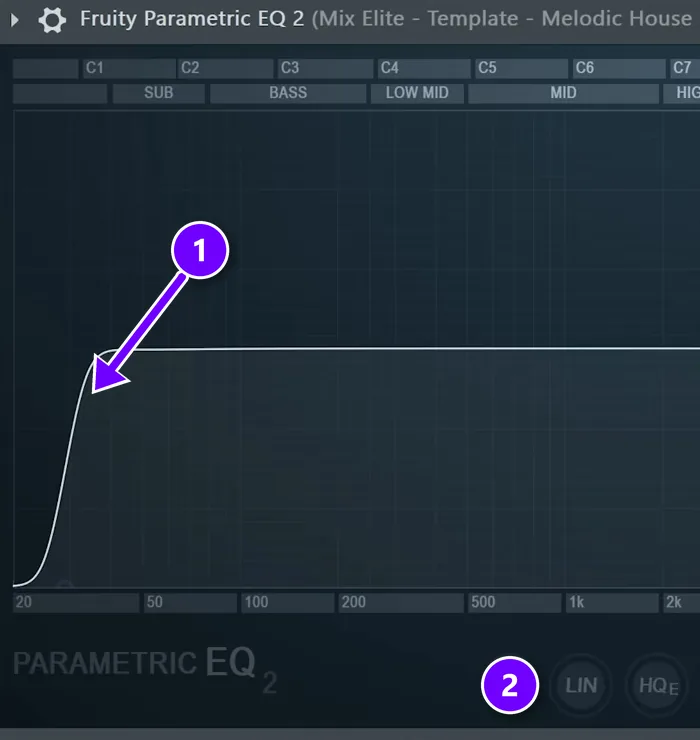
On the master, set a Parametric EQ 2 low cut (1) just under the lowest note your song plays, but never lower than 30 Hz. The track in the video is in E, at about 41 Hz, so the cut sits a little higher. Leave LIN, the linear phase mode (2), switched off on this EQ, and don’t add oversampling here either. Save both for the final limiter.
Step 3: Make the low end mono
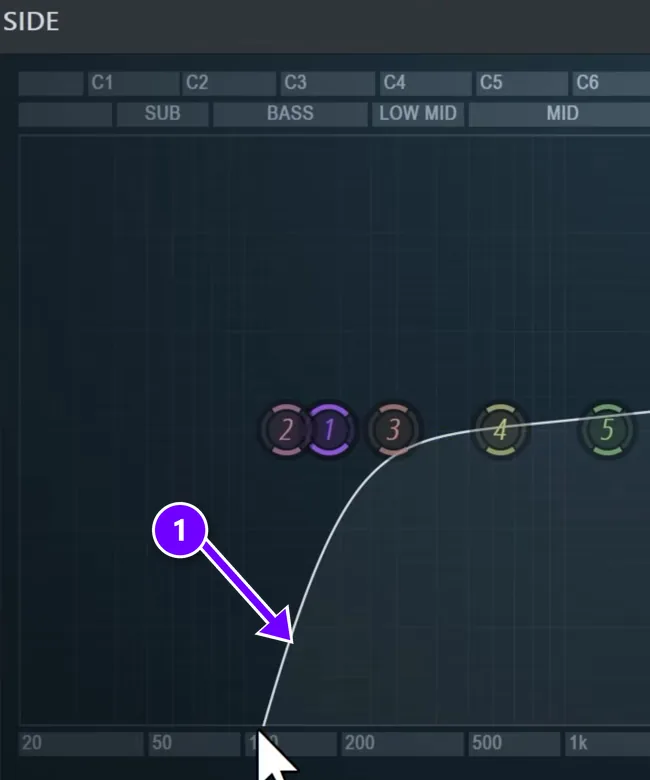
Wide bass can cancel itself out on mono speakers and leave dead spots in clubs. Use a mid/side EQ in Patcher and raise the side channel’s low cut (1) until everything under about 120 Hz is mono.
Step 4: Clip the stray peaks
A clipper simply chops the tops off peaks. Put the small GClip plugin right after the EQ. Push it until you can just hear the knock of the drums change, then back it off 10%, with oversampling on and softness at 0%. Why clip before the limiter? Limiters try to be smart and soften a big snare hit to squeeze it under the ceiling. A clipper doesn’t think, which is exactly why it works here.
Step 5: Compress each band
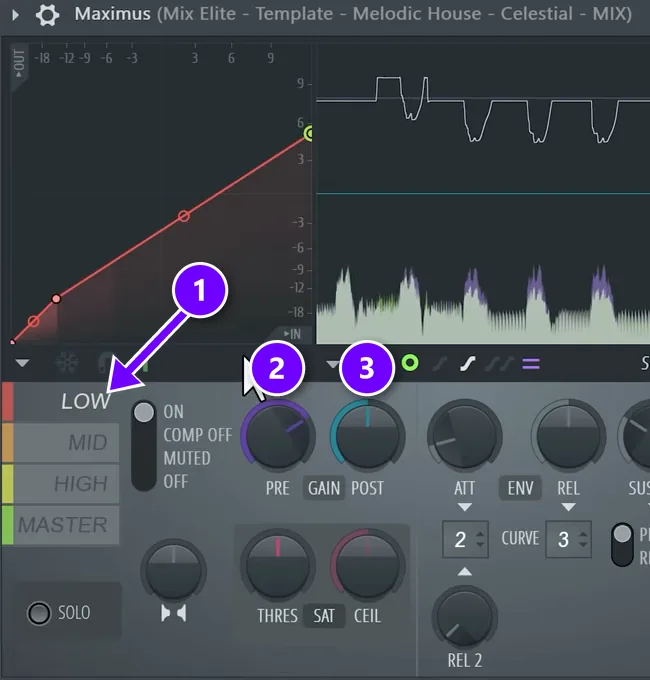
Use Maximus or a plugin like FabFilter Pro-MB.
- Click a band (1).
- Raise its PRE gain (2) by about 7 to 10 dB, so there’s more room to work with.
- Compress the band to shrink its dynamic range, then turn up POST (3) to make up the loss. If the lows came down from +8 dB to about +5, add about 3 dB back.
Step 6: Limit last, with true peak on
The limiter goes last. The video uses the maximizer in iZotope Ozone, but any true peak limiter does the job.
- Turn on true peak first.
- Start with the output ceiling at -0.3 dB.
- Raise the gain until you hear distortion, and back off.
Next, check what happens after the song is turned into a compressed file like AAC or MP3. Ozone has a codec preview for exactly this.
In the video’s test the master clipped after conversion even with true peak on, and that is why loud masters need the lower -2 dB ceiling Spotify asks for.
Max’s last word on loudness is worth keeping: “Quality is the best volume booster”. Make music people want to turn up. If you work in FL Studio, our step-by-step guide on how to master in FL Studio walks through a full chain with stock plugins only. For the last two steps in more depth, read about true peak meters and compression vs clipping vs limiting.
THE 7-DAY MUSIC PRODUCER COURSE
Learn loud, clean mastering on Day 6
On Day 6, the 7-Day course teaches mastering: a 3-step mastering chain that makes your song loud, clear and punchy everywhere, the inter-sample clipping mistake that ruins your sound without you knowing (and an easy way to always avoid it), and the best export settings for streaming platforms. It comes with a mastering chain preset pack and a final mix to practice on. It’s $27, and you have 60 days to decide if it was worth it.
Frequently asked questions
What’s the difference between LUFS and RMS?
RMS is the average power of the signal and treats every frequency the same. LUFS measures loudness the way people hear it, with a K-weighting filter that turns the deep bass down, and it follows one standard, ITU-R BS.1770, so every LUFS meter shows the same number. Use integrated LUFS when you finish a track.
Is RMS or LUFS better for mastering?
LUFS. It measures loudness the way people hear it, it follows one standard so meters agree, and Spotify measures and adjusts songs in LUFS. RMS still shows average power, but set your loudness targets and compare reference tracks using integrated LUFS, the reading for the whole song.
Can you convert RMS to LUFS?
Not with a formula. LUFS weights frequencies and RMS doesn’t, so a bass-heavy song and a bright song can share an RMS reading and still land at different LUFS. Measure LUFS directly with a free meter such as the Youlean Loudness Meter.
Should I master to -14 LUFS for Spotify?
You can, but you don’t have to. Spotify recommends -14 integrated LUFS and adjusts every track to that level during playback on its default setting, turning louder masters down without adding distortion. Mix Elite’s advice is to master as loud as the song stays clean. If your master is louder than -14 LUFS, Spotify asks you to keep true peak below -2 dB.
Why does my mix look loud on the meter but sound quiet?
Peak and RMS meters count raw energy, and most of it sits in the sub, which ears hear least. Heavy bass, thin mids and untamed drum peaks fill the meter without adding loudness. Check integrated LUFS, compare a reference track with the same meter, and clean up the low end before you master.





