
“We wanted subs in the room and we wanted a club sound because we were making club records, so we wanted it to be powerful.”
To master EDM loud and punchy without distortion, cut the rumble under 30 Hz, use a multiband compressor like Maximus so only the kick peaks get caught in the low band, and keep the lows close to mono with the top a little wider. Then soft clip at about 1% with a -1 dB ceiling, push until it distorts, back off 1 to 2 dB and match a pro track in your style.
Your house track sounds huge in your headphones. Then you play it right after a record from your favorite label, and the kick shrinks, the bass turns to mush, and the drop feels like a polite suggestion.
So you push the limiter harder, and now the whole song pumps and crackles. That’s the trap. Below is how Max, the founder of Mix Elite, masters an EDM house track in FL Studio, one step at a time, with screenshots from Mix Elite’s videos, the exact settings and what changes for tech house.
Table of Contents
What makes EDM mastering different?
EDM mastering has to keep a loud kick and bass steady and close to mono, work on club systems and on phones alike, and protect the contrast between the breakdown and the drop. The tools are the usual ones; the settings change.
Mastering is the final polish before release: small EQ moves, gentle compression and loudness, applied to the whole song at once. If the idea is new to you, read what mastering is first. Dance music asks three extra things of a master.
- The kick and bass carry the song. They share the same low range, so the master has to keep them steady and separate.
- It has to work in two worlds. Your track plays on club speakers with huge subwoofers, right after another DJ’s record, and in playlists on phones and earbuds.
- It runs on contrast. The breakdown pulls back, and the drop has to hit.
You can see all of this on a real song. Mix Elite’s complete FL Studio mastering tutorial masters an EDM house track from Mix Elite’s mixing course with stock plugins only, and the Maximus tutorial goes deep on the one plugin that does most of the work. Render the mix with nothing on the master, load it into a fresh project and judge every move on the busiest part, which in EDM is the drop. Our FL Studio mastering guide covers the whole chain; this page is about what changes for EDM, house and tech house.
What is the best mastering chain order for house and EDM?
Clean up first, then control, then get loud. In FL Studio, that’s Parametric EQ 2 for a 30 Hz low cut and a mid/side EQ in Patcher, then Maximus for the bands, the width, the soft clipper and a -1 dB ceiling. Youlean, a free loudness meter, goes last.
Drop automation goes on top once the chain is set. Each clip below jumps to its step:
Max builds a loud, clean master in the video below: skip to 3:23 for the mastering chain.
What LUFS should an EDM master be?
There’s no official club number. In Mix Elite’s loud-master video, Max aims for at least -8 to -6 LUFS integrated on electronic tracks. For DJ sets, match the integrated LUFS of pro records in your style, so the DJ never has to touch the gain.
Spotify is the only big service that publishes a number: it plays songs at -14 LUFS by default and turns louder songs down to match. LUFS measures how loud a song feels over time, so it’s closer to your ears than a peak meter. Spotify also asks for true peaks below -1 dB, or below -2 dB if your master is louder than -14 LUFS, which most EDM masters are.
Apple Music and YouTube don’t publish a LUFS target at all. Our guide to mastering for streaming platforms walks through what each service does say.
Don’t master to -14 just because Spotify plays at -14. You’re the producer, and you decide how loud your song is. There are two ways to decide: push the master as loud as it goes before you hear distortion, or measure a pro track in the same style and match it. The second way matters in clubs. If your track comes in at the same level as the record before it, the DJ never has to reach for the gain knob.
Cut the sub rumble below 30 Hz
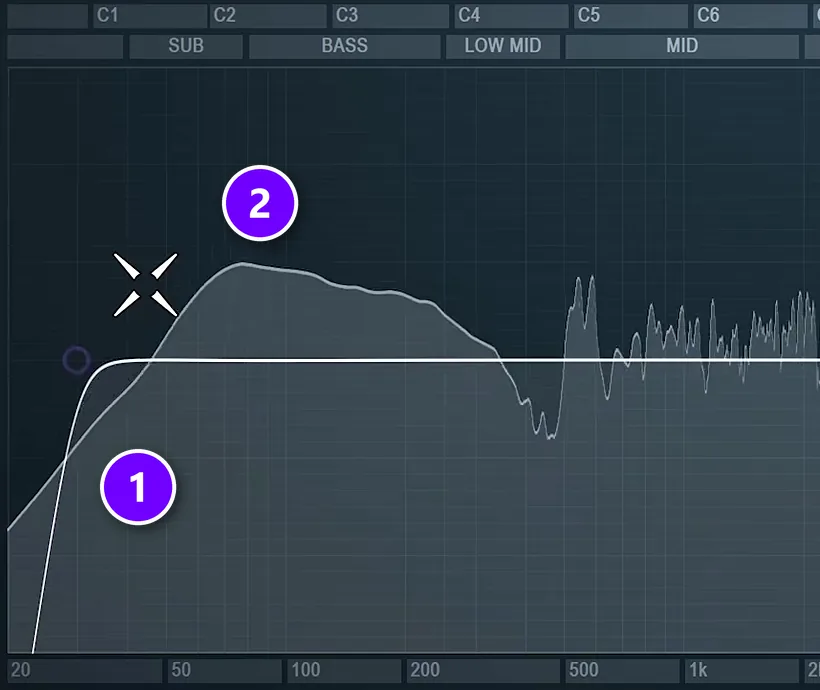
Start with a cleanup EQ. Load Parametric EQ 2 on the master, pick the preset with the 30 Hz cut, and look at where your kick and bass actually start.
The white line (1) is the low cut, and everything under about 30 Hz is gone. The hump (2) is the kick and bass. In the mastering tutorial’s house track it doesn’t go below 40 Hz, so the cut takes away nothing you’d miss.
The reason comes from the club. In Max’s words, most club systems don’t go lower than about 35 Hz, so energy below that only eats headroom, the space your song has before it hits the top of the meter. Some engineers cut at 40 Hz to get even louder, but he finds 30 Hz the sweet spot. He also rolls the very top off at about 16.5 kHz, which is his taste rather than a rule.
Keep every mastering EQ move under 2 dB. If the low end needs a bigger boost to sound full, go back to the mix and fix it there.
How do you keep the kick on top of the bass?
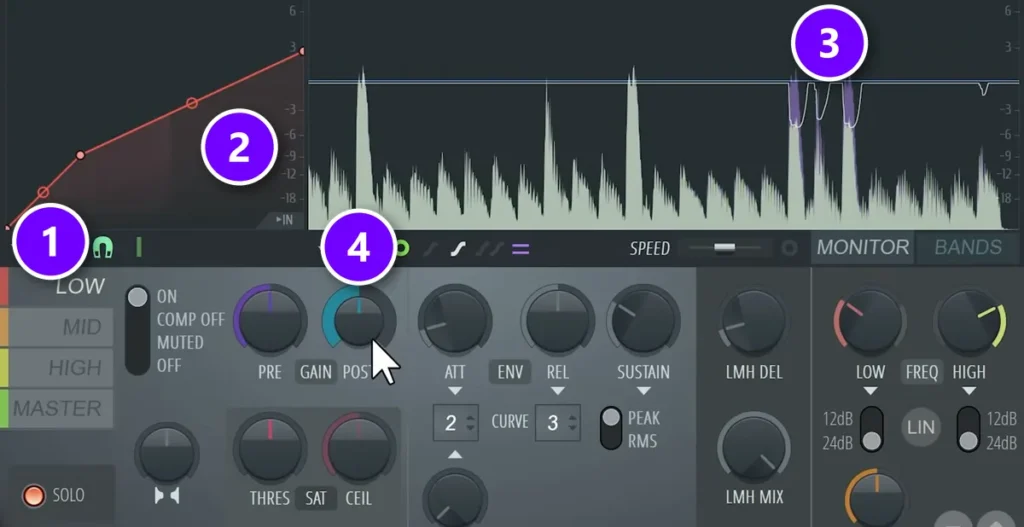
In house and tech house the kick and bass usually take turns: the kick lands on the beat and the bass fills the gaps. The first move in Maximus is on the low band: shrink the jump in level between the two, so the low end feels steady instead of lurching on every kick.
The secret is the threshold. Max sets it so only the tall kick peaks cross the line: “we don’t need to hit the bass but we want to hit the kick.”
- Open Maximus on the master and click LOW (1). Solo it, so you only hear the kick and the bass.
- Drag the point on the curve (2) until only the kick peaks touch the line. The purple marks (3) show the kicks getting caught while the bass passes under.
- The Maximus tutorial ends up with about 4 dB of reduction on the kicks, then turns POST (4) up 3 to 4 dB to win the level back.
Uneven lows are what make a mix sound amateur, so keep the low band the steadiest of the three. Not sure where your low band should end? Solo each band and listen to where it starts, as our multiband compression guide shows step by step.
Why do the kick and sub make the limiter distort on the drop?
Because they’re the biggest peaks in the song, so they hit the limiter first and hardest. Cut the rumble under 30 Hz, make the bass duck under the kick in the mix, and let Maximus’s low band catch only the kick peaks, so smaller peaks reach the soft clipper and the ceiling.
The mix side matters most. Mix Elite’s video on mixing mistakes every beginner makes keeps only the kick and one sub bass in the subs, cuts every other part at 100 Hz and always ducks the bass when the kick plays. The loud-master video also clips single tracks and whole groups in the mix, so their peaks never reach the master.
Will mastering kill your sidechain pump?
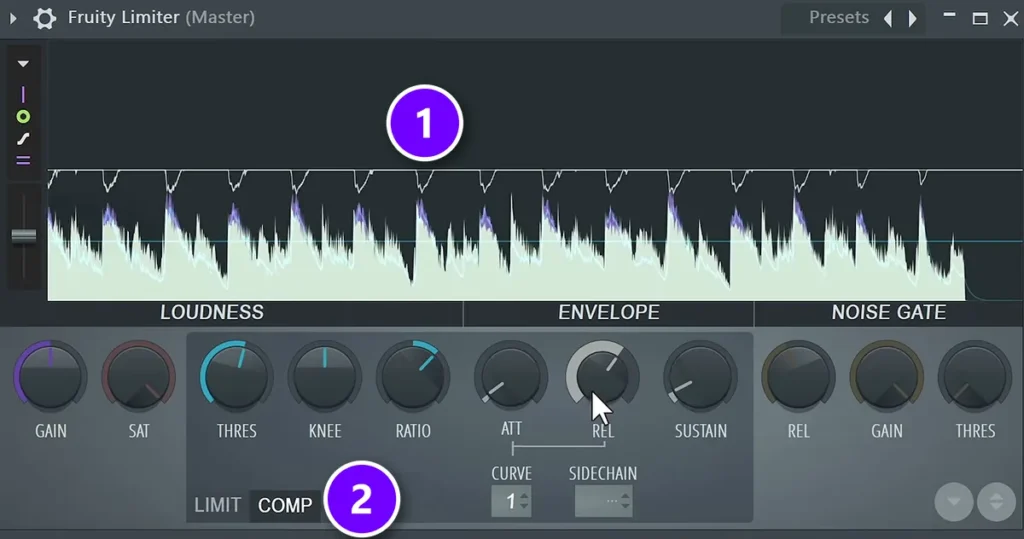
It can, if you put a plain compressor on the master. In EDM the kick hits every beat and is the loudest sound in the song, so a single-band compressor reacts to every kick and turns the whole track down with it.
Max shows exactly this in his tutorial: “we’re taking down the volume of whole track as soon as kick triggers the compressor.”
Each dip in the white line (1) is Fruity Limiter in COMP mode (2) pulling the whole song down for one kick. Your pads, hats and vocals now duck too, on top of the pump you already built in the mix, and the groove starts to wobble.
The fix is the multiband step above, because the kick then only pushes the low band and the rest of the track stays put. Still want one compressor on the master? Keep it gentle: a ratio of about 2, a fast attack of 0 to 2 ms when the track is too punchy, and around 2 dB of reduction. If the track feels too smooth instead, a slower attack of 40 to 60 ms lets the click of the kick through.
Don’t try to build the pump in mastering. A master compressor can’t tell your bass from your vocal, so everything ducks. If the bass doesn’t duck enough under the kick, or ducks too much, fix the sidechain in the mix with one of the three ways to sidechain in FL Studio.
How should you compress the mids and highs?
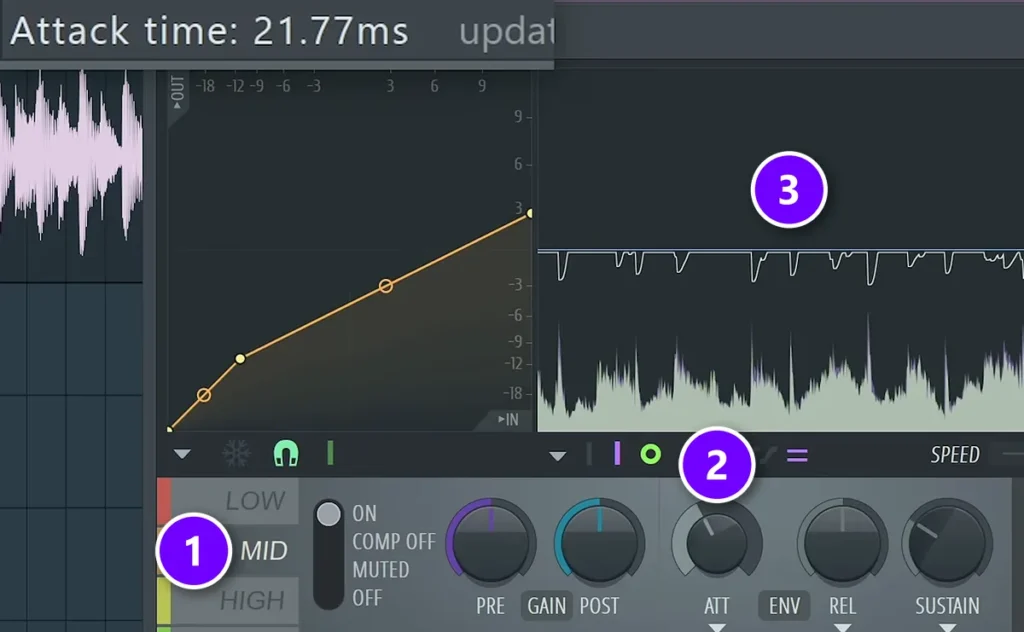
With a light touch. Compress each band only a little and stop at 3 to 4 dB of reduction, so you catch the peaks without changing the color and balance of the track.
On the MID band (1), slow the attack (2) to about 20 ms. That lets the first snap of the clap through before the band clamps down, so it still cuts through the mix. The dips (3) show the band working on each hit.
On the HIGH band, do just enough to tame sharp hats and claps, since harsh highs hurt the ears. Then turn POST up on each band to make up for what the compression took: about 2.5 dB on the lows and mids of the mastering tutorial’s house track, a little less on the highs. The peak level came out lower than before Maximus, while the low end got punchier and the mix sounded more polished.
How wide should an EDM master be?
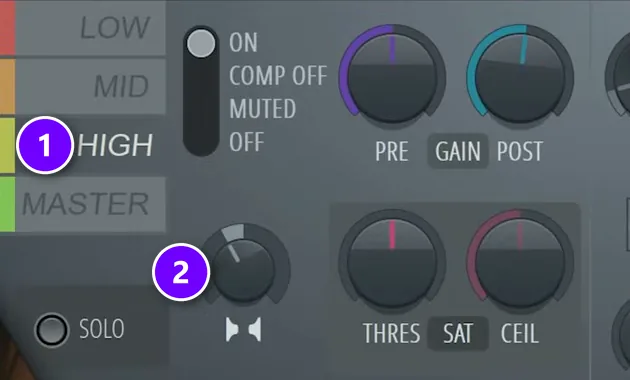
Wide on top, narrow at the bottom. Bass that’s wide in stereo can partly cancel itself out when left and right are added together, which is what a mono speaker does, and club subwoofers are often run in mono.
Maximus has a stereo separation knob for every band: turn it right to merge a band toward mono, or left to make it wider. Pick a band (1), then turn its stereo separation knob (2). On the mastering tutorial’s house track, the LOW band is merged by about 15 to 20%, the MID band opened by about the same amount and the HIGH band a little more. In the Maximus video, the highs sit at 21% separated. Push much further and the track starts to sound strange.
Two notes. If your mix already holds up in mono, you don’t really have to touch these knobs. And for even cleaner lows, cut the low end out of the side channel with a mid/side EQ in Patcher, which Max does on every song; the mastering guide shows that setup.
How do you widen synths without losing mono compatibility?
Widen only the mids and highs. Keep everything under about 120 Hz mono, leave Maximus’s LOW band merged 15 to 20% toward mono, and open the MID and HIGH bands by only about 15 to 20%. Then listen in mono: if the synths thin out or vanish, pull the width back.
To listen in mono in FL Studio, turn the stereo separation knob on the Master mixer track all the way right, which merges the song to mono, then set it back. Check the drop, where the widest synths play.
How do you get an EDM master loud without distortion?
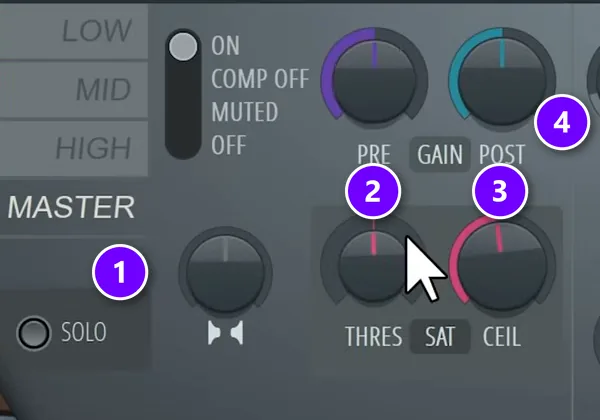
Clean the lows first, then let soft clipping do the work. Cut the rumble under 30 Hz, let Maximus’s low band catch the kick peaks so they stop driving the limiter, set a soft clip of about 1% and a -1 dB ceiling, and raise POST until you hear distortion. Then back off 1 to 2 dB.
A soft clipper rounds off the tallest peaks instead of chopping them flat, so the song gets louder without the crackle of hard clipping. The Maximus tutorial calls the saturation control exactly that, a soft clipper. Here’s the setup:
- Click MASTER (1) so you’re working on the whole song.
- Set THRES (2) to about 1% saturation. It has two modes, A and B, so try both and keep the one your track likes.
- Pull CEIL (3) down to -1 dB, the highest any peak may go. The tutorial sets it there every time.
- Play the loudest part of the drop and turn POST (4) up until you hear distortion. Then back it off by 1 to 2 dB.
Turn on LIN and the low cut
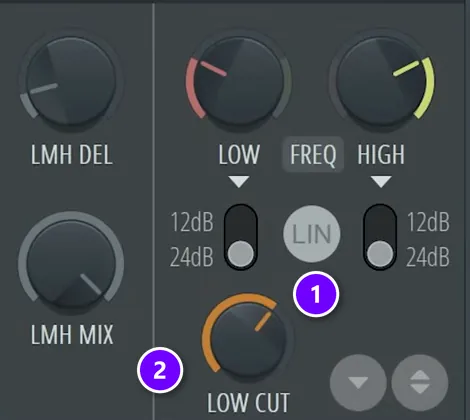
Two more switches finish the job. Turn on LIN (1), linear phase, which the tutorial uses so inter-sample peaks (peaks that form between the digital samples) can’t slip past the ceiling. LOW CUT (2) at about 30 Hz frees a little more headroom for loudness.
Done right, the result looks odd on the meter. In the Maximus demo the peaks came out lower while the song got louder. That’s what you want.
How do you use reference tracks for EDM mastering?
A reference track is a finished, released song in your style that you compare yours against. Pick one from the same lane: a tech house record for a tech house track, not a big-room festival anthem.
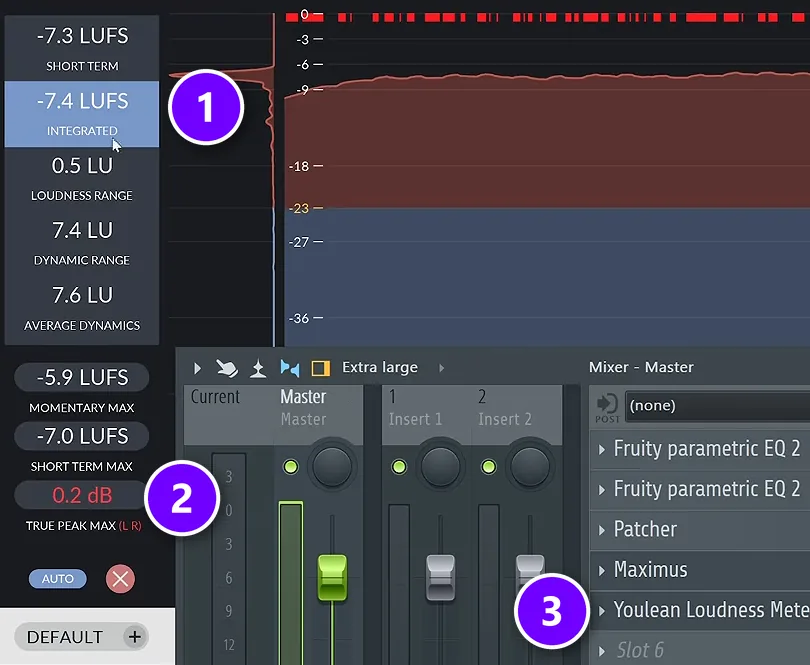
Then compare like with like. Louder almost always sounds better to our ears, so match the levels before you judge anything. Load Youlean Loudness Meter on the reference’s own mixer track and play its drop, then do the same on your master with the meter last in the chain.
INTEGRATED (1) is the number to match: raise or lower POST in Maximus until your song sits at the same level as the reference, as long as it stays clean. TRUE PEAK MAX (2) shows the highest true peak; here it reads 0.2 dB, above Spotify’s limit, so this master would need LIN switched on or a lower ceiling. Youlean sits last in the chain (3), after Maximus.
Match the balance with EQ Match
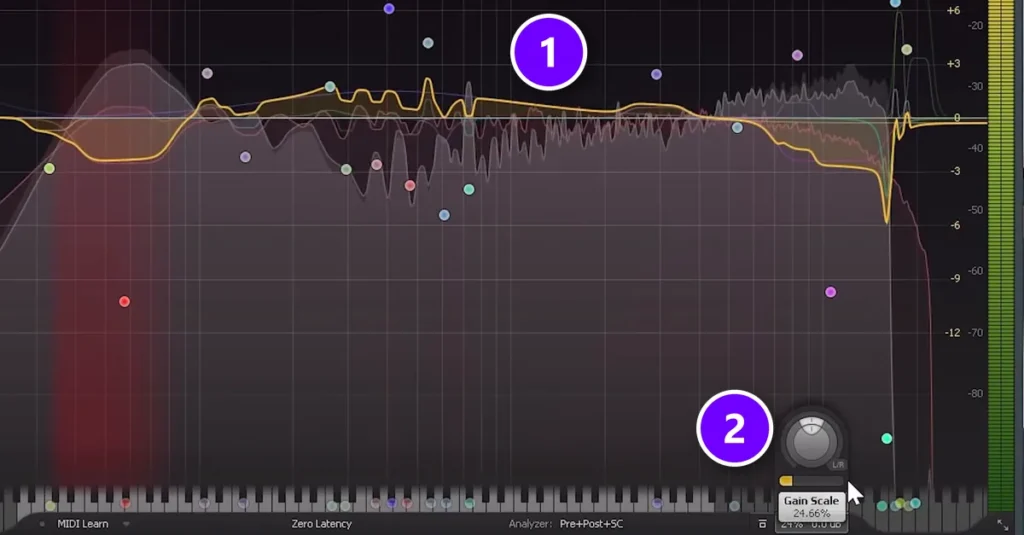
Loudness is half of the comparison. The other half is tonal balance: how much low end, mids and top your song has next to pro tracks. The shortcut is EQ Match in FabFilter Pro-Q or iZotope Ozone, which are paid plugins.
EQ Match draws a curve (1) that would move your song’s balance toward the reference. Delete the matched points at the very bottom and the extreme top, then turn Gain Scale (2) way down, because the change shows up fast and you get used to your own track. Even 10% makes a clear difference in Mix Elite’s Match EQ video, and a student’s track sounded best at about 50%.
In that video, the drop is matched to a reference built from modern electronic music, and the same tool works with any reference track you trust. Use it as a guide to what to boost or cut, though some people leave the match on the master too.
How do you make the drop hit harder when mastering?
Turn the build down and narrow it, then open everything up on the drop. Automate POST in Maximus about 2 dB lower over the bars before the drop, then jump back up on its first beat. Merge the master toward mono through the build, too, and snap back to full width on the drop.
This is the most EDM step of all, and most people skip it. Max calls the volume move extremely important.
Turn the build down, not the drop up
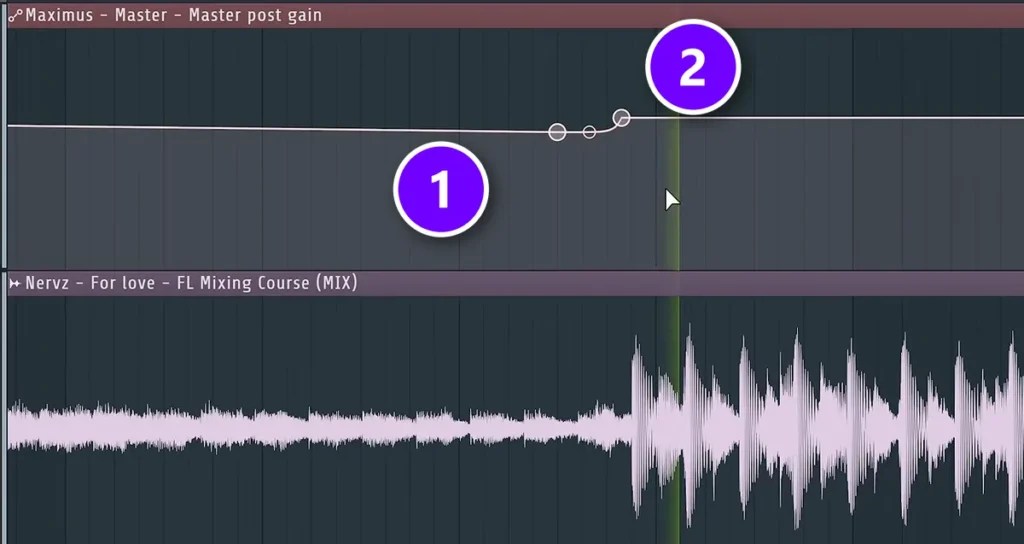
Right-click the POST knob in Maximus and choose Create automation clip. Over the bars before the drop, ease the level down by about 2 dB (1), then jump back up on the first beat of the drop (2). Before the second drop, the mastering tutorial dips 2 to 3 dB. The drop feels bigger because the part before it got quieter, not because the drop got louder.
Narrow the build, then open the drop
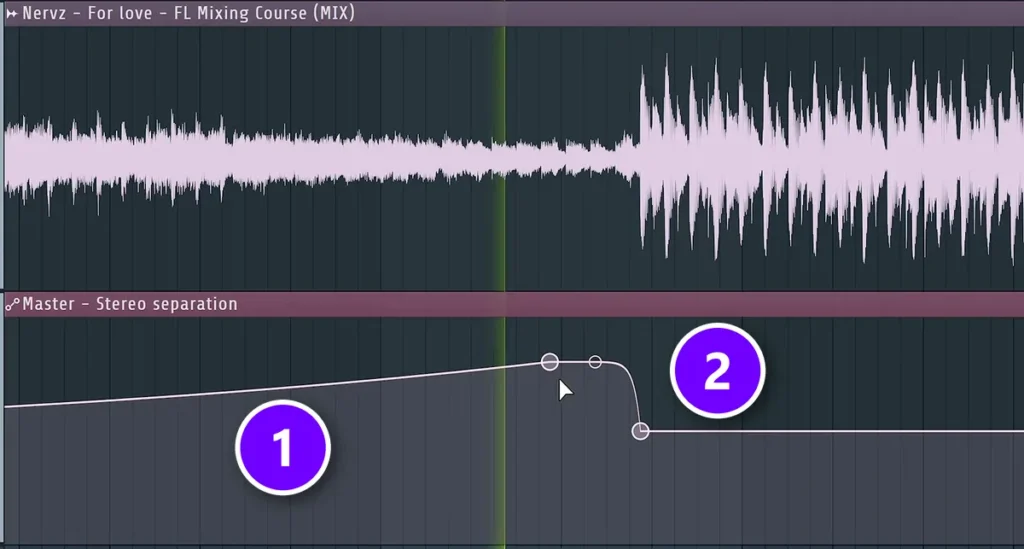
Do the same with width. Automate the stereo separation knob on the Master mixer track: merge the song slowly toward mono through the build (1), then snap back to full width on the drop (2). Max’s verdict after playing both versions: “the drop simply opens up way more than without this automation.”
How do you master tech house?
Same chain, different focus. Tech house lives on the groove between the kick and a rolling bassline, so the LOW band and the kick-over-bass threshold matter more than any other setting. Check that groove on headphones and on a small speaker before you touch the top end.
Pick a tech house record as your reference, because big-room EDM is built very differently, and keep the drop automation small, since tech house breakdowns are often short. If your track isn’t finished yet, start with our guide to producing house music. Mastering can only polish what the mix hands it.
Why does my EDM bass disappear on phone speakers?
Because phone speakers can’t play deep bass: below roughly 80 to 100 Hz they barely move any air, so a phone plays only the bass’s upper harmonics, around 100 to 250 Hz. A clean sub has almost none, and stereo bass can cancel itself out in mono. Keep the lows mono and give the bass some harmonics in the mix.
Tailout Studio’s guide to bass on small speakers explains the physics: phones, laptops, earbuds and Bluetooth speakers simply can’t reproduce very low notes, so boosting 60 Hz does nothing there. So fix it in the mix.
One way to do it, from this guide to mixing bass for smartphone speakers: copy the bass, cut everything below about 500 Hz on the copy, add saturation to it and blend it in quietly. The phone gets something it can play, and the club still gets the clean sub. Then check the master in mono on a small speaker before you call it done.
How do you master electronic tracks for streaming services?
Make one master and send it everywhere. Spotify turns songs louder than -14 LUFS down, so two loud EDM masters end up at the same playback level there, and what’s left to hear is how clean and punchy each one is. Keep the true peaks in check and let each service set its own volume.
Our streaming guide covers the rules of each platform, from Spotify’s true peak limits to the services that publish no target.
To export, press Ctrl + R in FL Studio and render a WAV at 24-bit plus an MP3 at 320 kbps, with dithering on. Leave a few milliseconds of silence before the first kick, and make sure the ending is the way you want it, for example with a short fade.
Your EDM mastering checklist
- Low cut at about 30 Hz, and every EQ move under 2 dB.
- The LOW band in Maximus catches the kick, not the bass.
- No single-band compressor pumping the whole track.
- Mids at about 20 ms attack so claps cut through, with 3 to 4 dB of reduction at most.
- Lows merged 15 to 20%, mids and highs a little wider.
- Soft clip at about 1%, ceiling at -1 dB, LIN on, POST up to distortion and then back 1 to 2 dB.
- Matched to a reference in your style, with the drop automation on POST and width.
Tonight, take one finished track and do only the first two steps: the low cut and the kick-over-bass threshold. That’s where EDM masters win or lose, and you’ll hear the difference on the first play.
DAY 6 OF THE 7-DAY MUSIC PRODUCER COURSE
Master your EDM track on Day 6
On Day 6, Mix Elite’s 7-Day Music Producer Course teaches mastering: a 3-step mastering chain that makes your song loud, clear and punchy everywhere, the inter-sample clipping mistake that ruins the sound without you knowing (plus an easy way to always avoid it), and the best export settings for streaming. You get a final mix to practice on and a mastering chain preset pack. The course is made for EDM, house, trap, hip-hop and pop, and it’s $27, with 60 days to decide if it was worth it.
Frequently asked questions
What LUFS should EDM be mastered to for DJ sets?
There’s no official club number. In Mix Elite’s loud-master video, Max aims for at least -8 to -6 LUFS integrated on electronic tracks. For DJ sets, match the integrated LUFS of pro records in your style with a meter like Youlean, so the DJ doesn’t have to change the gain. Spotify plays songs at -14 LUFS by default and turns louder ones down.
Why does my bass disappear on phone speakers?
Phone speakers can’t play deep bass, so on a phone you only hear the bass’s upper harmonics, roughly 100 to 250 Hz. A clean sub has almost none, and stereo bass can cancel itself out in mono. Keep everything under about 120 Hz mono, and in the mix blend in a saturated copy of the bass with its lows cut, so a small speaker has something to play.
What is the best mastering chain order for house music?
Clean up, control, then get loud: Parametric EQ 2 for a 30 Hz low cut, a mid/side EQ, Maximus for the low, mid and high bands and their width, then soft clipping and a -1 dB ceiling on the Maximus MASTER band, with a loudness meter last. Add the volume and width automation before each drop at the end.
Why do my kick and sub make the limiter distort on the drop?
They’re the biggest peaks in the song, so they hit the limiter first. Cut the rumble under 30 Hz, make sure the bass ducks under the kick in the mix, and set Maximus’s low band so it catches only the kick peaks. Then push the master until you hear distortion and back off 1 to 2 dB.
How do I widen synths without losing mono compatibility?
Widen only the mids and highs. Keep everything under about 120 Hz mono, leave the LOW band in Maximus merged 15 to 20% toward mono, and open the MID and HIGH bands by only about 15 to 20%. Then check the master in mono: if the synths thin out or vanish, pull the width back.