



“I would take different records… and just completely re-edit them to make them work better for my dancefloor.”
To make house music, set your tempo between 120 and 128 BPM and put a kick on every beat, a clap on beats 2 and 4 and an open hi-hat on every off-beat. Add a short off-beat bassline and a few minor 7th chords, arrange it in 8-bar blocks, then sidechain the bass to the kick so the whole track pumps.
You can feel a great house record in your chest long before you can explain why it works. The pulse is steady, the groove leans forward, and people start moving without thinking about it. Then you open FL Studio, build your own loop, and it comes out stiff and flat, more like a phone alarm than a dance floor.
Good news: house is made from a short list of parts, and each part has a simple rule. This guide takes one track from an empty project to a finished mix. It’s built on Mix Elite’s free 4.5-hour FL Studio course, taught by Max, the founder of Mix Elite, and the channel’s house shorts, with real screenshots at every step.
Table of Contents
What makes a track sound like house music?
House music was born in Chicago in the early 1980s. DJs like Frankie Knuckles played disco, soul and early electronic records at a club called the Warehouse, and the music took its name from the club. More than forty years later the core hasn’t changed: a steady beat, a groove you can dance to, and a track that builds slowly.
Every house track is made from the same few parts. Get these right and the style takes care of itself.
- A four-on-the-floor kick. One kick drum on every beat, so the pulse never stops.
- Claps or snares on beats 2 and 4. They answer the kick and give the beat its bounce.
- Hi-hats on the off-beats. The off-beat is the “and” between two kicks, and a hat there makes the groove lean forward.
- A bassline that dances around the kick. Short notes, often between the kicks, so kick and bass take turns.
- Chords with a little color. Pianos, organs, pads or short synth stabs, usually 7th or 9th chords.
- A hook. A vocal line, a vocal chop or a short synth riff that people remember.
What instruments are used in house music?
Mostly electronic ones. The beat usually comes from a drum machine, often a Roland TR-808 or TR-909, and the bassline from a synthesizer. Chords come from pianos, organs, pads or synth stabs, and many tracks are built on samples of disco, soul and funk records. The squelchy Roland TB-303 bass synth gave acid house its sound.
You don’t need any hardware for this. Everything below is made inside FL Studio with samples and its own stock plugins. If you’ve never opened it, our beginner guide to FL Studio shows you around first, and the free trial is enough to follow every step.
What BPM is house music?
Most house music runs between 120 and 128 BPM. BPM means beats per minute, the speed of the song. That’s slower than most people guess, and it’s why house feels relaxed even when it’s loud. Each style has its own sweet spot.
- Deep house: about 120 to 124 BPM, with warm chords and soft drums.
- Classic and soulful house: about 120 to 125 BPM.
- Tech house: about 124 to 128 BPM, punchy and stripped back (how to make tech house).
- Progressive and bass house: usually 124 to 128 BPM.
The house project in Mix Elite’s free FL Studio course runs at 126 BPM. If you’re not sure where to start, set 124 and adjust it once the drums are playing.
How to make house music in FL Studio, step by step
To make house music in FL Studio, set the tempo, program four-on-the-floor drums, add swing, write an off-beat bassline, add 7th chords and a vocal hook, arrange the loop in 8-bar blocks, sidechain the bass to the kick and mix it. Each step below has the exact clicks and a screenshot from the course project.
- Set the tempo and start a pattern
- Program four-on-the-floor drums
- Add swing and layers
- Write a bassline
- Add house chords and stabs
- Add a vocal hook
- Arrange the loop into a full track
- Sidechain the bass to the kick
- Mix it
Step 1: Set the tempo and start a pattern

Open a new project in FL Studio (the free trial is fine). The two controls you need first sit in the top toolbar.
- The PAT/SONG switch (1). PAT plays only the pattern you’re building. SONG plays the whole Playlist. Keep it on PAT while you make loops.
- The tempo box (2). Click it and drag up or down until it reads 124, or whatever tempo your style needs.
Then pick an empty pattern for your drums from the pattern list in the same toolbar. Patterns are FL Studio’s loops: you build each one in the Channel Rack, then paint it into the Playlist later.
Step 2: Program four-on-the-floor house drums
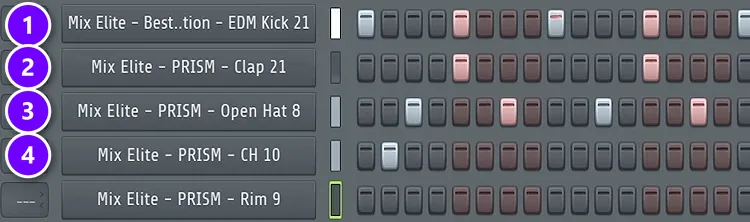
Open the Channel Rack with F6 and load four sounds: a kick, a clap, an open hi-hat and a closed hi-hat. Start with FL Studio’s stock drums from Packs, then Drums, in the Browser, and swap in better samples once the pattern works.
The Channel Rack shows one bar as 16 steps, and every group of 4 steps is one beat. Fill it in like this.
- Click the kick on steps 1, 5, 9 and 13, one hit on every beat (1 in the screenshot). That’s the four-on-the-floor.
- Put the clap on steps 5 and 13, which are beats 2 and 4 (2).
- Put the open hat on steps 3, 7, 11 and 15, the off-beats between the kicks (3).
- Add a closed hat or two in the gaps (4). Use a shorter hat here, the way a drummer’s hi-hat is either open or closed.
- Stretch the pattern to two bars by adding one more kick on step 17. A drum pattern, especially the kick, should always be at least two bars long.
The last touch is what makes it sound like house instead of a metronome. Add one percussion sound, like a rim or a shaker, on an off-beat near the end of the bar. Make it hit just before the next beat and you get that popular disco effect.
Max builds this exact pattern in the house drums chapter of his free FL Studio course, which starts at 1:17:54. The whole 4.5-hour course is below.
Step 3: Add swing and layers so the drums groove
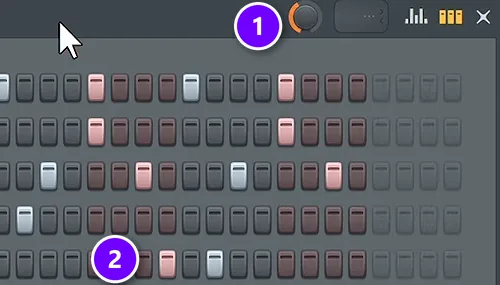
Right now every hit sits exactly on the grid, and that sounds stiff. “House drums love swing,” Max says. Swing delays the notes that fall between the beats and the off-beats by a few milliseconds, and the groove starts to shuffle.
- Turn up the swing knob at the top right of the Channel Rack (1 in the screenshot). The free course lands on about 40%.
- Keep your percussion on its off-beats near the end of the bar (2).
- Layer a second clap or snare on top of the first one for more punch, and a brighter open hat on top of yours.
- Pan each pair of layers a little to the left and right with the channel’s pan knob, so the two sounds don’t sit in the same spot in your headphones.
Layer anything you like except the kick. “You never layer kicks,” Max warns. Two kicks smear each other’s low end, while two claps or two hats just sound bigger.
Want instant groove ideas? Open the drum pattern in the Piano roll, press Alt + Q to open the Quantizer and look through its preset list. Each preset is a ready-made groove, and comparing them shows you how small changes in timing and velocity bring stiff drums to life.
The 90s house hi-hat trick
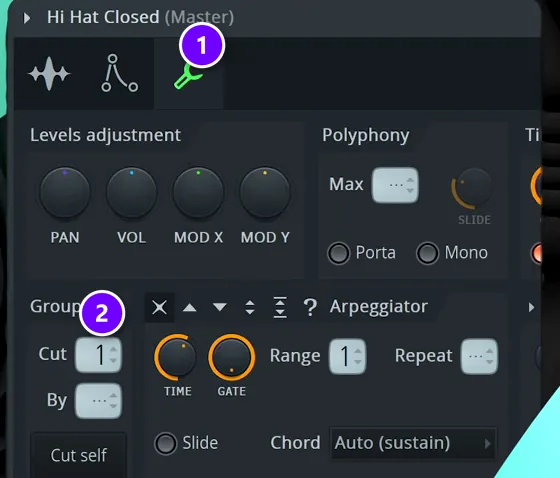
Real hi-hats can’t ring open while they’re closed, and old drum machines copied that. Here’s how one of Mix Elite’s shorts gets that classic 90s house hat in FL Studio.
- Click the closed hat’s channel to open its settings and go to the wrench tab, Miscellaneous functions (1).
- Under Group, set Cut to 1 (2).
- Open the open hat’s settings, go to the same tab and set By to 1.
Now every closed hat cuts the open hat short, so the two hats talk to each other instead of piling up.
Which drum sounds do you need for a classic house groove?
Four core sounds: a kick on every beat, a clap on beats 2 and 4, an open hi-hat on the off-beats and a closed hat in the gaps. What keeps them from sounding boring is the feel on top: about 40% swing, a shaker or rim near the end of the bar, layered claps and hats, and hats that aren’t all equally loud.
For that last part, turn every other hat down a little: in the Piano roll, select them, hold Alt and scroll down. It doesn’t have to be perfect, and a slightly uneven pattern sounds more human than a grid of identical hits. A shaker loop running under the whole beat is another common way to add depth, and the house project in the free course uses one.
Step 4: Write a house bassline
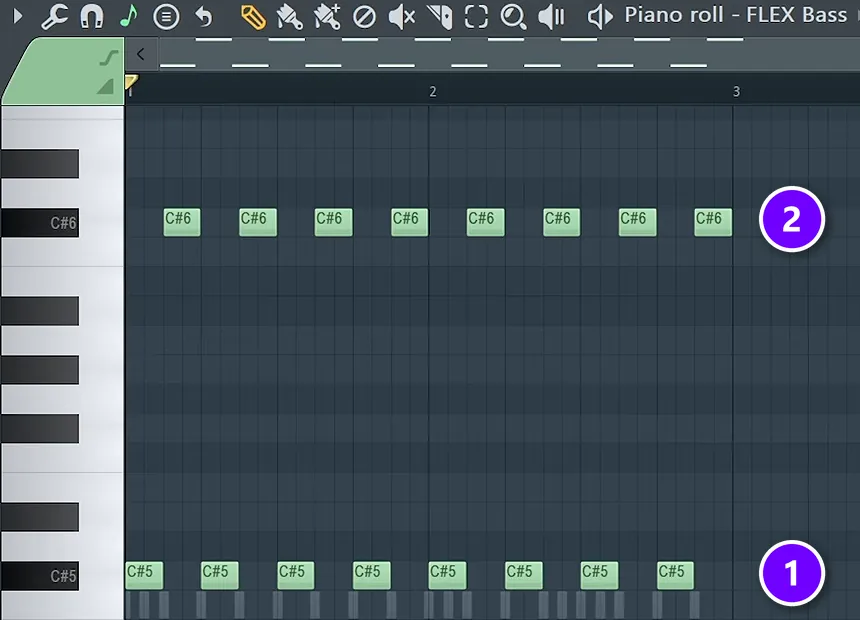
House basslines are simple, short and full of space for the kick. Basses love the off-beat too, especially over house drums.
Want a darker, moving bass? See how to make a reese bass.
The quick version in the free course plays one note on every beat (1 in the screenshot) and the same note an octave higher on every off-beat (2). Draw one bar in the Piano roll, select it and press Ctrl + B to copy it into the next bar. You can watch it at 1:23:48.
That bounce between a low and a high note is an old disco trick that house still uses. Once it works, try these changes.
- Drop the notes on the beat and keep only the off-beat ones, so the bass and the kick never hit at the same time.
- Stay on one note for a whole bar, then move to the root note of the next chord.
- Make the notes shorter for a plucky, bouncy line, or longer for a rolling one.
- Turn some notes down: select them and hold Alt while you scroll, so the line breathes.
For the sound itself, any short, round synth bass works. To build a plucky house bass in FL Studio’s free 3x Osc synth, follow the settings in our tech house guide. If you’d rather design your own from scratch, start with the fundamentals of sound design.
Step 5: Add house chords and stabs
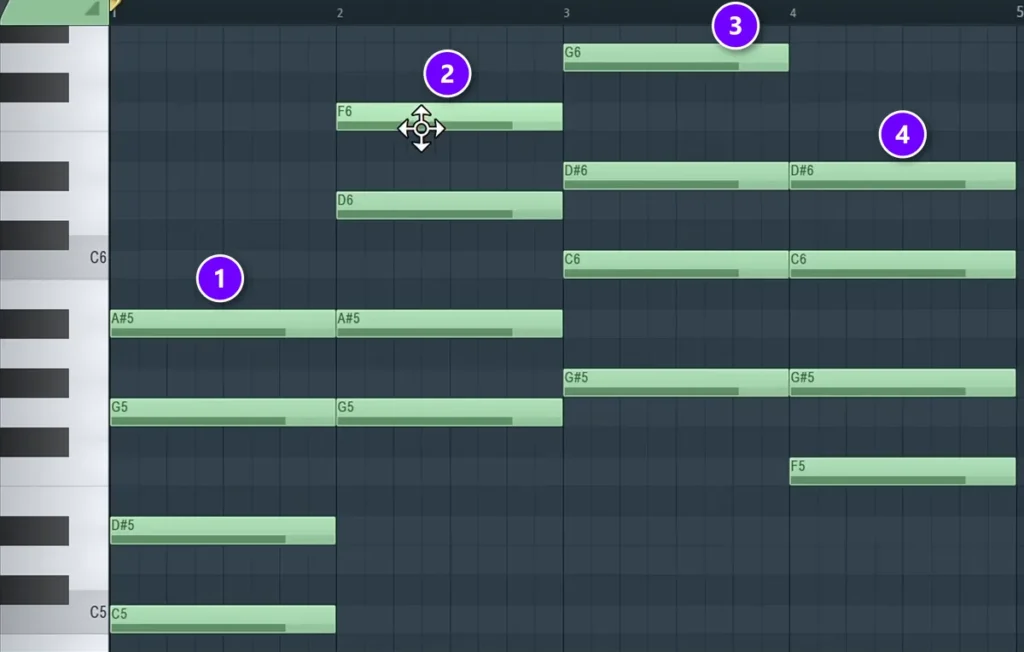
House chords are usually 7th or 9th chords: a normal three-note chord with one or two extra notes stacked on top. Those extra notes give house its warm, slightly jazzy color.
The free course builds them in the Piano roll, starting at 34:07. Place the root notes first, stack every other note of the scale on top, then add one more note for the 7th. That fourth note is where it starts to sound jazzy.
The screenshot shows four 7th chords in C minor: C minor 7, G minor 7, A-flat major 7 and F minor 7. The top note of each chord (1 to 4) is the added 7th. Loop these four chords and you already have a house progression.
Mix Elite’s house shorts show two fast ways to turn chords into stabs, the short chord hits that bounce on top of the beat.
- The Stamp tool. In the Piano roll, open the Stamp tool, choose a minor 9th chord and click to place it. Hold Ctrl and drag to select your chords, press Ctrl + B to repeat them, and change the root notes to make a simple progression. Then press Alt + U to open the Chopper tool, which cuts long chords into short, rhythmic stabs.
- A chord sample. Render the chord pattern as an audio clip, drag the clip into an empty Sampler channel, and in its envelope settings leave only Hold on. Turn up Attack for a soft fade-in, and you can now play the whole chord from one key.
For pianos, organs and electric pianos, our guide on mixing piano in EDM shows how to make them sit in a busy track. FL Studio’s stock synths are plenty to start with. When you want more sounds, see the best synthesizer VST plugins, and if you love real knobs, our picks of hardware synths for beginners. New to chords? Our music theory guide for producers explains scales and progressions in plain English.
Step 6: Add a vocal hook
Most house tracks have a vocal hook, even if it’s just one line that keeps coming back. A short vocal pitched up a little gives you that classic deep house sound, and a vocal cut into small pieces and played like an instrument is called a vocal chop.
Our tech house guide walks through two ways to chop a vocal in FL Studio, with screenshots. Use vocals you have the rights to, such as royalty-free vocal packs or a singer you work with.
Step 7: Arrange the loop into a full house track
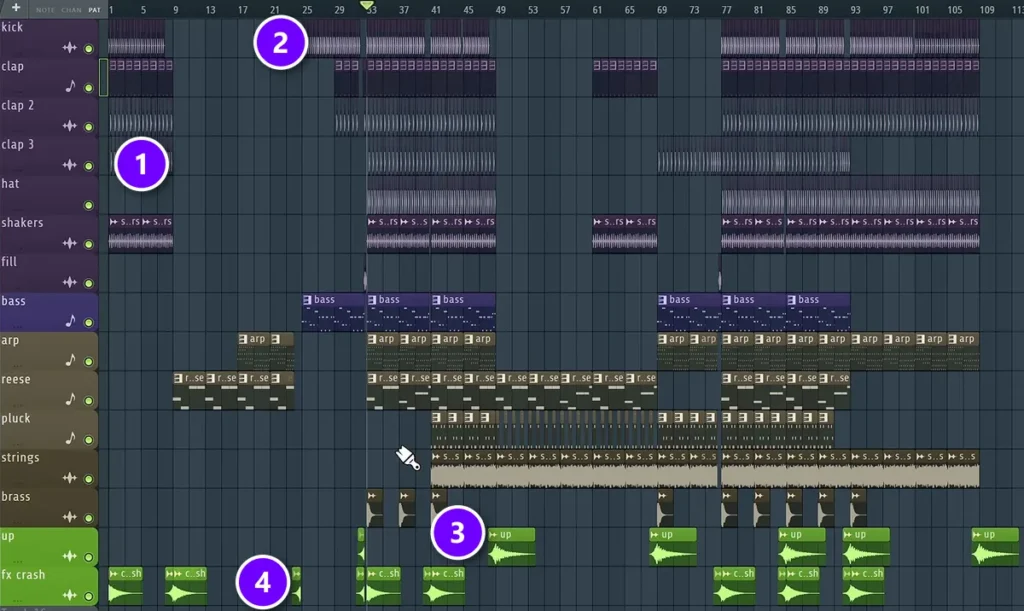
A house track is one loop that grows and shrinks over five or six minutes. The rule is to never throw everything in at once. Arrange it as if you were taking the listener by the hand through your song.
The screenshot shows the house project mixed on Day 4 of the free course, a simple slap house track at 126 BPM. You can read the whole idea at a glance.
- A short intro of kick, claps and shakers (1).
- The drums drop out, and the kick and bass come back together at bar 25 (2).
- Risers, the green “up” clips, lead into new sections (3).
- Crashes mark the first beat of a new section (4).
Two rules make arranging much easier. Change something every 8 bars, even if it’s only a hat, so the loop never feels stuck. And if you want DJs to play your track, keep the intro and the outro simple and long: 16 to 32 bars of drums gives them room to mix it in and out.
Tease what’s coming next with the drums. Bring in a hat or a rim a few bars before the drop, then let the kick land.
How do you structure a house track from intro to drop?
Build it in blocks of 8, 16 and 32 bars: a drum intro of 16 to 32 bars, a build-up of 8 to 16, a drop of 16 to 32, a breakdown of 16 to 32, then a second build-up and drop, and an outro as long as the intro. At 128 BPM, 32 bars last about a minute.
For a bigger, more melodic drop, see how to make a future bass drop.
- DJ version, about 6 minutes at 128 BPM: intro 32, build-up 16, drop 32, breakdown 32, build-up 16, drop 32, outro 32 bars.
- Short version, about 3 minutes: intro 16, build-up 8, drop 16, breakdown 16, build-up 8, drop 16, outro 16 bars.
In the build-up, a snare roll that speeds up, a riser and a filter that slowly opens add tension, and cutting the kick for the last bar makes the drop hit harder. House often grows with small changes every 8 bars instead of one giant drop, so the drop can simply be the moment the kick and bass come back together, like bar 25 in the screenshot above.
For what goes into each section, see our EDM song structure map. To copy the layout of a track you love, use the reference-track method in how to turn a loop into a full song. When it’s time to wrap it up, how to finish a song gets it over the line. The course’s arrangement chapter starts at 1:25:43.
Step 8: Sidechain the bass to the kick
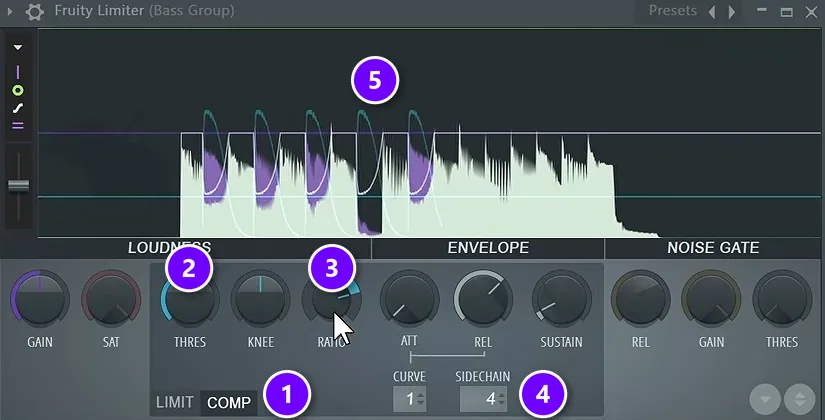
Sidechain compression is the pumping sound you hear in almost every house track. It turns the bass, and often the chords, down for a split second every time the kick hits. The kick punches through, and the music breathes in time with it. The free course shows it on the bass first, so the bass ducks down whenever the kick plays.
Here’s the setup in FL Studio’s Mixer, from Day 4 of the free course (2:42:20).
- Select the kick’s mixer track. Then right-click the small routing arrow at the bottom of the bass track and choose Sidechain to this track. The kick now sends a signal to the bass without playing twice.
- On the bass track, add Fruity Limiter, raise its ceiling so it doesn’t limit anything, and switch it to COMP mode (1 in the screenshot).
- Right-click SIDECHAIN (4) and pick the kick.
- Pull the threshold down (2) and set the ratio to about 4:1 (3).
- Watch the waveform dip each time the kick hits (5). Aim for 7 to 10 dB of dip.
Then go one step further. The course routes the arps, strings, Reese bass and pluck into one shared sidechain group, so everything except the short impact sounds ducks to the kick. For more ways to set it up, see the top 3 ways to sidechain in FL Studio.
Watch the depth. If the bass vanishes completely on every kick, the track starts to sound like it’s gasping. Stay inside the 7 to 10 dB range, and only go deeper if the kick still gets lost.
Why do my kick and bass sound muddy together?
Because they fight for the same low frequencies at the same moment. Give the deep sub to one sound, put the bass notes between the kicks, sidechain the bass so it dips 7 to 10 dB on every kick, and cut the lows from everything else.
- One kick, never two. Layered kicks smear each other’s low end (Step 3).
- Bass on the off-beats. When the bass plays between the kicks, the two take turns instead of stacking up (Step 4).
- Mono lows. Keep everything under about 120 Hz in the middle, one of the mix habits in our FL Studio mastering guide.
- Better samples. If you need big EQ moves to make them fit, try a different kick or bass sample first. Good sounds make the biggest difference.
Step 9: Mix your house track
Mix with the Holy Quad, Mix Elite’s mixing formula: volume, EQ, dynamics and space, in that order. On a house track that comes down to five moves.
- Volume first. The most important parts are always your drums and your main sound, so the kick and bass stay loudest and everything else sits around them.
- One sound owns the sub. Only the kick and one bass layer get deep low end. Cut the lows from everything else with Fruity Parametric EQ 2, and see how to use EQ in mixing for the details.
- Glue the drums. Send all the drums to one drum group and compress it gently. About 2:1 with 3 to 4 dB of reduction is enough. Our guide to mixing drums goes deeper.
- Space for the clap. Put a reverb on the clap with its low cut around 700 Hz and a decay of about one second, then pan the clap layers and the hats slightly apart.
- An empty master. FL Studio puts a limiter on the master by default, and it can hide a kick that’s far too loud. Keep the master completely empty until mastering.
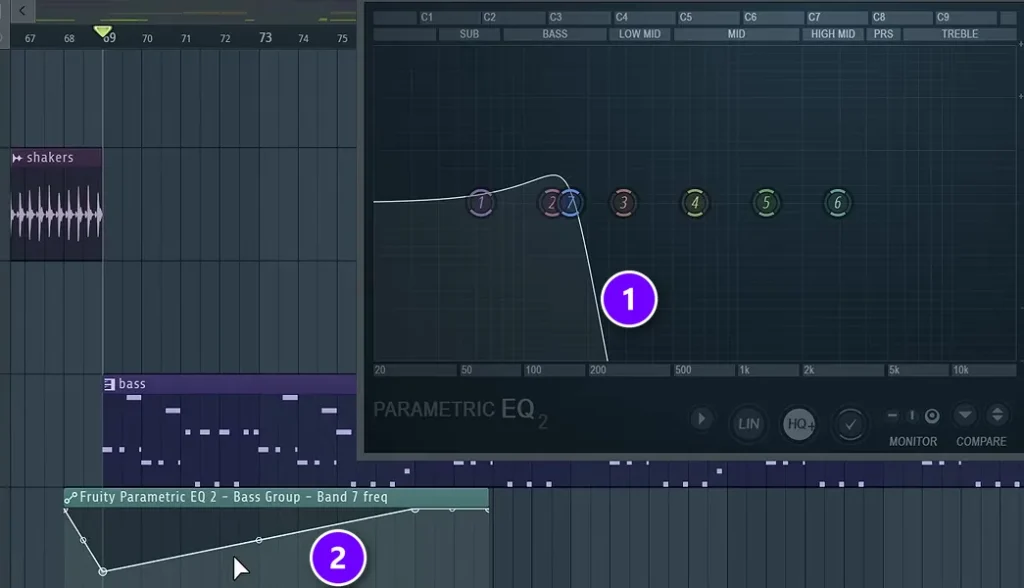
The classic house build is a filter sweep, made with the same EQ on the bass group.
- Turn the EQ’s top band into a steep low-pass filter, so only the lows get through (1 in the screenshot).
- Right-click the band’s frequency knob and choose Create automation clip.
- Draw the clip so the filter opens from about 20% to fully open just before the drop (2).
For the full process, read our step-by-step guide on how to mix a song, then finish with mastering in FL Studio. If the kick and bass still fight, how to mix a kick and 808 shows the fixes that work for any bass.
Which kind of house music should you make?
House has dozens of styles, but they all share the same bones. Pick the one you love listening to, then use a track from it as your reference.
- Deep house: slower, with warm chords, soft drums and soulful vocals.
- Tech house: punchy, stripped-back drums and a bouncy bass, with few chords. Our guide on how to make a tech house track covers its groove, bass and song structure.
- Progressive and melodic house: long builds and big, emotional chords and leads.
- Bass house: heavy, growling bass sounds where other styles would use pianos and pads.
- Slap house: a hard kick and a bouncy, slapping bass under a pop-style vocal. The project in Mix Elite’s free FL Studio course is this style.
House also sits close to other electronic styles worth borrowing from. Synthwave and retrowave share house’s love of old drum machines and synths, with an 80s sound, and ambient music is a great way to learn the long, soft pads that fill a house breakdown.
Common house music mistakes (and the fix)
Most beginner house tracks trip over the same six things.
- Too fast. At 130 BPM and up, it starts to feel like trance or techno. Stay between 120 and 128.
- No swing. A dead-straight grid sounds robotic. Turn the Channel Rack swing to about 40% and listen again.
- Layered kicks. Two kicks fight in the low end. Layer claps and hats instead.
- Kick and bass on top of each other. Move the bass to the off-beats and sidechain it to the kick.
- A loop that never changes. Add or remove one sound every 8 bars.
- Too many sounds. “It’s much better to have a few great sounds than lots of okay ones,” Max says.
Your next step is small. Build one 16-bar loop tonight with drums, a bass and four chords, and make it groove. Tomorrow, arrange it. A rough house track that’s finished teaches you more than a perfect loop that never leaves the pattern.
THE 7-DAY MUSIC PRODUCER COURSE
Day 3: drums and a full arrangement
Day 3 of the 7-Day course is drums and arranging: how to build drum patterns fast, how to pick sounds that hit, and one simple tactic for turning a loop into a full song. It’s made for EDM, house, trap, hip-hop and pop, and it’s taught in FL Studio (the free trial works). You need about 45 minutes a day, and on day 7 a pro gives you personal feedback on your finished track. It’s $27, with 60 days to decide if it was worth it.
Frequently asked questions
What BPM is house music?
Most house music runs between 120 and 128 BPM. Deep house usually sits at the slower end, around 120 to 124, while tech house and most club house sit around 124 to 128. The house project in Mix Elite’s free FL Studio course runs at 126 BPM. If you’re not sure, start at 124 and adjust once the drums are playing.
What instruments are used in house music?
Drums, a bassline, chords and usually a vocal. Classic house used drum machines like the Roland TR-808 and TR-909, synth basslines (the Roland TB-303 defined acid house), and pianos, organs, pads or synth stabs for the chords. Today most producers make every part inside a DAW like FL Studio with samples and software synths, so you don’t need any hardware to start.
Is house music easy to make for beginners?
Yes. House is one of the friendliest styles to start with, because the basic drum pattern is simple and repeats: a kick on every beat, claps on 2 and 4 and hats on the off-beats. The skill is in the groove and the arrangement: swing, a small change every 8 bars, a kick and bass that take turns, and a mix where the drums lead.
Can you make house music in FL Studio?
Yes. FL Studio’s Channel Rack is made for four-on-the-floor patterns and has a swing knob built in, and its stock plugins cover sidechain compression (Fruity Limiter) and filter sweeps (Fruity Parametric EQ 2). Every step in this guide uses FL Studio, and the free trial is enough to follow along.
How do you structure a house track?
In blocks of 8, 16 and 32 bars: a drum intro of 16 to 32 bars, a build-up, a drop where the kick and bass hit together, a breakdown, a second build-up and drop, and an outro as long as the intro. A DJ version runs about 6 minutes at 128 BPM, and a short version about 3. Change something every 8 bars so the loop never feels stuck.





