“We get it after it has been recorded and mixed, and then we try to optimize it, give it some consistency and make it sound good on any system you play it on.”
Audio mastering is the final step before a song is released. You take the finished mix as one stereo file and polish its tone, punch and loudness so it sounds clear, balanced and loud enough everywhere, from earbuds to car speakers to a club. It can’t fix a bad mix, but it makes a good one sound finished.
What is mastering, and why does your finished song still sound smaller than the ones on Spotify? You export the mix, play it next to a track you love, and yours comes out quieter and a little dull. That gap is what mastering is for. It’s also where a lot of beginners waste money on plugins they don’t need.
This guide explains it in plain English: what mastering does, how it differs from mixing, why your mix sounds quieter than pro songs, how loud to go for streaming, and whether to pay someone. You’ll also see how to master at home with stock plugins, with screenshots from Mix Elite’s free FL Studio course.
Table of Contents
What is mastering in music?
Mastering is the last step of making a song. The finished mix, exported as one stereo file, gets small EQ, compression and loudness changes so it sounds polished, balanced and consistent on every speaker before release.
In Mix Elite’s free 4.5-hour FL Studio course, Max, the founder of Mix Elite, compares it to “giving a car its final polish before it hits the showroom,” and the picture fits. The car is already built. Mastering just makes it shine.
You’ll see it called audio mastering, music mastering or song mastering. They all mean the same thing. The name comes from the days of tape and vinyl, when the mastering engineer made the master that every copy of a record was made from. Today the master is usually a WAV file that goes to Spotify, Apple Music, YouTube and every other store.
A mastering engineer is the person who does this as a job. On big releases, it’s almost always a specialist with a room and speakers built for careful listening. At home, it’s usually you.
What does mastering do to a song?

Mastering makes small, careful changes to the whole song. It balances the tone, evens out the dynamics and raises the loudness while keeping the peaks safe, so the song holds up on every system. These are its six main jobs:
- Balances the tone. Small EQ moves so the lows, mids and highs sit right together, with nothing harsh and nothing missing.
- Evens out the dynamics. Gentle compression brings the loudest and quietest moments a little closer, so the song feels tighter.
- Raises the loudness. The song gets as loud as it can go before it starts to distort or lose its punch.
- Keeps the peaks safe. The loudest peaks stay just under the digital ceiling, so the song doesn’t clip when it becomes an MP3 or a streaming file.
- Checks it everywhere. Earbuds, laptop speakers, a car and a club system. A master has to hold up on all of them.
- Makes an album sound like one record. On an EP or album, the songs get matched in level and tone, and the gaps and fades between them are set.
What mastering doesn’t do is fix a mix. Max is blunt about it: mastering “isn’t about fixing issues, okay, it’s about putting the cherry on top.” If the vocal is buried or the bass is muddy, go back to the mix.
Mixing vs mastering: what’s the difference?
Mixing balances the separate tracks of a song, like the drums, bass and vocals, and blends them into one stereo file. Mastering comes after and polishes that one file as a whole, so it can change the whole song’s tone and loudness, but not one instrument inside it.
That’s also why they take such different amounts of time. In the mix you set each track’s level, clean it up with EQ, control it with compression and add space with reverb and delay, and an average mix takes about 5 to 10 hours. Mastering is only the final 5% of preparing a track for release, because most of a song’s sound is decided in the mix.
So when something bothers you in a master, ask where it comes from. A harsh hi-hat or a quiet vocal is a mix problem. A whole song that sounds dull, quiet or thin next to other songs is a mastering job. If the mix needs work first, start with our guide on how to mix a song.
What is stem mastering?
Stem mastering sits between the two. Instead of one stereo file, you send the engineer a few grouped files, called stems, such as drums, bass, music and vocals. That lets them treat each group on its own. Some mastering engineers ask for stems for exactly this reason, but at that point it’s basically mixing, not a pure master.
Why can’t you just make your mix louder?
Because turning the whole mix up hits the digital ceiling, 0 dBFS, and the peaks clip into distortion. Mastering makes a song feel louder without crossing that ceiling, using compression and soft clipping, and it adds the final tone polish that a plain volume boost can’t.
Louder only helps a mix that’s already good. If the mix has problems, a louder master just makes them louder, so don’t hope that making a track louder will make it magically better, as Mix Elite’s free FL Studio course warns. Streaming apps like Spotify also turn very loud songs down by default.
What’s in a mastering chain?
A mastering chain is the short row of plugins a song runs through, in order: usually an EQ, a compressor, a loudness tool such as a clipper, limiter or maximizer, and a loudness meter. The chain in Mix Elite’s free FL Studio course is just two Parametric EQ 2s and Maximus, all stock plugins, plus a free meter.
Some songs need even less: some masters need nothing more than a simple volume boost, so never add a plugin just because it’s there.
- EQ (equalizer). Turns ranges of frequencies up or down. On the master, it cuts the rumble below about 30 Hz and the harshest highs, then makes small tone moves.
- Compression. Turns the loudest moments down a little so everything feels more even. Multiband compression does this separately for the lows, mids and highs.
- A clipper, limiter or maximizer. The loudness tool. It raises the volume and stops the peaks at a ceiling just under 0 dB. Mix Elite’s free course prefers a soft clipper or a maximizer, because a plain limiter can pump like an automatic volume knob.
- A loudness meter. Measures how loud the song feels, in LUFS, plus its true peak. The free Youlean Loudness Meter does the job.
- Optional extras. Stereo wideners, saturation and mid/side EQ. The free course leaves them out of its beginner chain on purpose.
If clipping and limiting still sound like the same thing, this guide on compression vs clipping vs limiting explains the difference.
How loud should a master be?
There’s no single right number. Spotify plays songs at -14 LUFS by default and turns louder masters down, so what matters is that your master still sounds good after that. For electronic music, Max aims much louder: about -8 to -7 LUFS on the EDM track in Mix Elite’s free course.
Loudness on a meter isn’t the same as volume on a fader. Digital audio has a hard ceiling called 0 dBFS. Anything that goes over it clips into an unpleasant, fuzzy sound, so the free course keeps the loudest peaks at about -0.1 or -0.3 dB. How loud a song feels is measured in LUFS, short for loudness units relative to full scale. That’s the number mastering pushes up.
Streaming services change the picture. By default, Spotify plays songs at -14 LUFS: it turns louder masters down and quieter ones up, as far as their peaks allow. Spotify also asks you to keep the true peak below -1 dB, or below -2 dB if your master is louder than -14 LUFS. Apple Music and YouTube publish no LUFS target at all.
So should you master to -14? Not necessarily. Spotify’s -14 LUFS is a playback setting, not a target you have to hit, and a louder master just gets turned down. In Mix Elite’s loud-master video, the rule is simple: master as loud as you can before it starts to sound worse.
For every platform’s rules in one place, read our guide on mastering for streaming. For what LUFS measures and how it differs from older meters, see LUFS vs RMS.
Why does my mix sound quiet and flat next to pro songs?
Usually because the pro songs are mastered and yours isn’t yet. The peak meter in your DAW doesn’t show how loud a song feels; LUFS does, and mastering raises it with compression, clipping and limiting while the peaks stay under 0 dB. If your song still sounds flat at the same loudness, the problem is in the mix.
That last part matters most. The same loud-master video says a master that isn’t crisp comes mainly from what you do while mixing, not on the master, and every fix it gives is a mix move:
- Delete parts that fight for space. Too many melodies plus a big sub all compete for the same headroom.
- Go easy on the sub. Low frequencies carry the most energy but add the least loudness, which is why pro tracks often have less sub than you’d think.
- Make room for what matters most. Use sidechaining, not only from kick to bass, so the main sound always has space.
- Control the peaks early. Clip single tracks and groups while you mix, and keep everything below 100 Hz in mono.
And if a song feels small or cluttered, the cause is often the arrangement, not the mix. Max sums it up: “Quality is the best volume booster.”
How do you master a song at home with stock plugins?
You can master a song at home with FL Studio’s stock plugins and a free meter, in five steps: export the mix as a 32-bit WAV, cut the rumble and harsh highs with Parametric EQ 2, even out each band with Maximus, push the loudness with the Maximus master band, then check the LUFS and true peak and export.
Want to watch a whole master first? In this 9-minute video, Max masters a full song in FL Studio, but he works backwards. He sets the loudness first, then cleans up in front of it.
The five steps below follow the normal order, from the mastering chapter of Mix Elite’s free 4.5-hour FL Studio course. It’s the short version. Our guide on how to master in FL Studio has the full walkthrough with every setting.
Step 1: Export your mix as a 32-bit WAV
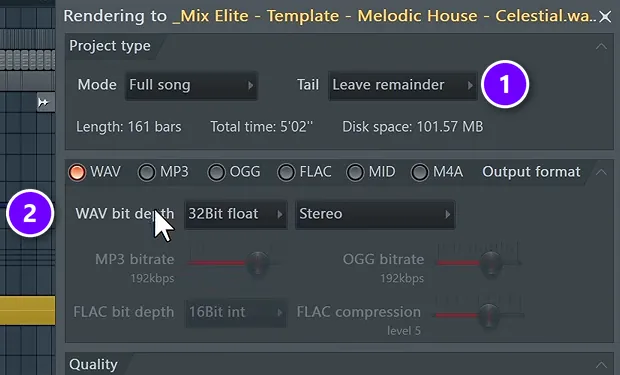
Clear every plugin off the Master track first, then go to File > Export > WAV. Set Mode to Full song and Tail to Leave remainder (1), then set the WAV bit depth to 32Bit float (2). 32-bit float is the pick because it keeps the detail even if the mix clips somewhere. Open a new, empty project and drag the WAV in.
Step 2: Cut the rumble and the harsh highs
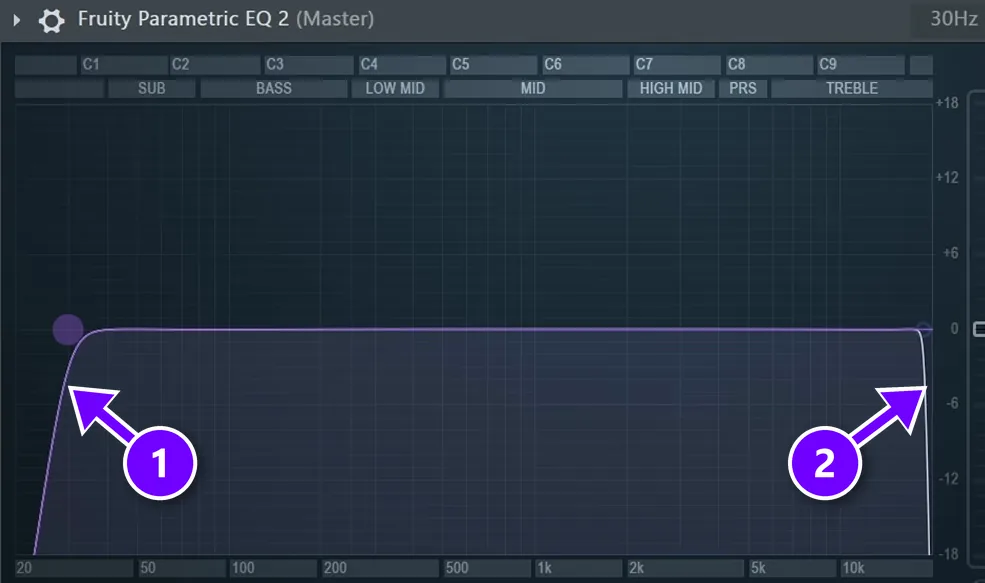
Load Fruity Parametric EQ 2 and pick its 30Hz + 18kHz cut preset. It rolls off the lows just under 30 Hz (1), where everything lower is basically clutter, and the very top above about 18 kHz (2). Any other EQ moves stay small, at 2 dB at most. If you need more than that, the problem lives in the mix.
Step 3: Even out each band with Maximus
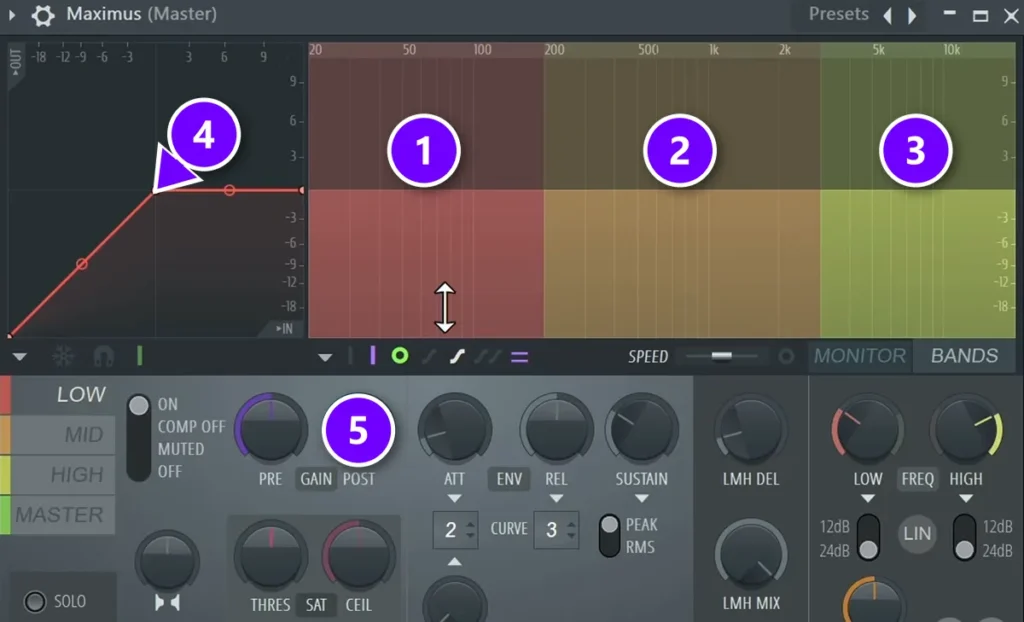
Maximus splits the song into three bands: lows (1), mids (2) and highs (3). Pick a band and drag its threshold point on the curve (4) down, holding Alt for fine moves, until the loud parts get turned down by about 2 to 3 dB. Then raise that band’s Post gain (5) to win the level back. Never go past 3 to 4 dB of reduction on any band.
Step 4: Push the loudness with the Maximus master band
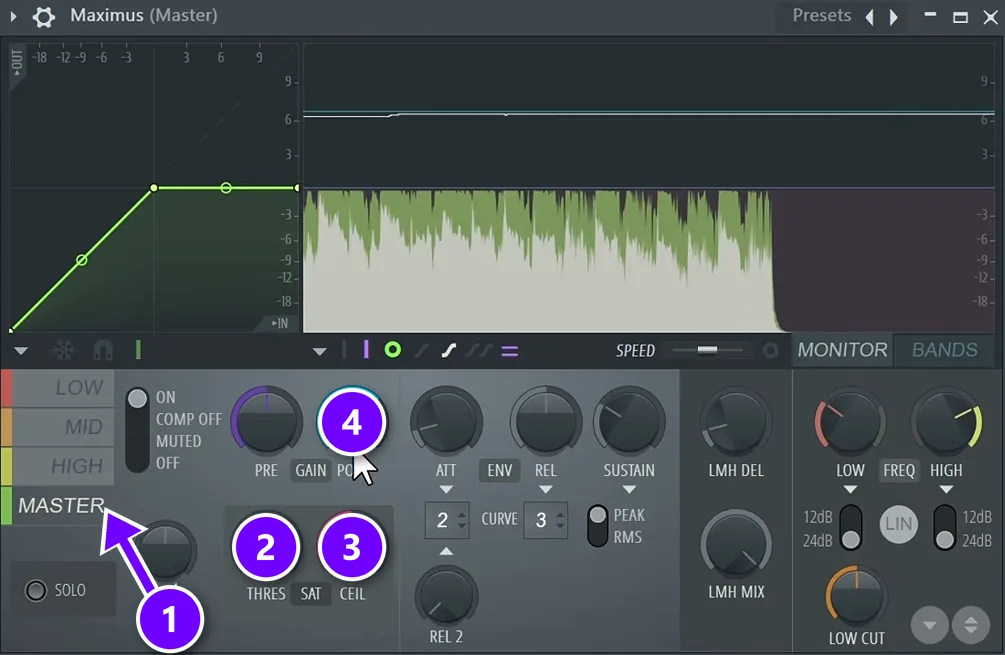
Click the MASTER band (1). Nudge its threshold (2) just a little to switch on the soft saturation, set the ceiling (3) to -0.3 dB and turn on LIN, the linear phase button. Then raise the Post gain (4) until you hear distortion, and back it off by half a decibel to a full decibel. In the free course, distortion showed up at about 6.8 dB, so the gain settled at 6 dB.
Step 5: Check the loudness, then export
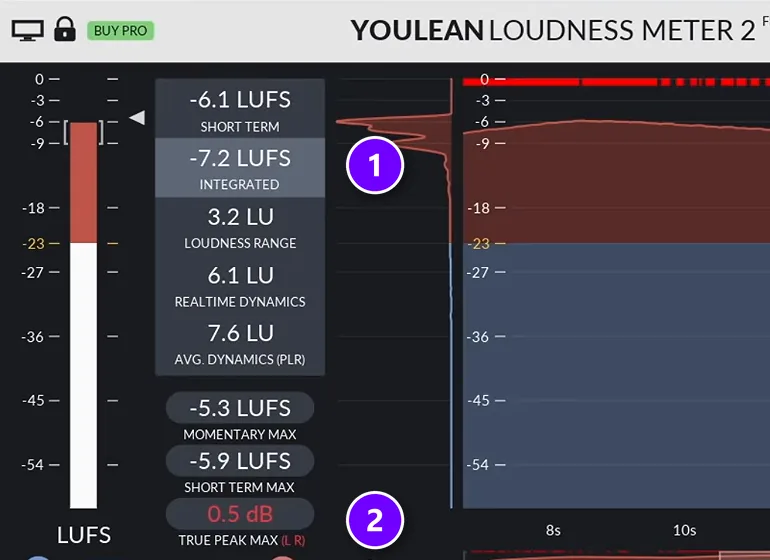
Put the free Youlean Loudness Meter last in the chain and play the loudest part of the song. The free course’s master read -7.2 LUFS integrated (1), inside its target. The true peak (2) read 0.5 dB, though, which can clip once the song becomes an MP3. The fix was to turn on linear phase and high quality in the EQs and lower the ceiling a little more. Our guide to true peak meters explains why that matters.
Then export a 24-bit WAV, plus an MP3 at the highest bitrate, and listen everywhere you can. The last step is to play it on different headphones, laptops, cars and Bluetooth speakers, and fix anything that sounds wrong.
Here are the numbers from that chapter in one place. They’re starting points for that track, not rules.
Want to learn how to set numbers like these for your own songs? Mix Elite’s Full Mastering from Start to Finish course covers the full chain, then shows a Hybrid Trap song and a Hip-Hop song getting mastered, in 43 lessons for any DAW.
Should you master your own music or pay an engineer?
Master your own songs while you’re learning: it costs nothing but time and teaches you a lot about your mixes. Pay a mastering engineer when a release matters and you want fresh ears, because after hours on a song you stop hearing it clearly.
Both work, and plenty of producers do both at different times. Mix Elite’s free course starts beginners on their own masters, with FL Studio’s stock plugins and a free meter.
Fresh ears are the whole point of paying someone. When you’re used to your own track, it’s hard to judge, so mastering is often handed to a professional for a fee. A good engineer brings fresh ears, a room built for listening and years of practice.
Prices vary a lot from engineer to engineer, so ask what’s included, such as revisions and an MP3 version, before you pay. Online AI mastering services are cheaper and faster. Like any master, they work best on a mix that’s already good.
If you’re a Mix Elite Academy student, mastering is already included. The Academy comes with unlimited mastering: the Mix Elite team masters your music, with no limit on how many songs.
To learn it step by step, see the best mastering courses online.
What are the most common mastering mistakes?
The most common mastering mistakes are hoping the master will fix the mix, leaving a limiter on the master while mixing, making big EQ moves, pushing loudness with a plain limiter, ignoring true peak and never checking the master on other speakers. Here’s how to avoid each one.
- Hoping the master will fix the mix. It won’t. Fix muddy bass and buried vocals in the mix, then master.
- Leaving a limiter on the master while mixing. FL Studio’s default template does this, and it’s one of the most common reasons a beginner’s song sounds off, so start your mixes with an empty master.
- Big EQ moves. If the master needs more than about 2 dB anywhere, go back to the mix.
- Copying someone else’s EQ settings. What works on one track won’t necessarily work on yours, so use your own ears on your own song.
- Pushing the loudness with a plain limiter. It can pump. Use a soft clipper or a maximizer, and back off as soon as you hear distortion.
- Ignoring true peak. A master that peaks right at 0 dB can clip once it’s turned into an MP3. Leave a little room under the ceiling.
- Never checking it anywhere else. Headphones, a laptop, a car, a small Bluetooth speaker. A master isn’t done until it works on all of them.
DAY 6 OF THE 7-DAY MUSIC PRODUCER COURSE
Master your first song, step by step
Day 6 of Mix Elite’s 7-Day Music Producer Course is all about mastering: a 3-step mastering chain that makes your song loud, clear and punchy everywhere, the inter-sample clipping mistake that ruins the sound without you knowing (and an easy way to always avoid it), and the best export settings for streaming platforms. You also get a final mix to practice on and a mastering chain preset pack. It’s taught in FL Studio (the free trial works), it’s $27 for all seven days, and you get 60 days to decide if it was worth it.
Frequently asked questions
What is audio mastering in simple terms?
Audio mastering is the final polish on a finished song. The whole mix is treated as one file and adjusted with EQ, compression and a loudness tool, so it sounds clear, balanced and loud enough on every speaker. It’s the last step before you release the song.
What’s the difference between mixing and mastering?
Mixing balances the separate parts of a song, like the drums, bass and vocals, into one stereo mix. Mastering works on that finished mix as a single file, polishing its overall tone, dynamics and loudness. Mixing decides most of the sound, and mastering is the final few percent.
Why does my mix sound quiet compared to professional songs?
Because pro songs are mastered to feel loud, and your DAW’s peak meter doesn’t show how loud a song feels. Mastering raises the loudness, measured in LUFS, with compression, clipping and limiting while the peaks stay under 0 dB. A clean mix with fewer parts fighting for the low end gets loud much more easily.
Can you master a song at home with stock plugins?
Yes. Mix Elite’s free FL Studio course masters a song with stock plugins only: Fruity Parametric EQ 2 to clean up the lows and highs, Maximus to compress each band, and the Maximus master band for loudness. The free Youlean Loudness Meter at the end checks the LUFS and the true peak.
What are the steps in the audio mastering process?
Export the finished mix as a high-quality WAV and load it into an empty project. Then clean up the tone with EQ, even out the dynamics with compression, raise the loudness with a clipper, limiter or maximizer, check the LUFS and true peak with a meter, and export the master. Last, listen on as many speakers as you can.