
“I sing the body electric”
To make vocal chops in FL Studio, drag a dry vocal into Slicex, which cuts it into slices and puts each one on its own piano roll key. Add a short attack and release so the slices don’t click. Then open the piano roll and draw the slices in a new order to make a melody.
You know the sound. A voice cut into tiny pieces hops around over the drop like a lead synth, and nobody can make out the words. It feels like a secret that takes years to learn.
It’s really just a few small moves, and FL Studio has a stock tool for each one. Below you’ll learn how to make vocal chops from the first cut to full vocal chop chords, with the exact clicks and short Mix Elite videos that show each trick.
Table of Contents
What are vocal chops?
Vocal chops are short pieces of a vocal, cut up and played back in a new order so they work like an instrument. One syllable can become a lead melody, a rhythm or a stack of chords. The words stop mattering, and the human tone is what stays.
That’s why they show up in so many genres. A synth can be bright and huge, but it can’t sound like a person. When you add even a few vocal chops to a drop, the track starts to feel emotional in a way that plain sound design rarely does.
What kind of vocal works best for vocal chops?

Start with a dry vocal, which means one with no reverb or delay on it, and look for long open vowels like “ah” and “ooh.” Dry slices end cleanly, so they don’t smear into each other. Open vowels hold a clear note, so they are easy to tune and easy to play as chords.
- Acapellas and phrases give you many syllables to pick from, which suits melodies.
- Sung one-shots, a single held note, are the best source for chords.
- Short adlibs like “hey” and “yeah” have a hard start, so they make good rhythm parts.
Need something to chop tonight? Mix Elite’s Grand Vocals pack has 327 royalty-free vocals, including 118 phrases, 154 adlibs, 28 hooks and 27 ready-made chops. For chords, Mix Elite’s Aria Vol. 1 vocal runs pack has 19 sustains and 31 hooks, each one dry and wet.
A vocal ripped from a released song belongs to someone else. Use royalty-free vocals or your own recordings for anything you plan to release, because a short slice of a record is not automatically safe.
How to make vocal chops in FL Studio
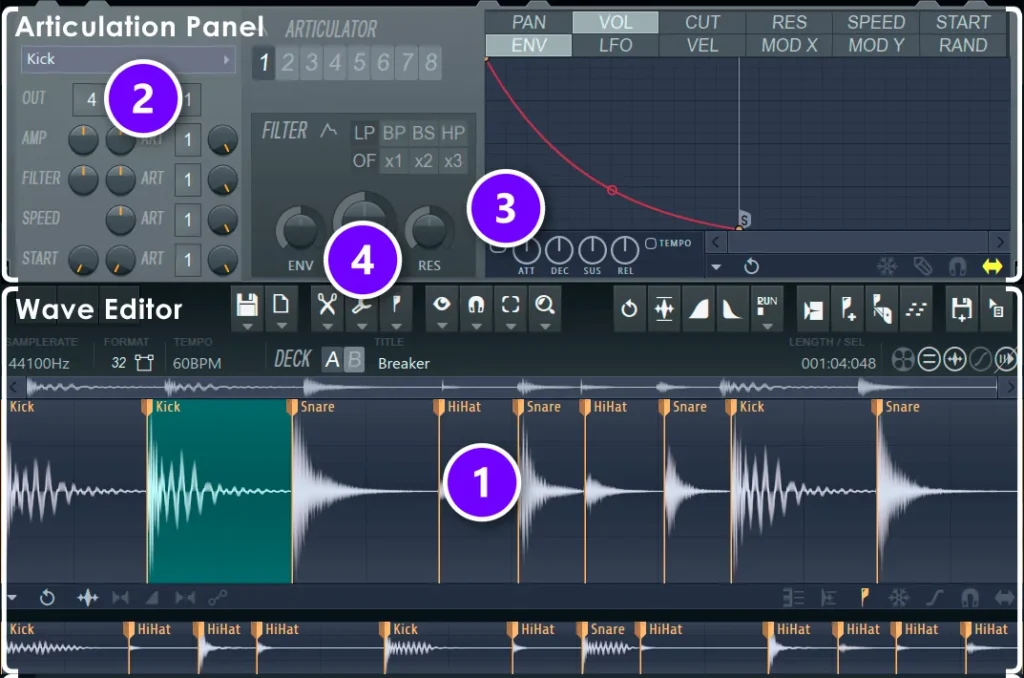
Drag your vocal into Slicex, FL Studio’s slicing sampler, and it cuts the sound for you. Each slice lands on its own piano roll key. Slicex comes with Producer Edition and higher, and the free FL Studio trial has it too.
This Mix Elite short runs through the whole Slicex method in under a minute:
Here are the same moves written out. The numbers match the picture of Slicex above, which comes from Image-Line’s manual.
- Click the + at the bottom of the Channel Rack and add Slicex, then drag your vocal from the Browser onto it. Slicex chops it right away and shows a marker at each cut (1).
- Don’t like those cuts? Click the Regions icon in the toolbar and go to the delete option to clear the markers.
- Press M to add a new marker, then drag it to where a syllable begins.
- To let FL Studio cut for you again, open the Regions icon and go to Auto slice. Dull makes fewer slices and Sharp makes more, while Alt + S runs Medium.
- Click each slice to hear it. Keep the ones that sound good on their own and ignore the rest.
- Open the piano roll with F7, or play the slices live on a MIDI keyboard.
Shortcuts doing nothing in Slicex? Turn on Typing Keyboard Priority first, as Image-Line’s manual explains.
Slicex isn’t your only choice. Fruity Slicer comes with every edition of FL Studio and does the same basic job, and you can also cut right on the Playlist. Our guide on how to sample in FL Studio compares each tool.
Why do my vocal chops click and pop?
Vocal chops click when a cut lands in the middle of a sound wave, so the level jumps from loud to silent in an instant. The fix is a tiny fade at the start and end of each slice. In Slicex, load the Volume ADSR preset and raise the attack and release a little.
- In Slicex, click the small arrow just under the envelope graph.
- Go to the presets and select the Volume ADSR preset.
- Raise ATT and REL (3) until the clicks are gone, and stop there.
Keep those fades small, because a long attack softens the start of the word and takes the bite away. In a plain Sampler channel, the IN and OUT knobs do the same job, and the Declicking mode menu sets it for you. The default, Out only, adds a 10 ms fade at the end. Smooth adds 100 ms fades at both ends, which is often too soft for a short chop.
How do you turn a vocal sample into a catchy melody?
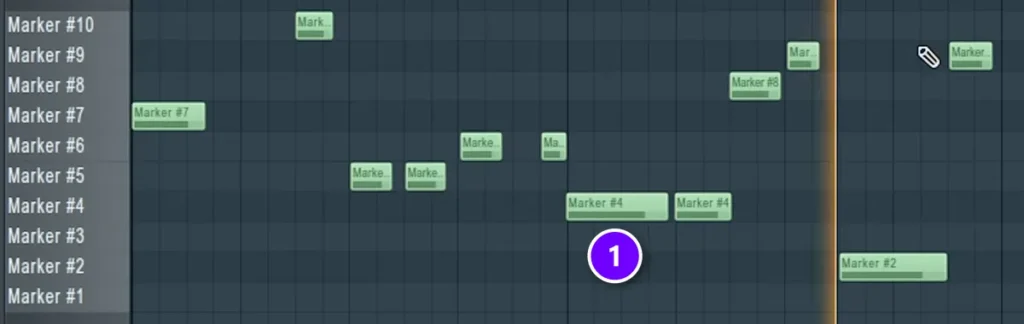
Open the Slicex piano roll, delete the notes it wrote and draw your favorite slices in a new rhythm. In Slicex, each key picks a different slice, so you are arranging syllables, not notes. Three or four slices repeated over a 2-bar pattern will almost always beat ten slices played once.
- Press F7 and clear the old notes with Ctrl + A and then Delete.
- Pick three or four slices that sound good together.
- Draw them on a 1/8 or 1/16 grid (1), and repeat the best slice more than once.
- Leave gaps. Silence is what makes a chop sound like a hook and not a stutter.
- Change the last bar a little, so the phrase has an ending.
A chop melody follows the same rules as any other melody, so short phrases and repetition still do most of the work. Our guide on how to write a melody goes deeper into that.
How do you make randomized vocal chops?
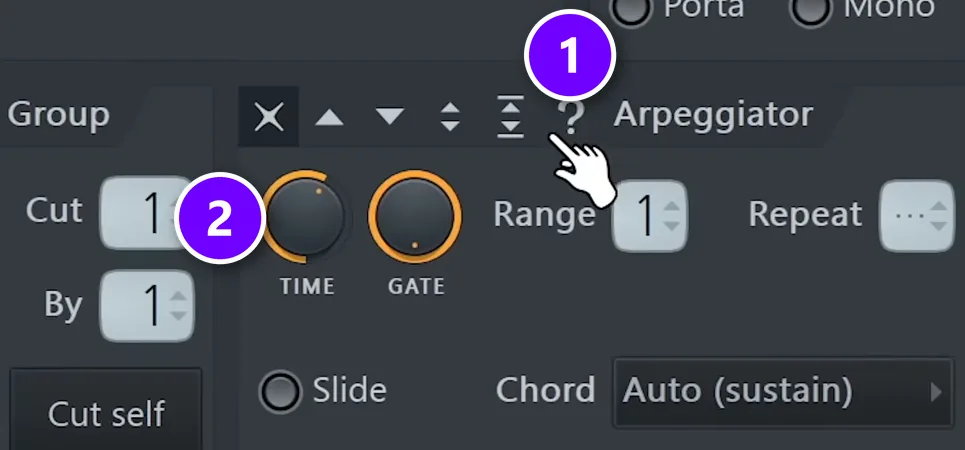
Stuck for ideas? Let FL Studio pick the order. This Mix Elite short keeps only the best slices in the piano roll and hands the rest to the arpeggiator.
- Load the vocal into Slicex, and chop it by hand or with Auto slice.
- Open the piano roll, delete all the notes and click in only the slices you like most.
- Open Slicex again and go to the Miscellaneous functions tab, the wrench icon.
- Click the question mark in the Arpeggiator (1) to turn on random order.
- Turn the TIME knob (2) to set the speed.
Every playback comes out different. When a run grabs you, record it, then clean it up by hand.
How do you tune vocal chops to the key of your song?
Load the slice into a Sampler channel, tell FL Studio which note it sings, and play it from the piano roll in your song’s key. A Sampler channel moves one sound up and down the keyboard, unlike Slicex, so it’s the right tool for a melody that needs real pitches.
- Find the note of your slice. Check the file name first, or play keys along with it until one matches.
- Double-click the channel, open the Miscellaneous functions tab and right-click that key on the small keyboard to make it the root note. The default root is C5.
- Now play the notes of your song’s scale, and the chop sings them in tune.
If a sung slice still drifts, right-click its waveform and choose Edit in pitch corrector to open NewTone. Not sure which notes fit? Our basic music theory guide covers keys and scales in plain words.
How do you make vocal chop chords?
Load one sung note into a Sampler channel, set it to loop with Crossfade, and play chords with it from the piano roll. Each key pitches the same note, so one vocal becomes a whole choir. Max, the founder of Mix Elite, adds this kind of layer to finish a drop.
“We still lack some cool layer,” Max says in his future bass drop video, right before he adds a vocal shot on top of his synths. Then he explains why it works: “it’s a little bit more focused on the mids and it fills up our whole spectrum.” You can follow the full build in our guide to the future bass drop.
Endless vocal chop chords
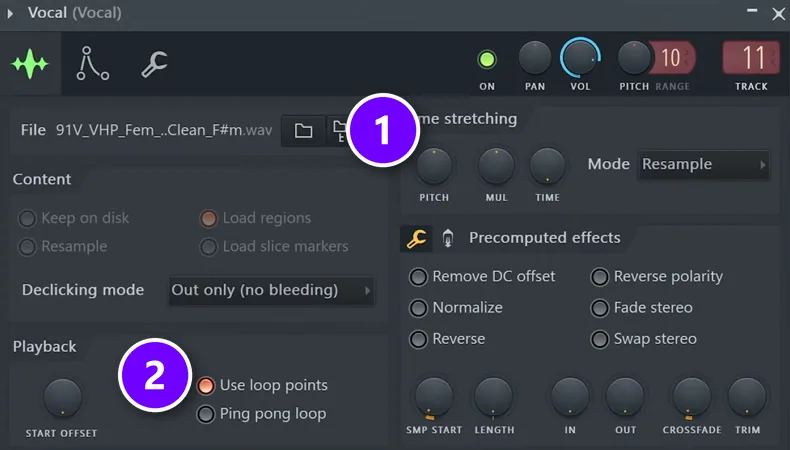
A one-shot vocal fades out when it ends, which is no use for a long chord. Crossfade fixes that, and the chop then plays for as long as you hold the note.
- Drag a vocal chop onto the Channel Rack. The short does this with one click of the mouse wheel.
- Make sure Cut itself is turned off, so the notes of a chord don’t cut each other.
- Double-click the channel. Use SMP START and LENGTH to keep only the part you like.
- Turn up CROSSFADE, and leave Use loop points (2) on.
- Nudge LENGTH until the loop sounds smooth and doesn’t pulse.
- In the envelope tab, on Volume, turn on the envelope and add a little release so chords don’t stop dead.
Give the channel real chords next. Our list of catchy chord progressions has plenty to try, and simple three-note chords sound the cleanest on a voice.
Vocal stutter chords
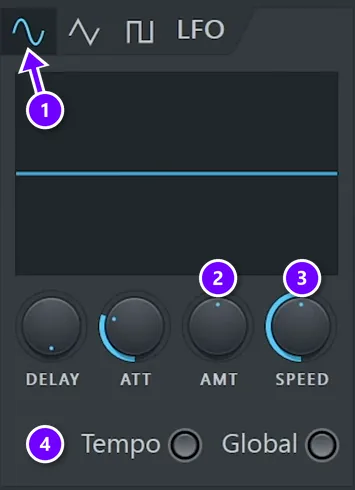
This is the same looped note with a fast volume pattern on top, so a held chord chops itself in time with your song. This Mix Elite short builds it in under a minute.
- Drop a vocal one-shot in a Sampler channel, shorten it and apply Crossfade.
- Open the envelope tab, stay on Volume and find the LFO box.
- Turn up the LFO’s AMT knob (2).
- Switch on Tempo (4), then set the rate with SPEED (3).
- Pick the square shape from the buttons on top (1). The short calls it the pulse wave, and it makes the stutter choppier.
Vocal chords like Skrillex
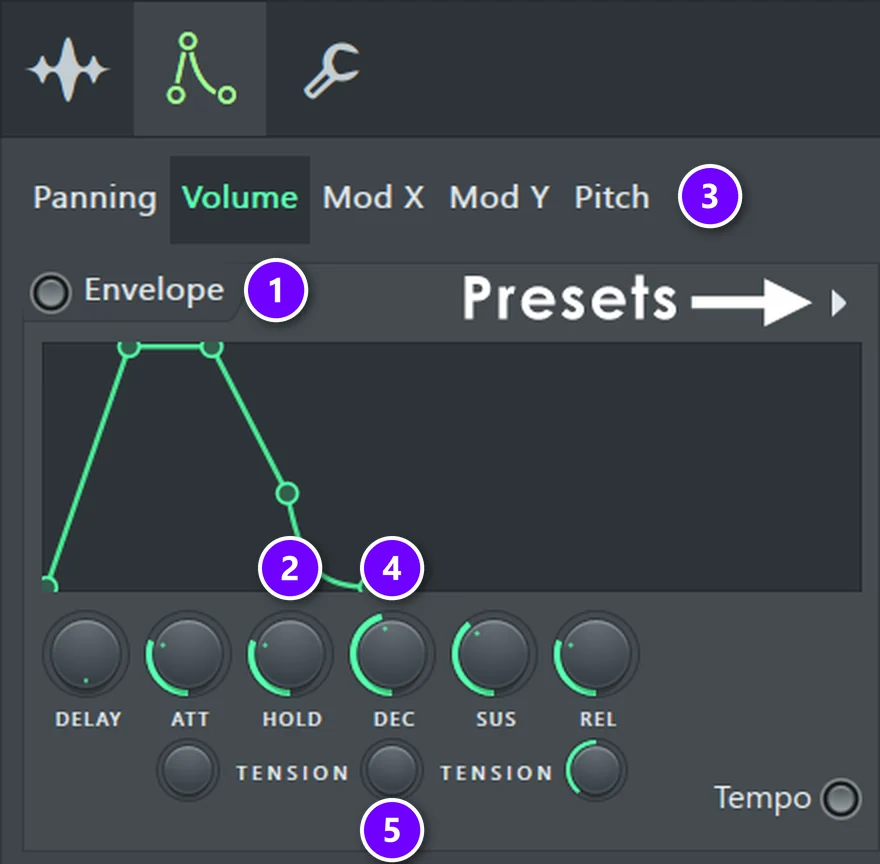
This short adds a pitch bend to the stutter. Each chord now slides as well as chops, which gives you that growling, robotic vocal lead.
- Find a vocal shot and apply Crossfade.
- Open the envelope tab and click Pitch (3), then turn on Envelope (1).
- Raise SUS and the amount knob, and bend the curve with TENSION (5).
- For a pitch glide, raise ATT. A longer attack makes a longer glide.
- Go to the Volume LFO, switch on Tempo and automate SPEED so the rate changes over the phrase.
- Write your chords with this sample, then add simple EQ and distortion.
Check your chords against a piano after this step, because the amount knob moves the pitch. If notes settle out of tune, lower the amount, or pull SUS down so the pitch comes back home.
Why do producers change the pitch and formant of vocal chops?
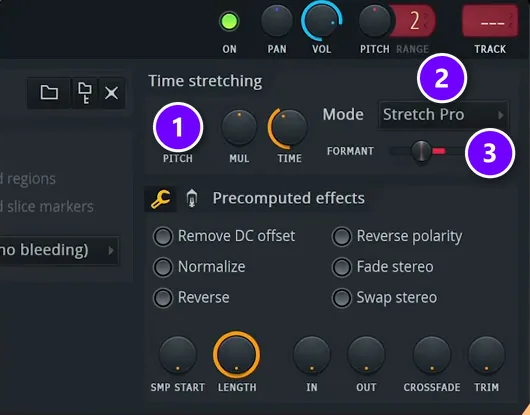
Pitch sets the note, while the formant sets the tone of the voice, or how big the singer seems. Changing the formant lets a vocal stop sounding like a person and start sounding like a texture, without moving it off the note. It’s the fastest way to make dark vocal chops.
- Open the vocal in Edison, FL Studio’s audio editor, with Ctrl + E from its Sampler channel.
- Press Alt + T to open the Time stretch / pitch shift tool.
- Move the formant control until the voice turns dark and heavy.
- Send the result back to the Playlist with Edison’s Send to Playlist button.
- Right-click the clip’s waveform, open it in Slicex and write your chops.
This Mix Elite short shows that route. Want to skip Edison? In a Sampler channel, set Mode to Stretch pro (2), and a FORMANT control (3) appears right next to the PITCH knob (1).
What other vocal chop tricks are worth trying?
Reverse the vocal before you slice it
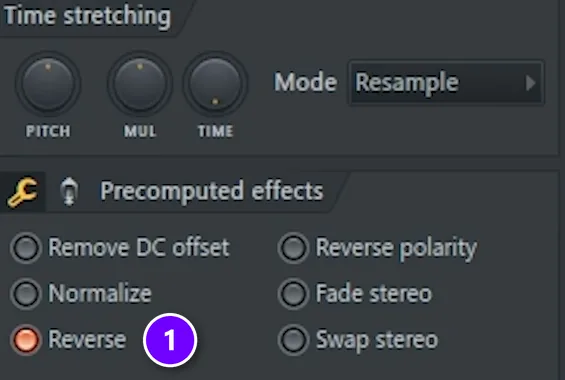
Reversed vocals stop sounding like words at once, which gives you strange, swelling chops no one can trace. One Mix Elite short calls Reverse the “one single button” that changes vocal chops dramatically.
- Double-click the vocal and turn on Reverse (1).
- Consolidate it with Ctrl + Alt + C, so the reversed sound becomes a new audio file.
- Run that new clip through your slicer and chop it as usual.
Move the timing with the Slip tool
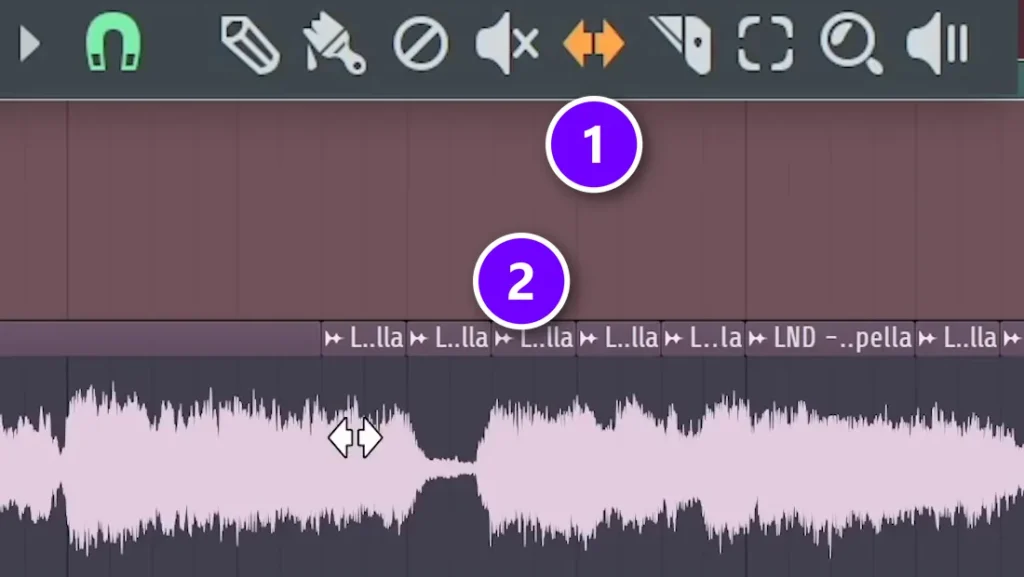
You can also skip the slicer completely, as this short shows. The Slip tool slides the audio inside each piece while the piece itself stays put, so the rhythm holds and the syllables change.
- Press C for the Slice tool and cut random parts of the vocal on the Playlist (2).
- Press S for the Slip tool (1), and drag inside a clip to move the audio.
- Hold Alt to turn off snap for finer moves.
Another short uses this same move for future bass, where a small timing change makes the chop feel like it’s skipping. It works just as well on melody loops.
What effects should you put on vocal chops?
Use EQ to clear the low end, then reverb and delay to place the chops in the track, and sidechain to make room for the kick. Put reverb and delay after the chops, so each slice stays tight while the tail fills the gaps between them.
- EQ: cut the lows in Fruity Parametric EQ 2, often below 150 to 250 Hz, because chops rarely need them.
- Reverb: Fruity Reeverb 2 on a send track pushes chops back and smooths the sharp cuts.
- Delay: Fruity Delay 3 set to a dotted 1/8 fills the holes in a sparse pattern.
- Distortion: a small amount adds grit and helps chords cut through.
- Sidechain: duck the chops under the kick with Fruity Limiter, so the drop keeps its punch.
Mix Elite’s Grand Vocals pack also comes with 9 FL Studio vocal presets, which give you a quick starting chain on your vocal samples.
How do vocal chops change by genre?
Trap vocal chops
Keep them dark and sparse. Pull the formant for a heavier tone, leave plenty of space for the 808 and repeat one short phrase over the loop. Our guide to trap melodies shows how to build the part around it.
Future bass vocal chops
This is where stutter chords and pitch glides live. Bright sustained vocals, a tempo-synced volume LFO and Slip tool timing all fit here. If you want the full process, Mix Elite’s Future Bass & Remixes course builds a whole remix around an acapella in 34 lessons, from chords to the drop, mix and master.
House vocal chops
House chops are short and rhythmic, and they often land on the off-beats so they bounce against the four-on-the-floor kick. Use one or two syllables, repeat them, and sidechain them hard. A small filter sweep across 8 bars will carry the part into the drop.
Your first chop doesn’t need to be clever. Load one vocal tonight, cut it in Slicex, fade the slices and draw a 2-bar pattern with three of them. Once that plays back and makes you nod, you’ve got the whole skill, and the rest is just adding tricks.
DAY 2 OF THE 7-DAY MUSIC PRODUCER COURSE
Give your vocal chops chords and a melody worth singing
Day 2 of Mix Elite’s 7-Day Music Producer Course is about chords and melodies that hook people: just enough music theory to write fresh chords, a 3-step chord formula, and 4 easy ways to write catchy melodies, even if you’ve never touched a keyboard. You also download 30+ chord progressions, ready to drop in. It’s taught in FL Studio, and FL Studio’s own free trial works. On Day 7 a pro gives you personal feedback on your track. It’s $27, with 60-day refunds.
Frequently asked questions
How do you make vocal chops in FL Studio without Slicex?
Use Fruity Slicer, which comes with every edition of FL Studio. Right-click the sample’s waveform in the sampler and choose Open in new Fruity Slicer channel. It cuts the vocal and puts one slice on each piano roll key. You can also press C on the Playlist and cut the vocal with the Slice tool.
What is the difference between a vocal chop and a vocal sample?
A vocal sample is any recorded piece of a voice, like a phrase, a hook or a single note. A vocal chop is a short slice of that sample, played back in a new order or at new pitches. So you start with a sample, and chopping it is what turns it into an instrument.
Why do my vocal chops sound robotic or chipmunk-like?
Pitching a vocal far from its original note moves its formants too, which gives you that chipmunk tone. Keep slices close to their real note, or set the Sampler’s Mode to Stretch pro and use the FORMANT control to bring the tone back. Sometimes a robotic sound is exactly what a future bass drop wants.
Can I use vocal chops from a famous song in my track?
Only if you clear it. A released song has owners, usually a label and the writers or their publisher, and you need their permission to release a track with part of it. Royalty-free vocal packs come with a license to use their sounds in your music, and your own recordings are yours to chop.