“Melancholy is thus the most legitimate of all the poetical tones.”
To make a trap melody in FL Studio, pick a dark minor scale (natural minor, harmonic minor or Phrygian), write a one- or two-bar idea on the notes of your chords at about 140 BPM, and repeat it with small changes. Play it on a bell, pluck, dark piano or flute, leave room for the 808, and add texture by detuning it, reversing it or chopping a loop into a counter-melody.
You’ve got the hi-hats rolling and an 808 that shakes the desk. Then you open the Piano Roll, click in a few notes, and the melody sounds like a ringtone. Or a nursery rhyme.
The difference between that and a melody that sounds dark and finished is a handful of small moves. Max, the founder of Mix Elite, shows five of them in a video that has passed 740,000 views, and all five work with tools that come with FL Studio. Below you’ll find each trick click by click, then the scales, sounds, layers and counter-melodies that make a trap melody work.
Table of Contents
What makes a trap melody sound like trap?
Trap melodies are short, dark and patient. Most of them are a one- or two-bar idea that repeats while the drums and the 808 do the moving around. That only works if the idea itself is strong, so the same six things show up again and again:
- A minor or darker scale. Minor scales sound serious or sad, which suits the genre. Harmonic minor and Phrygian push it even darker.
- Few notes, lots of repeats. A handful of notes played again and again is easier to remember than a long tune.
- Space. Rests give the 808, the hi-hats and later the vocal room to breathe.
- A sound with character. Bells, plucks, dark pianos, flutes and choirs, often a little detuned or lo-fi.
- Texture from effects. Reverse, delay, filters and volume movement make a simple line sound produced.
- A second layer. A counter-melody, or a chopped copy of the loop, answers the main idea.
This page is all about the melody. If you want the whole beat around it, with chords, drums, 808 and arrangement, our trap production guide builds one from an empty project.
How to make trap melodies in FL Studio: 5 tricks
These five tricks come from Mix Elite’s video 5 Tricks for Trap & Hip Hop Melodies. Max made it in 2019, so your FL Studio may look a little newer than his. Each trick fixes a different problem:
- Make a detuned lo-fi piano when your piano sounds too clean.
- Reverse a melody but keep the notes when you want a dreamy, backwards feel.
- Write only on the highlighted scale notes when you keep hitting wrong notes.
- Add movement with a volume pulse when a loop sounds flat and static.
- Chop a loop into a new melody when a sample-pack loop sounds like everyone else’s.
Watch the whole video once, then work through the steps below with your own melody open.
Trick 1: Make a detuned lo-fi piano with stock plugins
A clean piano sounds polite. An old, slightly out-of-tune one sounds like a sample lifted from a dusty record, and a lot of trap and hip-hop chases exactly that feel. You can build that sound from scratch with nothing but stock plugins, the ones that come with FL Studio.
Load a piano and shape it with EQ, Maximus and Fruity Limiter
- Load a plain piano. The video uses Close Grand from the Browser (Packs > Instruments > Keyboard), but any piano works.
- Send it to its own Mixer track, so the effects only touch the piano.
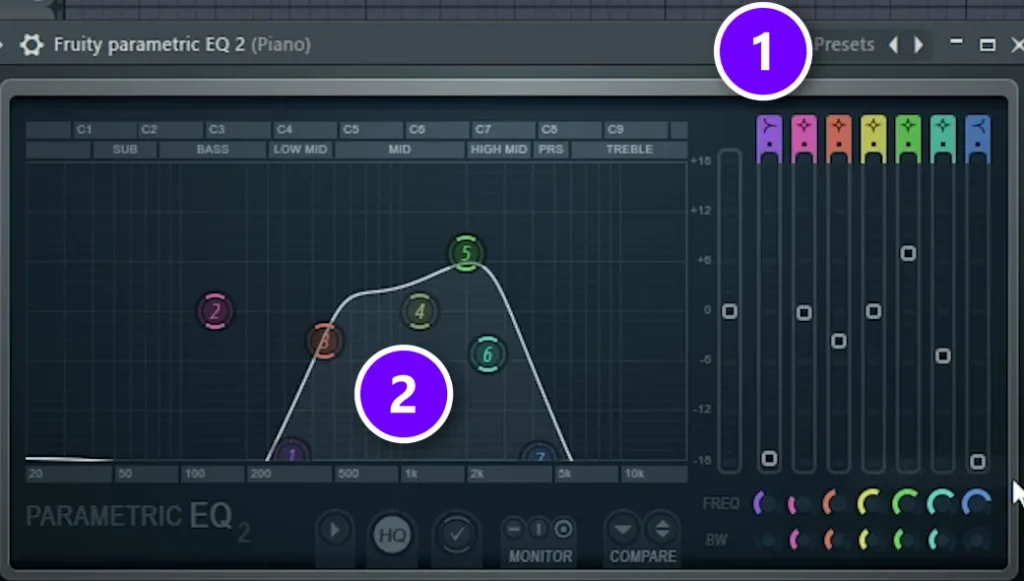
- Add Fruity Parametric EQ 2, open its Presets menu (1) and pick Radio. The curve (2) cuts the deep lows and the bright highs and leaves the middle, like a small old speaker.
- Add Maximus and load its Lo-Fi preset.
- Add Fruity Limiter, click COMP to switch it to compressor mode, then turn THRES down and RATIO up. That squashes the piano, so every note sits at about the same level.
Add the Humanizer wobble in Patcher
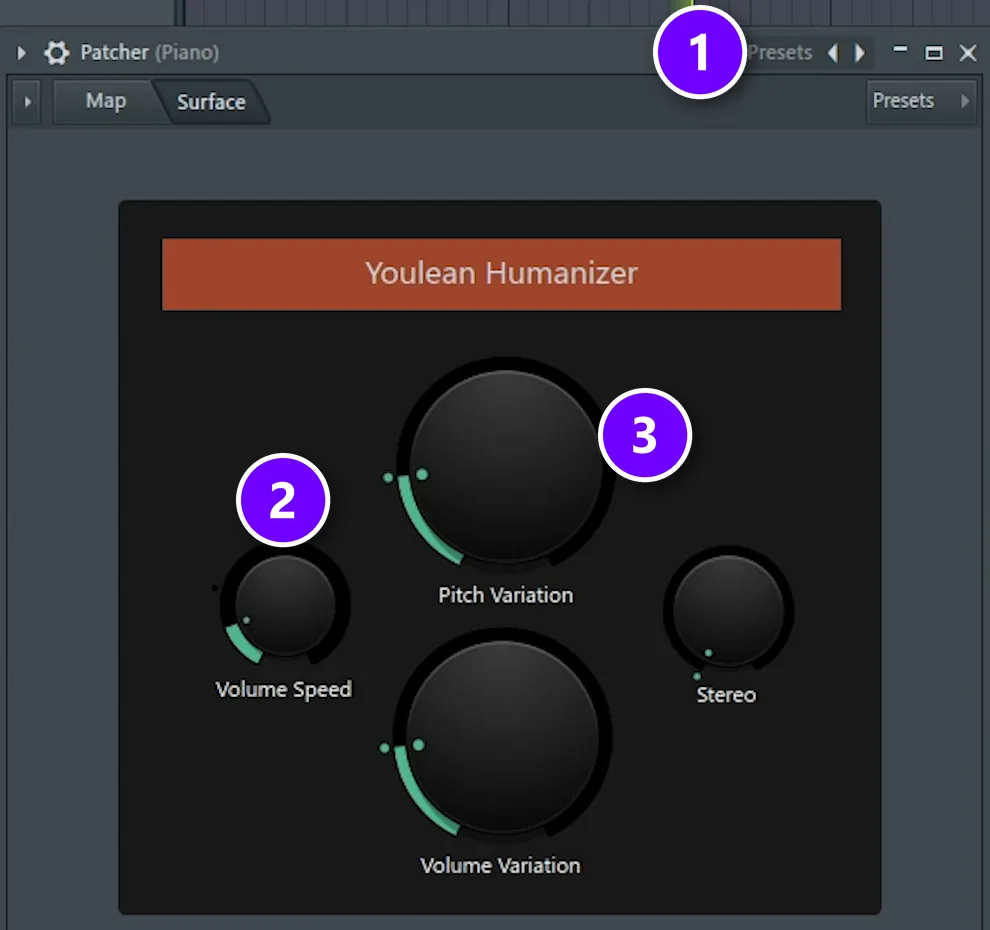
The last plugin does the detuning. It’s a ready-made Patcher preset, so there’s nothing to build.
- Add Patcher to the same Mixer track and drag a cable from From FL Studio to To FL Studio.
- Open the Presets menu at the top of the Patcher window (1) and choose Humanizer.
- On the Surface tab, turn Volume Speed (2) down. Pitch Variation (3) is the knob that bends the pitch around.
The result is a slow, gentle wobble in pitch and volume, like a tape machine that doesn’t run quite steady. Play it with your drums. Suddenly the piano sounds like it came off an old record. The dark piano in our drill melody guide gets the same Humanizer wobble, so it’s worth keeping.
Save the chain. Open the Mixer’s menu (the small arrow at its top left), go to File and pick Save mixer track state. Next time, load that file on a new track and your lo-fi piano is ready.
How do I slow down and pitch-shift a melody for an eerie, vintage vibe?
Slow it down the way tape does. Render the melody to audio, leave the clip’s stretch mode on Resample, and stretch the clip longer, so it plays slower and lower at the same time. Then run it through this trick’s chain, the Radio EQ, Lo-Fi Maximus and Humanizer wobble, so it sounds like an old record.
- In the Playlist, select the melody’s pattern and press Ctrl + Alt + C to render it to audio.
- Double-click the new clip and check that Mode under Time stretching says Resample. That’s the tape-style setting, where the pitch changes with the speed.
- Press Shift + M for the Stretch tool and drag the clip’s right edge to make it longer. The further you drag, the slower and lower it gets.
- To lower the pitch without slowing it down, turn the clip’s PITCH knob down instead. FL Studio keeps the length the same.
Trick 2: Reverse a melody but keep the notes
Reversed sounds swell in instead of hitting, which gives a melody a dreamy, haunted feel. The catch is that if you reverse a normal melody, the notes play backwards too, and the tune you wrote is gone. This trick keeps the tune and still gets the reverse sound. Here’s how.
Flip the notes in the Piano Roll
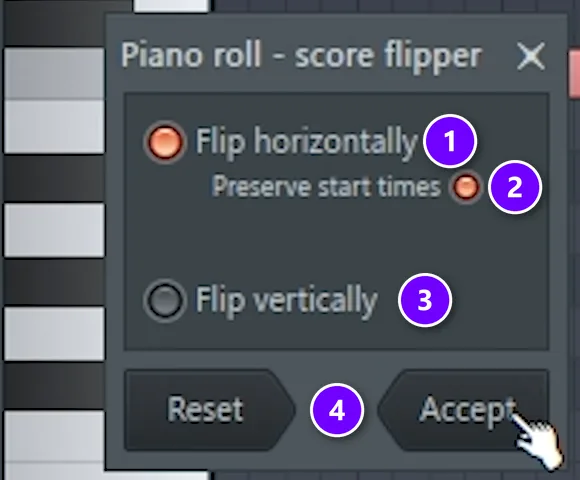
- Write your melody in the Piano Roll.
- Press Ctrl + A to select every note, then Alt + Y to open the score flipper.
- Keep Flip horizontally on (1), turn on Preserve start times (2), turn Flip vertically off (3) and click Accept (4).
- Your melody now plays back to front. Long, low notes can land late after the flip, so select them and drag them left until they start on the beat again.
Render it, then reverse the audio
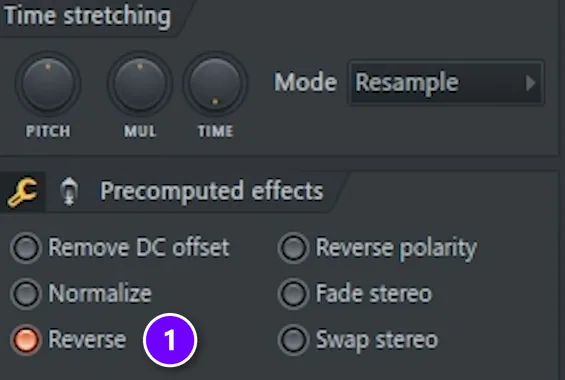
- Go to the Playlist, select the pattern and press Ctrl + Alt + C to render it to audio.
- Set Tail to Cut remainder, so the audio is exactly as long as the pattern, then click Start.
- Double-click the new audio clip and turn on Reverse (1) under Precomputed effects.
Reversing the audio flips the note order back to normal, but now every note fades in instead of hitting. “As you can hear, we preserved our notes that we had earlier, but we got the reverse effect,” Max says. That’s the whole trick.
Try it as a layer. Keep your original melody and put the reversed copy under it, a little quieter. The swells lead into each note, which works really well going into a hook.
Trick 3: Write only on the highlighted scale notes
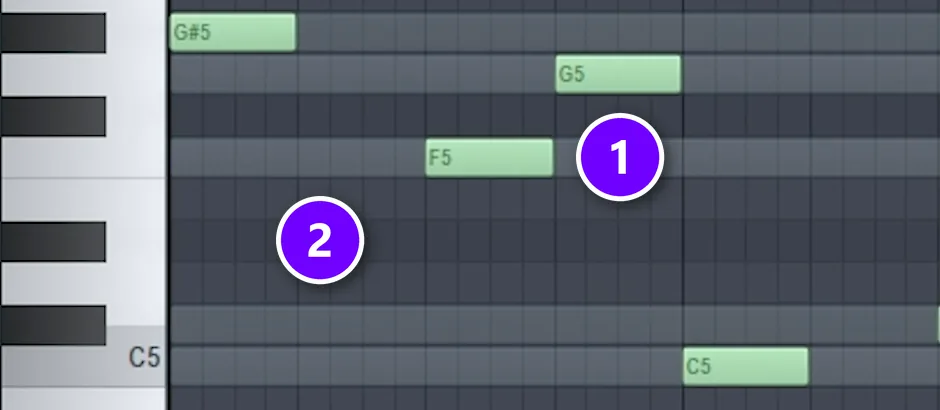
Wrong notes are the fastest way to make a trap melody sound cheap. The fix in the video takes the guessing out of it. Max puts a scale on a spare Sampler channel as long notes, and those notes show up as lit rows in the Piano Roll of the instrument he’s writing with.
“The one rule is just to follow the notes that are highlighted,” Max says. It really is that simple.
In the screenshot, the lighter rows (1) are in the scale and the darker rows (2) aren’t. Write only on the lighter rows and every note fits, even if you’ve never learned a scale.
You don’t need the scale file from the video anymore. Newer versions of FL Studio can light up the rows of any scale for you, and our trap guide shows where that setting is. The scale in the video is a dark Japanese one, and you’ll find it in the scales section below.
Trick 4: Add movement with a volume pulse
Static loops get boring fast. The fix is a pumping volume shape, drawn by hand, that makes a still melody breathe in time with the beat.
Draw a one-beat volume swell
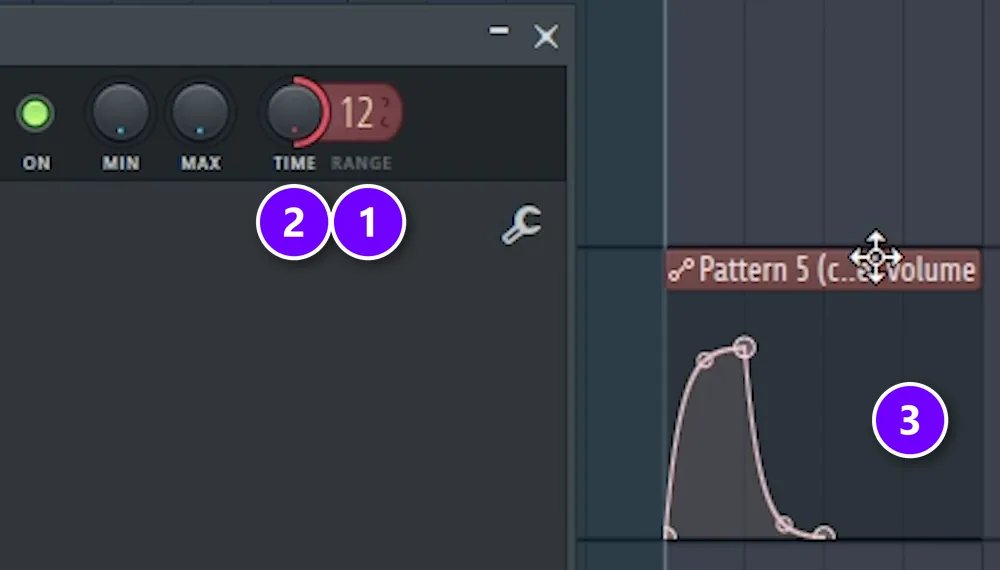
- Render your melody to audio first (Ctrl + Alt + C in the Playlist), so it’s easy to play with.
- Double-click the audio clip, right-click its volume knob and choose Create automation clip.
- Shorten the automation clip to one beat. Drag the line up at the start, add a point, then bend it back down, so the volume swells up and falls away.
- To make the pulse shorter, double-click the clip, set RANGE (1) to 12 and turn TIME (2) all the way up. The curve (3) now ends halfway through the beat.
An automation clip also has an LFO mode that wobbles the volume for you. Max finds drawing the shape by hand more convenient, and you can see exactly what each pulse will do.
Repeat it across the melody
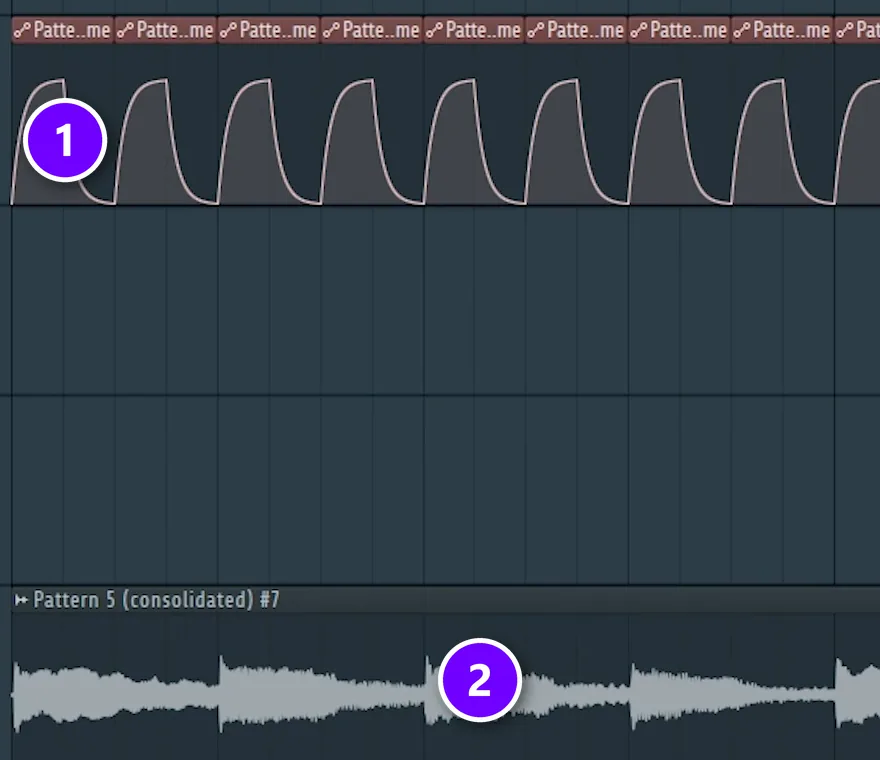
- Trim the clip so it ends where the curve ends, select it and press Ctrl + B until the pulses (1) cover the whole melody (2).
- Render the result to audio again with Ctrl + Alt + C.
- If you shorten or stretch the new clip, set its Time stretching mode from Resample to Stretch first, so the pitch stays the same.
Now the melody ducks and swells with the groove, as if a kick drum you can’t hear kept pushing it down.
Trick 5: Chop a loop into a new melody with Fruity Slicer
Sample-pack loops are a quick start. But other producers have the same loops. “This trick will be about making your melodies unique and interesting, especially when you’re working with loops,” Max says in the video. He uses a glock loop at 100 BPM in F minor, but any melodic loop works.
Open the loop in Fruity Slicer
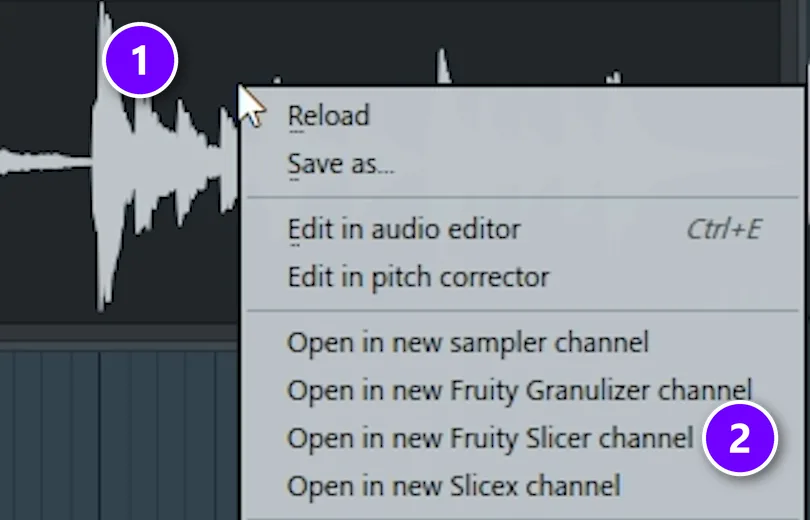
- Drop the loop into the Playlist and double-click it.
- Right-click the waveform (1) and choose Open in new Fruity Slicer channel (2). Fruity Slicer cuts the loop into slices and puts each slice on its own key.
Pitch it down and add space
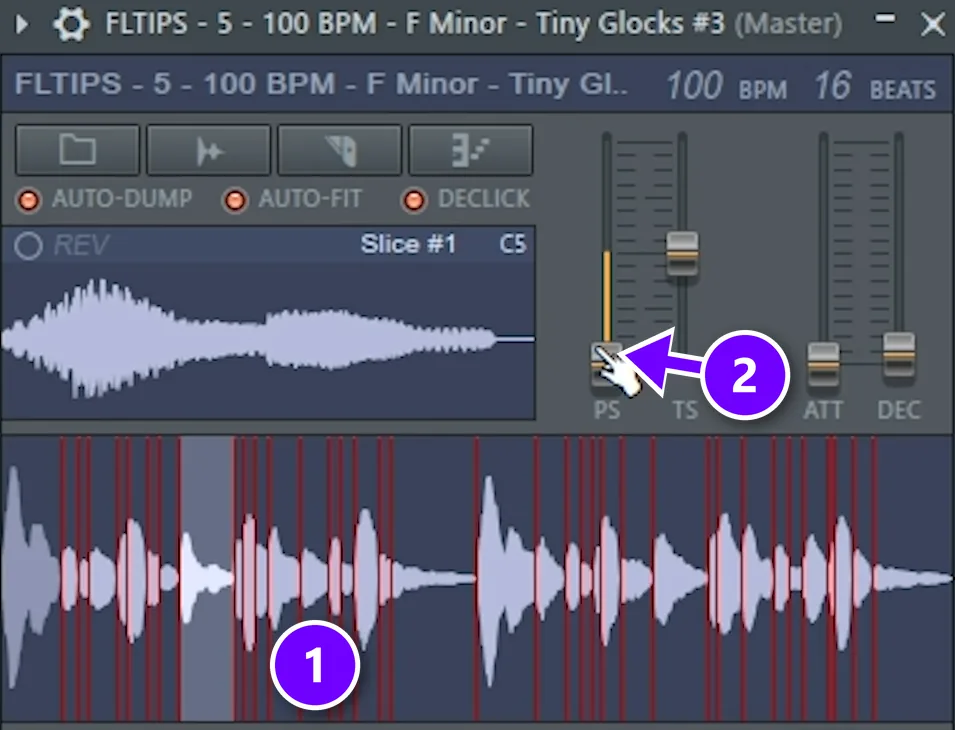
- In Fruity Slicer, the red lines (1) show where each slice starts. Pull the PS (pitch shift) slider (2) down, so the slices play lower than the original loop. Let your ears decide how far: it has to sound right against the original.
- Send the Slicer to a new Mixer track and add Fruity Delay 3. Set the delay model to Ping pong, turn up the feedback RES (resonance) and switch the feedback filter to BP (band-pass), so the echoes bounce left and right and sound thin.
- Add a little Fruity Reeverb 2 and an EQ low cut, so the new layer stays out of the low end.
Draw a new melody on the slices
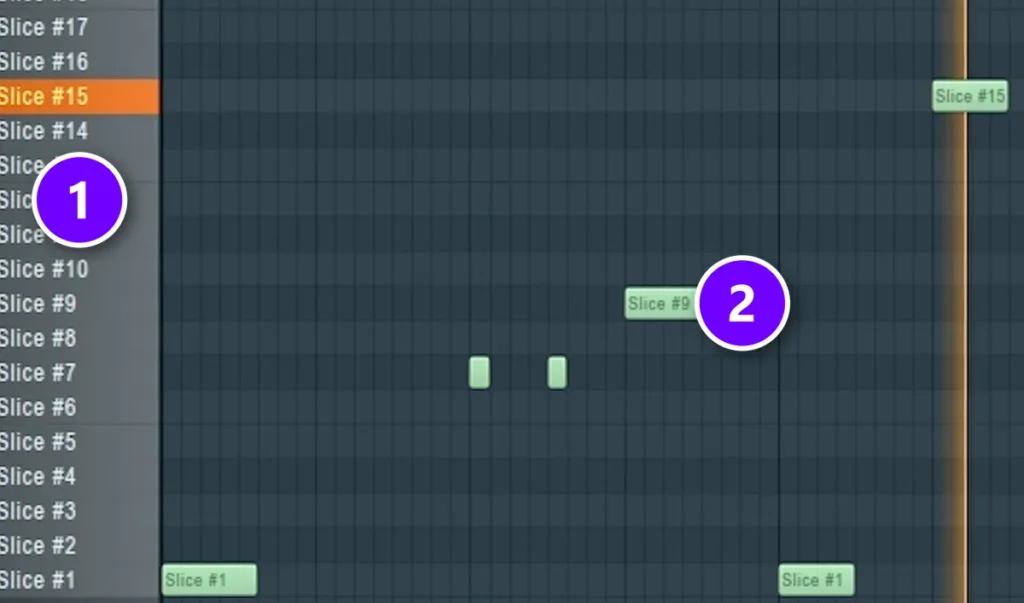
- Press F7 to open the Piano Roll, delete the notes that are already there and draw your own.
- Every row (1) plays one slice, so a new order of slices (2) is a new melody built from the same sounds.
Layer it over the original loop
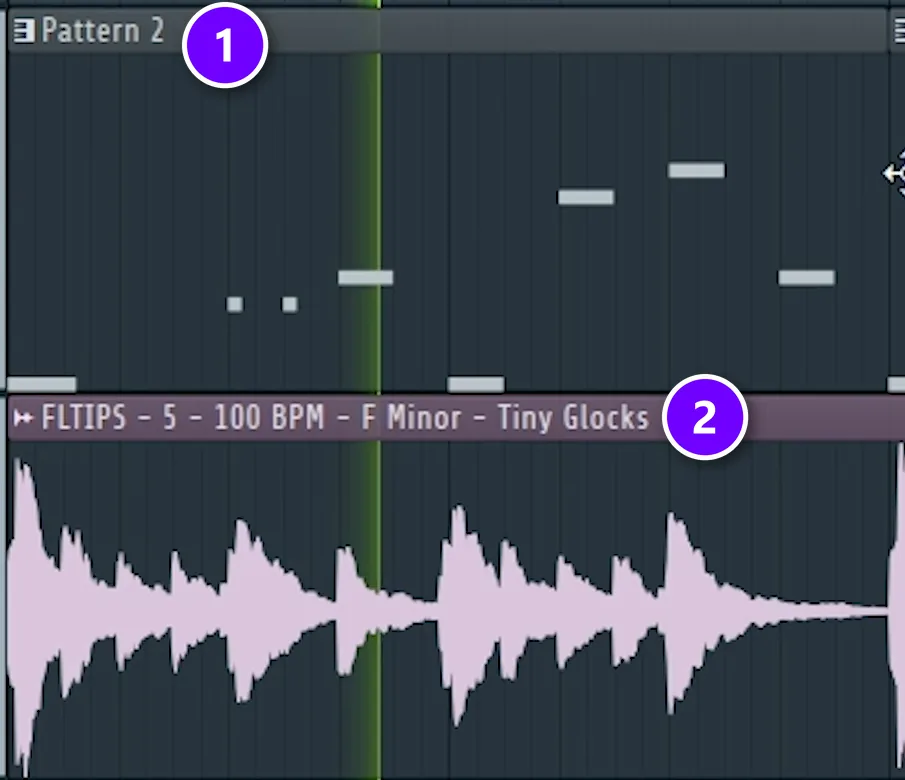
In the Playlist, put your new pattern (1) on the track above the original loop (2), so both play together. The original keeps the vibe, and the chopped, lower, echoing copy on top makes it yours.
Read the loop’s license. Loops from sample packs come with terms that say how you can use them. Check them before you release a beat built on one.
Which scale makes a trap melody sound dark and tense?
Pick a minor scale, then go darker by changing one note. Natural minor is the safe start, harmonic minor raises the 7th for a dramatic pull back to the root, and Phrygian lowers the 2nd for the darkest, most tense sound. That half step right above the root is what makes Phrygian sound so sinister.
Here are all three on C, so you can compare them note by note, along with the Japanese scale from trick 3:
The small numbers show each note’s place in the scale. FL Studio’s Piano Roll names the black keys with sharps, so the diagram does too: D# is the same key as E♭. New to scales? Start with our beginner guide to music scales.
Natural minor: the safe default
Natural minor is the plain minor scale, and most trap melodies use it. From C, it goes whole step, half step, whole, whole, half, whole, whole. A melody that leans on C, D# and G, the three notes of a C minor chord, already sounds moody. Start here. You can’t go far wrong.
Harmonic minor: the dramatic pull
Harmonic minor changes one note: the seventh goes up a half step, from A# to B. That opens a wide gap between G# and B that sounds eastern and dramatic. B also pulls hard toward C, so landing on it at the end of your loop makes the loop want to start again. Max calls it his personal favorite, and the trap loop in Mix Elite’s free 4.5-hour FL Studio course is in C# harmonic minor.
Phrygian: the darkest of the three
Phrygian is natural minor with the second note lowered: C# instead of D. That half step right above the root sounds tense and sinister, a bit like a horror film or a flamenco guitar. Play C, step up to C# and fall back to C. You’ll hear it at once. Phrygian is one of the seven musical modes, and our guide to musical modes explains the others.
Where the Japanese scale from trick 3 fits
The notes in trick 3 are C, C#, F, G and G#. That’s a five-note Japanese scale often called the In scale, and every one of its notes is also in C Phrygian. It keeps Phrygian’s tense C# and drops two notes. The result sounds dark. It’s also very hard to play a wrong note.
Whichever scale you pick, write your chords from it first. A melody that sits on the notes of its chords sounds right, and our music theory guide for producers shows how to build those chords.
Why do dark trap melodies use notes right next to each other?
Notes right next to each other are a half step apart, the smallest step in Western music, so they clash and pull toward each other. The ear hears that as tension. Dark scales put half steps where they hurt most: right above the root in Phrygian (C to C#) and between the 5th and the flat 6th (G to G#).
The Japanese scale from trick 3 keeps both of those half steps, so a melody that rocks between C and C#, or between G and G#, sounds dark right away. Harmonic minor adds one more right under the root, B to C, which is why a loop that ends on B wants to start again. In natural minor they sit between D and D# and between G and G#, away from the root, which is one reason it sounds calmer than Phrygian.
How do I make a happy melody sound darker and harder?
Most happy melodies sit in a major key and jump around a lot. Move yours to a minor scale, start and end its phrases on the root, lean on the half steps, and use fewer notes with more repeats and rests. Then play it on a darker sound, a little lower, and let the drums and the 808 do the hitting.
- Switch the scale. Rewrite the line on the lit rows of a minor scale, the way trick 3 does, and land on the root at the end of each phrase.
- Make it simpler. In his drill melody video, Max’s test is whether you can whistle it. If you can’t, it’s too complicated.
- Darken the chords under it. Max’s drill trick: play a minor chord and the minor chord on the 4th note of the scale, keep them close together and delete their middle notes. The progression gets darker, scarier and more aggressive.
- Swap the sound. A bright lead sounds cheerful even in minor. Try the detuned piano from trick 1, a bell or a flute, or layer in the reversed copy from trick 2.
What sounds work best for trap melodies?

The sound sets the mood before you play a single note. Three notes on a glassy bell sound eerie, and the same three notes on a soft piano sound sad. So choose it first. These are the sounds trap producers keep coming back to:
- Bells and music boxes: bright and spooky, great an octave above the main melody.
- Plucks: short and clean, so quick rhythms stay clear.
- Dark or detuned pianos: the classic, and trick 1 shows how to make one.
- Flutes: breathy and haunting, a favorite in melodic trap.
- Strings and choirs: big and cinematic, so keep their parts slow and simple.
- Guitars: clean or nylon guitar for sad, emotional trap.
- Vocal chops: short slices of a voice, played like an instrument.
You don’t need to buy anything to start. FL Studio’s own FLEX synth has bell, pluck and key presets, FL Keys covers pianos, and our list of free trap VSTs adds dark pianos, strings, orchestral sounds and guitars that cost nothing.
Pick one main sound and give it the spotlight. Then keep it out of the 808’s way: a low cut on the melody, like the Radio EQ preset from trick 1, leaves the bottom end to the bass.
Which instruments should you layer for a moody loop?
Give each layer one job. A stable main sound like a dark piano holds the chords, one or two extra instruments play a short, repeating motif (a bell, flute, fiddle or guitar), and a long, sustained vocal chop or pad sits underneath. Keep each in its own range and the extras quieter, so the loop sounds deep, not crowded.
That’s the recipe in our drill melody guide. Max calls the extra parts supplemental instruments: one or two sounds that are unique to your track. Because his piano progression is so steady, a moon guitar (a Chinese lute) on top can play a much busier rhythm, and for the vocal layer he picks a long, sustained chop so it stays out of the instruments’ way.
How do you write the rhythm of a trap melody?
Rhythm is where most beginner melodies go wrong. They sound random because every note lands somewhere new. Good trap melodies do the opposite: they’re easy to predict, and that’s exactly why they stick.
- Start with one bar. Write a short idea of 3 to 6 notes and loop it.
- Repeat it, then change the ending. A common shape is A, A, A, B: the same bar three times, then a different last bar that leads back to the start.
- Leave rests. Silence after a phrase gives the 808, the hi-hats and the vocal room.
- Mix long and short notes. One long note after a few quick ones sounds deliberate, not busy.
- Push into the bar. Now and then, start a note just before the downbeat, so the melody leans forward.
- Let the hi-hats do the fast stuff. The rolls live in the drums, so the melody can stay slower and simpler.
Keep it short. At 140 BPM, an 8-bar loop lasts only about 14 seconds, so a listener hears your idea many times in one song. If you can’t hum it after one listen, take notes away.
How do you add a counter-melody without cluttering the beat?
A counter-melody is a second, simpler line that answers the main one instead of competing with it. To keep the beat from getting cluttered, play it in the gaps, use fewer notes, give it a different range and a different sound, and keep it quieter than the lead.
- Play in the gaps. When the main melody rests, the counter-melody moves. When the main melody moves, it holds a note or rests.
- Use a different range. Put it an octave above the main line for bells or a music box, or below it for strings or a pad.
- Use a different sound. If the lead is a piano, try a bell, a flute or a choir.
- Use fewer notes. A few long notes, or a two-note figure, is often enough.
- Keep it quieter. Turn it down until you feel it more than you hear it.
- Stay in the same scale. Lean on the notes of your chords and it will fit.
- Carve a little room. If the two still clash, find the lead’s strongest frequencies with a boosted EQ band and cut a small dip there in the counter-melody.
Trick 5 is a shortcut here. The chopped, pitched-down copy playing over the original loop is a counter-melody, and it fits because it’s built from the same sounds. A quiet reversed copy of your melody from trick 2 works the same way.
When you arrange the beat, bring the counter-melody in for the hook and take it out for the verses, so the rapper has room.
Trap melody tips: 7 checks before you move on
- Can you hum it after one listen? If not, remove notes.
- Does it work with the drums and the 808 playing? Judge the melody in the full beat, never in solo.
- Is the low end clear? Cut the melody’s lows so it doesn’t fight the 808.
- Is every note in the scale? One stray note can make a dark loop sound happy or random.
- Does something change every 4 or 8 bars? Mute a layer, add the counter-melody or vary the last bar.
- Is the reverb muddy? Swap some of it for a filtered delay, like the ping-pong delay in trick 5.
- Is there room for a vocal? Under the verses, simpler is better.
Tonight, take a melody you already have and try trick 2 on it. It needs no new sounds or plugins, and you’ll hear the difference the first time you press play. Then build the rest of the beat with the trap guide.
DAY 2 OF THE 7-DAY MUSIC PRODUCER COURSE
Learn the chords every trap melody sits on
Day 2 of the 7-Day course covers music theory, chords and melodies: the 3-step chord progression formula, 4 easy ways to write melodies even if you’ve never touched a keyboard, and where to find pro-quality instruments, paid and free. You also download 30+ chord progressions and 20+ free plugins and tools. Each day takes about 45 minutes, it’s $27, and you get 60 days to decide if it was worth it.
Frequently asked questions
Which scale makes a melody sound dark and tense?
Start with natural minor, then go darker by changing one note. Harmonic minor raises the 7th for a dramatic pull back to the root, and Phrygian lowers the 2nd, which puts a tense half step right above the root. In FL Studio, light up the scale in the Piano Roll and write only on those rows.
Why do dark trap melodies use notes right next to each other?
Notes right next to each other are a half step apart, the smallest and most clashing step in Western music. They pull toward each other, and the ear hears that as tension. Rocking between the root and the note just above it, as in Phrygian, is one of the quickest ways to make a loop sound dark.
What instruments should I layer for a moody trap loop?
Use one stable main sound, like a dark or detuned piano, then one or two extra instruments with a short, repeating motif, such as a bell, flute, fiddle or guitar. A long, sustained vocal chop or pad can sit underneath. Keep each layer in its own range and turn the extras down so the loop stays clear.
How do I make my melodies sound darker and harder instead of happy?
Move them to a minor scale, start and end phrases on the root, and lean on the half steps. Use fewer notes with more repeats and rests, play the line on a darker sound like a detuned piano or a bell, and let the drums and the 808 do the hitting.
How do I add a counter-melody without making the beat cluttered?
Write a simpler second line that answers the main melody: let it move in the main line’s gaps, use fewer notes, put it an octave above or below, and give it a different sound. Keep it quieter than the lead, and bring it in for the hook only.