
“Generally speaking, the germ of a future composition comes suddenly and unexpectedly.”
To write a catchy melody without much music theory, set your Piano roll to the key of your chords so every note fits, then build a short idea of three to five notes from the notes in those chords. Repeat it in bars 2 and 3 with a slightly different rhythm, and make bar 4 answer it by moving the other way and landing on or near the root note.
You have a chord loop you like. You open the Piano roll to put a melody on top, and half an hour later you’re still clicking notes that go nowhere. Sound familiar? It isn’t a talent problem. Nobody showed you how to write a melody with a plan, so every note feels like a guess.
This guide is that plan. It’s the method Max, the founder of Mix Elite, teaches beginners in Mix Elite’s free 4.5-hour FL Studio course, broken into seven small steps, with a screenshot from that course’s Piano roll for each one. You don’t need to play piano, and the only theory you need is explained along the way, in plain words.
Table of Contents
What is a melody?

A melody is a line of single notes played one after another. It’s the part of a song you hum in the car, whether a singer, a synth or a piano plays it. Every melody is made of two things: pitch, which is how high or low each note is, and rhythm, which is when each note starts and how long it lasts.
Two more words come up below. A motif is a tiny idea of two to five notes that keeps coming back. A hook is the catchiest melody in a song, the one people remember after a single listen. Most hooks are a motif that repeats with small changes, which is exactly what you’ll build.
How to write a melody, step by step
Here’s the whole method in one list. Each step has its own section below, with a screenshot and the exact clicks.
- Pick a key and a scale, the same ones as your chords.
- Start with notes that are already in your chords.
- Find a rhythm that changes from bar to bar.
- Write a short motif of two to five notes.
- Repeat it, then change one note at a time.
- Make bar 4 answer the first three bars.
- Improvise in key and keep the happy accidents.
How do you write a catchy melody without knowing music theory?
Let FL Studio handle the theory. Set the Piano roll’s scale helper, or the in-scale typing keyboard, to your song’s key so every note fits, then build the melody from the notes already in your chords. Hum or whistle it back afterwards. If you can’t, make it simpler.
That’s the whole trick, and the steps below show each part with a screenshot. Step 1 sets the key, step 2 puts your chords on screen so you can see the safe notes, and step 7 turns your computer keyboard into an instrument with no wrong notes. You never have to read sheet music or know the name of a chord.
What you need before you start
- A chord loop. Four chords that repeat are plenty. If you don’t have one yet, build it first with our guide to writing chords in FL Studio, because the melody sits on top of those notes.
- A simple sound. In the free course, the chords play on a soft piano and the melody on a pluck from the free Vital synth. Plain sounds make it easy to hear if a note works.
- A Piano roll. The FL Studio free trial does everything in this guide. Other DAWs have the same tools with different names.
Step 1: Pick a key and a scale
A scale is the set of seven notes a song uses, and the key tells you which of them is home, the root note. Major scales sound happy and bright. Minor scales sound serious or sad, and minor is the more popular choice in today’s pop, hip hop, R&B and electronic music. If you already have chords, use their key. The example loop in this guide is in C# harmonic minor, so the melody is too.
Turn on FL Studio’s scale helper
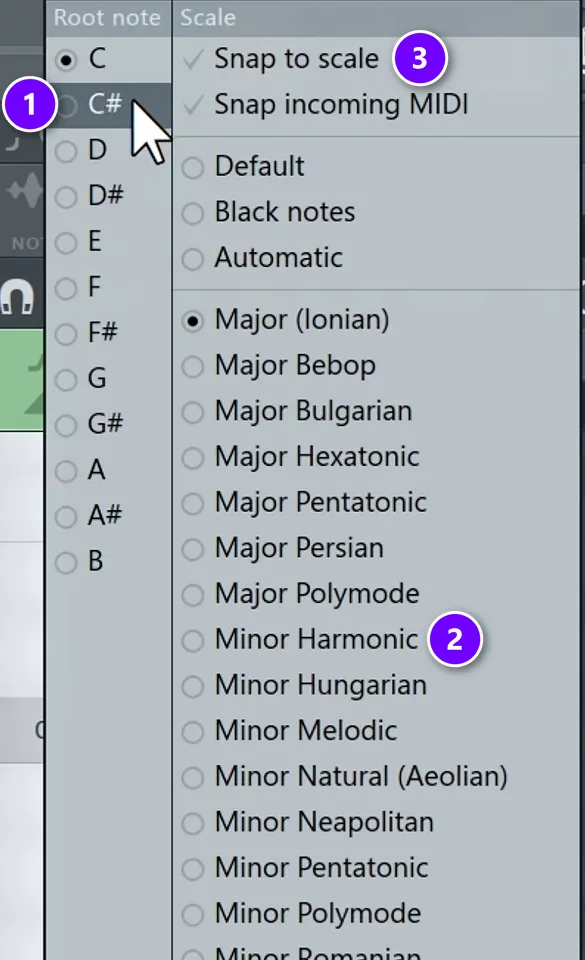
Right-click the small note icon next to the magnet in the Piano roll toolbar. Pick your root note (1) and your scale (2), and the rows that belong to the scale get highlighted. Turn on Snap to scale (3), or left-click that same icon, and new notes can only land inside the scale.
With snap off you can stumble on happy accidents, and with it on you work faster. On your first melodies, leave it on. Later, try other moods: the musical modes give the same notes a different color, and our beginner guide to scales shows how each scale is built.
Step 2: Start from the notes in your chords
This is the first of the four melody methods in Mix Elite’s free course, and the one to learn first: write the melody using only notes that are already in your chords. Those notes always fit, so nothing can clash. It also kills the blank-page feeling, because the chords show you where to start.
Show your chords as ghost notes
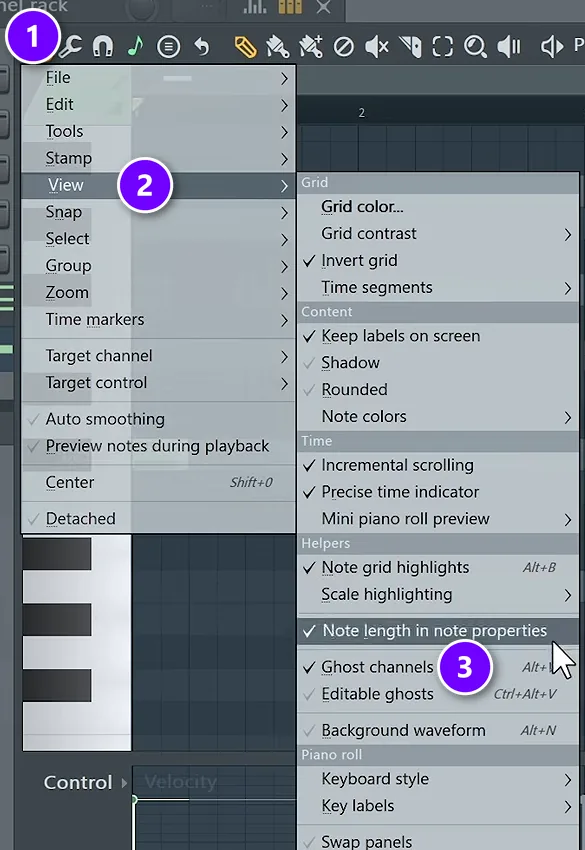
Open your melody’s Piano roll and click the small arrow at the top left (1). Go to View (2) and tick Ghost channels (3), or press Alt + V. Your chords now show up as grey ghost notes behind the melody, so you can see which rows to use.
Write on the grey rows
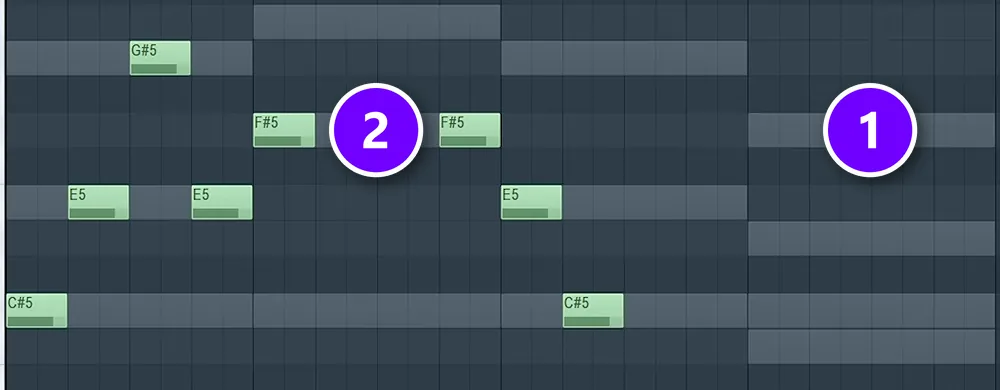
The grey bars are your chords (1). The green notes are the melody (2), and every one of them sits on a grey row. The first bar goes C#, E, G#, E, which is just the C# minor chord underneath it, played one note at a time.
Once that sounds good, try a few notes just off the chord notes. With snap to scale on, they’re still in key, and a quick in-between note can link two chord notes like a stepping stone.
Step 3: Find the rhythm first
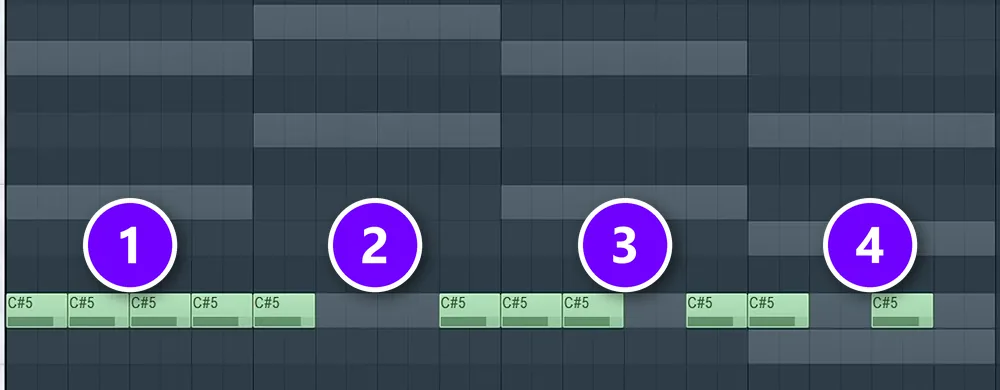
Rhythm is half of a melody, and it’s the half beginners forget. Here the same melody is flattened onto one note, so only the rhythm is left. Bar 1 has four notes (1), bar 2 has two (2), bar 3 has three (3), and bar 4 has two again, on different beats (4). No two bars share a rhythm, and that’s on purpose.
You can also build a melody rhythm first. Pick the Paint tool (the brush in the Piano roll toolbar) and paint a row of notes on one pitch across 4 bars. Delete a few so every bar gets its own pattern of notes and gaps. Then drag each note up or down to make the tune.
Max says this method “doesn’t really work as good as the first technique I showed you”, because the notes end up jumping up and down at random. Keep the rhythm you painted, but move each note to the nearest grey chord note from step 2. The line will flow instead of jumping.
Step 4: Write a short motif
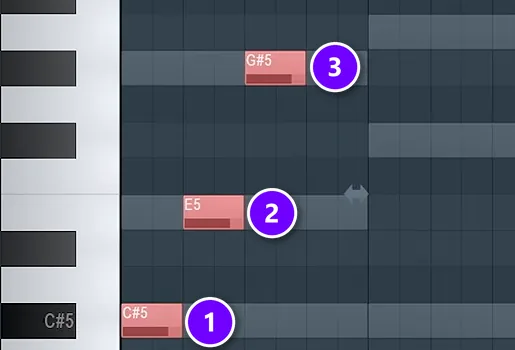
A motif is the seed of your melody. The one in the screenshot is just three notes climbing C# (1), E (2) and G# (3), the notes of the first chord, all in the first bar. That’s it.
Keep yours just as small: two to five notes, about one bar long, with a little gap so it can breathe. Draw it in with the pencil, or play it on your computer keyboard (step 7 shows how). Simple beats clever here. Use the whistle test from our drill melodies guide: if you couldn’t whistle it, it’s too complicated.
Step 5: Repeat it, then change one note at a time
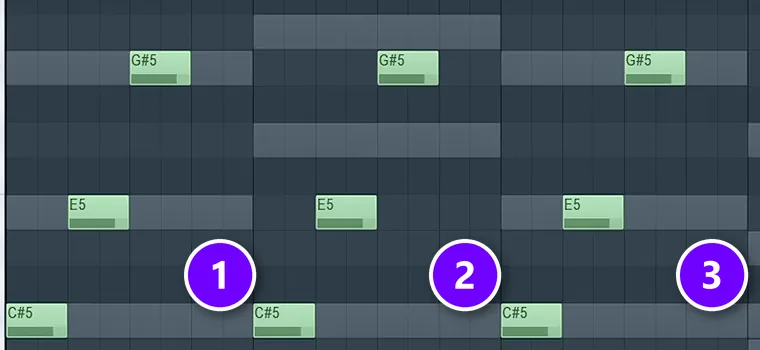
This is the third method in the course. Select the motif in bar 1 (1), hold Shift and drag a copy into bar 2 (2), then do it again for bar 3 (3). Ctrl + B also duplicates whatever you’ve selected.
Repetition is what makes a melody stick, because the ear learns it on the first pass and enjoys hearing it come back. Too much of it gets boring, though. So now you change things, slowly. Adjust one note at a time and listen, instead of deleting everything and starting over when a bar doesn’t land.
Small changes that work:
- Move one note up or down by one step in the scale.
- Swap two notes. In the course’s final version, the E and the G# swap places in each bar and the E moves later.
- Shift a single note earlier or later in the bar.
- Start the same shape on a different chord note, so it sits higher or lower.
- Turn it backwards: select the notes, press Alt + Y and flip them horizontally, a trick from Mix Elite’s trap melody tips video.
Step 6: Answer it with call and response
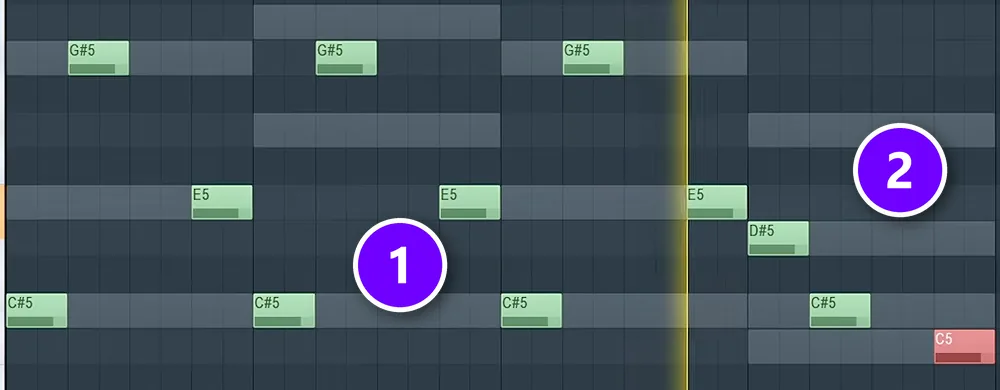
Now the fourth bar. The first three bars ask a question (1), and bar 4 answers it (2). In the example, the first three bars climb, so the answer steps down instead: D#, then C#, then C. That last C is the note right under C# in harmonic minor, so it pulls your ear back to the start every time the loop comes around.
Max says you “create some kind of question, right, and answer. This is what we usually do when creating melodies.” He calls his own version pretty cheesy, but it works, and cheesy is fine at this stage.
Call and response works at any size. Two bars can answer two bars, and in an 8-bar melody, bars 5 to 8 can answer bars 1 to 4. The answer usually ends on or near the root note, so it sounds finished. The question ends somewhere that wants to keep going.
Step 7: Improvise in key and keep the happy accidents
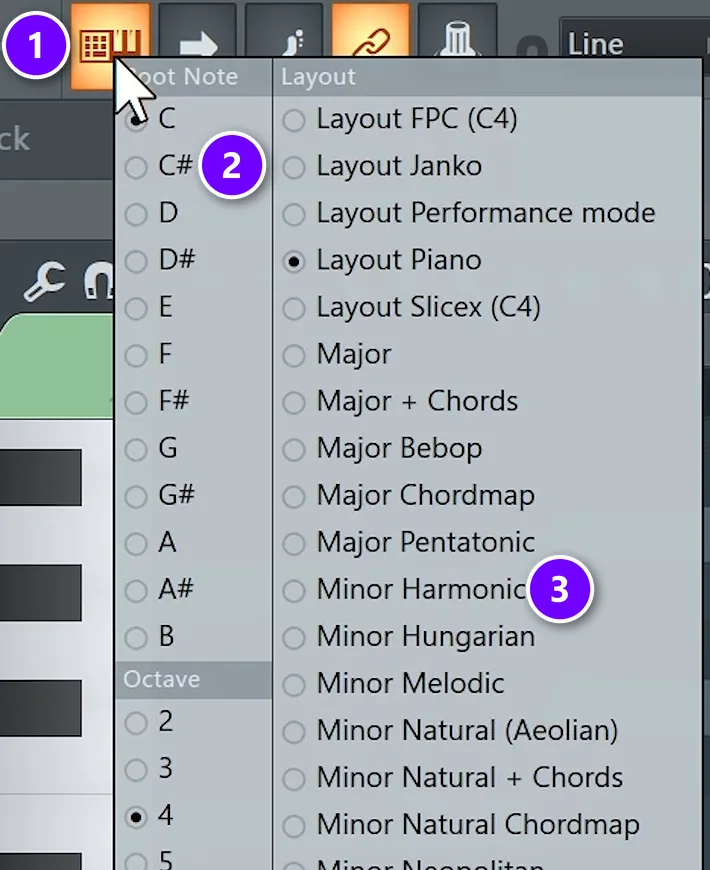
The fourth method skips the clicking. Right-click the typing keyboard to piano keyboard button (1), then choose the same root note (2) and scale (3) as your chords. Now every key on your computer keyboard plays a note in the scale, with the root on Z, A, Q and 1, so there are no wrong notes left to hit.
Max says it’s “a pretty good idea if you want to skip all the music theory”. Play along with your loop and keep whatever makes you smile. To record it, arm the record button, choose to record notes, and turn on the countdown.
The melody that made the final cut in Mix Elite’s free FL Studio course started as something Max played by accident on the typing keyboard. Improvising first and editing later is a real method, not cheating.
Forgot to record? Dump the score log
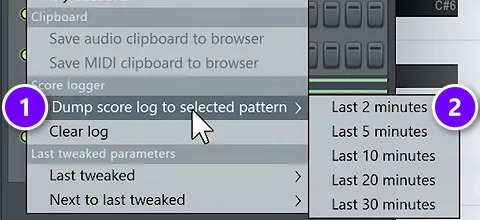
FL Studio quietly logs everything you play, even when you aren’t recording. Open the Tools menu, go to Dump score log to selected pattern (1) and pick Last 2 minutes (2). Zoom out with Ctrl + scroll, keep the bar you liked and delete the rest.
Then do one last cleanup: if a note sits right next to a chord note, move it onto the chord note. It will sit better with the chords.
This short Mix Elite video shows the in-scale keyboard trick, plus a way to get the same thing on a MIDI keyboard:
Want to watch all four methods in a row? They’re in Mix Elite’s free 4.5-hour FL Studio course, starting at 49:37.
Which notes and scales work best for a melody over chords?
Use the scale your chords are in, and land on a note of the chord that’s playing (its root, third or fifth) when each new chord starts. Fill the space in between with other notes from the same scale. For the fewest possible wrong notes, use the pentatonic version of your key.
- Chord notes are your targets. A basic chord has three notes: the root, the third and the fifth. Over C# minor those are C#, E and G#, which is exactly what the first bar of the example plays. They always fit, so put them where the ear notices most, like the start of a bar.
- Scale notes are the stepping stones. Notes between the chord notes keep the line moving. Keep them short and let them lead into the next chord note, as in step 2.
- Match the scale to the mood. Natural or harmonic minor suits trap, hip hop, R&B and emotional pop. Major sounds brighter and happier. If your chords are already written, their key decides for you.
- Pentatonic is the safe choice. It keeps five of the scale’s seven notes and drops the two that would make half steps, so almost nothing you play will clash.
Melody writing tips: what makes a melody catchy?
A melody is catchy when it’s simple enough to hum after one listen and it repeats a short idea with a small change each time. Most catchy melodies move in small steps, save their highest note for one big moment, and land back on the root note at the end. Check yours against this list:
- It repeats. A short idea that comes back is easy to remember.
- It changes a little. Each repeat moves one note or one rhythm, so it doesn’t go stale.
- It’s simple. If you can hum it after one listen, it’s simple enough.
- It moves in small steps. Most notes sit next to each other in the scale, with a bigger jump now and then for a moment you want people to notice.
- It has one high point. Save the highest note for one big moment instead of hitting it in every bar.
- It leaves space. Short gaps between phrases let the listener, and a singer, breathe.
- It ends at home. The last note lands on or near the root, so the loop feels finished.
Then test it the lazy way. Export the loop, go do something else for ten minutes, and notice if you’re still humming it.
Why does my melody sound repetitive, and how do I fix it?
A melody sounds repetitive when every bar has the same rhythm, every phrase ends on the root note, and nothing underneath it ever changes. Keep the repeat, because repetition is what makes a melody catchy, but change one thing each time it comes back: the rhythm, the last note, the direction or the octave.
Pick one or two of these fixes, not all of them at once:
- Give each bar its own rhythm. Move a note earlier or later, or start the second phrase on beat 2 instead of beat 1 (step 3).
- Change only the ending. Keep the first half of the repeat the same and change its last one or two notes.
- Stop ending every phrase at home. End the question on another chord note so it wants to keep going, and save the root note for the answer (step 6).
- Add one bigger jump. If every note sits next to the last one, leap up to a higher chord note once, at the high point, then step back down.
- Leave a gap. Delete a note or two. A short rest makes the next phrase hit harder.
- Change the chord under it. The same notes sound different over a new chord, so the melody can repeat while the song still moves.
For a chorus or a drop, try the whole melody an octave higher: select it and press Ctrl + Up arrow. Same notes, more energy.
Common melody mistakes and quick fixes
- Too many notes. Delete every other note and listen again. The melody is often hiding in there.
- The same rhythm in every bar. Move one or two notes in bars 2 and 4, then try the other fixes for a repetitive melody above.
- Random jumps. Move each note to the nearest chord note from step 2.
- Notes that clash with the chords. Turn on snap to scale and check the ghost notes.
- A melody buried in the chords. If it plays in the same range as the chords, select it and press Ctrl + Up arrow to move it up an octave.
What to write next
With a melody done, the next layer is the bass. The rule there is just as simple: follow the root note of each chord, and our guide on how to write bass lines walks you through it. For the theory behind every step above in one place, read our music theory guide for producers.
Tonight, keep it small: one loop, one motif played three times, and one answer. That’s a melody, and it’s yours.
THE 7-DAY MUSIC PRODUCER COURSE
Write the chords, then the melody, on Day 2
The 7-Day course spends Day 2 on music theory, chords and melodies: the 3-step chord progression formula, 4 easy ways to write melodies even if you’ve never touched a keyboard, and where to find pro-quality instruments, paid and free. You also download 30+ chord progressions to write over. It’s $27, and you have 60 days to decide if it was worth it.
Frequently asked questions
How do I write a catchy melody if I don’t know music theory?
Set FL Studio’s scale helper or in-scale typing keyboard to your song’s key, so every note you play fits. Write a short idea of three to five notes using the notes in your chords, repeat it twice, and change the fourth bar so it answers the first three. If you can hum or whistle it after one listen, it’s catchy enough to keep.
Why do my melodies sound so repetitive?
Usually every bar has the same rhythm, every phrase ends on the root note, and the chords under it never change. Keep the repetition, but change one thing each time the idea comes back: the rhythm, the last note, the direction, or the octave. Ending the first phrase on a note that isn’t the root also makes the melody feel like it’s going somewhere.
Which scale or notes should I use for a melody over chords?
Use the scale your chords are in, and land on a note of the current chord (its root, third or fifth) when each chord starts. Fill the gaps with other notes from the scale. Minor suits trap, hip hop, R&B and emotional pop, and major sounds brighter. A pentatonic scale is the safest start: five notes and no half steps, so very little can clash.
How do you make a melody if you can’t play an instrument?
Use FL Studio’s in-scale typing keyboard. Right-click the typing keyboard to piano keyboard button, pick your song’s root note and scale, and every key on your computer keyboard plays a note that fits. You can also click notes straight into the Piano roll, or record yourself humming over your chord loop on your phone and copy the tune note by note.
Should I write the chords or the melody first?
Either works, but chords first is easier when you’re starting out. Once the chords are down, their notes show you which notes the melody can use, and you can see them as ghost notes in the Piano roll. That’s the order Mix Elite’s free FL Studio course teaches: chords, then a melody on top, then a bassline that follows the chord roots.