“When working on hip-hop music, the main thing that I care about is that it has got to feel good, rhythmically and flow wise.”
Hip hop mastering means getting the beat loud while the 808 stays clean and the rap vocal stays on top. In FL Studio: cut the rumble just under your lowest 808 note, make everything under about 120 Hz mono, shave the drum peaks with a clipper, compress the low, mid and high bands apart in Maximus, then push the volume until you hear distortion and back off 1 to 2 dB.
Your beat sounds huge in your headphones. Then you play it in the car and the 808 turns to mush, or the rapper sinks behind the snare. Turn the limiter up to fix it, and the drums lose their knock.
None of that means the beat is bad. Hip hop is tricky to master because one sound, the 808, carries most of the energy, and the vocal has to ride on top of it. Below is the chain from two of Mix Elite’s mastering tutorials, taught by Max, the founder of Mix Elite (the stock-plugin one has passed a million views), set up for 808s and rap vocals, with a real FL Studio screenshot for every click.
Table of Contents
What makes hip hop mastering different?
Hip hop mastering uses the same tools as any genre, but it has to protect three things: a heavy 808 that stays steady and mono, a rap vocal that stays on top, and drums that keep their knock while the beat gets loud.
Mastering is the final polish on a finished stereo mix: small EQ moves, gentle compression and the last push in loudness. If the word is new to you, start with what mastering is (and what it can’t fix). The tools are the same in every genre. Mix Elite’s loud-master video says the same steps apply to EDM, trap and hip hop alike. What changes in hip hop is where you have to be careful:
- The 808 carries the weight. Low notes hold the most energy, so a long 808 decides how loud the whole master can get. Left alone, it pumps the compressor and smears on small speakers.
- The vocal is the star. People listen for the words. If the master pushes the rapper behind the beat, nothing else matters.
- The drums need their knock. Kicks, snares and claps should hit hard. Squash them and the beat feels flat, even when it’s loud.
- It gets played everywhere. Phones, earbuds, cars and club systems. The low end has to hold up on all of them.
- It’s often mastered loud. So you need clean ways to get there, like clipping and careful limiting, not just more gain.
Hip hop mixing and mastering: fix these in the mix first
Most mastering problems in rap are mix problems that show up late. As the loud-master video puts it, a master that won’t get crisp is mostly down to what happened while mixing. So before you load a single plugin on the master, check these five things:
- The kick and the 808 aren’t fighting. They share the same low notes. Sidechain the 808 to the kick, or let one of them own the sub. Our guide to mixing the kick and 808 shows both ways.
- The vocal is loud and clear in the mix. You can’t turn up only the vocal later. Our hip hop vocal mixing tips cover level, EQ and space.
- The lows are mono. Keep everything below 100 Hz in mono while you mix.
- Loud drums are already under control. Clip single tracks and whole groups in the mix to tame their peaks.
- The master channel is empty. No limiter, no clipper. Those go in the mastering project.
Then keep your mastering EQ small. Max’s rule from Mix Elite’s stock-plugin mastering tutorial: “Make sure that the changes in your EQ do not exceed 2 dB. If you feel like you need to boost a lot in the bass to make it sound more thick, then just go back to your mix and fix it there.”
How to master hip hop in FL Studio, step by step
What is the best plugin chain order for mastering hip hop?
EQ first, then a clipper, then multiband compression, then the limiter, with a loudness meter last. In FL Studio that’s Parametric EQ 2 for the low cut, a mid/side EQ in Patcher, an optional clipper like GClip, Maximus for the low, mid and high bands with its MASTER band as the limiter, then Youlean to read the loudness.
Every plugin in this chain comes with FL Studio, except one optional free clipper for loud trap and the free meter. For every setting in every genre, see Mix Elite’s complete guide to mastering in FL Studio. This page sticks to what matters for 808s and rap vocals.
Watch the loud, clean master video first. It’s short, and it shows the low cut, the mid/side trick, the clipper and Maximus at work. The steps below pair it with his stock-plugin tutorial.
Step 1: Render the beat and find the loudest part
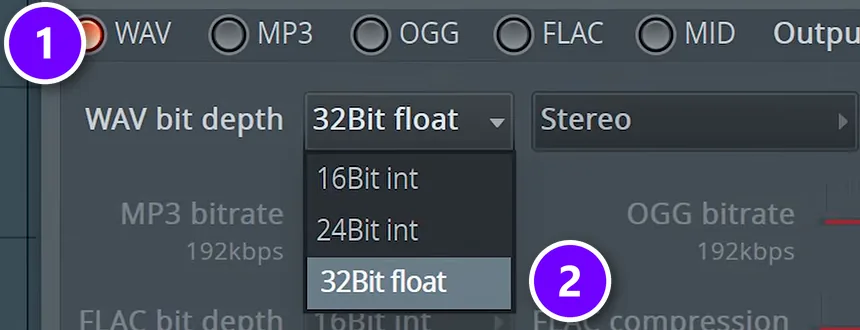
In your mix project, leave the master channel empty and export the beat with Ctrl + R. Pick WAV (1) and set WAV bit depth to 32Bit float (2), the way the video renders the mix before mastering it. Then load that WAV into a new, empty project. That’s where you master.
Loop the busiest part of the song while you work. In hip hop that’s usually the hook, where the 808, the drums and the vocal all play at once. Get the hook right and the rest follows.
Step 2: Cut the rumble under your lowest 808 note
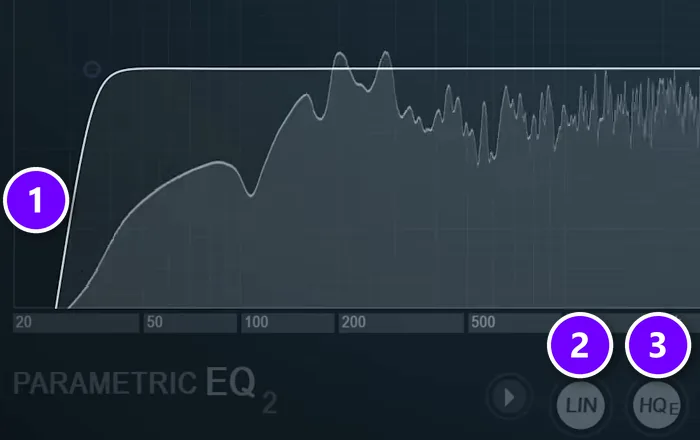
Load Fruity Parametric EQ 2 in the first slot of the master and pick its 30Hz + 18kHz cut preset from the Presets menu. Then move the low cut (1) so it sits just under the lowest note your 808 plays. The rule from the video: this cut never goes lower than 30 Hz.
Your 808 tells you where. Open its notes in the Piano roll and find the lowest one, slides included. A low D sits at about 37 Hz and a low E at about 41 Hz. The track in the video is in E, so the roll-off starts just under 41 Hz, and anything below it is rumble you don’t need.
Leave LIN (2) and HQ (3) off on this EQ. In the video, linear phase and oversampling made the master sound worse here, so save them for the final limiter. If the very top sounds harsh, roll it off at about 16.5 kHz. Most of a hi-hat’s bite sits below that.
Step 3: Make everything under 120 Hz mono
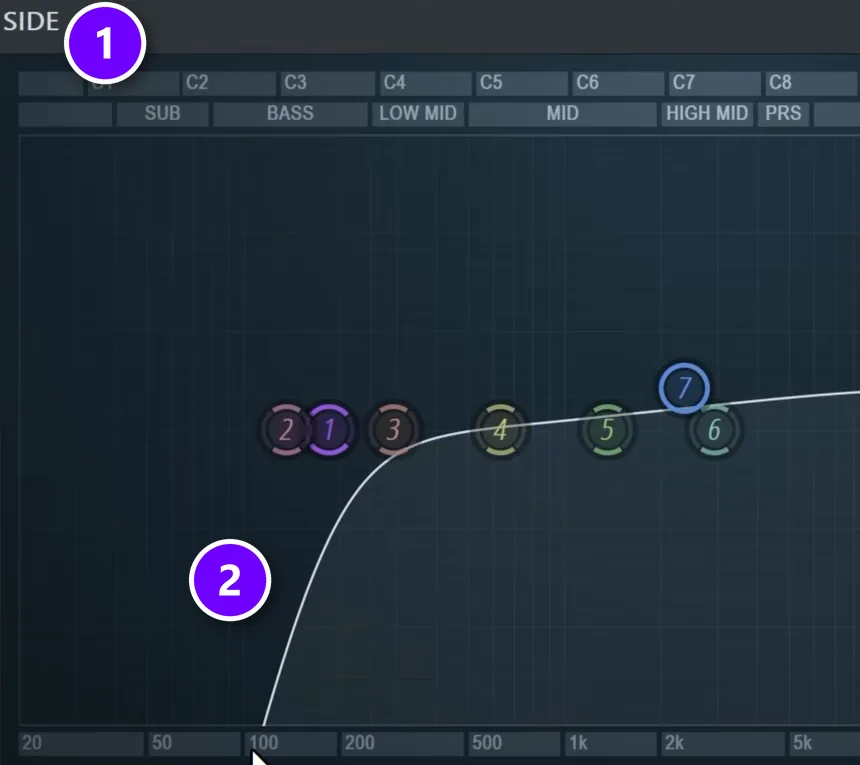
This is the step that saves your 808 on phones and in clubs. Lots of 808s and basses carry stereo width from chorus, wide saturation or stereo samples. On a mono speaker the left and right sides can cancel each other out. As Max explains it: “Side is what creates stereo width effect and stereo width in low frequencies is bad, very bad.” In a club it can even leave spots where the bass disappears.
The video uses a free mid/side EQ preset for Patcher, FL Studio’s built-in plugin for building your own chains (the download link is under the video). The EQ on its SIDE path (1) only touches the stereo part of the sound. Raise its side low cut until the curve (2) rolls off from about 200 to 300 Hz down, so nothing below about 120 Hz is left in the sides. The middle, where your kick, 808 and vocal live, stays untouched.
Step 4: Shave the peaks with a clipper
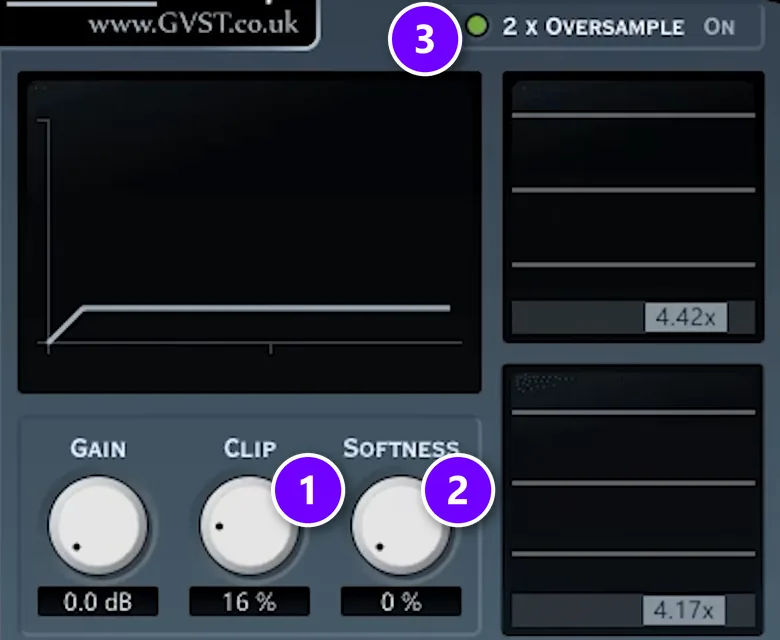
Zoom in on a loud trap beat and you’ll see thin spikes from snares, claps and 808 hits sticking up above everything else. A limiter tries to be smart about those spikes and softens each hit to squeeze it under the ceiling. A clipper is dumb, and Max says that’s exactly why he likes it. It just chops off the tip.
The video uses GClip, a tiny free plugin, right after the EQ. Push CLIP (1) until you just barely hear the knock of your drums change, then back it off by 10%. Keep SOFTNESS (2) at 0% and switch 2x OVERSAMPLE on (3). If you’d rather stay with stock plugins, Fruity Soft Clipper does a similar job with a softer edge.
Skip the clipper on soft, dynamic beats. It earns its place when you want trap-level loudness without the limiter pumping.
Step 5: Decide if the beat is too punchy or too smooth
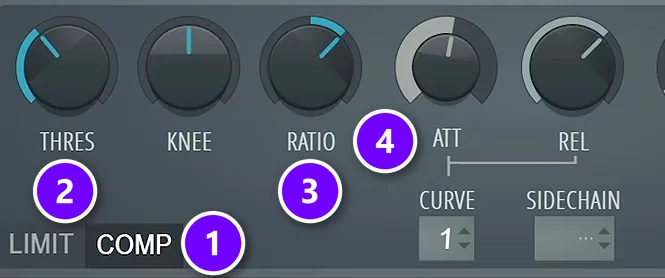
Before any compression, ask one question. Is the track too punchy, or too smooth? If it already feels right, you may barely need any. To test it, load Fruity Limiter and switch it to COMP mode (1). Pull the threshold (2) down and set the ratio (3) to about 2:1, and no more, for about 2 dB of gain reduction.
Then the attack (4) does the shaping. Too punchy, with the kick and 808 jumping out? Use a very fast attack of 0 to 2 ms. Too smooth, with drums that lack knock? A slower attack of about 40 to 60 ms lets the first hit of each kick through, so it clicks and pops more.
Listen closely and you’ll hear the catch. A single compressor turns the whole beat down every time the kick or the 808 hits, so the rap vocal dips with it. That’s why the next step swaps it for Maximus.
Step 6: Compress the low, mid and high bands apart in Maximus
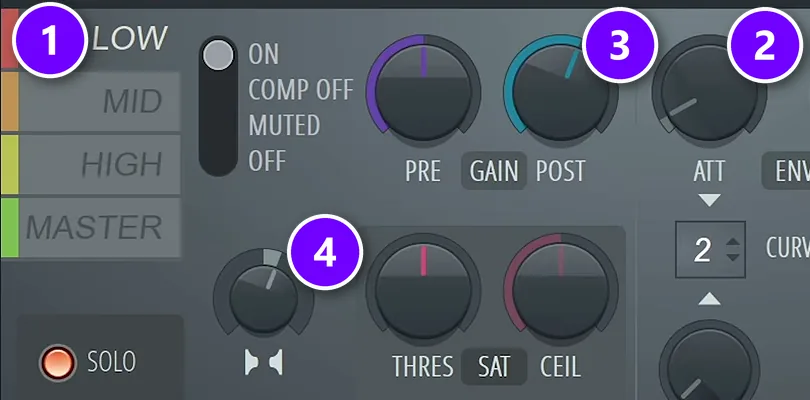
Maximus splits the beat into LOW, MID and HIGH bands and compresses each one on its own, so a big 808 no longer drags the vocal and the hats down with it. Don’t hunt for perfect numbers. The tutorial’s advice is to compress each band just a little, which already sounds better than one compressor on everything.
Start with the LOW band (1). Give it a fast attack (2) of about 1 to 2 ms, because the low end should stay as steady as possible, and a bouncing 808 sounds amateur. Pull about 3 dB of gain reduction, then win it back with POST (3), about 2.5 dB in the video’s example. On the MID band, use a slower attack of about 20 ms so the snare and clap still cut through, with the same 3 dB down and 2.5 dB back. The HIGH band needs only about 2 dB.
While the LOW band is selected, turn its stereo knob (4) toward merged by about 15 to 20%, so the lows sit even more in mono. Open the mids and highs up a little the other way, but only a little: too much width sounds weird.
Step 7: Get loud with Maximus’s soft clipper
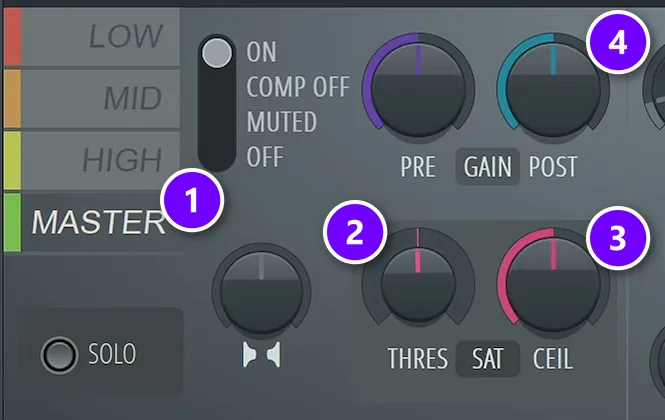
Stay in Maximus and click the MASTER band (1). Turn THRES (2), the soft saturation threshold, to about 1%. The left side of the knob is mode A and the right side is mode B, so pick the one you like by ear. On its own it barely touches the sound.
Set CEIL (3) to -1 dB if the song will be turned into an MP3 or streamed. If you only ever hand over WAV files, -0.3 dB is fine. The extra room is for the conversion, which can push peaks over the ceiling. Then raise POST (4) on the loudest part of the song until you hear distortion, and turn it back down 1 to 2 dB. That’s your loudness.
Judge the distortion on the hook, not the intro. The loudest part is where the 808 and the vocal break up first.
Step 8: Make the hook hit harder
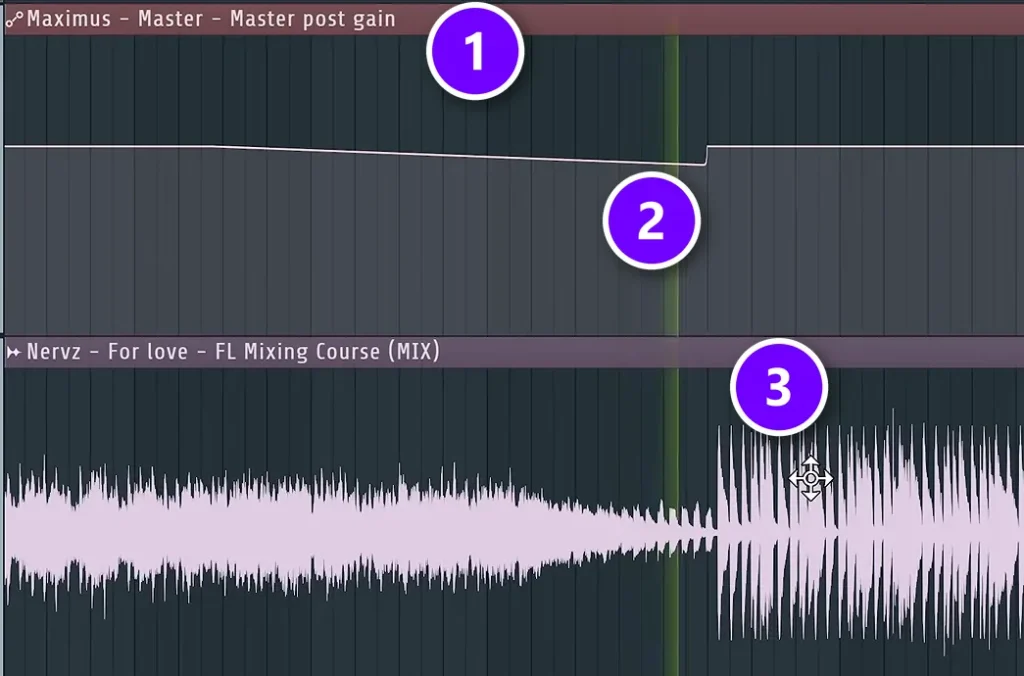
The last mastering move is automation. Right-click POST on the MASTER band and choose Create automation clip. The new clip (1) lets you lower the volume by about 2 dB in the bars before the big moment (2), then jump back up when it lands (3). In the video’s EDM example that’s the drop. In a rap song, try it before the first hook or the moment the 808 comes in. The hook feels bigger without the master getting any louder.
Step 9: Export WAV and MP3
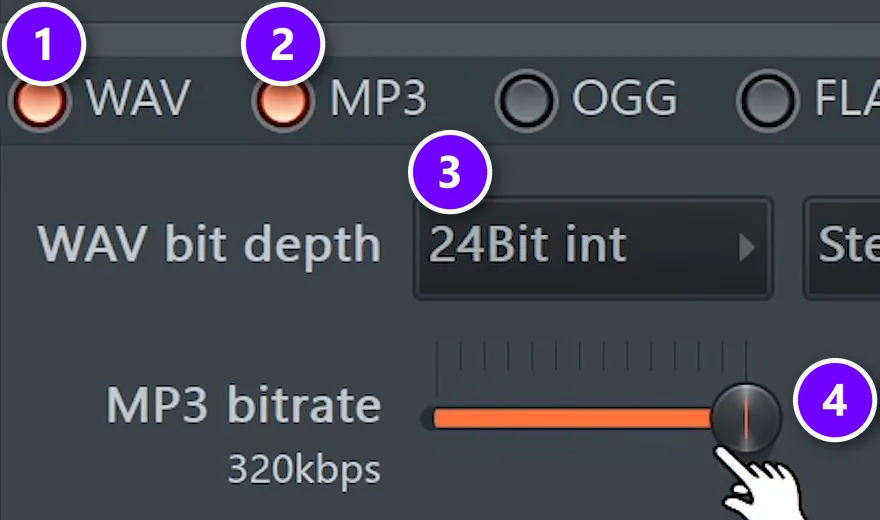
Press Ctrl + R again. Tick both WAV (1) and MP3 (2) to get both files from one render. Set WAV bit depth to 24Bit int (3) and the MP3 bitrate to 320kbps (4), then turn on Dithering in the Quality section. Those are the export settings from the video, and they work for streaming, beat stores and sending to an artist.
What LUFS should a hip hop or trap master be?
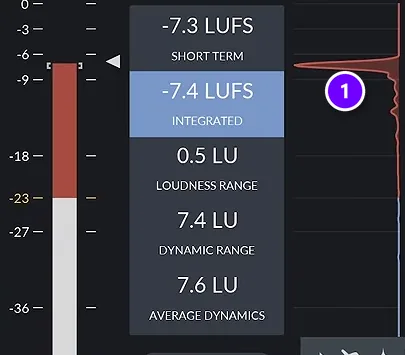
There’s no official number. Spotify plays songs at about -14 LUFS by default, but that’s the level it plays at, not a rule you must master to. In Mix Elite’s loud-master video, Max aims for at least -8 to -6 LUFS integrated on his electronic tracks; for rap, push until just before it sounds worse and match a reference in your style.
Spotify turns songs up or down to -14 LUFS by default (LUFS measures loudness the way ears hear it), so a louder master simply gets turned down. Its loudness guide suggests mastering to about -14 LUFS integrated, with true peaks below -1 dB, or below -2 dB if your master is louder than that. Apple Music and YouTube publish no LUFS target at all. Our guide to mastering for streaming covers each service.
So don’t chase a number. The first way is the one from Step 7: as loud as the song goes before you hear distortion. The second is a reference track, as Max says: “take your favorite track in the similar genre, put it next to yours, measure the LUFS of it and put your track as loud as this reference track is.”
Put a free loudness meter such as Youlean Loudness Meter last on the master. Play the loudest part of the reference with your other mastering plugins switched off, and read its integrated loudness (1). Then switch them back on and match it with your hook. Pick a reference from the same corner of hip hop as your beat, because a soft boom-bap record and a loud trap song sit at very different levels.
Why does my rap master sound quieter than commercial tracks?
Usually because the peaks aren’t under control. Big drum and 808 peaks hit the limiter first, so the master starts to distort while it’s still quiet. Clip the drums in the mix and on the master, compress the bands apart, then push until just before it distorts.
The loud-master video opens with exactly this. One render stalls at about -10 LUFS and distorts if you push it any harder. The same track, with the clipping and band compression from this guide, reaches about -5 to -6 LUFS and still sounds clean. Part of the fix is in the mix, too: pro tracks carry less sub than you might think, since the sub uses up the most energy while adding the least loudness.
How to master rap vocals and beats so the voice stays on top
Why does the limiter push my vocals into the background?
Because a limiter turns the whole song down whenever a big peak hits, and in rap the biggest peaks are the kick, snare and 808, so the vocal dips every time they play. Shave those peaks with a clipper first, compress the low band on its own in Maximus, and keep the vocal clearly on top in the mix.
Here’s the hard truth. Once the beat and the vocal are one stereo file, there’s no knob for the vocal alone. If the rapper is buried, fix it in the mix. What the master can do is stay out of the voice’s way, and five habits help:
- Don’t let the low end drive the compressor. That’s the point of Step 6. With the bands split, a big 808 can’t duck the vocal.
- Keep the middle in the middle. The vocal sits in the center of the stereo picture, so making the mids much wider pulls it back.
- Keep EQ moves under 2 dB. A small lift in the upper mids, where words get their clarity, is fine. A big boost means the mix needs work.
- Back off when the words crunch. If the clipper or POST gain starts to fuzz the hard sounds of the vocal, like t, k and s, you’ve gone too far.
- Compare with a reference. Listen to how loud the vocal sits next to the 808 in a song you love, then check yours.
Then try the simplest test there is and turn your speakers down low. If you can still follow every word, the vocal is where it should be.
How to master a trap beat: what changes
How do you make a trap beat loud without the 808 distorting?
Control the 808 before you push. Cut the rumble just under its lowest note, make everything under about 120 Hz mono, shave the drum peaks with a clipper and give Maximus’s LOW band a fast attack. Then raise the loudness until you hear distortion and back off 1 to 2 dB.
The chain stays the same, but trap pushes a few things harder. If you’re still building the beat itself, start with our guide to making a trap beat. For the master, watch these three:
- 808 slides and long tails. A glide can drop below your root note, so check the lowest note of every slide before you set the low cut in Step 2. Long 808 tails also fill the low band, which is why the LOW band in Maximus gets its fast attack.
- Bright hi-hat rolls. Fast hats get harsh when you push the loudness. If they start to sting, clip a little less or use the gentle roll-off at about 16.5 kHz from Step 2.
- The loudness comes from clipping. Trap is often pushed hard. The order for a loud, clean master is EQ, clipper, multiband compression and then the limiter, so the peaks are gone before the limiter has to work.
If you sell or send beats, give the rapper a loud preview so the beat sounds finished, but keep an unmastered WAV rendered with an empty master channel. The full song gets mastered once the vocal is on it.
How do you fix a muddy low end in a rap master?
Most mud in a rap master starts in the mix, where the kick, the 808 and other parts fight over the same low notes. Fix that there first. Then, on the master, cut the rumble under the lowest 808 note, make everything under about 120 Hz mono and keep the LOW band steady in Maximus.
Work through it in this order:
- Give the subs to two sounds. Mix Elite’s video on mixing mistakes every beginner makes keeps only the kick and one sub bass in the subs, with a low cut at 100 Hz on everything else, and makes the bass duck when the kick plays.
- Cut the rumble. Set the master’s low cut just under the lowest 808 note, slides included, and never below 30 Hz (Step 2).
- Try a shelf if it turns boomy. If the low cut leaves the track boomy, the loud-master video suggests a low shelf instead.
- Make the lows mono. Stereo bass can cancel itself out on mono speakers and in clubs, so cut the lows from the sides until everything under about 120 Hz is mono (Step 3).
- Keep the low band steady. A fast 1 to 2 ms attack on Maximus’s LOW band holds a long 808 in place (Step 6).
- Stay under 2 dB. If the lows need a bigger EQ move than that, go back to the mix.
How to check your master on phones, earbuds and in the car
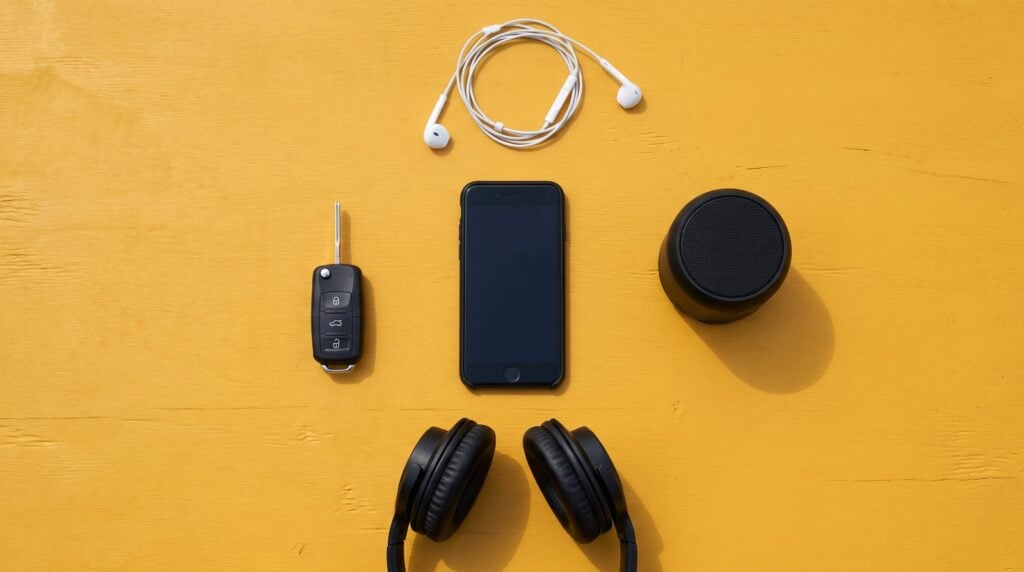
Your studio isn’t where people will hear the song. Check the master in at least five places, and play your reference track in each one at the same volume:
- A phone speaker. Tiny speakers can’t play deep sub notes, so you hear the 808 through its higher overtones. If it vanishes, the fix is in the mix, usually a little saturation on the 808.
- Earbuds. Every word should be clear, and the hi-hats shouldn’t sting.
- A car. The classic hip hop test. The low end should feel big but not boomy, and you should still hear the kick under the 808.
- One small speaker. Most small single speakers play in mono. If the bass drops out here, go back to Step 3.
- Your own speakers, turned low. Quiet listening shows whether the vocal and the drums still lead.
Write down what bugs you on each one, then fix it in the right place: balance problems in the mix, loudness and harshness in Steps 4 to 7. Start with one beat tonight, run it through Steps 1 to 7, and take it for a drive tomorrow. When it holds up in the car, it’s ready.
DAY 6 OF THE 7-DAY MUSIC PRODUCER COURSE
Master your first beat on Day 6
On Day 6, Mix Elite’s 7-Day Music Producer Course teaches mastering: a 3-step mastering chain that makes your song loud, clear and punchy everywhere, the inter-sample clipping mistake and an easy way to always avoid it, and the best export settings for streaming. You also download a final mix to practice on and a mastering chain preset pack. The course is made for EDM, house, trap, hip-hop and pop, it’s $27, and you get 60 days to decide if it was worth it.
Frequently asked questions
What LUFS should a hip hop or trap master be?
There’s no official number. Spotify plays songs at about -14 LUFS and turns louder masters down, but that’s the level it plays at, not a rule you must master to. In Mix Elite’s loud-master video, Max aims for at least -8 to -6 LUFS integrated on his electronic tracks. For rap, push until just before it sounds worse, then match a reference track in your style on a loudness meter.
How do I make a trap beat loud without the 808 distorting?
Control the low end before you push. Cut the rumble just under the 808’s lowest note, keep everything under about 120 Hz mono, shave the drum peaks with a clipper and give the low band in Maximus a fast attack. Then raise the loudness until you hear distortion and back off 1 to 2 dB.
Why does my rap master sound quieter than commercial songs?
Usually because big drum and 808 peaks hit the limiter first, so the master distorts before it gets loud. Clip single tracks and drum groups in the mix, put a clipper after the EQ on the master, compress the bands apart in Maximus, then push. In Mix Elite’s loud-master video, the same track goes from about -10 LUFS to about -6 this way.
What is the best plugin chain order for mastering hip hop?
EQ, then a clipper, then multiband compression, then the limiter, with a loudness meter last. In FL Studio that’s Parametric EQ 2 for the low cut, a mid/side EQ in Patcher to make the lows mono, an optional clipper like GClip, Maximus for the low, mid and high bands and its MASTER band for the final loudness, then Youlean.
Why does the limiter push my vocals into the background?
A limiter turns the whole song down whenever a big peak hits, and in rap those peaks are usually the kick, snare and 808, so the vocal dips with them. Shave the peaks with a clipper first, compress the low band on its own in Maximus, and keep the vocal clearly on top in the mix, because the master can’t turn up the voice alone.