


“Words mean more than what is set down on paper. It takes the human voice to infuse them with the shades of deeper meaning.”
To mix hip hop vocals, tune them, EQ out the rumble, compress hard (about 8:1) so every word is clear, then de-ess and send the reverb to its own low-cut, ducked track. Let the beat dip a little whenever the vocal plays, so the rap sits inside the beat instead of on top of it; R&B vocals take the same chain, only gentler.
The beat knocks. Then the vocal goes on, and something feels off. The words are hard to catch, the S sounds sting, or the voice just sits on top of the beat instead of inside it. Max, the founder of Mix Elite, calls that last one probably the most common vocal mistake of all.
This guide follows Mix Elite’s vocal mix of a melodic trap song in the exact order it was done, with a screenshot of every setting in FL Studio. It works for rap, trap and R&B, and you’ll find a free or stock option for almost every paid plugin.
Table of Contents
What to do before you mix hip hop vocals
No mix can save a weak take. As Mix Elite’s free 4.5-hour FL Studio course puts it, great vocals start with great singing or rapping. Record the vocal raw, with no effects on it, and always record a few takes so you can keep the best parts.
A typical hip hop session has three kinds of vocals:
- The main vocal, the lead that carries the lyrics.
- Ad-libs, the short shouts and echoes between the lines.
- Doubles, the same lines recorded a second time to make the lead feel bigger. The simplest way is to record the main part twice and cut the double down to the lines you want.
Before you add any plugin, even out the volume. When a rapper moves closer to the mic or leans back, the level jumps, and every effect you add later reacts to those jumps. Our vocal mixing guide shows how to fix that with Edison’s volume envelope in a few minutes.
What order should EQ, compression and de-essing go in?
EQ goes before compression. De-essing comes after it. Mix Elite’s chain runs tuning, EQ, compression, OTT, saturation and de-essing, then a final EQ, with the reverb on its own track. EQ first stops the compressor from reacting to rumble. The de-esser sits late because compression and EQ boosts can make S sounds sharper.
- Tuning, so every plugin after it works on a vocal that is already in key.
- EQ: a low cut for rumble and a lift in the presence range.
- Compression at about 8:1, so every word is easy to hear.
- OTT at 15 to 20% depth for a thicker vocal.
- Saturation, only if the beat is dirty.
- De-essing, to catch the S sounds the chain brought up.
- A final EQ to clean up whatever is left.
Reverb and delay stay out of this chain. They go on their own mixer track, low-cut and ducked, so they never get squashed along with the dry voice (step 8).
How to mix hip hop vocals in FL Studio, step by step
Give every vocal its own mixer track and a bus. Then run the lead through tuning, EQ, about 8:1 compression, OTT, a little saturation and a de-esser, send the reverb to a separate ducked track, and finish with a final EQ and a check on other speakers.
The video below shows the whole mix on a melodic trap vocal. The steps under it give you every setting.
Step 1: Give each vocal its own mixer track and a bus
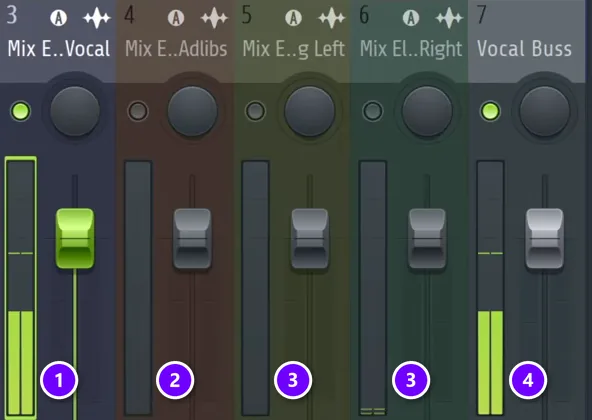
Right-click each vocal’s track in the Playlist, set Track mode to Audio track and give it its own mixer track: the main vocal (1), the ad-libs (2) and the doubles (3). Then select those tracks, right-click the small arrow at the bottom of an empty mixer track and choose Route to this track only. That track is now your vocal bus (4), so one fader turns every vocal up or down.
Step 2: Tune the vocal first
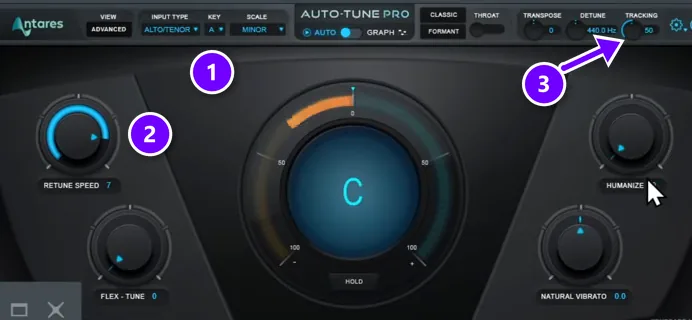
Tuning goes first, so every effect after it works on a vocal that’s already in key. The video uses Antares Auto-Tune: set the input type to the singer’s range and pick the song’s key and scale (1), keep Retune speed between 5 and 10 (2), and raise Tracking (3) when the recording is clean.
No Auto-Tune? FL Studio’s NewTone and the free edition of Graillon do the same job. In Graillon, set Smooth to about 10 ms: 1 ms sounds robotic and about 20 ms sounds soft. Our guide on how to tune vocals in FL Studio walks through both.
Step 3: Clean it up with EQ (presence, not treble)
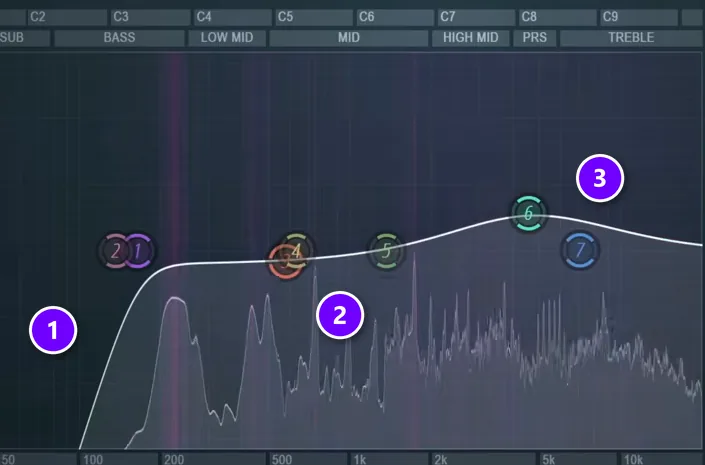
Next, an EQ cleans the vocal before any compression. In Fruity Parametric EQ 2, add a steep low cut (1) to remove rumble, shape the body in the mids (2) and add a gentle lift in the presence range (3) instead of boosting the very top.
Don’t cut too high on the lead, though. Below about 100 Hz there’s nothing you need, but cut much higher and the vocal turns thin. For hip hop, Max says “you’ll want to have a little bit more body to be a lot more in front of the face of your listeners.” Ad-libs and backing vocals can lose that body. The lead can’t.
Why presence instead of treble? Sometimes a vocal doesn’t need brightness at all. It needs presence. The harsh highs get handled later by the de-esser anyway.
Step 4: Compress hard so every word is clear
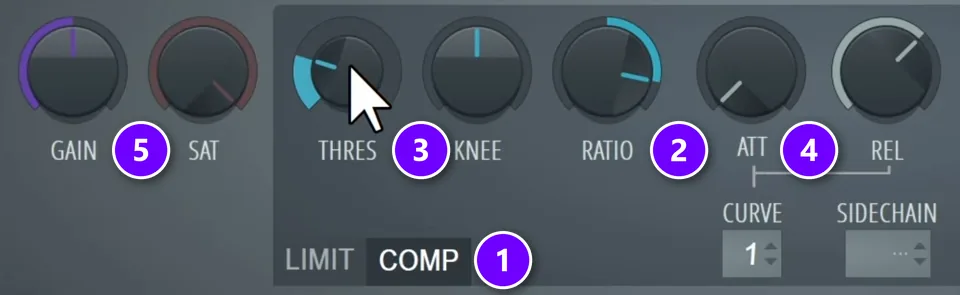
Load Fruity Limiter and switch it to COMP (1). Set the ratio to about 8:1 (2) and pull the threshold down (3) until the compressor works on the accents and uneven peaks, then lower it a few dB more. The result is a flat, steady vocal where every word is easy to understand.
The attack (4) is the setting most people overlook. It can stay instant, but when a vocal needs to cut through the beat, start at 25 ms and go up to 40 ms, so the start of each word slips past the compressor. Keep the release short, around 150 ms, so it lets go before the next word. Then turn up Gain (5) to win back the volume the compression took.
Want every knob explained? Our guide on how to compress vocals covers them all, plus how to tell when you’ve gone too far.
Step 5: Add OTT for a thicker vocal
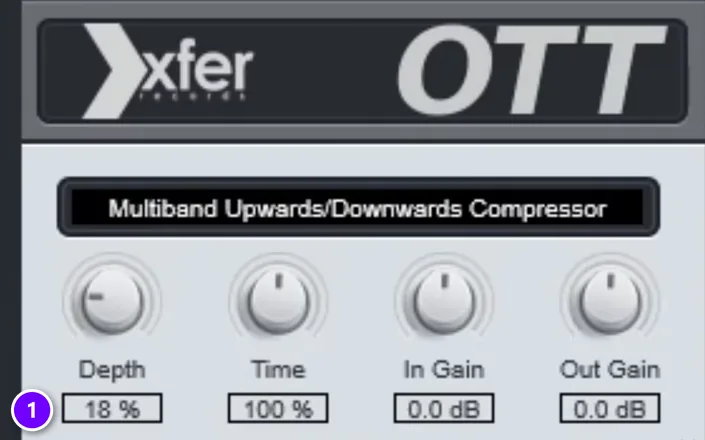
Then add OTT, a free multiband compressor from Xfer Records, at about 15 to 20% depth (1), depending on the style. It thickens the vocal and lifts small details. It also changes the tone a little, so go back and adjust the EQ if you need to.
Step 6: Saturate a little if the beat is dirty
A clean vocal over a gritty, distorted beat can sound pasted on. In that case, add a bit of saturation so the vocal shares some of the beat’s dirt. The video uses Soundtoys Decapitator here, and FabFilter Saturn 2 on just the high end works too. No extra plugins? Fruity Limiter has a SAT knob, just watch that it doesn’t squash the vocal even more.
Keep it subtle. The main vocal should never sound audibly distorted, only carry a little background dirt. Using the same distortion on the vocal that you used on the beat helps the two sound like one record.
Step 7: Tame the harsh S sounds
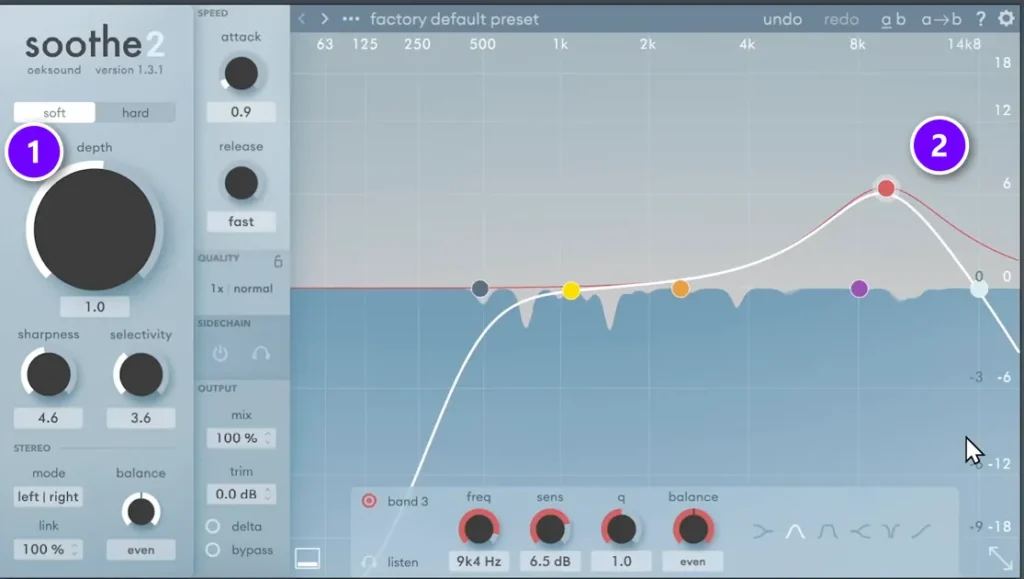
S sounds usually sit somewhere between 4 and 8 kHz. Cutting that area with a normal EQ makes the whole vocal darker, so use a de-esser that only reacts when an S hits. The favorite in this mix is Soothe2 by oeksound, with a low depth (1) and its focus on the S range of the singer (2). FL Studio’s Maximus has de-essing presets too, and here’s how to de-ess with Maximus.
Then comes the most surprising tip. Max says: “If you want clearer sounding vocals, you actually go really low on the de-essing or not do it at all.” Heavy de-essing makes a vocal darker and dirtier. That can be the sound you’re after, but it won’t sound clear.
Step 8: Add reverb with a low cut
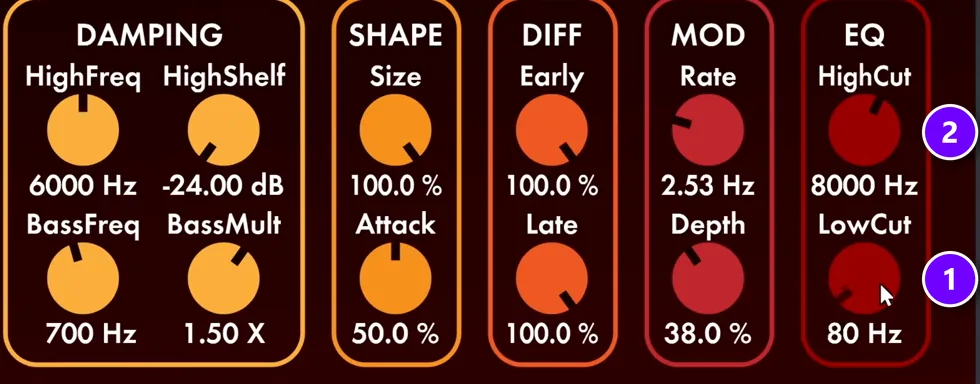
For depth, add a reverb that ducks while the vocal plays, so it fills the gaps between lines without blurring the words. In this mix it’s Valhalla VintageVerb inside a sidechained reverb preset. Always low-cut your reverb (1), and you can trim the very top too (2) so the brightest frequencies don’t wash out.
You can build the same ducking reverb with stock plugins. Our vocal mixing guide shows how to add reverb without washing the vocal out.
Step 9: Finish with a final EQ and a car test

A last EQ can clean up low end that the saturation added, or lift the top a touch. Then leave your desk and check the vocal on other systems, like your car, because a vocal that sounds right in your headphones can sound too bright somewhere else.
How to mix ad-libs
Ad-libs bring energy to the gaps between lines. They always add a ton of emotion, so even if your rapper didn’t plan any, it’s often worth recording a few.
Start by copying the main vocal’s chain: right-click the main vocal’s mixer track, open File and drag the Save mixer track state item straight onto the ad-lib track. Then change it so the ad-libs sit behind the lead:
- Turn them a few dB under the main vocal.
- Cut more low end and some of the top, so mostly the mids are left. They don’t need the lead’s body or presence.
- Speed up the retune speed for a hard, robotic effect like Travis Scott’s, if it suits the song.
- De-ess them harder, since they aren’t up front.
- Use reverb without ducking. Washing out ad-libs is fine, just low-cut it.
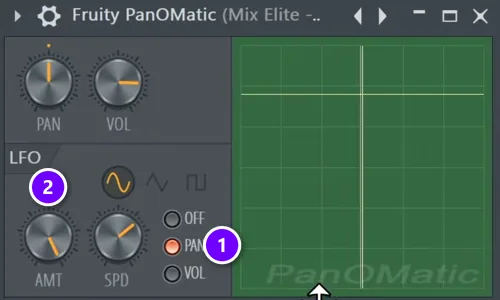
- Make them move with Fruity PanOMatic: set the LFO to PAN (1), turn the amount all the way up (2) and speed it up a little. The free PanCake by Cableguys works too.
- Add a ping-pong delay with a band-pass filter, placed before the reverb, so the ad-libs fill more of the space.
How to mix vocal doubles and backing vocals
Doubles should make the lead feel bigger without sounding like a second voice. In Mix Elite’s vocal layering tutorial, Max puts it simply: “we want to make it feelable and not audible.”
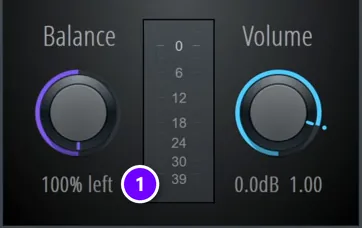
Pan one double all the way left and the other all the way right. Use Fruity Balance in an effect slot (1) instead of the mixer’s pan knob, which gives you more control. Then copy the main vocal’s chain and change five things:
- Band-pass them, a little more gently than the ad-libs.
- Compress them hard so they never poke out, and add a gate if you hear background noise.
- De-ess them hard. Never stack S sounds, because the lead’s S sounds are enough.
- Skip the distortion and the long reverb. A short room reverb can add some width.
- Set them well under the lead, around 10 dB lower.
Only have one double? Don’t push it to one side, where it pulls the whole vocal off center. Widen it instead with the free iZotope Ozone Imager: Stereoize mode I at about 11 ms with 100% width works well. Then check the EQ again, because widening makes the highs a bit louder.
How do you make rap vocals sit in the beat, not on top of it?
Make the beat dip a little, 8 to 20%, whenever the vocal plays, using Trackspacer or a sidechained compressor on the beat bus. The beat then makes room for the words instead of fighting them. Add a touch of saturation so the vocal shares the beat’s grit, and duck the reverb so the voice stays dry and up front.
The beat dip does most of the work. Here’s how to set it up:
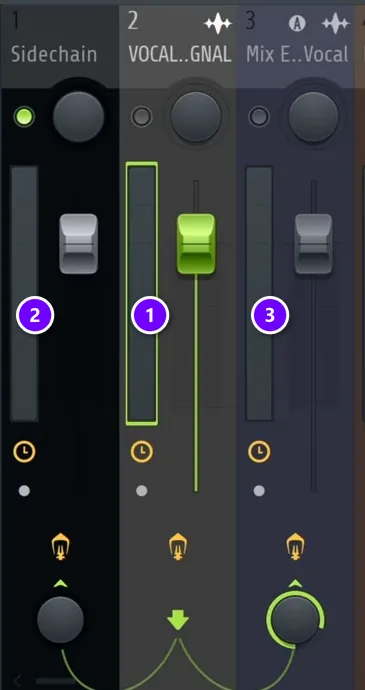
- Route all of the beat’s tracks to one bus. In the video it’s called Sidechain (2).
- Copy the main vocal to an empty mixer track, name it Vocal signal (1) and send the main vocal’s Playlist clip to this new track.
- Keep the dry effects (tuning, EQ, compression, OTT, saturation and de-essing) on Vocal signal. Keep only the reverb and other wet effects on the main vocal track (3).
- With Vocal signal selected, right-click the arrow under the main vocal track and choose Route to this track only. Then right-click the arrow under the beat bus and choose Sidechain to this track.
- On the beat bus, load Trackspacer by Wavesfactory and set its sidechain to Vocal signal. Anywhere from 8 to 20% works. Fruity Limiter in COMP mode, with the vocal as its sidechain input, is the stock option.
The dip is small, so you feel it more than you hear it. For more ways to set it up, see our guide on how to sidechain in FL Studio.
Three more moves help glue the vocal to the beat:
- Keep the level steady. Even out the volume before any plugin and compress the lead, so quiet words never drop under the 808.
- Keep the lead’s body. Low-cut it around 100 Hz, not much higher. Hip hop vocals need some body to sit in front of the listener, and a higher cut makes the lead thin.
- Match the beat’s dirt. A little saturation on the vocal, ideally the same kind you used on the beat, makes the two sound like one record.
How do you mix R&B vocals?
Mix R&B vocals with the same chain as rap vocals, only gentler. Ride the volume first, compress softly at about 2:1 to 4:1, tune with slower settings so runs stay natural, stack harmonies a third or a fifth above the lead, and give the voice more reverb and delay than a rap vocal gets.
R&B singing is smoother, with long notes, runs and soft, breathy lines sitting right next to big ones. That’s why every move gets gentler:
- Ride the volume first. The gap between a whispered line and a belted note is bigger than in rap, so even it out before the compressor.
- Compress more softly. Mix Elite’s video on vocal mixing mistakes suggests starting around 2:1 to 4:1 and raising it only if it sounds better. A softer ratio keeps the accents alive.
- Tune gently. Slower settings keep the voice natural, like Graillon’s Smooth at 10 to 20 ms instead of 1 ms.
- Stack harmonies. Copy the lead and use NewTone to move it up a third (3 or 4 semitones) or a fifth (7 semitones). Pan the harmonies left and right.
- Keep harmonies behind the lead. Cut their lows and highs, compress them hard (8:1 works) and keep their S sounds out.
- Give it more space. R&B usually carries more reverb and delay than rap, so lean on a ducking reverb to keep the words clear.
What EQ settings work for R&B vocals?
Use the same three EQ moves as on a rap vocal, only softer: a low cut around 100 Hz for rumble, the low mids left alone so the voice stays warm, and a gentle presence lift instead of a treble boost. Then let a de-esser handle the S sounds between 4 and 8 kHz.
Smooth beats aggressive here. Boost less than you would on a rap vocal, and always set the EQ with the beat playing, not in solo.
What makes a rap vocal aggressive and an R&B vocal smooth?
Mostly compression, tuning and space. An aggressive rap vocal gets hard compression (about 8:1), tight tuning, a presence lift and a little grit, with a ducked reverb so it stays dry and up front. A smooth R&B vocal keeps more of its dynamics with softer compression, slower tuning that lets runs breathe, and more reverb and delay.
Common hip hop vocal mixing mistakes
Mix Elite’s video on vocal mixing mistakes lists six that ruin a vocal, often without you noticing:
- Uneven volume. Fix the level before any effect, or every plugin treats the loud and quiet words differently.
- A thin EQ curve. Cutting too much low end strips the body from the lead. Shape the EQ with the beat playing, not in solo.
- Over-compression. The threshold matters more than the ratio. Set it so every word is equally easy to hear.
- A quiet input. Compressors, distortion and presets react to how loud the vocal hits them, so normalize or boost a quiet recording first.
- Reverb slapped on the vocal. Put it on its own track, low-cut it and duck it with the vocal.
- A vocal sitting on top of the beat. Make the beat dip a little whenever the vocal plays.
If your vocal sounds great on its own but small in the song, don’t reach for more compression. Check the level going into your chain and the space you’ve made in the beat first.
Start with one verse tonight. Build the bus, then tune, EQ and compress the lead, and compare it with a song you love in the same style. Once the lead sits right, the ad-libs and doubles only take a few minutes.
DAY 5 OF THE 7-DAY MUSIC PRODUCER COURSE
Day 5: record and mix a vocal that sits in the beat
Day 5 of the 7-Day course covers recording and mixing vocals: setting up your room, the best recording equipment for every budget, the V.O.C.A.L. mixing formula and 10 copy-and-paste vocal processing chains, plus practice acapellas if you don’t have a rapper or singer yet. It’s made for EDM, house, trap, hip-hop and pop, and taught in FL Studio (the free trial works). Plan on about 45 minutes a day, and on day 7 a pro gives you personal feedback on your finished track. It’s $27, and you get 60 days to decide if it was worth it.
Frequently asked questions
What order should EQ, compression and de-essing go in?
EQ first, then compression, then de-essing. Mix Elite’s full chain is tuning, EQ, compression, OTT, saturation, de-essing and a final EQ, with reverb on its own track. Cleaning the vocal with EQ first stops the compressor from reacting to rumble, and the de-esser goes late because compression and EQ boosts can make S sounds sharper.
Why do my rap vocals sound like they’re floating on top of the beat?
Usually the beat leaves no room for the vocal, and the vocal sounds cleaner than everything around it. Sidechain the beat bus to the vocal with Trackspacer or a compressor so the beat dips 8 to 20% while the words play. Then add a little saturation to match the beat’s grit and keep the reverb ducked.
What compression settings work for rap vocals?
A good start is Fruity Limiter in COMP mode at about 8:1, with the threshold low enough to catch the accents and loud peaks. Leave the attack fast, or try 25 to 40 ms if the vocal needs to cut through. Keep the release around 150 ms so it lets go before the next word, then add makeup gain.
How is mixing R&B vocals different from mixing rap vocals?
The chain is the same, but every move is gentler. R&B vocals get softer compression (about 2:1 to 4:1 instead of 8:1), slower tuning so runs and long notes stay natural, harmonies a third or a fifth above the lead, and more reverb and delay. Rap vocals stay drier, harder compressed and more up front.
Can you mix hip hop vocals with only stock FL Studio plugins?
Yes. NewTone handles tuning, Fruity Parametric EQ 2 the EQ, Fruity Limiter the compression and saturation, and Maximus the de-essing. Fruity Reeverb 2 covers the reverb, and OTT is a free download. Paid plugins like Soothe2 or Trackspacer save time, but the order and the settings matter more than the brand.





