



“But let there be spaces in your togetherness, and let the winds of the heavens dance between you.”
To mix kick and 808, set the 808 about 3 dB under the kick, then sidechain the kick to the 808 so only the 808’s low end dips each time the kick hits. In FL Studio, click the kick’s mixer track, right-click the arrow under the 808’s track, choose Sidechain to this track and duck the 808’s lows with a multiband sidechain or an EQ band linked to Fruity Peak Controller. Then glue both on one group track with light saturation.
If you’re learning how to mix kick and 808, you know this moment: the beat knocks in your headphones, then in the car the kick vanishes into one big, blurry boom. The two are fighting over the same low notes, and right now the 808 is winning. Below is the method from Max, the founder of Mix Elite, step by step in FL Studio: the levels, the sidechain trick that keeps the 808 loud and a screenshot for every click. It works for trap, hip-hop and any genre with an 808 or a big sub bass.
Table of Contents
How to mix kick and 808, step by step
- Pick a kick and 808 that fit, and write the 808 on the root notes of your chords.
- Balance the levels: kick peaking around -3 dB, 808 about 3 dB under it.
- Check the low end with a steep high cut and an oscilloscope on the master.
- Sidechain only the 808’s low end to the kick.
- Glue the two on one group track with saturation and a little compression.
- Clean up with EQ, and even out the 808 notes if your genre needs it.
- Judge it all with the whole track playing, never in solo.
Why does my 808 drown out my kick and sound muddy?
Because the kick and the 808 both live in the sub, the deep low end under about 100 Hz, and a long 808 keeps that space full right when the kick needs it. Two loud sounds in the same frequencies mask each other, so the kick’s punch gets buried. The fix: only one of them owns the sub at any moment.
An 808 is a bass played from a sample, and it behaves a lot like a long kick drum. Both put most of their energy in the sub, the part of the low end you feel more than you hear. When they hit at the same moment, they pile up in the same space.
Small speakers hide it. Max says: “you won’t be able to hear it on smaller systems, but the low frequencies of the kick and bass clash together.” On a big system or good headphones, that clash turns into distortion on your master, or a kick that smears into a dull rumble instead of a clean hit.
That’s why the first rule for a clean low end is no more than one instrument playing in the subs at one time. The kick and the 808 can’t both own the sub on the same hit, so one of them has to step aside for that moment. Everything below is about making that happen without losing any punch.
Two more things make it worse. If the kick turns hollow or blurry as the 808 comes in, the two sound waves are partly cancelling each other out, which is called phasing. FL Studio’s mixer has a reverse polarity button for sounds that cancel out, but you’ll rarely need it here, because the low-end sidechain below fixes the phasing too. And a low cut under 30 Hz won’t save you on its own: the kick and the 808 still stack up above it.
Start with a kick and 808 that fit

Mixing gets much easier when the sounds already work together. Better samples make better mixes right away, so pick a punchy kick and an 808 that sound good against it before you reach for a single plugin. If a kick has no sub, don’t try to boost one into it. It’s much better to choose a different sample.
Then write the 808 so it supports the kick. Play the root notes of your chord progression, which keeps the 808 in your song’s key, and follow the rhythm of the kick, so the 808 lands with the kick hits. Some tracks even drop the kick and let the 808 carry the punch. One more rule: never layer two kicks on top of each other.
How loud should the 808 be compared to the kick?
Start with the 808 about 3 dB quieter than the kick: the kick peaking around -3 dB on its mixer meter and the 808 around -6 dB. Then finish by ear, because a heavily distorted 808 reads lower on the meter than it sounds.
Max puts it simply: “if you got the balance right you’re practically halfway there.” Put the kick and the 808 on their own empty mixer tracks and watch the peak meters while they play.
Set the kick so it peaks around -3 dB. A common rule is to keep the 808 about 3 dB under the kick, so here the 808 goes to about -6 dB. In the video it started around -9, so it got turned up.
Peak meters can fool you. A heavily distorted 808 reads lower on the meter but sounds louder, because the distortion squashes it.
For a truer read, use a loudness meter, which measures loudness in LUFS, a unit for how loud something sounds to our ears.
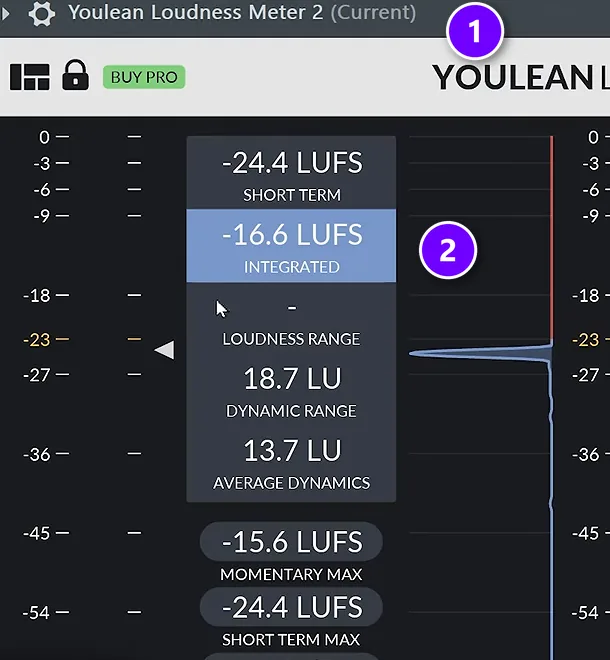
Load the free Youlean Loudness Meter on the Current mixer track (1), which shows whichever track you’ve clicked. Click the kick’s track and read its loudness (2), then click the 808’s track. In the video the kick read about -16.5 LUFS and the 808 about -21, so the 808 got aimed at about -19. Then finish by ear. The meter only gets you close.
How to check your low end before you fix it
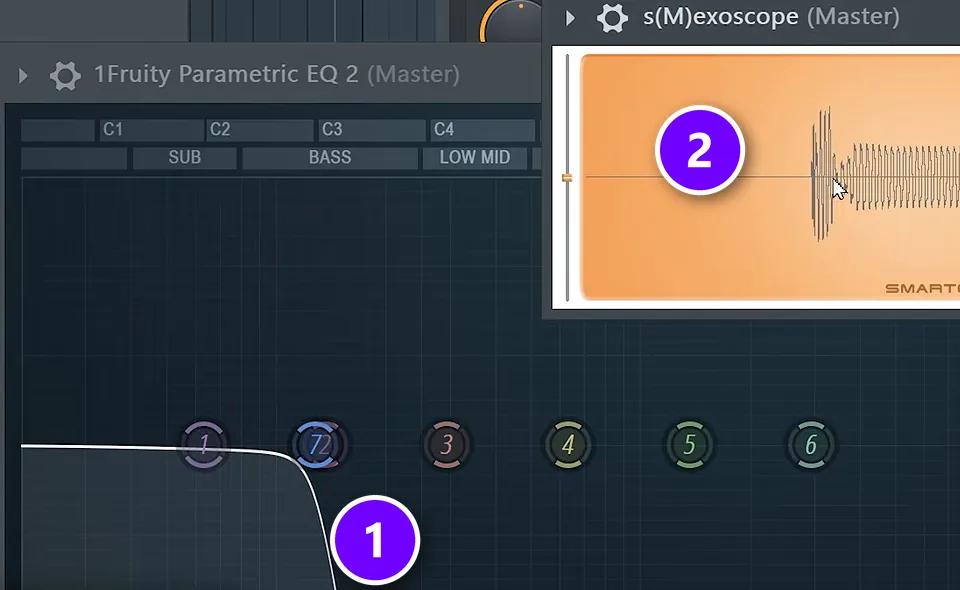
Before you change anything, look at what the low end is actually doing. Two plugins on the Master show you.
- Add Fruity Parametric EQ 2 to the Master and turn one band into a steep high cut (1), so only the very low end gets through.
- Add a free oscilloscope, a plugin that draws the waveform as it plays (2). The one in the screenshot is s(M)exoscope.
A clean kick shape followed by a smooth 808 is what you want to see.
Watch for two problems. A huge, overpowering shape means the kick and 808 are stacking up, which causes distortion in your mix that even cutting everything under 30 Hz won’t fix. If the kick turns into a blurry blob instead of a clear hit, that’s phasing, where the two sound waves partly cancel each other out. Both problems have the same fix, below. Take these two plugins off the Master when you’re done.
How to sidechain the kick and 808
Sidechaining means one sound controls another. Here, the kick turns the 808 down each time it hits. Whether you need it depends on your 808 sample, but the default is to sidechain, unless the kick is soft and isn’t meant to cut through the mix.
Skip the classic version that ducks the whole 808, though, unless you want the kick to pump and overpower everything. It turns the 808 down completely, including the higher frequencies you want to keep. The better move is to dip only the 808’s lowest frequencies while the kick plays. Here are two ways to do it, plus the classic version at the end. Our guide to sidechaining in FL Studio covers the classic method for other sounds.
The quick way: a multiband sidechain preset
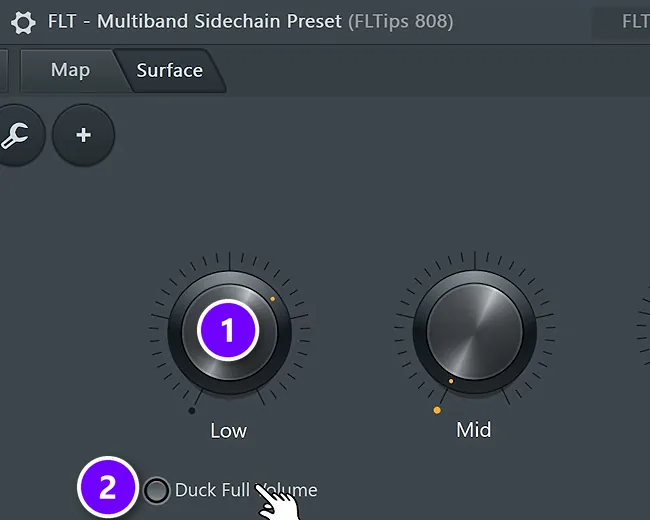
Of the two, this is the easier and better one, and it takes about 5 seconds.
- Send the kick to the 808: click the kick’s mixer track, right-click the small arrow at the bottom of the 808’s track, and choose Sidechain to this track.
- Load the Multiband Sidechain preset from Mix Elite’s free Patcher preset pack onto the 808’s track. It’s in the free downloads linked under Mix Elite’s videos.
- Everything inside is already linked, so you just turn up Low (1) until the 808’s low end gets out of the kick’s way, then adjust how long the dip lasts.
If you ever want the kick to cut through even harder, Duck Full Volume (2) ducks the whole 808 in one click.
The stock way, part 1: Fruity Peak Controller on the kick
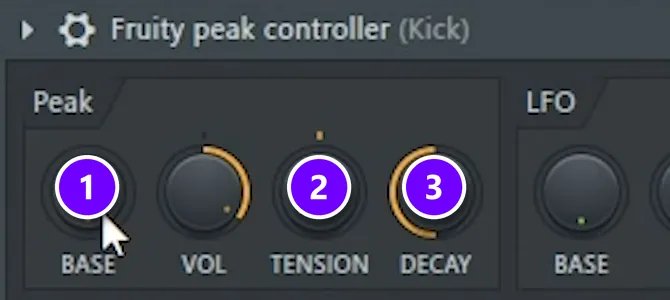
No preset? You can build the same effect with FL Studio’s own plugins, the way Mix Elite showed it back in 2019.
Add Fruity Peak Controller to the kick’s mixer track and set BASE to 50% (1). It follows the kick’s volume and turns it into a control signal that other knobs can follow. TENSION (2) and DECAY (3) shape how the dip rises and falls. Adjust them until the 808 comes back right after each kick.
The stock way, part 2: an EQ band on the 808 that follows the kick
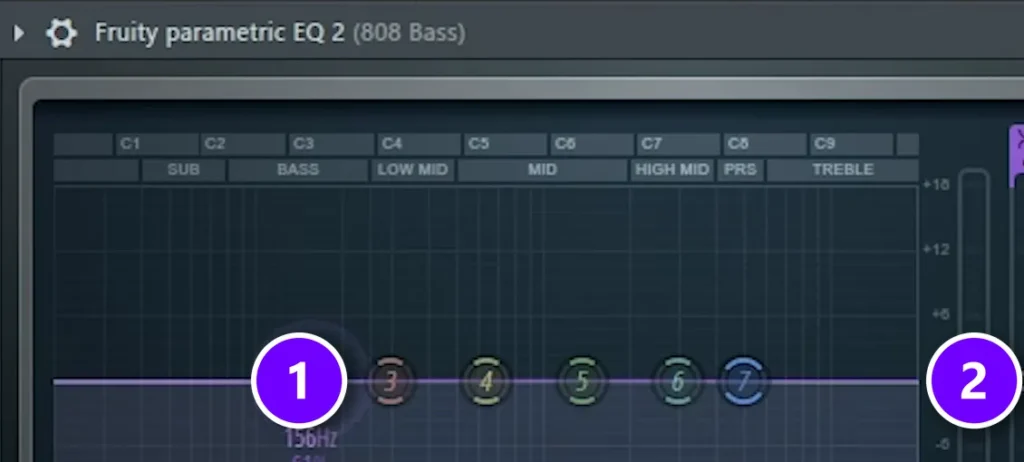
- Add Fruity Parametric EQ 2 to the 808’s track and drag the first band to about 200 Hz (1).
- Right-click that band’s level slider (2) and choose Link to controller.
- Set the internal controller to Peak ctrl – Peak and the mapping formula to Inverted.
- Click Accept.
Inverted means that the louder the kick gets, the lower the band goes. Now each kick pulls the 808’s lows down for a moment while the rest of the 808 keeps playing. Nothing changes that you can clearly hear, yet the mix has much more space. Here’s the short video of it:
How do you sidechain a kick to an 808 with a compressor?
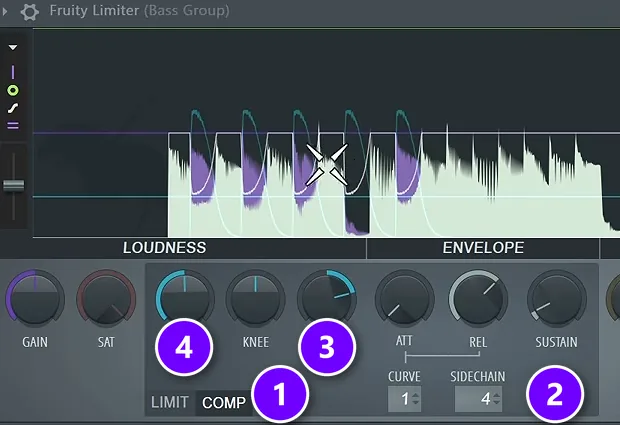
Put Fruity Limiter on the 808’s mixer track in COMP mode, pick the kick in its SIDECHAIN box, set the ratio to about 4:1 and lower the threshold until the 808 dips about 7 to 10 dB on every kick. This classic version ducks the whole 808, so use it when you want the kick to punch through hard.
It’s the setup Mix Elite’s free 4.5-hour FL Studio course uses on the bass:
- Click the kick’s mixer track, right-click the arrow at the bottom of the 808’s track and choose Sidechain to this track.
- Add Fruity Limiter to the 808’s track, turn its ceiling up so it doesn’t limit anything, and click COMP (1).
- Right-click the SIDECHAIN box (2) and pick the kick.
- Set RATIO (3) to about 4:1, then lower THRES (4) until the 808 dips about 7 to 10 dB each time the kick hits.
Play the whole beat. Then fine-tune by ear. Because this turns down the whole 808, tone and all, the two low-end-only methods above stay the better default for most beats.
How to glue the kick and 808 together
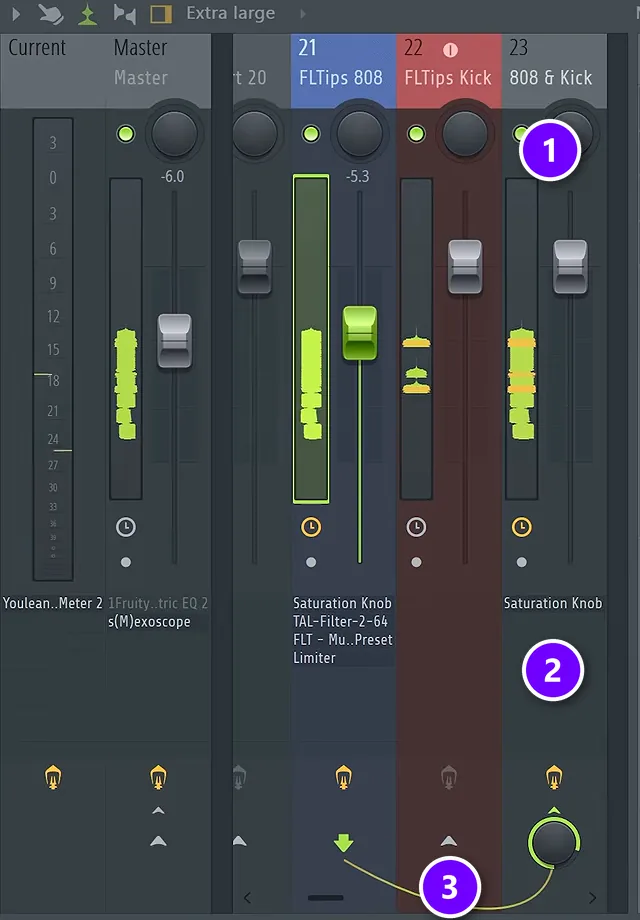
Send the kick and the 808 to one group track and put light saturation on it, plus a little compression if the saturation doesn’t squash much. That shrinks the low end’s dynamic range and gives both sounds the same color, so they hit as one.
Even with the sidechain in place, the two can still sound like separate sounds. The reason: the low end doesn’t like a high dynamic range. Dynamic range is the gap between the loud and quiet parts. Big jumps in the low end make it messy, and keeping them small makes the kick and 808 feel glued together.
It’s best fixed in the mix, so mastering only has to polish. Send both sounds to one group track, also called a bus, and process them together.
Select the kick’s and the 808’s mixer tracks, then hold Ctrl and click the routing arrow at the bottom of an empty track. Both now play through it (3). Name it 808 & Kick (1) and add a saturation plugin to it (2), such as the free Saturation Knob from Softube.
Saturation adds a little distortion, and here it does two jobs at once. It squeezes the dynamic range, and it gives the kick and the 808 the same color. “It’s like an Instagram filter on top of your kick and 808,” Max says. It blends them into one sound.
Add a little compression on the group
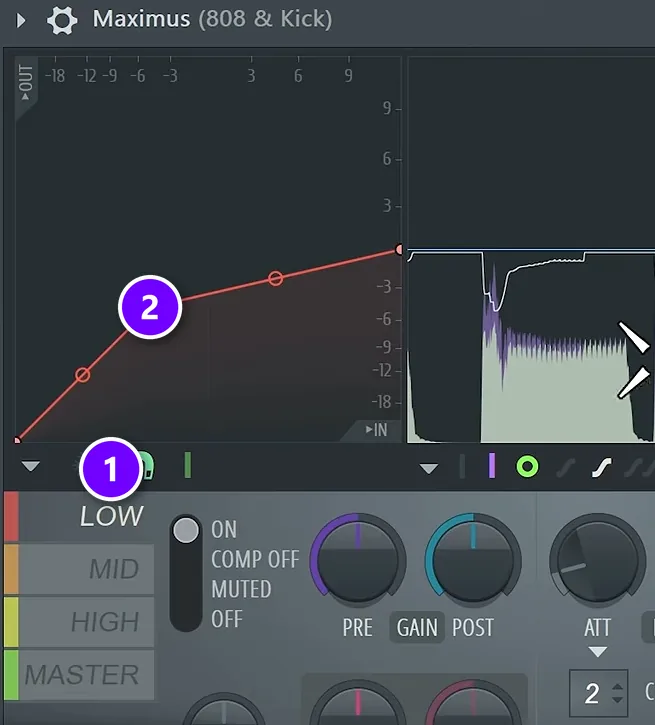
If your saturation plugin doesn’t squash the sound much, add a compressor after it. Fruity WaveShaper, for example, adds very little compression on its own, so it needs the help. Maximus can also do the job on the low band only.
Load Maximus on the 808 & Kick track, click LOW (1), and pull its curve (2) down gently, so only the low band gets compressed. Don’t overdo it, and judge it with the whole track playing. This step is optional: if your master chain already glues the low end, you can skip it.
How to EQ a kick and 808
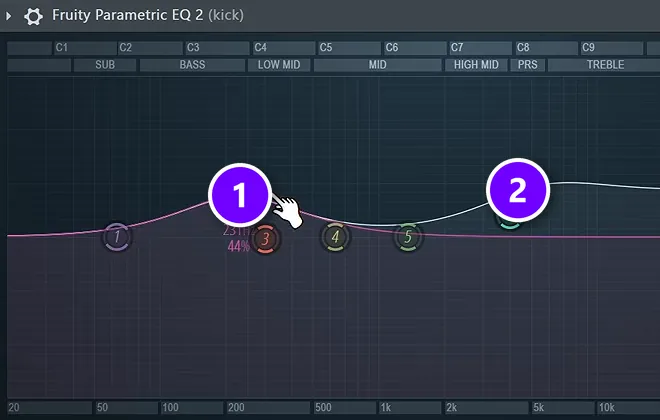
EQ comes after the balance, and the better your samples are, the less you’ll need. These rules come from Mix Elite’s free FL Studio course and mixing videos:
- Never cut the kick’s sub. The sidechain takes care of the clash.
- For punch, use a slight bell boost in the bass and low mids (1). For click, lift the presence and treble (2).
- Use gentle bells, never a big low shelf boost. If the kick lacks sub, choose another sample.
- If it sounds muddy or boxy, cut a little in the low mids, on the kick and on the 808.
- Boost 6 dB at most, and prefer cuts.
- Give every other bass layer a low cut at 100 Hz, so only one sound owns the sub.
Mix Elite’s rule of thumb: treat the area under 250 Hz as if it’s sacred. Everything you put down there has to earn its place.
Which frequencies should you cut on an 808?
Don’t cut the 808’s sub for good. Dip its lows under about 200 Hz only while the kick hits, with the sidechain EQ band above. Beyond that, cut a little in the boxy low mids if it sounds muddy, low cut every other bass layer at 100 Hz, and push that low cut toward 250 Hz on sounds with no useful bass.
A dip that only moves when the kick hits is a dynamic EQ. It beats a fixed cut. The 808 stays full between kicks. Our guide on how to use dynamic EQ shows more ways to set one up in FL Studio.
Even out the 808 notes with a limiter (optional)
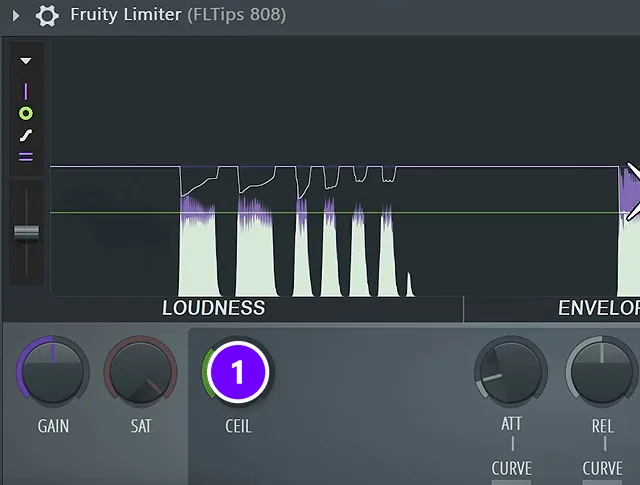
Different notes on an 808 or sub bass can sound louder or quieter even at the same volume. Evening them out matters more in EDM than in trap and hip-hop, where you might want some 808 notes to hit harder on purpose.
If you do want them even, add Fruity Limiter to the 808’s track. Then:
- Play the whole 808 pattern and find the quietest note.
- Lower CEIL (1) until that note just barely touches it. The louder notes now get held to the same level.
- Re-check the 808 against the kick, since it may sit a little lower now.
Kick and 808 mistakes to avoid
- Two sounds in the sub at once. Pick one main sub sound and low cut the rest at 100 Hz.
- Ducking the whole 808. A full-volume sidechain makes the kick pump. Duck only the low end.
- Trusting peak meters alone. Distorted 808s read low and sound loud.
- Fixing a weak sample with EQ. A big low boost on a kick usually means you need a different kick.
- Layering kicks. Skip it, and layer claps or hats instead if you want more depth.
- Mixing in solo. Listen to the kick and 808 with the whole track, because that’s how people will hear them.
FL Studio’s default template puts a limiter on the master. Boost the kick into it and you can ruin the whole track, so keep the master empty while you mix.
For more on drums that hit, read top 5 secrets for hard-hitting drums in FL Studio and the ultimate guide to mixing drums. If your whole low end still feels cloudy, see how to make your low end clean and punchy. And if you’re just starting out, begin with how to make your first beat from scratch.
DAY 4 OF THE 7-DAY MUSIC PRODUCER COURSE
Mix the whole beat, not just the low end
Day 4 of the 7-Day course is all about mixing: the simple Holy-Quad mixing formula, the “Mix Murdering” mistakes most beginners make, and the volume mistake people make in the first 5 minutes of every mix. You also get a mixing checklist and a mixing and production template. It’s taught in FL Studio (the free trial works), about 45 minutes a day, and on day 7 a pro gives you feedback on your finished track. It’s $27, and you get 60 days to decide if it was worth it.
Frequently asked questions
How do you sidechain a kick to an 808 in FL Studio?
Click the kick’s mixer track, right-click the arrow under the 808’s track and choose Sidechain to this track. Then load a multiband sidechain preset on the 808 and turn up Low, so only the 808’s low end dips on each kick. For the classic version, use Fruity Limiter in COMP mode at about 4:1, ducking the 808 7 to 10 dB.
Why does my 808 drown out my kick?
Both sit in the sub, and a long 808 fills that space right when the kick hits, so it masks the kick’s punch. Keep only one sound in the sub at a time: duck the 808’s low end under each kick and low cut any other bass layers at 100 Hz.
Which frequencies should I cut on an 808 to make room for the kick?
Avoid a permanent sub cut. Dip the 808 below about 200 Hz only while the kick hits, with an EQ band linked to Fruity Peak Controller, then cut a little in the boxy low mids if it sounds muddy. Never cut the kick’s own sub.
How loud should the 808 be compared to the kick?
A good starting point is about 3 dB under the kick: the kick peaking around -3 dB and the 808 around -6 dB on the mixer meters. On a loudness meter, a kick at about -16.5 LUFS means aiming the 808 at about -19. Distorted 808s read lower but sound louder, so finish by ear.
Should you sidechain the kick to the 808?
Usually yes, unless your kick is soft and isn’t meant to cut through. The cleanest way is to duck only the 808’s low end, with a multiband sidechain preset or a Fruity Peak Controller linked to an EQ band, instead of a classic sidechain that turns the whole 808 down and makes the kick pump.





