



“I usually like to use two melodies, three melodies, and let all of them bounce off each other so the audience don’t get bored.”
To make a UK drill melody, start with a dark piano: slow the attack, add reverb and a half-time effect, and EQ it so only the mids are left. Then write two minor chords, change one note at a time, and add a second instrument that repeats a simple motif you could whistle.
Learning how to make drill melodies usually starts with a letdown. You play a few dark chords, loop them over a drill beat, and somehow it sounds like a sad ballad instead of something menacing. Meanwhile, the producers you listen to make it sound easy.
Below are the exact FL Studio steps and settings from Mix Elite’s drill melody video, three progressions from it, and the free instruments that still work in 2026. Max, the founder of Mix Elite, teaches the method in that video, which you can watch right after the table of contents.
Table of Contents
What makes a drill melody sound like drill?

Drill melodies are dark, simple and repetitive. Most use minor chords, a piano or strings, and a lot of empty space for the rapper. The piano often sounds slowed down, and it swells in softly instead of hitting hard.
Max is clear about where that sound comes from: “First and most important reason for amazing sounding drill melodies is the instrument you choose. Not the harmony, not the groove, it’s the instrument.” That’s why so many producers love Omnisphere, a paid synth packed with processed recordings of real instruments. It’s also why his first step is building the sound, before a single chord.
Here’s what a UK drill melody usually has:
- Key: minor.
- Tempo: around 140 BPM, with a half-time feel.
- Main sound: a dark, slowed-down piano.
- Extra sounds: strings, mandolin, guitar, flute, bells and wordless vocal chops.
- Melody: a short motif that repeats, with lots of space.
- Low end: none in the melody. The 808 owns the bass.
A little history helps, too. Drill started in Chicago in the early 2010s, then took its modern shape in South London, where producers added sliding 808 bass and eerie piano and string lines. New York drill grew out of that UK sound a few years later. That’s why a UK drill melody is the best place to start.
Step 1: Make a dark drill piano in FL Studio
The video starts with Keyzone Classic, a piano plugin that was free back then and is paid now. Any plain piano works. FL Studio’s own FL Keys or the free LABS Soft Piano will do, because the effects do most of the work. Load your piano, open the Mixer with F9, and build this chain on the piano’s mixer track.
Slow down the attack
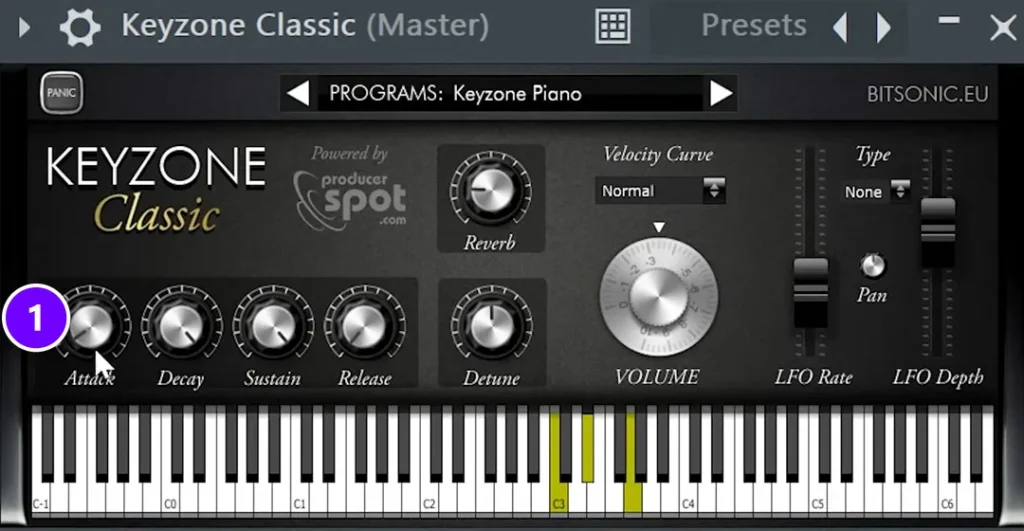
A lot of drill pianos swell in instead of striking hard, almost like a slow wave. You get that by turning up the piano’s Attack knob (1), so each note fades in. Your kick should be the hardest hit in the beat, not the piano.
Add reverb, wobble and compression
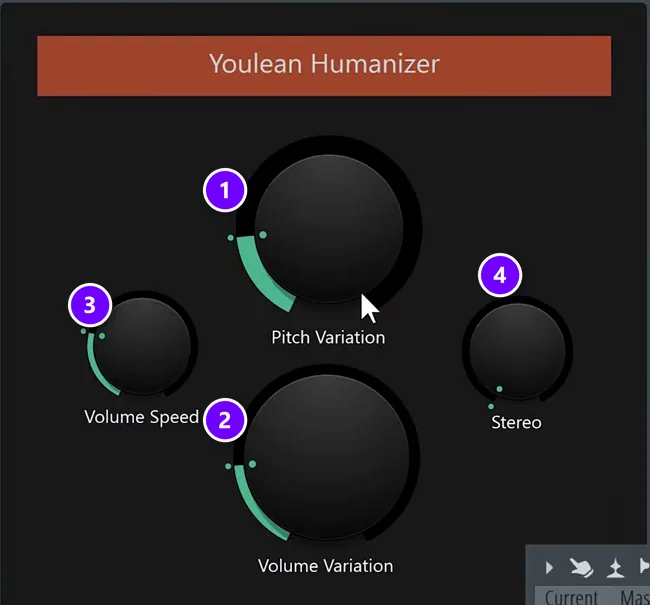
Next, add Fruity Reeverb 2 to make the piano a little more wet. Then load Patcher with its Humanizer preset by Youlean. Its Pitch Variation (1) and Volume Variation (2) knobs, with Volume Speed (3) and Stereo (4), make the piano wobble slightly, like an old tape.
Then comes compression, so the piano isn’t too loud and everything gets squashed together a little. In this chain that job goes to Fruity Limiter.
Add the half-time effect
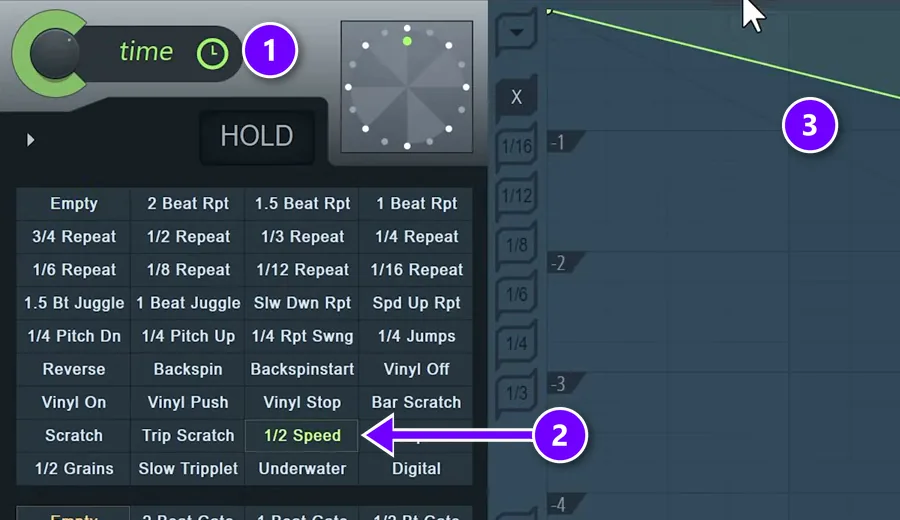
This is the part the video calls fundamental: the half-time effect you’ll hear on most drill tracks. A half-time effect plays the sound back at half speed, so it drags and turns darker. The video uses Gross Beat. In its time section (1), pick the 1/2 Speed preset (2). The falling line (3) is the time envelope that slows the audio down.
Gross Beat comes with FL Studio’s Signature Bundle and All Plugins Edition. Any other half-time plugin will work as well.
Keep only the mids with EQ
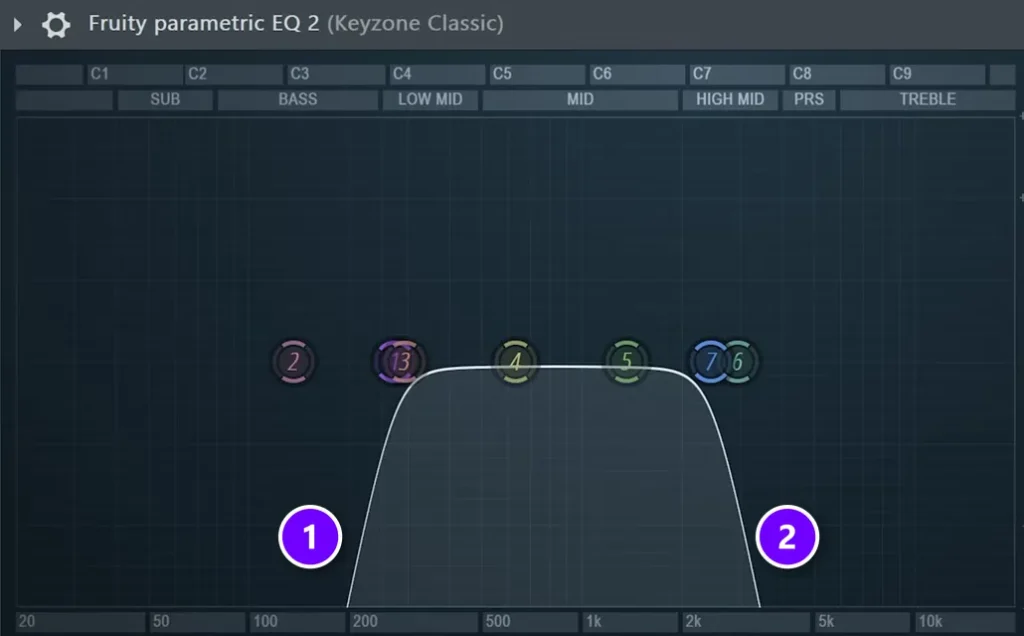
Last, Fruity Parametric EQ 2 cuts everything below about 200 Hz (1) and the very top (2). Gross Beat already took off a lot of the treble, so the high cut lands around the high mids. With the piano, you want mainly the mid frequencies. That leaves the low end free for your 808 and the top free for your hi-hats.
Save the chain
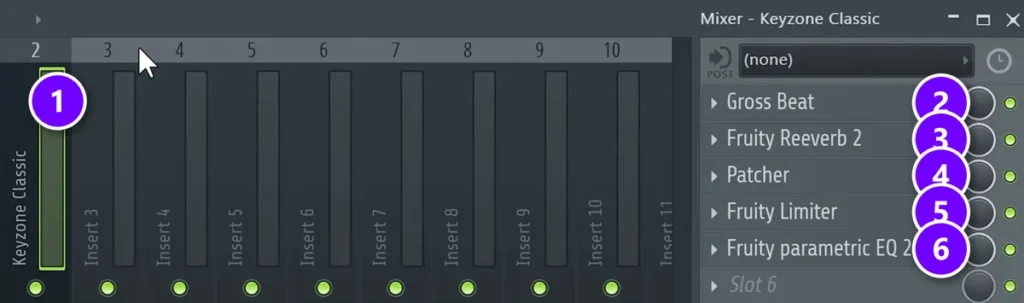
Here’s the finished chain on the piano’s mixer track (1): Gross Beat (2), Fruity Reeverb 2 (3), Patcher with the Humanizer (4), Fruity Limiter (5) and Fruity Parametric EQ 2 (6). Gross Beat sits in the first slot.
Save a chain like this and use it again in future beats. Open the Mixer’s menu, the small arrow at its top left, then go to File and pick Save mixer track state. Next time, open that file on a new track and your drill piano is ready.
Step 2: Write a drill chord progression
Now for the notes. Start with a couple of generic, foolproof progressions, then change them step by step until they sound like yours. Open the Piano roll for your piano and try this.
Build a minor chord, then move the third
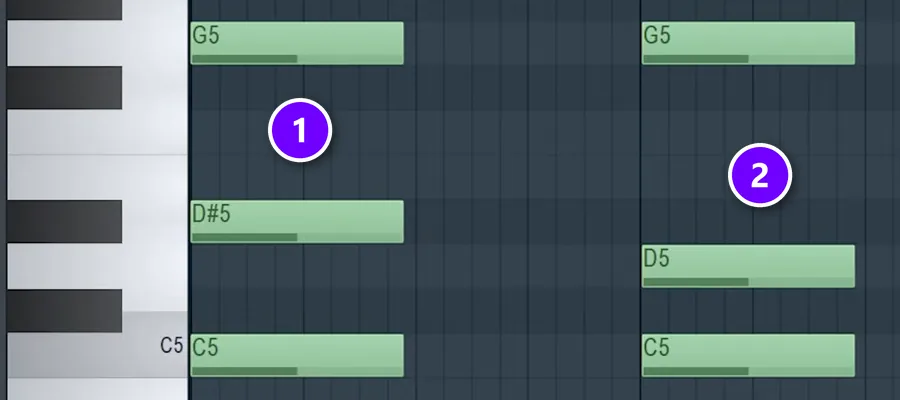
- Place a root note, like C5. Skip two keys and place the next one (D#5), then skip three keys and place the next one (G5). That’s a C minor chord (1).
- Copy the chord to the next bar.
- Move its middle note, the third, down to the second note of the scale. D#5 becomes D5 (2). That’s level 1: two chords and one change.
You could make a whole track with those two chords. But you’ll rarely hear them played this way, so play with the voicing, which means the octave each note sits in. Copy the root an octave lower, drop the G an octave, or double a few notes. Starting on F instead of C, or swapping the piano for another instrument, gives you a different feeling right away.
Change one note at a time
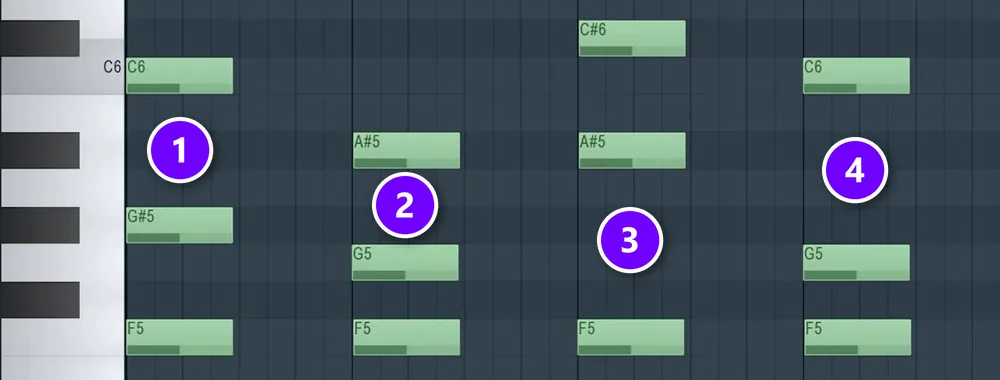
Level 2 moves the fifth, the top note, instead of the third. Here’s a catch: in a low, half-time piano the thirds start to sound muddy. An on-screen tip in the video sums it up: the lower your piano plays, the worse the third will sound. So delete them and play lower. Level 3 brings the third back an octave higher and combines both moves.
The rule behind every level is the same. In Max’s words: “You should just simply play with one change at the time, just simply stay in key.” In this F minor version, every chord keeps F5 at the bottom (1 to 4), and only the notes above it move. Step by step, a generic pair of chords becomes something of your own. If you’ve never built a chord in FL Studio, our guide on how to make chords in FL Studio shows every click.
3 drill chord progressions Max uses
After the basic levels, Max shares three progressions he likes for drill. Each one is just two chords. You can learn all three in a few minutes.
Minor to minor on the 4th: dark and aggressive
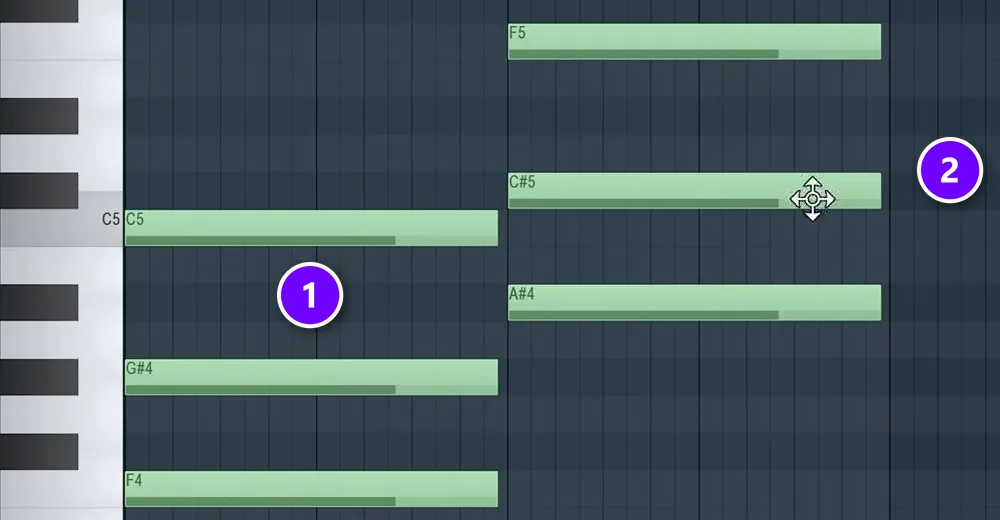
Play a minor chord, then a second minor chord built on the 4th note of the scale. In F minor, that’s F minor (1) to B-flat minor (2). Move the second chord’s notes close to the first, then delete the middle note of each chord. You’re left with F and C, going to F and D-flat. This one sounds way darker and scarier, which may be exactly the mood you want.
Two fifths a half step apart: even darker
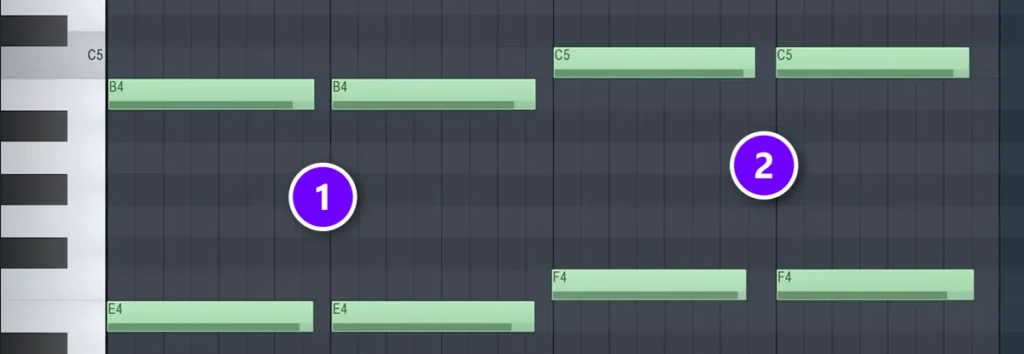
For something darker still, play two bare fifths, pairs of notes seven half steps apart. Then slide the whole shape up one half step: E and B (1), then F and C (2). It’s the darkest of the three.
Minor to minor on the 5th: Max’s favorite
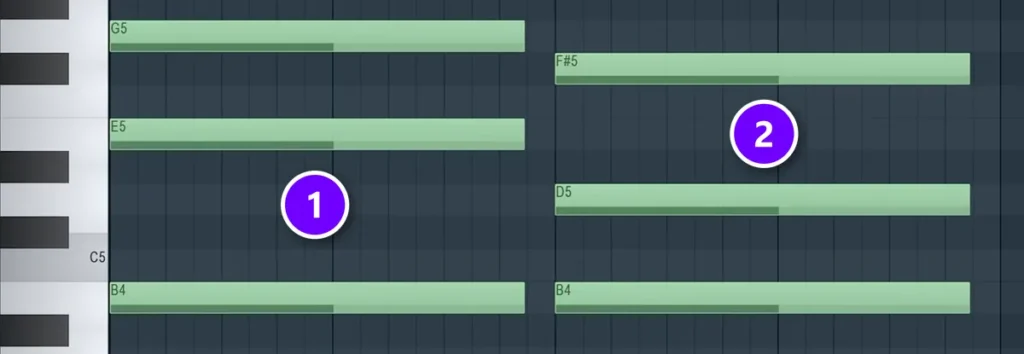
His favorite is a minor chord followed by another minor chord on the 5th note of the scale. In E minor, that’s E minor (1) to B minor (2). Keep the notes of both chords as close together as you can, which he says makes them sound more connected. It’s more melodic and chilled than the other two, so it leaves room for a busier instrument on top.
| Progression | Example | Mood |
|---|---|---|
| Minor, then minor on the 4th | F minor to B-flat minor | Dark and aggressive |
| Two fifths a half step apart | E and B, then F and C | The darkest, very tense |
| Minor, then minor on the 5th | E minor to B minor | Melodic and chilled |
Step 3: Add a second instrument with a catchy motif
Generic chords are fine here. Step 3 is what makes the track yours. Add one or two extra instruments that are unique to your track, like a fiddle, a guitar, a flute or an organic synth. They play a motif, which is a short musical phrase that repeats.
Pick an instrument that fits your taste
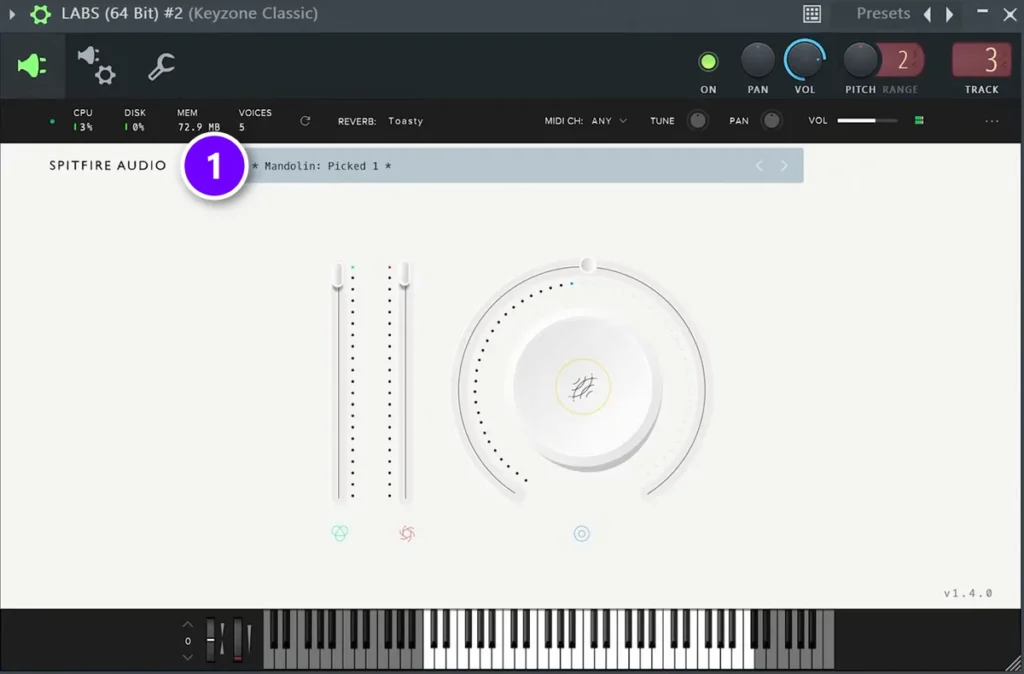
There’s no right answer here. It depends on your taste. For an analog feel, try a synth. For an organic one, try a violin or a guitar. The video uses Mandolin: Picked 1 (1) from Spitfire LABS. LABS is still free, and it now lives inside Splice’s free INSTRUMENT plugin. Our list of the best free trap VSTs covers it, plus a dozen more free sounds that work for drill.
Keep the motif simple
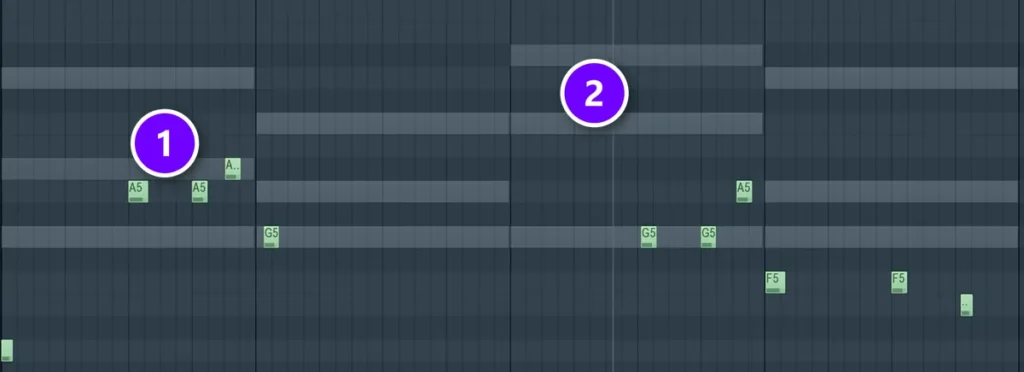
Max’s rule for what to play: “If you can’t whistle it, it’s not good enough.” Then he adds, “unless you can’t whistle at all, like me.” He has noticed that the more melodies you make and the more feedback you get, the more you realize your melodies are simply too complicated.
He doesn’t draw the motif in. He plays it on a MIDI keyboard and records it, so the notes land slightly off the grid (1), the way a real player would. The gray notes behind it are the chords, shown as ghost notes (2). To see your chords while you write, turn on ghost channels with Alt + V.
Real instruments sound fake when every note sits exactly on the grid, so go off grid. Playing the part on a keyboard does that for you.
Fill the gaps with another sound
If your motif leaves a gap, a second instrument can fill it. The mandolin in the video left empty space in the middle of the loop, so a Persian Ney fills it, a breathy flute, from Native Instruments’ free Kontakt Factory Selection. It comes with Komplete Start, NI’s free bundle. Now the melody comes alive.
Bonus step: Add vocal chops
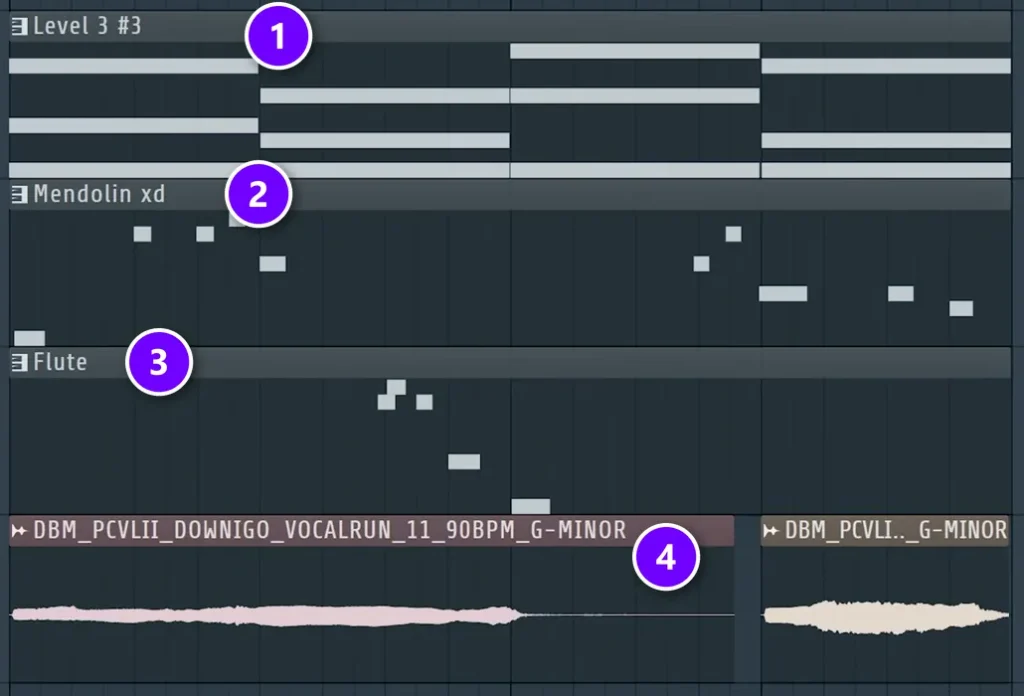
The favorite finishing touch in the video is a vocal line without words. It can be any vocal sample, as long as it’s in key and has no lyrics. In the project, the chords (1), the mandolin (2) and the flute (3) sit above a long, held vocal run (4). It’s a long one, so it doesn’t get in the way of the instruments, and a shorter vocal phrase could take the flute’s place instead.
An on-screen tip in the video: when you add vocals, keep them more subtle than you want. They should feel like part of the beat, not like a second singer.
How to keep a drill melody balanced
Once you stack instruments, balance matters more than notes. Always keep the balance in mind: if one part is busy, the next one stays simple.
- A steady part makes room for a moving one. Over the steady piano, a charango plays a bouncier rhythm.
- Two busy parts fight. Once the charango moves, a fiddle on top has to stay long and steady.
- Space is part of the melody. Leave gaps for the rapper, and fill them only with small ear candy, like a vocal chop.
- Half-time works on more than piano. The video adds the half-time effect to a LABS moon guitar too, to give it more body.
What scale and key are drill melodies in?
Almost always minor. Minor keys sound darker and more serious, which fits drill. The chords in the video sit in C, F and E minor, and any minor key works. Pick one and stay in it, so every chord, melody and bass note comes from the same set of notes.
FL Studio can help here, because its Piano roll can highlight the notes of your scale. Our guide to music theory for producers explains scales and keys in plain words, and the beginner’s guide to music scales goes deeper.
Which minor scale sounds darkest for drill?
Natural minor is the standard choice. Harmonic minor raises the 7th note for more tension, and it’s Max’s personal favorite: in Mix Elite’s free FL Studio course he uses it for a progression he calls excellent for melodic trap or any emotional song. For an even darker, tenser sound, try Phrygian, which puts a note just one half step above the root.
A Mix Elite FL Studio short gives the recipe: from your root, count 0, 1, 3, 5, 7, 8 and 10 half steps up. Starting on E, that’s E, F, G, A, B, C and D, all white keys. The two fifths progression above, E and B moving to F and C, is exactly that half step at work.
To set the scale, right-click the note icon in the Piano roll’s menu bar and pick a scale and a root note, and the scale’s notes light up. Left-click the same icon to turn on snap to scale, so you can’t place a wrong note.
Why does my drill melody sound happy, and how do I fix it?
Usually it’s one of three things: a major chord or note slipped in, the piano sounds too bright and clean, or the chords sit too high. Fix it by staying in a minor scale, running the piano through the dark chain from Step 1, and keeping the chords low and close together.
- A major chord or note crept in. Major sounds brighter. In Mix Elite’s free FL Studio course, Max says a major version of a progression suits a ballad or a happier track, then switches it to minor. Highlight your minor scale so every note stays in it.
- The piano is too clean. A bright piano with a hard attack sounds like a ballad. The slow attack, the half-time effect and the mids-only EQ from Step 1 are what turn it dark.
- The chords sit too high. In the drill video, copying one note up an octave suddenly made the chords sound like The Lion King, so it came straight back out. Keep the piano in the middle range.
Still not dark enough? Swap in one of the darker progressions above: minor to minor on the 4th, or the two fifths a half step apart.
Drill melody mistakes to avoid
- Writing too much. Fewer notes and more repeats beat a long, busy line.
- A bright, full piano. Without the slow attack, half-time effect and EQ, it sounds like a ballad, not drill.
- Thirds in a low, half-time piano. They turn muddy, so drop them or move them up an octave.
- Chords that jump around. Keep each chord’s notes close to the last chord’s notes.
- Low end in the melody. Cut below about 200 Hz and let the 808 own the bass.
- Real instruments locked to the grid. Play them in so they sit a little off the grid.
For your first one, keep it small: one dark piano chain, two minor chords and one motif you could whistle. Then put drums and an 808 under it.
How do you make a drill drum pattern in FL Studio?
Start from a two-bar trap pattern with the snare on beats 3 and 7, then delay the second snare to beat 8. Switch the hi-hats to a pattern that plays one step and skips two, add one extra kick near the end of the loop, and let the 808 follow your chord roots in the kick’s rhythm.
That method comes from Mix Elite’s trap drums tutorial, where changing the hi-hats alone gives the beat a drill feel right away. In the Channel Rack:
- Make the pattern two bars long. Each bar has four beats, and each beat has four steps.
- Put the snare on beat 3 and beat 7, the usual trap spots, then move the second one to beat 8. In drill, the second snare comes late.
- Change the hi-hats to a pattern that plays one step, skips two and repeats.
- Add one kick near the end of the loop, on beat 7 or 8, or both.
- Load an 808, open the Piano roll and follow the root notes of your chords, played in the kick’s rhythm.
Then make it feel human. Turn down the velocity of every other hi-hat a little, so the pattern doesn’t sound robotic, and add hat rolls only here and there. Our guide on how to make beats covers drums, 808s and arranging the full track.
DAY 2 OF THE 7-DAY MUSIC PRODUCER COURSE
Want more chords and melodies like these? That’s Day 2.
Day 2 of the 7-Day course covers music theory, chords and melodies: the 3-step chord progression formula, 4 easy ways to write melodies even if you’ve never touched a keyboard, and where to find pro-quality instruments, paid and free, and how to install them. You also download 20+ free plugins and tools and 30+ chord progressions. It’s taught in FL Studio (the free trial works), about 45 minutes a day, and on day 7 a pro gives you feedback on your finished track. It’s $27, and you get 60 days to decide if it was worth it.
Frequently asked questions
What scale is used for drill melodies?
Drill melodies are almost always in a minor key, because minor sounds darker. Natural minor is the usual start. Pick one key, like C minor or F minor, and keep every chord, melody and bass note inside it. FL Studio’s Piano roll can highlight the notes of your scale, so you don’t play a wrong one.
What instruments are used in drill melodies?
Piano is the classic drill sound, usually dark, slowed down and swelling in. On top of it you’ll often hear strings, plucked instruments like a mandolin or charango, flutes, bells and wordless vocal chops. Max’s advice is to add one or two instruments that make your track unique and let them repeat a short, catchy motif.
How do you make a drill drum pattern in FL Studio?
Make a two-bar pattern with the snare on beats 3 and 7, then move the second snare to beat 8. Change the hi-hats to a pattern that plays one step and skips two, add a kick near the end of the loop, and let the 808 follow your chord roots in the kick’s rhythm.
What BPM is UK drill?
Most UK drill sits around 140 BPM. The drums play in half time, with the snare on the third beat of each bar, so the beat feels slower and heavier than the number suggests. That’s why a slowed-down, half-time piano fits it so well. Set your tempo first, then build the melody on top.
How do you make a drill melody sound dark?
Use minor chords, keep the piano in the middle range, slow its attack, and add reverb and a half-time effect. For an even darker sound, try Max’s trick of two bare fifths a half step apart, like E and B moving to F and C. Leave plenty of space, too: a few notes in an empty mix sound darker than a busy line.





