



“…rhythm and harmony find their way into the inward places of the soul.”
The best drum VST depends on your style: Superior Drummer 3 for realistic acoustic drums, GetGood Drums for metal, XO or Battery 4 for trap and hip-hop, and KICK 3 or Microtonic for house and techno. The best free picks are SSD 5.5 Free and MT Power Drum Kit 2, and every FL Studio edition already comes with FPC.
You can have a great melody, but if the drums sound thin, the whole beat still feels like a demo. Then the shopping starts. Every drum plugin promises to be the one that finally makes your beats hit, and they can’t all be right.
If you make beats in FL Studio, don’t buy anything yet, because you may already own what you need. We checked every plugin and price on the makers’ sites in October 2026. Below are honest pros and cons, plus how to install and use your pick in FL Studio.
Table of Contents
What is a drum VST?
A drum VST is a plugin that plays drum sounds inside your DAW, the app you make songs in. Some play recordings of real drum kits, some copy classic drum machines like the 808, and some build every hit from scratch with synthesis. In FL Studio, drum VSTs load in the Channel Rack like any other instrument.
The best one depends on what you make, so this guide is sorted by style. It starts with the free ones you may already own.
Start with FL Studio’s own drum plugins
Every FL Studio user already owns a set of drum plugins, so try them before you spend money. Max, the founder of Mix Elite, puts sound before price: “the better quality sound we start with, the better it will end up being.” Good samples in a free plugin will take you a long way.
These come with FL Studio, according to Image-Line’s compare page in October 2026:
- FPC (every edition): a pad drum machine with layered samples, drum kits and ready-made drum patterns.
- Fruity DrumSynth Live (every edition): a drum synth with 120 drum sounds you can tweak.
- BassDrum and Fruity Kick (every edition): two kick drum synths.
- Drumpad (every edition): drums made with physical modelling, which is math that copies how a real drum vibrates, instead of samples.
- Slicex (Producer Edition and up): chops a drum loop into slices you can play and rearrange.
- Drumaxx (All Plugins Edition only, or bought separately): 16 physically modelled drums.
FPC: the drum machine you already own
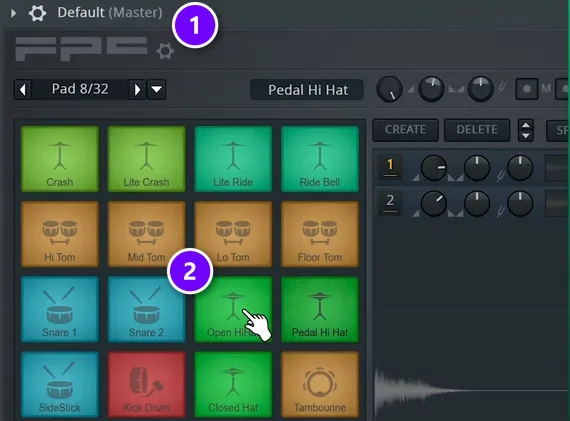
Open the Channel Rack, click + and pick FPC from the Drum section. It opens on its Default kit (1), with 16 pads (2) of kicks, snares, hats, toms and cymbals, plus a second bank of 16 more. Click a pad to hear it. You can also play the pads from a MIDI keyboard or your computer keyboard.
The presets menu at the top right of FPC loads other kits, from 707, 808, 909 and Linn to acoustic ones like HQ Rock Kit. FPC also comes with ready-made drum patterns you can drop into the Piano roll. A Mix Elite short calls it one of the best plugins in FL Studio.
Load your own samples into FPC
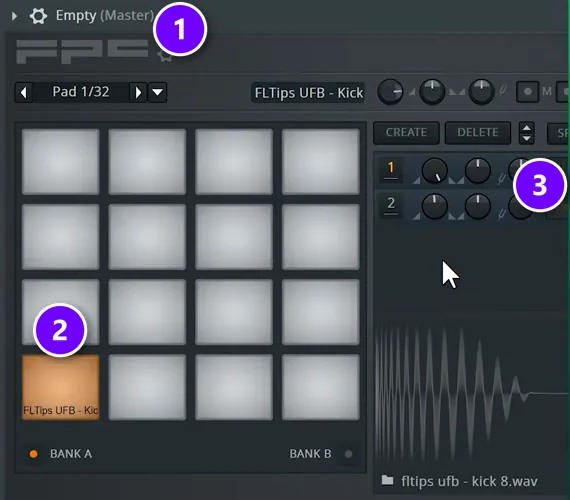
For your own sounds, pick the Empty preset (1). Then drag kick, snare and hat samples from the Browser onto the pads (2). Each pad can hold several layers, listed on the right (3).
New in FL Studio 2026: drop several samples on one pad at once, and FPC stacks them as layers for you.
Where to find FL Studio’s drum plugins
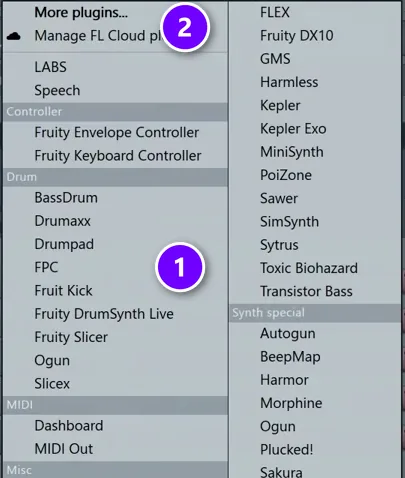
Click + at the bottom of the Channel Rack. The Drum section (1) lists FL Studio’s drum plugins, including FPC, Fruity Kick and Fruity DrumSynth Live. Drum plugins you install yourself show up under More plugins (2) until you star them.
The best free drum VST plugins
If FPC isn’t enough, these are free as of October 2026. Most of them need a free account.
Which free drum VST sounds most realistic for a beginner?
For realistic acoustic drums, start with SSD 5.5 Free, a Steven Slate Drums kit that never expires, or MT Power Drum Kit 2, which is easier: its kit comes pre-mixed, with a groove library you can drag straight into your song. In FL Studio, try FPC’s acoustic kits first, like HQ Rock Kit.
Kong in Reason Free
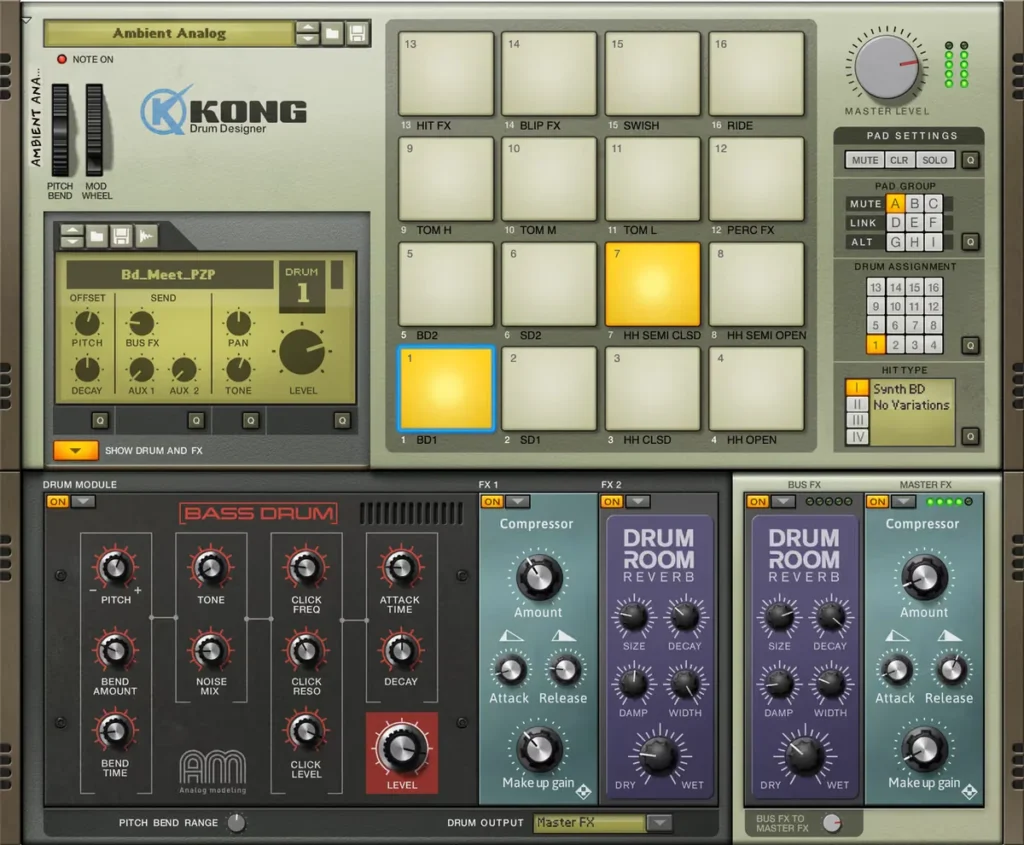
Reason Studios launched Reason Free in August 2026. It’s free forever. There’s no trial, no expiry and no watermark. It comes with 15 devices, and the installer also includes the Reason DAW. The one for drums is Kong Drum Designer, which has 16 pads, and each pad can use drum modules that mix samples, physical modelling and synthesis.
Kong runs as a VST3, AU or AAX plugin on Windows 10 and 11 and on macOS 11 and up (Intel or Apple Silicon). That means it loads in FL Studio’s Channel Rack like any other instrument.
Pros: a full drum designer, free, with no time limit. Cons: you need a free Reason Studios account to get it.
MT Power Drum Kit 2
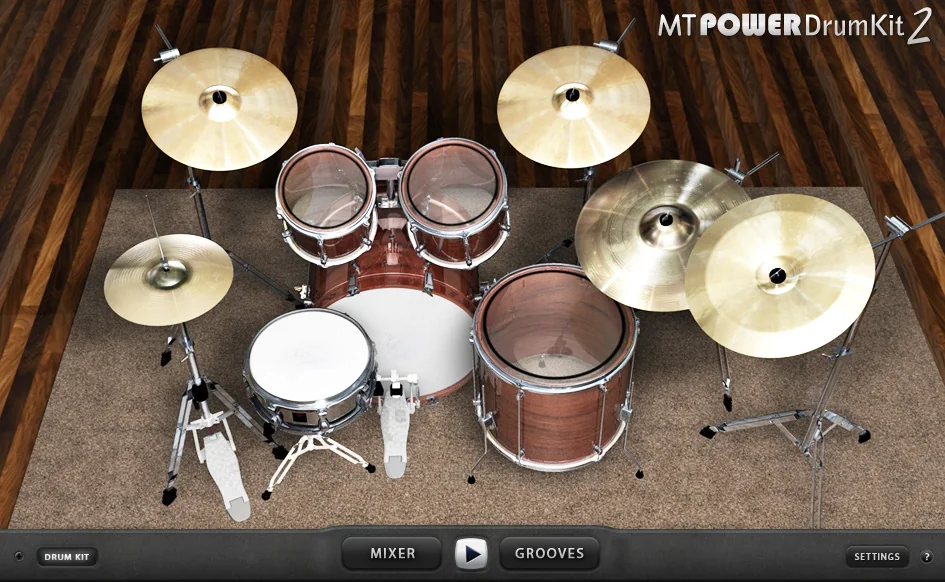
MT Power Drum Kit 2 is a free, full acoustic drum kit for pop, rock and metal, with a groove library. The kit comes pre-processed, so you don’t have to mix it from scratch. Version 2.1.5.1 runs on Windows (VST and AAX), Mac (VST, AU and AAX, Intel or Apple M chips) and Linux (a VST3 public beta). Donations are welcome.
Pros: the full version, free, with grooves. Cons: it’s one kit, so the sound is less flexible.
SSD 5.5 Free (Steven Slate Drums)
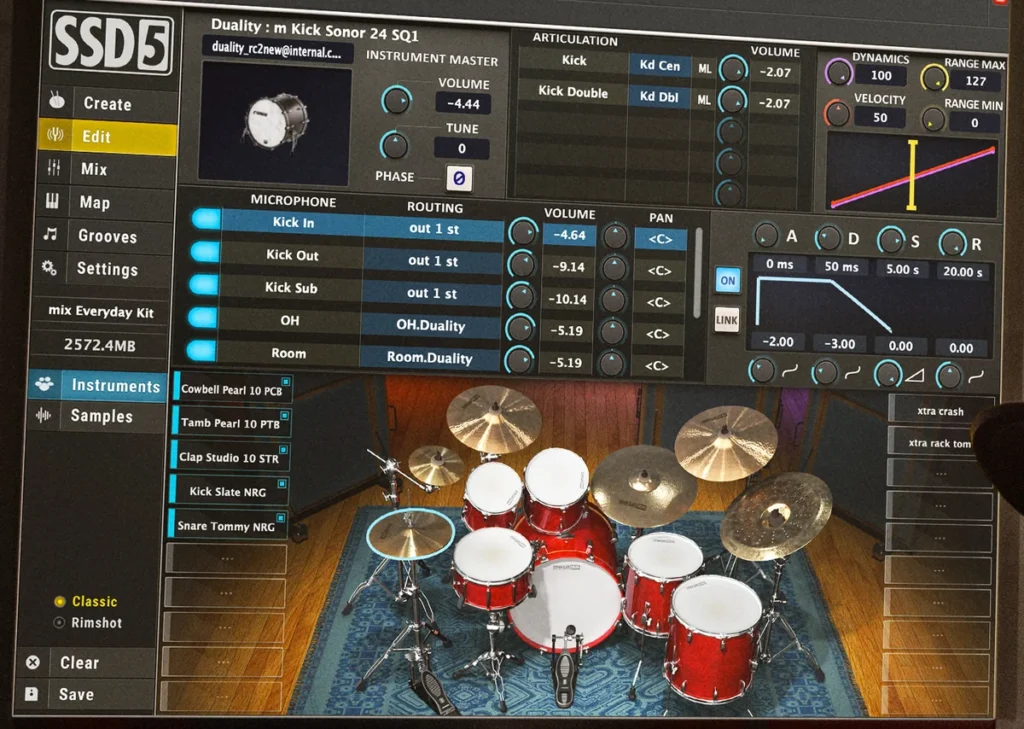
SSD 5.5 Free is a version of Steven Slate Drums that never expires. You get one Deluxe 2 kit, a processed snare and three kit presets, and you need an account to download it. The full SSD 5.5 is $119.99, or $9.99 a month for 12 months, with 148+ kits and 2,400+ grooves.
BFD Player (inMusic)
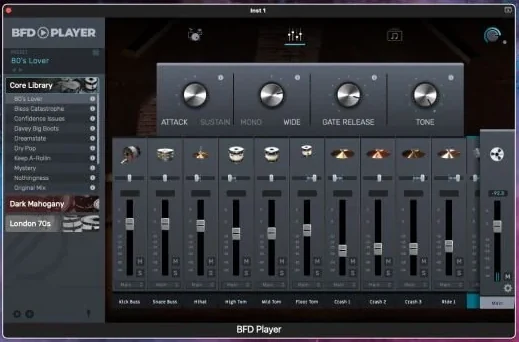
BFD Player is the free drum plugin from the makers of BFD. BFD says it has the same high-quality drum kits, grooves and mixing options as its paid plugin, and it comes with 340 grooves played by top drummers. You can run it in your DAW or on its own.
It needs Windows 10 (22H2 or later) or macOS Ventura or later, on Intel or Apple Silicon, plus 2 GB of disk space, or 5.25 GB for all its content. You download it through the inMusic Software Center, which asks you to sign in or create an account.
Pros: free real drum sounds with 340 grooves. Cons: you need an inMusic account, and BFD doesn’t list its plugin formats on the page.
LABS drums in Splice INSTRUMENT
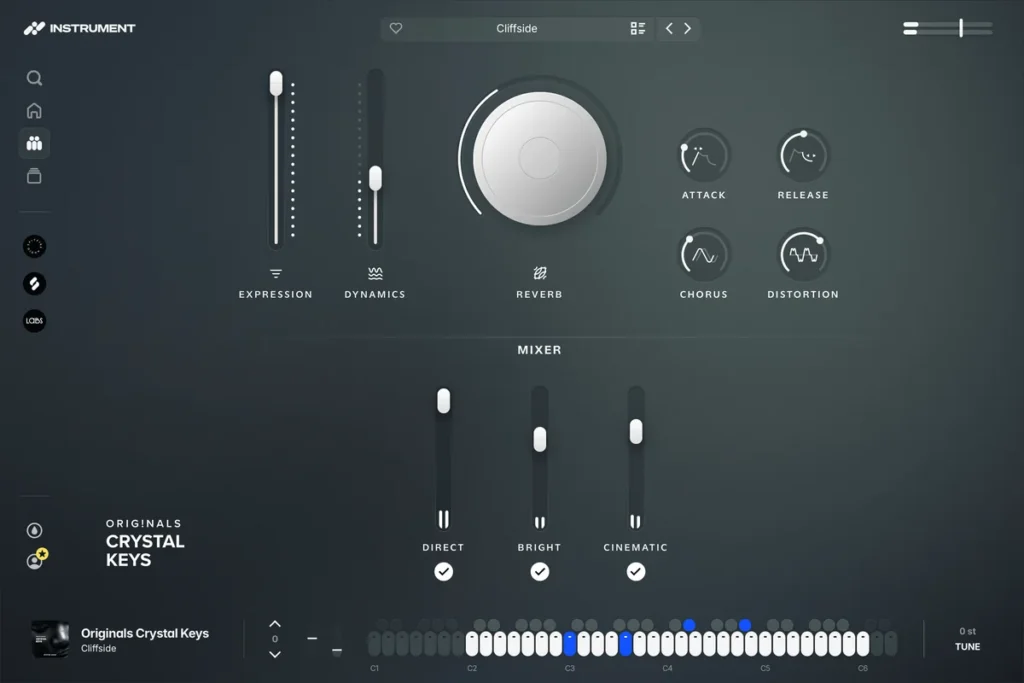
Spitfire’s free LABS series now lives inside Splice INSTRUMENT, since Splice owns Spitfire. Three drum packs are still free with a free Splice account: Drums, Vintage Drums and Percussion. Drum Machines, Glitch Drums and Office Machine now need a paid plan, which is $12.99 a month.
Sitala (the old free version)
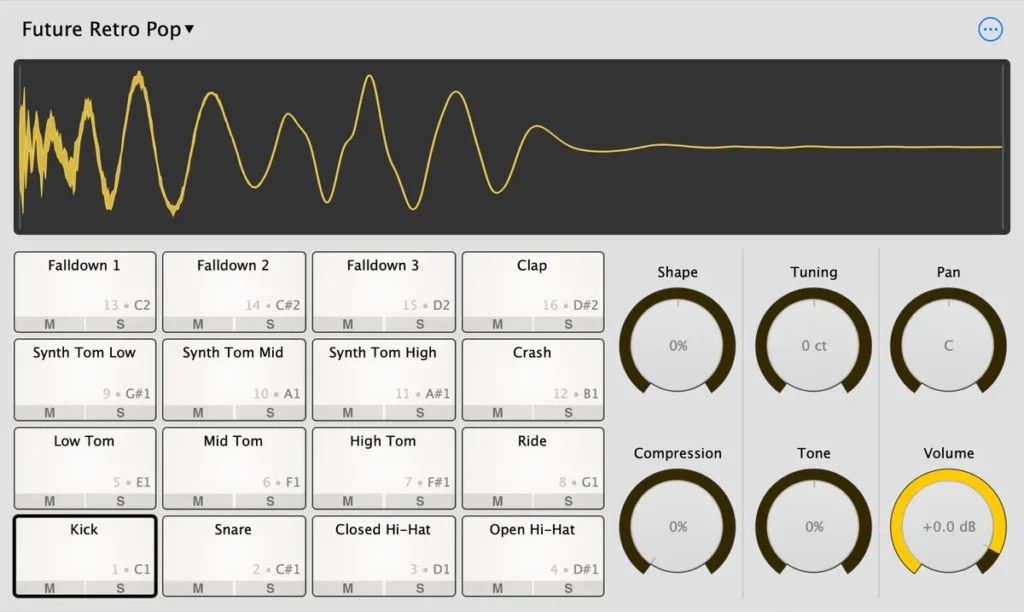
Sitala, a simple drum sampler, used to be free. Version 2 now costs $20. The old version 1.0.9 from 2021 is still a free download on the same page.
The best drum VST for realistic acoustic drums
Acoustic drum plugins play detailed recordings of real drum kits. They’re the pick for rock, pop and any song where the drums should sound like a drummer in a room.
Superior Drummer 3 (Toontrack)
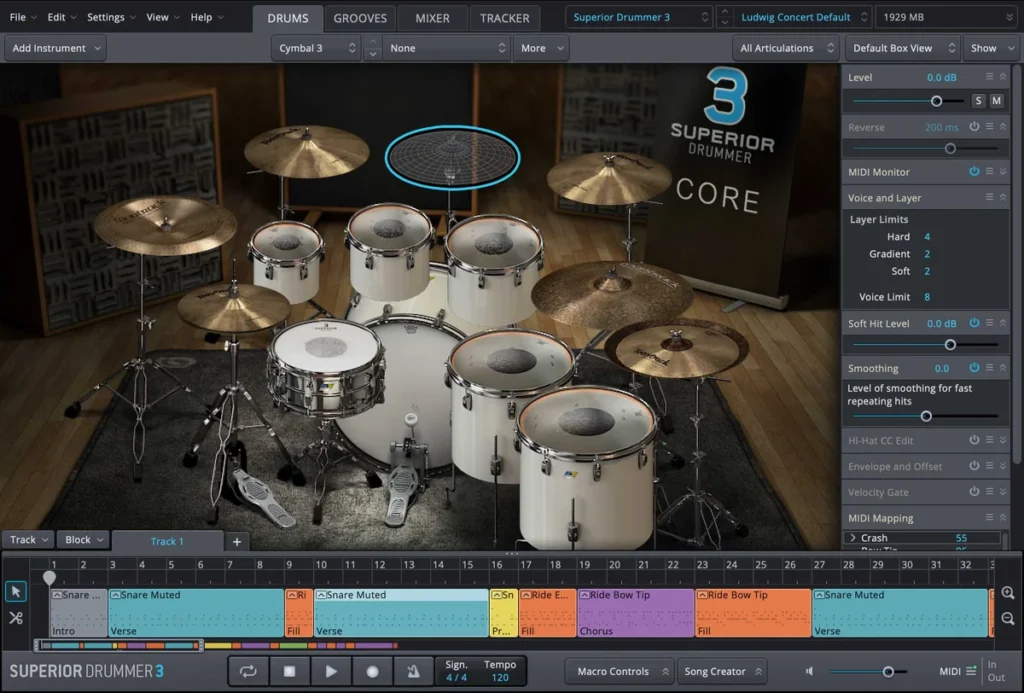
Superior Drummer 3 is the biggest library here: 230+ GB of drums, with 7 kits, 25 snares and 16 kicks, plus electronic kicks and snares. It has 35 built-in effects, a MIDI groove library, and Tracker, which turns recorded drum audio into MIDI. You can import your own samples, too.
It costs $399, or $319 if you already own EZdrummer. It runs on 64-bit Windows 10 and up and on macOS 10.13 and up (Intel or Apple silicon) as VST, AU or AAX, plus a standalone app. You install it with Toontrack Product Manager.
Pros: the biggest library on this list, with its own effects and Tracker. Cons: the complete install is about 236 GB to download, and there’s a lot to learn.
EZdrummer 3 (Toontrack)
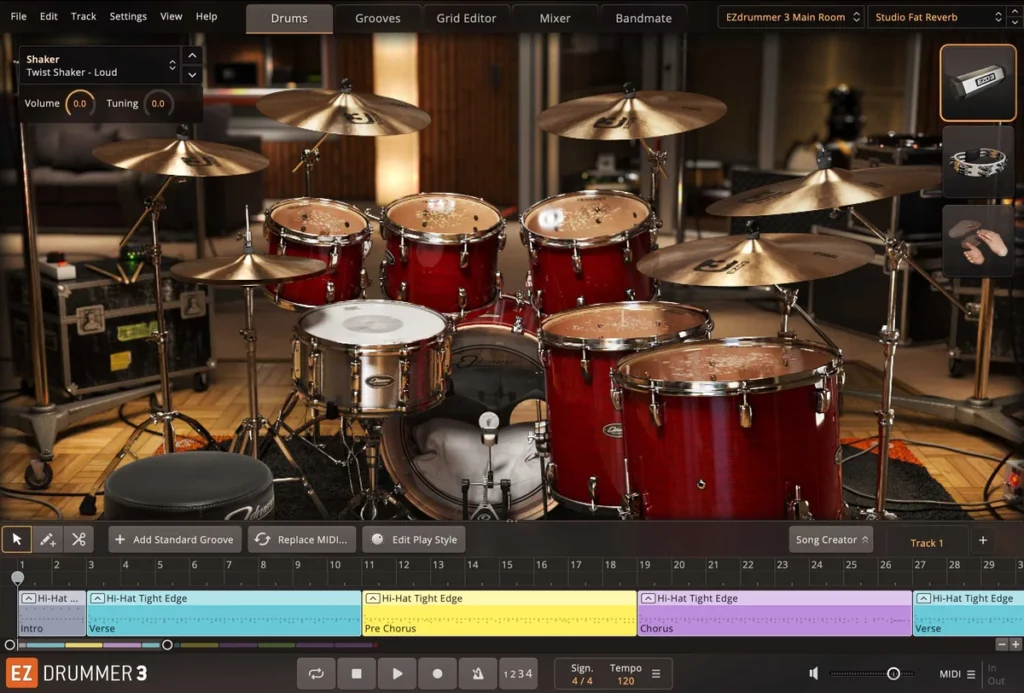
EZdrummer 3 is the easier, cheaper Toontrack plugin: about 15 GB, 7 kits and more than 2,500 grooves. Its Bandmate feature listens to an audio or MIDI file you drop in and suggests grooves that fit. Toontrack lists hip-hop and EDM among its styles, too.
It’s $179, or $99 as an upgrade, and it needs 18 GB of disk space. Expansion packs, called EZX, are $89 each. They include Hip-Hop!, Electronic, Metalheads, Dance and Drum & Bass. EZdrummer 2 was discontinued in May 2022, so skip any list that still recommends it.
Pros: fast songwriting with real drums. Cons: the expansions add up at $89 each.
Addictive Drums 2 (XLN Audio)
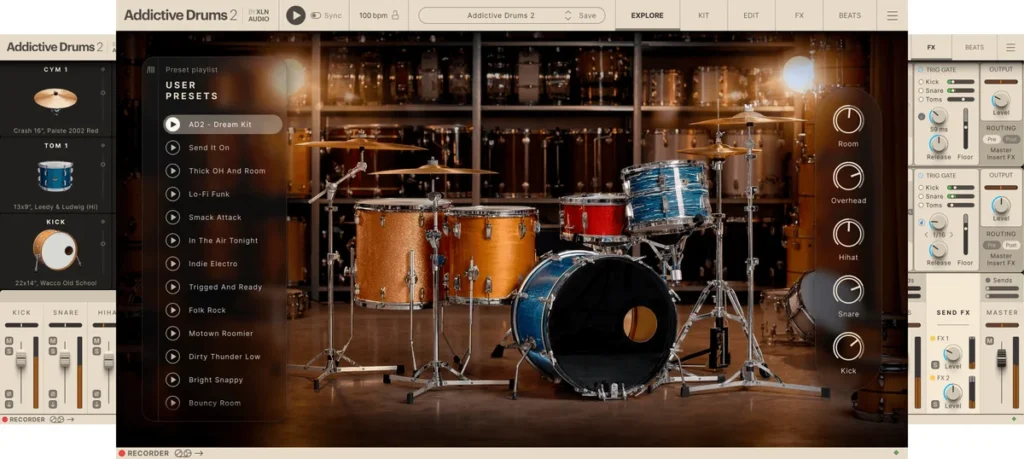
With Addictive Drums 2, you build your own collection. The Custom collection (3 drum kits, 3 beat packs and 3 kit pieces) is $179, genre collections like Hip Hop and Gospel are $169, and the Complete set is $999. XLN says it covers any genre from jazz to metal.
It runs on 64-bit Windows 10 and 11 and macOS 10.13 and up, as VST, AU or AAX plus a standalone app. FL Studio 20 and up is on XLN’s tested list, and there’s a free trial.
Pros: you only pay for the kits you want, and you can try it first. Cons: the price climbs fast as you add kits, and XLN doesn’t state Apple Silicon support.
BFD 3.5 (inMusic)
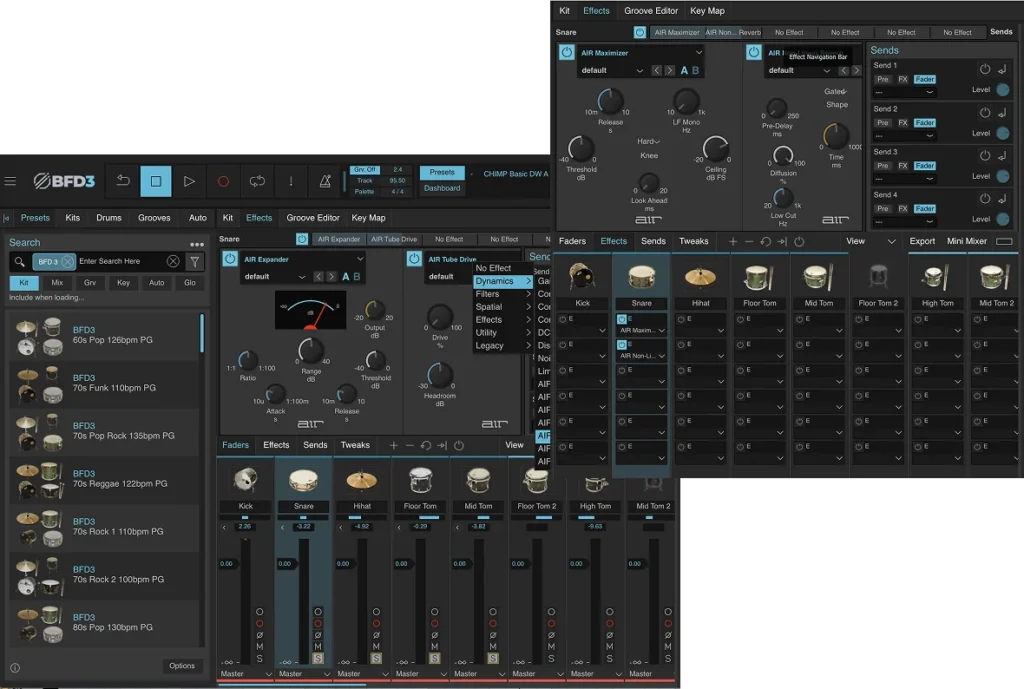
BFD 3.5 costs $199 and comes with 55 GB of drums, 51 kits and 60 mix-ready presets. It runs on Windows 10 (VST2, VST3 and AAX) and on macOS 12 and up (also AU, with Apple Silicon support). You buy it through an inMusic Profile, and BFD3 owners get version 3.5 as a free update.
The best drum VST for metal and rock
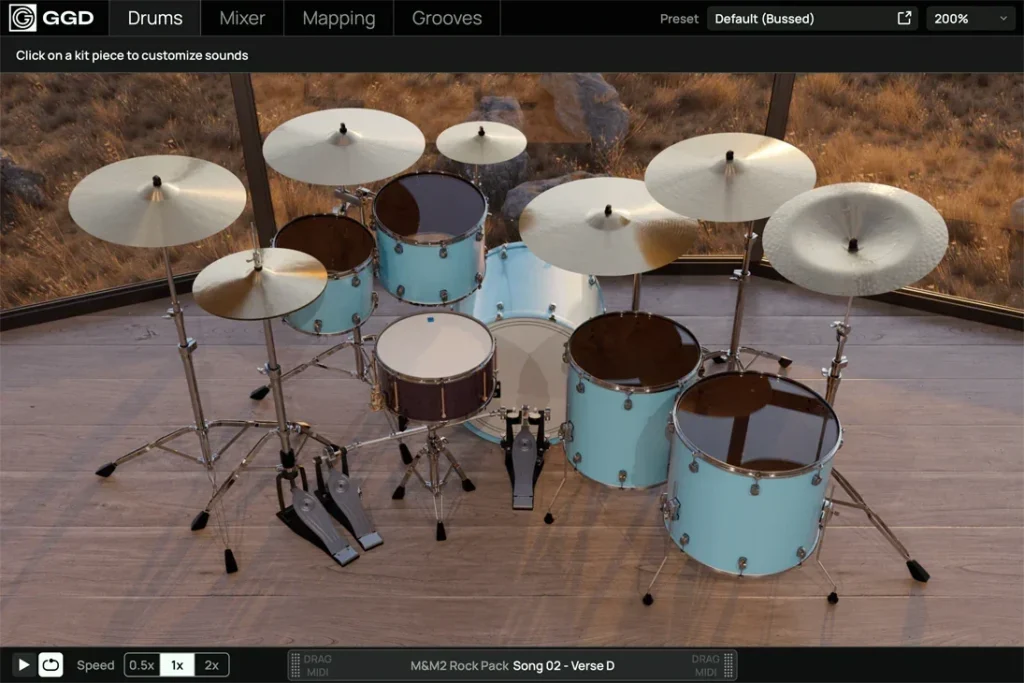
GetGood Drums Modern & Massive 2 ($219) is built for modern rock and metal. You get 20 GB of drums, 1,500+ MIDI grooves and 100+ mix presets. It’s its own plugin, so you don’t need Kontakt, and you install it with the Cradle Hub app. FL Studio 2024 and up is on GGD’s tested list.
On a budget, the original Modern & Massive is $99 and runs in the free Kontakt Player. Toontrack’s Metalheads EZX ($89), made with Tomas Haake of Meshuggah, turns EZdrummer 3 into a metal kit. And MT Power Drum Kit 2 is the free option.
The best drum VST for trap and hip-hop

Trap and hip-hop drums are mostly one-shots: single recorded hits of a kick, snare, hi-hat or 808. Mix Elite’s trap drum lessons build the drums in FL Studio’s Channel Rack with good samples and no drum plugin at all. Max’s advice on the pattern: “Drums, especially in trap music, are only to keep the rhythm going and not necessarily be in the highlight.”
If you want a plugin anyway, start with one of these.
XO (XLN Audio)
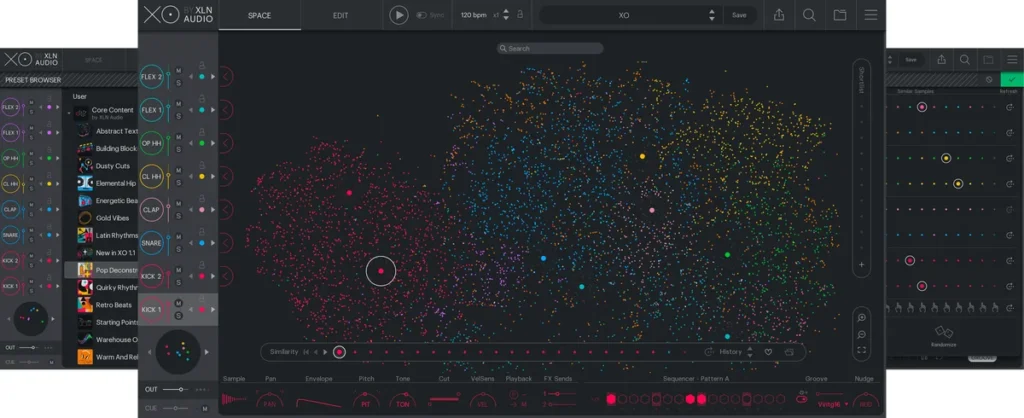
XO sorts your whole sample library into a map, with similar sounds grouped together. That way you can find a better kick in seconds. It comes with 8,700+ one-shots and 240+ beat presets, and you can drag finished beats out as audio or MIDI. Expansions include Trap, Boom Bap, Afrobeats and Drum n Bass.
XO is $149, or $9.99 a month for 15 months. XO Complete, with all 33 expansions, is $479. There’s a 10-day trial.
Pros: a fast way to search the samples you already have. Cons: expansions cost extra, and XLN doesn’t state Apple Silicon support.
Battery 4 (Native Instruments)
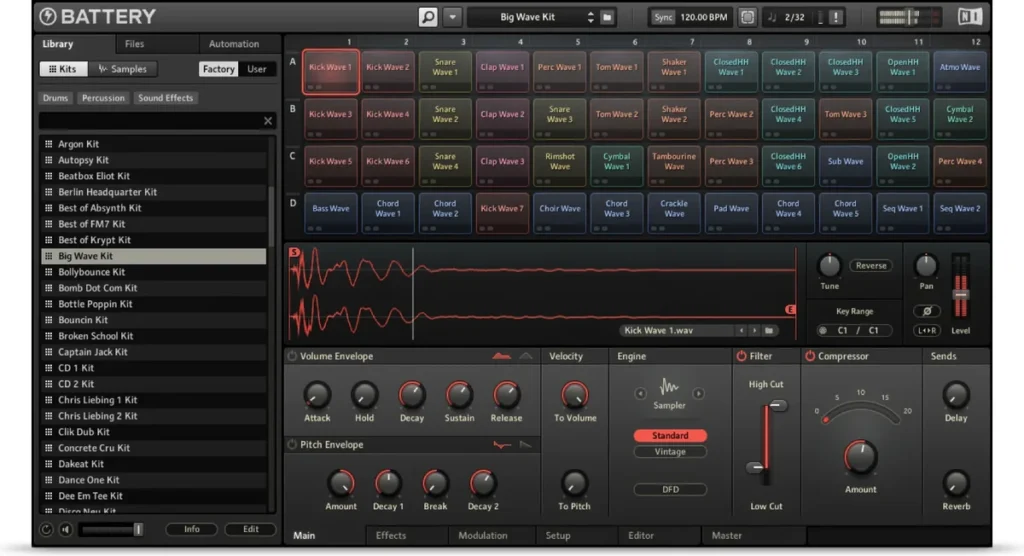
Battery 4 is a drum sampler that Native Instruments aims at electronic and urban styles. It has seven sample modes, including groovebox emulations, plus Time Machine Pro time-stretching. It’s $199, and it runs on Windows and Mac as a standalone app or as a VST, VST3, AU or AAX plugin.
Pros: seven sample modes, from clean to groovebox style. Cons: NI lists macOS 13 to 15, so check your Mac first, and the library size isn’t stated.
Roland TR-808 (Roland Cloud)
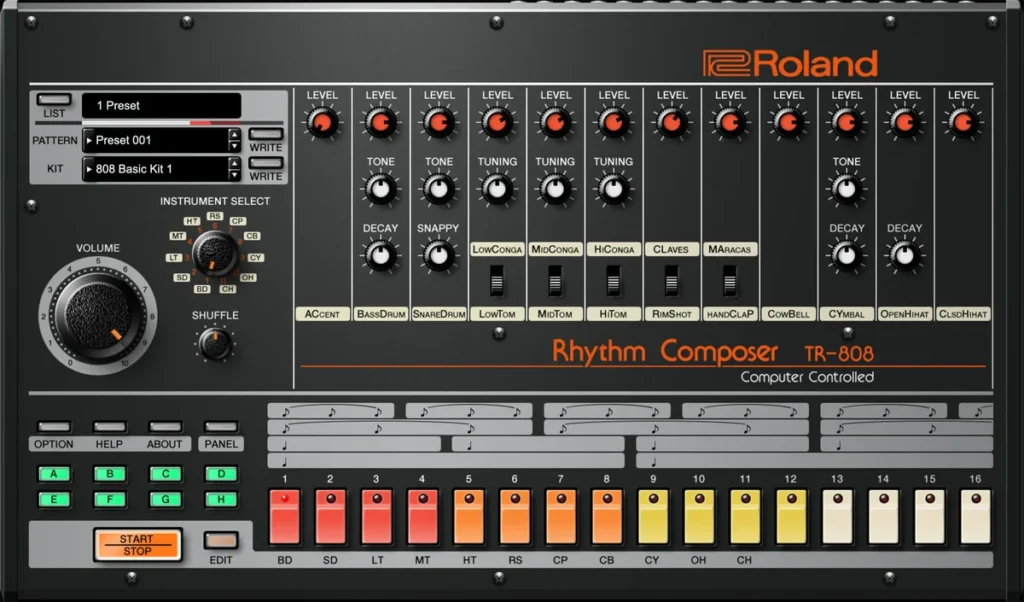
Roland’s own TR-808 plugin brings the drum machine behind the 808 sound into your DAW. Buy it outright as a Lifetime Key for $149, or pick it as part of a Roland Cloud plan. Pro is $9.99 a month, Ultimate is $19.99 a month, and new users get a 30-day Ultimate trial.
It runs as VST3, AU or AAX, and you need a Roland account and the Roland Cloud Manager app.
Two more options: Toontrack’s Hip-Hop! EZX ($89) adds 22 kits for neo-soul, Southern trap and boom bap to EZdrummer, and UJAM’s Beatmaker titles ($49 each) play genre beats with no programming.
The best drum VST for house, techno and EDM
Electronic drums are often synthesized, so the plugins here build sounds from scratch or design kicks in layers.
KICK 3 (Sonic Academy)
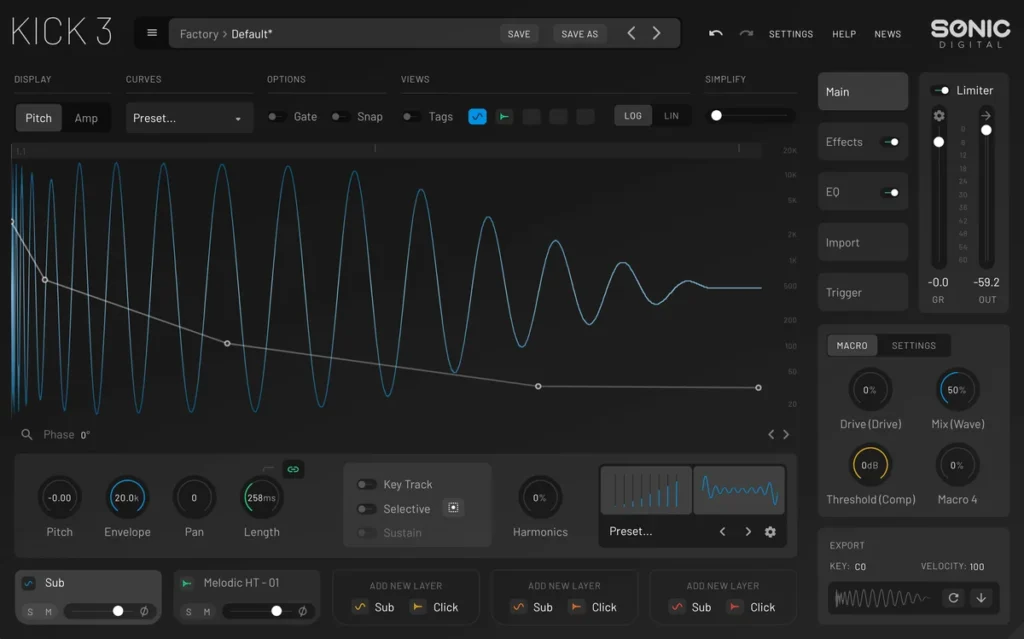
KICK 3 does one job. It builds kick drums. You get 5 layers, 540+ presets aimed at house, techno, trance and dubstep, and Import & Analyze, which rebuilds a kick from a sample. It also has a TRIGGER sidechain feature.
It’s £79.95, since Sonic Academy prices in pounds, with a 14-day trial. It comes as VST3, AU or AAX, with no VST2 version. KICK 2 is now marked End of Life, so get KICK 3.
Microtonic (Sonic Charge)
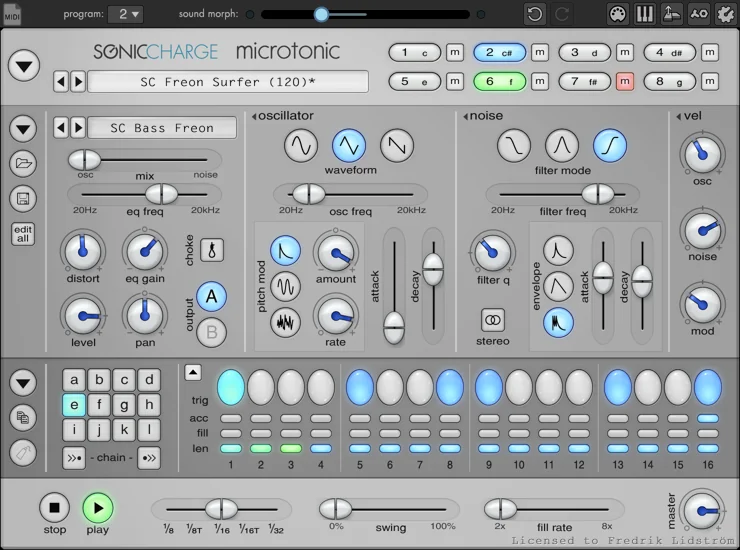
Microtonic is an 8-channel drum synth with its own pattern sequencer. Every sound is synthesized, with no samples, and it can morph between sounds. It’s $99, with a 3-week trial. It runs as VST 2.4 or VST3 on Windows, and on Mac it also comes as AU and a standalone app.
Drumazon 2 and Roland TR-909
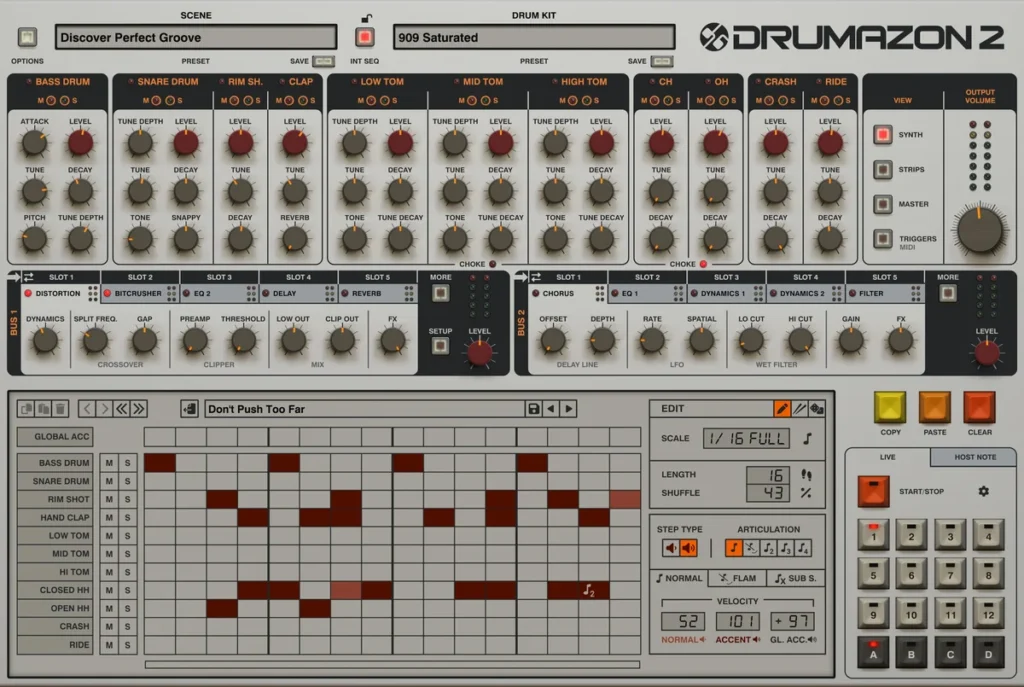
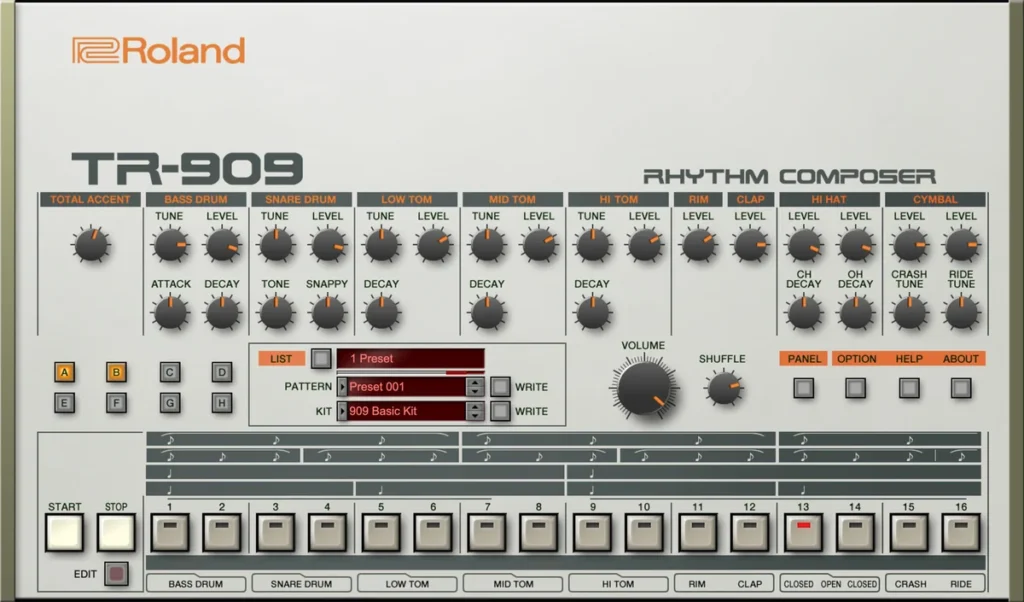
For classic 909 drums, D16’s Drumazon 2 is €119 (D16 lists prices in euros only), and Roland’s own TR-909 is $149 as a Lifetime Key. D16 also makes Nithonat 2, a 606 drum machine (€119), and PunchBox 2, a kick designer (€99), with demos for all of them.
Are paid drum plugins worth it, or are stock drums enough?
For trap, hip-hop, house and most EDM, stock drums and good samples are enough, and the sounds you pick matter more than the plugin. A paid drum VST earns its price when you want realistic acoustic drums or ready-made grooves, which is what Superior Drummer 3, EZdrummer 3 and GetGood Drums are built for.
That’s how Mix Elite’s trap lessons work: good one-shot samples in FL Studio’s Channel Rack, with no drum plugin. What a paid acoustic plugin adds is the drummer: whole recorded kits, ready-made grooves (EZdrummer 3 has more than 2,500) and mix presets that help the kit sit in a song.
How to choose the best drum VST for you
Answer these seven questions before you buy:
- What do you make? Rock, metal and other band-style songs sound best with an acoustic library. Trap, house and hip-hop beats run on one-shots and drum machines.
- Samples or synthesis? Sample libraries play recordings. Drum synths like Microtonic and FL Studio’s Drumpad build sounds from scratch, so you can shape every hit.
- Do you want grooves? EZdrummer 3, SSD 5.5 and GGD come with ready-made MIDI drum parts. You drag them into FL Studio and edit them.
- How much disk space do you have? Superior Drummer 3 needs about 236 GB, BFD 55 GB, GGD 20 GB and EZdrummer 3 18 GB.
- Will it run on your computer? Check your Windows or macOS version and Apple Silicon support. FL Studio loads VST, VST3 and CLAP plugins, plus AU on a Mac.
- Can you try it first? XO, KICK 3, Microtonic, Addictive Drums 2 and Roland Cloud all have free trials.
- What’s your budget? Start free. Then buy the one plugin that fits your genre.
Advice from Mix Elite’s free 4.5-hour FL Studio course fits here: different styles need different sounds, so keep trying samples until one sounds right. It’s much better to have a few great sounds than lots of okay ones.
How to install a drum VST in FL Studio
Drum plugins are instruments, so they go in the Channel Rack, not in a mixer slot. Here’s the short version:
- Run the plugin’s installer and choose the VST3 version.
- In FL Studio, open Options, then File settings, then Manage plugins, and click Find installed plugins.
- Star the plugin in the list, so it shows up near the top of FL Studio’s menus.
- Click + in the Channel Rack and pick it.
Big libraries like Superior Drummer 3, GGD and Roland’s plugins come through their makers’ own apps first: Toontrack Product Manager, Cradle Hub and Roland Cloud Manager. Our full guide on how to install VST plugins in FL Studio covers the folders, plus the fixes for when a plugin doesn’t show up.
How to make drums with your new plugin in FL Studio
Mix Elite’s trap drums video shows the whole method in FL Studio, step by step. It works with FPC, with any drum VST, or with plain samples in the Channel Rack.
Swap in better sounds
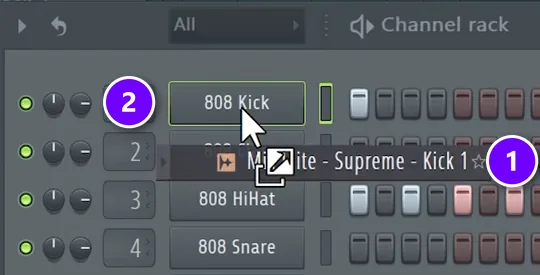
Find a sound in the Browser and drag it (1) onto a channel’s name button (2). That channel now plays your new sample. Max’s tip for picking sounds: “If you don’t like the sound, you can quickly exchange it using Shift and arrow up or down in your browser while playing the song.”
Fill the hi-hats in one click
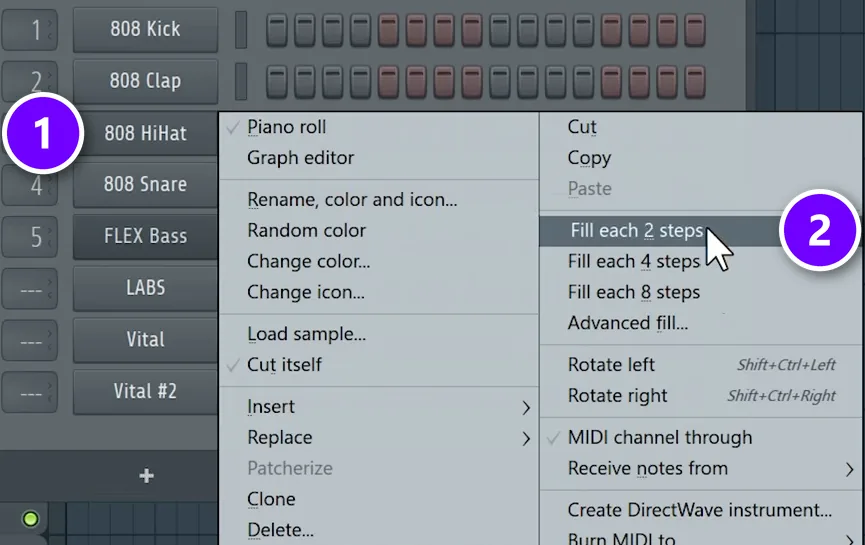
Right-click the hi-hat channel (1) and choose Fill each 2 steps (2). That puts a hat on every other step. That’s how the video starts its trap drums.
Add the snare and the kick
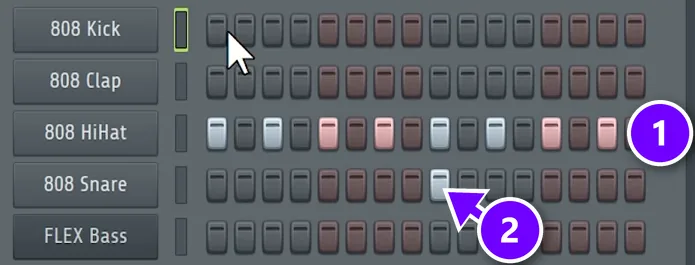
Put the snare on beat 3 (2), which is step 9 of 16, while the hats (1) keep running on every other step. Then add the kick on beat 1 and wherever else it feels good. The pattern, and the kick most of all, should be at least two bars long.
With FPC or a drum VST, use the Piano roll instead. It’s the first option when you right-click the channel, and each key plays a different drum.
How do you route a drum VST to separate mixer tracks in FL Studio?
Turn on separate outputs inside the drum plugin, then open its wrapper settings in FL Studio, go to the Processing tab and click Auto map outputs. Each output lands on its own mixer track, right after the plugin’s own track. In FPC, set each pad’s Output offset instead.
- Give the plugin a mixer track. Select its channel in the Channel Rack and press Ctrl + L. That assigns it to a free mixer track.
- Turn on separate outputs in the plugin. Every plugin does this its own way. In Addictive Drums 2, XLN says to open the Kit page and click the arrow next to each fader you want on its own output.
- Auto map the outputs. Open the plugin’s wrapper settings, click the Processing tab, and click Auto map outputs under Connections. FL Studio maps them to the mixer tracks after the plugin’s own track. Make sure each output is switched on.
- Name the new tracks. Image-Line calls this a good habit with multi-output plugins, because it tells FL Studio those tracks are in use.
One catch, from XLN: a drum on its own output skips the plugin’s master channel, so effects on that master won’t touch it anymore. Rebuild them on the FL Studio mixer if you need them.
FPC has this built in. Select a pad and set its Output offset. In Image-Line’s example, with FPC on mixer track 1 and an offset of 2, that pad plays on track 3.
Using plain samples in the Channel Rack? Select all the channels and press Ctrl + L, or open Channel options and choose Assign selected to free mixer tracks. Mix Elite’s free 1-hour mixing course does exactly that before it starts on EQ.
Make any drum plugin hit harder in FL Studio
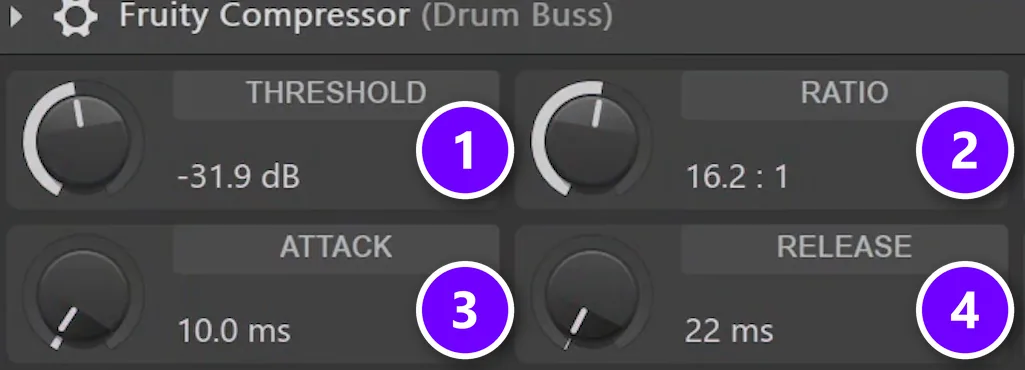
Whatever plugin you pick, the mix decides how hard your drums hit. A drum bus is one mixer track that all your drums run through. In Mix Elite’s video on hard-hitting drums, the drum bus gets squashed with Fruity Compressor, then blended back in. That’s called parallel compression.
The settings: Threshold at -31.9 dB (1), Ratio 16.2:1 (2), Attack 10 ms (3) and Release 22 ms (4). That’s very heavy on its own. That’s the point.
Blend it in with the mix knob
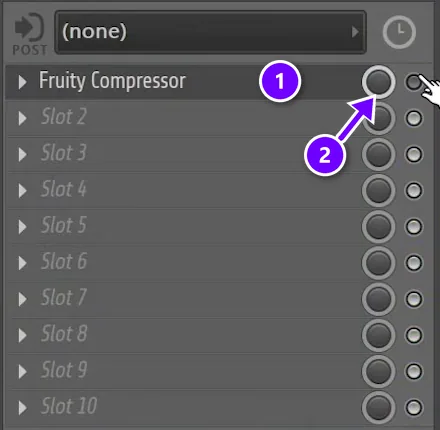
Every mixer slot in FL Studio has its own mix knob. With Fruity Compressor in the drum bus’s first slot (1), turn that slot’s mix knob (2) down until the drums sound punchier but not squashed.
For more, read our top 5 secrets for hard-hitting drums in FL Studio. If your kick and 808 fight each other, see how to mix kick and 808.
Drum plugins that changed or went away in 2026
Older lists of the best drum VSTs still recommend some of these. Here’s what’s true now:
- EZdrummer 2: discontinued in May 2022. EZdrummer 3 replaced it.
- KICK 2: marked End of Life. KICK 3 replaced it.
- Sitala: version 2 now costs $20. The old version 1.0.9 is still free.
- Spitfire LABS: now inside Splice INSTRUMENT, with only three drum packs still free.
- Groove Agent SE: it comes with Cubase. It isn’t a free download on its own.
- Arturia Spark 2: still sold for $149, but its spec page lists Windows 7, macOS 10.8 and 32-bit formats, with no word on Apple Silicon.
- DrumGizmo: free and open source, but last updated in September 2022.
The best drum VST plugins at a glance
Here’s the whole list in one place. Prices are the makers’ regular prices, checked in October 2026, and several were on sale for less when we looked.
| Plugin | Best for | Regular price |
|---|---|---|
| FPC (comes with FL Studio) | Beat makers in FL Studio, any genre. | Included in every edition |
| Kong (in Reason Free) | A free drum designer that runs as a plugin. | Free |
| MT Power Drum Kit 2 | Free acoustic drums for pop, rock and metal. | Free |
| Superior Drummer 3 | The biggest acoustic drum library. | $399 |
| EZdrummer 3 | Writing songs fast with real drums. | $179 |
| Addictive Drums 2 | Acoustic kits for any genre. | From $179 |
| GetGood Drums Modern & Massive 2 | Modern rock and metal. | $219 |
| XO | Trap and hip-hop one-shots and beats. | $149 |
| Battery 4 | Electronic and hip-hop kits. | $199 |
| KICK 3 | Designing EDM kicks. | £79.95 |
| Microtonic | Synth drums for house and techno. | $99 |
Ready to use your new drums? Our guide on how to make beats walks you through your first full beat, and our list of free VST instruments for trap covers the melody side.
DAY 3 OF THE 7-DAY MUSIC PRODUCER COURSE
Turn your drum sounds into a finished beat
Day 3 of the 7-Day course covers drums and arranging: how to choose sounds that work, how to build drum patterns fast even if you have no feel for rhythm, and one simple tactic to turn your ideas into a full song. You also get the 2025 Producer Toolkit sound pack to build with. It’s taught in FL Studio (the free trial works), about 45 minutes a day, and on day 7 a pro gives you feedback on your finished track. It’s $27, and you get 60 days to decide if it was worth it.
Frequently asked questions
What is the best drum VST?
It depends on your style. Superior Drummer 3 is the pick for realistic acoustic drums, GetGood Drums Modern & Massive 2 for metal, XO or Battery 4 for trap and hip-hop, and KICK 3 or Microtonic for house and techno. If you make beats in FL Studio, start with FPC, which comes with every edition.
What is the best free drum VST?
If you use FL Studio, start with FPC, which comes with every edition. For realistic acoustic drums, try SSD 5.5 Free, MT Power Drum Kit 2 or BFD Player; the last two come with grooves. Kong in Reason Free is a full drum designer that’s free forever.
How do I route a drum VST to separate mixer tracks in FL Studio?
Turn on separate outputs inside the plugin first. Then open its wrapper settings, go to the Processing tab and click Auto map outputs, which puts each output on its own mixer track after the plugin’s track. In FPC, set each pad’s Output offset. For plain samples, select the channels and press Ctrl+L.
Are paid drum plugins worth it?
Not for most trap, hip-hop, house and EDM, where good one-shot samples in FPC or the Channel Rack are enough. A paid drum VST is worth it when you want realistic acoustic drums, ready-made grooves or mix-ready kits, like Superior Drummer 3, EZdrummer 3 or GetGood Drums. Start free, then buy the one plugin that fits your style.
Is FPC good enough for making beats?
Yes, for most beats. FPC comes with every FL Studio edition and gives you 16 pads per bank, layered samples, kits like 808 and 909, and ready-made patterns. Load your own samples into its Empty preset and it plays them like any drum plugin. What matters most is the quality of the sounds you put in.





