



“When you have the best and tastiest ingredients, you can cook very simply and the food will be extraordinary…”
To make good drums in FL Studio, start with great samples, layer claps and hats (never kicks), add about 40% swing and some velocity changes, then route every drum to one drum bus and balance it. For extra hit, compress the bus hard and blend it in at about 30 to 40% with the slot’s mix knob.
Ever wonder how to make good drums in FL Studio when your pattern already looks right, but the drums still sound small next to a song on Spotify? That’s rarely a pattern problem, it’s a sound and balance problem. If you’re still placing your first kick and snare, start with our guide to making your first beat, and if your kick and 808 fight each other, read how to mix kick and 808. Everything below picks up from there.
Table of Contents
How to make good drums in FL Studio, step by step
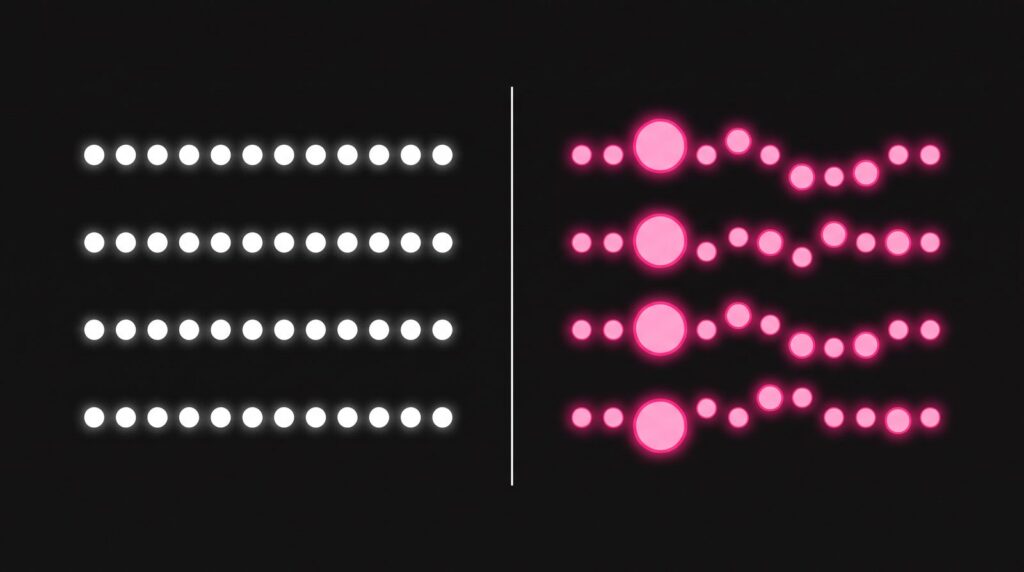
Work in this order. Each step makes the next one easier, and the first two matter more than any plugin.
- Pick samples that already sound finished.
- Layer claps, snares and hats. Never layer kicks.
- Add swing and vary the velocity so the groove feels human.
- Route every drum to one drum bus and balance the levels.
- EQ only what bothers you, like a boxy kick or harsh hats.
- Compress the drum bus, then add parallel compression and a little distortion.
- Sidechain the bass to the kick so the kick cuts through.
Choose drum samples that already sound finished
Every later step depends on this one. When the video below gets to processing, it says the result depends on “the samples you choose and the track you have.” EQ can shape a good kick, but it can’t turn a weak one into a great one.
There’s no trick for spotting a good sample, and Mix Elite’s free 4.5-hour FL Studio course says so plainly. “Other than getting a high quality sample pack like this one, there’s no shortcut to learning how to distinguish what sound is good or bad,” says Max, the founder of Mix Elite. The more you compare your drums with professional tracks in your style, the faster your ear learns.
- Pick for the song, not for solo. Different styles need different sounds, so keep trying samples until one fits the track.
- Reuse what works. Some producers reuse the same drum samples across whole albums, and that’s not a bad habit.
If one side of a sample’s meter is louder than the other, the sample was already panned before it reached you. Check your samples before you pan any layers.
How do you program drums in FL Studio?
Program drums in the Channel Rack, FL Studio’s step sequencer. Each row plays one sound, and a bar has 16 steps: four beats with four steps each. Click a step to place a hit, and make the pattern at least two bars long so the groove has room to change.
Two patterns from the free course make a good start:
- Trap, at about 140 BPM. Hi-hats on every 2nd step (right-click the hat channel for an automatic fill), a snare on beat 3, and a kick on beat 1 so listeners hear where the bar starts.
- House. A kick on every beat, called four on the floor, a clap on beats 2 and 4, and a hat on every off-beat.
- Hi-hat rolls. Open the Channel Rack’s graph editor and raise a step in the Repeat lane. Change something every 4 beats instead of filling the whole bar with rolls.
Our guide to making your first beat builds these from an empty project. The rest of this page is about making those patterns sound good.
How to layer drums in FL Studio
Layering means playing two or three samples at the same moment, so they sound like one bigger hit. It works best on claps, snares, open hats and percussion. The one rule: never layer kicks.
Layer a clap from three samples
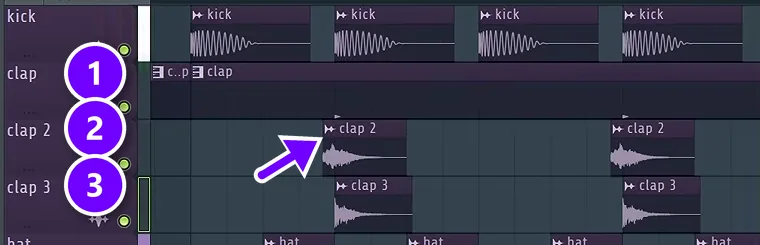
In the free course project, the clap is three samples stacked together. The first (1) is very short and gives the clap its transient, the sharp click at the start that cuts through the mix. The second (2) brings the body. The third (3) adds brightness in the high mids and treble.
Look closely at the second layer. It starts a tiny bit before the beat, off the grid (see the arrow), which gives the clap an interesting extra layer. To nudge a clip off the grid like this, drag it while holding Alt, which turns snapping off. Each layer also has its own mixer track, so you can EQ them one by one.
You don’t have to layer your claps or snares, but try it. It can make your drums more interesting and give them more depth.
Layer snares and hats, then pan them apart
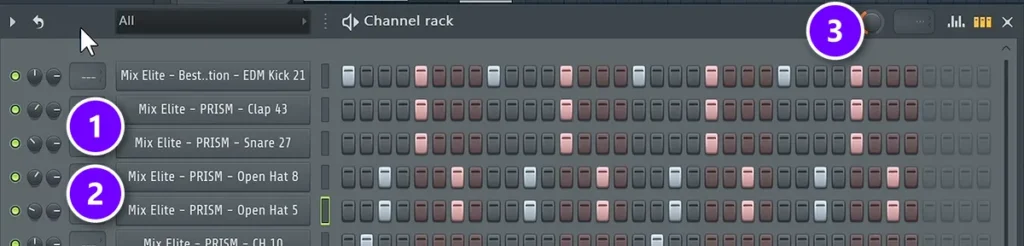
You can layer right in the Channel Rack, too. In the course’s house beat, a snare plays the same steps as the clap (1), a common way to give your drums more punch. A second, brighter open hat doubles the first one (2). Pick a layer that sounds a little different, or it adds nothing.
Then turn each layer’s pan knob, the first small knob on its row, a little left on one and a little right on the other. Now the two layers aren’t in the same place in your headphones, and the beat gets a little excitement it didn’t have before.
How do you layer drums without them getting muddy?
Give every layer one job: the click, the body or the bright top. Let only one sound own the low end, which is why kicks are never layered, and make sure the layers start together so they don’t cancel each other out.
- Split the jobs. The three-layer clap above works because each sample covers a different part of the hit.
- EQ each layer on its own track. Cut what a layer doesn’t need, so two layers aren’t fighting over the same frequencies.
- Fix a thin stack. If two layers sound weaker together than apart, their waveforms are cancelling each other out. Zoom in and line up their starts, or press the reverse polarity button on one layer’s mixer track.
How to make drums groove: swing and velocity
When every hit lands exactly on the grid at the same strength, drums sound like a machine. Two settings fix most of that. Neither takes more than a minute.
Add swing
Swing delays every second step by a few milliseconds, so the groove bounces instead of marching. Turn up the swing knob at the top of the Channel Rack (3 in the screenshot above). On the course’s house drums, about 40% sounds right, and it’s a good place to start.
Swing works on the Channel Rack’s step patterns. If you want only some sounds to swing, each channel’s settings window has its own Swing knob (in the Miscellaneous functions tab, under Time). It scales the main swing, so you can keep the kick straight and let the hats move.
Change the velocity in the Piano Roll
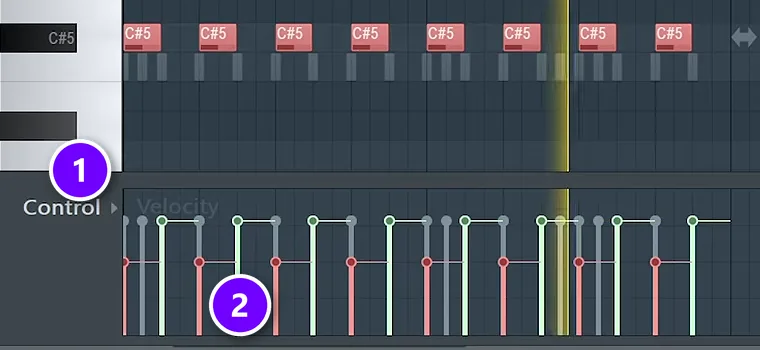
Velocity is how hard each note is hit. Our beat-making guide shows the quick version in the Channel Rack. The Piano Roll gives you more control. The control lane at the bottom shows Velocity (1). Select the notes you want to change, then hold Alt and scroll down to lower them all at once (2). The course shows it here on a bass line, and drum notes work the same way.
Keep that lane simple: note velocity and note pan are all you need. Start small, like lowering every other hi-hat a little, and listen for the hats to stop sounding robotic. Our guide to humanizing MIDI drums has more ways to do it.
How to mix drums in FL Studio
To mix drums in FL Studio, give every drum its own mixer track (select the channels and press Ctrl + L), route them all into one drum bus and set the levels first. Then EQ only the problems, compress the bus instead of each hit, and sidechain the bass to the kick.
Mixing drums is mostly about balance. The video below covers the whole process in about five minutes: balance, processing and sidechain. Here’s what it does, step by step.
Send every drum to one drum bus and balance it
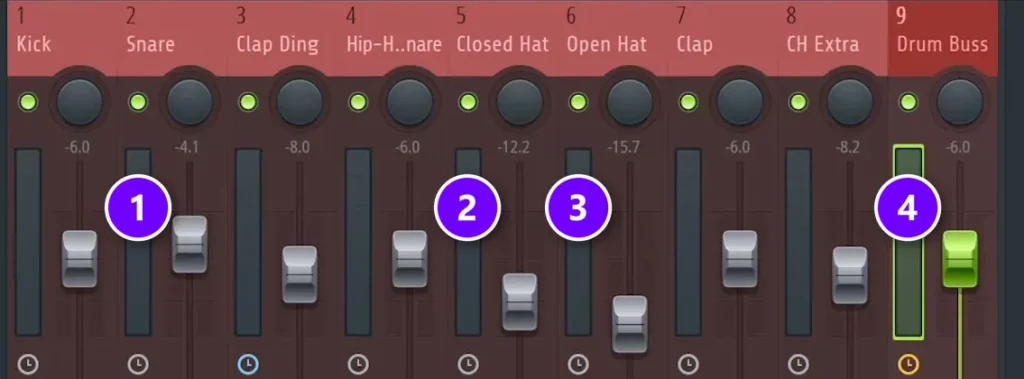
A drum bus, also called a drum group, is one mixer track that all your drums play through, so you can control them together. To make one, select all the drum mixer tracks, hold Ctrl and click the routing arrow at the bottom of an empty track. Then rename it.
Now play the loop and listen for the one drum that’s too loud. Samples usually come in normalized, which means already at full level, so the balance is often close from the start. In the video, the closed hat (2) and open hat (3) come down quite a bit, while the snare (1) sits higher than you might expect. Every drum then plays through the Drum Buss track (4).
That snare level is on purpose. In trap and hip-hop, the kick and snare carry the beat, so the video’s advice is clear: “do not be afraid to put the snare louder than you think.”
Cut the boxiness from the kick
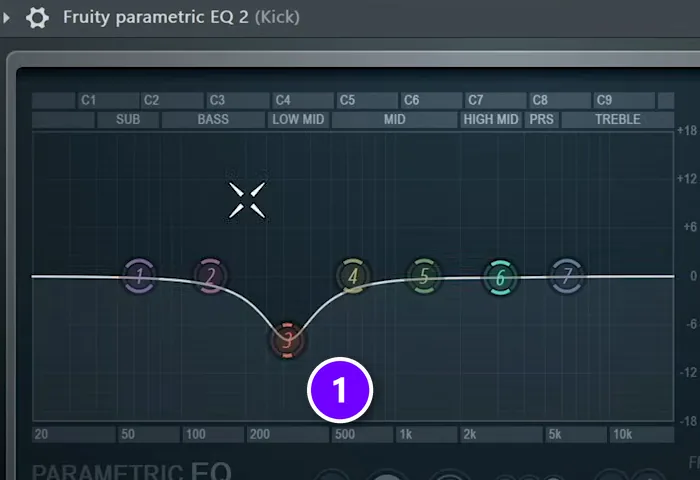
EQ, short for equalizer, turns chosen frequencies up or down. In the video, the kick has too much boxiness, a hollow, cardboard-like sound in the low mids. So it gets a deep bell cut (1) between 200 and 500 Hz.
In another song, that same low-mid area might sound great, so treat it as a choice for this track, not a rule. The kick’s low end is a bigger topic, and our kick and 808 guide covers it.
Find the harsh spot in the hats
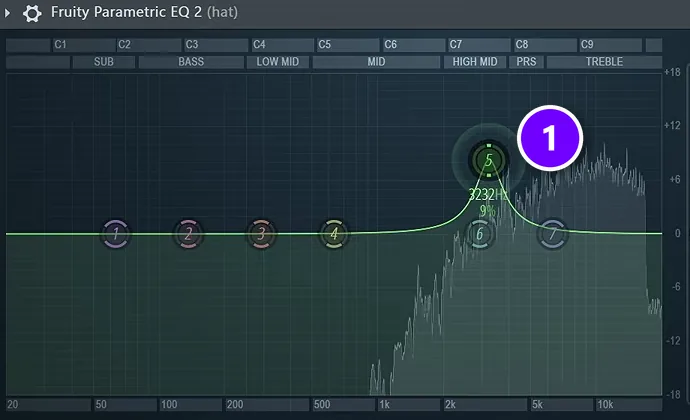
Hats rarely need much work. If they hurt your ears, boost a narrow bell (1), sweep it left and right until the harsh sound jumps out, then cut that spot a little. Check it with the whole mix playing, because the cut can sound better or worse there.
Beyond that, leave the hats alone. The video only reaches for an EQ or a bit of reverb on hats, and adds that it’s “really not necessary to put reverb on everything.”
Compress the drum group, not each hit
It’s tempting to put a compressor on the kick, but it rarely helps. “There’s no sense of just compressing the kick drum alone, because it’s so plucky and so short,” Max says. The same goes for claps, snares, shakers and hats. Set their volume instead.
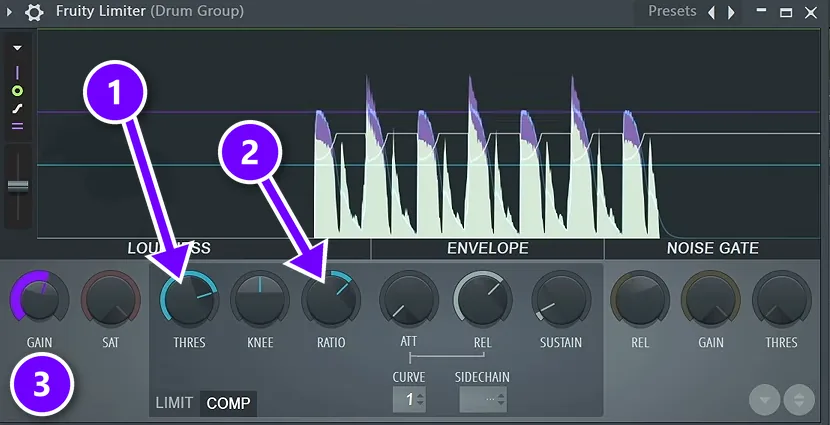
Compress the whole drum group. In the free course, Fruity Limiter goes on the drum group with the ceiling turned up and COMP switched on. Lower the threshold (1) and set the ratio (2). At 3:1 it took off about 6 dB, which was too much, so the course settles on 2:1 with 3 to 4 dB of reduction and +3 dB of gain (3). The kick and clap stop jumping out, and the kit sounds more controlled.
Every knob used here is explained in our FL Studio compressor guide.
Pan the drums and add a little reverb
Panning and reverb give the kit room to breathe. In the free course, the clap layers go slightly left and right, the shaker about 10% left and the hat about 10% right.
Reverb goes only where it helps. On the clap, Fruity Reeverb 2 gets its size at max, the low cut up around 700 Hz so the reverb stays out of the low end, a decay of about 1 second and very little wet. Hats get an even shorter decay, so the tail is gone before the next hat hits.
How to make drums hit harder: parallel compression
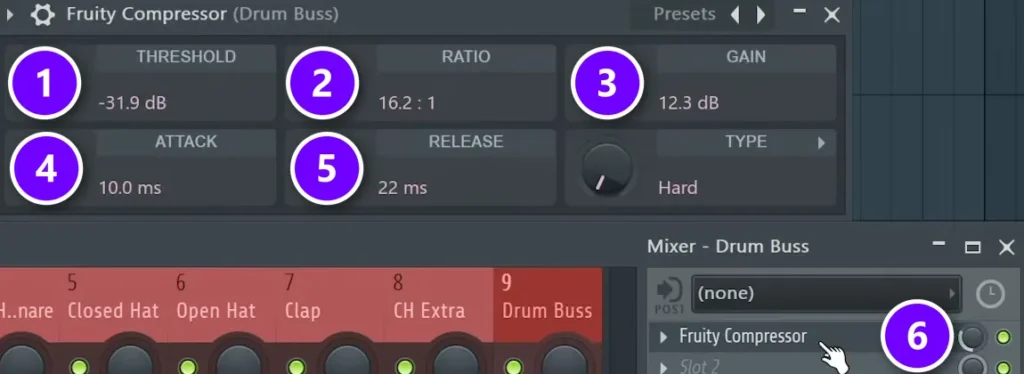
Parallel compression means crushing your drums with heavy compression, then blending that under the untouched drums. The crushed part brings up the body and room sound, while the clean part keeps the punch. The video calls it “the easiest process on the planet Earth” and says it “makes a whole world of the difference.”
Here’s the setup from the video, with Fruity Compressor on the drum bus:
- Threshold (1) down to about -30 dB.
- Ratio (2) turned to about 12 o’clock, which reads 16.2:1 here.
- Attack (4) at 10 ms and release (5) at 20 to 30 ms.
- Gain (3) up until the drums are as loud as before, about +12 dB here.
- Then the small mix knob next to the plugin’s mixer slot (6) down to about 30 to 40%.
That last knob is what makes it parallel. The video’s verdict is drums that are “controlled, fat and hard hitting.”
Every effect slot in the FL Studio Mixer has its own small mix knob, to the right of the plugin’s name. It blends the effect with the dry sound, so you can use parallel compression on any track without making an extra one.
Add a little distortion before the compressor
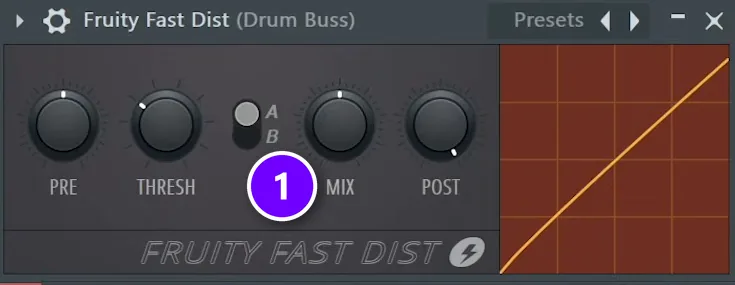
One more trick from the video: add a distortion plugin in the slot above the compressor, so it comes first. Any distortion works, as long as the settings are subtle. The video uses Fruity Fast Dist with its MIX knob (1) at about halfway. Think of it like a filter on a photo. It gives every drum the same color, so the kit sounds like one unit.
What is the best effect chain for hard-hitting drums?
Keep single drums simple and do the heavy work on the drum bus: EQ on a drum only if it needs it, then a subtle distortion and a compressor on the bus, in that order. Finish with a sidechain on the bass. Mixer slots run from top to bottom, so the order on screen is the order you hear.
- Each drum track: volume first, then an EQ in slot 1 only for a real problem, like a boxy kick or harsh hats. No compressor on single hits.
- Clap and hat tracks: a short reverb if they sound too dry, with the settings above.
- Drum bus, slot 1: a subtle distortion, such as Fruity Fast Dist with its MIX knob about halfway.
- Drum bus, slot 2: a compressor. Use Fruity Limiter in COMP mode at 2:1 for 3 to 4 dB of glue, or crush the drums with Fruity Compressor and blend it in at 30 to 40% for parallel compression.
- Bass or 808 track: a sidechain compressor triggered by the kick, ducking the bass about 7 to 10 dB.
Sidechain the bass so the kick cuts through
The last key in the video is sidechain compression. Every time the kick hits, it briefly turns the bass or 808 down, so the kick isn’t buried. The steps are in our guide to sidechaining in FL Studio, and the kick and 808 guide shows a version that ducks only the low end, so the 808 keeps its weight.
How much? In the free course, the bass group gets Fruity Limiter in COMP mode with the kick as its sidechain input, a ratio of about 4:1 and the threshold lowered until the bass ducks 7 to 10 dB each time the kick hits.
Why does my kick drum sound thin and weak?
A thin kick is usually a weak sample or a bass fighting it in the low end. Pick a kick that already has the weight you want, never cut its sub, and sidechain the bass so it ducks 7 to 10 dB each time the kick hits. Then shape it with small EQ moves, not big boosts.
- Swap the sample before you boost. A small bell boost in the sub is fine, but a big one means you need another kick.
- Keep the sub. Never low-cut a kick. If the bass clashes with it, the sidechain takes care of that.
- Boost where the punch lives. A kick’s punch sits in the bass and low mids, and its click sits in the presence and treble range. Use a slight bell, never a big low shelf, and cut the low mids instead if it sounds muddy.
- Give it room. Only one bass sound should play the sub at a time, so low-cut the extra bass layers.
- Keep the master empty while you mix. FL Studio puts a limiter on the master by default, and a kick boosted into it can ruin the whole track.
Max puts it plainly: “It’s much better to choose a different sample if you feel like you really need to boost this area in the sub range.” For the low end in more detail, read our guide to mixing kick and 808.
Why do my drums sound bad in FL Studio?
If your drums still sound weak, it’s almost always one of these seven things:
- Weak samples. No plugin turns an average kick into a great one. Swap the sample first.
- A quiet snare. In trap and hip-hop, the snare carries the groove with the kick. Push it up.
- Loud hats. They’re the easiest drums to overdo. Pull them down until they sit behind the kick and snare.
- A robotic groove. Every hit sits on the grid at the same velocity. Add swing and lower some velocities.
- Reverb on everything. Save it for a clap or a hat that needs space.
- A compressor on every drum. Compress the drum bus instead.
- Judging drums in solo. Layered drums often don’t sound perfect on their own, but in the mix they do a good job. Always check them with the whole song playing.
Fix them in that order, sound first and plugins last. Once your drums hit, the next job is turning the loop into a full song.
DAY 3 OF THE 7-DAY MUSIC PRODUCER COURSE
Get drums that hit, then turn them into a full song
Day 3 of the 7-Day course is about drums and arranging: how to choose sounds that work, how to build drum patterns fast even if you have no feel for rhythm, and one simple tactic for turning an idea into a full song. You get the 2025 Producer Toolkit sound pack to work with. It’s taught in FL Studio (the free trial works), about 45 minutes a day, and on day 7 a pro gives you personal feedback on your finished track. It’s $27, with 60 days to decide if it was worth it.
Frequently asked questions
How do I make my drums hit harder in FL Studio?
Start with punchy samples and get the balance right on a drum bus. Then add parallel compression: compress the drum bus hard (threshold around -30 dB, attack 10 ms, release 20 to 30 ms), match the volume, and turn the slot’s mix knob down to about 30 to 40%. A little distortion before the compressor and a sidechain on the bass help too.
How do you mix drums in FL Studio?
Send each drum to its own mixer track with Ctrl + L, then route them all into one drum bus. Balance the levels first, with the kick and snare strongest and the hats tucked behind. EQ only what bothers you, compress the bus instead of each hit, and sidechain the bass to the kick.
Why does my kick drum sound thin?
Usually the sample is weak or the bass is fighting it in the low end. Pick a kick that already has the weight you want, never cut its sub, and sidechain the bass so it ducks 7 to 10 dB when the kick hits. If you need a big sub boost, choose another sample instead.
How do I layer drum samples without getting mud?
Give each layer one job, such as the click, the body or the bright top, and let only one sound own the low end. That’s why you never layer kicks. Put each layer on its own mixer track so you can EQ it, and line up the starts so the layers don’t cancel out.
How do you program drums in FL Studio?
Use the Channel Rack, FL Studio’s step sequencer. Each row is one sound and each bar has 16 steps, so you click steps to place hits. For trap, put hats on every 2nd step, a snare on beat 3 and a kick on beat 1. Make the pattern at least two bars long.





