



“Be quick, but don’t hurry.”
The best compressor plugins in 2026 start with free ones: Fruity Limiter in COMP mode (in every edition of FL Studio), Universal Audio’s 1176 and LA-2A (free in UAD Explore FREE) and TDR Kotelnikov, and they’re good enough for a professional mix. If you pay, FabFilter Pro-C 3 ($199) covers every job and Cytomic The Glue ($99) glues the mix bus.
Almost every plugin sale has a compressor in it. Each one promises punch and glue. Then you put three of them on the same drum loop, you can barely hear a difference, and you start to wonder if your ears are the problem.
They’re not. “Compression is so hard to hear,” says Max, the founder of Mix Elite, in Mix Elite’s free 4.5-hour FL Studio course. So this list starts with the compressors FL Studio already gives you, then the free ones worth installing, then three paid picks. We checked every price on the maker’s own site on October 12, 2026. Sales change fast.
Table of Contents
What does a compressor plugin do?
A compressor turns down the loud parts of a sound once they go over a level you choose. The quiet parts stay where they are, so the gap between loud and quiet gets smaller. That’s what keeps a vocal easy to follow from the first word to the last. It’s also what makes drums sound tight instead of jumpy.
Every compressor has the same core controls. The threshold is the level where it starts working. The ratio is how hard it pushes down. For beginners, Max’s advice is to focus on just those two: “only those two knobs will matter for now and for many, many weeks to come.”
Attack sets how fast the compressor grabs a loud sound, and release sets how fast it lets go. Grab too fast and the snap at the start of a drum hit disappears, which is why the coach’s line at the top fits so well. Our FL Studio compressor guide explains every knob step by step, and compression vs clipping vs limiting sorts out the tools that look alike.
Which type of compressor do you need?
Most compressor plugins copy a famous piece of studio hardware, and each type has its own sound. You’ll see these five names in every review:
- FET: very fast and a little aggressive. It adds bite to rap vocals, snares and bass. The 1176 is the classic one.
- Opto (optical): slow and smooth. It evens out a vocal or a bass line without drawing attention to itself. The LA-2A is the classic one.
- VCA: clean and punchy. The bus compressor on SSL mixing desks is the famous one, used to make a drum group or a whole mix feel glued together.
- Tube (vari-mu): soft and warm, made for mix buses and masters. The Fairchild 670 is the legend.
- Digital: copies no hardware at all. It’s clean, and it can usually do a bit of everything, like FL Studio’s own compressors.
You don’t need one of each to start. Below, each pick tells you which type it is, so you can match it to the job.
The best compressor plugins in FL Studio
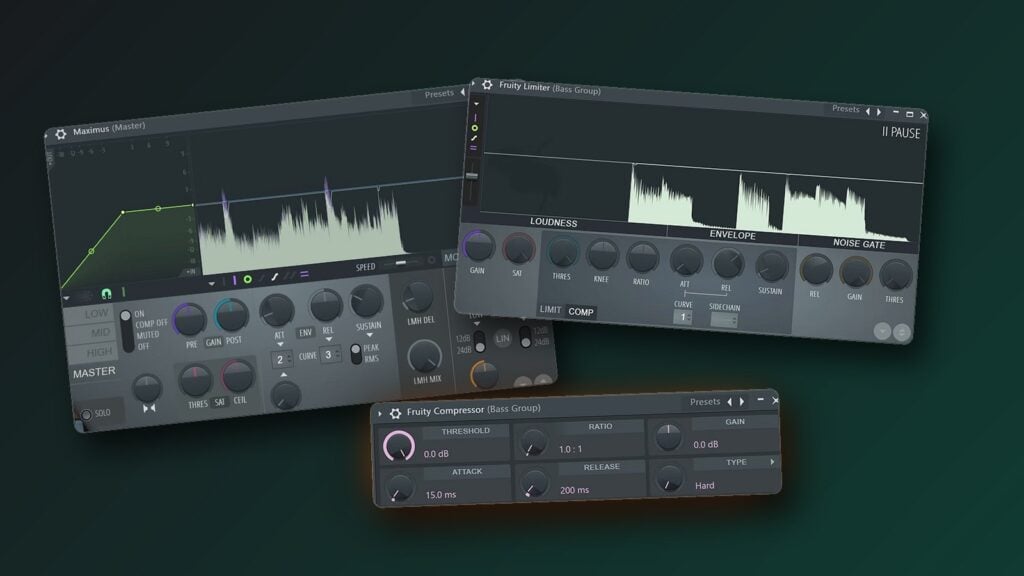
If you make music in FL Studio, you already own three good compressors. Image-Line’s edition comparison lists Fruity Limiter and Fruity Compressor in every edition, and Maximus in Producer Edition and up.
1. Fruity Limiter (FL Studio)
Price: free with every edition of FL Studio, and in the free trial.
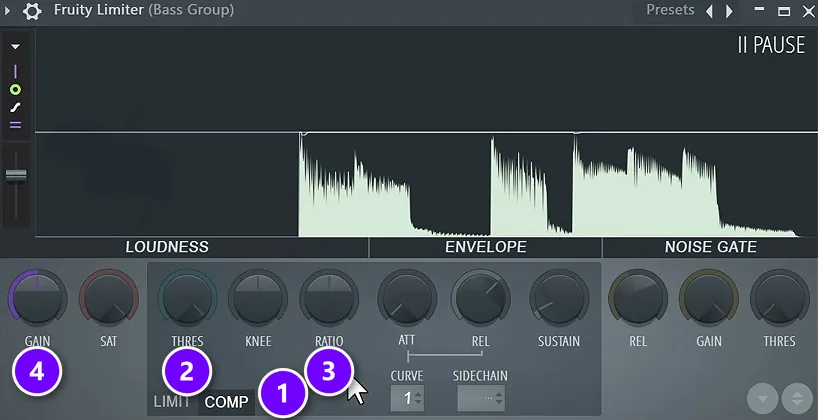
Don’t let the name fool you. Image-Line describes Fruity Limiter as a single-band compressor, limiter and noise gate in one plugin. It opens as a limiter, so click COMP (1) to turn it into a compressor. Then lower THRES (2), raise RATIO (3), and use GAIN (4) to win back the volume you took away.
This is the compressor Mix Elite’s free FL Studio course teaches with. The course deletes Fruity Compressor and loads Fruity Limiter instead, because with Fruity Compressor “we don’t have any visual feedback to what’s happening,” as Max puts it. Fruity Limiter draws the waveform, so you can watch every peak get caught. On the drum group, the course sets it to 2:1 for about 3 to 4 dB of gain reduction, then adds 3 dB back with the gain.
Best for: learning compression, and everyday mixing in FL Studio.
2. Fruity Compressor (FL Studio)
Price: free with every edition of FL Studio.
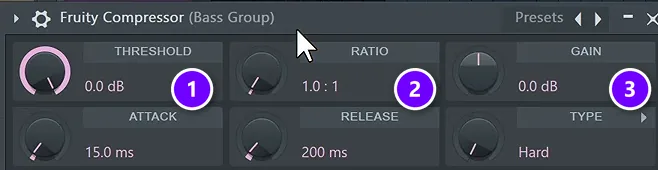
Fruity Compressor is the plain one. There’s nothing on screen but its controls. Turn THRESHOLD (1) down and RATIO (2) up until the loud parts get caught, then raise GAIN (3) to make up the volume. Below them sit Attack, Release and a Type menu that sets the knee, which is how gently it starts to compress.
It can also be sidechained, so a kick can duck a melody. Select the kick’s mixer track, right-click the routing arrow under the melody’s track and choose Sidechain to this track. Then pick the kick in Fruity Compressor’s Sidechain Input menu.
Best for: quick, light compression when you trust your ears.
3. Maximus (FL Studio)
Price: included in FL Studio Producer Edition and up, but not in the Fruity Edition. Every edition gets Fruity Multiband Compressor, a simpler tool of the same kind.
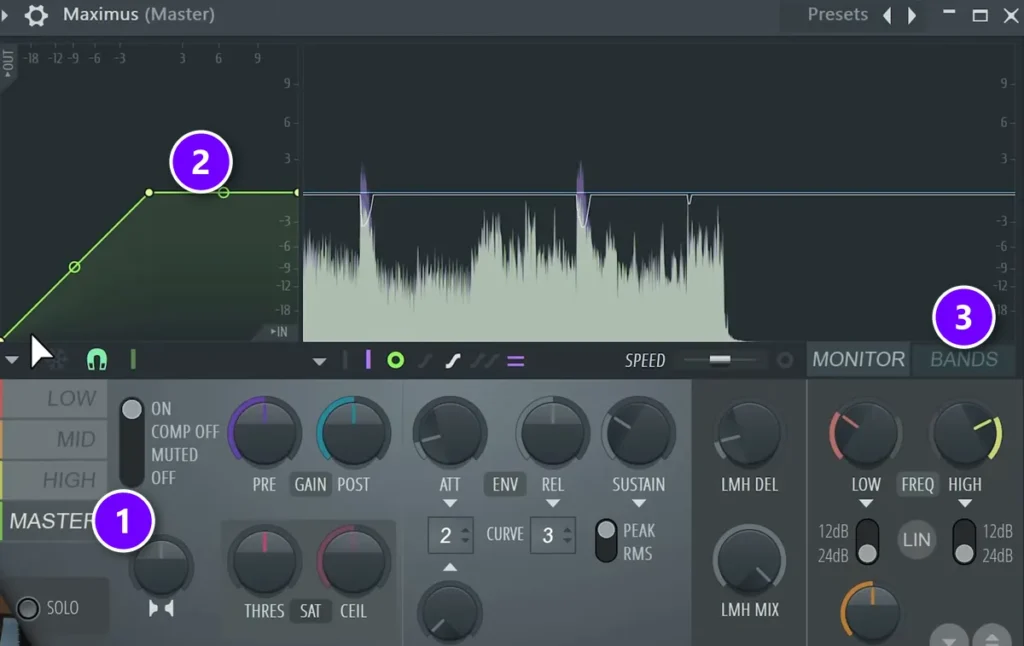
Maximus splits your sound into low, mid and high bands and compresses each one on its own. As Mix Elite’s Maximus tutorial explains, it works like Fruity Limiter, but with one compressor for each band plus one for the whole sound. Every colored band you see is its own compressor.
Pick a band on the left (1), shape its compression on the curve (2), and open BANDS (3) to set where low, mid and high split. Our multiband compression guide walks through the full method.
Best for: mastering, the mix bus, and a low end that won’t sit still.
Want to see Fruity Limiter and Fruity Compressor at work on a vocal, a piano and drums? It’s all in the video below.
The best free compressor plugins
Free doesn’t mean second best here. Two of the six picks below are Universal Audio classics that UA now gives away. Yes, really.
4. 1176 Classic FET Compressor (Universal Audio)

Price: free. It’s part of Universal Audio’s UAD Explore FREE bundle: eight plugins plus UA’s LUNA recording app, no credit card, and a license you keep. You install it with UA’s free UA Connect app and need a free iLok account, but no USB key.
The 1176 is the classic FET compressor, and UA’s plugin models the original unit, transformers and all. UA recommends it for vocals, drums, bass and guitar when you want punch and attitude. Input sets how hard it compresses, Output sets the volume, and four buttons pick the ratio: 4, 8, 12 or 20 to 1.
One quirk trips everyone up. On a 1176, the Attack and Release knobs get faster as you turn them up, not slower.
It runs on Mac (Apple silicon too) and Windows as VST3, AU and AAX, with no UA hardware needed. If you outgrow it, the 1176 Classic Limiter Collection has three versions and was $29 on sale on UA’s store on October 12, 2026 (list price $149).
Best for: rap vocals, snares and bass that need to cut through.
5. Teletronix LA-2A Tube Compressor (Universal Audio)
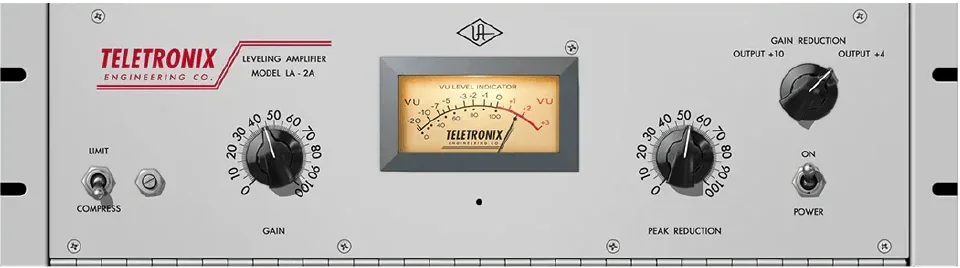
Price: free, in the same UAD Explore FREE bundle.
The LA-2A is the classic optical tube compressor, and it’s about as simple as compression gets. Peak Reduction sets how much it compresses, Gain turns the volume back up, and a switch picks Compress or Limit. It reacts slowly and smoothly, so a vocal or a bass line gets more even without sounding squashed.
The setup is the same as the 1176: UA Connect, a free iLok account, and VST3, AU or AAX on Mac and Windows. The paid Teletronix LA-2A Leveler Collection has three models of the hardware and was $49 on sale on October 12, 2026 (list price $149).
Best for: lead vocals and bass that jump between loud and quiet.
6. TDR Kotelnikov (Tokyo Dawn Labs)
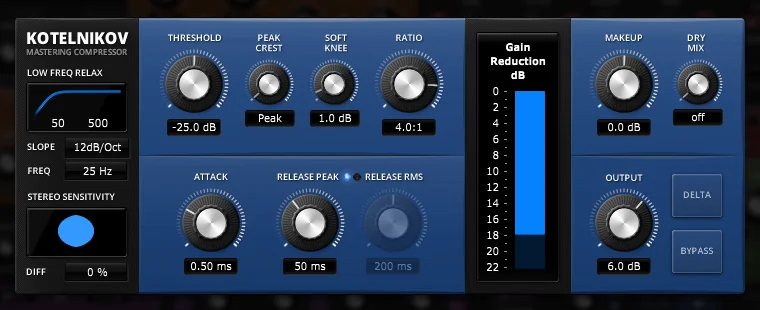
Price: free, as a direct download. There’s also a paid GE version for €50.
Kotelnikov doesn’t copy any old hardware. Tokyo Dawn Labs calls it a wideband dynamics processor with a “stealthy” sound: it can control a lot of level while keeping the tone and punch of your mix. It has separate release controls for sharp peaks and for the overall level. A sidechain high-pass filter keeps heavy bass from making it pump, and a Delta button plays only what it takes away.
Version 1.6.7 runs on Windows 7 or newer and Mac OS X 10.9 or newer, as VST2, VST3, AU (Mac) and AAX. It’s a digital compressor.
Best for: clean compression on the mix bus and the master.
7. DC1A (Klanghelm)
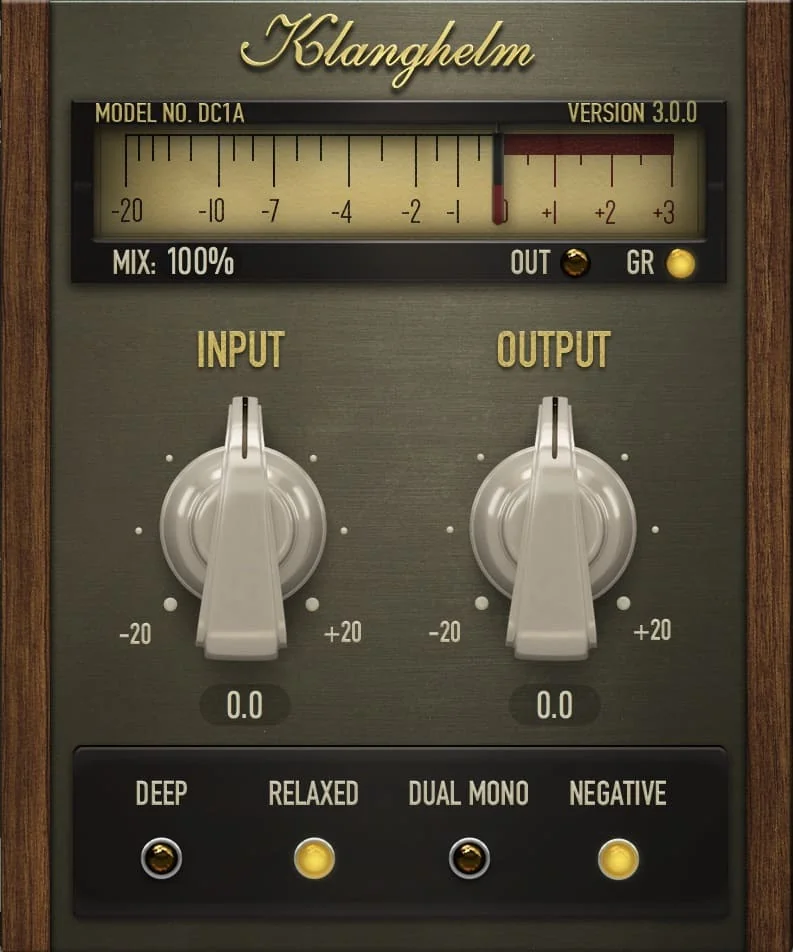
Price: free (version 3.5.0).
DC1A has just two knobs, Input and Output. Turn Input up and it compresses more, then set the volume with Output. Klanghelm built it as a compressor that just works, from almost invisible leveling to heavy pumping. Four switches add tricks: DEEP stops heavy bass from pumping it, RELAXED makes it react to the average level as well as the peaks, DUAL MONO treats left and right on their own, and NEGATIVE over-compresses as an effect.
It runs on Windows 10 or newer (VST, VST3, AAX) and macOS 10.13 or newer (VST, VST3, AU, AAX), natively on Apple silicon, with no copy protection.
Best for: a first compressor you can learn with one knob.
8. MJUC jr. (Klanghelm)
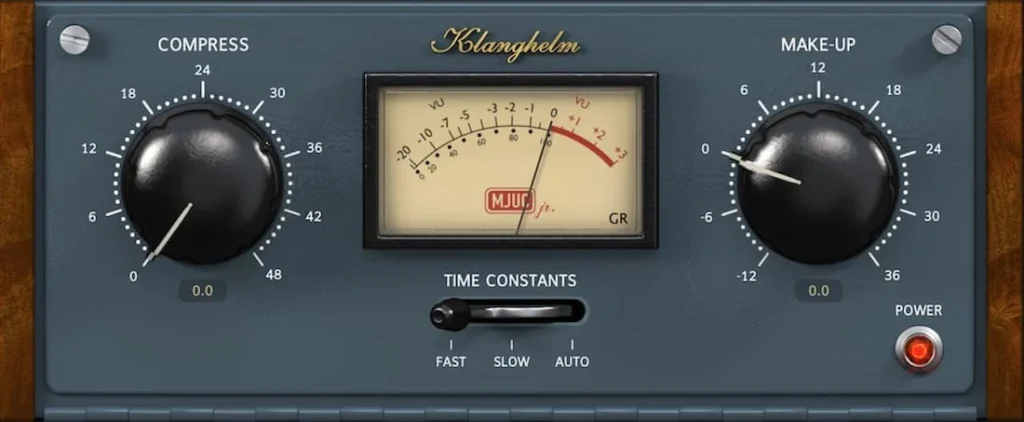
Price: free (version 1.5.0). Its big brother, MJUC, is €24 on Klanghelm’s site.
MJUC jr. is a variable-mu tube compressor, inspired by the smooth tube compressors of the early 1960s. It has two big knobs, Compress and Make-up, and a Time Constants switch with Fast, Slow and Auto settings. Klanghelm says it can do smooth leveling or heavy pumping. Start small.
It has the same system needs as DC1A: Windows 10 or macOS 10.13 and newer, Apple silicon included.
Best for: warmth and glue on a mix bus or master.
9. OTT (Xfer Records)
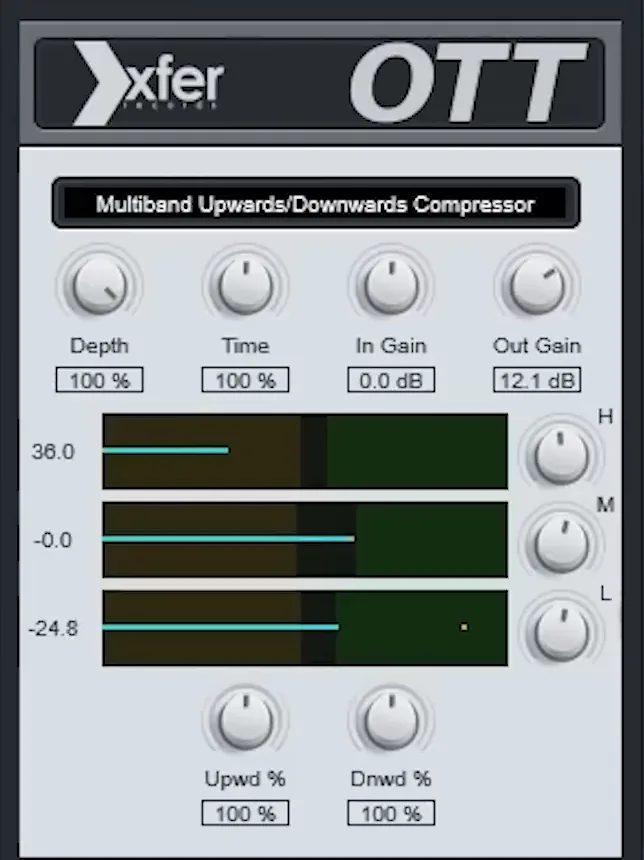
Price: free (version 1.37).
OTT is a free multiband compressor that squashes the loud parts and pulls up the quiet ones in three bands at once. Mix Elite’s free plugins video calls it a legend that glues sounds together and makes them sound better. The Depth knob blends it with the dry sound. All the way up, it’s an effect, not a mix tool.
It runs on Mac (VST, VST3, AU, AAX) and Windows (VST, VST3, AAX). Our OTT compressor guide shows how to set it on vocals and on the master.
Best for: bright, loud synths and a little extra energy.
The best paid compressor plugins
Pay for a compressor when you can name the problem it solves. Not before. These three are worth the money in 2026.
10. Pro-C 3 (FabFilter)
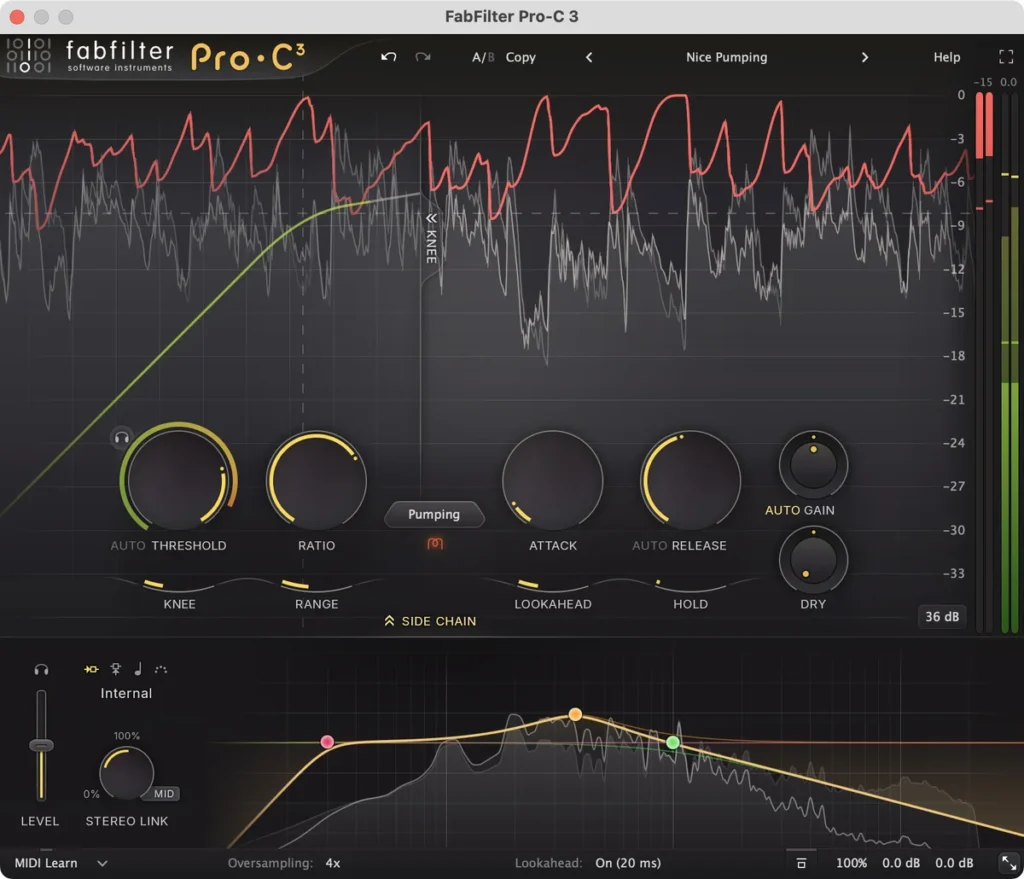
Price: $199 (€169) on FabFilter’s shop, with a 30-day free trial.
Pro-C 3 is the one to buy if you want a single compressor for every job. It has 14 compression styles, six of them new in version 3, including Vari-Mu and El-Op, FabFilter’s takes on tube and optical compressors. Like Fruity Limiter, it shows the level and the gain reduction as a moving graph. Character modes can add saturation and vintage color.
It runs on Windows (Vista to 11) and macOS 10.13 or newer (Apple silicon or Intel) as VST, VST3, AU, CLAP, AAX and AudioSuite. It replaced Pro-C 2 from our old list.
Best for: one clean, visual compressor for everything.
11. The Glue (Cytomic)
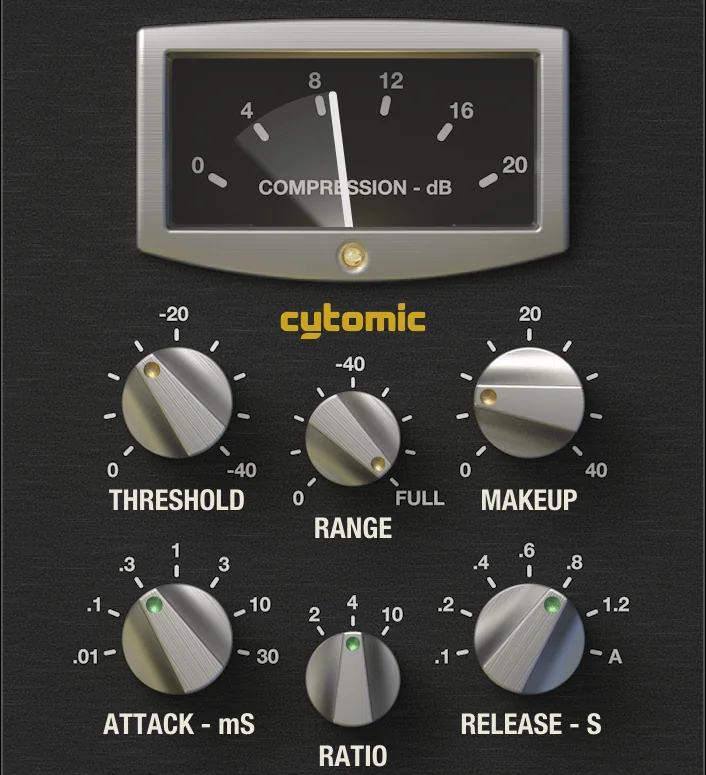
Price: $99, a one-time purchase with no subscription. There’s a free trial download.
The Glue is modeled on the British console bus compressor of the 1980s, the SSL one. Bus compressors like this go on a drum group or the whole mix to make the parts feel like one performance. It adds controls the hardware never had: Mix for parallel compression, Range to cap how much it can compress, a sidechain high-pass filter and a Peak Clip switch.
Version 1.9.3 runs on Windows 10 or newer and macOS 10.13 or newer as VST2, VST3, AU and AAX.
Best for: drum buses and the whole mix.
12. SSL G-Master Buss Compressor (Waves)
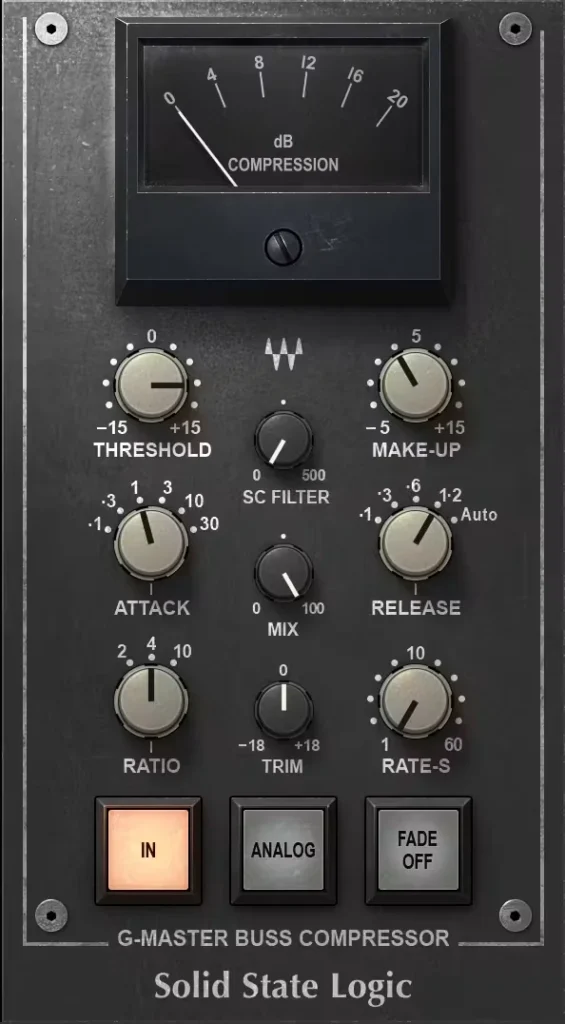
Price: $39.99 on sale on Waves’ site on October 12, 2026 (list price $149). Waves changes its prices often, and there’s a demo.
Waves modeled this one on the master bus compressor of the SSL 4000 G console. It does the same job as The Glue. It was on our old list too. If you’d rather buy from SSL itself, SSL Native Bus Compressor 2 is $99 on SSL’s store.
It runs on macOS 14 or newer and Windows 10 or 11 (64-bit) as VST3, AU and AAX.
Best for: classic console glue, cheap when it’s on sale.
What is the best compressor plugin for beginners?
The best compressor for a beginner is one you can see working. In FL Studio that’s Fruity Limiter in COMP mode, which draws the waveform so you can watch each peak get caught. For a free plugin, Klanghelm’s DC1A is the easiest, with one knob for how hard it compresses and one for the volume. The LA-2A is nearly as simple.
If you’d rather pay once and never switch, FabFilter’s Pro-C 3 is the friendliest paid pick, because its moving graph shows exactly how much it turns down.
Which compressor is best for vocals, drums, bass and the mix bus?
For vocals, an opto compressor like the LA-2A evens out the level smoothly, and a fast FET like the 1176 adds bite to a rap vocal. For drums, the 1176 adds snap to a snare, and a bus compressor like The Glue glues the whole kit. On drums, keep the attack slow enough that the snap of each hit gets through.
Here’s where each pick shines, with the settings from Mix Elite’s free FL Studio course:
- Vocals: the LA-2A for smooth leveling, or the 1176 for an upfront rap vocal. In FL Studio, put Fruity Limiter in COMP mode at about 4:1, then lower the threshold until every word is equally audible. Our guide on how to compress vocals has the full method.
- Drums: the 1176 on a snare or a drum loop for bite. On the whole drum group, use Fruity Limiter at 2:1 for 3 to 4 dB of reduction.
- Bass: the LA-2A to even out the notes. To make room for the kick, sidechain the bass group with Fruity Limiter at about 4:1 and duck it by 7 to 10 dB.
- Mix bus: The Glue, the SSL G-Master or Kotelnikov, set gently so you feel it more than you hear it.
- Mastering: Maximus or Kotelnikov for control, and MJUC jr. for warmth.
How do I stop compression from making my mix quiet or flat?
A mix gets quieter when a compressor turns the loud parts down and you don’t add that volume back, so raise its gain (makeup gain) by about as much as it takes away. It sounds crushed and flat when the compressor works too hard: start around 2:1 with 3 to 4 dB of gain reduction, then compare before and after.
That’s exactly how the drum group gets set in Mix Elite’s free FL Studio course. At 3:1 the compressor works about 6 dB, which is a little too much, so the ratio drops to 2:1 for 3 to 4 dB and the gain goes up 3 dB.
A few compressors on this list make it hard to overdo:
- Fruity Limiter and Pro-C 3 draw the gain reduction as it happens, so you can see when they’re working too hard.
- DC1A has only two knobs, so there’s very little to get wrong.
- The LA-2A reacts slowly and smoothly, so a vocal or a bass line gets more even without sounding squashed.
- TDR Kotelnikov can control a lot of level while keeping the tone and punch, which is why it suits the mix bus.
Do you need paid compressor plugins, or are free ones good enough?
No. Free and stock compressors can give you a clean, professional mix: Mix Elite’s free FL Studio course teaches compression with FL Studio’s own Fruity Limiter. Evening out a vocal, gluing a drum group and sidechaining the bass work in any compressor on this list. A paid one mostly buys speed, more styles or a certain color.
Buy one when you can say what your free compressor can’t do. Want one plugin that covers every style with a clear display? Get Pro-C 3. Does your mix bus need that console glue? Get The Glue, or the SSL G-Master when it’s on sale.
Watch the sales, too. On October 12, 2026, UA’s 1176 collection was $29 instead of $149, the LA-2A collection was $49 instead of $149, and the SSL G-Master was $39.99 instead of $149. Still, hearing compression is the real skill, and it’s only one step of a mix. Our guide to how to mix a song shows where it fits.
What happened to the compressors on our old list?
This page used to list five paid compressors. Here’s where they stand in October 2026:
- FabFilter Pro-C 2: replaced by Pro-C 3 (pick 10).
- Waves SSL G-Master Buss Compressor: still sold, and still on the list (pick 12).
- Universal Audio LA-2A Classic Leveler Collection: now called the Teletronix LA-2A Leveler Collection. It runs on your computer with no UA hardware, and a single LA-2A model is now free (pick 5).
- Cytomic The Glue: still $99, now at version 1.9.3 (pick 11).
- Slate Digital FG-Grey: part of Slate’s Virtual Buss Compressors ($149), which also comes with Slate’s Complete Access subscription ($19.99 a month).
Whichever one you pick, the skill is in your ears, not in the plugin.
DAY 4 OF THE 7-DAY MUSIC PRODUCER COURSE
A compressor is one tool. Day 4 teaches the whole mix.
Day 4 of Mix Elite’s 7-Day course is all about mixing: the simple “Holy-Quad” mixing formula, the “Mix Murdering” mistakes most beginners make, and the volume mistake people make in the first 5 minutes of every mix. You also get a mixing checklist and a mixing and production template. It’s taught in FL Studio (the free trial works), about 45 minutes a day, and on day 7 a pro gives you feedback on your finished track. It’s $27, and you get 60 days to decide if it was worth it.
Frequently asked questions
What is the best compressor plugin?
There’s no single best one, but FabFilter Pro-C 3 ($199) comes closest to doing every job, with 14 styles and a clear display. If you use FL Studio, start with Fruity Limiter in COMP mode, which is free and shows the waveform. For free classics, get Universal Audio’s 1176 and LA-2A from the UAD Explore FREE bundle.
What is the best free compressor plugin?
Universal Audio’s 1176 Classic FET Compressor and Teletronix LA-2A Tube Compressor, both free in the UAD Explore FREE bundle since April 2026. For clean mix bus compression, TDR Kotelnikov is free too, and Klanghelm’s DC1A is the easiest to learn, with just two knobs. FL Studio users already have Fruity Limiter.
What is the best compressor for vocals?
The LA-2A is the classic for smooth vocals, and the 1176 is the classic for upfront, aggressive vocals like rap. Both are free from Universal Audio. In FL Studio, Mix Elite’s free course puts Fruity Limiter in COMP mode at about 4:1 and lowers the threshold until every word is equally audible.
What is the best compressor for drums?
For snap on a snare or a drum loop, the 1176, free from Universal Audio, adds bite. To glue a whole drum group, use a bus compressor like Cytomic The Glue ($99) or Waves’ SSL G-Master, set gently. In FL Studio, Fruity Limiter in COMP mode at 2:1 for 3 to 4 dB of gain reduction does the job for free.
Is Fruity Limiter better than Fruity Compressor?
For learning, yes. Both come with every edition of FL Studio, but Fruity Limiter shows the waveform, so you can see each peak being compressed. That’s why Mix Elite’s free FL Studio course swaps Fruity Compressor for Fruity Limiter in COMP mode. Fruity Compressor is fine for quick, light compression by ear.





