



“With so many options to choose from, people find it very difficult to choose at all.”
The best synth plugins (VST synths) in 2026 are Xfer Serum 2 for most producers, u-he Diva for warm analog sound and Spectrasonics Omnisphere 3 for the biggest library of ready-made sounds. The best free synth is Vital, and every edition of FL Studio already includes good ones: FLEX, 3x Osc and GMS.
Search for the best synth plugins and you get long lists where every synth is a must-have. So you buy three, open one, and end up scrolling through presets instead of finishing a song.
This guide is built the other way around. It starts with the synths FL Studio already gives you, then the free ones Mix Elite uses in its lessons, then the paid synths that are worth the money in 2026, with real screenshots from Mix Elite’s videos along the way.
Table of Contents
What is a synth plugin?
A synth plugin, short for software synthesizer, is an instrument that makes its sound from scratch. It doesn’t play back a recording of a real piano or guitar. It starts with simple waves, like a saw or a square wave, then shapes them with filters, envelopes and effects until you get a bass, a pad or a lead.
VST is simply the most common plugin format, so a synth VST and a synth plugin are the same thing. When Max, the founder of Mix Elite, opens FL Studio’s own synth in Mix Elite’s free 4.5-hour FL Studio course, he puts it plainly: its sounds are made by synthesizing waveforms, so “it is not a pre-recorded real life instrument.”
Synths build their sound in a few different ways. You don’t need the theory, but knowing the five main types tells you what a synth will be good at:
- Analog-style: starts with a bright, buzzy wave and filters part of it away, like the classic hardware synths of the 70s and 80s. Great for warm basses and soft pads. Diva and TAL-NoiseMaker work this way.
- Wavetable: sweeps through a row of different waves, so the sound can move and morph while a note plays. That’s the sound of modern EDM basses and leads. Serum 2 and Vital are wavetable synths.
- FM: one wave wobbles the pitch of another very fast. You get bells, glassy keys and the electric pianos of 80s pop.
- Sample-based: starts from recordings and then treats them like a synth. That’s how Omnisphere 3 holds tens of thousands of sounds.
- Hybrid: mixes several of these types in one plugin, like Pigments 7 and Phase Plant.
How do you choose your first synth plugin?
Pick the synth that makes the sounds your music needs, has good presets and plenty of tutorials, and runs well on your computer, then try its free demo before you pay. For most beginners, that means FL Studio’s own synths first, the free Vital next, and one paid synth only when you hit a real limit.
Start with your music, not with the feature list. Think about the sounds your songs need, then pick the synth that makes those sounds easiest. These six checks will save you money:
- Your style: house, EDM and trap lean on wavetable synths like Serum 2 and Vital. Lo-fi, R&B and synthwave love warm analog pads. Film-style music wants a giant library like Omnisphere 3.
- Presets first: a good preset gives you a finished sound in seconds. You learn faster by changing one knob at a time than by starting from a blank patch.
- Tutorials: pick a synth that lots of lessons use. Serum shows up in tutorials again and again, and the free Vital works in a very similar way, so you can follow along with either.
- Your computer: big synths need lots of memory. Spectrasonics asks for 8 GB of RAM for Omnisphere 3 and recommends 16 GB or more.
- A free trial: almost every paid synth here has a demo or a trial, so play it with your own songs before you pay.
- The real price: u-he sells in euros, so your card converts the price. Some makers also offer a monthly plan.
We checked every price, version and plugin format below on each maker’s own website in October 2026. Prices are regular prices without sales, so check the maker’s page before you buy.
The synths already in FL Studio
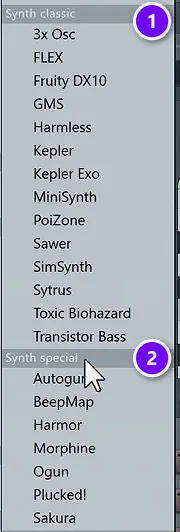
Open what you already own before you spend a cent. In FL Studio, click the + at the bottom of the Channel Rack to see every instrument you have. In the screenshot, the menu is sorted by type, and the synths sit under Synth classic (1) and Synth special (2).
Mix Elite’s advice for beginners is to start right here. The free FL Studio course says there’s no need to install anything extra if you don’t want to, and the first synth it opens is FLEX.
1. FLEX (FL Studio)
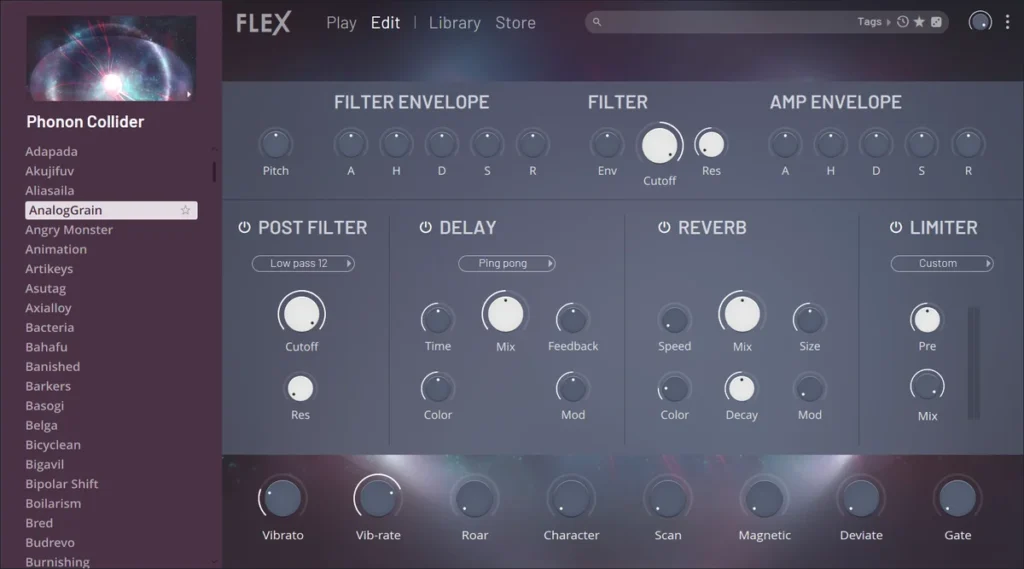
FLEX is FL Studio’s preset synth, and the quickest way to a good sound. FL Studio 2026 rebuilt it from the ground up, with a new browser, faster loading and, Image-Line says, up to 50% less CPU use.
Pick a preset from the list on the left, open Library to browse packs, then shape the sound with the eight macro knobs along the bottom. Every edition of FL Studio includes FLEX, plus eight free Core Series packs with more than 200 presets. Mix Elite’s free course shows the older FLEX, but the idea hasn’t changed: pick a preset, then turn the macros.
Best for: good sounds in seconds.
2. 3x Osc (FL Studio)
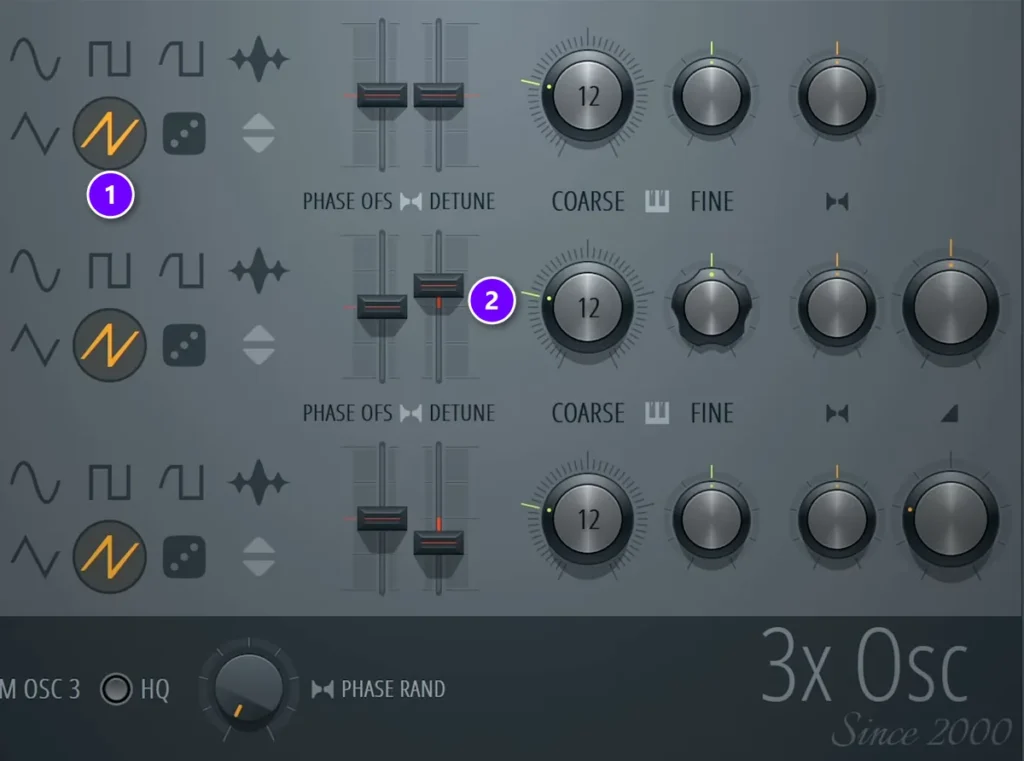
3x Osc is the oldest synth in FL Studio, and it’s beautifully simple: three oscillators, each with a wave shape, coarse and fine tuning and a detune slider. Because there’s so little to it, it’s the best place to learn what a synth actually does.
Mix Elite’s Reese bass video uses it for a Reese bass, the dark, wide bass that slowly moves and growls. All three oscillators go to the saw wave (1), the second and third DETUNE sliders move in opposite directions (2), the oscillators get fine-tuned apart as well, and mono and portamento go on, so the notes slide into each other.
It comes with every edition of FL Studio, including the $99 Fruity Edition.
Best for: learning synthesis and detuned basses.
3. GMS (FL Studio)
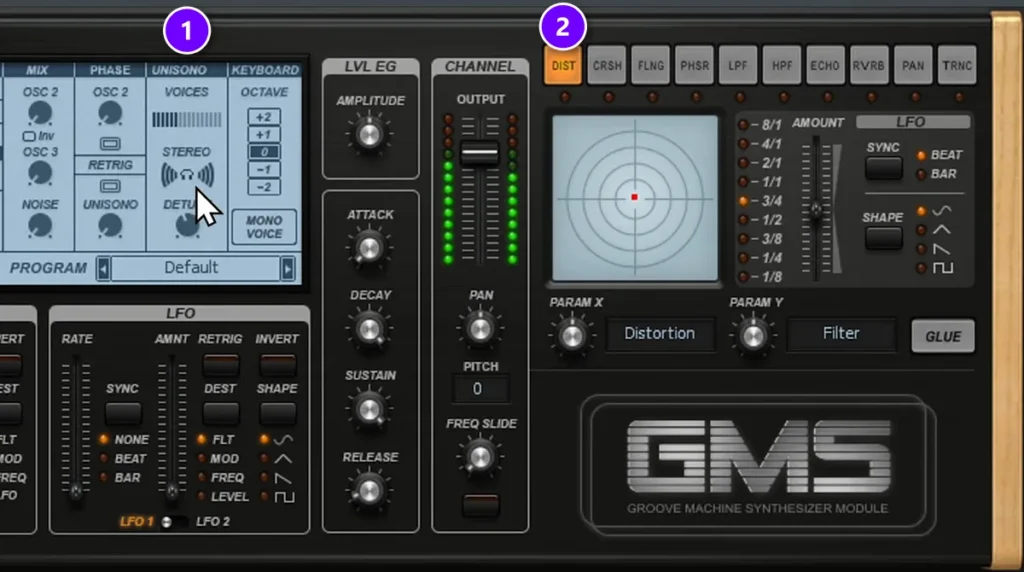
GMS, short for Groove Machine Synth, is a three-oscillator synth with unison, filters and effects built in. Max calls it a “super cool plugin” and says “we use it a lot in our online courses.”
The Reese bass in GMS takes less than a minute. Load the Default preset from the User bank, raise the unison voices to 6, the detune to about 40 and the stereo to 100 (1), then switch on the DIST effect (2).
GMS also comes with every edition of FL Studio.
Best for: fat unison leads and basses.
The bigger editions add more synths. Sytrus does FM and much more and comes with the Producer Edition and up, Kepler (a recreation of the Roland Juno-6) also starts at Producer, Harmless at the Signature Bundle, and Harmor with the All Plugins Edition. FL Studio 2026 costs $99 for Fruity, $179 for Producer, $269 for Signature and $449 for All Plugins.
Want to hear how close the stock synths get? In this Mix Elite video, the same Reese bass gets built in Serum first, then in 3x Osc and GMS.
The best free synth plugins
When the stock synths start to feel small, these four free synths are the next step. All of them are yours to keep and use in released songs.
4. Vital (Vital Audio)
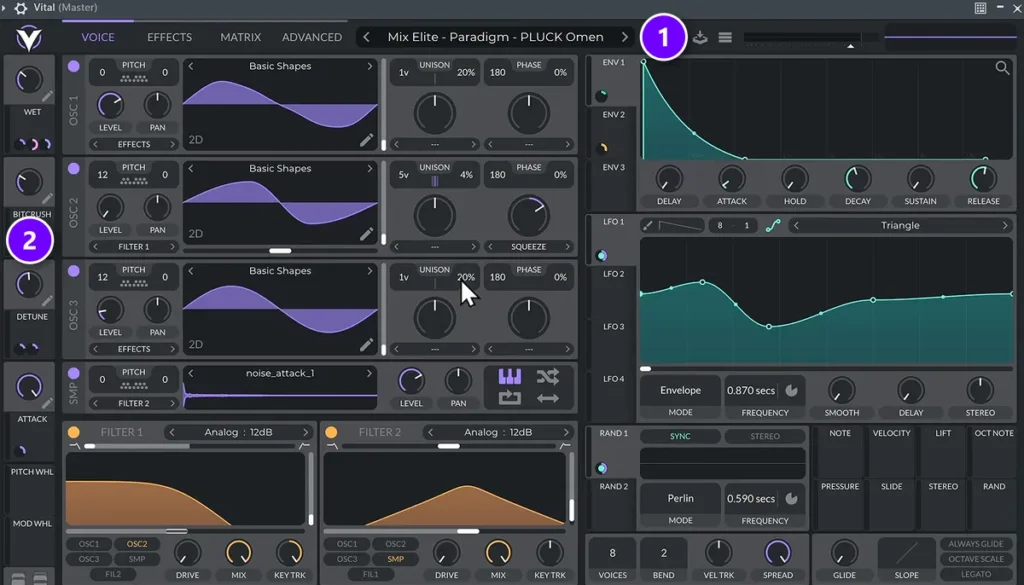
Vital is a wavetable synth with the same kind of power as Serum, and its Basic version costs nothing. Mix Elite’s free FL Studio course calls it the best free VST synthesizer and installs it on camera.
Every Vital version is the full synth. The paid tiers only add sounds: Basic comes with 75 presets and 25 wavetables, Plus costs $25, Pro costs $80, and there’s also a $5 monthly plan. The course’s verdict: there’s no need to upgrade to Plus or Pro.
Click the preset name (1) to browse sounds. The four knobs down the left side (2) are the preset’s macros, and turning them is the fastest way to change a sound. If nothing plays when you type, click inside the plugin window first. Vital runs on Windows 10 and up, macOS 10.15 and up and Linux, as VST, VST3, AU or LV2, and you need a free account to download it.
Best for: almost everything, for free.
5. Surge XT (Surge Synth Team)
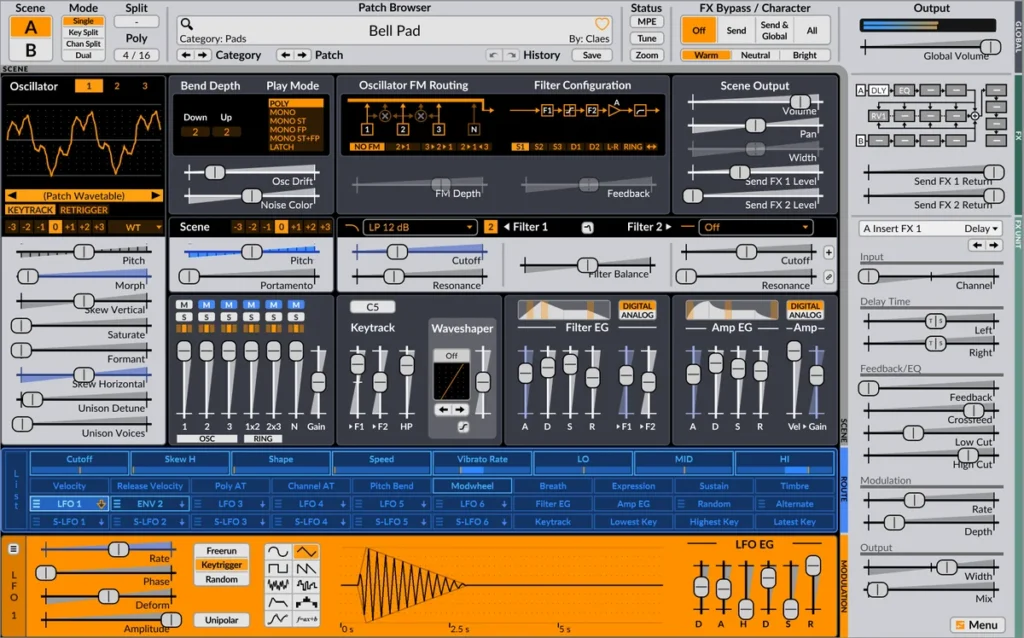
Surge XT is a free, open-source synth, and it goes deeper than many paid ones. Each patch has two scenes, so you can layer or split two sounds, and each scene has three oscillators with 12 oscillator types to choose from.
It comes with more than 2,800 patches and 700 wavetables, so you’ll never run out of starting points. Version 1.3.4 runs as a standalone app and as CLAP and VST3 on Windows, macOS and Linux, plus AU on Macs.
Best for: a huge free preset library.
6. TAL-NoiseMaker (TAL Software)
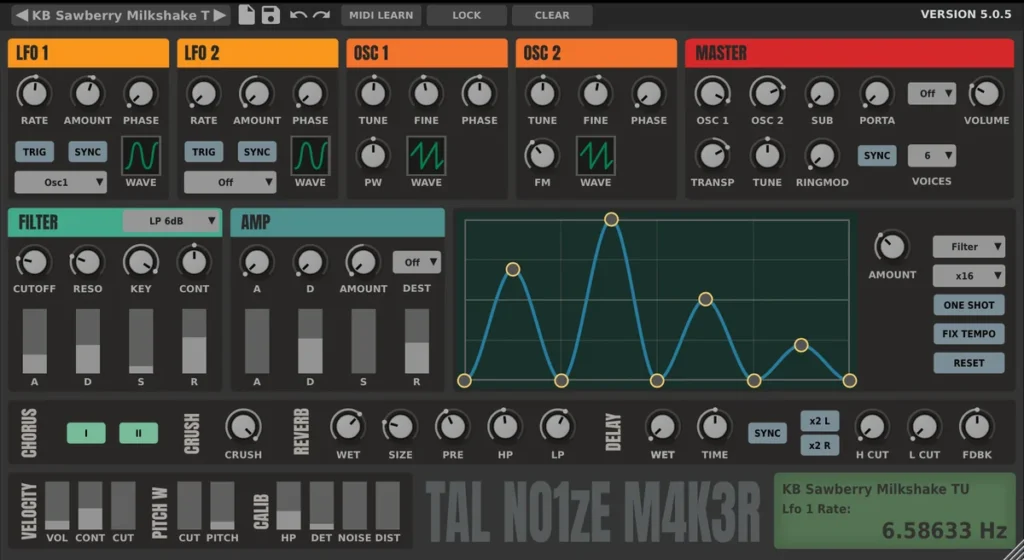
TAL-NoiseMaker is a free analog-style synth with three oscillators and no hidden panels. Everything sits on one screen, which makes it easy to learn. It also uses very little CPU, so it runs well on an older laptop.
You get 256 presets plus a built-in chorus, bitcrusher, reverb and delay. Version 5.0.6 runs as VST, VST3, AU, AAX and CLAP.
Best for: slow computers and simple sounds.
7. Tyrell N6 (u-he)
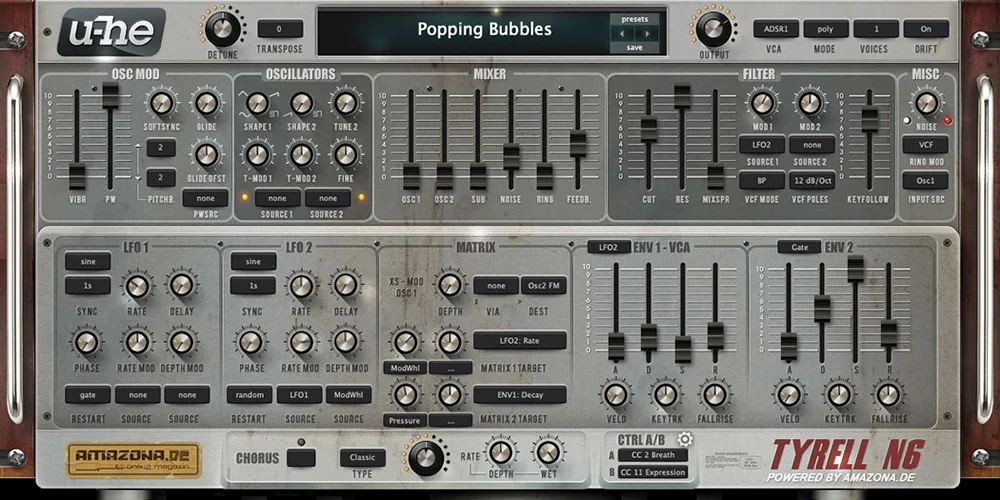
Tyrell N6 is a free analog-style synth from u-he, the company behind Diva. It began as an idea for a hardware synth from the German website Amazona.de that never got built, so u-he made it a plugin instead.
It has two oscillators plus noise and ring modulation, a filter related to Diva’s, and more than 580 factory presets. The 2025 version, 3.0.0, is still labeled beta and added CLAP and native support for Apple Silicon Macs.
Best for: free, warm analog sound.
The best synth plugins worth paying for
These are the synths worth paying for in 2026. Most of them have a free demo or trial, so try them with your own music first.
8. Serum 2 (Xfer Records)
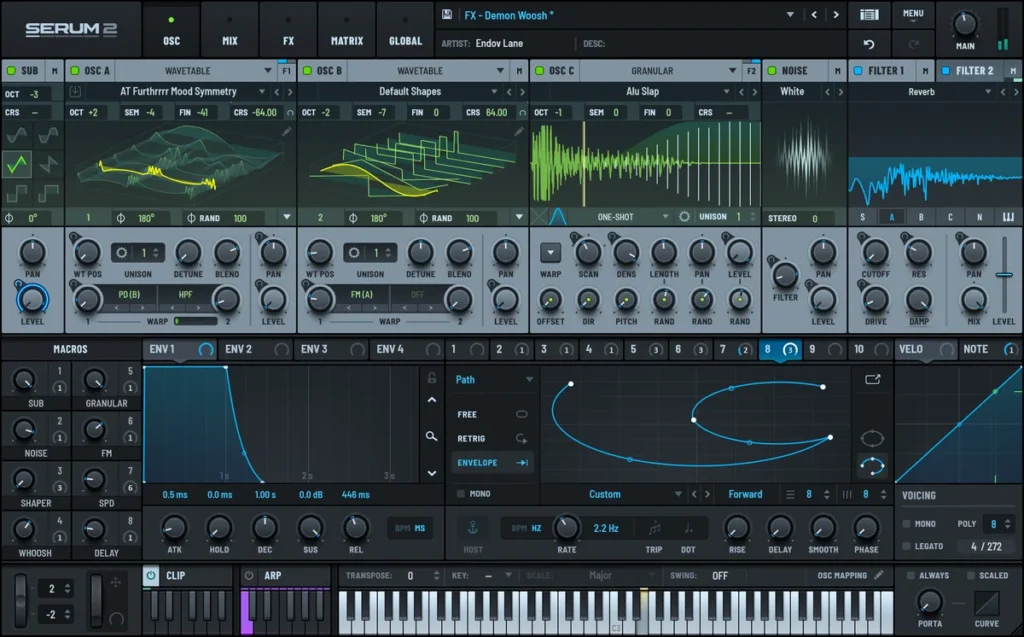
Serum is everywhere in EDM, house and trap tutorials. Max says it plainly: “whenever you’ll be watching any tutorials, you’ll see it coming again and again.”
Serum 2 came out in 2025 and replaced the original. It has three main oscillators instead of two, and each one can be a wavetable, multisample, sample, granular or spectral oscillator. It also adds an arpeggiator and a clip sequencer, and it ships with more than 600 presets and 288 wavetables.
It costs $249, and if you already own Serum 1 the upgrade is free. It runs as VST3, AU and AAX on Windows 10 and up and macOS. There’s a free demo, too.
Best for: EDM, house and trap sounds.
9. Omnisphere 3 (Spectrasonics)
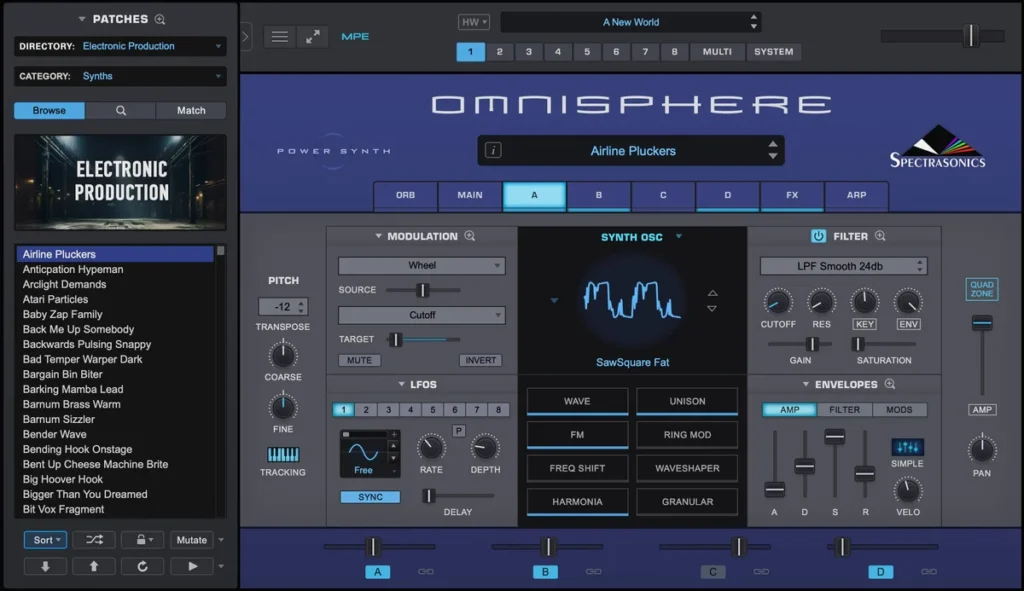
Omnisphere is the biggest synth here. Version 3 holds 41,405 sounds, from soft pads and keys to huge film-style textures, and it mixes wavetable, granular and FM synthesis with real recordings.
It costs $499, and owners of Omnisphere 1 or 2 can upgrade for $199. It runs as a standalone app and as AU, VST3, VST2 and AAX on macOS 13 and up and Windows 10 and up. There’s no demo, and it needs at least 8 GB of RAM.
Best for: pads, textures and ready-made sounds.
10. Diva (u-he)
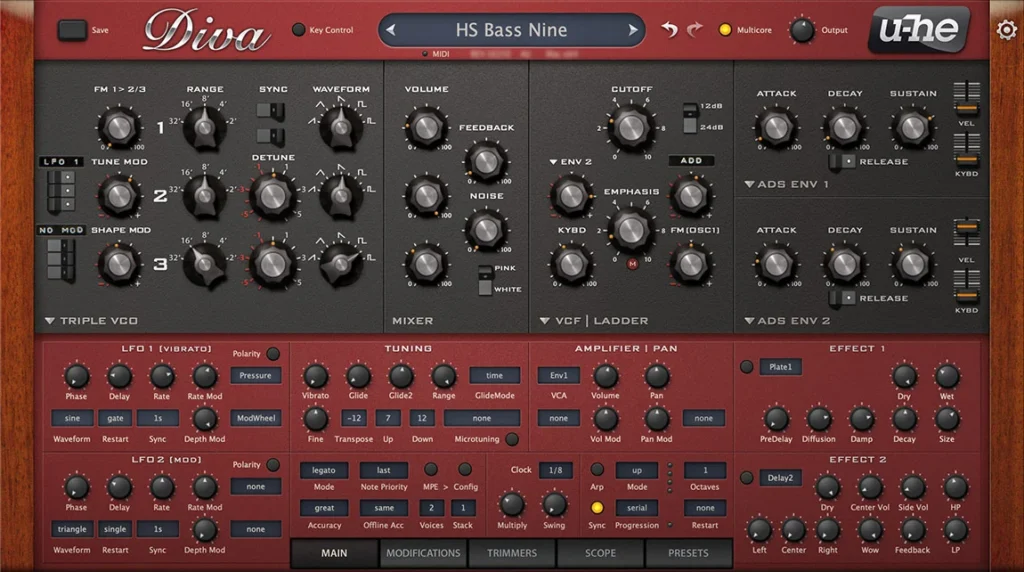
Diva is the one to get if you want the warmest analog sound in a plugin. It simulates the circuits of classic hardware synths in real time, and you can mix and match five oscillator models and five filter models based on famous old machines.
It costs €179 and comes with more than 1,200 presets. Version 1.4.8 runs as VST3, AU, AAX and CLAP. The free demo is the full synth, but it adds a crackle now and then until you buy a license.
Best for: the warmest analog sound.
11. Phase Plant (Kilohearts)
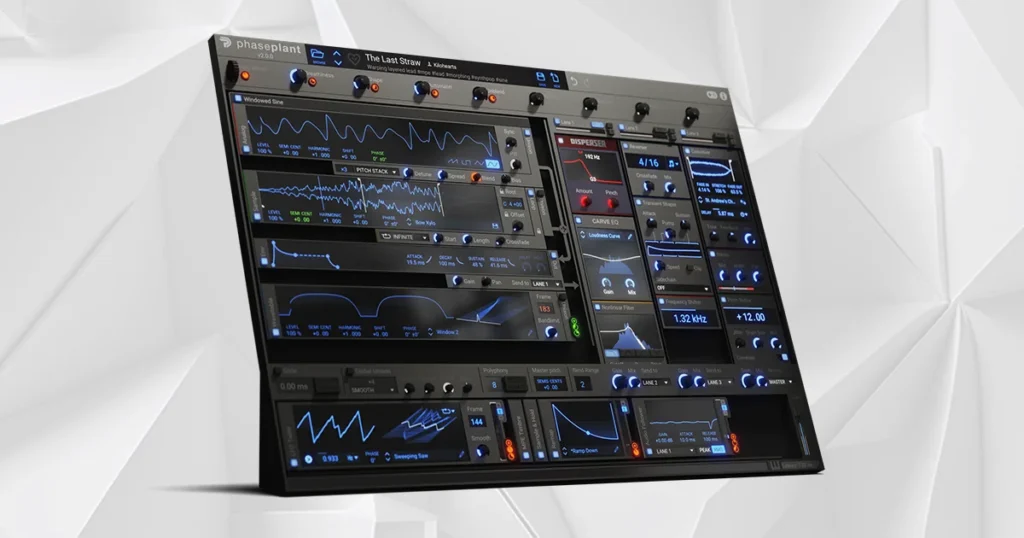
Phase Plant is a box of parts. You start with an empty patch and add as many sound generators, modulators and effects as you need, and a generator can be a classic wave, a wavetable, a sample or noise.
It costs $199, there’s a 10-day trial, and a $9.99 monthly plan includes every Kilohearts plugin. Version 2.4.6 runs as VST, VST3, AU and AAX.
Best for: building sounds from scratch.
12. Pigments 7 (Arturia)
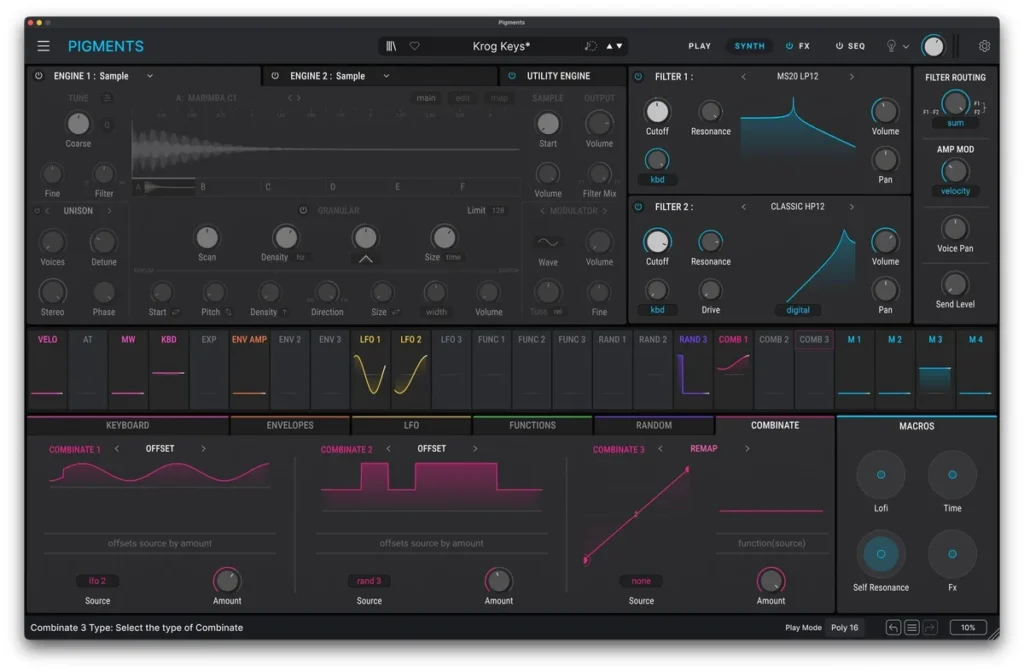
Pigments is Arturia’s all-in-one synth, with six kinds of synthesis in one plugin: virtual analog, wavetable, sample, granular, harmonic and modal. Its color-coded screen shows what every modulator is doing, which makes it one of the friendliest big synths to learn.
Pigments 7 costs $199 and comes with more than 1,700 presets. It runs as a standalone app and as VST, AU and AAX. The demo plays in 20-minute sessions, and Arturia also offers a free version called Pigments Play.
Best for: a bit of everything.
13. Massive X (Native Instruments)
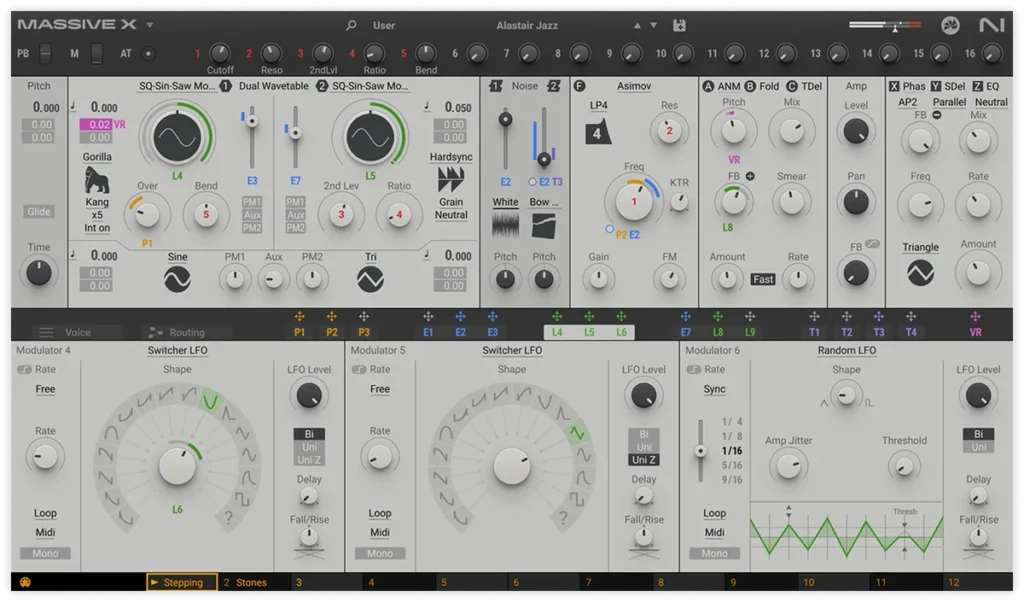
Massive X is Native Instruments’ big wavetable synth, the follow-up to the original Massive, a longtime favorite for dubstep and EDM bass. It has more than 170 wavetables, 10 oscillator modes and a routing page where you decide how the signal flows. That makes it strong for heavy, moving basses and big cinematic sounds.
It costs $199 and comes with 780 presets. Version 1.7 runs as VST, VST3 and AAX on 64-bit Windows 10 and 11, plus AU on Macs. The demo has every feature, 60 minutes at a time, and NI’s free Komplete Start bundle includes Massive X Player, a lighter, preset-based version.
Best for: heavy wavetable basses and cinematic sounds.
14. Sylenth1 (LennarDigital)
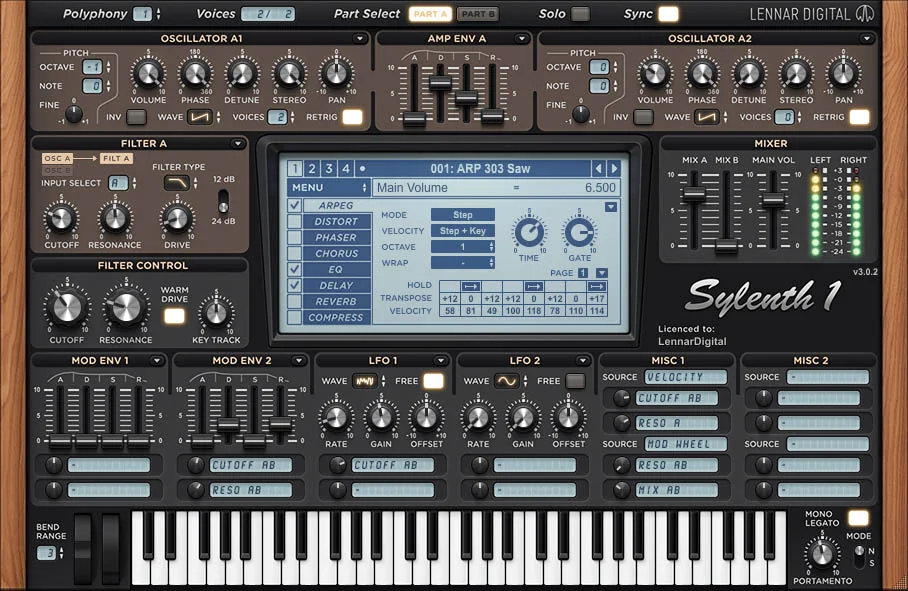
Sylenth1 is a classic EDM and house synth: a virtual analog synth with four oscillators, and each oscillator can stack up to 8 unison voices in full stereo. That stacking is what makes its supersaw chords and plucks sound so wide.
It costs €139 before VAT, or €9.95 a month until it’s paid off, and it comes with more than 2,500 presets. It runs as VST, VST3, AU and AAX on Windows and macOS, including Apple Silicon Macs. The demo works, but it plays a reminder sound about every 60 seconds and can’t save presets.
Best for: house and trance supersaws.
Which synth plugins sound like the 80s?
A lot of the 80s sound came from a few famous synths. The Yamaha DX7 gave pop its glassy electric pianos and bells, and Roland’s Juno and Jupiter synths gave it big, lush pads. These two plugins copy those machines closely.
15. TAL-U-NO-LX (TAL Software)
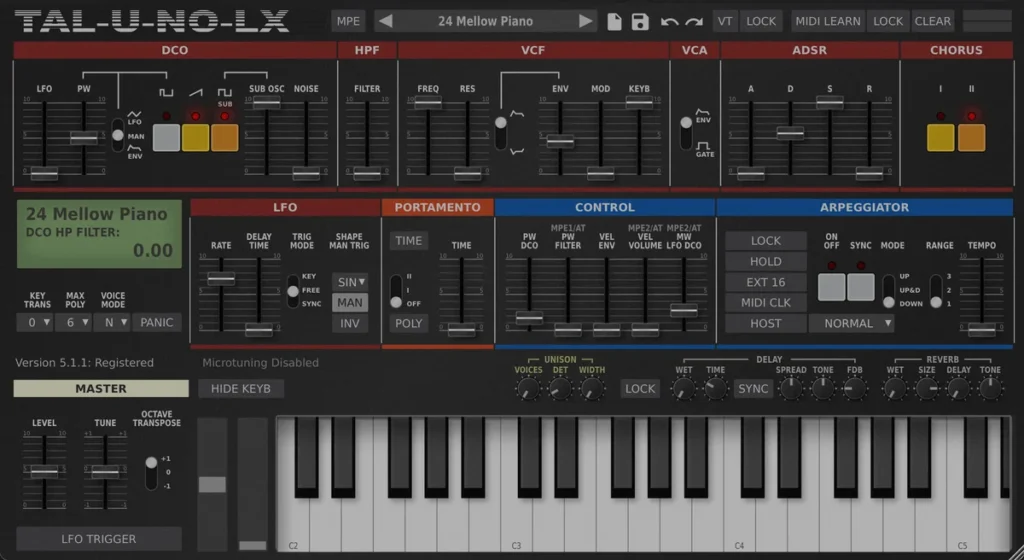
TAL-U-NO-LX is a model of the Roland Juno-60, the early-80s polysynth famous for its warm, chorused pads. TAL modeled every oscillator, filter and envelope and tuned the plugin against its own Juno-60.
It costs $59 plus VAT and runs on Windows, macOS and Linux as VST, VST3, AU, AAX or CLAP. The demo works, but it plays a rising white-noise sound every minute until you buy it.
Best for: Juno-style pads on a budget.
16. V Collection 11 (Arturia)
V Collection is Arturia’s bundle of modeled classic synths and keyboards. The 80s ones include Jup-8 V (a Roland Jupiter-8), DX7 V (the Yamaha DX7), OP-Xa V (an Oberheim OB-Xa) and Jun-6 V (a Roland Juno-6).
V Collection 11 Pro costs $699, and the smaller Intro edition with 10 instruments costs $199. Every instrument runs as a standalone app and as VST, AU and AAX.
Best for: classic synths in one bundle.
On a $0 budget, Dexed is a free copy of the Yamaha DX7 that even loads original DX7 sound files. And if you own FL Studio Producer Edition or higher, you already have Kepler, Image-Line’s recreation of the Roland Juno-6. Once you have the sounds, our guide to mixing synthwave and retrowave shows how to make them sit like a real 80s record.
Why do my melodies sound flat with stock synths?
Usually it’s the patch, not the synth. A flat sound is often one dry oscillator with no unison, no movement and no effects. Stack detuned unison voices, add an LFO and some distortion or chorus, and even FL Studio’s GMS sounds much bigger. For thicker sounds straight from the presets, this list’s picks are Serum 2, the free Vital and, for warm analog sounds, u-he Diva.
Four moves from Mix Elite’s sound design lessons make the biggest difference:
- Unison: stack several detuned copies of each note. Six voices is a good start, like the GMS Reese bass above.
- A second layer: add another oscillator an octave or two up, or a quiet, wide layer just for width.
- Movement: point an LFO at the cutoff or the wavetable position, so the tone keeps changing while a note plays.
- Effects: distortion adds grit, chorus adds width, and a little reverb puts the sound in a room.
Keep the low end in one mono sound under all of that, and your melody gets bigger without turning muddy. Our sound design guide shows each move step by step.
What are the best synth plugins for beginners?
Start free. FLEX and 3x Osc come with FL Studio, and Vital costs nothing. Surge XT and TAL-NoiseMaker are free too, if you want more sounds. Buy one paid synth only when a free one can’t make the sound in your head: Serum 2 ($249) for EDM, house and trap, or u-he Diva (€179) for warm analog sounds.
Mix Elite’s free FL Studio course follows the same order, with FLEX on day one and Vital on day two, and it keeps you making music instead of shopping for it.
- Learn FLEX and 3x Osc first. Use FLEX presets for finished sounds, and use 3x Osc to learn what each knob does.
- Add Vital next. It’s free, and Serum works in a very similar way, so what you learn in Vital carries over.
- Buy one paid synth when a free one can’t make the sound in your head. For EDM and house that’s usually Serum 2. For warm analog sounds, it’s Diva.
Synths don’t finish songs, though. Our sound design basics guide explains what the knobs on any synth do, and if you make house, the step-by-step house music guide shows where each synth sound goes in a track. Thinking about real hardware instead? Read our guide to hardware synths for beginners first. And if your song needs a guitar part too, here are the best guitar VST plugins.
How to add a synth plugin to FL Studio
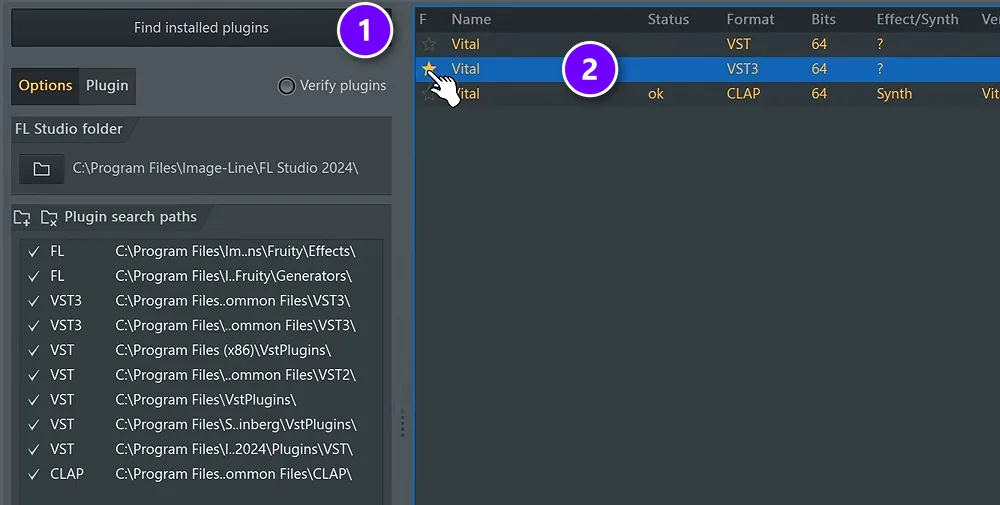
Every synth installs the same way. Mix Elite’s free course shows it with Vital:
- Download the synth from the maker’s website and run the installer. Note the folder it uses for VST3 files.
- In FL Studio, go to Options, then File settings, and click Manage plugins.
- Click Find installed plugins (1). FL Studio already scans the standard Windows folders, so only add a folder under Plugin search paths if you installed somewhere else.
- Type the synth’s name in the Find box at the bottom, then click the star next to the VST3 version (2). Pick VST3, the newest version of the format.
- Close the window, click + in the Channel Rack and choose your synth.
If a synth doesn’t show up, it’s almost always installed in a folder FL Studio doesn’t scan. Our full guide to installing VST plugins in FL Studio walks you through the fixes.
DAY 2 OF THE 7-DAY MUSIC PRODUCER COURSE
Picked your synth? Day 2 shows you what to play on it.
Day 2 of the 7-Day course covers music theory, chords and melodies, plus where to find pro-quality instruments, paid and free, and how to install them. You get a 3-step formula for chord progressions that hook listeners, 4 easy ways to write melodies even if you’ve never touched a keyboard, 30+ chord progressions and 20+ free plugins and tools. It’s taught in FL Studio (the free trial works), about 45 minutes a day, and it’s $27 with 60 days to decide if it was worth it.
Frequently asked questions
What is the best synth plugin?
For most producers in 2026 it’s Xfer Serum 2. You’ll see it again and again in EDM, house and trap tutorials, it has three main oscillators, and it costs $249. For warm analog sound pick u-he Diva, and for the biggest library of ready-made sounds pick Spectrasonics Omnisphere 3. If you don’t want to spend anything, get Vital.
What is the best free synth plugin?
Vital. Its free Basic version is the full wavetable synth with 75 presets and 25 wavetables. Mix Elite’s free FL Studio course calls it the best free VST synthesizer. After Vital, try Surge XT for its 2,800+ patches, TAL-NoiseMaker for older computers and u-he’s Tyrell N6 for a warm analog sound. FL Studio users also have FLEX and 3x Osc built in.
What are the best synth plugins for beginners?
Start with what’s free. FL Studio users already have FLEX for presets and 3x Osc for learning, and Vital is a free wavetable synth with the same kind of power as Serum. Surge XT and TAL-NoiseMaker are free too. Buy one paid synth only when a free one can’t make your sound: Serum 2 for EDM, house and trap, or u-he Diva for warm analog sounds.
How do you choose your first synth plugin?
Start with the sounds your music needs. Wavetable synths like Serum 2 and Vital suit EDM, house and trap, analog-style synths like Diva suit warm pads and basses, and Omnisphere 3 suits film-style textures. Then look for good presets, plenty of tutorials and a free demo, and check that your computer can run it: Omnisphere 3 needs at least 8 GB of RAM.
Why do my melodies sound flat with stock synths?
Usually it’s the patch, not the synth. A flat sound is often one dry oscillator with no unison, no movement and no effects. Stack detuned unison voices, add an LFO and some distortion or chorus, and even FL Studio’s GMS sounds much bigger. For thicker sounds straight from the presets, try Serum 2, the free Vital or u-he Diva.





