



“It was never about the timbre or the sound really, it was about the way the sound could move, how you could control it.”
The best synth for beginners in 2026 is the Arturia MicroFreak ($399): it’s affordable, it makes a huge range of sounds, and it comes with 320 factory presets to learn from. For chords, get the Korg minilogue xd ($699.99); for analog bass and leads, the Novation Bass Station II ($599.99). Under $200, start with the Korg volca keys or the Roland S-1.
Here’s what most synth guides won’t tell you: you don’t need a hardware synth to make music. Max, the founder of Mix Elite, says it in his gear video: “Spoiler alert, you also don’t need any real instrument. Every instrument you can think of and more you can find in the form of a virtual instrument that you can use to make music with.”
So why do so many producers still want one? Because a box with real knobs is fun. You turn a knob, the sound changes, and synthesis finally clicks. Below are the 14 hardware synths that are easiest to start on in 2026, grouped by budget and by what you want to play, plus how to hook yours up to FL Studio.
Table of Contents
Do you need a hardware synth to make music?
No. Every sound in this guide can also come from a synth plugin, which is software that runs inside your DAW (the program you make songs in, like FL Studio). FL Studio already comes with several synths, and the best free one, Vital, costs nothing. Mix Elite’s free 4.5-hour FL Studio course calls Vital the best free synth plugin and installs it in the lesson on writing melodies.
A hardware synth earns its place in three cases:
- You learn better with your hands. On a knob-per-function synth, most knobs do one job, so you hear what a filter or an envelope does the moment you turn it.
- You want to play away from the screen. Many synths here run on batteries, and a few have a built-in speaker.
- You want to jam. Ten minutes of playing a real instrument often turns up ideas you’d never click into a piano roll.
If none of that sounds like you, start with plugins. Our guide to the best synth plugins covers the free ones and the paid ones worth buying. Max says the same about extra gear: “Having a MIDI keyboard is cool, but definitely optional.”
What should you look for in your first synth?
Five things decide whether a synth is right for you. Here they are in plain English.
Analog, digital or hybrid?
An analog synth makes its sound with real electronic circuits, which gives it that warm, slightly alive tone. A digital synth makes its sound with code, so it can do far more kinds of sounds, from bells to glassy pads. A hybrid mixes the two: digital oscillators (the part that makes the raw tone) run through a real analog filter (the part that shapes it).
For most beginners, hybrid is the sweet spot. You get lots of sounds for the money and still get the hands-on feel of analog.
Monophonic, paraphonic or polyphonic?
This one decides what you can play. A monophonic synth plays one note at a time, which is all you need for bass lines and leads. A polyphonic synth plays several notes at once, so you can play chords. Paraphonic sits in between: you can hold a few notes, but they share one filter, so they move together.
Want chords and pads? Look at the voice count. Four voices covers most chords, and six or more leaves room for long, layered pads.
How many keys do you need?
Twenty-five keys is enough for bass lines and simple melodies. Thirty-seven keys gives you room to play a chord with one hand and a bass note with the other. Slim keys save space but feel smaller than a piano, and a few synths here skip moving keys altogether and use touch keys or pads.
Presets and a sequencer
Presets are ready-made sounds, and they’re the fastest way to learn. Load one, then turn one knob at a time and listen. A sequencer is a built-in step recorder that plays back a short pattern, so you can make a loop without a computer. An arpeggiator plays the notes of a chord you hold one after another.
USB and audio connections
Look for USB. One cable lets the synth talk to FL Studio, and some synths even take their power from it. Then check the audio output, because that’s what you record. And if you want the synth to play FL Studio’s instruments too, its keys need to send MIDI over USB or a MIDI cable.
The best synth for beginners: 14 picks for 2026
We grouped the picks by budget and by job: one overall pick, then synths under $300, synths for chords, for bass and leads, for ready-made sounds and for beats. In each group, the best first synth comes first. Prices come from each maker’s US website or store, checked on October 21, 2026. When a maker shows no price or doesn’t sell that model itself, we give a dated price from a US retailer and name the store. Prices change often, so check before you buy.
The best synth for beginners overall
If you buy one synth to learn on, make it a hybrid with lots of presets and a knob for almost everything. One pick stands out.
1. Arturia MicroFreak
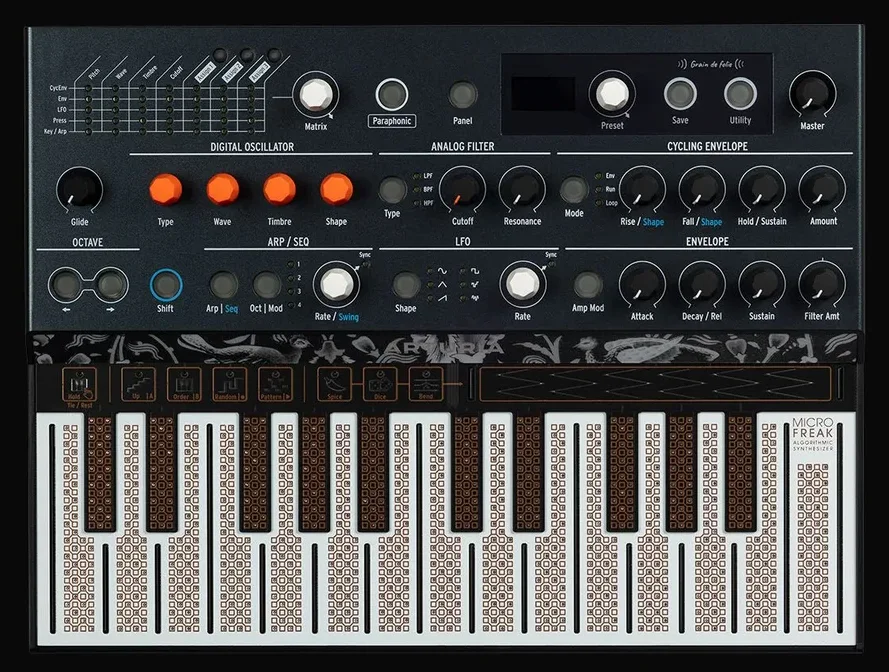
Price: $399 on Arturia‘s US store (October 21, 2026).
The Arturia MicroFreak is the synth we’d hand to most beginners. It runs digital oscillators with a long list of modes, from classic analog shapes to speech and granular textures, through a real analog filter. You get 320 factory presets, an arpeggiator, a sequencer, and USB, MIDI and CV outputs, so it can talk to almost any other gear. That’s a lot of synth.
Its 25-note keyboard is a flat circuit board with no moving parts. That looks odd at first, but each key senses how hard you keep pressing (Arturia calls this poly aftertouch), so a note can swell when you push harder. In paraphonic mode it plays up to 4 notes at once.
Who it’s for: Your first synth, if you want the most kinds of sound for the money.
The best synths for beginners under $300
You don’t need to spend much to get a real instrument. All four cost under $300, and each one teaches the basics with real knobs.
2. Korg volca keys
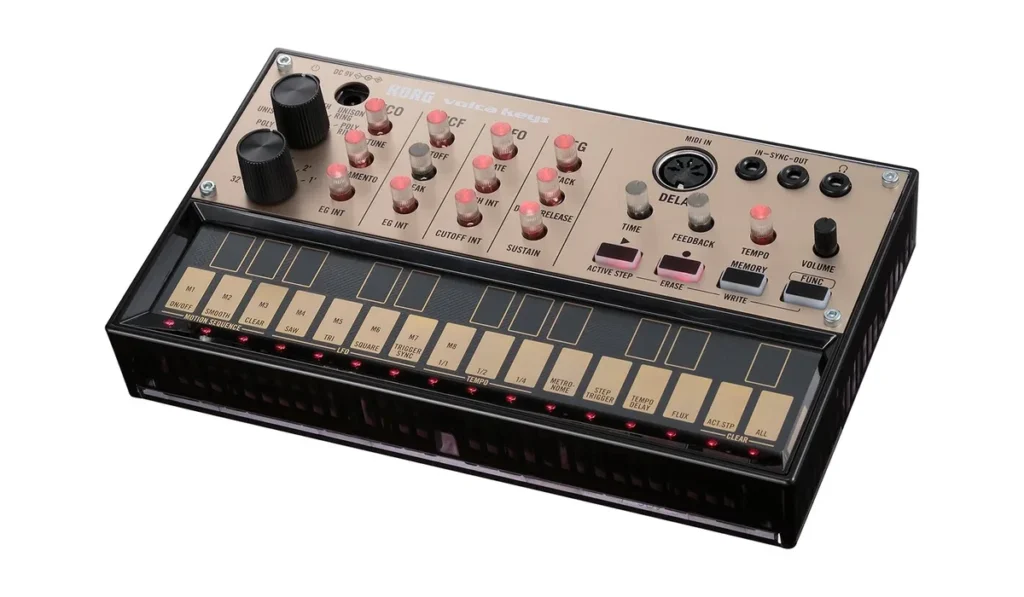
Price: $159.99 on KORG USA’s store, where it was sold out on October 21, 2026. Thomann‘s US store had it in stock for $125 that day.
The Korg volca keys is the cheapest real analog synth here, and KORG itself pitches it as an ideal first analog synth. It’s a tiny three-voice synth with a 27-key keyboard, a delay effect and a loop sequencer. It runs on batteries and has a built-in speaker, so you can play it anywhere.
The keys are small, so it’s made for tapping in riffs and loops, not for piano parts. It connects through a 5-pin MIDI input and a sync jack instead of USB.
It’s one of KORG’s volca boxes, the series the first version of this page recommended. Two siblings suit beginners too. The volca bass ($159.99 on KORG USA’s store) has three analog oscillators and a slide function made for acid bass lines. The volca fm2 ($179.99 there) is a six-voice FM synth that can load classic Yamaha DX7 sounds. Link them with a sync cable and they play in time.
Who it’s for: Trying analog synthesis on a small budget, then adding boxes one at a time.
3. Roland S-1
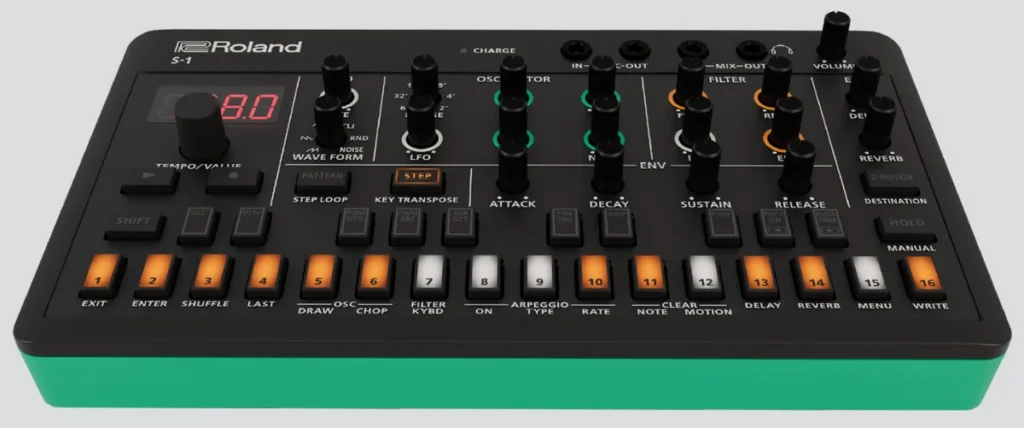
Price: $175 at Thomann‘s US store (October 21, 2026). Roland’s US site doesn’t list a price.
The Roland S-1 is a pocket-size synth inspired by the SH-101, Roland’s classic ’80s bass and lead synth. Unlike the original, it plays four notes at once, so it does chords too. Instead of keys you get 26 pads that work as a keyboard with a range of just over two octaves and as the buttons of a 64-step sequencer.
It has delay, reverb and chorus effects, a built-in battery that lasts up to 4.5 hours, and USB-C to connect to FL Studio, plus MIDI in and out. Roland says it’s made to be fun for beginners and serious synth players alike.
Who it’s for: The cheapest way into a real Roland sound, in a box that fits a laptop bag.
4. Korg monologue
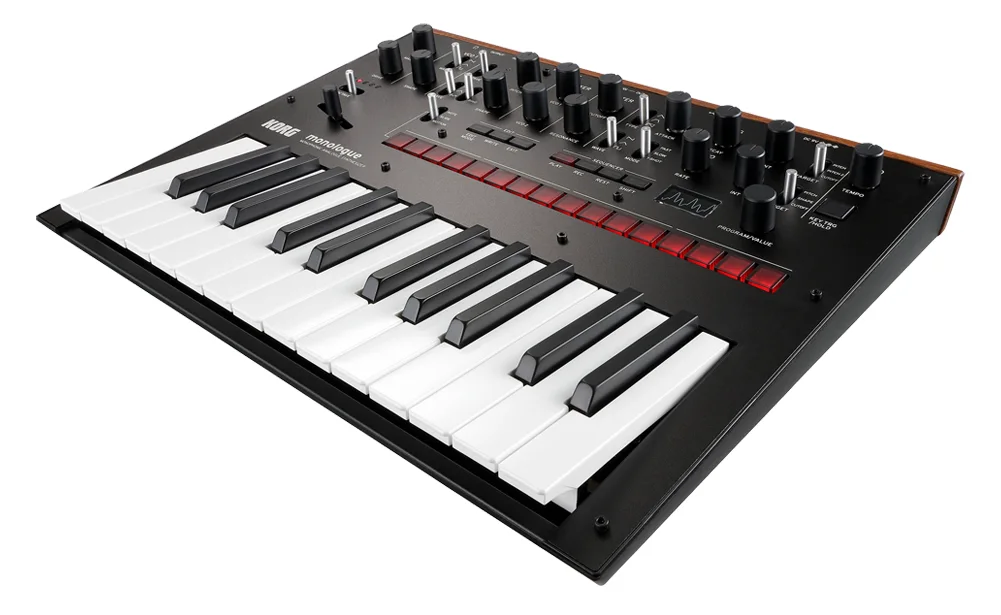
Price: $268 at Thomann‘s US store (October 21, 2026). KORG USA’s own store doesn’t sell it.
The Korg monologue is the minilogue’s one-voice sibling: a real analog synth built for bass lines and leads. It has two analog oscillators, a punchy filter, a drive knob and 25 slim keys that run from E to E, like a bass guitar.
Its 16-step sequencer can record your knob moves as well as notes (KORG calls this motion sequencing), so a filter sweep plays back with the pattern. You get 80 preset sounds, room for 20 of your own and a screen that draws the waveform as you turn the knobs. It also runs on batteries.
Who it’s for: Analog bass and leads on a tight budget, with real keys and presets.
5. Cre8audio East Beast
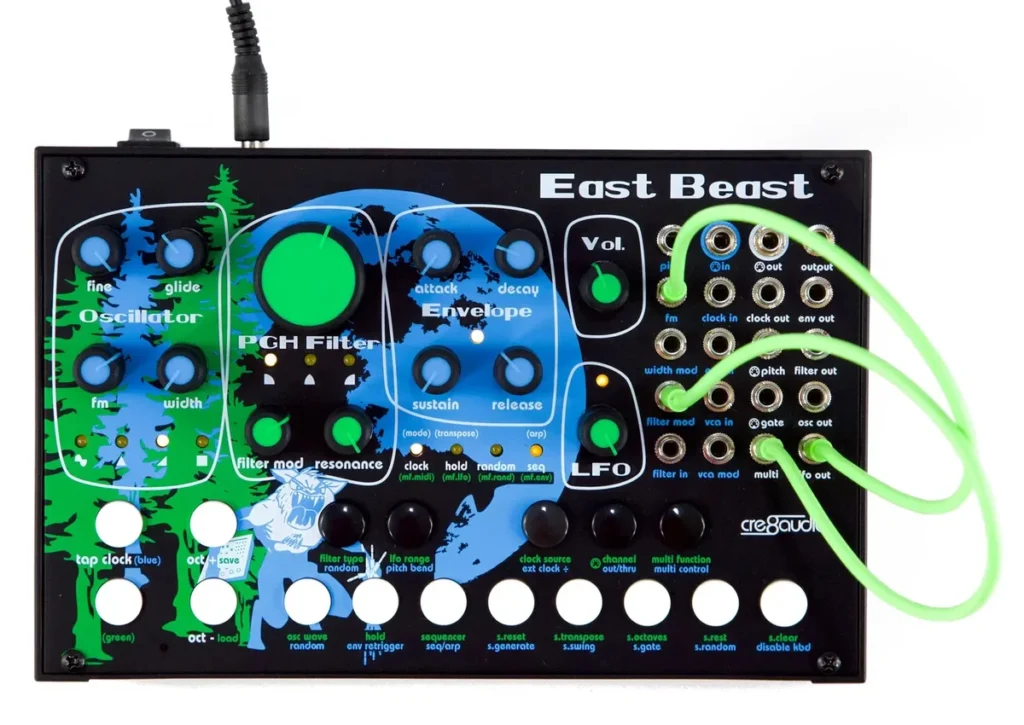
Price: $249.99 on Cre8audio‘s site, sold out there on October 21, 2026. Thomann‘s US store had it for $215.
The Cre8audio East Beast is a small semi-modular synth. That means it makes sound on its own the moment you plug it in, but it also has 18 patch points where short cables reroute the sound. It’s the gentlest way to learn how modular synths are wired.
It’s fully analog and plays one note at a time. Inside are an oscillator and a filter designed with Pittsburgh Modular, a 32-step sequencer, an arpeggiator, a button keyboard and MIDI in, so FL Studio can play it.
Its sibling, the West Pest (also $249.99 on Cre8audio’s site), does the stranger “West Coast” style: it folds the wave to add overtones instead of filtering them away. Moog’s Mavis is a semi-modular kit you build yourself, at $254 at Thomann‘s US store (October 21, 2026).
Who it’s for: Curious beginners who want to see how a synth is wired, one cable at a time.
The best polyphonic synths for chords
A polyphonic synth plays several notes at once, so you can hold chords and pads. Four voices covers most chords, and all four of these have at least that many.
6. Korg minilogue xd
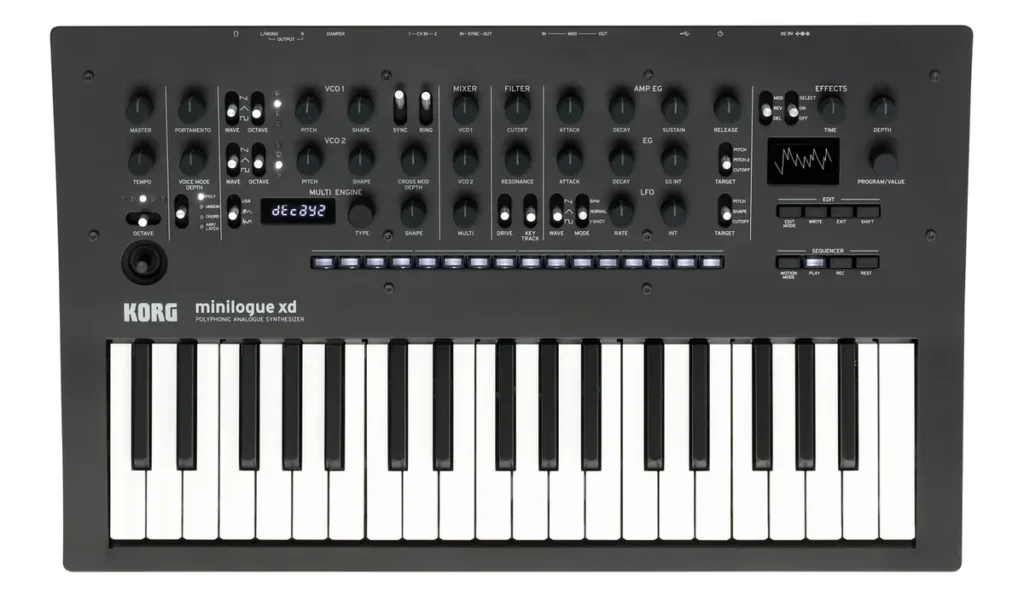
Price: $699.99 on KORG USA’s store, down from $799.99 on October 21, 2026.
The Korg minilogue xd is the classic pick if you want to play chords. It’s a real analog synth with 4 voices and two analog oscillators per voice. A digital multi engine on top adds noise and brighter digital tones, and there are built-in effects.
It has 37 slim keys that respond to how hard you play, more than 200 preset sounds and a 16-step sequencer that records chords as well as single notes. Its small screen even draws the waveform as you turn the knobs, so you can see what each one does.
Who it’s for: Chords, pads and warm analog sound, with effects built in.
7. Korg minilogue
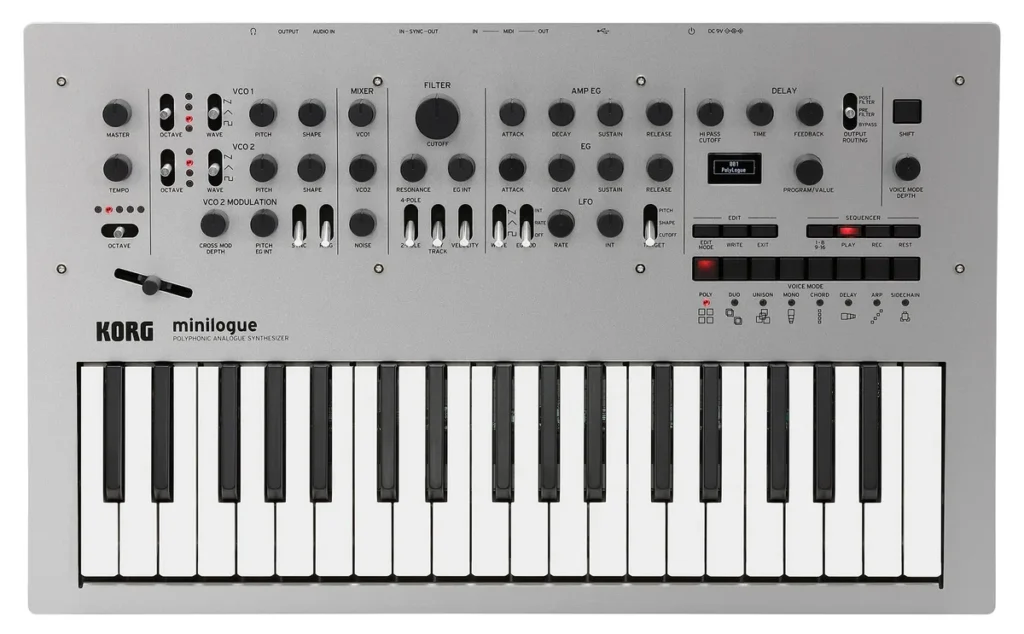
Price: $699.99 on KORG USA’s store (October 21, 2026), the same as the xd’s sale price there. Thomann‘s US store had it for $444 the same day.
The original Korg minilogue was the top pick on the first version of this page, and it’s still a great first chord synth. Think of it as the xd without the digital engine: 4 analog voices, 37 slim keys, a tape-style delay and the same waveform screen.
Its 16-step sequencer records chords and knob moves, and it holds 200 programs, with 100 factory sounds to start from. At the same price, take the xd. When a store sells the original for less, it’s the cheaper way to get real analog chords.
Who it’s for: Pure analog chords and pads, when you find it below the xd’s price.
8. Roland Boutique JU-06A
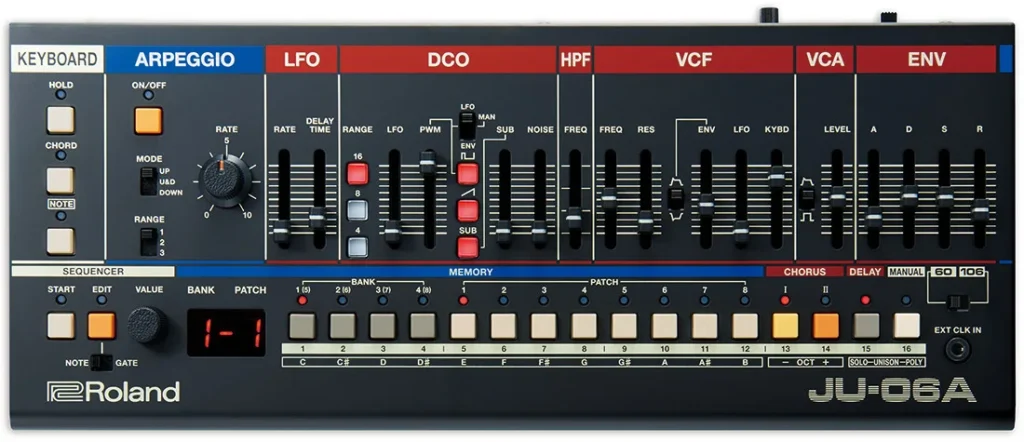
Price: $369 at Thomann‘s US store (October 21, 2026). Roland’s US site doesn’t list a price.
Roland’s Boutique series shrinks its classic synths and drum machines into small modules, and the JU-06A is the one to start with. It brings back the sound of two famous ’80s synths, the Juno-60 and the Juno-106, including their swirling chorus.
It plays 4 notes at once and has an arpeggiator, chord memory and a step sequencer. It runs on four AA batteries, has a built-in speaker, and sends both audio and MIDI to FL Studio over one USB cable.
There’s no keyboard on the module itself. Dock it onto Roland’s K-25m, a 25-key keyboard ($99 at Thomann‘s US store), or play it from a MIDI keyboard you already own. Its natural partner is the Boutique TR-08 ($375 at Thomann‘s US store), a detailed copy of the TR-808 drum machine.
Who it’s for: Lush ’80s chords and pads in a box that fits a backpack.
9. Arturia MiniFreak
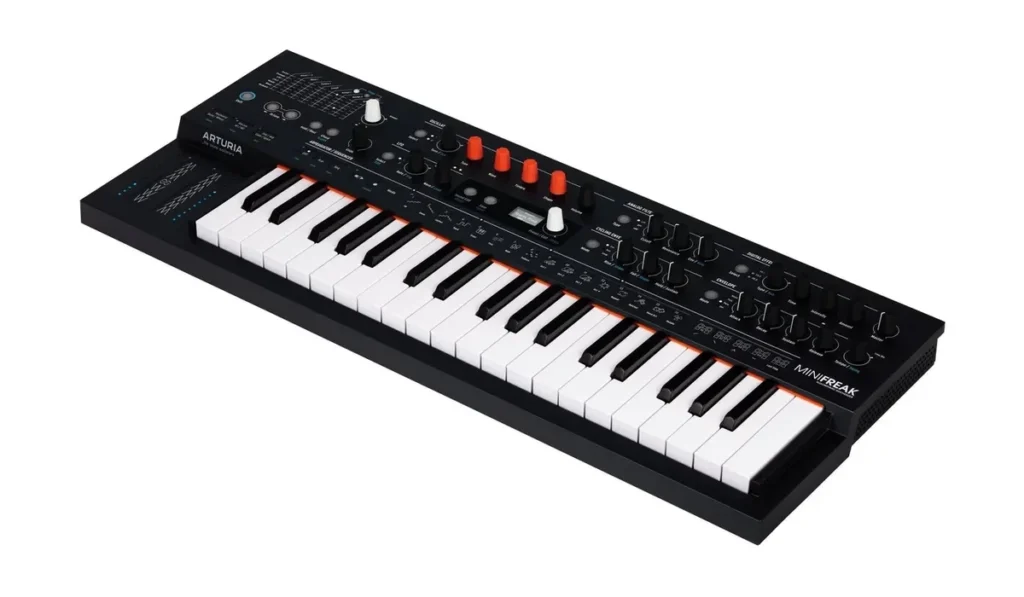
Price: $649 on Arturia‘s US store (October 21, 2026).
The Arturia MiniFreak is the MicroFreak’s bigger sibling. It has 6 voices, so it plays full chords. Two digital sound engines with 31 oscillator modes run into analog filters, followed by three effect slots.
You also get 37 slim keys that respond to velocity and aftertouch, plus stereo outputs for wide pads.
Who it’s for: Room to grow. If you think you’ll get serious about sound design, it’s the synth here you’re least likely to outgrow.
The best synths for bass and leads
Bass lines and leads only need one note at a time, so a monophonic synth can put everything into one big voice.
10. Novation Bass Station II
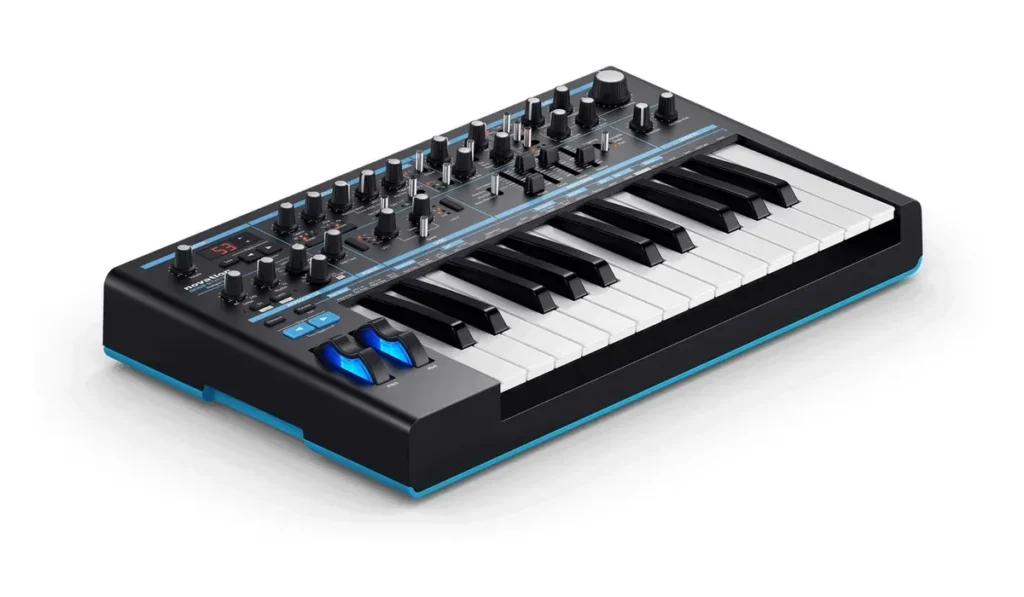
Price: $599.99 on Novation‘s US store (October 21, 2026).
The Novation Bass Station II is an analog synth built for bass lines and leads: two analog oscillators plus a sub-oscillator (an extra, lower tone that adds weight), two filters, overdrive and distortion, and a built-in sequencer and arpeggiator.
It has 25 full-size keys with aftertouch, so it feels like a real keyboard under your fingers. Novation calls it paraphonic, but it shines on single-note lines. Around the back you get USB plus 5-pin MIDI in and out.
Who it’s for: Deep bass and lead lines in house, techno and trap.
11. Arturia MicroBrute
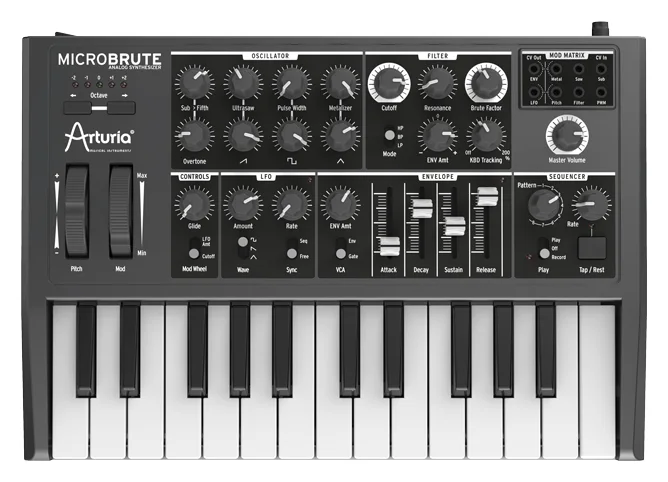
Price: $349 on Arturia‘s US site, which showed it out of stock on October 21, 2026. In July 2025 Arturia brought it back as the limited MicroBrute UFO edition, with the same insides in a black-and-green case.
The Arturia MicroBrute was the second pick on the first version of this page, and it’s still one of the most fun ways to learn how a synth shapes sound. It’s a small analog synth with 25 mini keys and one big oscillator that blends saw, pulse and triangle waves, plus a sub-oscillator.
A Steiner-Parker filter gives you low-pass, high-pass and band-pass, and the Brute Factor knob adds grit. You get 8 sequences of up to 64 steps, USB and MIDI, and a small patch bay where cables reroute the sound, a first taste of modular.
Want full-size keys? The MiniBrute 2 ($549 on Arturia’s US store) is the bigger version, with 25 full-size keys that respond to aftertouch and a 48-point patch bay. Arturia’s MiniBrute page now sells it in place of the original MiniBrute, a runner-up on our first list.
Who it’s for: Gritty analog bass and leads on a budget.
The best synths for ready-made sounds
Some beginners want great sounds first and sound design later. These two are digital, with hundreds of presets sorted so you can find a sound fast.
12. Korg microKORG2
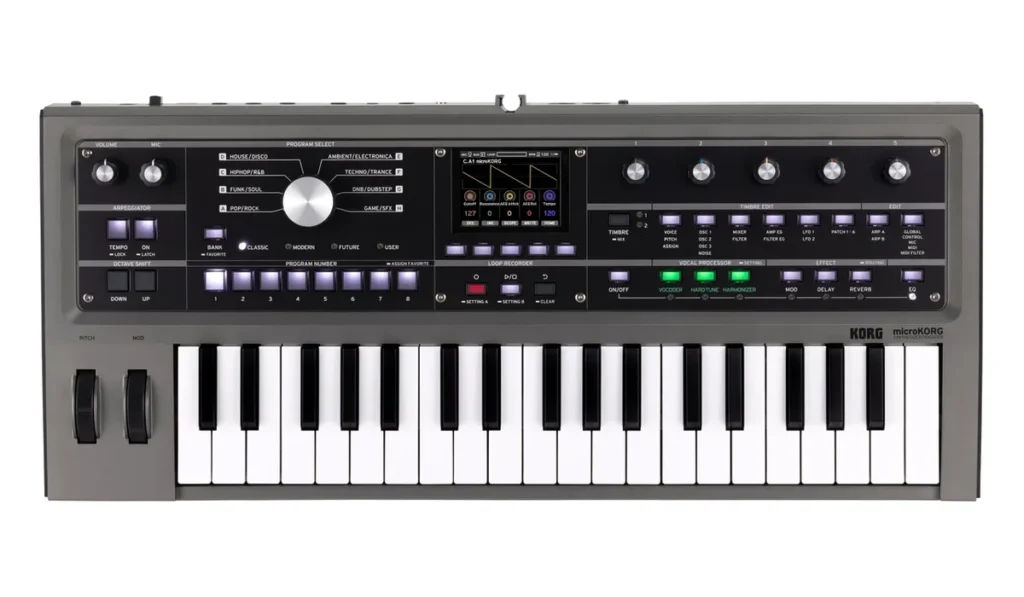
Price: $599.99 on KORG USA’s store for the grey version, down from $699.99 on October 21, 2026.
The Korg microKORG2 is the follow-up to the original microKORG, and like that one it comes with a microphone for its vocoder, the effect that makes your voice sing through the synth.
Its 192 presets are sorted into eight genre groups, so you turn one big dial and land on a sound in the style you make, and you can save 64 of your own. A new vocal processor adds hard-tune pitch correction and a harmonizer, and it runs on six AA batteries when you want to play away from a wall plug.
The original microKORG, a runner-up on our first list, is still sold too: $375 at Thomann‘s US store (October 21, 2026), shipping in 6 to 8 weeks. It plays 4 voices on 37 mini keys and has the same vocoder and microphone.
Who it’s for: Lots of ready-made sounds, and singing through a synth.
13. ASM Hydrasynth Explorer
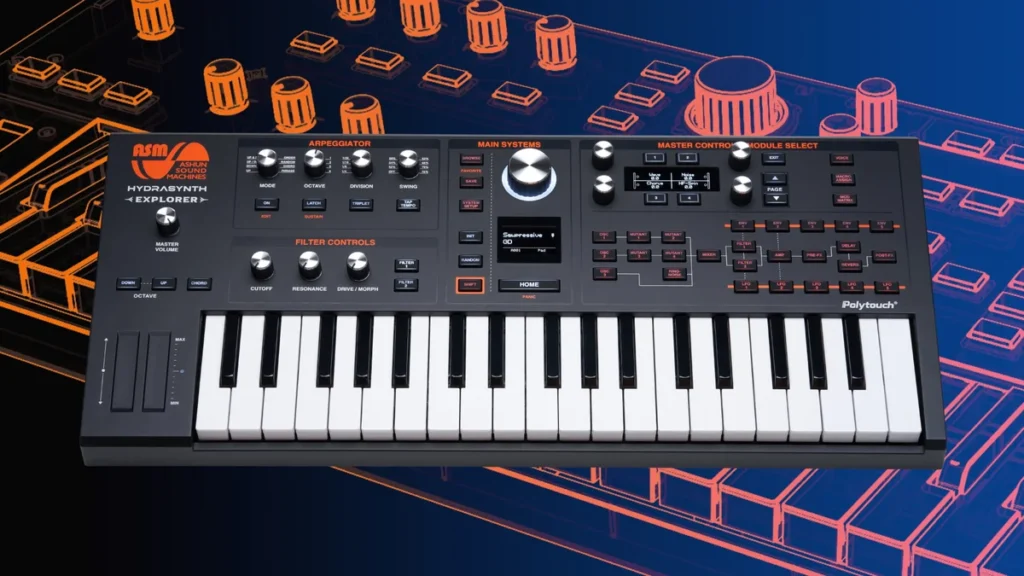
Price: $549 at Thomann‘s US store (October 21, 2026). ASM’s site doesn’t list a price.
The ASM Hydrasynth Explorer is a digital wavetable synth, which means its oscillators can morph smoothly between many stored wave shapes. It plays 8 voices on 37 mid-size keys with polyphonic aftertouch, so each note in a chord reacts to how hard you press it.
Three oscillators, two filters and a deep modulation system cover almost any sound. It holds 1,024 patches, made by sound designers ASM hired for the job, and it runs on 8 AA batteries. It goes deeper than the knob-per-function synths above, so start with the presets and the macro controls.
Who it’s for: The widest range of modern sounds, from glassy pads to wobbling bass.
The best groovebox for beginners
A groovebox puts synths, drums and a sequencer in one box, so you can sketch a whole beat without a keyboard or a computer.
14. Novation Circuit Tracks
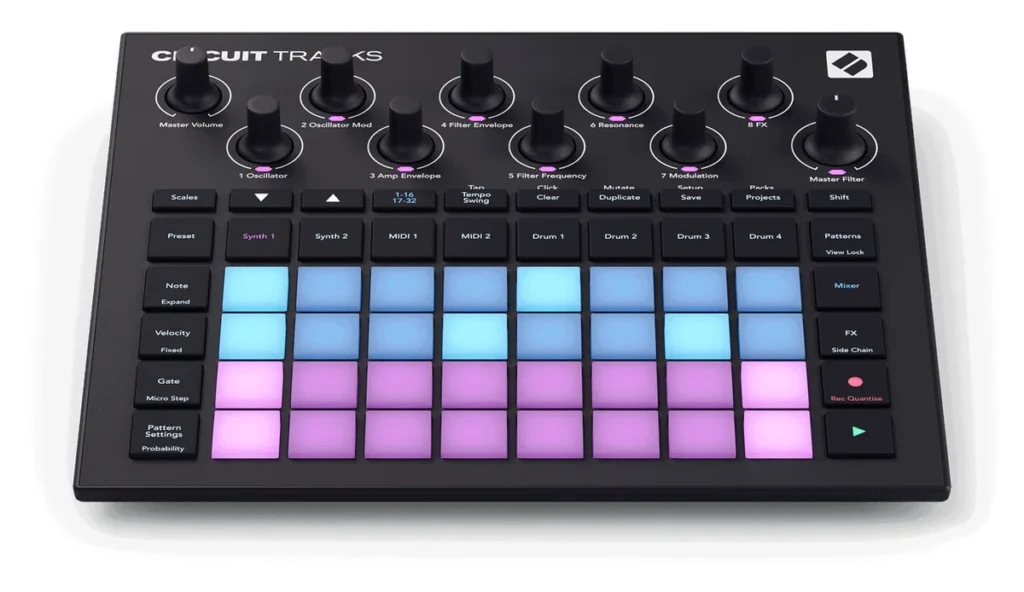
Price: $479.99 on Novation‘s US store (October 21, 2026).
The Novation Circuit Tracks isn’t a keyboard synth. It’s a groovebox: two synth engines, four sample-based drum tracks and a 32-step sequencer in one box, played from a grid of light-up pads.
That makes it the one pick here that can make a whole beat on its own, for up to four hours on its built-in battery. Its two MIDI tracks can also play other hardware, like a second synth from this list.
Who it’s for: Making full beats away from the computer.
Which beginner synth should you buy?
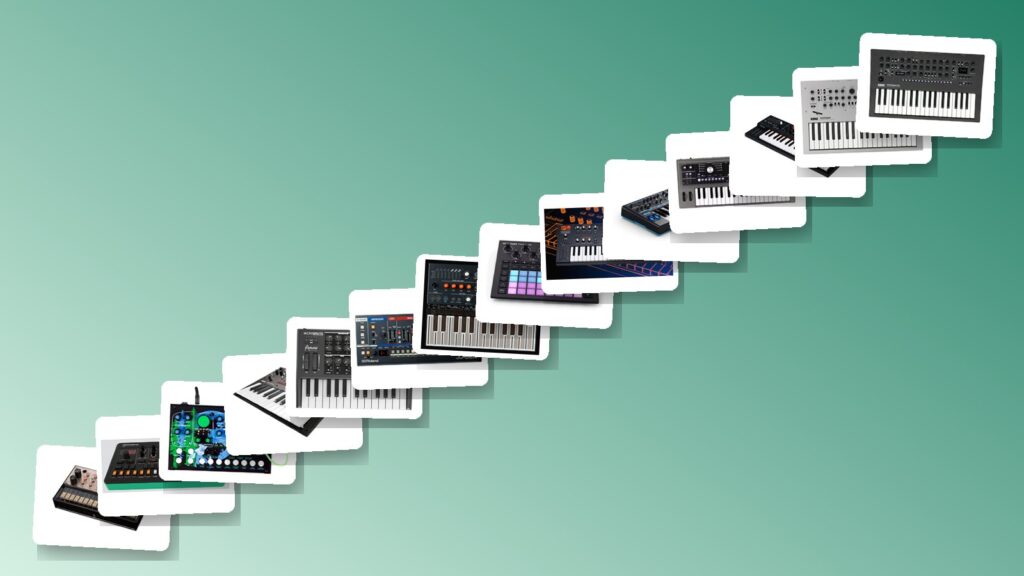
- The most sounds for the money: Arturia MicroFreak, $399.
- The smallest budget: Korg volca keys ($159.99) or Roland S-1 ($175 at Thomann).
- Chords and pads: Korg minilogue xd ($699.99), the Roland JU-06A, or the 6-voice Arturia MiniFreak ($649).
- Bass and lead lines: Novation Bass Station II ($599.99), or the Korg monologue or Arturia MicroBrute for less.
- Learning with patch cables: Cre8audio East Beast, $249.99.
- Ready-made sounds: Korg microKORG2 ($599.99) for its vocoder, or the ASM Hydrasynth Explorer for 1,024 modern patches.
- Whole beats without a computer: Novation Circuit Tracks, $479.99.
Still not sure? Spend nothing yet. Open FL Studio’s own synths or the free Vital plugin, make a few songs, and notice what you keep reaching for. If it’s chords, buy a polyphonic synth. If it’s bass lines, a monophonic one will do. A synth you actually play beats a better one that sits on a shelf.
What is the easiest synth to learn sound design on?
The Korg minilogue xd is the easiest synth to learn sound design on. Its screen works as an oscilloscope, so you watch the waveform change as you turn each knob. On a smaller budget, the Korg monologue has the same kind of screen, and the Arturia MicroFreak ($399) teaches well too, with 320 factory presets to take apart and a mod matrix that links 5 modulation sources to 7 destinations.
Look for a knob-per-function layout, where most knobs do one job. You hear what a filter or an envelope does the moment you turn it, with no menus in the way. The four parts to learn first are covered in how to learn your first synth, below.
What is the best analog synth for beginners?
The Korg minilogue xd ($699.99) is the best analog synth for most beginners: it has 4 voices, so it plays chords, and real analog oscillators. For bass and lead lines, pick the Novation Bass Station II ($599.99), or the Korg monologue or Arturia MicroBrute to spend less. The cheapest real analog synth here is the Korg volca keys ($159.99), which KORG calls an ideal first analog synth.
Not everything here is analog. The Arturia MicroFreak and MiniFreak are hybrids, with digital oscillators running through analog filters. The Roland S-1 and JU-06A use digital models of Roland’s old analog circuits, and the microKORG2 and Hydrasynth Explorer are fully digital. Choose analog for a warm, classic tone, and a hybrid or digital synth for variety.
How to connect a hardware synth to FL Studio
You need two connections. USB, or a MIDI cable, carries the notes between the synth and FL Studio, and an audio cable from the synth’s output to your audio interface carries the sound. In FL Studio, switch the synth on in MIDI settings, play it from a MIDI Out channel, set a Mixer track’s input to the interface, and record.
The short video below shows the MIDI part, and the recording steps come from Mix Elite’s free FL Studio course.
Step 1: Connect the cables
Most of these synths connect to your computer with one USB cable. MIDI is the language they use to send notes, and our guide to MIDI explains it in plain words. If your synth only has 5-pin MIDI sockets, like the volca keys, run a MIDI cable to an audio interface with a MIDI port, or use a USB-MIDI adapter.
Then run an audio cable from the synth’s output to an input on your audio interface, so FL Studio can hear it.
Step 2: Turn on your synth in MIDI settings
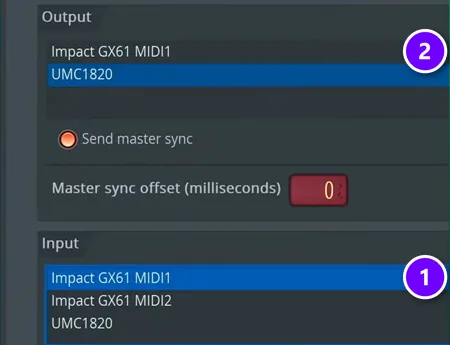
In FL Studio, open Options, then MIDI settings. In the Input list, click your synth or keyboard (1) and make sure it’s enabled, so its keys can play FL Studio’s instruments. In the Output list, click the port your synth is on (2): its own USB name, or your interface’s MIDI port if you used a 5-pin cable.
Step 3: Give the output a port number
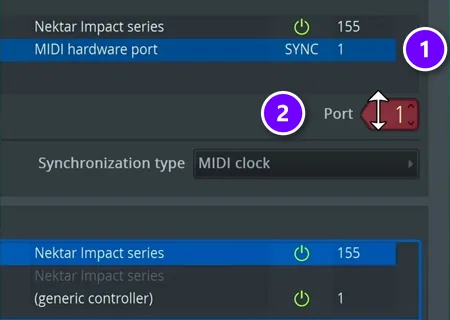
With your synth’s output selected (1), drag the red Port box (2) to pick a number. Any number works, as long as you use the same one in the next step.
Synth still silent? Check its own MIDI settings. In the video, the synth’s MIDI receive setting was off, and it had to be switched on in the synth’s menu before it would play.
Step 4: Add a MIDI Out channel
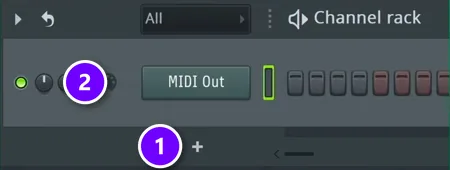
Click + at the bottom of the Channel Rack (1) and add MIDI Out (2). Open it and set its Port to the same number as in step 3. Now any notes you put in the Piano roll for that channel play on your synth.
Step 5: Send the synth’s sound into the Mixer
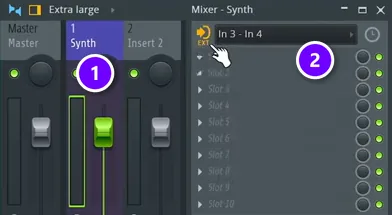
The synth’s sound comes back in through your audio interface. Open the Mixer, select a track (1), and pick the input your synth is plugged into from the menu at the top right (2). Now you hear the synth through FL Studio and can add effects to it like any other track.
This only works once FL Studio uses your interface’s driver, which you pick under Options, then Audio settings. A synth with one mono output, like the Bass Station II, goes into one input such as In 1. A synth with stereo outputs, like the MiniFreak, goes into a pair such as In 1 – In 2.
Step 6: Record notes or audio
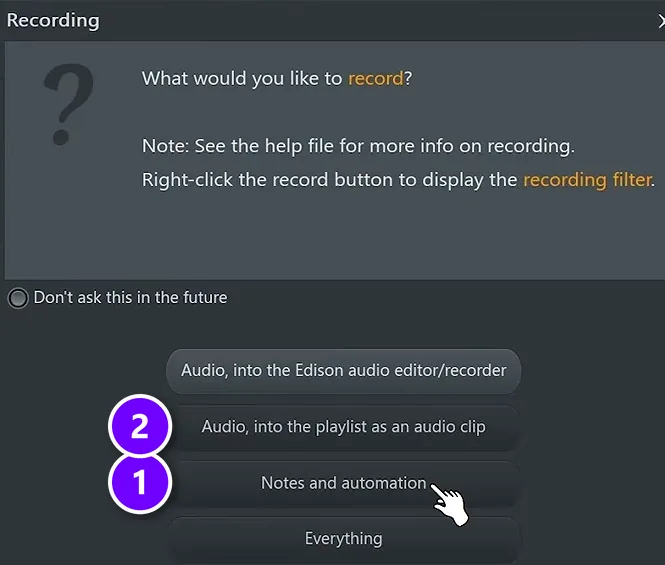
Click the record button and FL Studio asks what to record. Pick Notes and automation (1) to capture what you play as notes you can edit later. Pick Audio, into the playlist as an audio clip (2) to record the actual sound.
Notes first, sound later. Recording the notes first is the safer habit, because notes stay editable: you can fix the timing or a wrong key, then play them back through the synth and record the final sound.
Hear a delay between pressing a key and hearing the synth? That’s latency. The fix Mix Elite’s free course gives for recording vocals works here too: switch off the effects in your project while you record, or record into a new, empty project.
Step 7: Forgot to press record? Dump the score log
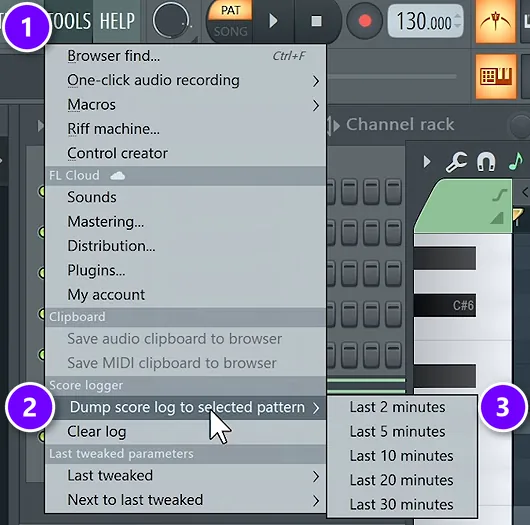
Played something great without recording? A tip from Mix Elite’s free course, in Max’s words: “FL Studio always records your MIDI, even if you’re not recording.” Open Tools (1), then Dump score log to selected pattern (2), and choose how far back to go, like the last 2 minutes (3). The notes you played land in the pattern, ready to clean up.
What happened to the synths on our old list?
The first version of this page, from 2024, recommended a different set of synths. Here’s where each one stands on October 21, 2026:
- Korg minilogue: still sold. It’s back as pick 7, next to its follow-up, the minilogue xd (pick 6).
- Arturia MicroBrute: back as pick 11. Arturia brought it back in July 2025 as the limited UFO edition.
- Korg volca series: still sold. The volca keys is pick 2, with the volca bass beside it. The volca fm now has a follow-up, the volca fm2.
- Roland Boutique series: back as pick 8, the JU-06A, with the TR-08 drum machine and the K-25m keyboard.
- Cre8audio East Beast and West Pest: back as pick 5.
- Roland S-1 and ASM Hydrasynth Explorer: back as picks 3 and 13.
- Korg microKORG: still sold. Its follow-up, the microKORG2, is pick 12, and the original is listed there too.
- Arturia MiniBrute: replaced by the MiniBrute 2, covered in pick 11.
- Teenage Engineering OP-1: replaced by the OP-1 field, which costs $1,666 at Thomann‘s US store, well above a first-synth budget.
Hardware synth or synth plugin: which should you start with?
For most beginners, a plugin comes first: it’s free or cheap, and it saves with your project. Buy hardware if you learn better with your hands. Most of its knobs do one job, so you hear what each part does the moment you turn it, and you play it like an instrument instead of clicking a window.
You don’t have to pick just one. Plenty of producers end up using both: hardware for jamming and finding ideas, plugins for finishing songs. And a synth with USB doubles as a MIDI keyboard, so its keys can play every plugin you own (see step 2 above).
How do you learn your first synth?
Start with the presets, not a blank sound. Load one you like, then turn one knob at a time and listen to what changes. Almost every synth, hardware or software, is built from the same four parts:
- Oscillator: makes the raw tone. Its wave shape decides if the sound is soft or buzzy.
- Filter: cuts some frequencies to make the sound darker or brighter. The cutoff knob is the one you’ll turn most.
- Envelope: shapes how a note starts and fades, with attack, decay, sustain and release.
- LFO: a slow, repeating wobble that moves another knob for you, like a hand that never gets tired.
Once those four click, every synth on this list makes sense, and so does every plugin. Our sound design basics guide goes deeper on each one.
Then put your synth in a song. A bass line from the Bass Station II or a chord from the minilogue xd only matters once it sits in a track, and our guide to making house music walks through a full one. If you love retro sounds, our guide to mixing synthwave shows how to make warm synths sit right in a mix.
DAY 2 OF THE 7-DAY MUSIC PRODUCER COURSE
Got a synth? Learn the chords and melodies to play on it
Day 2 of the 7-Day course covers music theory, chords and melodies, plus where to find pro-quality instruments, paid and free, and how to install them. You get a 3-step formula for chord progressions that hook listeners, 4 easy ways to write melodies even if you’ve never touched a keyboard, 30+ chord progressions and 20+ free plugins and tools. It’s taught in FL Studio (the free trial works), about 45 minutes a day, and it’s $27 with 60 days to decide if it was worth it.
Frequently asked questions
What is the easiest synth for a beginner to learn?
Look for a synth with lots of knobs and good presets. The Korg minilogue xd is a classic pick: its screen draws the waveform as you turn the knobs, so you see what each one does. The Arturia MicroFreak is also easy to start on, thanks to its 320 presets. Whatever you buy, learn the oscillator, filter and envelope first.
Is an analog synth good for beginners?
Yes, if you want warm, classic sounds and hands-on knobs. Analog synths tend to be simpler, which makes them good teachers. But a hybrid like the Arturia MicroFreak gives you more kinds of sound for less money, and digital synths hold more presets. Pick by the sound you want: warm bass and pads point to analog, and wide variety points to hybrid or digital.
How much should I spend on my first synth?
Plan on $400 to $700 for a great first keyboard synth in 2026, from the Arturia MicroFreak ($399) to the Korg minilogue xd ($699.99). Under $300, the Korg volca keys ($159.99), the Roland S-1 and the Korg monologue are real instruments, not toys. Or spend nothing at first: FL Studio’s own synths and the free Vital plugin are plenty to learn on.
How do I connect a synth to my computer and record it?
Use USB, or a MIDI cable, for the notes, and run an audio cable from the synth’s output to an input on your audio interface for the sound. In FL Studio, enable the synth in Options, then MIDI settings, set a Mixer track’s input to that interface input, then press record and choose notes or audio.
Do I need to know how to play piano to use a synth?
No. Max puts it simply in his gear video: “you don’t have to be able to play any instrument at all.” A synth’s arpeggiator and sequencer can play patterns for you, and in FL Studio you can click notes into the Piano roll and send them to your synth. Learning a few chords helps you jam, but it isn’t required.





