



“The past is never dead. It’s not even past.”
To mix synthwave, balance the drums and the lead synth first, give the sub to one bass sound and low-cut everything else, then sidechain the bass, pads and arps to the kick so they pump. Finish with the 80s space: a gated reverb on the snare, chorus on the pads, and long reverbs and delays on the synths.
Synthwave lives on a contradiction. It should sound like a worn VHS tape of a 1985 night drive, yet it has to hit as hard as anything on a playlist today. Get the balance wrong and you end up with one of two problems: a fog of pads and reverb where the drums vanish, or a clean, modern track that has lost the glow that made you love the genre.
There’s no secret plugin behind the fix. It’s the same mixing system Max, the founder of Mix Elite, uses on every style, plus a handful of 80s moves that give synthwave its sound. Every step below is shown in FL Studio, with screenshots from Mix Elite’s videos.
Table of Contents
What is synthwave, and is retrowave the same thing?
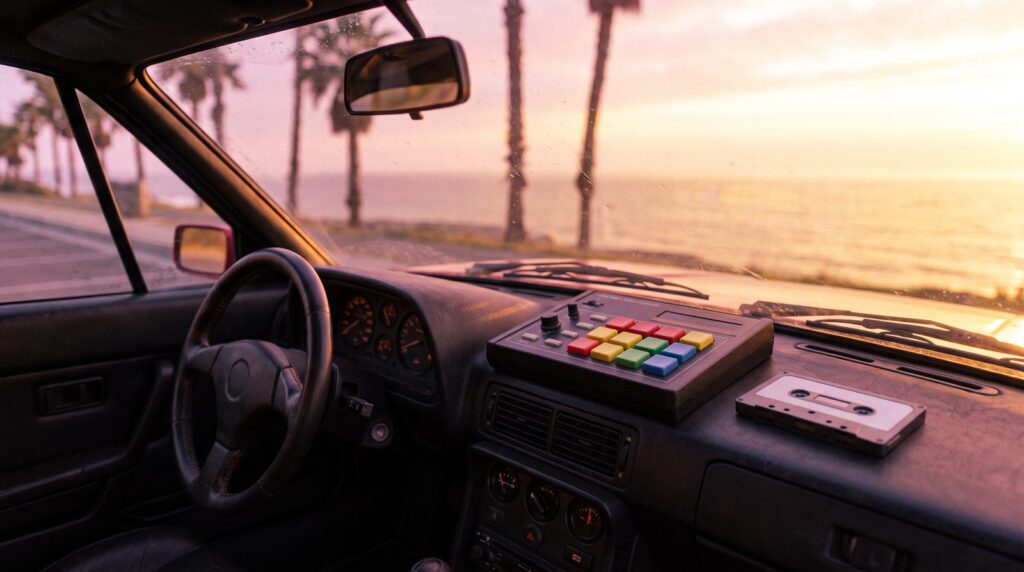
Synthwave is electronic music built on the sound of the 1980s: analog-style synths, drum machines and big reverbs, inspired by 80s film soundtracks and video games. It grew out of France and Western Europe in the mid-to-late 2000s, and the 2011 film Drive pushed it into the mainstream.
Retrowave is simply another name for the same style. Outrun is the name of one of its subgenres. Tempos usually sit between about 80 and 118 BPM, while upbeat tracks run faster, around 128 to 140 BPM. If you also make house or other dance music, the drum and bass ideas here carry over; see how to produce house music.
What sounds make up a synthwave track?
Before you mix, know what you’re mixing. Most synthwave tracks are built from the same five parts:
- Drum machine drums: punchy kicks and claps, and a huge snare with a gated reverb.
- The bass: often a synth bass that jumps between two octaves of the same note.
- Pads: slow, wide chords that fade in and hang in the air, thickened with chorus.
- The lead: a bright synth melody, or sometimes a vocal, guitar or sax, that carries the song.
- Arps: arpeggios, the notes of a chord played one after another, that add constant motion.
The 80s octave bass in FL Studio
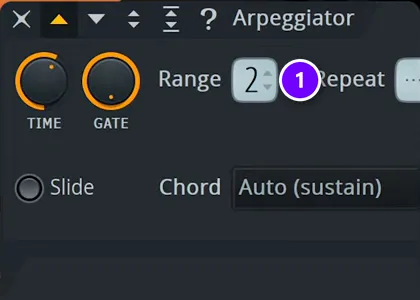
That bouncing octave bass takes one setting. A Mix Elite short shows it: open the bass synth’s channel settings, click the wrench tab (Miscellaneous functions), switch the Arpeggiator on by picking a direction, and set Range to 2 (1). Hold one note, and FL Studio plays it across two octaves. The short calls it the typical 80s style.
80s pads: slow attack and chorus
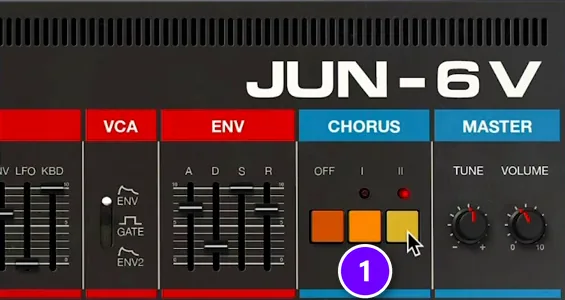
Two Mix Elite shorts build 80s pads, one in Serum and one in Arturia Jun-6 V, an emulation of Roland’s Juno-6. The recipe is the same: a bright, buzzy waveform, the filter turned down, a slow attack, a high sustain and a slow LFO for movement. The finishing touch is the synth’s chorus (1), which makes one pad sound wide and warm.
You don’t need that synth to get the effect. FL Studio’s stock Vintage Chorus is modeled on the Juno-6 chorus, so you can put the same shimmer on any pad. New to synth settings like attack and filter? Start with our sound design basics.
How do you make synthwave music, step by step?
Set a tempo between about 80 and 118 BPM, build an 80s drum machine beat with a big gated snare, and add a bouncing octave bass. Then layer slow, chorused pads, a bright lead and arps, arrange it all in 8- or 16-bar sections, and mix it with the steps below.
- Pick the tempo. Most synthwave sits between about 80 and 118 BPM, and upbeat tracks run around 128 to 140.
- Program the drums. Punchy drum machine kicks and claps, plus a snare with the gated reverb shown further down.
- Add the octave bass. Switch on the channel Arpeggiator with Range set to 2, as shown above.
- Write the chords on pads. A slow attack, a high sustain, the filter turned down and chorus on top.
- Add the lead and the arps. A bright synth melody (or a vocal, guitar or sax), plus arpeggios for constant motion.
- Arrange it. Build 8- or 16-bar sections that each add or remove a layer, then mix it with the four steps below.
How to mix synthwave, step by step
Synthwave doesn’t need its own mixing rules. In Mix Elite’s free 1-hour mixing course, Max puts it simply: “whatever style you produce, please follow along. The process is always exactly the same.” He calls it the Holy Quad, Mix Elite’s mixing formula: volume first, then EQ, then dynamics, then space.
Our guide on how to mix a song covers the full system. Here’s how each step plays out on a synthwave track.
Step 1: Set the volumes, drums and lead first
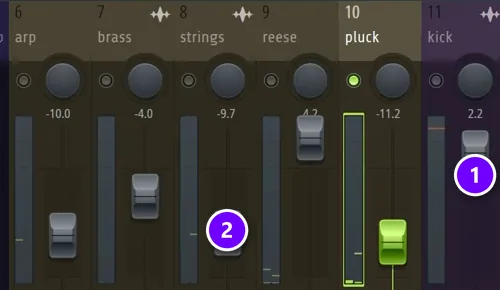
Start with the faders and ask what makes this track this track. In synthwave, that’s the drums and the lead. Start by pulling down whatever feels too loud instead of pushing the important parts up. In the course’s mix, the kick sits above everything (1), and supporting synths like the strings sit well below it (2).
Pads are the usual problem. They’re wide and lush, so they feel quiet when you play them alone and then swallow the drums once everything plays. Pull them down until the snare cuts through again.
Step 2: EQ so one sound owns the sub
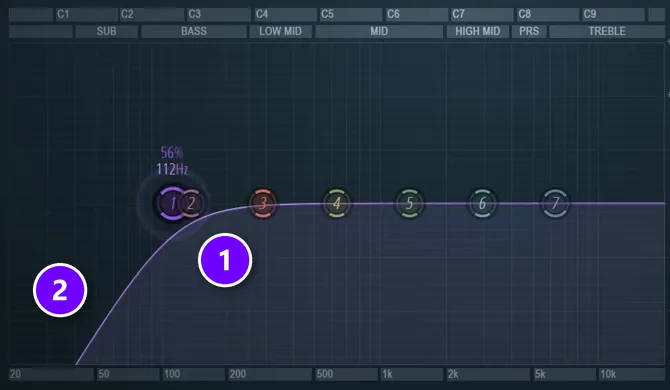
The lowest frequencies, the sub, are where synthwave mixes turn to mud, because the bass, the kick, the pads and the low notes of every synth pile up there. Max is strict about it: “Only one of them can play it at the same time.” Pick the bass, or the kick and bass together, to own the sub and cut it out of everything else.
In Fruity Parametric EQ 2, the course switches band 1 from a shelf to a low cut (also called a high-pass) and sets it to 112 Hz on a layered bass sound (1). Then the slope gets steeper so the lows roll off fast (2). On pads, arps and leads you can cut much higher. Listen for the point where they start to sound thin, then back off a little.
Step 3: Compress, then sidechain to the kick
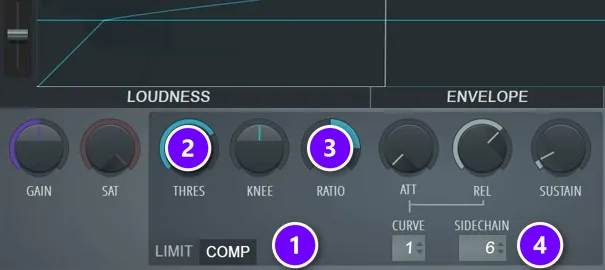
Compression controls dynamics, the jump between loud and soft. In synthwave, its most famous job is the pump: the bass, pads and arps duck for a split second every time the kick hits. The kick punches through, and the whole track breathes with it. Here’s how the course builds it:
- Make a new mixer track and name it Sidechain. Route everything that should pump to it. The course sends the arps, strings, plucks and the bass group, and leaves the brass and crashes out.
- On the Sidechain track, load Fruity Limiter, turn its ceiling up so it doesn’t limit anything, and switch it to COMP (1).
- Select the kick’s track, right-click the arrow at the bottom of the Sidechain track and choose Sidechain to this track. Then pick the kick in the compressor’s SIDECHAIN box (4).
- Set the RATIO (3) to about 4:1 and lower the threshold, THRES (2), until you hear the track pump with the kick.
Go lighter on pads if you want a soft, floating feel, and heavier for the classic pump. When you’re done, check your levels again. As Max warns, sidechaining changes the levels a lot, so new balance problems can pop up. For other ways to set it up, see how to sidechain in FL Studio.
Step 4: Add space with big reverbs and delays
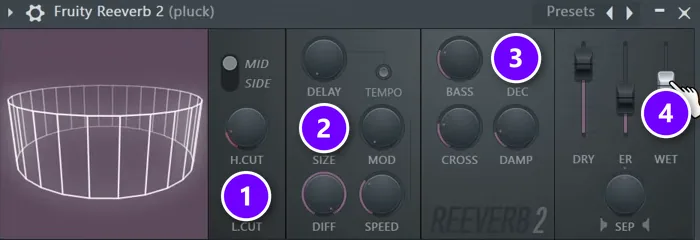
Space is where synthwave gets its size. The course uses Fruity Reeverb 2 and focuses on three knobs and one fader. On a pluck synth, it raises the low cut, L.CUT (1), sets the room SIZE (2) high, makes the decay, DEC (3), much longer than on the drums, and turns up WET (4). That’s where the soundscape comes from.
Keep the drums tighter. On percussion, the course keeps the decay around 1 second or shorter, so the reverb doesn’t smear the groove. Echoes work the same way: Fruity Delay 3 is FL Studio’s stock delay. Try it on the lead, with its own low cut up, so the echoes stay out of the bass.
How do you mix synthwave kick and bass so they don’t clash?
Make sure their lows never play at the same time. Give the sub to one sound, set the bass synth to mono so its notes don’t overlap, shorten its release to about a quarter note, and duck the bass every time the kick hits. Keep both in the center, so the low end hits hard on any speaker.
Mix Elite’s 2026 video on a clean low end explains why: the lower a sound, the longer it rings. A kick and a bass that overlap stack up volume and mud, and can even cause phase problems. Its fixes, in order:
- Turn on mono (and legato, if the synth has it). Overlapping bass notes stack up, and mono plays one at a time.
- Shorten the bass release. Aim for about a quarter note, the length of one beat. In the video’s project, that’s about 470 ms.
- Let one sound own the sub. Low-cut everything else, as in Step 2 above.
- Duck the bass on every kick. Use the Sidechain track from Step 3, or the video’s own favorite: Fruity Balance on the bass group, with a volume automation clip shaped like the kick.
Our guide to mixing the kick and the 808 uses the same ideas on hip-hop low end.
How to make the 80s gated reverb snare in FL Studio
Put a big, long reverb on the snare’s own mixer track, then gate it so the tail stops dead after each hit. The burst sounds huge, but it never hangs over the next beat, so it can’t drown the song. As with any reverb in Mix Elite’s mixing course, raise its low cut so the tail stays out of the kick and bass.
The gated snare is the drum sound of the 80s: a huge burst of reverb that stops dead instead of fading out. A Mix Elite short builds it with two stock plugins on the snare’s own mixer track.
Load a big reverb, then Fruity Limiter
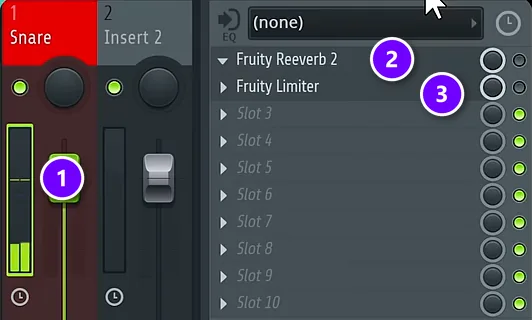
Select the snare’s mixer track (1). Load Fruity Reeverb 2 with a heavy, long reverb (2), and put Fruity Limiter in the slot right after it (3). The order matters. The gate has to come after the reverb, or it has no tail to cut.
Gate the reverb tail
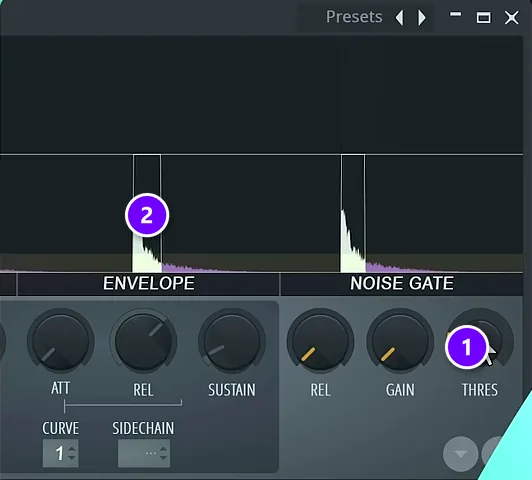
Open Fruity Limiter, switch it to compression and find the NOISE GATE section. Raise THRES (1) until the reverb tail stops sharply after each hit (2). Lower it for a longer burst, raise it for a tighter one.
Because the gate listens to the snare’s own level, the reverb blooms on every hit and shuts the moment the hit fades. That’s the whole trick, and it costs nothing.
How to make synthwave sound warm and wide
Warmth and width are what make a synthwave mix sound like a record instead of a demo. Both are easy to overdo, so add them last and in small amounts:
- Chorus on pads and leads: Vintage Chorus gives you the Juno-6 shimmer on any synth.
- Width on the edges only: keep the kick, snare, bass and lead in the center, and let pads and arps spread wide. A centered kick and bass keep the low end solid on any speaker.
- Saturation with care: a little drive adds analog warmth, but watch your drums. In Mix Elite’s saturation video, Max shows the catch: “we got the warmth from the distortion plugin, we lost the whole punch from the drums.”
Then step back and compare. Play a synthwave song you love at the same volume as your mix, and listen for one difference at a time: the snare, the pads, the width. Fix the biggest one first.
Why do my synth leads sound too bright and modern?
Usually the top end is doing too much. Turn the synth’s filter cutoff down a little, dip any harsh spot in the high mids with EQ, then add chorus and a small amount of saturation. A long reverb and delay, with their lows cut, finish the 80s feel.
- Close the filter a little. Mix Elite’s 80s pad recipes start from a bright, buzzy waveform and turn the filter down. The same knob tames a lead.
- Cut harsh spots instead of boosting. The high mids are where hearing is most sensitive. Boost a narrow EQ band, sweep it to the harshest spot and cut it there, as Mix Elite’s EQ masterclass shows.
- Roll off the fizz. If the very top still sizzles, a gentle high cut (also called a low pass) removes everything above the point you set.
- Add the 80s color last. Vintage Chorus for the Juno-6 shimmer, then a touch of saturation, checking that the drums keep their punch.
What is the typical synthwave song structure?
Instrumental synthwave usually runs intro, build, main section, breakdown, second main section and outro, in sections of 8 or 16 bars. Songs with vocals use a pop structure of verses and choruses instead. Each new section adds or removes a layer, so the track never stands still.
It’s the build-and-release shape of other electronic music. The intro sets the mood, the build adds layers, and the main section is where the lead plays. In the breakdown, the drums drop out and the pads take over, before a second main section and an outro.
Our guide to EDM song structure shows the bar counts in detail.
DAY 4 OF THE 7-DAY MUSIC PRODUCER COURSE
Want the whole Holy-Quad mixing formula? That’s Day 4.
Day 4 of the 7-Day course is all about mixing: the simple Holy-Quad mixing formula, the “Mix Murdering” mistakes most beginners make, and a one-click setting that makes your song wider, with no new plugins. You also get a mixing checklist and a mixing and production template. It’s taught in FL Studio (the free trial works), about 45 minutes a day, and on day 7 a pro gives you feedback on your finished track. It’s $27, and you get 60 days to decide if it was worth it.
Frequently asked questions
What is the difference between synthwave and retrowave?
There isn’t a real one. Retrowave is another name for synthwave: electronic music built on the sound of the 1980s, with analog-style synths, drum machines and big reverbs. Outrun is the name of one of its subgenres, but synthwave and retrowave describe the same style.
What BPM is synthwave?
Most synthwave sits between about 80 and 118 BPM, and upbeat tracks run faster, around 128 to 140 BPM. Pick the tempo for the mood you want: slower for a dreamy night-drive feel, faster for driving, energetic tracks.
What is the structure of a synthwave song?
Instrumental synthwave usually follows intro, build, main section, breakdown, second main section and outro, with sections of 8 or 16 bars. In the breakdown, the drums drop out and the pads take over. Songs with vocals use a pop structure of verses and choruses instead.
How do you make a gated reverb snare?
Put a heavy reverb on the snare’s mixer track and Fruity Limiter in the slot right after it. Switch Fruity Limiter to compression, go to its NOISE GATE section and raise the threshold until the reverb tail stops sharply after each hit. That sudden cutoff is the 80s gated sound.
What synths are used for synthwave?
The classic sound comes from 80s analog polysynths like Roland’s Juno series, which is why chorus matters so much. You don’t need hardware: emulations like Arturia’s Jun-6 V, software synths like Serum, or FL Studio’s stock synths with Vintage Chorus get you close, and the mix does the rest.





