



“I decided to call my music ‘organized sound’ and myself, not a musician, but ‘a worker in rhythms, frequencies, and intensities.’”
Sound design means building your own sounds instead of only picking presets. Sound design for beginners comes down to the four parts every synth has, including the ones inside FL Studio: an oscillator makes the raw tone, a filter makes it darker or brighter, an envelope shapes how it starts and fades, and an LFO adds movement.
You open a synth, see 40 knobs, and do what almost everyone does: scroll through presets until something sounds close enough. That works right up until a preset is nearly right but too bright, too long or too boring, and you have no idea which knob fixes it.
This guide is the fix. You’ll learn what each part of a synth does, using the synths that already come with FL Studio and real screenshots from Mix Elite’s videos. Then you’ll build your first sound from an empty patch, one knob at a time.
Table of Contents
What is sound design in music?
Sound design is the part of music production where you make the instrument itself. Instead of asking “which preset?”, you decide how the bass growls, how bright the lead is and how slowly the pad swells in. Producers do it with synthesizers, samplers and effects. It’s also how a track starts to sound like you and not like everyone else’s sample pack.
Outside music the word means more. In film, games and theater, sound design covers the whole soundtrack of a scene: the sound effects, the dialogue and the music. In music production it means shaping the sounds inside your song, and that’s what this guide is about.
Your main tool is a synthesizer. The one that comes with FL Studio is called FLEX, and when Max, the founder of Mix Elite, opens it in Mix Elite’s free 4.5-hour FL Studio course, he puts it simply: “technically we should say that it’s a synthesizer since the sounds are made artificially by synthesizing different waveforms. It is not a pre-recorded real life instrument.”
What are the basic elements of sound?
Every sound you’ll ever design changes in only four ways. Learn them and each knob on each synth starts to make sense, because every knob moves one of these:
- Pitch: how high or low the note is. The oscillator sets it.
- Tone: bright and buzzy, or dark and soft. Producers call this timbre (you say it like “TAM-ber”). The oscillator’s shape and the filter set it.
- Loudness over time: does the sound hit hard and stop, or fade in slowly? The envelope sets it.
- Movement: does the sound stay still, or does it wobble, pulse and breathe? The LFO sets it.
That’s the whole map. The rest of this guide takes the four parts one at a time.
How does a synth make sound? The 4 building blocks

Picture the sound flowing from left to right. The oscillator makes a raw tone. The filter shapes its tone, and the amp at the end sets how loud it is. Two helpers sit on the side and turn knobs for you:
- The envelope moves a knob once, every time you press a key.
- The LFO moves a knob again and again, in a loop.
Every synth in FL Studio has these parts, even when the knobs look different. 3x Osc, GMS and FLEX are a good place to start, and Sytrus and Harmor go much deeper. The FL Studio free trial includes every one of them, and the free Vital synth works the same way.
Oscillators: where every sound starts
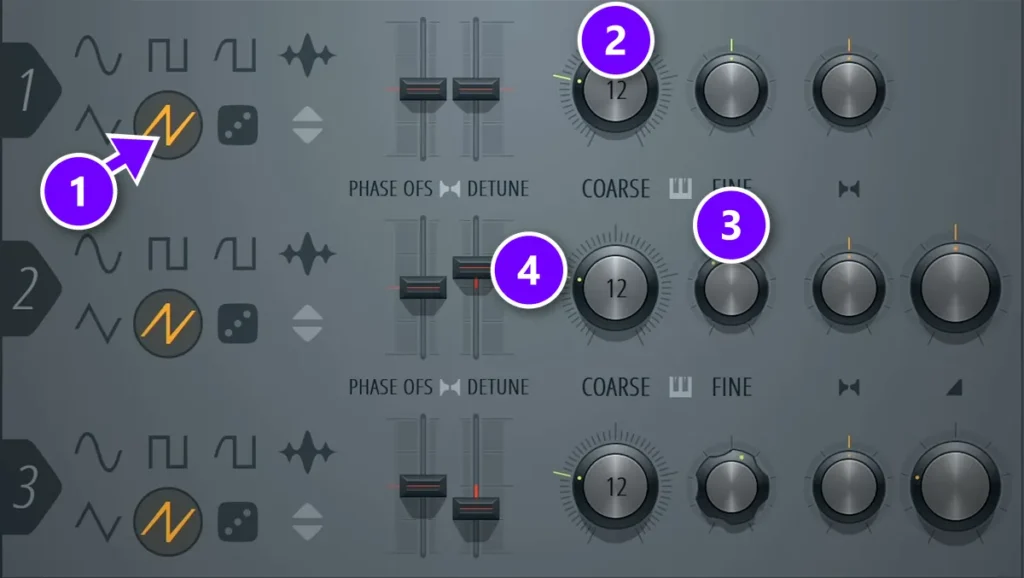
The oscillator makes the raw tone. Its waveform, the shape of the wave, sets the basic character before you touch anything else. You’ll meet these shapes on almost every synth:
- Sine: smooth and pure, with no buzz at all. Great for a sub bass under your track.
- Triangle: soft like a sine, with a little more edge.
- Square: hollow and woody, like an old video game.
- Saw: bright and buzzy. It’s the workhorse for basses, leads and big pads, because it has the most to filter away.
- Noise: pure hiss. Use it for risers, snare layers and breathy textures.
In 3x Osc, each row is one oscillator. Click a shape to pick it (1). COARSE (2) moves the pitch in semitones, up to 24 either way, and FINE (3) nudges it by less than a semitone. DETUNE (4) plays the left and right side at slightly different pitches, which makes the sound wider.
Stacking slightly detuned copies of one sound is the oldest trick for a fat synth, and big synths call it unison. In Mix Elite’s Reese bass video, Serum gets six unison voices and stops there, because a seventh already starts to sound strange.
Filters: make a sound darker or brighter
A filter removes part of the sound. The point where it starts cutting is called the cutoff, and moving it is the fastest way to change a sound’s mood. There are three main types:
- Low pass: lets the lows through and cuts the highs, so the sound gets darker and softer. It’s the one you’ll use most.
- High pass: cuts the lows, so the sound gets thinner. It keeps pads and leads out of the bass’s way.
- Band pass: keeps only a slice of the middle, like a voice on an old phone.
Resonance boosts a narrow band right at the cutoff. A little makes a filter sweep sound alive. A lot makes it squeal.
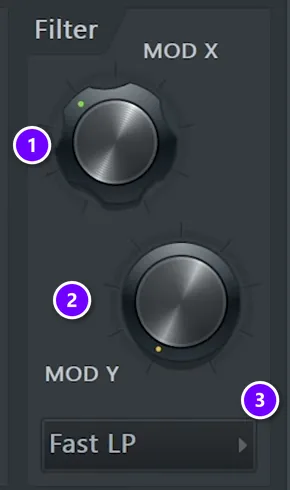
Every FL Studio synth has a filter in its channel settings. Open the channel and click the envelope tab. MOD X (1) is the cutoff, MOD Y (2) is the resonance, and the menu below them (3) picks the filter type, such as Fast LP, a quick low pass. In the Reese bass video, the cutoff comes down and a little resonance goes in, so the buzz turns into a growl.
Envelopes (ADSR): how a sound starts and fades
An envelope moves a knob once, every time you press a key. On volume, it decides whether a note slams in or fades in, and whether it stops dead or rings out. Most synths split it into four stages, called ADSR:
- Attack: how long the sound takes to reach full volume.
- Decay: how long it takes to fall from that peak to the sustain level.
- Sustain: the level the note holds while you keep the key down. It’s a level, not a time.
- Release: how long the sound fades after you let go.
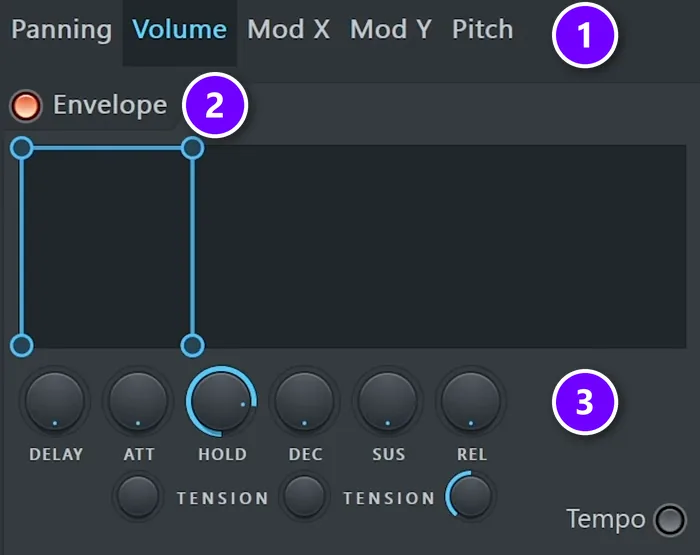
FL Studio’s channel envelope adds two more knobs, DELAY and HOLD. Pick what the envelope moves with the tabs at the top (1): Volume, Mod X (the filter cutoff), Mod Y (the resonance), Pitch or Panning. Switch the envelope on (2), then shape it with the knobs (3). Here only HOLD is up, the setting the Reese bass below uses, so each note plays at full level and stops as soon as you let go.
Three envelope shapes cover most of the sounds you’ll make:
- Pluck: a fast attack, a short decay and no sustain. The note pops and dies away, like a plucked string.
- Pad: a slow attack and a long release, so chords swell in and fade out softly.
- Bass: a fast attack, full sustain and a short release, so every note is solid and stops on time.
Hear a click at the start of every note? Raise the attack a hair. In Mix Elite’s Serum video, the keys sound gets an attack of at least 2.1 ms, and the click is gone. A soft, breathy flute goes to about 100 ms, so each note fades in.
LFOs: add movement so a sound feels alive
LFO stands for low frequency oscillator. It’s a wave too slow to hear, so instead of making sound, it moves a knob up and down for you. Point it at the filter cutoff and you get a wobble. Point it at the volume and the sound pulses, and on the pitch you get vibrato.
It’s one of the quickest ways to bring a flat sound to life. In the same Reese bass video, Max calls it “one of my favorite tricks in here”: linking an LFO to the cutoff.
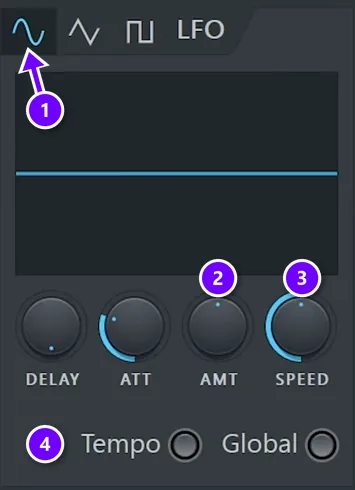
In FL Studio’s channel settings the LFO box sits right next to the envelope. Pick a shape (1), then raise AMT (2) for how far it moves and SPEED (3) for how fast. Switch on Tempo (4) to lock the speed to your song, so the wobble lands on the beat. To make it move the filter, click the Mod X tab first, just like in the envelope screenshot.
Keep the amount small at first. A slow, gentle LFO on the cutoff makes a pad breathe, while a fast, deep one turns a bass into a wobble.
How do you make a simple synth bass from scratch?
Start from an empty patch with saw waves, switch the synth to mono so one note plays at a time, darken it with a low-pass filter and give it a fast attack and a short release. A Reese bass, a few detuned saws rubbing against each other, is the classic first one, and FL Studio’s own 3x Osc can build it.
Time to build it. The slow drift between the saws gives the rolling, growling low end you hear in drum and bass, house and dubstep. Here is the recipe in 3x Osc, from the end of Mix Elite’s Reese bass video:
- In the Channel Rack, click + and add 3x Osc.
- Set all three oscillators to the saw shape, like the 3x Osc screenshot above.
- Turn the three COARSE knobs to the same number, so they play one note together. The video sets all three to 12.
- Push the DETUNE slider of oscillator 2 up and oscillator 3 down, then turn their FINE knobs in opposite directions too. The saws now drift against each other, and that drift is the growl.
- Open the channel settings and click the envelope tab. Pick Volume, switch the envelope on, turn HOLD up and leave the rest down.
- Take MOD X down to darken the sound, and raise MOD Y a little for bite.
Make the notes glide
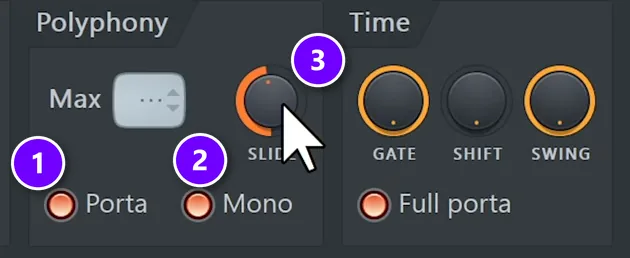
Last, open the wrench tab of the channel settings. Switch on Porta (1) and Mono (2), so one note glides into the next, and use SLIDE (3) to set how long the glide takes. Play two notes that overlap and you’ll hear the pitch slide between them.
When you like it, save it: click the small arrow at the top left of the channel window and choose Presets, then Save preset as.
A trick from the same video for a bigger drop: turn the bass’s stereo width down in the breakdown and back up for the drop. Everything in music is relative, so the drop then feels much wider.
The faster way: the same bass in GMS
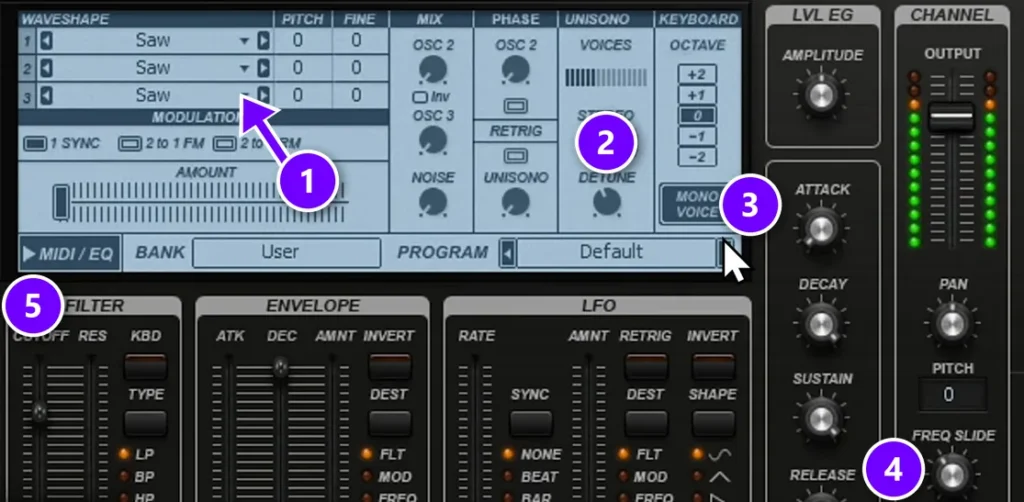
GMS, another synth that comes with FL Studio, has unison built in, so the same bass takes about a minute. These are the settings from the video:
- Load GMS, set the bank to User and the program to Default, so you start clean.
- Set all three oscillators to Saw (1).
- In the UNISONO section (2), raise VOICES to 6, set DETUNE to about 40 and turn STEREO up. The video goes to 100.
- Click MONO VOICE (3) and add some FREQ SLIDE (4), so notes glide.
- Pick LP in the FILTER section (5) to darken it. The video also switches on the DIST effect for grit. Clicking GLUE keeps an effect on, and the XY pad sets it.
You’ll notice the same four blocks again. The oscillators, the filter, the envelopes and the LFO are all on one panel in GMS, so it’s a good synth to practice on once 3x Osc makes sense.
Start with presets, then tweak the macros
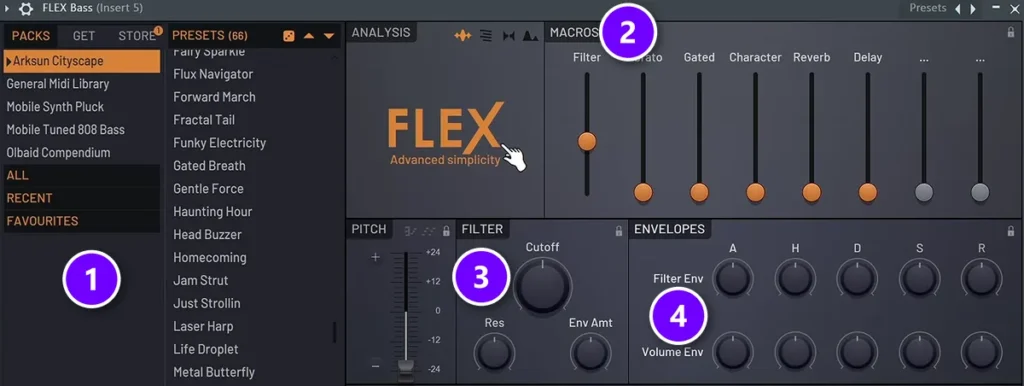
Building from scratch is the best way to learn, but nobody makes every sound that way. The fast route is a good preset that you then make your own. Max is honest about how a synth window feels the first time: “pretty intimidating at first but all of those gives you some kind of control over how this sound sounds and it’s definitely not as complicated as you might think.”
FLEX shows the idea well. Pick a pack on the left and click through its presets (1). The MACROS (2) are big sliders that the preset’s designer wired to the most useful knobs, so one slider might open the filter and add vibrato at once. Underneath you’ll still find a normal FILTER (3) and two ENVELOPES (4), one for the filter and one for the volume.
Change one macro at a time and listen. Then open the filter and the envelopes to see which knobs it moved. That’s how presets teach you sound design. Mix Elite’s free FL Studio course also picks the free Vital synth for beginners and uses its macros to reshape presets quickly.
Which type of synthesis should you learn first?
Start with subtractive synthesis, the kind this guide covers: a bright wave goes in, and a filter carves it down. 3x Osc and GMS work this way, and almost everything else builds on it. Once it clicks, these are worth a look:
- FM synthesis bends one wave’s pitch with another, for bells, metal plucks and hard basses. Sytrus does it in FL Studio.
- Additive synthesis builds a sound from many sine waves added together. Harmor mixes it with subtractive tools.
- Wavetable synthesis sweeps through a table of different wave shapes, so the tone morphs while you play. Vital (free) and Serum are the popular ones.
- Sampling starts from a recording instead of a wave, like a voice, a guitar or a door slam. FL Studio’s sampler gives it a filter, an envelope and an LFO, the same tools as a synth.
What are the main sound design techniques?
The main sound design techniques are synthesis, sampling, layering, modulation, effects and resampling. They all rest on the same principles: build a sound from waves or start from a recording, stack layers that each cover their own range, let envelopes and LFOs move the knobs, finish it with effects, and often record the result to shape it again.
Synthesis, modulation and effects have their own sections in this guide. Here are four more.
- Layering: two or more sounds play as one, each covering a different range. Mix Elite’s free FL Studio course layers claps, hats and percussion for more depth, never kicks, and it has one firm rule for the low end: never layer the sub frequencies. One sound owns the sub.
- Resampling: record your sound to an audio file, then treat that file as new material. Chop it, pitch it, reverse it or run it through more effects, and you get sounds no preset has.
- Pitching and reversing: pitch a recording down an octave or two and it turns deep and heavy. Play a cymbal or a reverb tail backwards and it swells up into the next beat.
- Foley: the film and game version of sound design. Everyday sounds, like footsteps or a creaking door, are recorded to match what happens on screen.
Which effects finish a sound?
Effects are the last step of sound design, and a few of them do most of the work:
- Distortion adds new harmonics, so a bass gets grit and cuts through on small speakers.
- Chorus layers slightly delayed copies of the sound for width.
- Reverb and delay put the sound in a space. Here’s when to use reverb vs delay.
- OTT brings out detail and makes synths sound bigger and brighter. Our OTT compression guide shows how far to push it.
Even reverb on a bass can work. Usually you keep basses dry so the mix stays clean, but the Reese bass video cuts the reverb’s lows and highs first. Then you only hear the space after the notes end, and the low end stays tight.
Why do my synth patches sound thin compared to presets?
Presets are rarely one raw wave. Preset designers stack detuned voices, layer a second sound, add movement and run it all through effects, while a new patch is usually one still, dry oscillator. Add unison, a quiet layer for width, an LFO and some distortion or chorus, and keep the sub in mono.
These are the moves from Mix Elite’s Serum and Reese bass videos, in the order to try them:
- Stack voices with unison. Six voices is a good start. Go much further and the voices start to phase against each other, which sounds weird instead of bigger. In GMS, it’s VOICES and DETUNE in the UNISONO section.
- Layer a second sound. The breathy flute gets a second oscillator in unison, pitched two octaves up. The dirty pad gets a quiet layer with 10 voices and less detune, only to add width.
- Keep the low end in one mono sound. Cut the main bass below about 120 Hz, then put a plain sine sub under it with a steep cut above that same point. The wide layers can’t smear the lows anymore.
- Add movement. A wave that never changes sounds lifeless. Point an LFO at the cutoff, the wavetable position or the pulse width, so the tone keeps shifting while a note plays.
- Add grit and width with effects. Distortion adds harmonics, so the sound cuts through. The pad in the Serum video gets a lot of tube distortion, then chorus, a compressor, reverb and EQ, and Serum’s Hyper/Dimension effect for even more width.
- Add a little noise. In the flute patch, a quiet layer of noise is what makes it sound real, like breath on a bottle.
Sound design for beginners: a simple practice routine
Practice beats theory here. This routine works, even in 45 minutes a night:
- Open a preset you like and move one knob at a time. Say out loud what changed.
- Rebuild a sound you love from an empty patch. Get close, not perfect.
- Save every sound you like as a preset, so your own library grows.
- Use your sounds in a real track, because a sound only proves itself next to drums and a bass.
Then watch Max build three sounds from scratch in Serum, in this Mix Elite video: trap keys, a breathy flute and a dirty vintage pad. The knobs have different names, but it’s the same four blocks you just learned.
When your sounds are ready, put them to work in a full track with our guide to producing house music. And if you want more instruments to play with, start with these synth plugins or, if you like real knobs, these hardware synths for beginners.
DAY 2 OF THE 7-DAY MUSIC PRODUCER COURSE
Find great instruments, then write with them
Day 2 of the 7-Day course covers music theory, chords and melodies, plus the best instruments: where to find pro-quality instruments, paid and free, and how to install them. You also get 20+ free plugins and tools and 30+ chord progressions. It’s taught in FL Studio, where the free trial works, and you get 60 days to decide if it was worth $27.
Frequently asked questions
What are the basics of sound design?
The basics are four parts that every synth shares. The oscillator makes the raw tone, the filter makes it darker or brighter, the envelope shapes how each note starts and fades, and the LFO adds movement. Learn what those four do and you can reshape almost any preset or build a sound from scratch.
What are the elements of sound design?
In music, a sound changes in four ways: its pitch (how high or low), its tone or timbre (bright or dark), its loudness over time (how it starts and fades) and its movement. In film and games, sound design also means the three parts of a soundtrack: sound effects, dialogue and music.
What are the main sound design techniques?
Synthesis builds a sound from simple waves, and sampling starts from a recording. Layering stacks sounds that each cover their own range, modulation lets envelopes and LFOs move the knobs, and effects such as distortion, chorus and reverb finish the sound. Resampling records the result to audio, so you can pitch, reverse or process it again. In film and games, foley adds everyday sounds recorded to match the picture.
Why do my synth patches sound thin compared to presets?
A preset is rarely one raw wave. It stacks detuned unison voices, layers a second sound, moves with LFOs and runs through effects like distortion and chorus, while a fresh patch is one still, dry oscillator. Add unison, a quiet layer for width, an LFO on the cutoff or wavetable position and some distortion, and keep the low end in one mono sub.
What do filter cutoff and ADSR mean, in plain English?
The cutoff is a brightness control. On a low-pass filter, turning it down works like the treble knob on a stereo, only much stronger, until just the dull low end is left. ADSR is how a note lives over time: attack is how fast it arrives, decay how fast it settles, sustain the level it holds while you press the key, and release how long it rings after you let go. An organ holds full volume as long as you press. A bowed violin swells in slowly.





