



“…the room flatters the music. It actually improves it.”
The best reverb plugins in 2026 start with two already built into every edition of FL Studio: Fruity Reeverb 2 and Fruity Convolver. The best free add-on is Valhalla Supermassive, and the best paid reverbs are Valhalla VintageVerb ($50) for lush, classic spaces and FabFilter Pro-R 2 ($199) for clean, precise rooms.
You add reverb to make the vocal sound expensive, and instead the whole mix turns to mush. Max, the founder of Mix Elite, sees it all the time: “Reverb usually is something beginner producers overuse, since it basically blurs the imperfections.” The fix is rarely a pricier plugin. It’s knowing which reverb does which job, and setting it right.
Below are 15 reverb plugins worth your time, starting with the two already in FL Studio. Every price, free or paid status and version was checked on the maker’s own website in October 2026. After the list come the settings that keep any reverb from muddying your mix, part of our step-by-step guide to mixing a song.
Table of Contents
What does a reverb plugin do?

Clap your hands in a church and the sound keeps going after the clap. That tail is thousands of echoes bouncing off the walls, blended so tightly that you hear one smooth wash. A reverb plugin fakes that space, so a voice recorded in a closet can sound like it was sung in a room, a hall or a cathedral.
Every reverb plugin shares a few controls, and the names are worth learning once:
- Size: how big the fake room is.
- Decay: how long the tail lasts, in seconds.
- Pre-delay: a short gap before the reverb starts, so the dry sound stays clear.
- Low cut and high cut: filters that take rumble and harsh highs out of the reverb.
- Dry and wet: the plain sound and the reverb sound. On a send track you want 100% wet.
Reverbs also come in types. These six are on almost every plugin’s preset menu:
- Room: short and natural, for drums and for vocals that should sound close.
- Hall: big and long, for pads, strings and slow vocals.
- Plate: bright and smooth. It copies the big steel plates studios used before digital reverb, and it’s the classic vocal sound.
- Chamber: a real room built just for reverb, warm and dense.
- Convolution: a recording of a real space, called an impulse response, that the plugin puts your sound into.
- Creative: huge, shimmering or frozen spaces that couldn’t exist in real life.
What is the difference between algorithmic and convolution reverb?
An algorithmic reverb builds the space from math, so you can change its size, decay and shape freely. A convolution reverb plays your sound through an impulse response, a recording of a real space, so it sounds exactly like that room, but the recording sets its size and shape. Algorithmic reverbs are easier to learn on, because every knob changes what you hear.
FL Studio has one of each, so you can compare them for free. Fruity Reeverb 2 is algorithmic, and Fruity Convolver is a convolution reverb. Most plugins on this list are algorithmic. Altiverb 8 is the big convolution one, full of recordings of real halls, churches and studios.
How we picked the best reverb plugins
We started with the reverbs already in FL Studio, because that’s what Mix Elite teaches with and they cost nothing extra. Then we added the free and paid reverbs that come up again and again in the top-ranking reverb guides, and kept only the ones their makers still offer. For every plugin, we checked the price, free or paid status, platforms and current version on the maker’s own website, then re-checked every price, free or paid status and version in October 2026.
The reverb plugins already in FL Studio
FL Studio comes with two reverbs that are good enough to finish a song with. Image-Line’s pricing page lists both as included in every edition, from the cheapest Fruity Edition up, and the free trial has them too. The All Plugins Edition adds a third, LuxeVerb. Everything below was checked against FL Studio 26.1.7, the current version.
1. Fruity Reeverb 2 (FL Studio)
Price: included in every FL Studio edition. Works on: Windows and macOS, inside FL Studio.
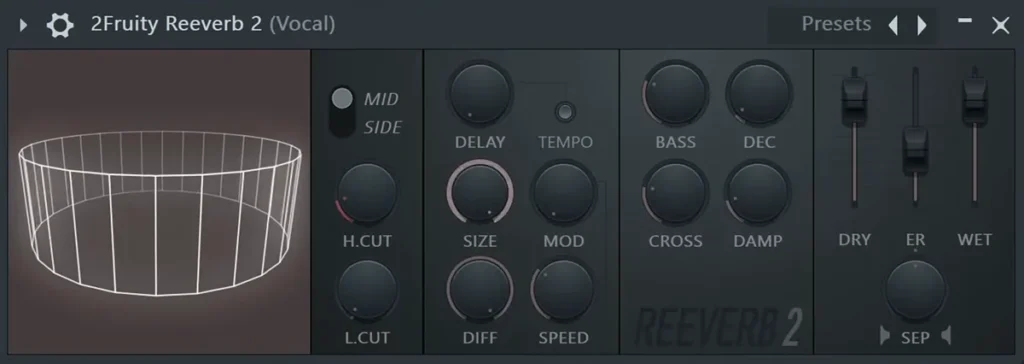
Reeverb 2 is FL Studio’s main algorithmic reverb, which means it builds the room from math instead of a recording. Its manual says it can make reverbs up to 20 seconds long. You get low and high cut, pre-delay with a tempo-sync button, size, diffusion, modulation, decay and damping, plus separate faders for the dry sound, the early reflections and the wet tail.
It’s one of the two reverbs set up in Mix Elite’s vocal reverb video. Next to Valhalla VintageVerb, Reeverb 2 starts at about half the size, so for vocals, turn the size up first. For a touch of width, a small room with a very short decay works well, and you can get it from Reeverb 2 by taking the size down.
Best for: vocals, pads and snares when you don’t want to buy anything, and for learning what every reverb control does. Read Image-Line’s manual.
2. Fruity Convolver (FL Studio)
Price: included in every FL Studio edition, Fruity Edition too. Works on: Windows and macOS, inside FL Studio.
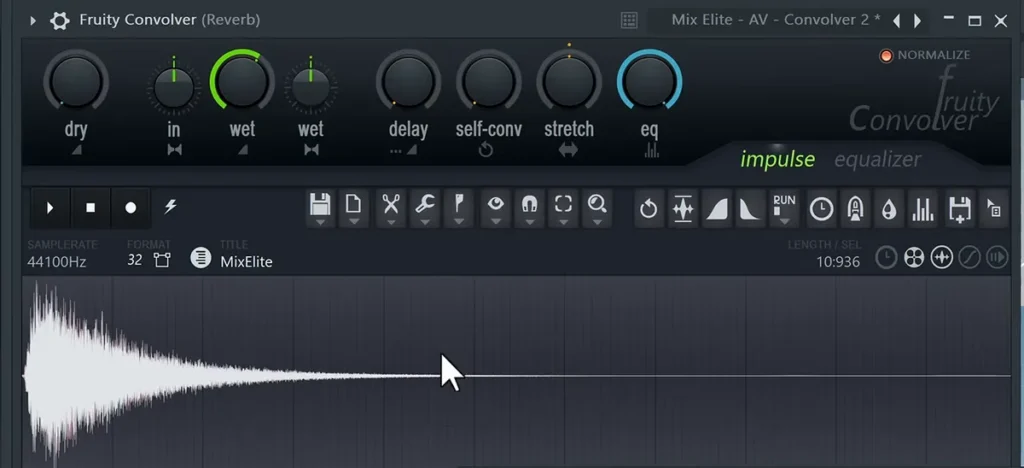
Fruity Convolver is a convolution reverb. Instead of building a room from math, it plays your sound through an impulse response, a short recording of a real space or piece of gear, so you get that exact room. It comes with a set of impulse responses, you can drag in your own, and Image-Line’s manual credits its engine to LiquidSonics, the company behind Seventh Heaven further down this list.
Mix Elite rates it highly. The chapter of the vocal reverb video that loads it is even called “The Best Free Reverb.” The video drags in Convolver presets from a pack Mix Elite made for FL Studio users and sets them fully wet, and it recommends them especially if you don’t own a reverb like Valhalla.
Best for: real-sounding rooms and halls on vocals, piano and pads, without paying for a plugin. Read Image-Line’s manual.
What are the best free reverb plugins?
Valhalla Supermassive is the best free reverb for big, lush spaces, TAL-Reverb-4 is the best free plate, and Dragonfly Reverb is the best free natural room and hall. Native Instruments’ Raum and u-he Protoverb are free too, for creative effects and odd little rooms. Black Rooster’s RO-GOLD, a warm plate, and Acon Digital’s Verberate Basic, with four presets and one knob, are the simplest. All seven work in FL Studio and most other music apps.
New to plugins? Our guide to installing VST plugins in FL Studio gets you set up in a few minutes.
3. Valhalla Supermassive
Price: free, no account needed. Works on: Windows and macOS, Apple silicon included (VST2, VST3, AU, AAX). Version: 5.0.0 (November 2025).
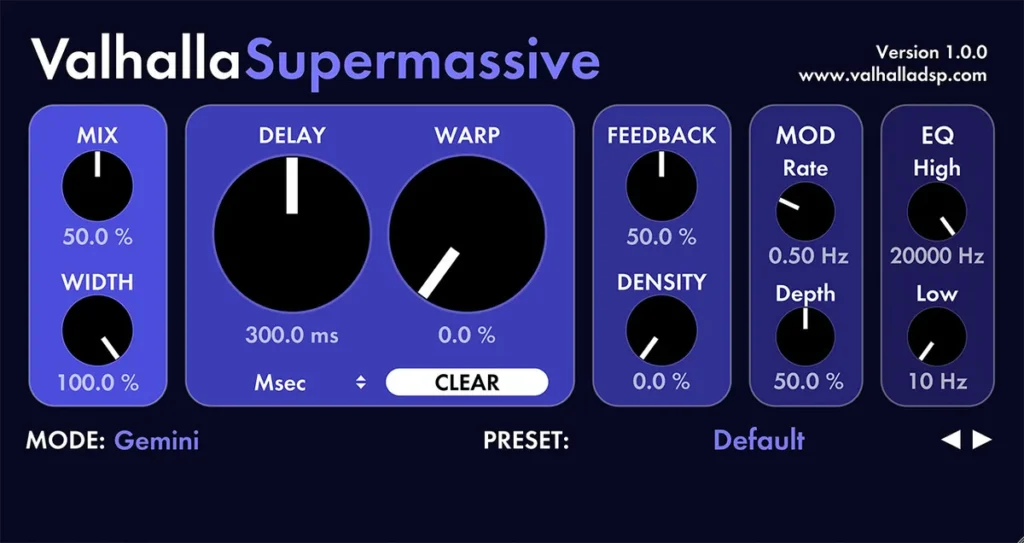
Supermassive is made for huge, washy spaces and long, feeding-back echoes rather than realistic rooms. Version 5.0.0 has 22 modes, each a different kind of space, shaped with Warp, Feedback and Density knobs. It’s the free reverb every top-ranking guide we checked recommends.
Best for: pads, ambient intros, vocal throws and sound design. Get it from Valhalla DSP.
4. TAL-Reverb-4
Price: free, no account needed. Works on: Windows, macOS (Apple silicon native) and Linux (VST2, VST3, AU, AAX, CLAP). Version: 4.0.4.
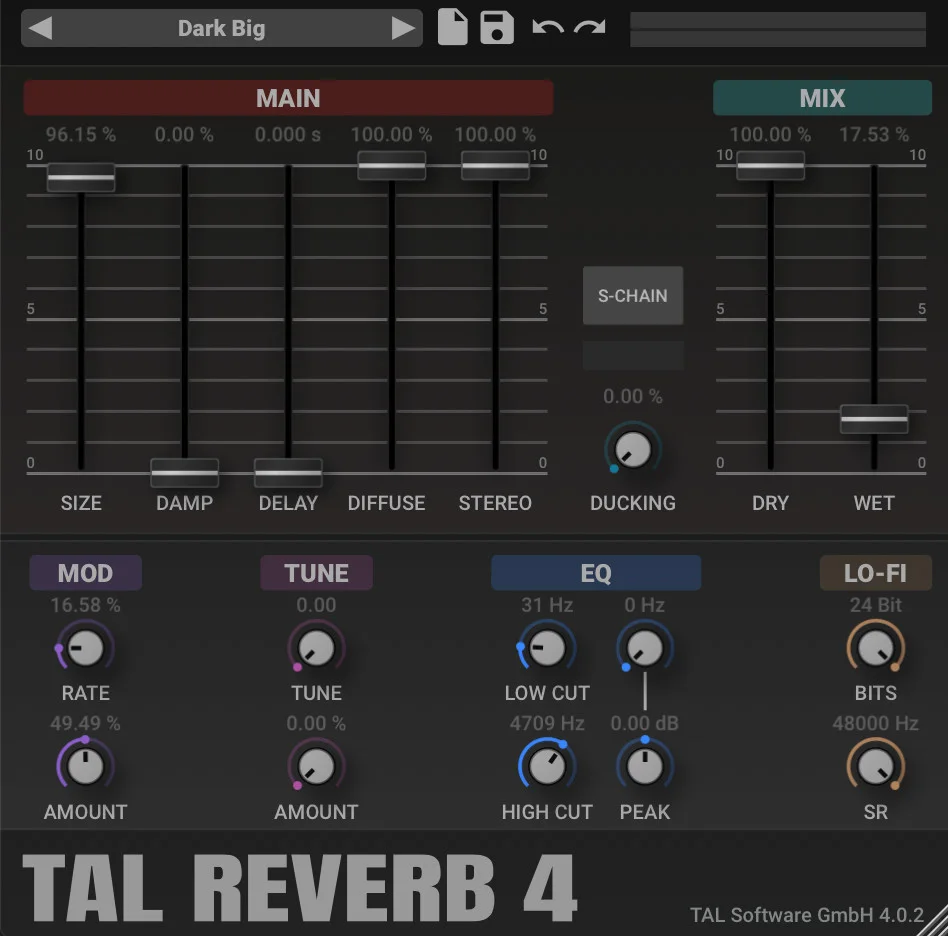
TAL-Reverb-4 is a plate reverb “with a vintage 80’s character,” in TAL’s words: smooth, very dense and gently moving. Besides size, damping and pre-delay, it has ducking, an EQ and a lo-fi section that lowers the bit depth and sample rate when you want grit.
Best for: vocals, snares and synths that want a lush, slightly retro plate. Get it from TAL Software.
5. Black Rooster Audio RO-GOLD

Price: free, with a free Black Rooster Audio account. Works on: Windows and macOS, Apple silicon included (VST2, VST3, AU, AAX). Version: not listed on Black Rooster’s page.
RO-GOLD is a plate reverb inspired by the EMT 140, the classic studio plate, but modeled as a plate made of 24-karat gold, which Black Rooster says sounds warmer and mellower than steel. There are just four knobs: Bass Cut, a ten-step Damper that sets the decay, Pre/Delay up to 500 ms, and Dry/Wet.
Best for: a warm, vintage plate on vocals, snares and pads, with almost nothing to learn. Get it from Black Rooster Audio.
6. Native Instruments Raum
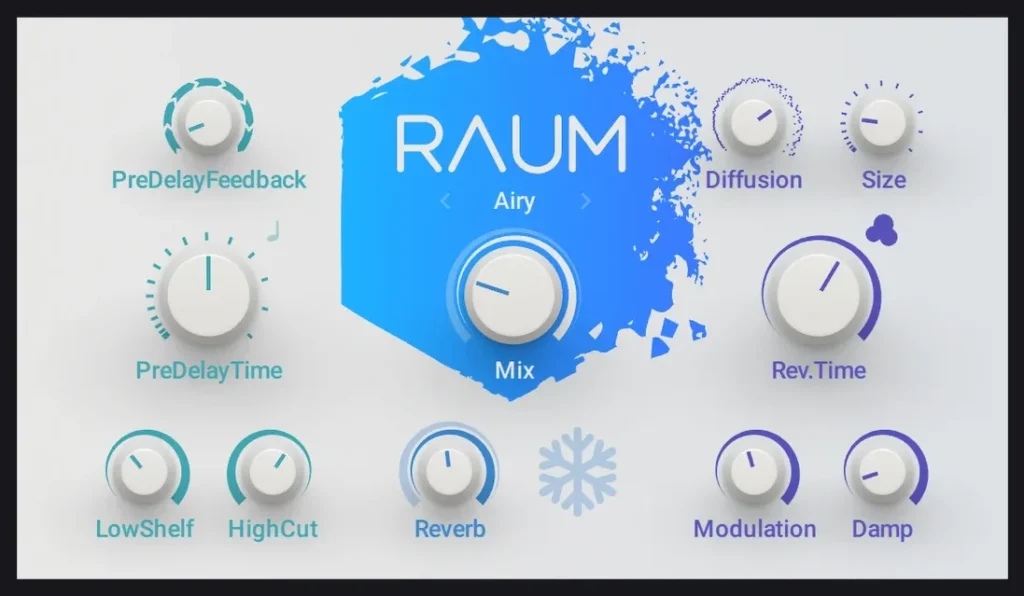
Price: free, as part of Native Instruments’ free Komplete Start (you need a free NI account and the Native Access app). Works on: Windows and macOS, Apple silicon included (VST2, VST3, AU, AAX). Version: not listed on NI’s page.
Raum is a creative reverb with three modes: Grounded for rooms, Airy for halls and Cosmic for strange, experimental spaces. A Freeze button holds the tail so it keeps ringing, which is great for transitions. Some older lists still show a price for it, but on NI’s own page it’s a free download today.
Best for: creative effects, risers and frozen ambient tails. Get it from Native Instruments.
7. Dragonfly Reverb
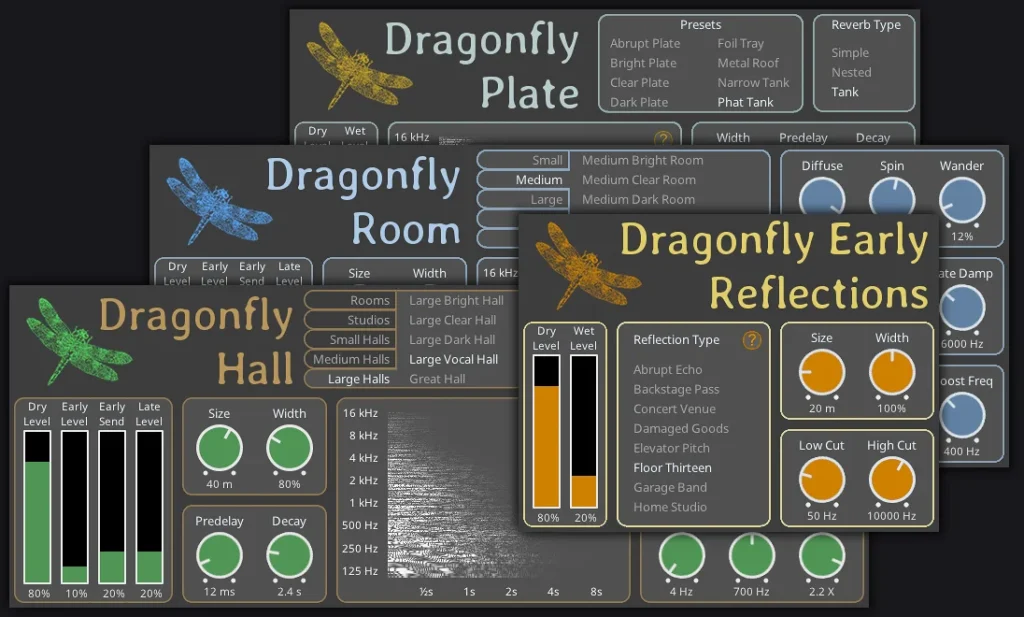
Price: free and open source, no account needed. Works on: Windows, macOS and Linux (VST2, VST3, CLAP, LV2; no AU or AAX). Version: 3.2.10 (April 2023).
Dragonfly is four free reverbs in one download: Hall, Room, Plate and Early Reflections. They aim for natural rather than flashy, and the presets have plain names like Medium Clear Room, so you can pick one and only adjust the size and decay.
Best for: natural rooms and halls on a zero budget. Get it from the Dragonfly site.
Pro tip: Looking for OrilRiver, the free reverb older lists recommend? It has no maker website, and its development stopped after a 2017 beta, so it’s only shared through plugin download sites. Dragonfly does the same natural room-and-hall job, and its code is still maintained.
8. Acon Digital Verberate Basic
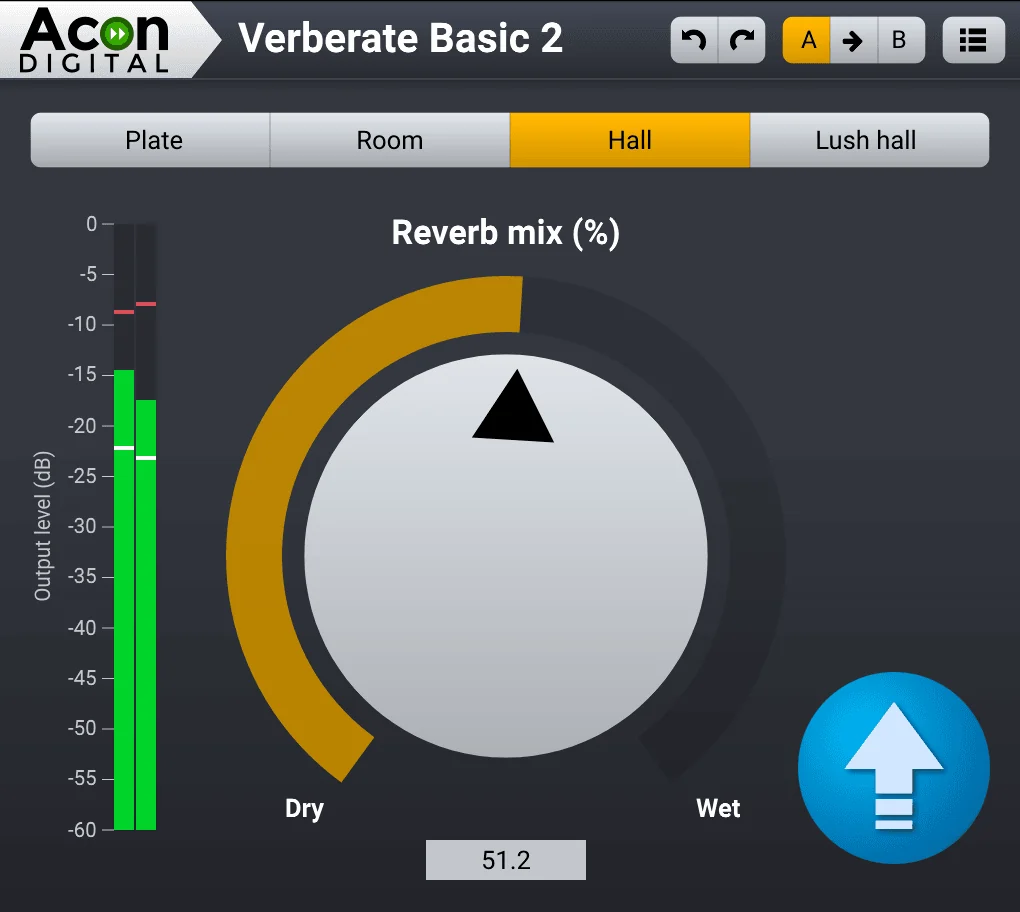
Price: free. Works on: Windows and macOS, Apple silicon native (VST2, VST3, AU, AAX). Version: 2.x, based on Acon’s paid Verberate 2.
Verberate Basic gives you four presets from Acon Digital’s paid Verberate 2, each on its own button: Plate, Room, Hall and Lush Hall. The only other control is a mix knob, so you pick a space, set the amount and get back to the song. Acon also made Reverb SOLO, the one-knob freebie older lists recommend. It’s no longer offered, so Verberate Basic is the free Acon reverb to get today.
Best for: a good plate, room or hall without touching a single setting. Get it from Acon Digital.
9. u-he Protoverb
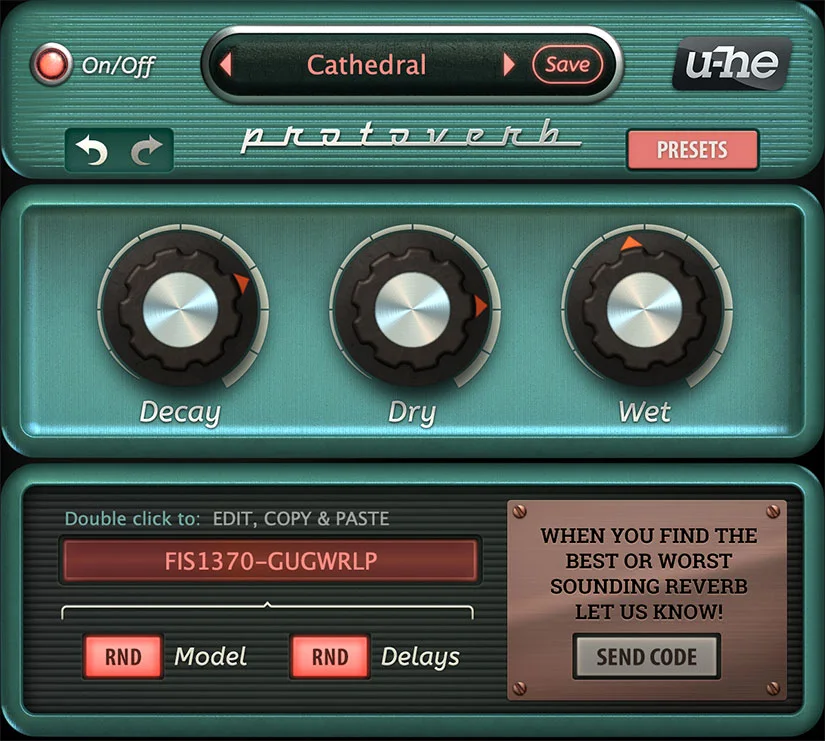
Price: free, no serial number needed. Works on: Windows (VST3, AAX), macOS (AU, VST3, Apple silicon native) and Linux (beta). Version: 1.0.1 (2021).
u-he calls Protoverb “researchware.” Instead of copying a classic reverb, it simulates the air inside a room and builds up that room’s own resonances, and you roll the dice for random room models until one sounds right. The main controls are just three knobs: Decay, Dry and Wet. It hasn’t been updated since 2021, but it runs natively on current Macs and PCs.
Best for: experimenting, and natural, slightly odd rooms on drums and percussion. Get it from u-he.
Which paid reverb plugins are worth buying?
Valhalla VintageVerb ($50) is the best value and the one to buy first. After that, add Valhalla Room ($50) for natural rooms, FabFilter Pro-R 2 ($199) for clean, precise reverb or Seventh Heaven ($69) for the sound of a high-end hardware unit. Every price below is the maker’s own, checked on October 12, 2026. Sales are common, so check before you pay full price.
10. Valhalla VintageVerb
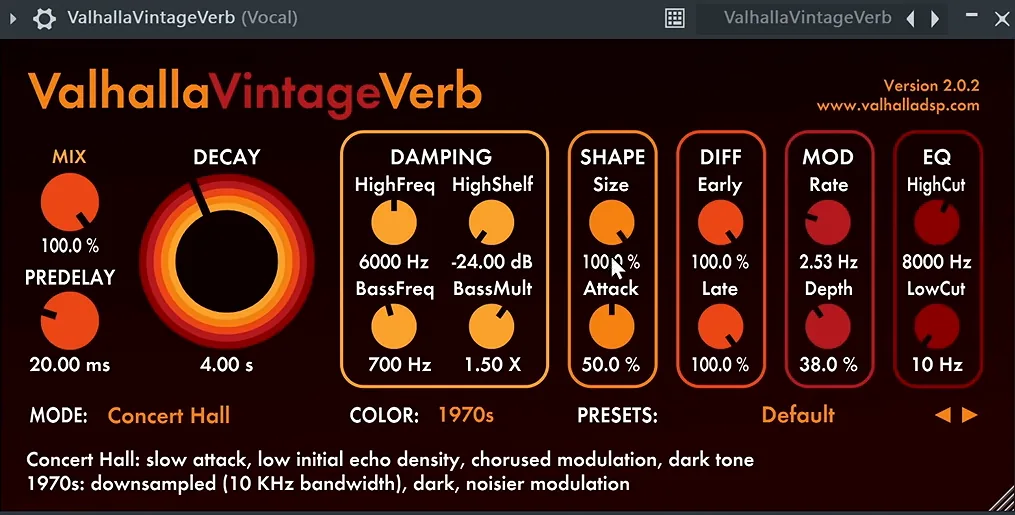
Price: $50. Works on: Windows and macOS, Apple silicon native (VST2, VST3, AU, AAX). Version: 4.0.5 (March 2024).
VintageVerb is inspired by the studio reverb units of the 1970s and 1980s. It has 22 reverb modes, from halls and plates to chambers and rooms, and three color modes (1970s, 1980s and Now) that change how dark and grainy it sounds. It’s hard to make it sound bad.
It’s the reverb on the vocal in Mix Elite’s vocal reverb video, where its big starting size of 100% suits the vocal well. Best for: vocals, snares and synths that should sound like a record. It’s the best all-round paid reverb for the money. See VintageVerb at Valhalla DSP.
11. Valhalla Room
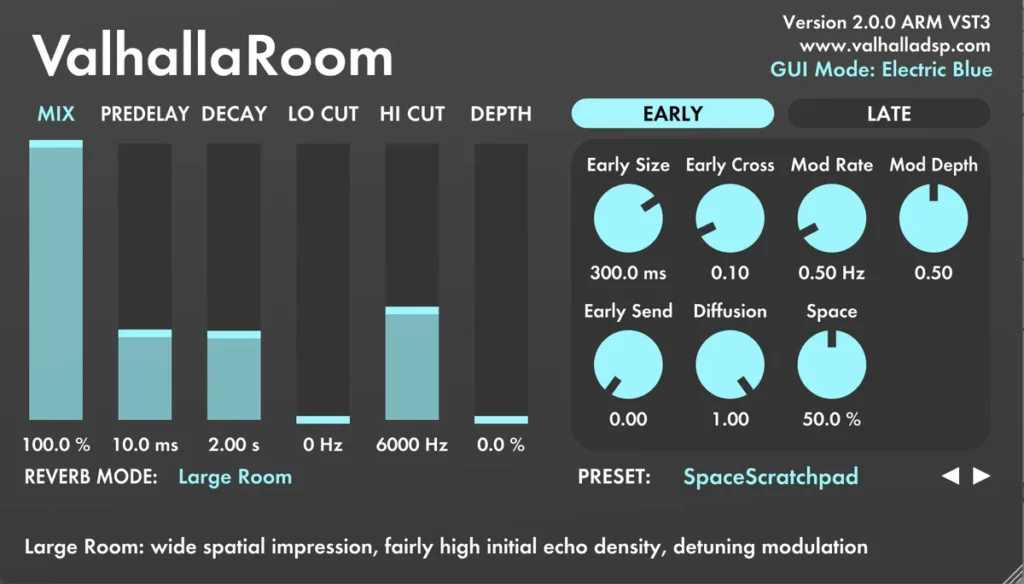
Price: $50. Works on: Windows and macOS, Apple silicon native (VST2, VST3, AU, AAX). Version: 2.0.5 (March 2024).
Valhalla Room makes realistic rooms and halls with 12 reverb algorithms, and version 2.0.5 added Space and Lo Cut controls. Its Early and Late sections shape the first reflections apart from the tail, so a drum room can sound tight while the tail stays smooth. It loads in FL Studio like any other VST3.
Best for: drums, guitars and anything that should sound like it was played in a real room. See Valhalla Room.
12. FabFilter Pro-R 2
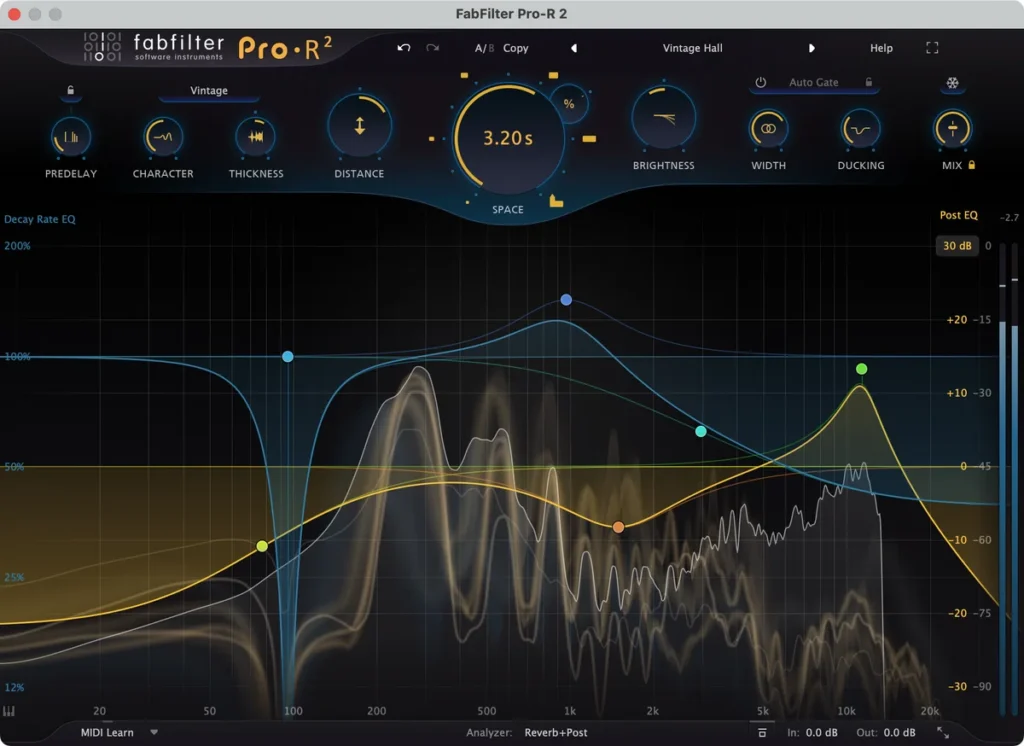
Price: $199. Works on: Windows and macOS, Apple silicon native, plus iPad (VST2, VST3, AU, AAX, CLAP). Version: 2.06 (April 2026).
Pro-R 2 hides a deep reverb behind musical controls. One Space knob sets the room size and decay together, and the Decay Rate EQ lets the lows die faster than the highs, which keeps a mix clean. Version 2 added Vintage and Plate styles, a Thickness knob, built-in ducking and a way to turn an impulse response into reverb settings.
Best for: clean, natural reverb you can shape exactly, for anyone who wants clarity over color. See Pro-R 2 at FabFilter.
13. LiquidSonics Seventh Heaven
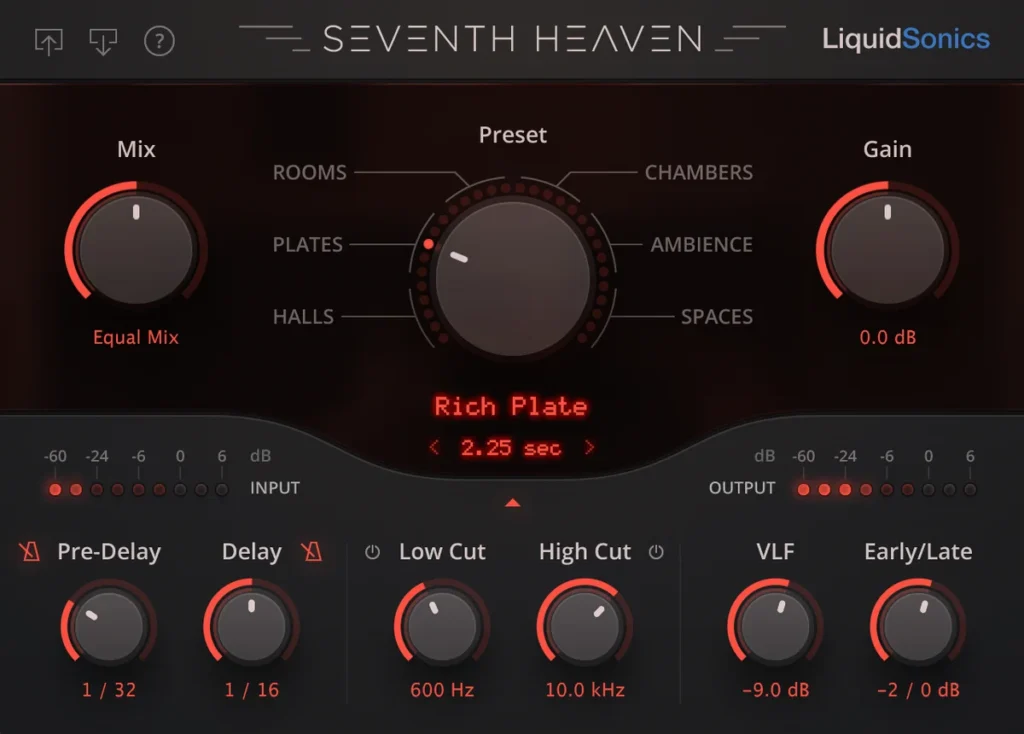
Price: $69 (Seventh Heaven Professional: $299). Needs an iLok account. Works on: Windows and macOS, Apple silicon native (VST2, VST3, AU, AAX). Version: 1.5.8.
Seventh Heaven recreates the Bricasti M7, a high-end hardware reverb unit, with LiquidSonics’ Fusion-IR technology. The standard version has 30 presets and decays from 200 ms to 30 seconds. Professional adds 236 presets, more algorithms, a 5-band EQ and surround sound.
Best for: lush, expensive-sounding halls and plates on vocals and full mixes. See Seventh Heaven at LiquidSonics.
14. Universal Audio EMT 140
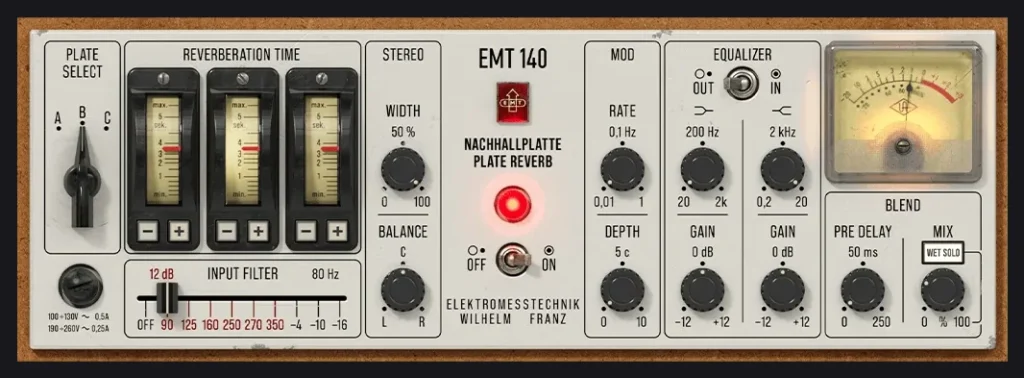
Price: $149, on sale for $79 on UA’s site when we checked on October 12, 2026 (no end date shown). It’s also part of UAD Spark, UA’s plug-in subscription. Needs a free iLok account. Works on: Windows 10/11 and macOS 11 or newer (VST3, AU, AAX), no UA hardware needed. Version: UA lists no number; the native version came out in August 2026.
The EMT 140 is the classic studio plate: a large steel sheet hung in a box that turns sound into a bright, smooth shimmer. UA’s plugin copies three real EMT 140 plates captured at The Plant Studios and adds width, modulation and EQ. Until August 2026 it needed UA’s own hardware to run. Now it runs on any computer.
Best for: the classic bright, smooth plate on vocals and snares. See the EMT 140 at Universal Audio.
15. Audio Ease Altiverb 8
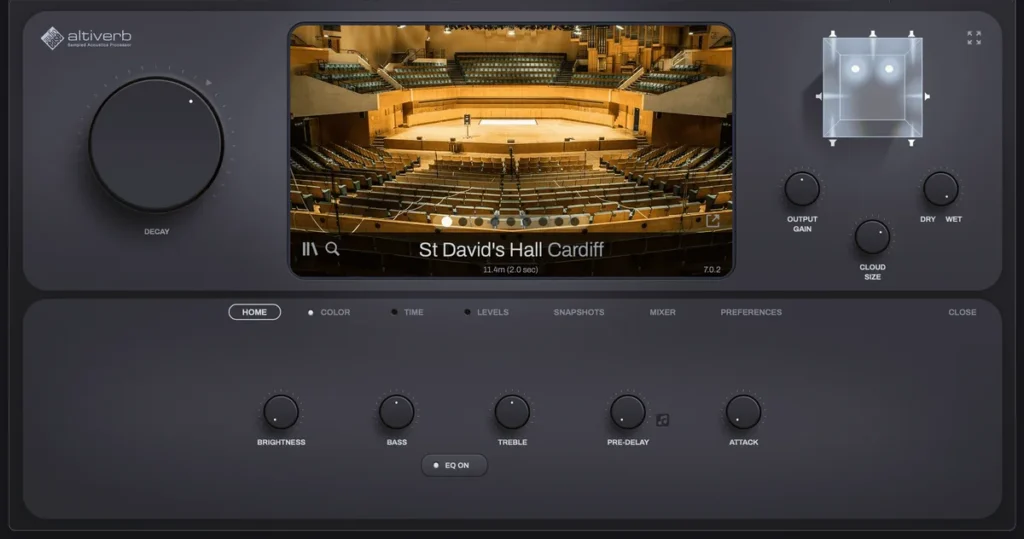
Price: $595 (Altiverb 8 Regular) or $995 (XL). Needs an iLok account. Works on: Windows 10/11 and macOS, Apple silicon native (VST3, AU, AAX). Version: 8.2.7 (December 2025).
Altiverb is a convolution reverb with a huge library of real spaces, “from Sydney Opera House to a Scottish underground oil tank the size of a cathedral,” in Audio Ease’s words. Regular works in stereo. XL adds surround and higher sample rates, with the same spaces and controls.
Best for: orchestral music, film scores and anything that must sound like a specific real room. See Altiverb 8 at Audio Ease.
What is the best room reverb plugin?
Valhalla Room ($50) is the best room reverb for most people. It makes realistic rooms and halls, and its Early and Late sections shape the first reflections apart from the tail. The best free one is the Room plugin in the free Dragonfly Reverb bundle, and in FL Studio, Fruity Reeverb 2 becomes a small room when you take its size down.
Want more control? FabFilter Pro-R 2 ($199) sets the room’s size and decay with one Space knob and lets the lows die away faster than the highs. For the sound of one specific real room, a convolution reverb like Altiverb 8 loads recordings of real spaces. Whatever you use, keep rooms short on drums and fast guitar parts, so the notes don’t smear.
Which reverb plugin is best for vocals, drums, guitar and orchestral music?
For vocals, use a plate or a smooth hall, such as Valhalla VintageVerb or FL Studio’s free Fruity Reeverb 2. For drums, use a short room like Valhalla Room. Guitar suits a room or a plate, and orchestral music wants a convolution reverb full of real concert halls, like Altiverb 8. Here’s the pick for each job:
- Vocals: Valhalla VintageVerb, lush plates and halls on a send at 100% wet. It’s the reverb on the vocal in Mix Elite’s vocal reverb video. Free option: Fruity Reeverb 2.
- Plate: UAD EMT 140, the classic bright, smooth plate on vocals and snares. Free option: TAL-Reverb-4.
- Room and drums: Valhalla Room, short, natural rooms that add space without blur.
- Clean and precise: FabFilter Pro-R 2, natural halls you can shape exactly, with an EQ on the tail.
- Orchestral and film: Audio Ease Altiverb 8, recordings of real concert halls and studios.
- Ambient and huge: Valhalla Supermassive, endless washes and echoes for pads and intros, free.
For guitar, start with a room or a plate: Valhalla Room for a natural amp-in-a-room sound, or the free TAL-Reverb-4 for a vintage plate. Keep the decay short on fast parts so the notes don’t smear, and save long halls for slow, clean parts.
How to set up any reverb plugin the right way
The plugin matters less than how you set it. Mix Elite’s vocal reverb video walks through the same settings with Fruity Reeverb 2 and Valhalla VintageVerb, and they work in any reverb on this list. The full walkthrough, with delay too, is in our guide to reverb vs delay.
Put the reverb on its own Mixer track
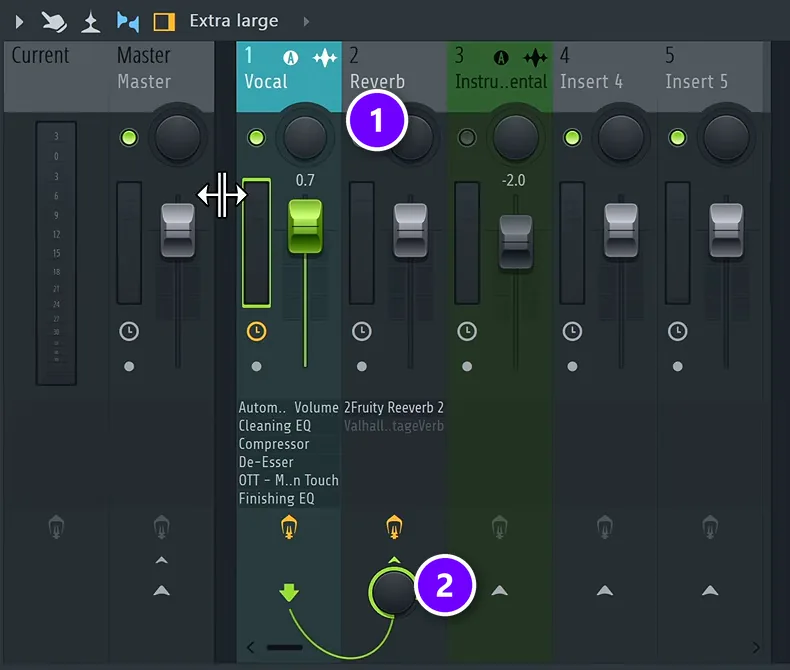
Don’t load the reverb straight onto the vocal. Add an empty Mixer track (1), put the reverb there, and send the vocal to it with the send knob (2). On that track the reverb is 100% wet, with no dry sound, and the same goes for third-party reverbs like Valhalla: set their mix knob to 100%. Now you can EQ and compress the reverb on its own.
Set size, decay, pre-delay and low cut
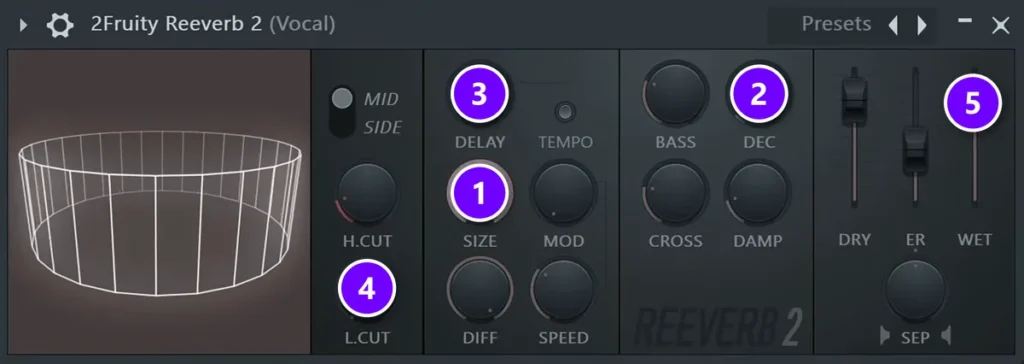
- Size (1): go bigger than you think. VintageVerb starts at 100% size while Fruity Reeverb 2 starts at about half, and a small size on a vocal leaves a weird, ringing echo.
- Decay (2): match it to your song’s tempo. In the video, a quarter note at the song’s tempo is about 500 ms and a whole bar is 1.8 seconds, worked out with Mix Elite’s reverb and delay calculator. Fast rap vocals want a shorter decay, so the words don’t blur.
- Pre-delay (3): never zero. With no pre-delay, the reverb starts at the same instant as the voice, which sounds unnatural: in a real room, the sound hits the walls before it comes back to you. Stay under 50 ms, or sync it to the beat: the video picks a 1/32 note (58 ms in that song), or half that.
- Low cut (4): “in my opinion the most important part is EQing your reverb,” Max says. Cut the lows so the reverb doesn’t muddy the mix. In a dense mix, go as high as 1 kHz.
- Wet (5): all the way up, with dry all the way down, because the dry sound is already on the vocal track.
One more step from the video keeps a busy vocal clear: duck the reverb under the dry vocal with a sidechain compressor on the reverb track, at a ratio of about 4:1 to 8:1. The video does it with Fruity Limiter in compressor mode, and our guide to sidechaining in FL Studio shows the routing. For the rest of the vocal chain, see how to mix vocals.
How do you stop reverb from making vocals muddy and distant?
Process the reverb, not the vocal. Put it on a send at 100% wet, cut its lows (up to about 1 kHz in a busy mix) and its harsh highs, and add 28 to 58 ms of pre-delay so the dry voice lands first. Then time the decay to the tempo and duck the reverb under the vocal with a sidechain compressor.
Match the fix to what you hear:
- Muddy: cut more lows, and dip the low mids, where most of the muddiness in a vocal reverb sits.
- Distant: keep the pre-delay, so the dry vocal reaches you before the room does, and turn the send down until the voice sits in front again.
- Blurry words: shorten the decay on fast vocals, and duck the reverb at 4:1 to 8:1 so it only blooms in the gaps between lines.
- Harsh, hissy tail: high cut the vocal before it reaches the reverb. S sounds and air only mush up the top end of the tail.
Watch out: a reverb can sound great on its own and still muddy the song. In the video, Max’s verdict on the unprocessed reverb is blunt: “It’s messing up the mix a ton.” It sounds rich, but on good headphones or speakers it muddies the whole mix. If the low end gets cloudy or the words blur, cut more lows or shorten the decay before you reach for a different plugin.
DAY 4 OF THE 7-DAY MUSIC PRODUCER COURSE
Reverb is one step. Day 4 teaches the whole mix.
Day 4 of the 7-Day Music Producer Course is the mixing day: the simple ‘Holy-Quad’ mixing formula, the ‘Mix Murdering’ mistakes most beginners make, a one-click setting that makes your song wider with no new plugins, and the volume mistake that quietly caps how good a mix can sound. You also get a mixing checklist and a mixing and production template. It’s taught in FL Studio (the free trial works), about 45 minutes a day, and at the end a pro gives you personal feedback on your finished track. It’s $27, and you get 60 days to decide if it was worth it.
Frequently asked questions
What is the best free reverb plugin?
In FL Studio, start with Fruity Reeverb 2 and Fruity Convolver: they come with every edition, and Mix Elite’s vocal reverb video uses both. Outside FL Studio, Valhalla Supermassive is the best free reverb for big, lush spaces, TAL-Reverb-4 is the best free vintage plate, and Native Instruments’ Raum is a free creative reverb.
What is the best reverb plugin for vocals?
A plate or a smooth hall. Valhalla VintageVerb ($50) is the top pick. It’s the reverb on the vocal in Mix Elite’s vocal reverb video, and FL Studio’s free Fruity Reeverb 2 can be set up the same way. The settings matter more than the plugin: use a send at 100% wet, add 28-58 ms of pre-delay, time the decay to the song and cut the lows.
What is the best plate reverb plugin?
Universal Audio’s EMT 140 is the classic: a copy of real EMT 140 steel plates that now runs on any computer. It lists at $149 and was on sale for $79 on UA’s site on October 12, 2026. For less, Valhalla VintageVerb ($50) has several plate modes, and TAL-Reverb-4 is a free plate with an ’80s character.
Which is easier to learn, algorithmic or convolution reverb?
Algorithmic. It builds the space from math, so every knob, from size to decay, changes what you hear, and that’s how you learn what each control does. A convolution reverb plays your sound through a recording of a real room, called an impulse response, so it sounds real, but the recording sets its size and shape. In FL Studio, learn on Fruity Reeverb 2, then try Fruity Convolver.
Does FL Studio have a good reverb?
Yes. Fruity Reeverb 2 is a solid algorithmic reverb for vocals, drums and pads, and Fruity Convolver loads recordings of real spaces. Both come with every edition of FL Studio, and Mix Elite’s vocal reverb video uses both. The All Plugins Edition adds a third reverb, LuxeVerb.





