



“Digital delay for me was a way to add coloration, dimension, additional rhythm and a certain machine-age quality.”
Reverb blends many reflections into one tail that places a sound in a room, while delay repeats the sound as distinct echoes timed to the beat. Use reverb for depth and distance and delay for size that keeps the words clear. On a lead vocal, use both lightly, each on its own send track.
Reverb vs delay can feel like a coin toss at first. Add too much reverb and your vocal sounds like it was recorded in a bathroom down the hall; skip it and the whole mix feels dry and flat. Below you’ll see how each one works, when to pick which, and how Max, the founder of Mix Elite, sets up FL Studio’s stock Fruity Reeverb 2 and Fruity Delay 3 so they add depth without washing out the mix. Both belong to space, the last of the four steps in Mix Elite’s method for mixing a song.
Table of Contents
What’s the difference between reverb and delay?
Reverb blends many fast reflections into one smooth tail, so it places a sound in a room and pushes it back. Delay repeats the sound as separate echoes you can count, usually timed to the beat, so it adds size while the sound stays up front. Both add space; they differ in how many repeats you get and how close together they are.
Used together, they set the depth of a vocal, so it fits the beat and still sounds exciting.
Here’s how the two compare:
- Reverb: one smooth tail that fades out. It puts a sound in a room and pushes it back. Its main controls are size, decay, pre-delay, low cut, dry and wet. The most common mistake is too much, so words and drums blur. FL Studio’s stock reverb is Fruity Reeverb 2.
- Delay: separate repeats you can count. It adds width and rhythm while the sound stays up front. Its main controls are time, feedback, mode, dry and wet. The most common mistake is repeats that clash with the beat or pile up. FL Studio’s stock delay is Fruity Delay 3.
Here’s an easy way to hear it. Clap once in a big empty church, and the sound hangs in the air and slowly dies away. That’s reverb. Shout across a canyon and your voice comes back two or three times. That’s delay.
Technically, reverb is built from delay. A reverb plugin stacks so many short delays that your ear can’t tell them apart, so they blur into one tail. Fruity Delay 3 even has a Diffusion section that smears its echoes until they start to sound like a reverb.
What is reverb?

Reverb is the sound of a space: the echo you would hear if you sang in a cathedral or in a bunker. Every room has its own. A small tiled bathroom sounds bright and short, while a concert hall sounds big and long.
Reverb plugins copy those spaces, so you’ll see names like room, hall, plate and spring. Room and hall copy real places. A plate copies an old studio trick that ran sound through a big metal sheet, and a spring copies the reverb inside guitar amps. Some plugins build the tail with math (algorithmic reverb), and others use a recording of a real room (convolution reverb).
The more reverb a sound has, the farther away it seems. That’s great for pads and backing parts and risky for a lead vocal. As Max warns: “Reverb usually is something beginner producers overuse, since it basically blurs the imperfections.”
How to use reverb in FL Studio (Fruity Reeverb 2)
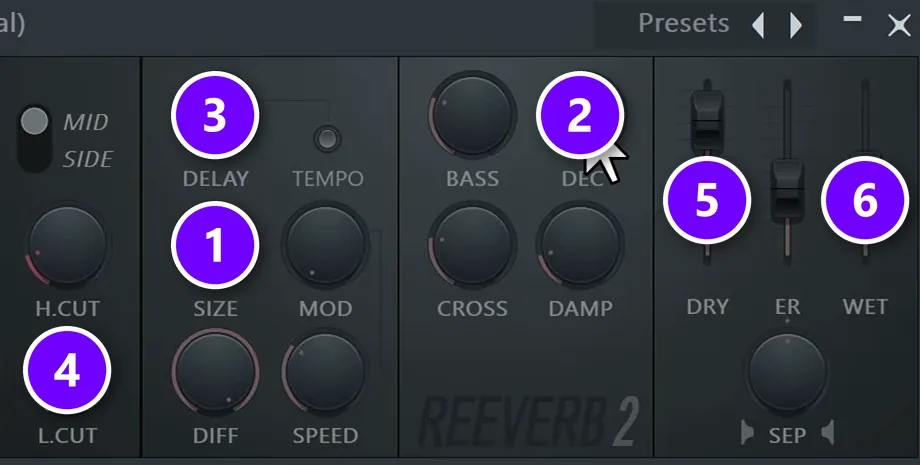
FL Studio’s stock reverb is Fruity Reeverb 2, spelled with a double e, so search “reeverb” when you load it. Open the Mixer with F9, click an empty effect slot and pick it from the list. Watch three knobs and two faders, because every reverb plugin has them. Set them in this order:
- Size (1): turn it up first, to or near the top, because on a vocal a very small size gives a strange, ringing echo.
- Decay (2): how long the tail lasts. Image-Line measures it as the time the reverb takes to fade by 60 dB. Keep it short on fast rap so the words don’t blur together, around 1 second on drums, and longer on slow vocals and pads.
- Pre-delay (3): the knob labeled DELAY, the short gap before the reverb starts. As Max puts it, “having no pre-delay is very unnatural to our ears,” because in a real room the sound has to hit a wall before it comes back. Start at about 50 ms. The TEMPO switch next to it locks the gap to your BPM.
- Low cut (4): the L.CUT knob takes the low end out of the reverb, so it doesn’t muddy your kick and bass. Set it around 700 Hz on claps and as high as 1 kHz on a vocal in a busy mix.
- Dry (5) and wet (6): dry is the untouched sound and wet is the reverb. On a send track (below), pull DRY all the way down and push WET up. Straight on a sound, keep the wet low.
Reverb on claps, snares and hats
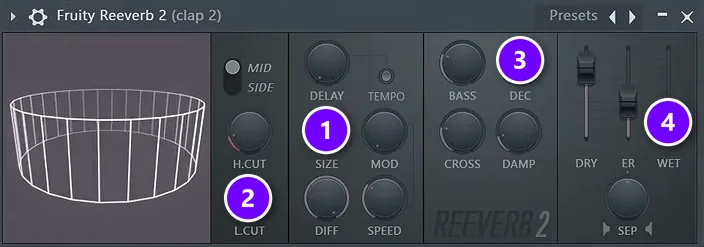
In the drum mixing part of Mix Elite’s free 4.5-hour FL Studio course, Fruity Reeverb 2 goes on a clap with the size high (1), the low cut around 700 Hz (2), a decay of about 1 second (3) and just a little wet (4), about 14% in the video. On hi-hats, go even shorter, 1 second or less. A smaller room size can sound interesting there.
You won’t hear a big echo. The drums just feel like they were recorded in a real room instead of nowhere, and they still hit hard.
What is delay in music?
Delay plays the sound back later, once or many times, so you hear clear echoes. Put simply, it copies the sound and echoes it. Each echo is a little quieter than the one before. Then it fades away.
You’ll run into a few common types:
- Slapback: one quick repeat, roughly 75 to 150 ms after the sound, that makes a vocal or guitar sound thicker.
- Tempo-synced echo: repeats on the beat, every quarter note, eighth note or dotted eighth.
- Ping-pong: echoes that bounce from your left ear to your right.
- Tape or analog style: each repeat gets darker and a little wobbly, like an old tape machine.
How to use delay in FL Studio (Fruity Delay 3)
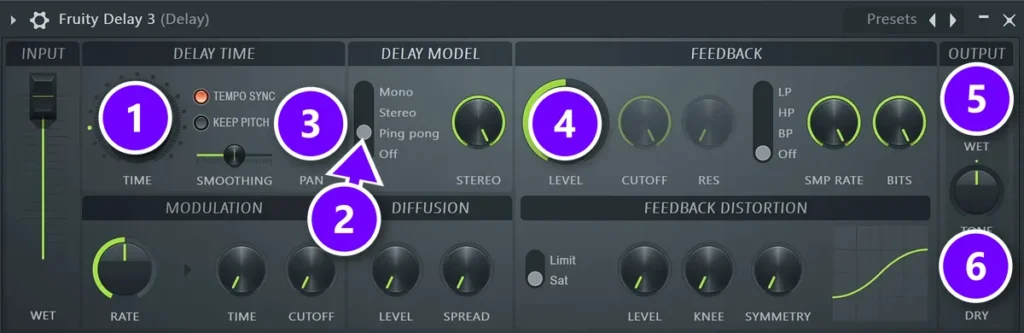
Fruity Delay 3 is the stock delay in both Mix Elite videos, which call it the most popular one in FL Studio. Load it like the reverb. Then set these:
- Time (1): with TEMPO SYNC lit, the Time knob counts in steps, and one step is a sixteenth note. So 4 is a quarter note, 2 is an eighth note and 3 is a dotted eighth. The course uses 4 on a vocal and 3.0 on a pluck.
- Delay model (2): switch it to Ping pong, so the echoes bounce between your left and right ear.
- Pan (3): ping-pong only bounces if the sound starts off to one side, so turn the PAN knob all the way to one side.
- Feedback level (4): how many times the echo repeats. A low setting gives a couple of repeats, and a high one lets them ring on. Keep it low enough that the echoes fade before the next line.
- Wet (5) and dry (6): on a send track, turn DRY all the way down, because you only want the pure effect.
Want more movement? The Modulation section can wobble the delay time a little, like tape. Automating the delay’s pitch makes a vocal more exciting too, as the video shows. If the echoes sound harsh, put an EQ before the delay, just like on the reverb.
Ping-pong is one of the easiest ways to make a mix feel wider. Our guide to mono vs stereo mixing explains why that width matters and how to check it.
Reverb or delay: which should you use?
On a lead vocal, use both, lightly. Delay can carry more of the effect, because its echoes add size while the words stay clear and up front. Reverb adds space but blurs words, so keep its decay short on fast vocals like rap and let it run longer on slow ones.
For everything else, use the one that fits the job. Reverb answers “where is this sound?” Delay answers “how do I make it bigger without pushing it back?” Here’s a starting point for each sound in a beat:
| Sound | Reverb | Delay |
|---|---|---|
| Rap vocal | Short decay so words don’t blur, pre-delay around 50 ms | Quarter-note echoes, ping-pong, on its own send |
| Slower sung vocal | Longer decay, up to about one bar | Same as above, with the dry out |
| Clap or snare | Size high, low cut around 700 Hz, decay about 1 s, a little wet | — |
| Hi-hats | Decay 1 s or shorter; try a smaller size | — |
| Pluck or arp | Low cut up, longer decay, more wet | Time 3.0, ping-pong, panned |
| Kick, 808 and bass | Keep reverb off the low end | — |
Check your synth presets first. Many come with reverb and delay already switched on. Turn those off inside the synth and add the effects on the mixer instead, where you can control them. Stacking both is a fast way to a muddy mix.
Should you use delay instead of reverb to keep a vocal up front?
Often, yes. If reverb makes your vocal sound distant and washed out, there’s too much of it, because reverb pushes a sound back. Let a delay timed to the beat carry the size instead, and keep a little reverb for space: on a send, with about 50 ms of pre-delay, its low end cut and ducked under the words.
Mix Elite’s vocal video fixes a washed-out vocal in three levels. First come the reverb’s own settings, then a send track with an EQ in front of the reverb, and last, sidechain ducking from the dry vocal. You’ll find all three on this page, and each one makes the words clearer without losing the space.
Reverb and delay are only one part of a vocal sound. For the full chain, see our guide on how to mix vocals.
How do you use reverb and delay together without a muddy mix?
Give each one its own send track, fully wet, instead of putting them on the sound. Cut the lows going into both, where mud builds up, and the harsh highs too. Keep the delay’s feedback low and timed to the beat, then duck the reverb and the delay under the dry sound with a sidechained compressor.
The steps below show the whole setup in FL Studio, from the send tracks to the ducking.
How to set up reverb and delay sends in FL Studio
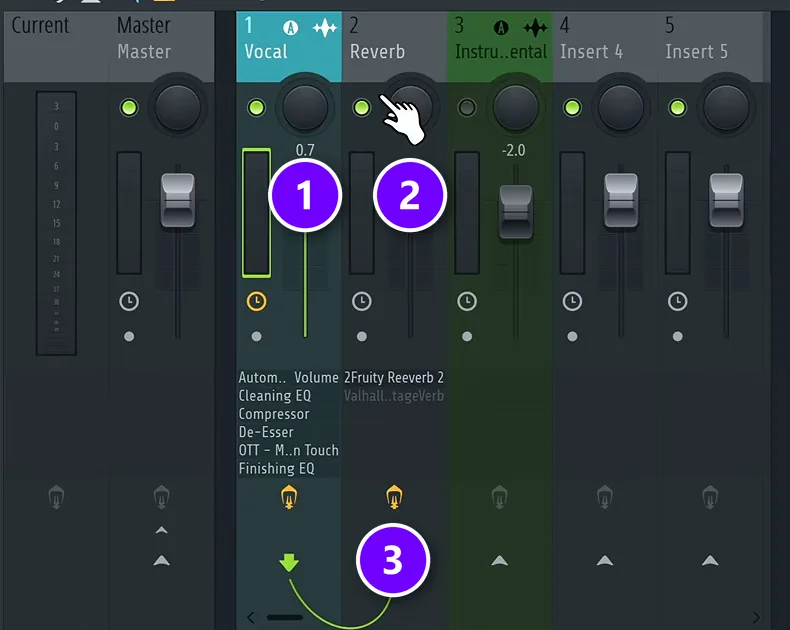
A send track is a separate mixer track that holds only the effect. You send a copy of the vocal to it, and the reverb or delay plays back fully wet, next to the dry vocal. The rule is to never put the reverb straight on the vocal. Here’s the setup:
- Pick an empty mixer track next to your vocal and name it Reverb. Here the vocal is track 1 (1) and the new Reverb track is track 2 (2).
- Click the vocal track to select it, then click the send switch, the small arrow at the bottom of the Reverb track. A cable and a knob appear (3). The knob sets how much vocal goes into the reverb, and the vocal still plays through the Master as normal.
- Load Fruity Reeverb 2 on the Reverb track. Set DRY to zero and WET all the way up.
- Do the same for delay: a second empty track called Delay, a send from the vocal, and Fruity Delay 3 with the dry out.
To hear only the reverb while you dial it in, temporarily unroute the vocal from the Master. Just remember to route it back when you’re done.
Mix Elite’s video below walks through this whole setup, step by step.
EQ what goes into the reverb
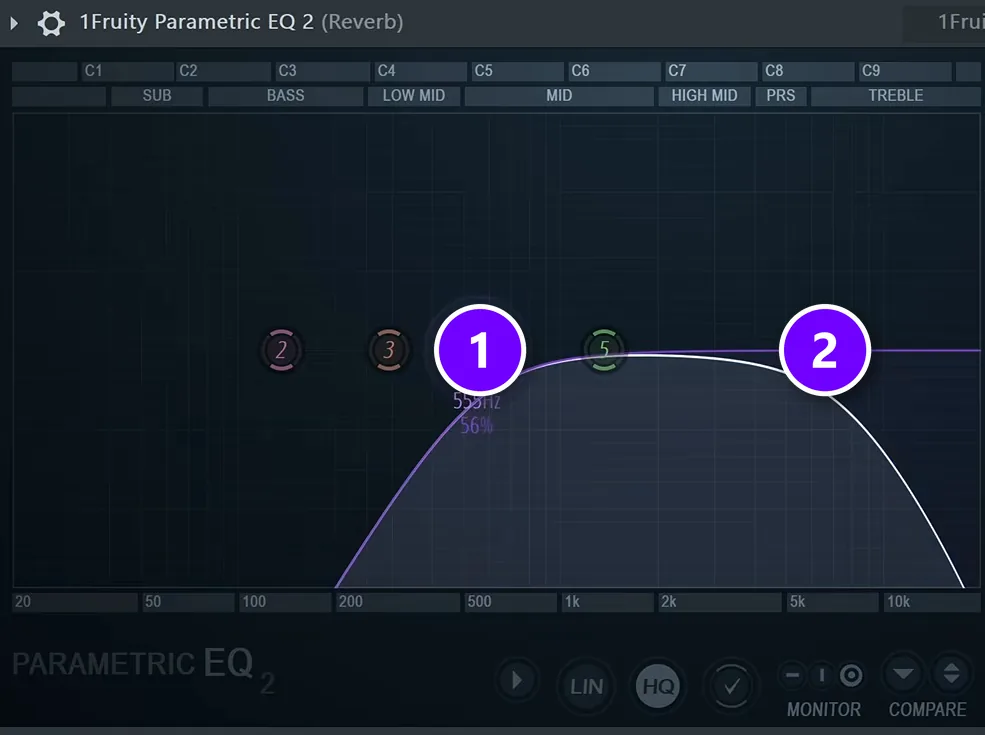
Max is clear about this step: “In my opinion, the most important part is EQing your reverb.” Put Fruity Parametric EQ 2 before the reverb on the Reverb track. Cut the lows (1), where reverb turns to mud. Then cut the highs (2), because the hissy “s” sounds in a vocal only smear the top end once they hit the reverb.
The video also tames harsh spots with soothe2 and adds a little warmth with Softube’s free Saturation Knob before the reverb. Those are extras. The low cut and high cut do most of the work.
Duck the reverb and delay under the vocal
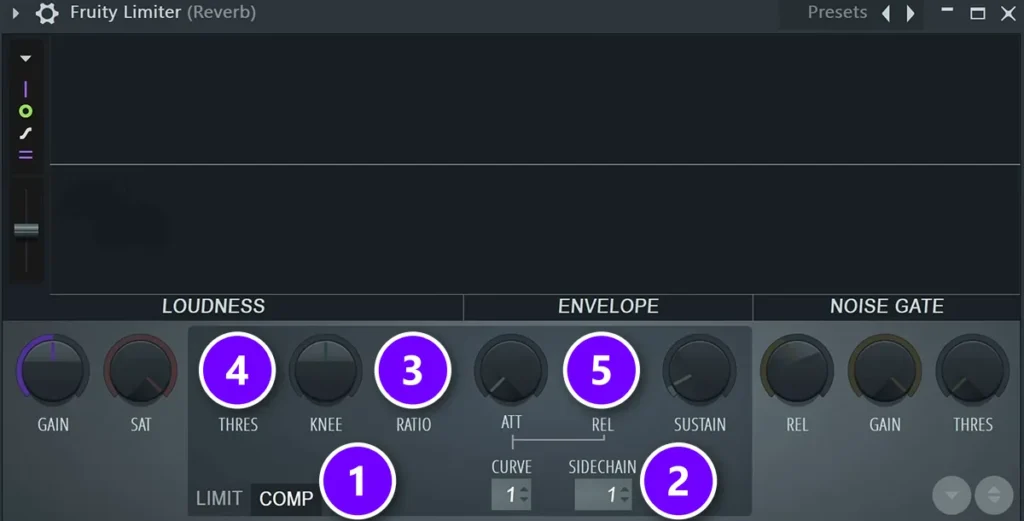
Even a well-set reverb can cloud the words while the vocal is singing. The fix is sidechain compression: the reverb turns itself down whenever the vocal plays and swells back up in the gaps. Here’s how with Fruity Limiter on the Reverb track:
- Load Fruity Limiter after the reverb and click COMP (1).
- Set SIDECHAIN (2) to the vocal’s track. The vocal is already sent to this track, so it shows up there.
- Set the ratio (3) somewhere between 4:1 and 8:1.
- Lower the threshold (4) until the reverb dips under the words. If the dips sound unnatural, raise the release (5) so the reverb blends back in more smoothly.
Go easy. The vocal should feel better, not sound obviously ducked. The video also tries a dynamic EQ plugin for the same job, and the simple compressor sounds better there. Our guide to sidechain in FL Studio covers the routing in more detail, and the Fruity Limiter compressor guide explains every knob.
The full reverb and delay setup
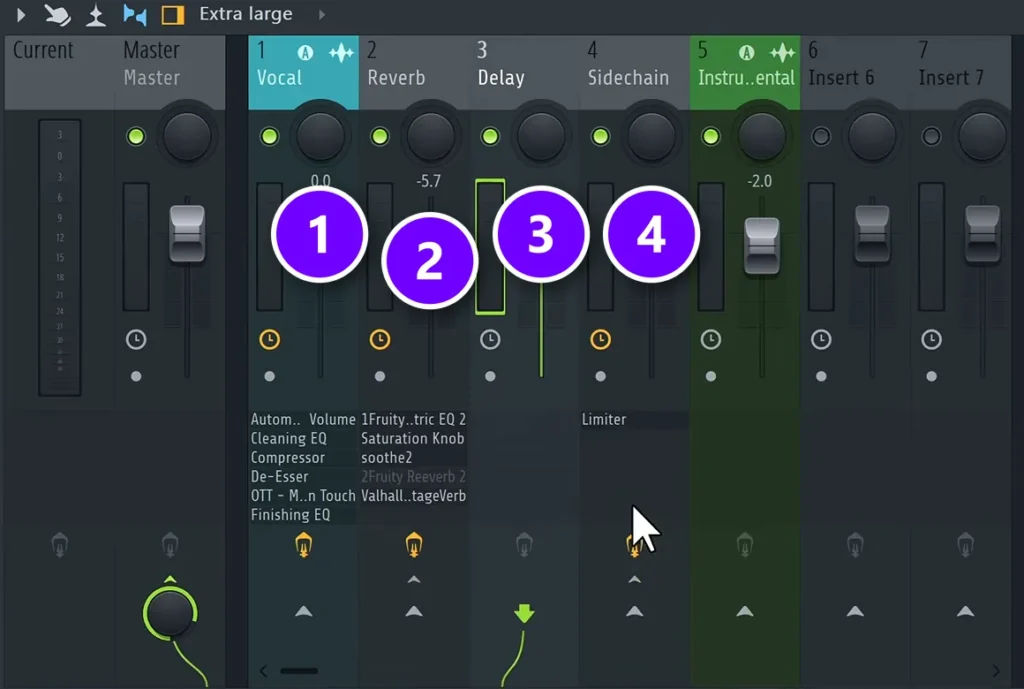
For the most control, add one more track. The vocal (1) sends to the Reverb track (2) and to the Delay track (3). Both of those route only to a fourth track called Sidechain (4), which now holds the Fruity Limiter, with the vocal sidechained into it. One compressor ducks the reverb and the delay together.
The final version in the video uses Valhalla VintageVerb, a paid plugin, on the Reverb track. Every step above works the same with Fruity Reeverb 2, and you can follow the process in any DAW.
Should delay go before or after reverb?
The send setup skips the question. Reverb and delay sit on separate send tracks side by side, so neither one feeds the other. That keeps both clean, and you can turn each one up or down on its own.
If you stack them on one track, or on a guitar pedalboard, the usual order is delay first, then reverb. That way the echoes sit inside the same space as the sound. Reverb before delay works too, but it repeats a washy tail and gets cloudy fast. Mix Elite’s vocal video uses one version of the first order on purpose: a very short room reverb on the delay track, just to make the echoes wider.
How to time reverb and delay to your BPM
Echoes and reverb tails that line up with the beat sound tighter. The math is simple: a quarter note lasts 60,000 ÷ BPM milliseconds. Double it for a half note, and halve it for an eighth note.
| Note | 90 BPM | 128 BPM | 140 BPM |
|---|---|---|---|
| Whole note (1 bar) | 2,667 ms | 1,875 ms | 1,714 ms |
| Quarter note | 667 ms | 469 ms | 429 ms |
| Dotted eighth | 500 ms | 352 ms | 321 ms |
| Eighth note | 333 ms | 234 ms | 214 ms |
| 32nd note | 83 ms | 59 ms | 54 ms |
The free Mix Elite Reverb & Delay Calculator does this math for you. In the video, the vocal runs at 128 BPM, so a whole note lasts 1,875 ms, and the reverb decay goes to 1.8 seconds. The tail of one loud shout then ends just before the next busy line starts. For the pre-delay, pick a 32nd note, 58 ms, or about half of that to stay under 50 ms.
Small changes add up. Mixing comes down to tiny differences like this one.
Reverb vs delay pedals
The same difference holds for guitar pedals. A delay pedal repeats your notes as echoes you can set to the song’s tempo, and a reverb pedal adds the sound of a room, a hall or a spring. Most players put delay before reverb near the end of the pedalboard, after any drive pedals, so the echoes sit inside the reverb’s space.
If you record guitar into FL Studio, you can skip the pedals and use the same send setup as above. Record the guitar dry, then add Fruity Delay 3 and Fruity Reeverb 2 on their own tracks.
Reverb and delay mistakes to avoid
- Reverb straight on the vocal at full wet. Use a send track instead.
- No pre-delay. Without a short gap, the reverb smears the start of every word.
- No low cut. Reverb on the low end turns your kick and bass to mud.
- Double effects. A synth preset with its own reverb, plus more reverb on the mixer.
- Ping-pong with nothing panned. Turn the PAN knob, or the echoes won’t bounce.
- Too much of everything. If the effects are the first thing you hear, turn them down.
More traps like these are in our list of beginner mixing mistakes. For your next vocal, start with one send of each: Fruity Reeverb 2 with the low cut up, Fruity Delay 3 on quarter notes, both fully wet and ducked under the words. Turn them up until you can feel them. Then stop.
DAY 4 OF THE 7-DAY MUSIC PRODUCER COURSE
Reverb and delay are one part of the mix. Day 4 covers the rest.
Day 4 of the 7-Day course is all about mixing: the simple Holy-Quad mixing formula, the “Mix Murdering” mistakes most beginners make, and a one-click setting that makes your song wider. You also get a mixing checklist and a mixing and production template. It’s taught in FL Studio (the free trial works), about 45 minutes a day, and on day 7 our team gives you personal feedback on your finished track. It’s $27, and you get 60 days to decide if it was worth it.
Frequently asked questions
Is reverb a type of delay?
In a way, yes. A reverb is made of a huge number of very short delays packed so tightly that your ear hears one smooth tail instead of separate echoes. A delay keeps its repeats far enough apart to hear each one. That’s why reverb sounds like a room and delay sounds like an echo.
Should I use reverb or delay on vocals?
Usually both, used lightly. Delay adds size and width while the words stay clear, so it can carry more of the effect. Reverb adds space but blurs words, so keep its decay short on rap and longer on slow singing, cut its low end, and duck it under the vocal with a sidechained compressor.
How do you use reverb and delay together without a muddy mix?
Put each one on its own send track, fully wet, instead of on the sound itself. EQ what goes into them, cutting the lows and the harsh highs, keep the delay’s feedback low and timed to the beat, and duck both under the dry sound with a sidechained compressor so they bloom in the gaps.
Why does reverb make my vocals sound distant and washed out?
Because reverb pushes a sound back, and too much of it blurs the words. Turn it down, put it on a send, add about 50 ms of pre-delay so each word starts clean, cut its low end and duck it under the vocal. Let a delay timed to the beat carry more of the size, since its echoes keep the vocal up front.
Should delay go before or after reverb?
If you chain them on one track or on a pedalboard, delay usually goes first, so the echoes sit inside the reverb’s space. In FL Studio you can skip the question: put reverb and delay on separate send tracks, side by side, as in Mix Elite’s vocal setup, and control each one on its own.





