“To every Action there is always opposed an equal Reaction.”
To sidechain with Fruity Limiter, select the kick’s mixer track, right-click the arrow under your bass track and choose Sidechain to this track. Load Fruity Limiter on the bass, turn CEIL up, switch to COMP, right-click SIDECHAIN and pick the kick. Then lower THRES and set RATIO to about 4:1, until the bass ducks 7 to 10 dB on every kick.
Your kick sounds huge on its own. Then the bass comes in, and the punch is just gone. The low end turns into one big blur, and turning the kick up only makes the whole beat louder, not clearer.
You’ve seen the word sidechain in a dozen tutorials. Then you opened Fruity Limiter and found a panel full of knobs. Here’s how to sidechain with Fruity Limiter the way Max, the founder of Mix Elite, does it in Mix Elite’s free 4.5-hour FL Studio course: the routing, the exact settings for a clean duck or an obvious pump, a silent ghost trigger, the fixes for when it won’t work, and Max’s hidden trick that flips the whole effect around.
Table of Contents
What does sidechaining with Fruity Limiter do?
It lets your kick control the volume of your bass. Every time the kick hits, Fruity Limiter turns the bass down for a split second, then lets it come back. The kick gets the low end to itself and punches through. With a longer release, the bass pumps in time with the beat.
A normal compressor reacts to the sound it sits on. Put Fruity Limiter on a bass in compressor mode and the bass turns itself down when it gets loud. A sidechain swaps the trigger: the limiter still sits on the bass, but it listens to the kick. That’s the whole idea, and it’s why our guide to FL Studio’s compressor is worth a look if threshold and ratio are new to you.
Why go to the trouble? Kick and bass both live in the deep lows, and when they hit at the same moment they pile up into mud. Max’s rule from the course: “we don’t want any sub bass playing at the same time with the kick.” Sidechain makes that happen automatically, on every single hit.
How to sidechain with Fruity Limiter, step by step
Fruity Limiter comes with FL Studio, and the free trial is enough. Press F9 to open the Mixer (our FL Studio shortcuts list has the rest). The bass is the track that gets turned down, and the kick is the trigger.
Step 1: Give the kick and the bass their own mixer tracks
In the Channel Rack, the small number box on each channel shows which mixer track it plays through. Make sure the kick and the bass point to two different tracks. If they share one, Fruity Limiter can’t tell them apart, and the sidechain has nothing to listen to.
Step 2: Send the kick with “Sidechain to this track”
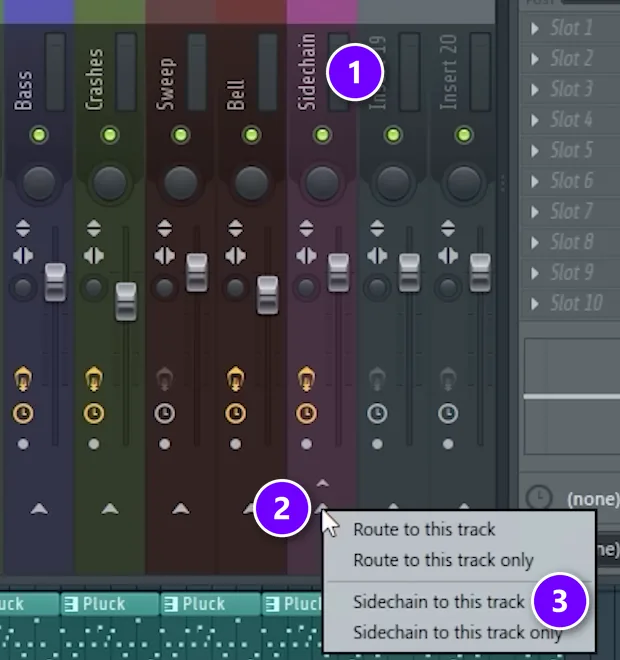
Click the kick’s mixer track so it’s selected. Then go to the track you want to duck (1), right-click the small arrow at its bottom (2) and choose Sidechain to this track (3). In the video, the target is a group track called Sidechain; on your beat it’s simply the bass.
That menu has four options, and picking the wrong one is the most common mistake:
- Route to this track sends the kick’s sound there. You’ll hear the kick twice.
- Route to this track only moves the kick’s sound there completely.
- Sidechain to this track sends only the signal. Plugins on the bass track can read it, but you don’t hear the kick through it. This is the one you want.
- Sidechain to this track only does the same and also cuts the kick’s send to the Master, so the kick goes silent. It’s for silent “ghost” triggers (more below), and the Fruity Limiter manual describes it the same way.
A shortcut Max uses: just left-click that arrow. It sends the kick’s sound along with the signal, so turn the little send knob under it all the way down. Then the kick only reaches your ears once, but the bass track still gets the signal.
Step 3: Load Fruity Limiter on the bass, raise CEIL, switch to COMP
Click an empty effect slot on the bass track and choose Fruity Limiter. It opens on the LIMIT tab. Turn the CEIL (ceiling) knob all the way up first, so the limiter part never touches your bass. Then click COMP at the bottom left to switch to compressor mode.
Step 4: Pick the kick in the SIDECHAIN selector
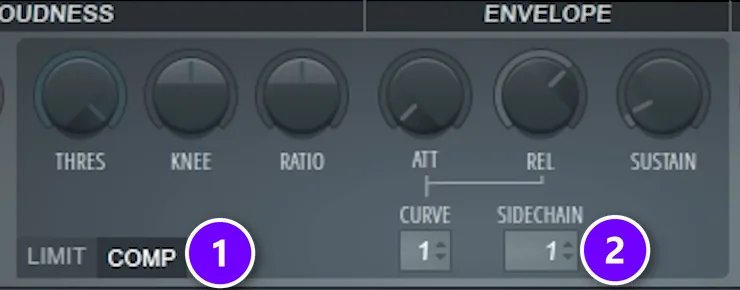
Find the SIDECHAIN box under the envelope knobs (2), next to the COMP tab (1). Right-click it. Max: “if you right click it you will see all the signals that this compressor sees.” Choose the kick.
The box then shows a number for the input you picked (1 in the video). Right-click it again any time to see which track is selected. If it isn’t the kick, the limiter isn’t listening to the kick yet.
Step 5: Lower THRES and raise RATIO until the bass ducks
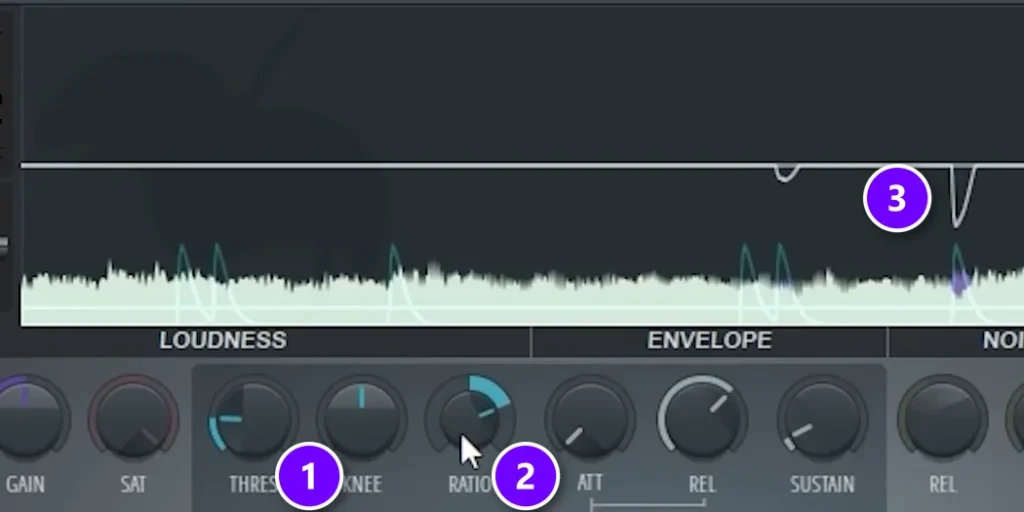
Play the kick and the bass together. Pull THRES (1) down and turn RATIO (2) up to about 4:1. Now watch the display: the kick shows up as blue spikes, and the white line dips (3) each time the bass gets turned down. The purple edge on the waveform is the part being taken away.
How far should it dip? “I think that attenuating by about 7 to 10 dB will be perfect in that case,” Max says about his course mix. That’s enough for the kick to cut through without the bass vanishing.
Step 6: Set ATT and REL by ear
Keep ATT (attack) fast, so the bass ducks the instant the kick lands. Then use REL (release) to decide how quickly the bass comes back. A simple test is to listen to the very end of each dip. The bass should be fully back just before the next kick hits. Flip the limiter off and on a few times to compare.
What does each knob in Fruity Limiter’s COMP section do?
THRES and RATIO decide how much the bass ducks, ATT and REL decide how fast it ducks and recovers, and SIDECHAIN decides what triggers it. KNEE, SUSTAIN and CURVE fine-tune the shape. You can ignore the rest for sidechain.
The COMP knobs, one by one
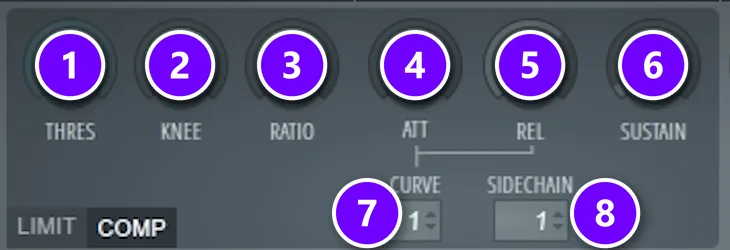
- THRES (threshold): the level the trigger has to cross before anything happens. All the way up (0 dB) switches the compressor off, so it has to come down.
- KNEE: how gently the ducking starts. A soft knee eases in, a hard knee grabs at once.
- RATIO: how hard it turns the sound down once the threshold is crossed. The manual says it has to be raised, along with lowering THRES, before the compressor does anything. Turned counterclockwise below 1:1, it expands instead (Max’s trick below).
- ATT (attack): how fast the ducking kicks in, in milliseconds.
- REL (release): how fast the sound comes back. This one shapes the pump the most. Set it too short and the bass can distort.
- SUSTAIN: how long the limiter averages the level, from 0 to 1000 ms. More sustain stops the duck from letting go too early.
- CURVE: the shape of attack and release, from 1 (instant) to 8 (slow). It matters most with a long release, which is exactly the pumping kind.
- SIDECHAIN: which mixer track triggers the compressor.
There’s also GAIN, the makeup gain that adds volume back after compression. For sidechain you usually leave it alone, because the goal is a dip, not a louder bass. The Fruity Limiter manual lists every control if you want the full detail.
What are the best Fruity Limiter sidechain settings?
Start with RATIO at about 4:1, a fast ATT, and THRES low enough that the bass ducks 7 to 10 dB on each kick. Set REL so the bass is back before the next kick. For a subtle duck, use less reduction and a short release. For an obvious pump, go deeper, raise the ratio and stretch the release across the beat.
Here are three starting points. They’re places to begin, not rules, so trust your ears over the numbers:
Clean kick-and-bass duckThe setup from Mix Elite’s free course
- RATIO
- About 4:1
- THRES
- Down until the bass drops 7 to 10 dB on each kick
- ATT
- Fast, close to the left
- REL
- Short: the bass is fully back before the next kick
- CURVE
- 1 (the default)
Subtle duckPads, chords and reverb you only want to step aside
- RATIO
- About 4:1
- THRES
- Only a light dip of a few dB
- ATT
- Fast
- REL
- Short
- KNEE
- Turn it up a little for a softer start
Obvious EDM pumpWhen you want to hear the breathing
- RATIO
- 4:1 or higher
- THRES
- Lower than the clean duck, for a deeper dip
- ATT
- Fast
- REL
- Long: the sound swells back across most of the beat
- CURVE
- Try higher numbers for a rounder swell
Max doesn’t fuss over the exact ratio. In the course he sets it to about four and adds that you can go higher, and that past that point the exact number doesn’t really matter. The threshold decides how deep the dip goes.
How do you time the release to your BPM?
Divide 60,000 by your tempo to get one beat in milliseconds. At 128 BPM, one beat is about 470 ms, so an eighth note is about 235 ms and a sixteenth about 117 ms. For a clean duck, the bass should be back well inside that beat. For a pump, let it rise over most of it. You don’t need to type numbers in, though. Set REL by ear and use the math only as a sanity check.
Should you use the COMP or the LIMIT tab for sidechain?
Use COMP. The sidechain works through the compressor, which gives you a ratio and a knee to shape the duck. The LIMIT side is a brick wall for peaks at the CEIL level. Turn CEIL all the way up first, to +12 dB, so the limiter stays out of the way.
There’s a second reason the compressor feels smoother. The manual says the limiter works on peak levels, while the compressor follows the average level of the sound. Peaks jump around. The average moves more like music does.
Why sidechain the bass to the kick instead of using EQ?
An EQ cut is permanent. Carve the lows out of your bass and they’re gone between kicks too, so the bass sounds thin all the time. Sidechain only turns the bass down for the moment the kick hits, then gives it its full weight back.
The two work best together. Use EQ to clear out what nothing needs, then sidechain for the moment of impact. Our guide to a clean, punchy low end covers the EQ side, and the kick and 808 guide shows how to duck only the lowest part of an 808, so its tone keeps playing.
How do you sidechain without hearing the trigger?
Use a ghost trigger: a separate kick channel sent with Sidechain to this track only. That option cuts the channel’s send to the Master, so you never hear it, but Fruity Limiter still reacts to it.
Why bother? It keeps the pump going in a breakdown where the real kick drops out. It also lets you pump on a rhythm your real kick doesn’t play, like four steady hits under a broken beat. Program the pattern on the ghost channel, send it to the bass track that way, and pick it in SIDECHAIN instead of the kick.
Max’s hidden trick: sidechain expansion in Fruity Limiter
Sidechain expansion is ducking in reverse. With RATIO turned counterclockwise below 1:1, Fruity Limiter’s compressor pushes a sound up each time the sidechain trigger hits, instead of pulling it down. In Mix Elite’s video, Max uses it to make a white-noise layer play only with the rhythm of his drums.
Here’s the problem it solves. His beat sounds clean but has no grit. White noise adds that grit, but noise that plays all the time just hisses over everything. Keyed to the drums, it only opens up on the hits, so you get texture and movement instead of a constant wash.
How to set up sidechain expansion, step by step
- Put the white noise on its own mixer track.
- Select the trigger’s track. Max uses his top loop, a drum loop on its own track. Then right-click the arrow under the noise track and choose Sidechain to this track.
- Load Fruity Limiter on the noise track and switch to the COMP tab.
- Right-click SIDECHAIN and pick the top loop.
- Turn THRES well down.
- Turn RATIO counterclockwise, below 1:1. Now the noise opens up with each hit of the loop.
- Raise ATT so the noise swells in softly behind each hit, a bit like a shaker. Then set REL to decide how long the noise rings after each hit.
- Add a second Fruity Limiter after the first one to tame the peaks.
That last step matters, because expansion pushes level up and the louder hits can jump out. Keep an eye on the noise track’s meter while you set it. The video below shows the whole setup, from the routing to the finished sound.
Use it on hi-hats as a free transient shaper
A transient shaper is a plugin that boosts or softens the very start of a sound, its transient. Max gets the same effect on his hats with Fruity Limiter. He puts it on the hats track in COMP mode, turns RATIO below 1:1, and sets THRES so only the start of each hit crosses it. With a short attack and a short release, only that first click gets pushed up, and the hats come forward in the mix.
Is it better than a real transient shaper? Max’s answer is honest: sometimes it works better, sometimes worse. What he likes here is the control the limiter’s envelope gives him over exactly how each hit moves.
Add bursts of noise to the kick and snare

For more presence, Max keys noise to the kick and the snare too. He puts two Fruity Limiters on the noise channel, one with the kick as its sidechain input and one with the snare, both set up for expansion the same way. Each drum hit then gets its own short burst of noise, which adds texture and makes the drums feel bigger.
Why isn’t my Fruity Limiter sidechain working?
Usually it’s one of three things: the kick never reached the bass track, the kick isn’t picked in SIDECHAIN, or THRES is still at 0 dB, which keeps the compressor off. Check them in that order, then work down this list.
- The SIDECHAIN list has no kick. You haven’t sent it yet. Select the kick track first, then right-click the arrow on the bass track, not the other way round.
- The kick is listed, but nothing ducks. You’re still on the LIMIT tab, or SIDECHAIN shows a different track. Switch to COMP and pick the kick.
- Still nothing. THRES is still at the top or RATIO hasn’t been raised. Both have to move before the compressor reacts, so pull THRES down and turn RATIO up.
- The kick got louder. You chose Route instead of Sidechain, or left-clicked the arrow. Turn the send knob all the way down.
- The kick disappeared. “Sidechain to this track only” cut its send to the Master. Redo it with plain Sidechain to this track.
- The bass clicks or crackles on each kick. REL is too short. Lengthen it, give ATT a touch more time, or turn KNEE up.
- The bass gets louder on the kick. RATIO is below 1:1, which is expansion, the trick in the section above. Turn RATIO up past 1:1 to get ducking again.
Other ways to sidechain in FL Studio
Fruity Limiter is the quickest way to sidechain, but not the only one. Our guide to the other ways to sidechain in FL Studio covers Fruity Compressor’s sidechain input, a whole group ducked by one limiter, reverb that steps aside for the vocal, an LFO-style pump built with Patcher, and third-party plugins.
Sidechain is one move inside a bigger mix. When the low end works, the next steps are levels, EQ and space, and our guide to mixing a song walks through them in order. Start tonight with just the kick and the bass. Four knobs, one menu, and you’ll hear the moment the low end stops fighting.
DAY 4 OF THE 7-DAY MUSIC PRODUCER COURSE
A clean low end is one step. Day 4 is the whole mix.
Day 4 of Mix Elite’s 7-Day Music Producer Course is all about mixing: the Holy-Quad formula, the “Mix Murdering” mistakes most beginners make, and the volume mistake people make in the first 5 minutes of a mix. You also get a mixing checklist and a mixing template to start every track from. It’s taught in FL Studio, and on day 7 a pro gives you feedback on your finished track. It’s $27, with 60-day refunds.
Frequently asked questions
What ratio should I use to sidechain with Fruity Limiter?
Start at about 4:1, then lower THRES until the bass ducks 7 to 10 dB on each kick. That’s the setup in Mix Elite’s free FL Studio course. For an obvious EDM pump, go to 4:1 or higher with a deeper threshold and a longer release. Max’s view: past about four, the exact ratio doesn’t really matter.
Why doesn’t my kick show up in Fruity Limiter’s SIDECHAIN list?
Because it hasn’t been sent to that mixer track yet. Click the kick’s mixer track to select it, then right-click the arrow at the bottom of the bass track and choose Sidechain to this track. Open Fruity Limiter, switch to COMP, right-click SIDECHAIN, and the kick appears in the list.
What’s the difference between Sidechain to this track and Route to this track?
Route to this track sends the kick’s audio, so you hear it through that track and the kick plays twice. Sidechain to this track sends only the signal: plugins on that track can react to it, but you don’t hear it there. The “only” versions also cut the send to the Master, which silences the kick.
What is sidechain expansion in Fruity Limiter?
It’s sidechain ducking in reverse. In COMP mode with a sidechain input picked, turn THRES down and RATIO counterclockwise below 1:1. Instead of ducking, the sound opens up every time the trigger hits. In Mix Elite’s video, Max uses it to make a white-noise layer follow his drum loop, then shapes it with attack and release and tames the peaks with a second limiter.
Should I use Fruity Limiter or Fruity Compressor for sidechain?
Both can sidechain. Mix Elite’s course uses Fruity Limiter for kick and bass, and its display lets you watch the kick and the dip in the bass while you set the threshold. Fruity Compressor has a sidechain input too, and our guide to the other ways to sidechain in FL Studio shows that setup.