



“Omit needless words.”
To get a clean punchy low end, shorten the bass so it never rings over the kick and duck it whenever the kick hits. Then low cut every other sound at about 250 Hz (reverbs at 800 Hz or higher), keep everything under 150 Hz in mono, and compress only the low end by about 2 to 5 dB.
Max, the founder of Mix Elite, starts his video on getting a clean punchy low end with a joke: mud lives in the low end, so you could cut that whole range on the master and call it a day. Then he points out the catch: the low end is also what makes people want to dance. The goal isn’t less bass. It’s cleaner bass, and here’s Mix Elite’s method in FL Studio, with a screenshot from the video for every click.
Table of Contents
What is the low end in a mix?
The low end is the bottom of your mix: the kick, the bass, the 808 and the sub. In numbers, it’s roughly everything from 20 Hz up to about 250 Hz. Hz (hertz) measures how low or high a sound is. The lower the number, the deeper the sound.
- Sub (about 20 to 60 Hz): the deep rumble you feel in your chest more than you hear. Phone speakers can’t play most of it.
- Bass (about 60 to 250 Hz): the thump of the kick and the body of the bass line. This is where punch lives.
- Low mids (about 250 to 500 Hz): warmth, but also the zone where mud builds up when too many sounds overlap.
Max’s rule of thumb: “muddiness of your mixes lives in the low frequencies, specifically under 500 hertz”. Mud comes from two things: how loud that range is and how dense it is. One low sine wave on its own sounds clean. Play four low sounds at once and it turns thick and blurry. That’s mud.
So a clean low end means every low sound gets its own moment and its own space. Punchy means the kick lands hard, right in the center, at the same level every time.
Why does the mix get muddy when the kick and bass play together?
Because they pile up in the same place at the same time. Both put most of their energy below about 250 Hz, and a long bass note rings right through the next kick, so the two add up into one loud blob that eats your headroom, can clip and can even cancel out in spots.
The fix is to give each one its own moment and its own space. Step 1 below sorts out the timing, so the kick and bass never hit at full level together, and steps 2 to 4 clear out everything else that piles up down there.
Why does my bass sound heavy in my room but disappear on my phone?
Two things lie to you in opposite directions. Small rooms boom on certain low notes, so the bass sounds bigger at your desk than it is, and phone speakers can’t play the sub, so a bass that lives only down there vanishes. Cut your room’s boom while you mix, and give the bass harmonics a phone can play.
Start with the room, before you touch a plugin. You mix around its booming notes without knowing, and then the track sounds thin or muddy everywhere else. Low notes have the longest waves, which is why they’re so hard to dampen, and why you hear your neighbor’s sub through the wall and not the rest of the song.
That’s the reason a mix sounds so different everywhere else. A cheap fix is a thick foam mattress against the wall. Then find your room’s problem notes and turn them down while you mix.
How to find and cut your room’s boom
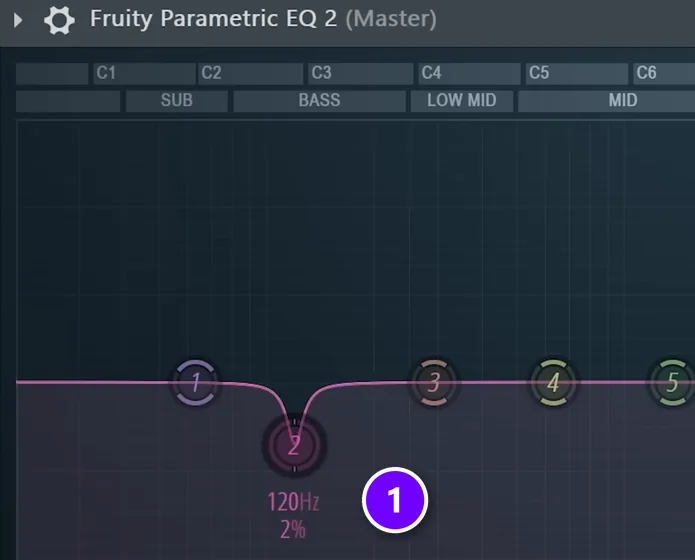
- Play a sine wave through your speakers, start low and slowly sweep it up. A sine wave is the plainest tone there is: one pure note with nothing on top.
- Listen for spots where it suddenly gets much louder. Write those frequencies down.
- Add Fruity Parametric EQ 2 to the Master track and make a small, narrow cut at one or two of those spots (1). In the screenshot, the cut sits at 120 Hz.
- Mix as usual. Now you hear less of your room and more of your song.
Turn that room EQ off before you export, and when you switch to headphones. It fixes your room, not your song, so it must never end up in the final file.
The video calls this an alternative to pro measuring systems, and it’s key if you want clear music that translates well, which means it sounds right on any speaker, not just yours. The phone half of the problem gets fixed in the mix itself, in how to make bass cut through the mix below.
How to get a clean punchy low end: the 4 steps
Shorten the bass and duck it under the kick, low cut everything else (reverbs even higher), keep the lows in mono, then compress only the low end. Do them in that order, because each step builds on the one before, so don’t jump ahead to compression.
- Control the length of the kick and bass so they never play at the same time.
- Low cut everything else, reverb included, so other sounds stop stealing low end.
- Keep the low end in mono, so it hits as one solid wall from the center.
- Compress only the low end, so every bass note lands at the same level.
The low end is one part of a full mix. If you’re new to mixing, read how to mix a song first, then use the steps below to fix the bottom. The video below walks through all four.
Step 1: How do you stop the kick and bass from clashing?
Low sounds ring longer than high ones. The lower the note, the longer it takes to fade out, so a long bass note keeps going right through your next kick. When the two overlap, they add up into one loud, thick blob. They can even cancel each other out in spots, which is called phasing, and that makes the low end sound weak and hollow.
So step 1 is about time. No two low sounds should overlap.
Turn on mono and legato, then shorten the release
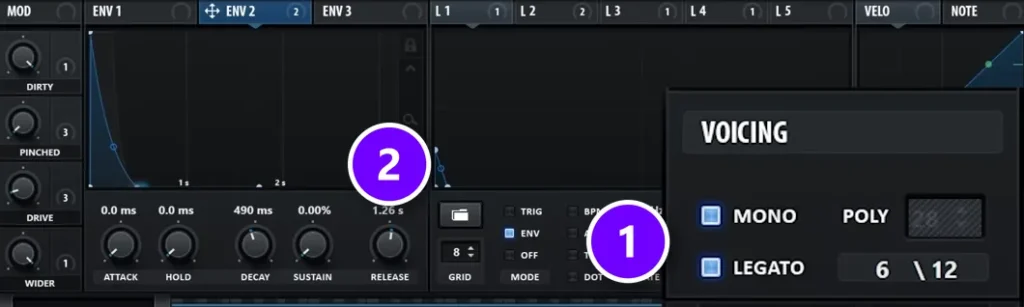
Open your bass synth and switch on Mono (1). Mono means the synth plays one note at a time, so a new note cuts off the old one instead of stacking on top of it. Legato is optional. It lets overlapping notes flow into each other without restarting the sound. Max’s verdict after turning them on: “This already fixed 80% of the issue”. Two switches did most of the work.
Next, shorten the Release (2). The release is how long a note keeps sounding after you let go of the key. Make it last at least one quarter note, which is one beat. In the video’s project one beat lasted about 470 milliseconds (ms), so the release went to about 470 ms. If the next note comes sooner, it cuts the old one off anyway, because mono is on.
No need to guess the milliseconds. Divide 60,000 by your tempo to get one beat: 128 BPM gives about 470 ms, 140 BPM about 430 ms and 90 BPM about 670 ms.
How do you use sidechain compression to make the kick punch?
Put a compressor on the bass, feed it the kick as its trigger, and every kick turns the bass down for a split second, so the kick lands clean. In Mix Elite’s free 1-hour mixing course, that’s Fruity Limiter in COMP mode on the bass group at about 4:1, with the threshold lowered until the bass ducks by about 7 to 10 dB.
Even with short notes, the kick and bass still hit at the same moment. Something has to give way, and it’s the bass, because when the kick plays, it matters more. That’s what sidechain is for. Sidechain means one sound controls another. Here, the kick turns the bass down for a split second.
- Add Fruity Limiter to the bass group, turn its ceiling up so it doesn’t touch the sound, and switch it to COMP mode.
- Click the kick’s mixer track, right-click the arrow at the bottom of the bass group and choose Sidechain to this track.
- In Fruity Limiter, right-click SIDECHAIN and pick the kick.
- Lower the threshold and set the ratio to about 4:1, until the bass ducks by about 7 to 10 dB on every kick.
A compressor can leave the bass breathing in and out, with a gap after every kick. The three options below give you more control over the dip.
The precise way: draw the bass dip yourself
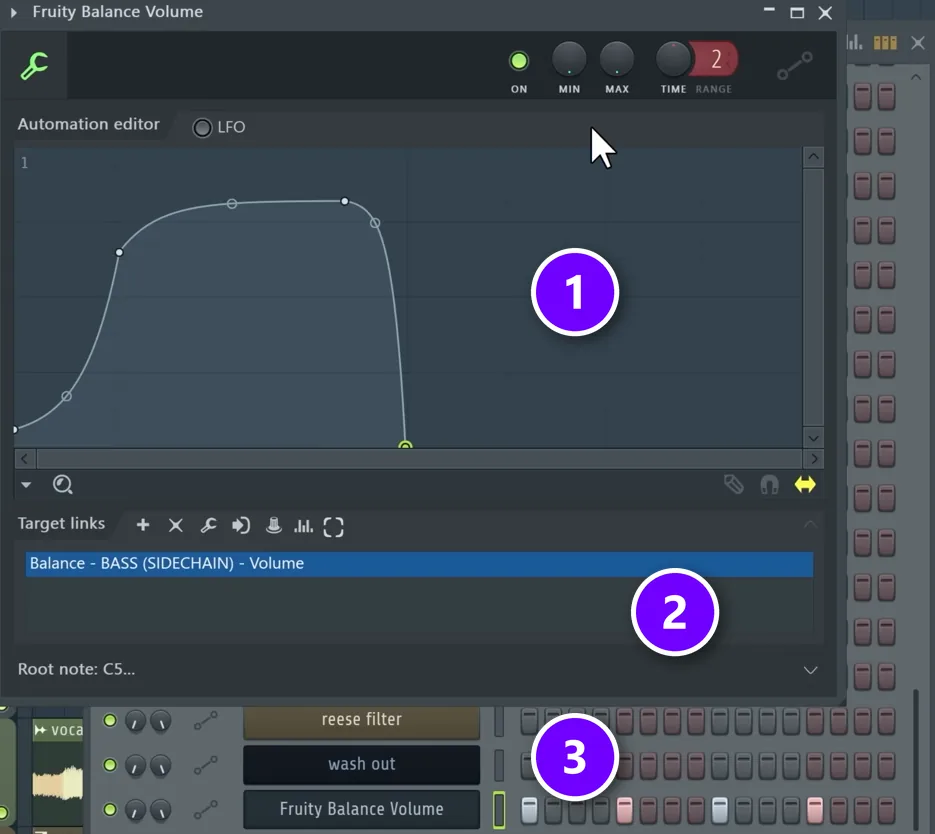
Instead of a compressor, the main video draws a volume shape, because then you decide exactly how the bass dips. Here’s the setup.
- Send all your bass sounds to one mixer track, called a group or bus, and add Fruity Balance to it.
- Right-click its Volume knob and choose Create automation clip.
- Draw a shape that copies the kick: down when the kick hits, back up as the kick fades (1). The clip is linked to the bass group’s volume (2).
- In the Channel Rack, right-click the automation channel and choose Fill each 4 steps, so it fires on every beat (3).
- Play it with the kick and move the point where the volume comes back up to the spot where the kick ends.
Some producers also pull the volume all the way down just before the next kick. That split second of silence makes the kick even punchier. For more ways to set this up, see how to sidechain in FL Studio.
The cleaner way: duck only the kick’s frequencies
A volume dip turns the whole bass down, top end included. The cleaner option only dips the frequencies the kick plays in, so the bass keeps its full sound and the kick still gets its punch.
First, route the kick to the bass group with Sidechain to this track, as in the compressor setup above. Then pick one of these two tools.
- soothe2 (paid): load it on the bass group, open the plugin options, go to Processing and set the sidechain input to the kick. Turn on soothe2’s sidechain mode, remove its low cuts and raise Depth until the bass makes room.
- Mix Elite’s free Multiband Sidechain preset: drop it on the bass with the kick sidechained to it and turn up the lows. It can also duck the full volume. It’s in Mix Elite’s free downloads.
The 5-second way: a ready-made sidechain preset
Mix Elite has a second video on this exact problem, and it starts by showing why the usual fixes fall short. A normal sidechain compressor left the bass “weirdly breathing,” with a gap after every kick, and the mix still clipped. Clipping means the signal goes over the top and distorts in a nasty way.
Ring mode sidechain is a trick a lot of producers have started using. It takes the kick’s exact waveform, flips it and uses it as the bass’s volume control, so the bass ducks perfectly. The catch is that it always adds artifacts, small bits of unwanted distortion. The video says that’s fine for heavy genres like dubstep or heavy techno.
For EDM, house, trap and hip-hop, Mix Elite made a free preset called Perfect Sidechain. Put it on your bass group with the kick sidechained to it. On the sub it works like ring mode without the artifacts, so the bass comes back the moment the kick ends, even if you swap or shorten the kick. Its Amount and Decay knobs set how much pump you hear and how long it lasts. Turn Amount to 100% to test it, then back it off. It’s free with your email from the link under this video.
Step 2: How do you clean up low-end mud from other sounds?
This is the step where most producers accidentally kill their mix. Your kick and bass can be perfect and still get buried by ghost low end: the bass hiding in your synths, guitars, piano and, above all, your reverb. You can’t always hear it on its own, but it adds up.
The fix is a low cut on everything that isn’t a bass sound. A low cut, also called a high-pass filter, removes everything below the frequency you pick and lets the rest through. Cut below 250 Hz.
Low cut every sound that isn’t bass
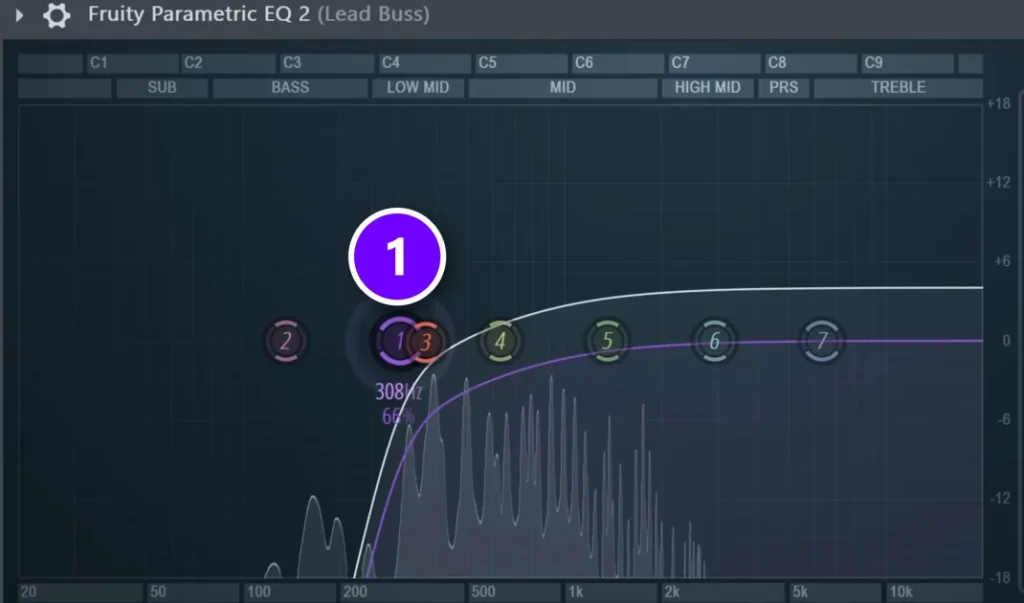
- Add Fruity Parametric EQ 2 to every instrument that isn’t a kick, bass or 808. Short on time? Send them all to one bus and use a single EQ there.
- Turn band 1 into a low cut and drag it up to around 250 Hz (1). On the lead bus in the screenshot, it sits a little higher, at about 300 Hz.
- Play the full mix and listen. Each sound gets a little thinner on its own, but the whole track gets clearer.
On the piano in the video, a low cut at 200 Hz took out the mud, and the cleaner piano could then be turned up without making the mix muddy again. The general rule stays at 250 Hz, because the difference between what’s above and below that line is huge. New to EQ? How to use EQ in mixing shows Parametric EQ 2 from scratch.
Low cut your reverb even higher
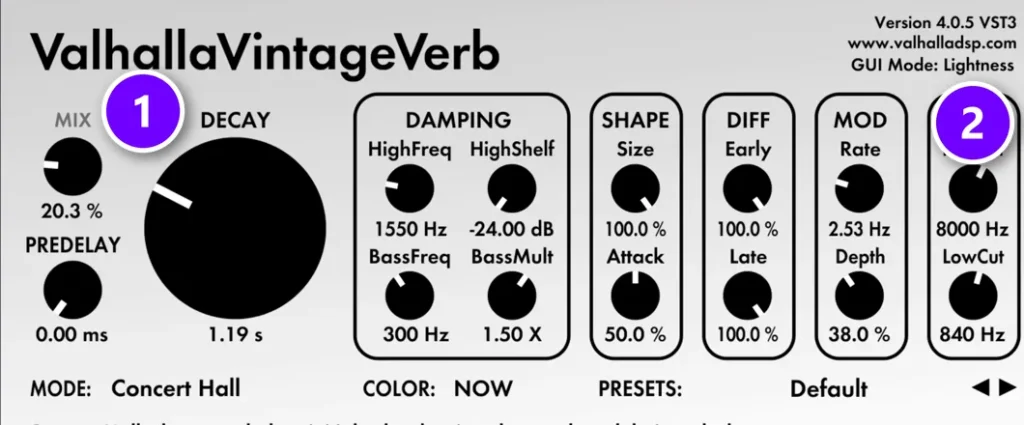
Reverb is where most people muddy their mix, because it spreads a long, blurry tail under everything. So every reverb gets a low cut too, and a much higher one. Go to at least 800 Hz.
Then set the decay, which is how long the reverb tail lasts. Use the same idea as the bass release: decide how long you want it in beats, then set it to match. In the video, half a bar was 1 second, so the decay (1) went to about 1 second and the low cut (2) to around 800 Hz. Keep it a little shorter than you want it, for the most clarity. Shorter is cleaner.
Put the reverb before any sidechain or compression in the chain. Then the reverb tail ducks along with the sound instead of washing over your kick.
The video uses ValhallaVintageVerb here, but any reverb with a low cut works, including FL Studio’s own Fruity Reeverb 2.
Give each sound its own space (frequency masking)
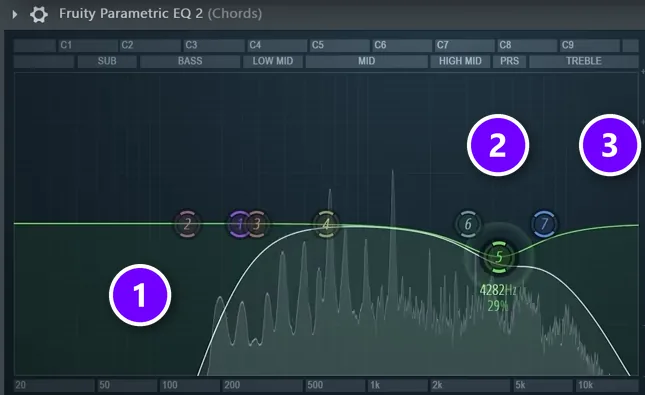
If you have a bit more time, go one step further. Frequency masking is when two sounds fight over the same frequencies, so neither one comes through clearly. The fix is to carve: each sound keeps its own range and gives up the range a more important sound needs.
In the video’s example, a pluck melody fights with the chords. The pluck matters more, because people should remember that melody. The melody wins. Here’s the fix.
- On the chords, low cut the bottom (1) and cut the very top (3), so those ranges belong to other sounds.
- On the pluck, take out the low end too, so it plays only in the mids. Then boost the range you want more of. The video boosts the range around 4 kHz.
- On the chords, do the opposite at 4 kHz: a small cut right where the pluck got its boost (2).
The same carving can also happen by itself while the song plays. In the video, all the instruments go to one bus, the vocal is sidechained to it, and Mix Elite’s Multiband Sidechain preset runs in Patcher. Now the instruments dip only where the vocal needs room, and only while the vocal plays.
Step 3: Should the low end be mono or stereo?
Mono. Keep everything below about 150 Hz exactly the same in both speakers. A mono low end hits as one solid wall from the center, keeps its punch on mono speakers and club systems, and can’t cancel itself out, while the highs above it can stay wide.
Here’s why. Stereo low end means two slightly different waveforms, one in each speaker. The energy stops hitting you as one wall of air from the center, so the punch drops and the bass sounds messy. The two sides can even cancel each other out until the sub almost disappears. You won’t hear that on headphones, but Mix Elite’s loud master video warns that on mono speakers, or in a club, there can be spots with no bass at all.
A mid/side EQ fixes this. Mid is what’s the same in both ears, and side is the difference between them. Cut the low end out of the side, and the lows end up in the center while the highs can stay wide.
How to make your low end mono with a mid/side EQ
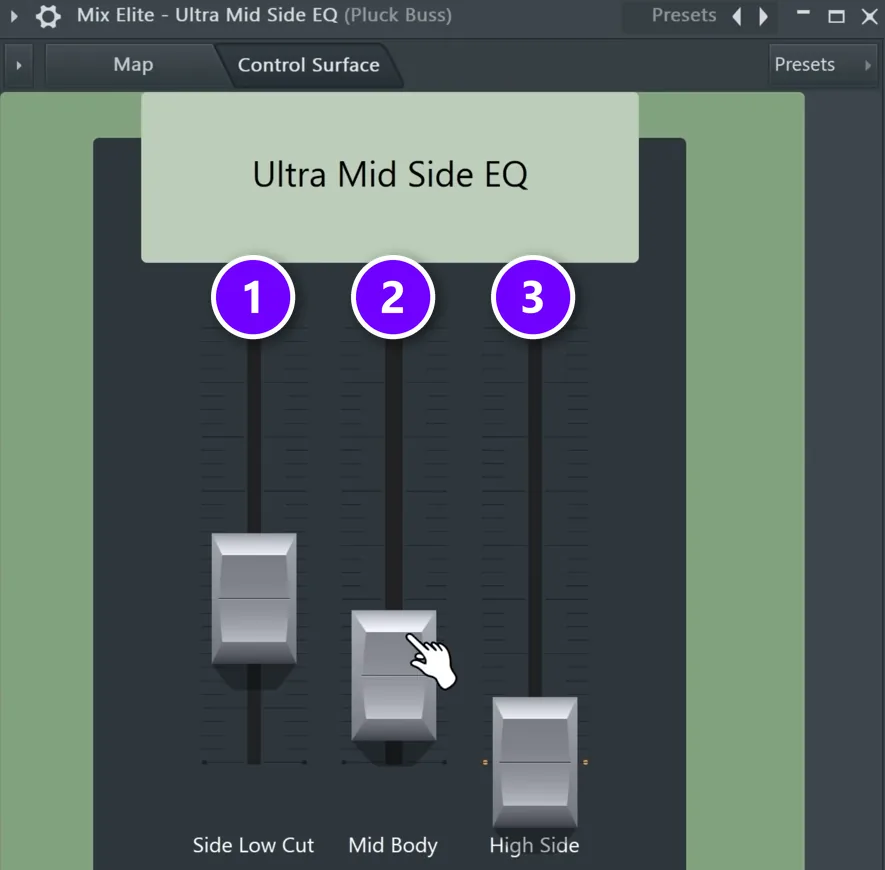
- Send the sounds that carry low end to one bus, so one plugin handles them all.
- Load the Ultra Mid Side EQ preset from Mix Elite’s free preset pack on that bus. In the screenshot it sits on a pluck bus.
- Raise Side Low Cut (1) to take the low end out of the sides.
- Add back some weight in the center with Mid Body (2), if you want it.
- Push High Side (3) a little to widen the highs.
Don’t treat this as optional. According to the video, every pro mix uses a mid/side EQ like this one.
Step 4: How do you make the low end hit harder?
The last step adds power. Power comes from steady levels. Max explains it like this: “If one bass note is 3 dB louder than the last one, it’s unexpected and triggers confusion”. In an amateur mix, the low end jumps around and the listener’s brain keeps adjusting, which gets tiring. In a pro mix, the low end is thick and predictable, so people stop thinking about it and start moving.
The fix is to compress only the low end. A compressor turns down the loudest moments so the level stays even. You can put one compressor on a group with your kick, sub and bass. Or you can use a multiband compressor on the master, which splits the sound into bands and compresses each one on its own. The video uses FL Studio’s Maximus on the master. In another DAW, a multiband compressor like FabFilter Pro-MB does the same job.
How to compress only the low end with Maximus
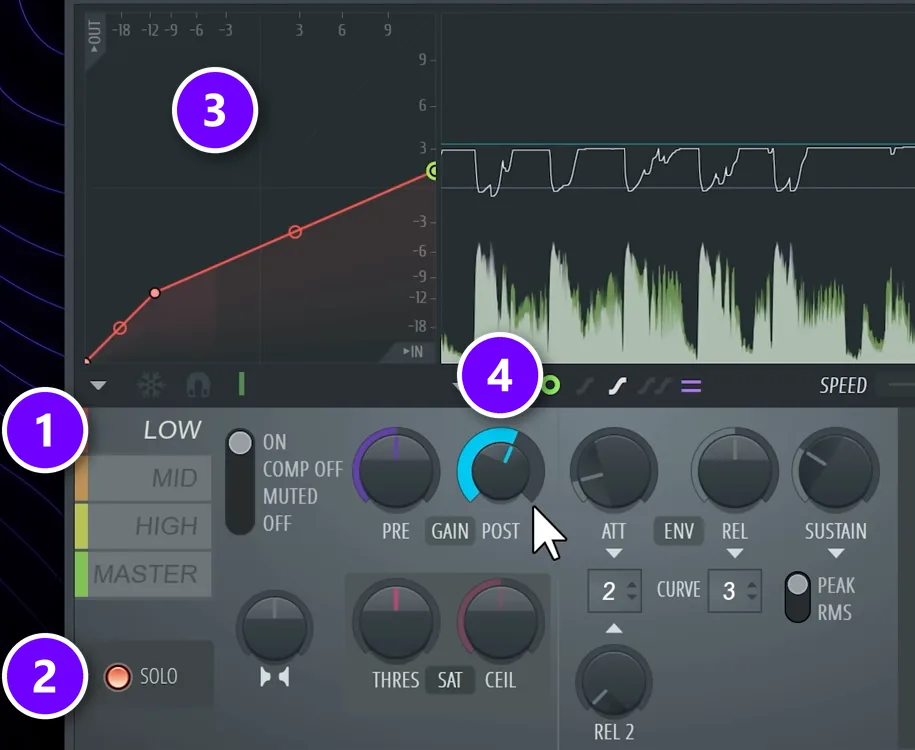
- Add Maximus to the Master track and click the LOW band (1).
- Press SOLO (2) so you hear only the low end.
- Shape the band’s curve (3) so the kick gets turned down by about 2 to 5 dB. The video settles on about 3 dB. The curve compares the level going in with the level coming out, and you change it by dragging its points.
- Turn up POST (4), the make-up gain, until the purple in the display is hidden. Purple shows the level going in, so this brings the band back to its full volume.
- Turn SOLO off and compare before and after with the whole track playing.
Which EQ frequencies clean up sub bass?
Give the sub, below about 60 to 80 Hz, to one sound at a time, and low cut every other low instrument at about 100 Hz. Low cut the master just under the lowest note your song plays, at 30 Hz or higher. If the sub then vanishes on regular headphones, add harmonics, not more sub.
- Below your lowest note: cut it on the master, but keep that cut at 30 Hz or higher. If your song is in E, its lowest E sits around 41 Hz, so the cut goes just under that.
- Sub, below about 60 to 80 Hz: one sound at a time, in mono. A plain sine or triangle wave works best, and the triangle feels a little fuller.
- Bass, from about 60 to 80 Hz up to 250 Hz: the part of the bass you actually hear. The most common problem here is too little of it, not too much.
- Everything else: a low cut at about 250 Hz on sounds that aren’t kick or bass, and at 800 Hz or higher on reverbs, as in step 2.
These ranges come from Mix Elite’s 27 mixing tricks video and its loud master video. Check the result on more than one system, because a heavy bass range makes it hard to hear that the sub is missing.
How do you separate sub bass from mid bass?
Split the bass into two layers at about 120 Hz. Put a plain sine wave sub on its own track with a steep high cut there, and the bass with character on another track with a low cut at the same point. Keep the sub in mono and let the upper layer carry the movement.
That’s how Mix Elite’s Reese bass tutorial keeps a wide, moving bass clean: a second Serum instance plays only the sub, the Reese above it is cut at about 120 Hz, and both are linked to one Layer channel, so one pattern plays them together. For the notes themselves, see our FL Studio bassline guide.
The same rule holds for the whole song. Mix Elite’s mixing mistakes video allows only one sound in the sub at a time, usually the kick and one sub bass, like an 808 or a synth. If anything else reaches down there, pick the main one and low cut the others at 100 Hz.
How do you make bass cut through the mix?
A clean low end can still vanish on a phone. Small speakers can’t play the sub. A bass that lives only down there just disappears. To make bass cut through the mix, give it something higher that small speakers can play.
- Add harmonics. A little saturation or distortion on the bass adds higher copies of each note, called harmonics. Your ear hears them and fills in the low note, even on a phone. One trick from the 27 mixing tricks video: add a little white noise to the sub and distort the two together.
- Layer a mid bass. Pair the sub with a second bass that has more bite, split from the sub as shown above, so only one sound owns the sub.
- Keep the bass line simple. Root notes, the notes your chords are named after, stay clear in a busy low end. Fast runs of low notes blur together.
- Check on small speakers. Play the mix on your phone and in the car. If the bass line gets lost there, add more harmonics, not more sub.
For trap and hip-hop, where the bass is an 808, see how to mix kick and 808 for kick and 808 levels and a sidechain setup.
Low end mixing mistakes to avoid
- Cutting all the lows on the master. It removes the mud and the power with it. Fix each sound instead.
- Letting bass notes ring. A long release blurs into the next kick. Turn on mono and keep the release to about one beat.
- Forgetting the reverb. Low cut every reverb at 800 Hz or higher, and keep the tail a little shorter than feels right.
- Stereo bass layers. Wide sounds below 150 Hz lose punch and can cancel out. Keep the lows in mono.
- Over-ducking. A sidechain that dips too deep makes the bass breathe in and out, with a gap after every kick. Shape the dip to the kick and no more.
- Trusting your room. Booming notes trick you into cutting or boosting the wrong thing. Check on other speakers before you call it done.
Start with step 1 tonight. Turn on mono, shorten the release and set up the sidechain. Mono and legato alone fixed most of the mess in the video’s example, and you’ll hear the change in the first few bars.
DAY 4 OF THE 7-DAY MUSIC PRODUCER COURSE
Now mix the whole song, not just the low end
Day 4 of the 7-Day course is all about mixing: the simple Holy-Quad mixing formula, the “Mix Murdering” mistakes most beginners make, and the volume mistake people make in the first 5 minutes of every mix. You also get a mixing checklist and a mixing and production template. It’s taught in FL Studio (the free trial works), about 45 minutes a day, and on day 7 a pro gives you feedback on your finished track. It’s $27, and you get 60 days to decide if it was worth it.
Frequently asked questions
Why does my mix get muddy when the kick and bass play together?
They pile up below about 250 Hz at the same moment. A long bass note rings into the next kick, and the two add up into one loud blob that eats headroom and can clip. Shorten the bass with mono and a release of about one beat, duck it under the kick with a sidechain, and low cut every other sound at about 250 Hz.
How do you sidechain the bass to the kick?
Put a compressor on the bass group with the kick as its sidechain trigger, so every kick turns the bass down for a moment. Mix Elite’s free 1-hour mixing course uses Fruity Limiter in COMP mode at about 4:1, ducking the bass by about 7 to 10 dB. For more control, draw the dip as a volume shape or duck only the lows with a multiband sidechain.
What’s the best way to clean up low-end rumble?
Use low cuts. Put one on every sound that isn’t a kick, bass or 808 at around 250 Hz, and on every reverb at 800 Hz or higher. On the master, also cut just under the lowest note your song plays, at 30 Hz or higher. Then shorten long bass notes, because notes that ring too long build up mud too.
Should bass be mono or stereo?
Keep everything below about 150 Hz in mono. Stereo low end splits the energy between two speakers, which costs punch and can make the sub cancel itself out. Above that, a bass sound can have some width. A mid/side EQ that cuts the low end from the side channel is the easiest way to get both.
Should the kick be louder than the bass?
When they hit together, the kick wins. The kick is more important than the bass at that moment, so the bass ducks under it with a sidechain and comes back up between kicks. Overall, both should feel about equally strong. Check your balance against a professional song in your genre, played at the same volume.





