



“We tried to use these machines to express something extremely moving that a machine cannot feel, but a human can.”
Vocodex is the best vocoder plugin for FL Studio users (Producer Edition and up), TAL-Vocoder is the best free vocoder VST for Windows, Mac and Linux, and Softube Vocoder ($99) and iZotope VocalSynth 2 ($199) are the best paid picks.
You say a few words into the mic, hold down a chord, and the synth says them back. That’s a vocoder: the robot voice from Daft Punk records and old sci-fi films. The best vocoder plugins make that sound easy to get, and the first time your own voice comes out of a synth, it’s hard to stop playing.
We checked all nine on their makers’ sites in October 2026: price, Windows and Mac support, plugin formats and downloads. Then Max, the founder of Mix Elite, shows how to set up a vocoder in FL Studio in five steps, with screenshots from his video.
Table of Contents
What is a vocoder plugin, and how does it work?
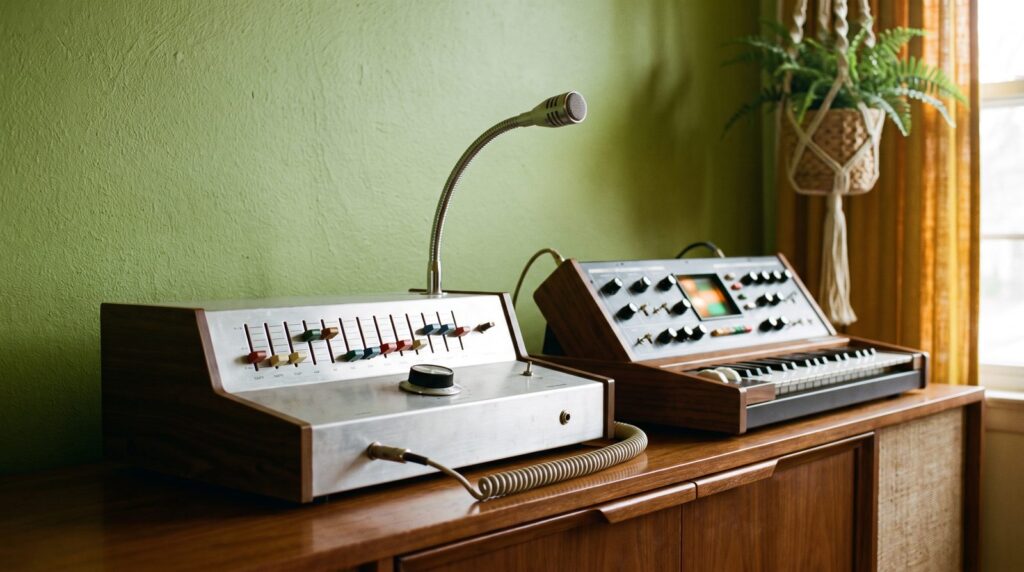
A vocoder plugin uses your voice to shape a synth. It splits the voice into frequency bands, from low to high, measures how loud each band is from moment to moment, and opens and closes the same bands on the synth. The synth takes on the shape of your words, so it sounds like it’s speaking.
Image-Line’s manual for Vocodex sums up the result: when a voice shapes a synth chord, it sounds like the synthesizer is talking, the classic robot voice from sci-fi movies.
Two words help with everything below. The modulator is the sound that does the talking, usually your voice. The carrier is the sound you actually hear, usually a synth playing chords.
More bands usually means clearer words. TAL-Vocoder has 11, Softube Vocoder lets you pick from 4 to 20, and Vocodex goes up to 100. The carrier matters just as much. A vocoder can only let through sounds the synth actually has, so bright, full patches like a saw wave work best.
Image-Line recommends thick, lush synths as carriers, and a little noise if you need to hear s and t sounds. Where have you heard it? A Mix Elite short names Daft Punk and synthwave tracks like Kavinsky’s Nightcall.
The 9 best vocoder plugins in 2026
Each pick has what it is, what it runs on, what it costs, and how to use it in FL Studio. To install any of them, see our guide on how to install VST plugins in FL Studio.
1. Vocodex (Image-Line, in FL Studio)
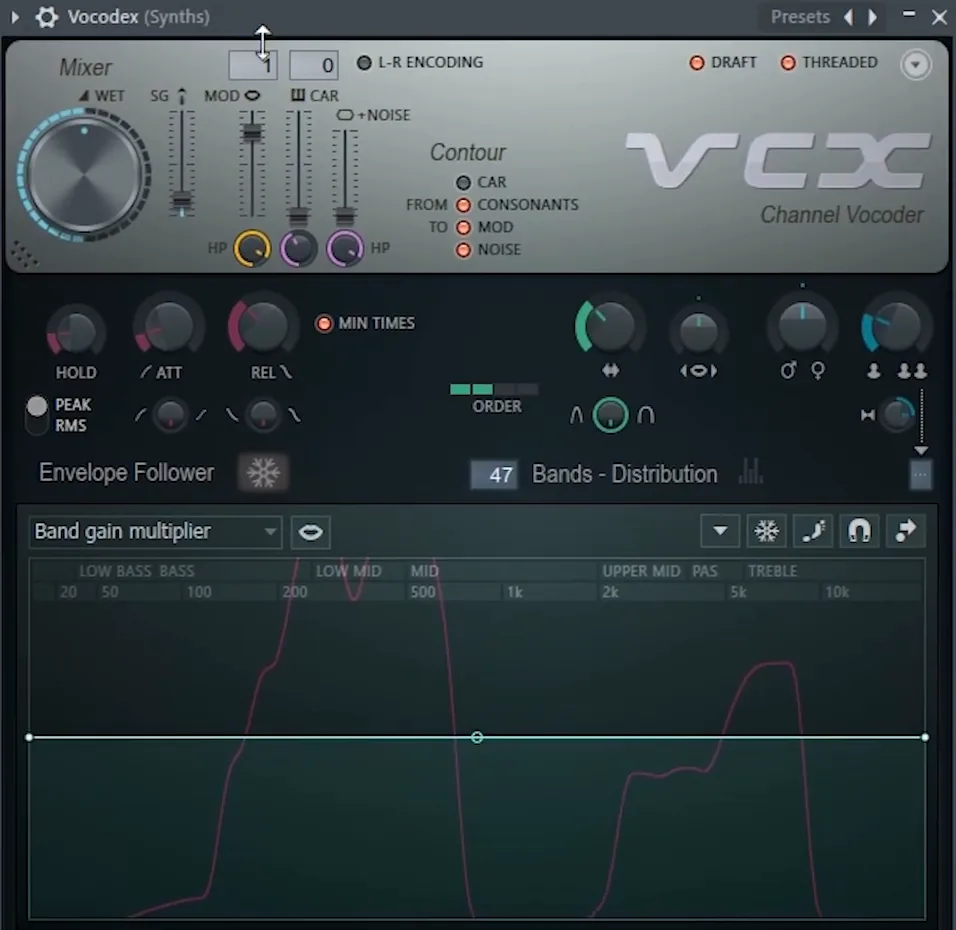
Vocodex is the vocoder that comes with FL Studio Producer Edition and up, and it’s the one Mix Elite’s vocoder tutorial uses. Image-Line calls it an advanced vocoder for robotic and harmonized vocal effects. It has up to 100 vocoder bands, a built-in carrier synth for quick tests, envelope settings for how fast the bands react, and a Soundgoodizer maximizer built in.
On Fruity Edition? You still get Fruity Vocoder, Image-Line’s classic vocoder, which comes with every edition.
In FL Studio: load it on the synth’s mixer track and send your voice to it with a sidechain. The full setup is in the steps below.
2. TAL-Vocoder (TAL Software)
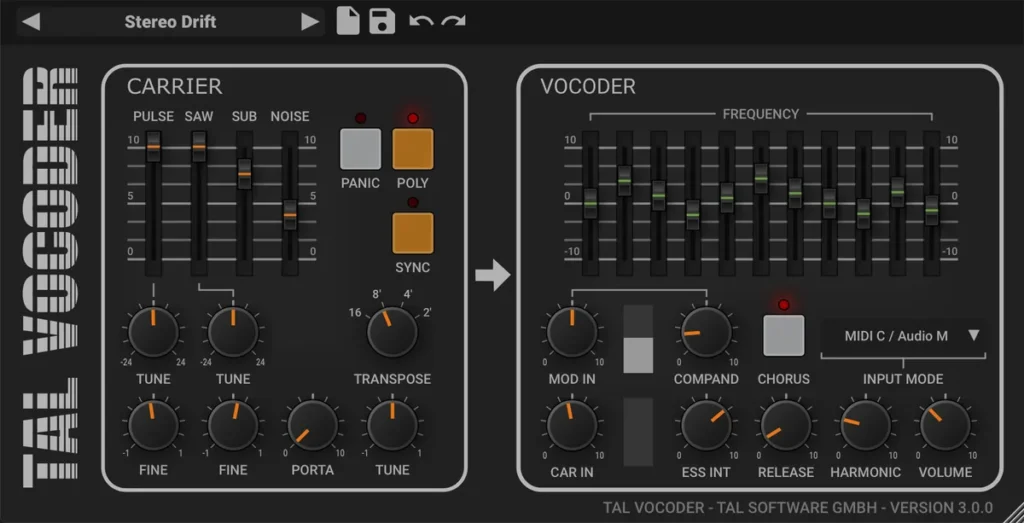
TAL-Vocoder is our free pick. TAL Software lists it with its free plug-ins and describes it as a vintage-style vocoder with 11 bands that sounds like the vocoders of the early 80s. It has its own carrier synth with classic analog waveforms, and it can also take your own synth through a sidechain.
Version 3.0.4 runs on Windows 7 and newer and macOS 10.9 and newer (Intel and Apple Silicon) as VST, VST3, AU, AAX and CLAP, and on 64-bit Linux as VST2 and VST3. The downloads are plain zip files on the product page. No account needed.
In FL Studio: put it on the vocal’s mixer track. Then play its built-in synth from a MIDI Out channel (see the steps below), or sidechain your own synth into it and pick the matching Input Mode.
3. FBVC (Full Bucket Music)
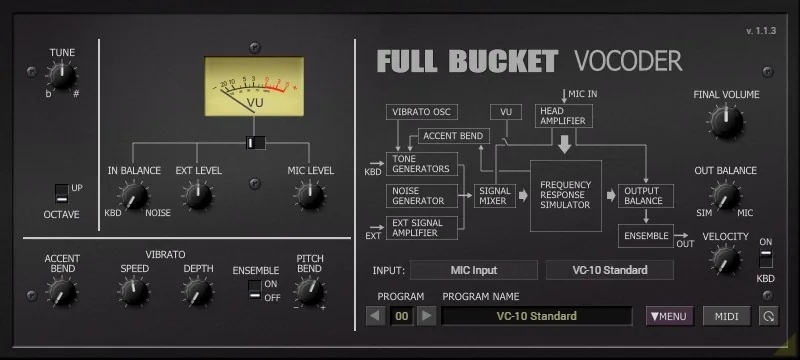
FBVC is the Full Bucket Vocoder, a free model of the KORG VC-10 vocoder from 1978. It’s a 20-band stereo vocoder with a 64-voice tone generator built in, plus accent bending and vibrato.
Version 1.1.3 (November 2024) runs on Windows as VST2, VST3, CLAP and AAX, and on Macs with Intel or Apple chips as VST2, VST3, CLAP, AU and AAX. Full Bucket Music offers all its plug-ins for free.
In FL Studio: load it on the vocal’s mixer track and play its tone generator from a MIDI Out channel, as shown in the steps below.
4. Softube Vocoder
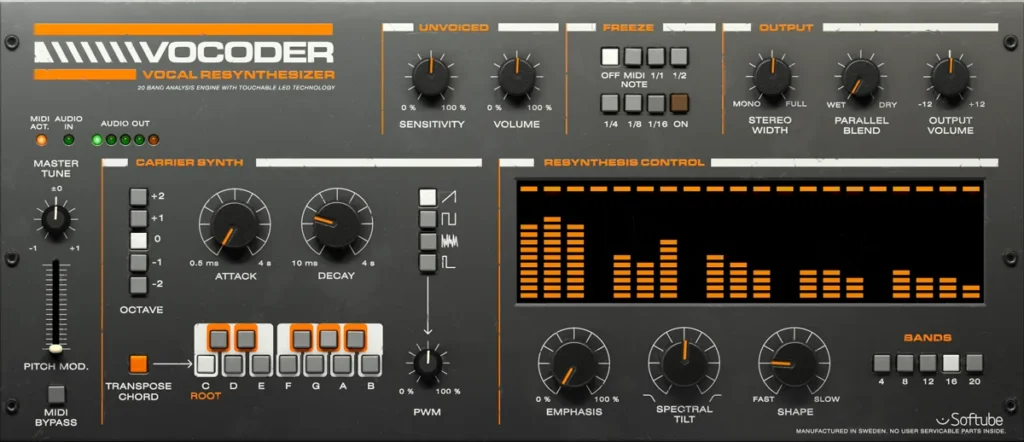
Softube Vocoder ($99 when we checked, with a 20-day trial) is a classic vocoder with a six-voice carrier synth built in. You choose saw, square, noise or pulse waves, and 4, 8, 12, 16 or 20 bands.
Two extras help a lot. The Unvoiced section brings back plosives and consonants like s and t, so words stay clear. The Freeze section holds parts of the sound in rhythm, by hand, from MIDI notes or synced to your DAW. It runs on macOS 14, 15 and 26 and on Windows 10 and 11 as AU, VST, VST3 and AAX. It needs a Softube account and an iLok account, and it’s also part of Softube’s Flow subscription suites.
In FL Studio: load it on the vocal’s mixer track and play its synth from a MIDI Out channel set to the same port.
5. iZotope VocalSynth 2
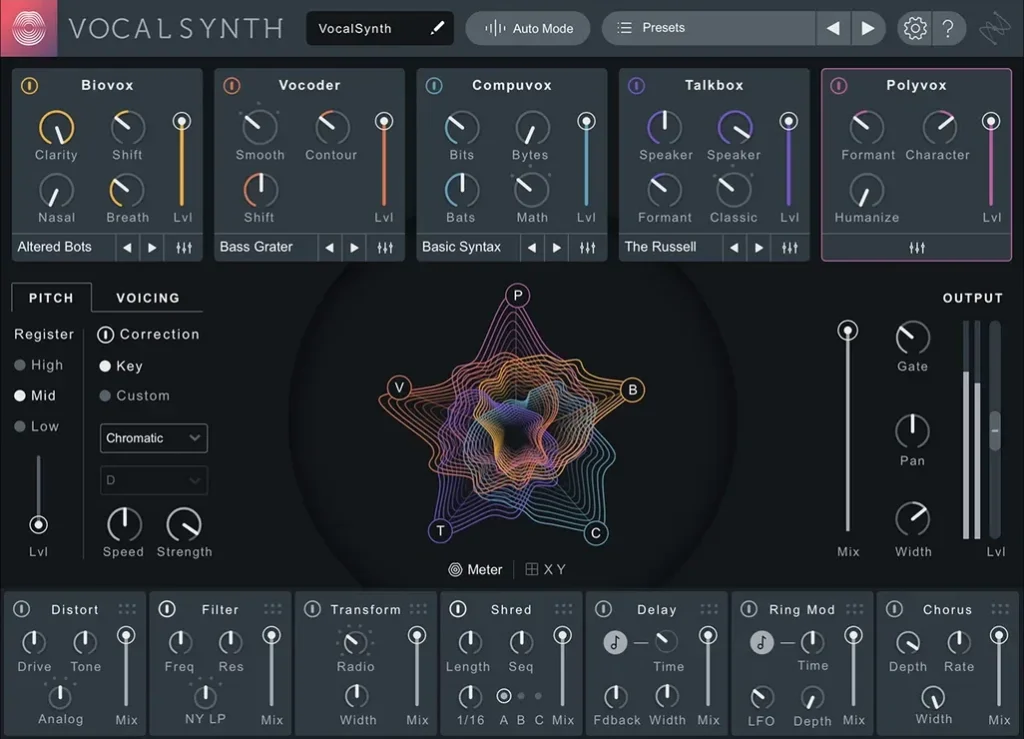
iZotope VocalSynth 2 ($199) is five voice effects in one plugin: Vocoder, Talkbox, Compuvox, Polyvox and the newer Biovox, plus seven stompbox-style effects. You can blend the modules, so a vocoder can sit under a talkbox sound or a robotic Compuvox voice.
It runs on macOS Sonoma, Sequoia and Tahoe (Intel and Apple Silicon) and on Windows 10 and 11, as AAX, AU, VST2 and VST3. There’s a free trial.
In FL Studio: load it on the vocal’s mixer track. Its Auto, MIDI and Sidechain modes let you use it on its own, play it from a MIDI Out channel, or sidechain a synth into it.
6. Waves OVox
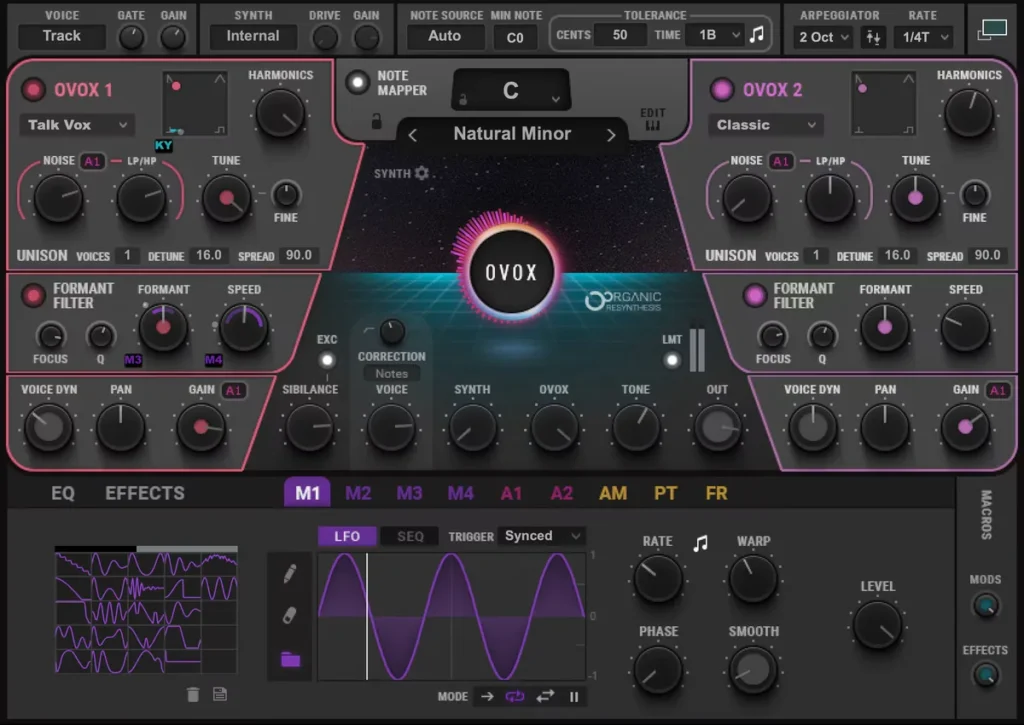
Waves calls OVox a voice-controlled synth. It does vocoder and talkbox sounds, but it also builds chords and harmonies from a single voice, adds tune and pitch effects, and has an arpeggiator.
Its list price is $149, and it was on sale for $29.99 when we checked on October 12, 2026. Waves changes its prices often. There’s a demo, and it installs through Waves Central on Windows 10 or 11 and macOS 14 or newer.
In FL Studio: load it on the vocal’s mixer track. Waves has its own video on sending MIDI to OVox in a VST host, and FL Studio’s MIDI Out channel does that job.
7. Zynaptiq Orange Vocoder IV
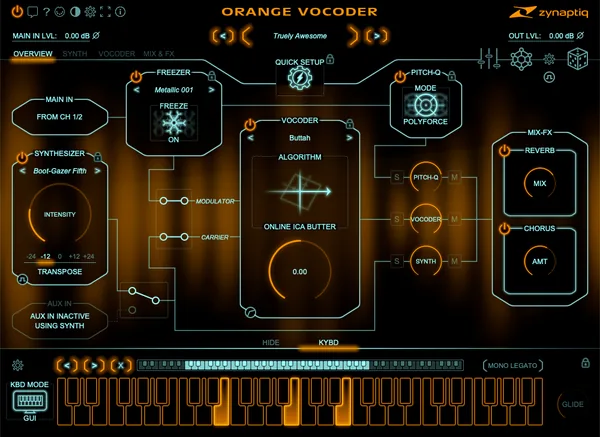
Zynaptiq Orange Vocoder IV ($149, or $79 in a sale that runs until October 25, 2026, with a 30-day free trial) is the deep end of the pool. It has 24 vocoding types, from analog models to speech-model and LPC designs, a full synth section, and freeze and pitch effects.
You need an iLok account to use it, but no iLok dongle. It runs as AU, AAX, VST2 and VST3 on macOS and as AAX, VST2 and VST3 on Windows. The current version is 4.0.6.
In FL Studio: load it on the vocal’s mixer track. Play its synth from a MIDI Out channel, or feed your own synth into its aux input with a sidechain.
8. AutoTune Vocodist (Antares)
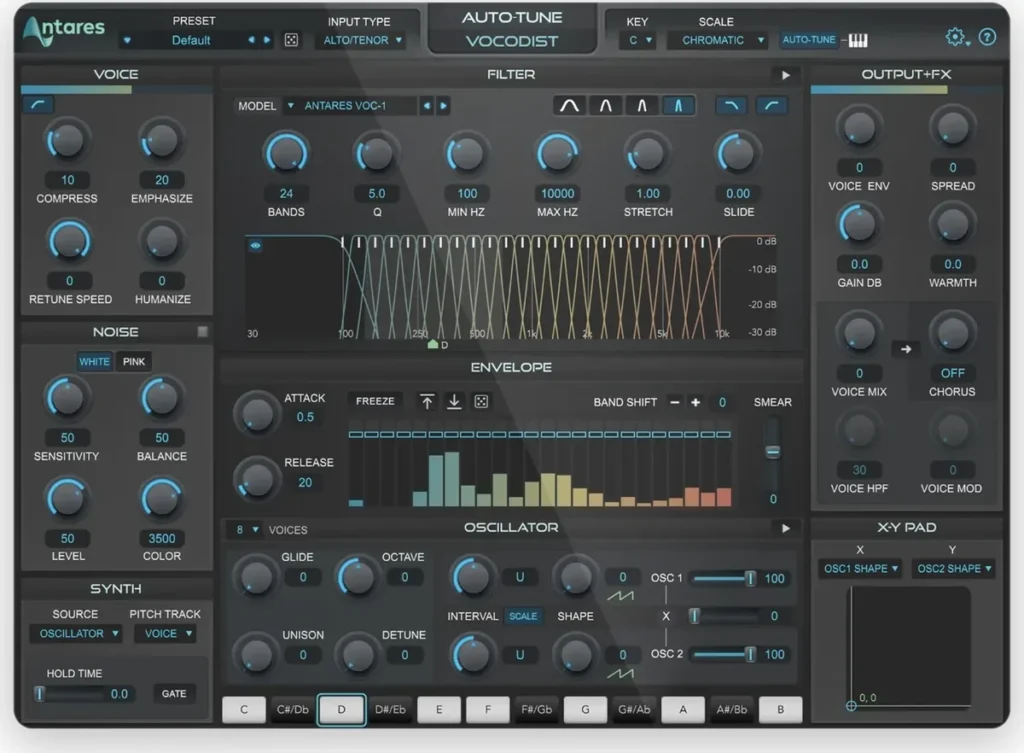
Antares AutoTune Vocodist is a vocoder with AutoTune built in, so you can tune and vocode in one plugin. It models classic vocoders, has an 8-voice synth with two oscillators, and adds tube saturation, chorus and ring modulation.
You control the pitch with your voice or a MIDI keyboard, or use any outside sound through a sidechain. Antares sells it on its own or in AutoTune Unlimited, its monthly subscription, with a 3-day free trial. It needs macOS 14 or newer, or Windows 10 or 11.
In FL Studio: load it on the vocal’s mixer track. Send notes from a MIDI Out channel, or sidechain a synth into it.
9. Arturia Vocoder V
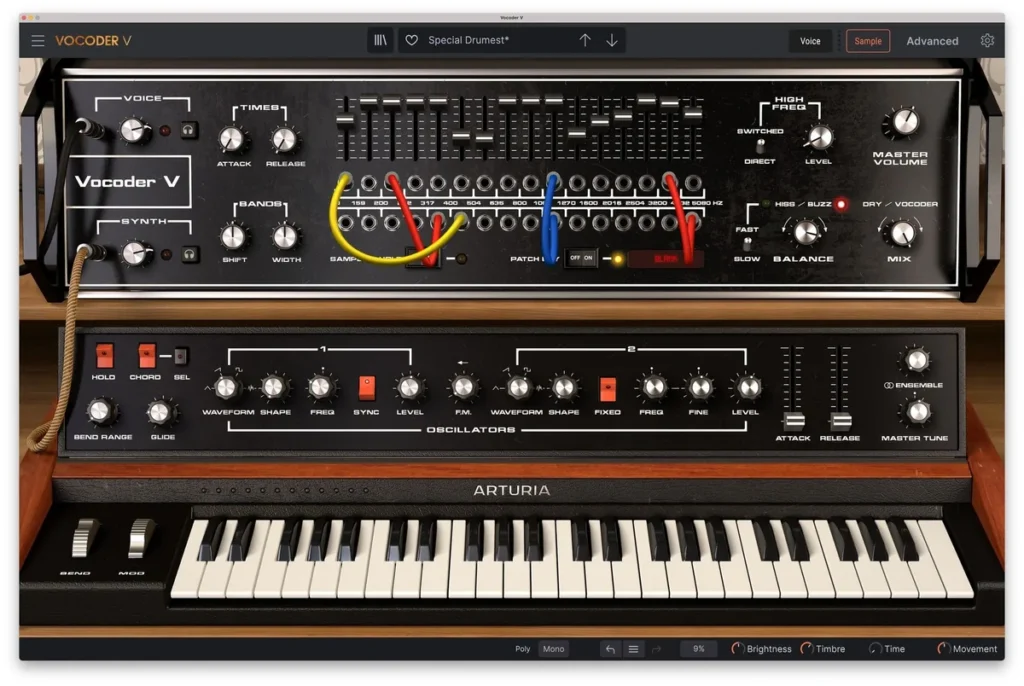
Arturia Vocoder V (€149, with a free demo) models Bob Moog’s 16-band vocoder from 1979. It adds what the original didn’t have: a built-in synth, a sampler and modern effects. Its 16 bands cover 50 to 5,080 Hz, and it can follow the pitch of a vocal loop with no MIDI notes at all.
It runs on Windows 10 or newer (64-bit) and macOS 11 or newer, as a standalone app or a VST, AAX, AU or NKS plugin. It’s also part of Arturia’s V Collection.
FL Studio users, read this first. Arturia’s own support page lists FL Studio, GarageBand and Komplete Kontrol as DAWs that can’t route audio into Vocoder V, because they don’t support sidechaining into virtual instruments. In FL Studio, pick one of the eight above.
What’s the best free or cheap vocoder for beginners?
TAL-Vocoder is the best free vocoder for beginners. It’s free on Windows, Mac and Linux, and it has its own carrier synth, so you don’t need a second synth to start. FBVC is the other free pick, and FL Studio already includes Fruity Vocoder in every edition.
Want something cheap with more sounds? Watch for sales on the paid picks. Waves OVox was $29.99 instead of $149 on October 12, 2026, and Orange Vocoder IV was $79 until October 25. Every paid vocoder above has a free trial or demo, so try before you buy.
How do you set up a vocoder in FL Studio?
Put your voice on one mixer track and a synth playing chords on another. Sidechain the voice to the synth’s track only, then load Vocodex on the synth’s track and keep its default preset. The synth now speaks your words in the notes you play.
Mix Elite’s vocoder tutorial uses Vocodex with your own synth as the carrier, which Image-Line’s manual calls the production method. It doesn’t even need a singer. Max records a Google Translate voice reading his lyrics, chops each word onto the beat, and vocodes that.
- Put the voice on its own mixer track.
- Write chords for a synth on a second track.
- Sidechain the voice to the synth’s track only.
- Load Vocodex on the synth’s track and keep the default preset.
- Polish it with OTT, reverb and EQ.
Step 1: Put the voice on its own mixer track
Double-click the vocal clip and assign it to a new mixer track. Get the timing tight first: cut each word with the Slice tool and move it onto the beat.
Step 2: Write chords for a synth on a second track
Write chords in the Piano roll for a synth, and route that synth to its own mixer track too. The synth is the carrier, the sound you’ll hear. Image-Line’s tip: stereo carriers stay in stereo through Vocodex, so a lush stereo synth often sounds better.
Step 3: Sidechain the voice to the synth’s track only
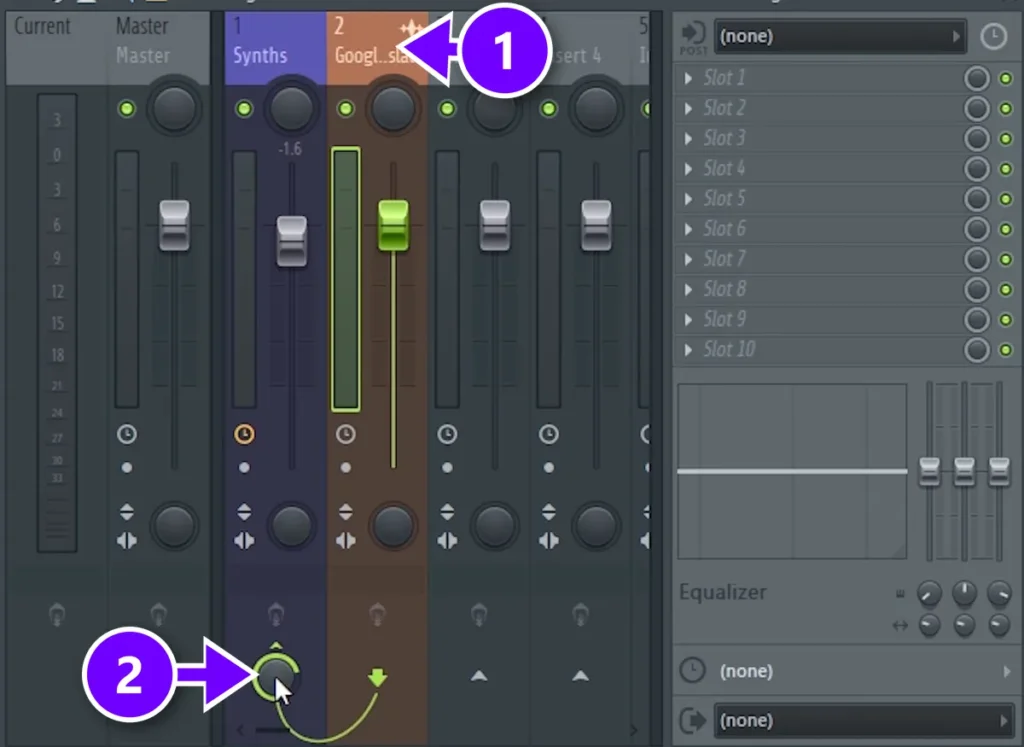
Select the vocal’s mixer track (1). Then right-click the small arrow at the bottom of the synth’s track and choose Sidechain to this track only (2).
This sends the voice to the synth’s track as a control signal and stops it from playing through the Master, so you won’t hear the dry vocal. Max’s own words: “Unroute the vocal from the master channel and assign it only to chords.”
Step 4: Load Vocodex and keep the default preset
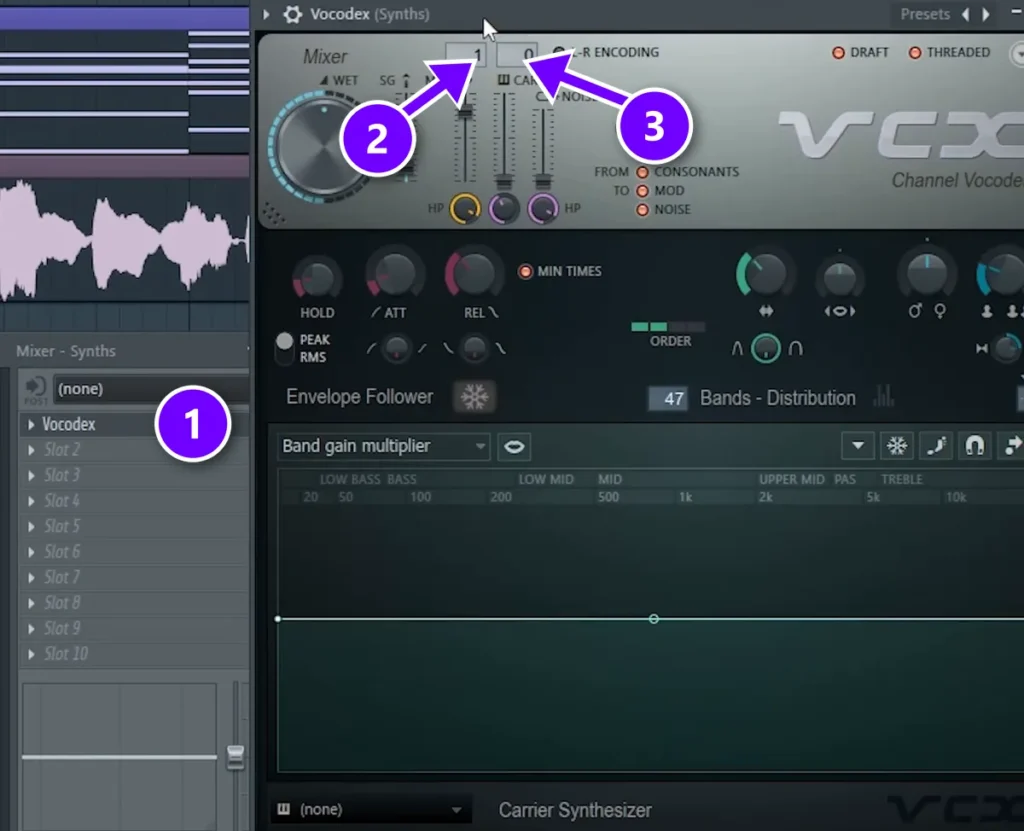
On the synth’s mixer track, load Vocodex in a free slot (1) and keep the default preset. It’s already set up for this routing. MOD reads input 1, your sidechained voice (2), and CAR reads input 0, the synth on Vocodex’s own track (3).
Press play. The synth now speaks your words in the notes of your chords.
Step 5: Polish it with OTT, reverb and EQ
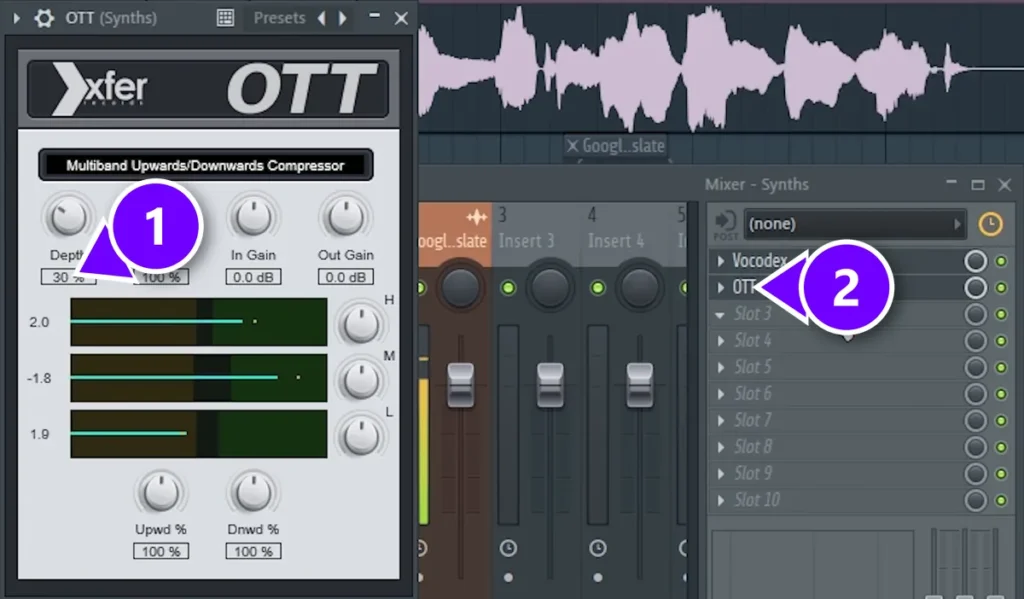
Finish the sound on the same mixer track. Load OTT in the slot after Vocodex (2) and set Depth to about 30% (1). Max says it simply: “This is a free multiband compressor from Xfer, and we need to turn the depth to about 30%.”
Then add a reverb with a bigger size, a low cut and a longer decay, and an EQ. Max’s EQ trick: “Take one band, narrow it and search for harsh frequencies. When you found it, just go down.”
Words hard to understand? Image-Line’s manual suggests compressing the voice before it reaches the vocoder, and mixing in a little noise with the NOISE slider to bring back s and t sounds.
How do you play a vocoder’s built-in synth with MIDI in FL Studio?
Add a MIDI Out channel, give it a port number, and set the vocoder’s MIDI input port to the same number in its wrapper settings. Then write your chords in MIDI Out’s Piano roll. FL Studio doesn’t send Piano roll notes straight to effects, so this is the extra step.
Vocoders with a built-in synth, like TAL-Vocoder, FBVC or Softube Vocoder, need it. Image-Line’s MIDI Out plugin handles it:
- Load the vocoder in a slot on the vocal’s mixer track.
- Add a MIDI Out channel in the Channel rack and give it a Port number, for example 1.
- Open the vocoder’s plugin window, click the wrapper options icon at the top, and set its MIDI Input port to the same number.
- Write your chords in MIDI Out’s Piano roll and press play.
The vocoder now plays its own synth on your notes, shaped by the voice on that track. Image-Line’s manual calls this using MIDI Out to reach features of a VST plugin that the Piano roll can’t.
How do you set up a vocoder in Ableton Live or Logic Pro?
In Ableton Live, put the Vocoder on the vocal track, set Carrier to External and pick the synth’s track in Audio From. In Logic Pro, load EVOC 20 PolySynth as the instrument, choose the vocal track in its Analysis Input menu, and play the notes on your keyboard.
Ableton’s manual suggests choosing Post FX in the bottom Audio From chooser and soloing the voice track to hear only the vocoded sound. Its Vocoder comes with Live Standard and Suite, not Intro. In Logic, Apple’s guide says to mute the vocal track that feeds the vocoder, so you only hear the result.
Vocoder vs talkbox vs autotune: what’s the difference?
All three can sound robotic, but only a vocoder turns a synth into a voice. A talkbox shapes a synth with the player’s mouth, through a tube, and autotune only changes the pitch of your own voice.
- A vocoder uses your voice to shape a separate synth. You hear the synth, playing whatever notes you give it.
- A talkbox is a hardware effect. The synth’s sound goes through a tube into the player’s mouth, and the mouth shapes it into words. VocalSynth 2 and OVox include talkbox-style modes.
- Autotune changes your own voice, pulling each note to the nearest note in your key. Fast settings give the hard, stepped robot sound. Here are the best free autotune plugins.
- A pitch shifter moves your whole voice up or down for deep or chipmunk voices, with no synth involved. See the best free pitch shifter plugins.
Are paid vocoder plugins worth it?
Not to get started. Free TAL-Vocoder and FBVC, or the vocoders that come with FL Studio, all make the classic robot voice. Paid vocoders earn their price with extras: built-in synths and presets, talkbox and harmony modes, and tools like Softube’s Unvoiced and Freeze.
Mix Elite’s vocoder tutorial builds its sound around Vocodex, which comes with FL Studio Producer Edition, and Xfer’s free OTT. Try the free trials before you buy anything.
Want a clean, tuned vocal instead of a robot? Our guide on how to tune vocals in FL Studio starts with Newtone. And once your vocoder part sounds right, mix it like any vocal, following our guide on how to mix vocals.
Vocoders we left out
XILS 201 Vocoder was on our old list. But xils-lab.com wouldn’t load when we checked on October 7 and again on October 12, 2026, so we couldn’t confirm its price or versions on the maker’s site, and we left it out for now.
The best vocoder plugins at a glance
Here are all nine in one place, with what each one cost when we checked on October 12, 2026. Some stores, like Waves, change their prices often with sales.
| Plugin | Best for | The catch |
|---|---|---|
| Vocodex In FL Studio Producer and up | FL Studio users who want deep control. | Not in Fruity Edition (Fruity Vocoder is). |
| TAL-Vocoder Free | A free, classic early-80s vocoder sound. | 11 bands, fewer than most paid ones. |
| FBVC Free | A free model of a 1978 KORG vocoder. | In FL Studio, its synth needs a MIDI Out channel. |
| Softube Vocoder $99 | Classic vocoder sound with its own synth. | In FL Studio, its synth needs a MIDI Out channel. |
| iZotope VocalSynth 2 $199 | Five voice effects in one, talkbox included. | The priciest pick here. |
| Waves OVox $149 list ($29.99 on sale) | Chords, harmonies and talkbox from one voice. | Prices change with Waves’ sales. |
| Orange Vocoder IV $149 ($79 on sale) | Deep sound design: 24 vocoder types. | Needs an iLok account. |
| AutoTune Vocodist Paid or subscription | A vocoder with AutoTune built in. | Macs need macOS 14 or newer. |
| Arturia Vocoder V €149 | The vintage 1979 Moog vocoder sound. | Arturia says it can’t take a voice in FL Studio. |
DAY 5 OF THE 7-DAY MUSIC PRODUCER COURSE
Robot or not, make your vocals sound finished
Day 5 of the 7-Day course is about recording and mixing vocals: setting up your room, the V.O.C.A.L. mixing formula, and the mistakes that make vocals sound amateur. You also get 10 copy-and-paste vocal processing chains, practice acapellas, and a list of the best free VST plugins for mixing vocals. It’s taught in FL Studio (the free trial works), about 45 minutes a day, and on day 7 a pro gives you feedback on your finished track. It’s $27, and you get 60 days to decide if it was worth it.
Frequently asked questions
What is the best vocoder plugin?
For FL Studio users, it’s Vocodex, which comes with Producer Edition and up. The best free vocoder is TAL-Vocoder, on Windows, Mac and Linux. If you want to pay, Softube Vocoder ($99) is the classic choice, and iZotope VocalSynth 2 ($199) adds a talkbox and other voice effects.
Is there a free vocoder plugin?
Yes. TAL-Vocoder and FBVC (the Full Bucket Vocoder) are both free, with direct downloads and no account. TAL-Vocoder has 11 bands and an early-80s sound. FBVC has 20 bands and models the KORG VC-10. FL Studio also includes Fruity Vocoder in every edition.
How do you make a vocoder follow your melody?
Feed it two signals: your voice as the modulator and a synth playing the melody or chords as the carrier. In FL Studio, sidechain the vocal to the synth’s mixer track and load Vocodex there. Vocoders with a built-in synth, like TAL-Vocoder, follow the MIDI notes you send them instead.
Does FL Studio have a vocoder?
Yes, two. Vocodex comes with FL Studio Producer Edition and up, and Fruity Vocoder comes with every edition, including Fruity. Load the vocoder on the synth’s mixer track, sidechain your vocal to that track only, and the synth will speak your words in the notes you play.
Do Ableton and Logic have a built-in vocoder?
Yes. Ableton Live Standard and Suite include the Vocoder effect, but Live Intro doesn’t. Logic Pro has EVOC 20 PolySynth, a vocoder and synth in one with up to 20 bands. The third-party plugins on this list work in both DAWs too.





