



“My design leads me to speak of forms changed into new bodies.”
Graillon 3 Free Edition by Auburn Sounds is the best free pitch shifter VST in 2026: it moves a voice up to 12 semitones up or down, keeps it human with formant control, and adds auto-tune, on Windows, Mac and Linux. For bigger, clean shifts on any sound, Inner Pitch 2 Free goes two octaves each way. The simplest to learn is Kilohearts Pitch Shifter, free with an account.
You have one vocal take, and you want it to sound like someone else. Drop it an octave and it turns dark and heavy, perfect for an intro. Push it up and you get that sped-up soul sound behind so many sample beats, and none of it has to cost a thing.
We checked all nine on their makers’ sites in October 2026 and dropped the old favorites that are now dead or 32-bit only. FL Studio users already own a pitch shifter, too. Below is what each plugin does best, its catch, and how to use it in FL Studio, with screenshots from Mix Elite’s videos.
Table of Contents
Pitch shifter, pitch correction or formant: which one do you need?

Use a pitch shifter to move a whole sound up or down, pitch correction (auto-tune) to snap sung notes to your song’s scale, and a formant shifter to change how big a voice sounds without changing its notes. People mix these words up a lot. The right plugin depends on the job.
- Pitch shifting moves a whole sound up or down without changing its speed. Use it for deep voices, chipmunk voices, octave layers and harmonies.
- Pitch correction, often called auto-tune, pulls each sung note to the nearest note in your song’s scale. Set it fast for the hard, robotic sound, or slow so nobody notices.
- Formant shifting changes the size and character of a voice without changing its notes. It’s why a pitched-down voice can still sound human instead of like a monster.
- Frequency shifting moves every frequency by the same number of Hz, so the harmonics stop lining up. It sounds metallic and strange, which is fun for sound design but no use for tuning.
Graillon 3 does the first three jobs. MAutoPitch corrects and shifts formants, but it only moves the pitch itself by up to 100 cents, which is one semitone. A semitone is one step on a piano keyboard, so 12 semitones make a full octave. Inner Pitch, Pitchproof and Kilohearts Pitch Shifter are pure shifters, and GSnap only corrects.
The 9 best free pitch shifter VST plugins, reviewed
Each pick below has what it does, what it runs on, and an honest pro and con.
1. Graillon 3 Free Edition (Auburn Sounds)
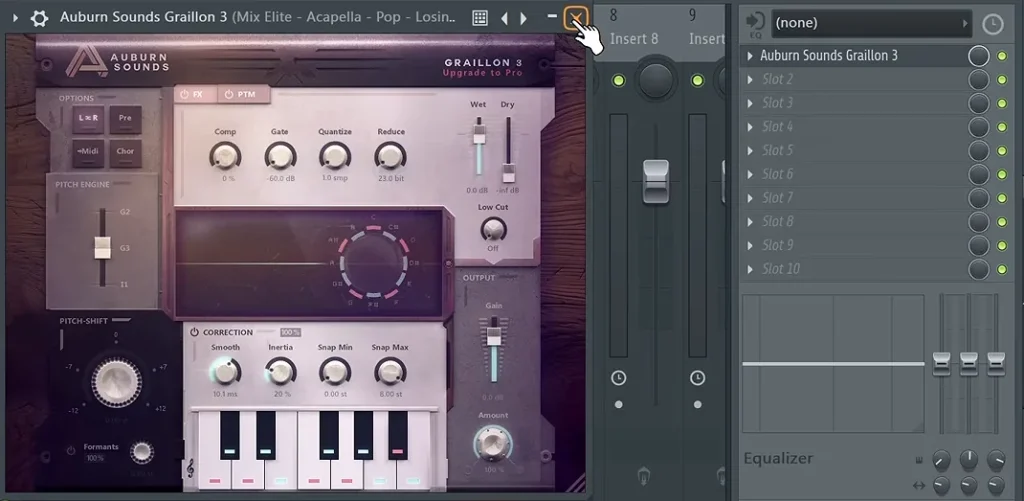
Graillon is a live voice changer and auto-tune in one plugin. It’s our top pick. The free edition gets the Pitch Shift knob, formant control, pitch correction with all three pitch engines, and a compressor, gate, chorus, preamp and bitcrusher. It’s the auto-tune that Mix Elite’s free 4.5-hour FL Studio course installs and uses on a pop vocal.
Version 3.2 came out in February 2026, and it still has the old Graillon 2 sound as its G2 engine. It runs on Windows 7 and up, macOS 10.15 and up (Apple Silicon included) and Ubuntu Linux. You get CLAP, VST3, VST2, AU, AAX and LV2 versions. The download is a plain zip file, with no account or email needed.
Pros: natural shifts, real-time tuning, and a VST2 version that works in OBS. Cons: the vocal doubler, pitch-tracking modulation and Tune Keyboard are paid only. The full edition costs $38.67 at its regular price.
2. Inner Pitch 2 Free (Auburn Sounds)
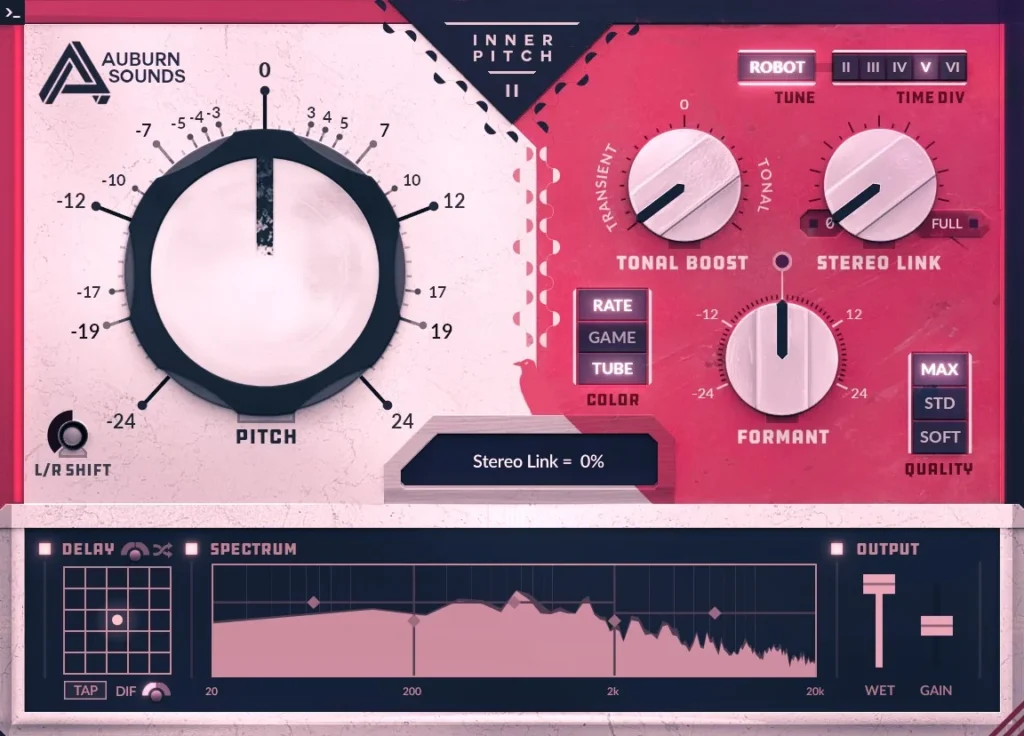
Inner Pitch is the clean, big-range shifter from the same company. Its Pitch and Formant controls each go two full octaves up or down, and you can shift the left and right sides apart for a wide sound. It can also make the endless rising or falling “infinite pitch” effect.
The free edition gets the full feature set from the product page. The paid edition adds Robot pitch correction plus the Quality and Time Div settings. Version 2.1 came out in February 2026, with the same systems and formats as Graillon.
Pros: two octaves each way, natural formants, and great octave layers under vocals, bass and synths. Cons: it adds at least 17.8 ms of delay, which you may notice if you sing through it live.
3. MAutoPitch (MeldaProduction)
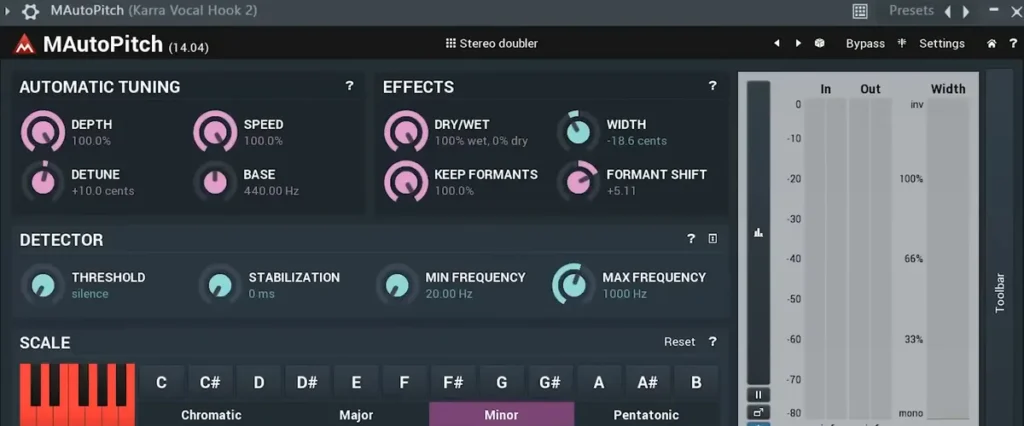
MAutoPitch is free auto-tune with two extras: formant shift, 12 semitones each way, and a Width control. Width detunes the left and right sides by up to 100 cents. Melda’s manual says a small amount makes one vocal sound double-tracked. Mix Elite’s video of must-have free plugins shows it in action.
It’s part of Melda’s free effects bundle, and the €49 upgrade is optional. It runs on 64-bit Windows 10 and 11 and on macOS 10.14 and up, Intel or Apple Silicon. Since version 17, Melda plugins install only through MPluginManager, Melda’s own installer app, and the official steps include logging into your account.
Pros: light, fast, with formant shift and doubling built in, and it works in OBS. Cons: the pitch itself only moves one semitone, so it’s not for big shifts. You also need an account to install it.
4. Pitchproof (Aegean Music)
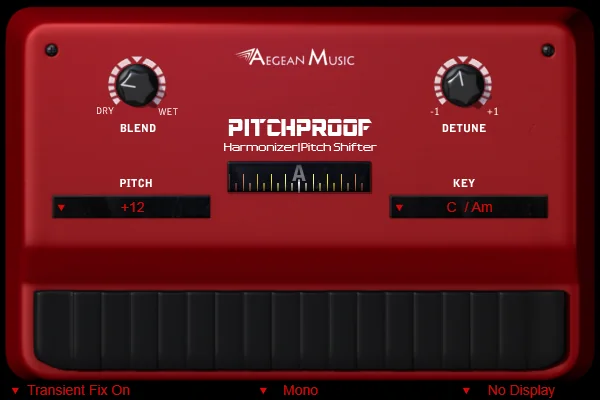
Pitchproof is the guitar player’s pick. Its Pitch menu gives you set intervals, like 7 semitones up or down, or harmonies from a 2nd to a 7th. Set Key to your song’s key (C also covers A minor), mix the dry and shifted sound with Blend, and add just a little Detune to thicken it.
It’s free, and it’s the full version, with a built-in tuner and two MIDI modes. Downloads are direct, with no account. Windows gets 32-bit and 64-bit builds, and the Mac build (macOS Monterey to Tahoe) comes as VST3 and AU.
Pros: whammy-style shifts and in-key harmonies for guitar or vocals. Cons: the range is only one octave up or down.
5. Kilohearts Pitch Shifter
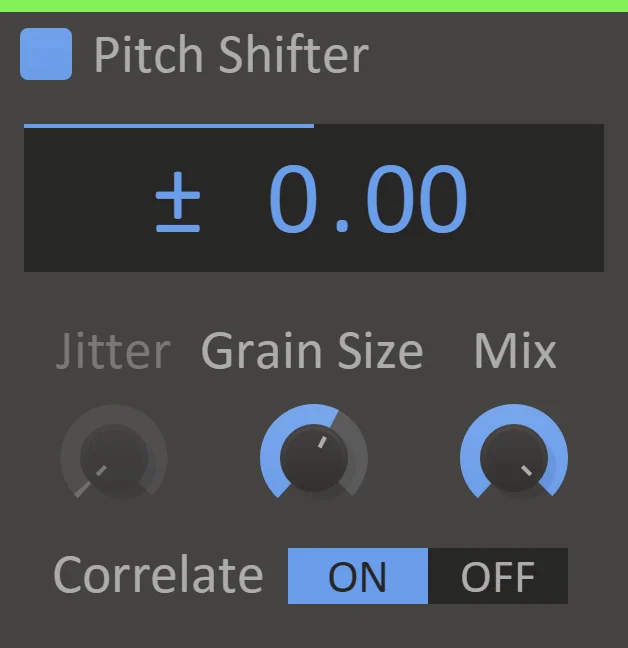
Kilohearts Pitch Shifter does one job well. It moves a sound up or down in semitones, with a Mix knob to blend it in. Turn Correlate on for a clearer sound. Lower Mix to use it as a quick harmony layer under a lead.
It’s free with a Kilohearts account, as part of Kilohearts Essentials. You install it with the Kilohearts Installer, which also pulls in about 1 GB of extra content. It runs on 64-bit Windows and macOS, Apple M chips included, as VST2, VST3, AU and AAX.
Pros: simple and clean, and Essentials adds a free Frequency Shifter and Formant Filter. Cons: you need the account and the installer, and Correlate can struggle on pads.
6. GSnap (GVST)
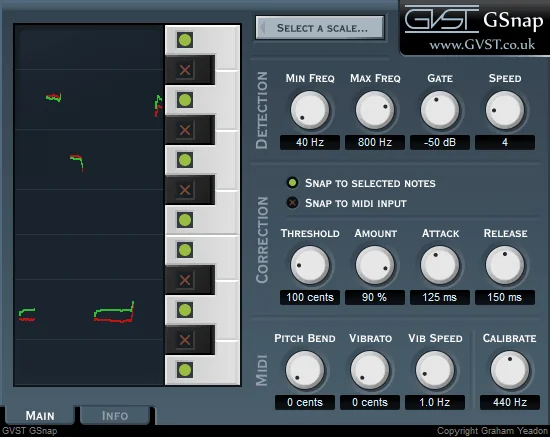
GSnap is a classic free auto-tune, and it’s still a free download at gvst.uk. It has no pitch shift knob, so it’s a pick for correction only. You set the range it listens to, then Threshold, Amount, Attack and Release. In MIDI mode, it bends your vocal to the notes you play.
Its manual says a Threshold of 100 cents covers a normal scale, or 150 for a pentatonic one. A very fast Attack gives the hard, artificial snap. It only works on one voice at a time, and it comes as VST2 only, for Windows, Mac (Apple Silicon included) and Linux.
Pros: free, light, and you can play the melody it snaps to. Cons: it only corrects, and its MIDI mode won’t work in OBS.
7. MIDI Choir (MV’s Plugins)

MIDI Choir turns one voice into a choir. It re-pitches a single vocal to whatever notes you play on a MIDI keyboard, so you can play chords and hear your voice sing them. It also has a gate, a compressor and a reverb. Version 3.1 is free from the developer’s site, as a 64-bit or 32-bit VST2 or a standalone app.
Pros: instant harmonies from one take. Cons: it’s Windows only, and the developer tells Mac users to use Windows emulation. Since it needs MIDI notes, it won’t work in OBS either.
8. Vocal Pitch Shifter (Stone Voices)
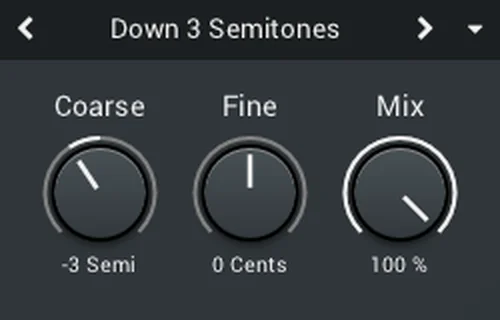
Stone Voices’ Vocal Pitch Shifter is plain and quick. It does 12 semitones up or down, cents for fine-tuning, and a mix control. It has low latency, which means very little delay, so it suits live singing and streaming. It’s a direct download with no account, for Windows 8 to 11 (VST2 or VST3) and macOS 10.11 and up (VST2, VST3 or AU).
Pros: fast, simple, and its VST2 version works in OBS. Cons: it only does pitch, fine-tune and mix, and the page doesn’t mention Apple Silicon.
9. PitchNasty (Airwindows)
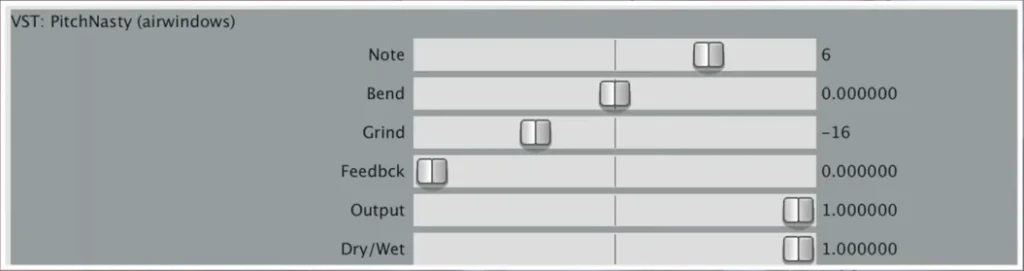
PitchNasty is a gritty pitch effect for sound design. Note moves the pitch in semitone steps, 12 each way, and Bend adds a smooth shift on top. Grind and Feedback rough it up. Airwindows suggests layering about 30% of a pitched copy under a snare to thicken it.
It’s free and open source. There’s zero latency, too. You get a 64-bit VST2 on Windows, AU and VST2 on Mac (M1 and Intel), and Linux builds, and the Airwindows Consolidated build adds CLAP, VST3 and LV2. Its sister plugin, PitchDelay, puts the pitch shift inside a delay.
Pros: zero latency, a tiny download, and fun on drums and samples. Cons: it’s made for effects, not for natural vocals.
Bonus: Valhalla Freq Echo, a frequency shifter
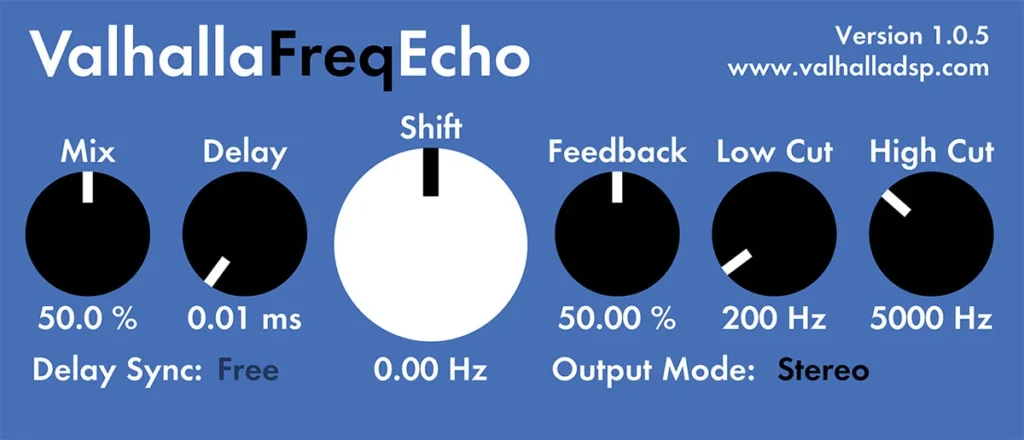
Valhalla Freq Echo is free, but it’s a frequency shifter with an analog-style echo, not a pitch shifter. It moves every frequency by a set number of Hz, so it won’t keep a vocal in tune. For metallic, spacey sound design, though, it’s great. It runs on Windows and on Mac (Intel and Apple M chips) as VST2, VST3, AAX and AU.
Which free pitch shifter is easiest for beginners?
Stone Voices Vocal Pitch Shifter and Kilohearts Pitch Shifter are the easiest to learn. Set the pitch, set the mix, done. Kilohearts Pitch Shifter is free with a Kilohearts account. For vocals, Graillon 3 Free is the easiest all-in-one, with its Pitch Shift knob and Formants switch right on the front.
Two newer free shifters keep the controls just as simple, but both ask you to sign up first:
Pitchmunk (Vox Samples)
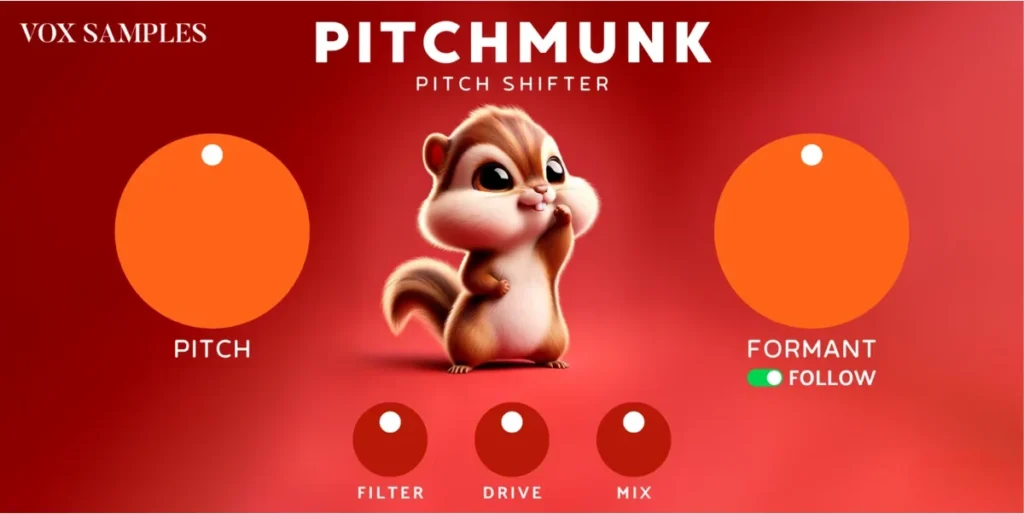
Pitchmunk keeps everything on one panel. Its big Pitch knob covers two octaves up or down, 48 semitones in all, and a Formant knob with a Follow switch sits next to it. Filter, Drive and Mix finish the sound.
It’s free, but there’s no download button. Instead, Vox Samples emails it to you as part of a bundle of 15-plus free plugins. It runs on 64-bit Windows as VST3 or AAX, and on macOS as AU, VST3 or AAX.
Pros: a huge pitch range with just a few big knobs. Cons: you have to sign up with your email, and with no VST2 version listed, it won’t load in OBS.
AV Pitchshifter (AngelicVibes)
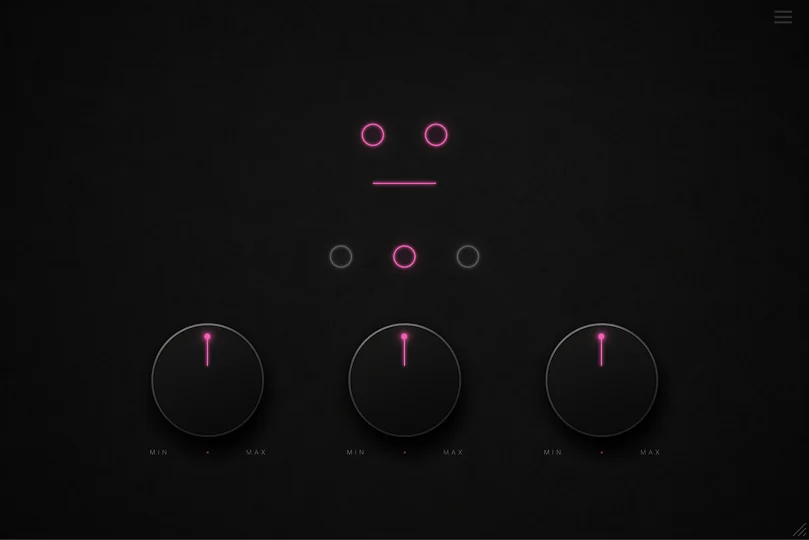
AV Pitchshifter has three knobs. Semitones moves the pitch up to 12 semitones up or down, Cents fine-tunes it by up to one semitone, and Mix blends it in. Three buttons switch between its modes, which AngelicVibes calls Studio Shift, Spectral Shift and Window Shift.
It’s free, but you need a free AngelicVibes account to download it. It comes as VST3 for Windows and Mac, plus AU on Mac, and version 1.0.2 came out in July 2026.
Pros: simple controls and three sound modes to try. Cons: you need an account first, and with no VST2 version, it won’t load in OBS.
How to pitch shift in FL Studio with the tools you already have
Before you download anything, look at what FL Studio already gives you. The edition notes come from Image-Line’s compare page, checked in October 2026.
- The Sampler’s Time stretching section: shift a sample’s pitch without changing its speed.
- Edison (Producer Edition and up): an audio editor with a pitch and formant tool.
- Newtone (Signature Bundle and up): pitch-correct a vocal note by note.
- Pitcher (Signature Bundle and up): real-time pitch correction and harmonies.
- Pitch Shifter (All Plugins Edition only): its Voice tab shifts 12 semitones each way with formant control, and its Music tab suggests a 50% mix for two-part harmonies.
One detail from Mix Elite’s free FL Studio course: in the Producer Edition, Newtone runs as a trial, so you can use it but can’t export the tuned vocal.
Shift pitch without changing speed in the Sampler
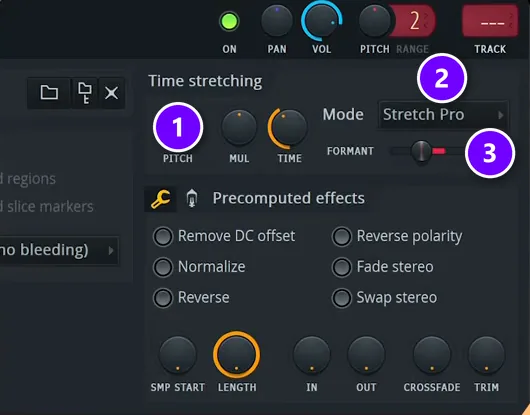
This trick comes from a 36-second Mix Elite short. Copy your vocal onto a new Playlist track, right-click the copy and choose Make unique, so your changes don’t touch the original. Double-click the copy to open it.
In the Time stretching section, set Mode to Stretch Pro (2). Then turn PITCH (1). The short drops it by 700 cents, which is 7 semitones. Move the FORMANT slider (3) to change the voice’s character, then play the copy under the original vocal. Here’s the whole thing:
Shift formants in Edison
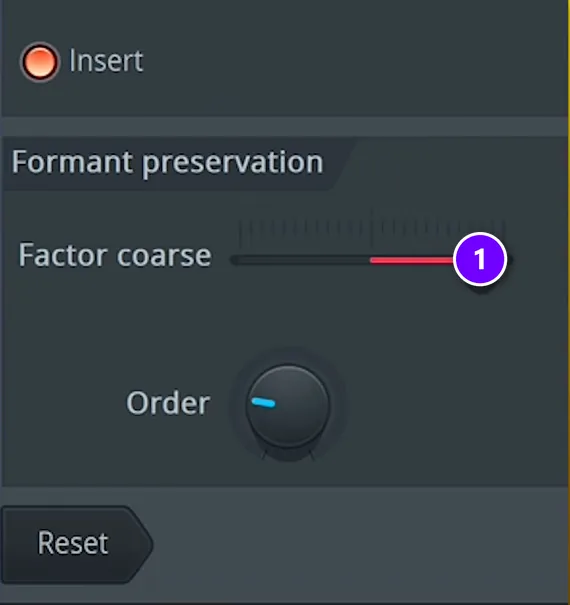
Edison is FL Studio’s audio editor. It can shift formants on its own. In another short, the vocal is opened in Edison from its settings with Edit in audio editor. Then Alt+T opens the window with the formant settings. Under Formant preservation, drag Factor coarse (1) right or left until the voice has the size you want.
Open a vocal in Newtone
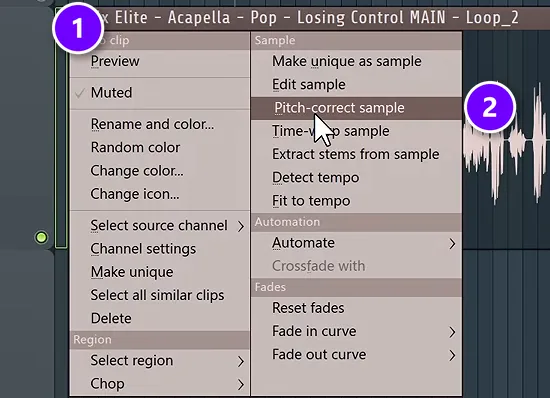
Newtone is FL Studio’s note-by-note pitch editor, and the free course uses it on a pop vocal. Click the menu at the top left of the audio clip (1) and choose Pitch-correct sample (2). The vocal opens in Newtone.
Snap the vocal to your song’s scale
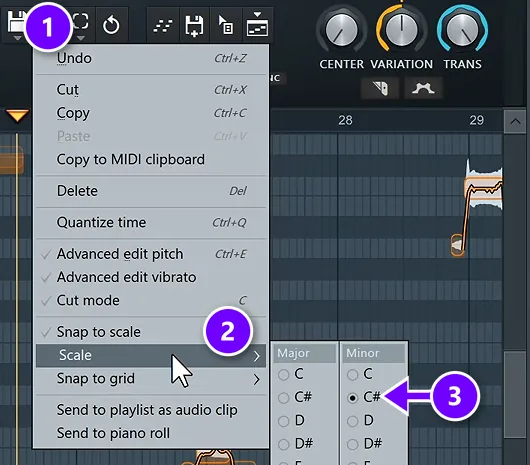
Open the Edit menu, the scissors icon (1), then go to Scale (2) and pick your song’s key (3). Turn on Snap to scale in the same menu. Don’t know the key? Drop it into the analyzer on tunebat.com. In the course, it came back as C# minor.
Set Center, Variation and Transition
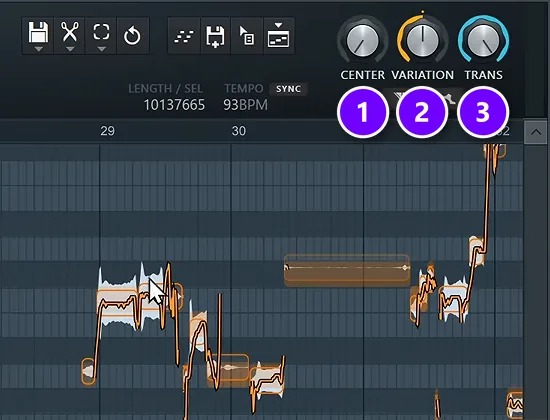
Now use the three knobs at the top. CENTER (1) moves each note’s average pitch onto the right note. VARIATION (2) keeps or flattens the wobble inside each note, and TRANS (3) sets how the voice glides from note to note.
Turn Center up first, then play with Variation, but never take Variation all the way down. Max, the founder of Mix Elite, warns about Transition: “if you change the transition to 0% it will be completely robotic.” For a deeper walkthrough, see our guide to tuning vocals like a pro.
How to install a free pitch shifter in FL Studio
Here’s the install with Graillon 3 Free, the way Mix Elite’s free 4.5-hour FL Studio course does it. The same steps work for every plugin on this list. Our full guide on how to install VST plugins in FL Studio covers the folders, plus the fixes for when a plugin won’t show up.
The video is long, so jump ahead: the vocal tuning part starts at about 3:25:50, and Graillon comes in at 3:29:09.
Step 1: Download the free edition and pick VST3
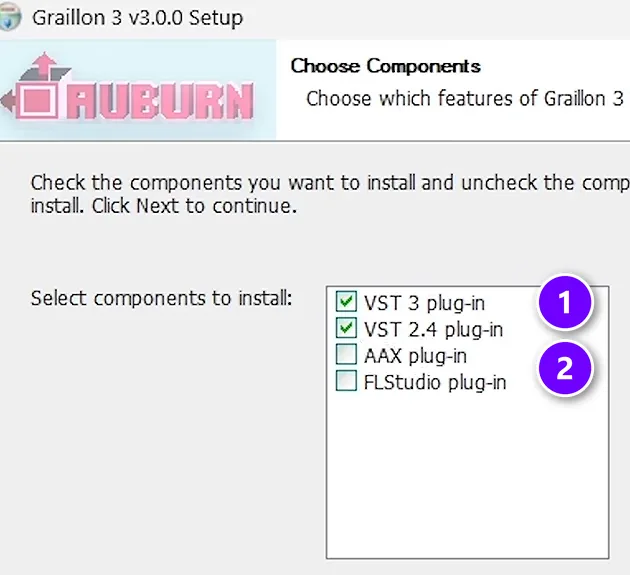
Download the Free Edition from the Auburn Sounds website and run the installer. When it asks which components you want, keep VST 3 and VST 2.4 ticked (1). Leave AAX and the FLStudio plug-in unticked (2).
AAX is for a different DAW. A DAW is the music app you make songs in. The course skips the FL Studio version too, so your projects open the same way on any computer. It sticks with VST3.
Step 2: Scan for it in FL Studio
In FL Studio, open Options, then File settings, then Manage plugins, and click Find installed plugins. You don’t have to star it. Every installed plugin shows up under More plugins in a mixer slot, starred or not.
Step 3: Put it on your vocal’s mixer track
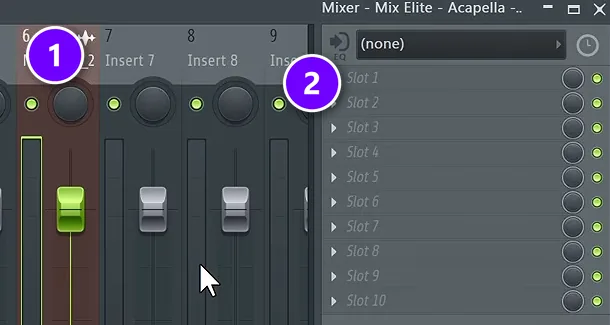
A pitch shifter is an effect, so it goes on a mixer track, not in the Channel Rack. First, send the vocal to its own mixer track. Double-click the audio clip and pick a track number in its settings, or select the channel and press Ctrl+L.
Then click the vocal’s mixer track (1), click an empty slot (2), and choose Graillon 3.
How to use Graillon 3 to shift and tune a vocal
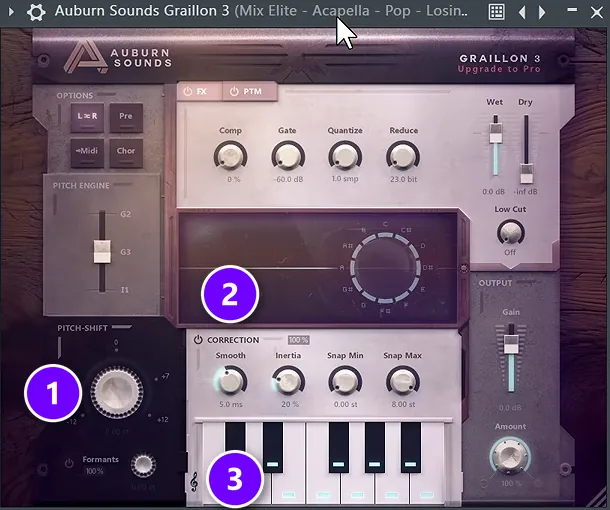
To shift the pitch, turn PITCH-SHIFT (1). Right-click it to snap to whole semitones, so the new pitch stays in key. The Formants switch under it keeps the voice human. If a big shift sounds harsh, Auburn’s guide says to pull Formant Amount back.
For auto-tune, use the Correction section (2). First, click the small clef icon next to the keyboard (3) and pick your song’s scale. Without a scale, Graillon tries to stick the vocal to every note, when a song in one key only uses seven of them.
Then set Smooth. The lower the milliseconds, the faster and more robotic the tuning gets. For a gentle tune, Max suggests: “If you want to have very soft effect, go to something like 20 milliseconds.” The course settles on 10 ms. He’s honest about the plugin, too: “This is not the best sounding autotune plugin.” Still, he says you can definitely work with it and learn a lot.
One more FL Studio trick: tweak Smooth, then go to Tools, Last tweaked, Create automation clip. Now you can draw in more or less tuning for each part of the song.
How to use MAutoPitch for quick auto-tune and wider vocals
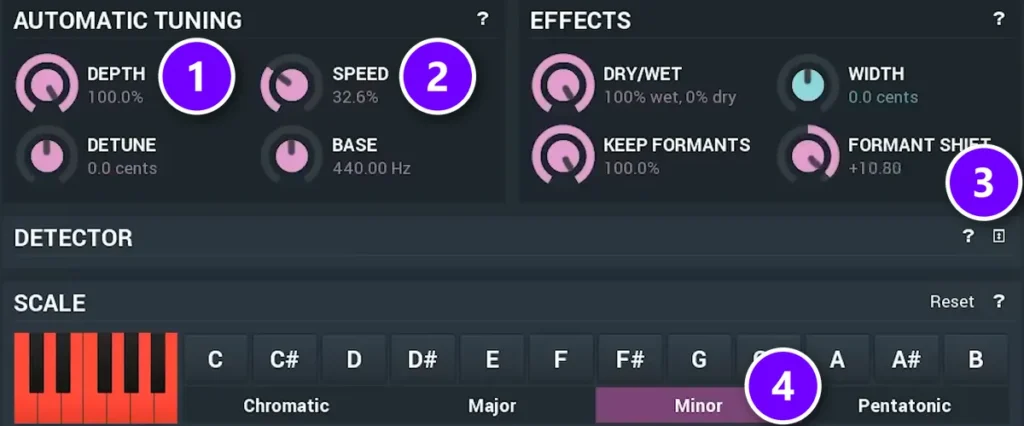
Load MAutoPitch on the vocal’s mixer track the same way. DEPTH (1) sets how much correction you get, and SPEED (2) sets how fast it grabs each note. In Mix Elite’s video, they sit at 100% and about 33%. Pick your key and scale at the bottom, which is Minor here (4).
FORMANT SHIFT (3) moves the character of the voice up or down, by up to 12 semitones, without changing the notes. For a wider vocal, turn up WIDTH a little. Melda’s manual says that makes one vocal sound double-tracked and hard-panned.
How do you pitch a vocal up an octave without the chipmunk sound?
Shift the pitch up 12 semitones but keep the formants where they are. Formants are the resonances that tell your ear how big a voice is, and when they rise with the pitch, you get the helium, chipmunk sound. Use a shifter with formant control, like Graillon 3 or Inner Pitch 2, or FL Studio’s e3 Mono mode.
Here’s how with these tools:
- Graillon 3 Free: turn PITCH-SHIFT to +12 and leave the Formants switch on. If the high voice sounds harsh, Auburn’s guide says to pull Formant Amount back a little.
- Inner Pitch 2 Free: Pitch and Formant are separate controls with two octaves of range each, so you can raise the pitch an octave and set the formant on its own until the voice sounds natural.
- FL Studio’s Sampler: double-click the clip and, in the Time stretching section, set Mode to e3 Mono. Image-Line built it for vocals and solo instruments, and it keeps the formants in place automatically. Then raise PITCH, which counts in cents: 1,200 cents is one octave.
- FL Studio’s Pitch Shifter (All Plugins Edition): in the Voice tab, set Formant Correction to 0%. Image-Line says that keeps the formants where they are, for the most natural sound.
Then use it as a layer. Keep the original vocal on top and tuck the shifted copy under it, the way the Mix Elite short above plays its pitched-down copy under the original.
Why does a pitch shifter add delay, and how do you fix it?
A pitch shifter works on short slices of audio, so the shifted sound comes out a split second late. That delay is called latency. FL Studio lines tracks back up for playback, so you mostly hear it when you sing or play through the plugin live. Lower your buffer, or pick a low-latency shifter for live use.
Here’s how to fix it, from Image-Line’s manual and Mix Elite’s vocal recording video:
- Lower the buffer. Open Options, then Audio settings, and set the buffer length as low as it goes before the sound starts to crackle. Image-Line calls 10 ms (441 samples) a good target.
- Use your interface’s own driver. If you record through an audio interface, choose its own ASIO driver in Audio settings. Image-Line says it can run at a lower latency than FL Studio ASIO.
- Record in a lighter project. A busy project may not run at a low buffer, so the vocal recording video suggests recording in a separate project.
- Pick a low-latency shifter for live use. Airwindows lists PitchNasty as zero latency, and Stone Voices says its Vocal Pitch Shifter has low latency. Some auto-tune plugins also have a low-latency setting.
- Let PDC do its job while mixing. FL Studio’s plugin delay compensation (PDC) sets a track delay to line up tracks that run late because of their effects, so the shifted vocal stays in time on playback.
Is Waves SoundShifter free? The best free alternatives
No. Waves SoundShifter has no free version, even though lots of people search for a free download. Its full price is $129, though Waves runs sales often, and it was $39.99 when we checked in October 2026.
You can only try it for free in two ways. One is a demo through Waves Central, which needs an account and mutes the audio every so often. The other is the 7-day Creative Access trial, which asks for payment details. Also, only the Pitch part of SoundShifter works as a normal insert in every DAW, since its Graphic and Parametric parts are Pro Tools AudioSuite only.
For the same jobs for free, use Graillon 3 for vocals, Inner Pitch 2 for big, clean shifts on anything, or Pitchproof for guitar. And skip any site that offers a free SoundShifter download, because it isn’t Waves.
Which free pitch shifter is best for guitar, vocals or streaming?
Graillon 3 Free is the pick for vocals, Pitchproof for guitar, and any shifter with a VST2 version for streaming in OBS. Here’s the full breakdown:
- Vocals and auto-tune: Graillon 3 Free.
- Guitar and whammy-style shifts: Pitchproof. For a paid whammy-style plugin, Kuassa Whammo is $39.
- Deep or chipmunk voices: Inner Pitch 2 or Graillon 3, with formants on so the voice still sounds human.
- Harmonies: Pitchproof for in-key intervals, or MIDI Choir on Windows if you want to play them on a keyboard.
- Octave layers under bass and synths: Inner Pitch 2.
- Live streaming in OBS: OBS only loads VST 2.x plugins and passes no MIDI. Graillon, MAutoPitch, Inner Pitch, Kilohearts Pitch Shifter and Stone Voices work, while VST3-only plugins and MIDI Choir don’t.
- A Mac with Apple Silicon: Graillon, Inner Pitch, MAutoPitch, Kilohearts Pitch Shifter, GSnap and PitchNasty all list Apple Silicon support.
Free pitch shifters to skip in 2026
Older lists, including the first version of this one, still recommend these. Here’s why they’re out:
- Stolon (Novaflash): the official folder has no download anymore, and the readme says development has stopped.
- Son Of A Pitch (Saltline): the maker’s website is gone, and only third-party copies remain.
- dShift (whiteLABEL): still a download, but 32-bit Windows only, and the developer has no plans for 64-bit.
- FreSh (Max Project): 32-bit, for Windows XP to 8.1, and it’s a frequency shifter anyway.
- Voloco: no longer free. It’s a $14.99 a month subscription now.
- KeroVee (g200kg): last updated in 2013.
- BlueLab PitchShift: its official website no longer loads.
Paid pitch shifters worth it when free isn’t enough
Free covers most jobs. If you outgrow it, these are the upgrades, at regular prices checked in October 2026:
- Graillon 3 full edition, $38.67: adds the Vocal Doubler, pitch-tracking modulation and the Tune Keyboard.
- Little AlterBoy (Soundtoys), $99, with a free 30-day trial.
- Waves SoundShifter, $129 at full price.
- Kuassa Whammo, $39, for whammy-style guitar shifts.
- Pitcher and Pitch Shifter, which come with FL Studio’s Signature Bundle and All Plugins Edition.
The best free pitch shifter VST plugins at a glance
Here are all nine in one place, from the best all-rounder to the specialists.
| Plugin | Best for | The catch |
|---|---|---|
| Graillon 3 Free Windows, Mac, Linux | Vocals: pitch, formant and auto-tune in one. | The doubler and a few extras are paid. |
| Inner Pitch 2 Free Windows, Mac, Linux | Big, clean shifts on any sound. | Robot tuning is paid. |
| MAutoPitch Windows, Mac | Quick auto-tune and wider vocals. | Installs through Melda’s app, with an account. |
| Pitchproof Windows, Mac | Guitar, whammy-style shifts and harmonies. | One octave of range. |
| Kilohearts Pitch Shifter Windows, Mac | Simple shifts and harmony layers. | Needs a free account and an installer. |
| GSnap Windows, Mac, Linux | Hard-tune and MIDI-forced melodies. | Correction only, VST2 only. |
| MIDI Choir Windows | Harmonies played on a MIDI keyboard. | No Mac version. |
| Stone Voices Vocal Pitch Shifter Windows, Mac | Live singing and streaming. | Pitch, fine-tune and mix only. |
| Airwindows PitchNasty Windows, Mac, Linux | Gritty effects on drums and samples. | Made for effects, not natural vocals. |
All nine come in 64-bit versions, which modern DAWs like FL Studio run best. Every price in this guide was checked on the maker’s own site in October 2026.
Pitch is only one part of a finished vocal. Our guide on how to mix vocals covers the rest of the chain, and mixing vocals with only FL Studio’s stock plugins shows a full chain with nothing to download. For more tuning options, see our list of the best free autotune plugins.
DAY 5 OF THE 7-DAY MUSIC PRODUCER COURSE
Make your vocals sound finished, not just in tune
Day 5 of the 7-Day course is about recording and mixing vocals: setting up your room, the V.O.C.A.L. mixing formula, and the mistakes that make vocals sound amateur. You also get 10 copy-and-paste vocal processing chains, practice acapellas, and a list of the best free VST plugins for mixing vocals. It’s taught in FL Studio (the free trial works), about 45 minutes a day, and on day 7 a pro gives you feedback on your finished track. It’s $27, and you get 60 days to decide if it was worth it.
Frequently asked questions
What is the best free pitch shifter VST?
Graillon 3 Free Edition by Auburn Sounds. It shifts pitch 12 semitones each way, keeps voices natural with formant control, and adds real-time pitch correction. It runs on Windows, Mac and Linux with no account needed. For bigger shifts on any sound, Inner Pitch 2 Free goes two octaves each way.
Does FL Studio have a pitch shifter?
Yes. A sample’s channel settings have a Time stretching section: set Mode to Stretch Pro and turn PITCH to change the pitch without changing the speed. Producer Edition and up also has Edison for formant shifts, the Signature Bundle adds Newtone and Pitcher for tuning, and the All Plugins Edition adds Pitch Shifter.
Is there a free version of Waves SoundShifter?
No. SoundShifter is paid, at $129 full price, and it’s often on sale. You can try it through a Waves Central demo that mutes the audio now and then, or through a 7-day Creative Access trial. For free, use Graillon 3 for vocals, Inner Pitch 2 for big clean shifts, or Pitchproof for guitar.
How do you pitch a vocal up an octave without the chipmunk sound?
Shift the pitch up 12 semitones but keep the formants in place. Formants tell your ear how big a voice is, so when they rise with the pitch you get the helium sound. Use Graillon 3 with its Formants switch on, Inner Pitch 2, or FL Studio’s e3 Mono mode, then tuck the shifted copy under the original vocal.
Why does a pitch shifter add delay to my track?
It works on short slices of audio, so the shifted sound comes out a split second late. FL Studio’s plugin delay compensation lines tracks up for playback, so you mostly notice it while singing through the plugin. Lower the buffer in Audio settings, use your interface’s own driver, or pick a low-latency shifter like PitchNasty for live use.





