“True ease in writing comes from art, not chance, / As those move easiest who have learned to dance.”
The best online mastering course for beginners is Mix Elite’s Full Mastering from Start to Finish Course: $97, paid once, with lifetime access and a 60-day money-back guarantee. Its 43 self-paced lessons (4.5+ hours) teach the mastering chain one step at a time, then master a Hybrid Trap song and a Hip-Hop track from start to finish. The best free start is the mastering chapter of Mix Elite’s free 4.5-hour FL Studio course on YouTube.
Your mix sounds great in your headphones. Then you play it right after a song you love, and yours sounds smaller, quieter and a little dull. You can’t say why.
So you try a mastering preset, then another one, then a YouTube video that says the opposite of the last video. Below, we cut all of that down to the courses worth your money and your evenings, with every price checked on October 11, 2026. You also get the three-step chain that Max, the founder of Mix Elite, teaches for free, so you can try it on a song tonight.
Table of Contents
What are the best mastering courses online for beginners?
Mix Elite’s Full Mastering from Start to Finish Course is the best mastering course online for beginners and home producers. It costs $97, paid once, with lifetime access. Its 43 lessons teach the full mastering chain step by step, then master two full songs: a Hybrid Trap song and a Hip-Hop track.
It’s made by Mix Elite, the school behind the Mix Elite | FL Studio Tips YouTube channel, and there’s no monthly fee.
It’s made for one kind of producer: someone who already makes and mixes their own songs and wants them to sound loud and clear. You don’t need to have mastered anything before, because the first lessons explain what mastering really is. From there, every move is explained, so you know what to do and why you’re doing it.
Full disclosure: Mix Elite makes this page and the course. That’s why every other price below comes from the seller’s own site, checked on the same day.
Best for: home producers who finish songs but can’t get them to sound as loud, clear and balanced as the tracks they love.
What the 43 lessons cover
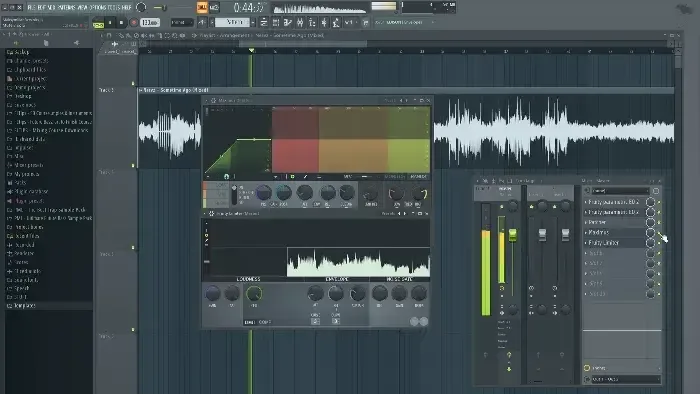
The 43 video lessons run for more than four and a half hours, in five modules that build on each other:
- Audio basics (9 lessons): what mastering really is, room and speaker settings, meters, equal loudness, how loud your mix should be, and sample rate, bit depth and dithering.
- The mastering chain, step by step (15 lessons): EQ, mid/side EQ, compression and multiband compression, saturation, stereo width, tonal balance, reference tracks, match EQ, and limiting versus clipping.
- Loudness and other big questions (5 lessons): streaming loudness and meters, inter-sample peaks, and whether to join the loudness war.
- The Hybrid Trap master (7 lessons): a full song mastered with stock plugins only, including how to balance the breakdown against the drop.
- The Hip-Hop master (7 lessons): a second song mastered with top plugins, plus stereo width and two lo-fi tricks you can use on your own songs.
What you get for 97 dollars
- FLP Mastering templates, so every new master starts from a pro setup
- FST Mastering presets
- PDF Bonus cheat sheets and infographics with the mastering essentials
- MP4 43 video lessons and 12 short quizzes, 4.5+ hours
You also get an official mastering certificate when you finish, lifetime access on your phone, tablet or computer, and a 60-day money-back guarantee. If it isn’t for you, email support or use live chat and you get every cent back.
You can follow along in any DAW. The lessons are shown in FL Studio (version 20 or newer), with stock plugins plus a couple of free ones. Paid plugins like iZotope Ozone and FabFilter are optional.
Do your mixes need work first? The Mixing & Mastering Bundle adds the Full Mixing from Start to Finish Course for $147 in total.
Watch a song from the course get mastered
Before you buy, you can see the method at work. In this free video of about nine minutes, Max masters one of the tracks from the course from start to finish.
He works backwards. First he sets the loudness with Maximus, FL Studio’s multiband compressor. Then he builds the chain in front of it: EQ first, then mid/side EQ, and multiband compression last. He cuts everything below 30 Hz, too, because songs almost never have anything useful down there, and very low sound eats up headroom (the space left before a sound clips).
The step up: Mix Elite Academy
If you’d rather have a pro listen to your music, or master it for you, Mix Elite Academy is the step up. It includes this mastering course and every other course in the store, 600+ lessons in all, plus unlimited mastering of your music by the Mix Elite team: you upload a WAV, and after 2-5 days your master is ready as a WAV and an MP3.
You also get unlimited 1:1 feedback on your music from a pro, weekly live coaching calls in small groups and a private community. The Academy is 3 payments of $137 for lifetime access, with a 60-day money-back guarantee. Bought the mastering course first? Its page says to ask support for your personal discount on the Academy.
Should you learn mixing before mastering?
Yes. Learn to mix first, or learn both together, because mastering only polishes a finished mix and can’t fix a muddy one. Mix Elite’s mastering course is made for producers who already mix their own songs, and the Mixing & Mastering Bundle pairs it with the mixing course for $147 in total.
Max’s starting point says it all: “Mastering isn’t about fixing issues, okay. It’s about putting the cherry on top.” In the free mastering chapter, every EQ move on the master stays at about 2 dB or less. The more a song needs, the more likely the real fix is back in the mix.
That doesn’t mean your first songs have to stay quiet. The free chain below gets a decent mix loud and clean while your mixing improves. Once your mixes sound balanced, Mix Elite’s mastering course teaches the rest, from meters and reference tracks to stereo width and how loud to go. If mixing is your weak spot, start with our guide to the best mixing courses online.
How do you make a quiet track louder and punchier?
Master it in three steps. Clean up the lows and highs with EQ, then glue the mix with gentle multiband compression of about 2 to 3 dB. Last, get loud with a soft clipper instead of pushing a plain limiter. That’s Mix Elite’s free 3-step mastering chain, taught in under 40 minutes of its free 4.5-hour FL Studio course.
The whole chain is free in the mastering chapter of that course on YouTube, where Max masters a finished mix with FL Studio’s own plugins and a free loudness meter. New to the word? Our guide to what mastering is covers the basics in plain English.
Why does your song sound quiet next to the tracks you love? Every digital file has a ceiling, called 0 dBFS. Once your peaks hit it, you can’t just turn the whole song up. What counts is how loud the song feels, and that’s measured in LUFS. Mastering raises that feeling without going past the ceiling. It mostly uses compression, which shrinks the gap between the loud and quiet parts, and a soft clipper.
How should you export your mix for mastering?
Export the full song as a WAV, with the reverb tails left in and nothing on the master channel unless you automated an effect there. Set the bit depth to 32-bit float. In Mix Elite’s free mastering chapter, Max picks 32-bit float over 16 or 24 bit because it keeps everything, even where the mix clips, so you can recover it.
Step 1: Clean up the lows and highs with EQ
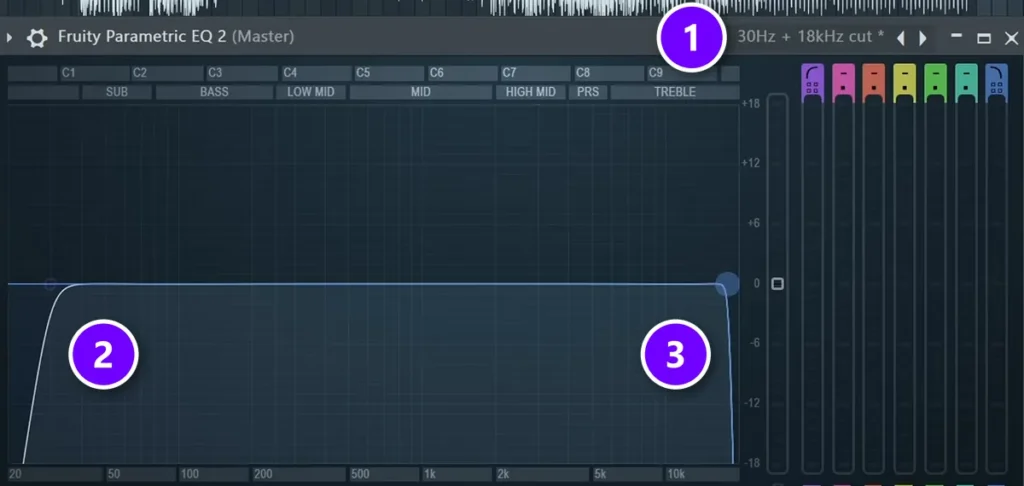
Put Fruity Parametric EQ 2 on the master and load its 30Hz + 18kHz cut preset (1). It rolls off everything below about 30 Hz (2), which Max calls clutter, and everything above 18 kHz (3).
Then add a second EQ for small moves of 2 dB or less. On his song, Max lifts the mids by 2 dB and adds a small bell at 12 to 14 kHz for sparkle, instead of a wide high shelf. Max’s rule for every move: “If something doesn’t sound better after you’ve applied it, don’t apply it.”
Step 2: Glue the mix with multiband compression
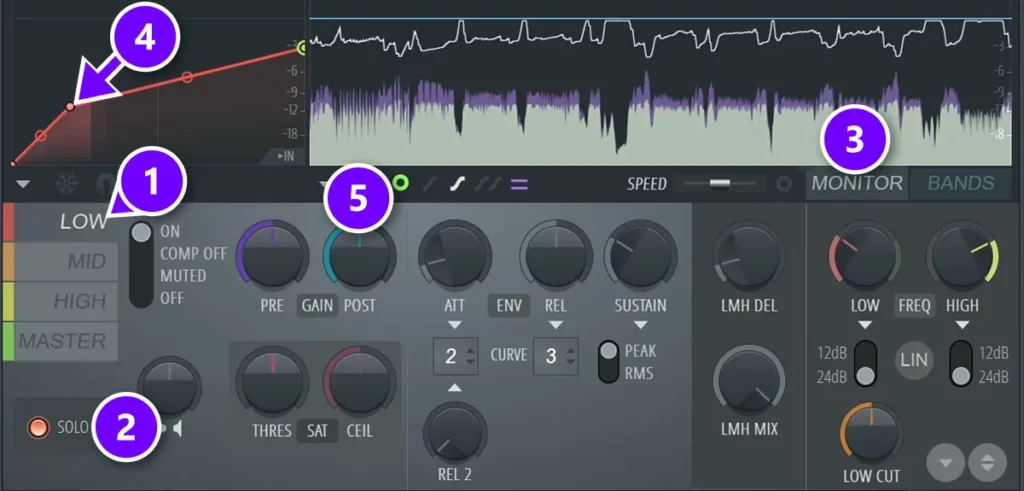
Next comes Maximus, which squeezes the lows, mids and highs separately. Pick the LOW band (1), press SOLO (2) and switch the display to MONITOR (3). While the loudest part of the song plays, drag the threshold point on the curve (4) down, holding Alt for fine moves, until you see about 2 to 3 dB of gain reduction.
Do the same, more gently, on MID and HIGH, and never go past 3 or 4 dB. Then turn up each band’s POST gain (5) to win back what you took off, about +3 dB on the lows. In a hurry? Max’s shortcut is OTT at about 15% with its upward compression turned off, though he still prefers doing it by hand.
Step 3: Get loud with soft clipping, not a plain limiter
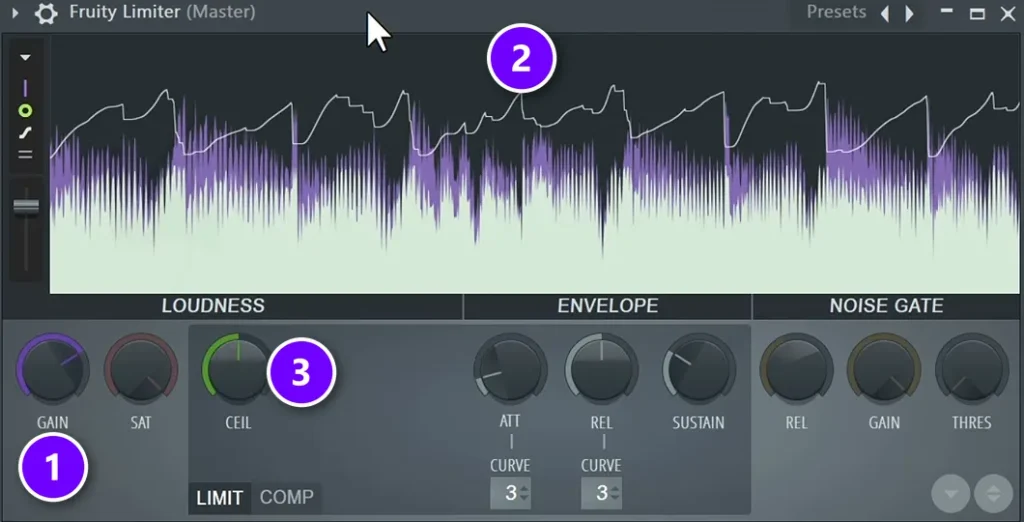
This is the step that trips up most beginners. In the demo, pushing the GAIN (1) of a plain limiter like Fruity Limiter makes the display (2) duck and swell, so some sounds jump out while others drop away. That’s because a limiter keeps everything under its ceiling (3) by turning the whole mix down. It’s also why Max warns against starting from a template that already has a limiter on the master.
So the chain gets its loudness from soft clipping, which rounds off the peaks instead of pushing the whole song down. In Max’s words: “I’m personally yet to find a free maximizer plugin that’s better than just simply using a simple soft clipper plugin.” FL Studio has one built in, Fruity Soft Clipper, and Maximus has another on its master band.
How to set the soft clipper in Maximus
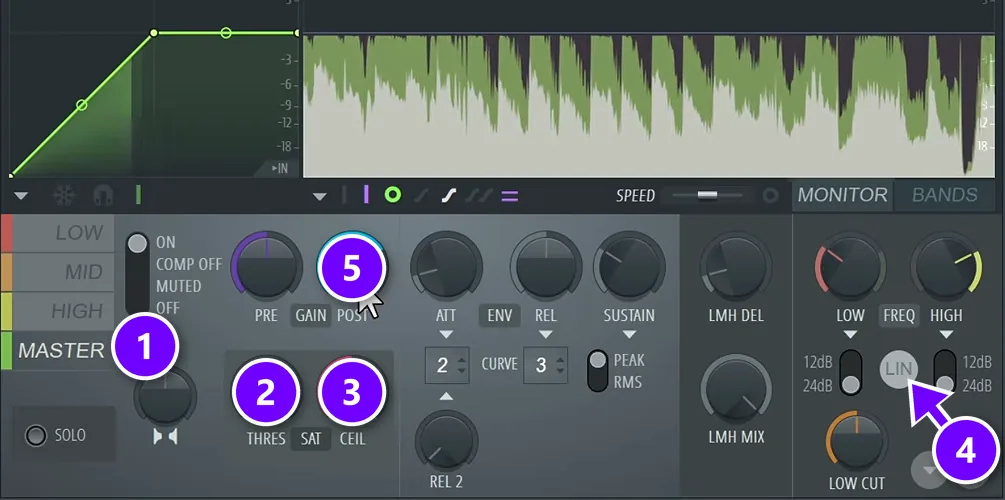
Pick the MASTER band (1). Turn THRES (2) just a hair to the left, set CEIL (3) to -0.3 dB and switch on LIN (4) for linear phase. Then raise POST gain (5) until you hear distortion, and back it off by 0.5 to 1 dB.
On the song in the chapter, the distortion kicked in at about 6.8 dB of post gain, so Max settled on 6 dB. Quick and clean.
Always set compression and loudness while the loudest part of the song plays, like the drop or the chorus. That’s the part that hits the limits first.
Last: check the loudness, then export
Put the free Youlean Loudness Meter last in the chain and read the Integrated number while the loudest part plays. That number is in LUFS, the unit for how loud a song feels. For this song, Max suggests aiming for about -8 to -7 LUFS.
A song can still clip once it’s turned into an MP3. To prevent that, turn on linear phase and HQ in your EQs and lower the ceiling to about -0.5 dB, and some people go down to -1 dB to be extra safe. Then export a 24-bit WAV, plus an MP3 at the highest bitrate with dithering on.
The last check costs nothing. Play the master on other headphones, on a laptop, in the car and on a small Bluetooth speaker, and fix whatever sounds off. For every setting in more detail, read our guide to mastering in FL Studio.
How loud should a master be for Spotify, Apple Music and YouTube?
Spotify is the only one of the three that publishes a number: it plays music at -14 LUFS on its Normal setting and turns louder songs down. Apple Music and YouTube don’t publish a LUFS target, so there’s no one number every service asks for.
Spotify’s loudness guide adds that Premium listeners can switch to Loud (-11 LUFS) or Quiet (-19 LUFS).
For your master, Spotify’s tips are to aim for -14 LUFS integrated and keep the true peak below -1 dB, or below -2 dB if your master is louder than -14 LUFS.
So -14 is the level Spotify plays at, not a rule for how loud your file has to be. Max’s own masters run louder, and the course spends a whole module on this choice, from streaming meters and inter-sample peaks to the loudness war. Our guide to mixing and mastering for streaming goes deeper.
Other mastering courses worth a look
Here’s what else we checked on October 11, 2026, with schools and big platforms first. Every price comes from the seller’s own site. For production schools in general, see our guide to the best online music production courses.
Berklee Online: Audio Mastering Techniques
Best for: experienced producers who want a college-level class with graded work.
Audio Mastering Techniques is a 12-week, level 4 (advanced) class written by Jonathan Wyner and Marc-Dieter Einstmann. It covers room setup and monitoring, metering, EQ, compression and limiting, noise removal, streaming loudness, dither, and delivery for CD, vinyl and streaming.
It asks a lot up front. You need to be comfortable with a DAW, EQ and compression, and you need a full DAW (FL Studio Producer or Signature works), iZotope Ozone 8 and RX 7 or newer (not the Elements versions), an audio interface, studio monitors and good headphones.
Price: $1,575 in 3-credit tuition. The next term starts on January 11.
We found no class just on mastering when we searched Coursera’s catalog. The closest is Berklee’s Music Production Capstone, a 9-hour class whose last module covers mixing and mastering. Coursera Plus costs $59 a month or $399 a year.
Udemy: Music Mastering Masterclass
Best for: a low-cost overview that works in any DAW.
J. Anthony Allen’s Music Mastering Masterclass: Loud, Clean, Streaming-Ready has 74 lectures and runs 4 hours and 18 minutes. It works in any DAW with stock EQ, compressor and limiter plugins. It was last updated in May 2026 and has a 4.5 rating from 400 ratings.
Price: $69.99 on October 11, 2026, with no sale running. Udemy prices change often with sales, and its refund policy lets you get your money back within 30 days on eligible classes.
iZotope: Are You Listening? (free)
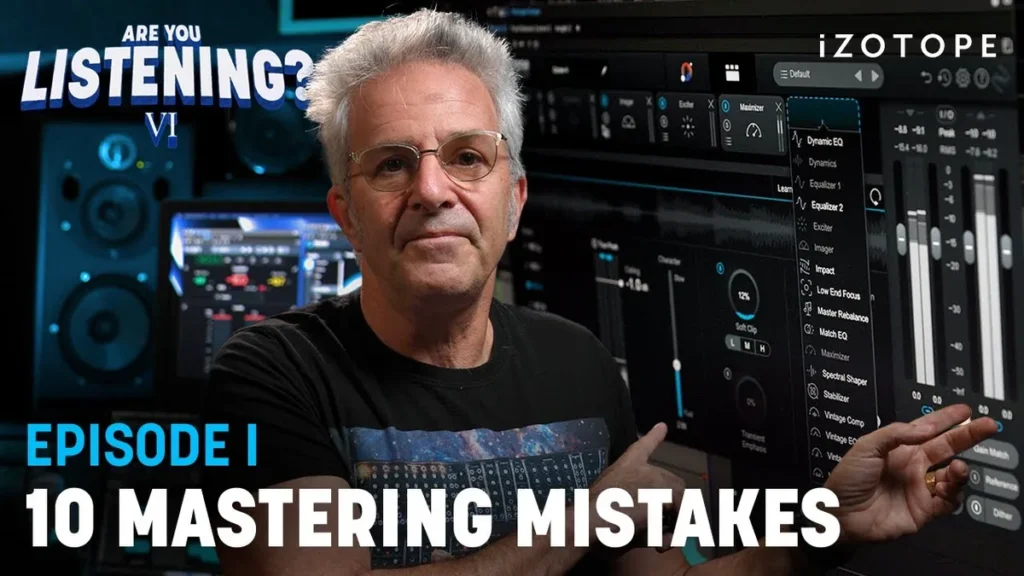
Best for: free, bite-size lessons from a mastering engineer.
iZotope, the company behind the Ozone mastering plugin, makes a free video series called Are You Listening? Four of its seasons are about mastering: the basics, a mastering toolkit with reference tracks, loudness meters and mastering for Spotify, advanced techniques, and a start-to-finish season hosted by mastering engineer and Berklee professor Jonathan Wyner.
Price: free on YouTube. Expect iZotope’s own plugins in the lessons.
Lurssen Mastering: How to Master Your Music
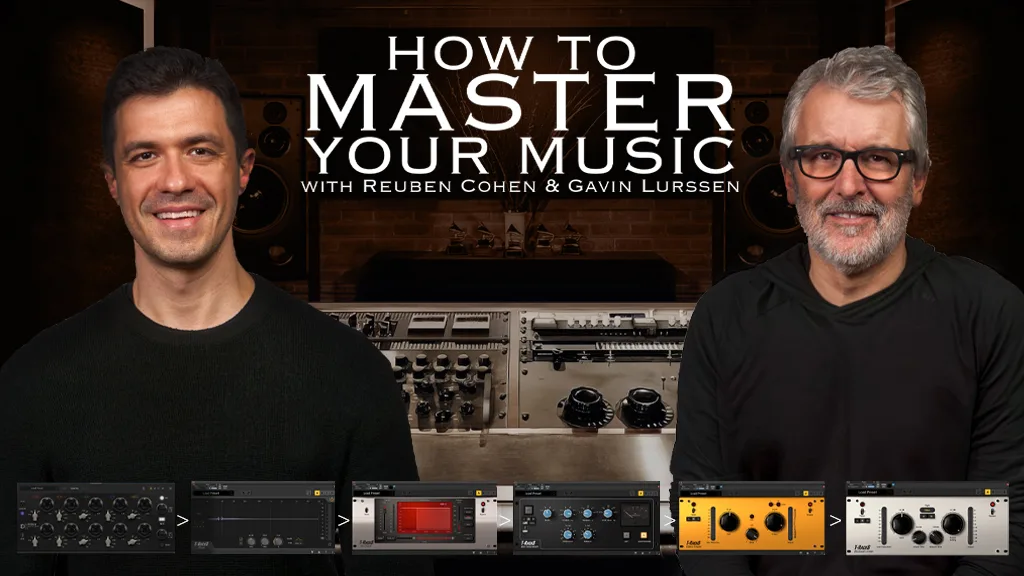
Best for: seeing how Grammy-winning engineers think about a master.
Gavin Lurssen, a four-time Grammy winner, and Reuben Cohen, who has a Latin Grammy and mastered Pharrell’s “Happy,” teach their workflow in 10 on-demand lesson modules that add up to a little over two hours. You get their Pro Tools sessions, audio files and plugin settings, and you can follow along with the plugins you already own.
Price: $150, with lifetime access.
Mix With The Masters: mastering workshops
Best for: watching top engineers master famous records.
Mix With The Masters films engineers at work in their own studios. Its mastering workshops include John Greenham on how he mastered Billie Eilish’s “Bad Guy” and “Everything I Wanted,” and an 8-part Randy Merrill series filmed at Sterling Sound, with songs like Silk Sonic’s “Leave the Door Open.” You watch pros work on real records, rather than follow a step-by-step plan.
Price: the Pro plan is $29.90 a month for the full catalog of 200+ video series. The Access plan is $99 a year for four series a year, and there’s a free plan to try it.
Point Blank: Audio Mastering (Online)
Best for: producers who want a live class and a teacher.
Point Blank Music School’s online Audio Mastering class runs for 3 months, with one live two-hour class a week on Zoom that’s recorded if you miss it. It covers EQ, compression, limiting and mid/side processing, taught so you can use any mastering software.
Price: £620 on its UK site on October 11, 2026, with classes starting in October 2026 and January 2027.
Mastering.com: The Reverse Engineer
Best for: producers ready to pay for long-term, one-on-one mentoring.
Rob Mayzes’ team at Mastering.com runs The Reverse Engineer, a lifetime mentorship that mixes a self-paced curriculum on mastering, mixing and production with mentor calls and a community. Its free Members Club on Skool has free courses, and a paid tier adds a monthly 15-minute call with a pro and a library of short courses.
Price: $6,800, or financing from about $244 a month. Its FAQ says there are no refunds, because it’s a mentorship.
How do you choose a mastering course on a busy schedule?
Choose a self-paced course that teaches one step per lesson, masters whole songs and works with your DAW’s stock plugins, so a few hours a night keep you moving. Mix Elite’s $97 mastering course is built that way, with 43 lessons and 4.5+ hours in all. A 12-week college class with set start dates is harder to fit around a job.
- Does it master whole songs? Watching a full master from start to finish teaches more than a pile of separate tips.
- Can you use the plugins you have? Stock plugins are enough to learn. Some classes require paid ones, such as iZotope Ozone.
- Does it teach loudness with real numbers? Look for lessons on LUFS, true peak and streaming that use what the services actually publish.
- Can you follow along in your DAW? EQ, compression and limiting do the same job in every DAW, so lessons shown in another program can still fit.
- What’s the real total? Compare a one-time price with a full year of a monthly plan, or with full tuition.
- Can you get your money back? Look for a refund window long enough to master a song or two.
- Will anyone hear your master? Lessons teach the steps. Feedback on your own song shows you what to fix next.
Every mastering course side by side
Here’s every option in one place, with prices checked on October 11, 2026.
| Course | What it is | Price | Best for |
|---|---|---|---|
| Mix Elite: Full Mastering from Start to Finish | 43 video lessons and two songs mastered. | $97, paid once. | Home producers. |
| Mix Elite’s free mastering chapter | Under 40 minutes on YouTube. | Free. | A first try. |
| Berklee Online: Audio Mastering Techniques | A 12-week college class. | $1,575 (3 credits). | Advanced producers. |
| Udemy: Music Mastering Masterclass | 74 lectures in any DAW. | $69.99 (no sale on). | A cheap overview. |
| iZotope: Are You Listening? | A free video series. | Free. | Short lessons. |
| Lurssen Mastering | 10 modules from Grammy winners. | $150. | A pro’s workflow. |
| Mix With The Masters | Workshops with top engineers. | $29.90 a month. | Watching pros. |
| Point Blank: Audio Mastering | 3 months, one live class a week. | £620. | A live teacher. |
| Mastering.com: The Reverse Engineer | A lifetime mentorship. | $6,800. | One-on-one mentoring. |
FULL MASTERING FROM START TO FINISH
Master your songs so they sound loud and clear
43 video lessons teach the full mastering chain, then you watch a Hybrid Trap song and a Hip-Hop track get mastered from start to finish. It’s $97, paid once, with lifetime access and a 60-day money-back guarantee.
Frequently asked questions
What is the best online mastering course for beginners?
Mix Elite’s Full Mastering from Start to Finish Course is the best online mastering course for beginners and home producers. It costs $97, paid once, with lifetime access and a 60-day money-back guarantee. Its 43 self-paced lessons (4.5+ hours) teach the full mastering chain one step at a time, then master two songs from start to finish. You can follow along in any DAW.
Should beginners learn mixing before mastering?
Yes, learn to mix first or learn both together. Mastering only polishes a finished mix and can’t fix a muddy or unbalanced one. In Mix Elite’s free mastering chapter, every EQ move on the master stays at about 2 dB or less. Mix Elite’s mixing and mastering bundle pairs both courses for $147, paid once.
How do I make my tracks louder and punchier?
Fix the mix first, then master in three steps: clean up the lows and highs with EQ, glue the mix with gentle multiband compression of about 2 to 3 dB, and get loud with a soft clipper instead of pushing a plain limiter. Check the result with a free LUFS meter such as Youlean. Mix Elite’s free 4.5-hour FL Studio course teaches this chain in under 40 minutes.
How loud should my master be for Spotify?
Spotify plays tracks at -14 LUFS on its Normal setting and turns louder songs down. Its own tips are to aim for -14 LUFS integrated with the true peak below -1 dB, or below -2 dB if your master is louder. Apple Music and YouTube don’t publish a LUFS target. In Mix Elite’s free mastering lesson, founder Max aims for about -8 to -7 LUFS on a melodic house song.
Do I need paid plugins like Ozone to learn mastering?
No. Mix Elite’s mastering course uses stock plugins plus a couple of free ones, and its Hybrid Trap master uses stock plugins only. Paid plugins like iZotope Ozone and FabFilter are optional. Some classes do require them: Berklee Online’s Audio Mastering Techniques asks for Ozone 8 and RX 7 or newer.