
“A recipe has no soul. You, as the cook, must bring soul to the recipe.”
Mix Elite’s Spirits presets are the best FL Studio vocal presets for most home recordings: 51 one-click vocal chains for rap, singing, adlibs and vocal effects for $17, built mostly with FL Studio’s own plugins and labeled so you know what to tweak. The best free option is a chain you build once from FL Studio’s stock plugins and save as a mixer preset. Whichever you pick, turn your vocal up to a healthy level before the preset so its compressors work evenly.
You finally record a vocal over your beat, press play, and it sounds like a voice memo stuck on top of a song. So you go looking for a preset and find hundreds of them, from free downloads to packs that cost close to $100, all promising a finished vocal in one click.
Some of them are great. None of them know your voice. Below are the presets we’d load first, the free ones worth trying, and the part most guides skip: how to make any preset fit your recording, the way Max, the founder of Mix Elite, does it in his vocal mixing videos.
Table of Contents
The best FL Studio vocal presets in 2026
We picked these for a vocal recorded at home in FL Studio: presets that load in one drag, run on FL Studio’s own plugins or free ones, and cover the vocals you actually record, from rap verses to sung hooks and adlibs. Mix Elite’s own pack comes first. Free options and other well-known packs follow, described from each maker’s own site in November 2026.
Spirits by Mix Elite: best for rap, singing and adlibs
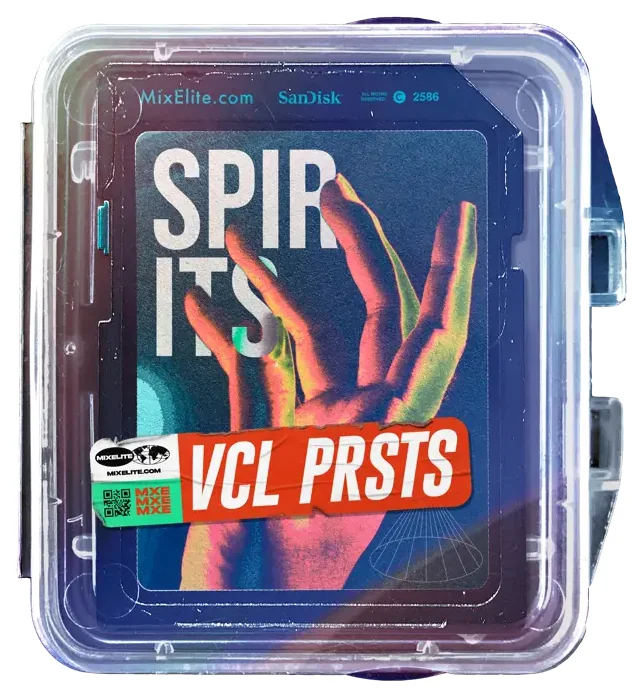
Mix Elite’s Spirits vocal presets are 51 vocal chains for FL Studio, Ableton Live and Logic Pro. They’re sorted by job into rap, singing, adlibs and vocal effects, so you pick the kind that matches the vocal in front of you and drag a preset onto its mixer track. After that, it’s one drag per vocal.
Each preset is a full chain, built from more than EQ and compression. Every step is labeled, so you can see what each plugin does and which ones to adjust for your recording.
- FST Vocal presets for FL Studio: rap, singing, adlibs and vocal effects FL Studio
- ADG The same presets as racks for Ableton Live Ableton
- CST And as channel strips for Logic Pro Logic
- PDF A guide to the best free plugins for mixing vocals bonus
It costs $17, paid once, and every preset is royalty-free for your own tracks, so you keep 100% of your royalties. Most of the presets use only FL Studio’s own plugins. A few use free ones, like OTT and free MeldaProduction plugins, so there’s nothing else to buy. You also get a 60-day money-back guarantee.
Max uses them in his own videos, too. In Mix Elite’s video on vocal mixing mistakes, he opens the Spirits folder and drops a rap preset on a vocal. As Max puts it: “I know a lot of people use vocal presets and of course there’s nothing wrong about that.” Later in the same video he plays a vocal through one of the presets to show its reverb. You can hear it, but it hides in the gaps between words instead of blurring them.
Three more Mix Elite products include vocal presets:
- Grand Vocals ($27) is a pack of 327 royalty-free vocals, with phrases, hooks, adlibs and chops, plus 9 vocal mixer presets for FL Studio. It’s handy when you don’t have a singer yet.
- Patcher Lords ($7) has 33 Patcher presets for FL Studio 20 and newer, built only with FL Studio’s own plugins. One of them is a Self Sidechained Reverb that ducks under the vocal by itself.
- Mix Elite Academy includes every pack in the store, Spirits too, along with all the courses, weekly coaching calls and feedback on your music, for 3 payments of $137 with lifetime access.
What are the best free FL Studio vocal presets?
The best free FL Studio vocal preset is one you build yourself from FL Studio’s stock plugins and save as a mixer preset. It costs nothing, and it’s made for your voice. If you want to hear a finished chain first, free starter packs from preset makers are a good test.
FL Studio’s own plugins: build a free vocal chain
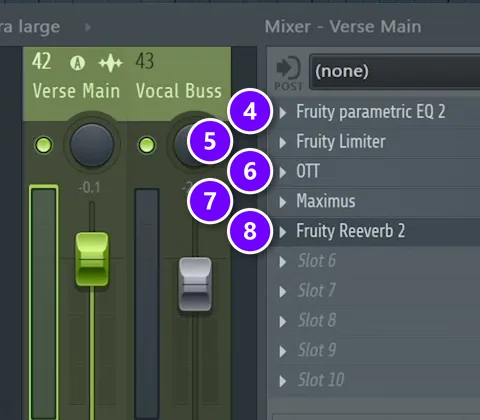
In the video below, Max mixes a full rap vocal with nothing but FL Studio’s stock plugins and one free extra. Here’s his chain, in order. Steps 4 to 8 are plugins on the vocal’s mixer track, numbered the same way in the picture above.
- Even out the volume. Turn loud lines down and quiet ones up; in the video, one loud part comes down about 4 dB. Then consolidate the clip with Ctrl + Alt + C and normalize it.
- Clean it up. Listen for breaths and mouth clicks, and decide one by one which ones to keep.
- Tune it with NewTone, FL Studio’s pitch corrector.
- EQ it with Fruity Parametric EQ 2. Cut everything below about 100 Hz and dip the low mids a little.
- Compress it with Fruity Limiter in compressor mode, at a ratio of about 5:1, or up to 20:1 for a rapper who hits lots of loud accents.
- Add OTT at about 20% if you like a modern sound. It’s a free plugin from Xfer Records and the only one here that isn’t stock.
- De-ess it with Maximus by compressing only its high band, starting around 6 kHz.
- Add reverb with Fruity Reeverb 2, and use Fruity Peak Controller to duck it while the vocal plays.
- Make room in the beat. Sidechain your instruments, not the drums, so they dip about 2 dB whenever the vocal plays.
Our guide to mixing vocals with only stock FL Studio plugins walks through each step with its own screenshot and settings. If the ducking reverb in step 8 feels like a lot of wiring, Mix Elite’s Patcher Lords pack ($7) does it in one slot. In Mix Elite’s melodic trap vocal tutorial, Max drops its sidechained reverb preset on his own vocal and says it works right out of the box.
Max’s line about de-essers fits the whole chain: “greatest of them all is always the custom one you make.”
Save your chain as a free preset
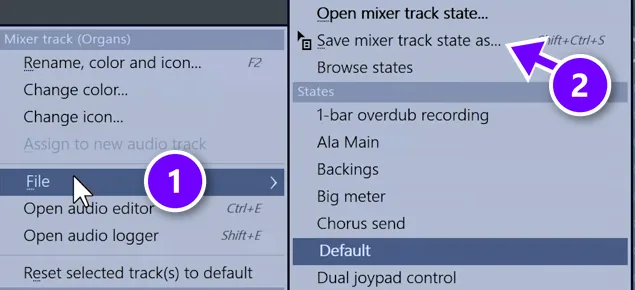
Once the chain sounds right, save it. Right-click the name of the vocal’s mixer track, go to File (1) and choose Save mixer track state as (2). Give it a clear name, like Rap vocal main, and it waits in the Browser under Mixer presets for every new song.
One catch: Maximus comes with Producer Edition and up, and NewTone with Signature Bundle and up, according to Image-Line’s edition comparison. The free trial has every plugin, so you can build the chain before you buy. For more free tools to add, see our list of the best free vocal plugins.
Vocal Magic Lite by Music By Mattie: 10 free chains

Music By Mattie gives away Vocal Magic Lite: 10 vocal presets built only with stock plugins, in versions for FL Studio, Ableton Live, Logic Pro and GarageBand. You get it by signing up for the Music By Mattie newsletter. It’s a quick way to hear what a finished chain does to your voice before you build or buy one.
Baywood Audio has a similar free pack: 10 stock-plugin vocal chains for your name and email, and Baywood says you can use them on commercial releases. For the rest of your track, Mix Elite’s free downloads page has more than 1.4 GB of free samples, presets, e-books and cheat sheets.
Other paid FL Studio vocal preset packs
These are other well-known sellers you’ll find when you shop for FL Studio vocal presets. Each one is described from its maker’s own site in November 2026, so check the current price before you buy.
Vocal Drip 2 by Rys Up Audio
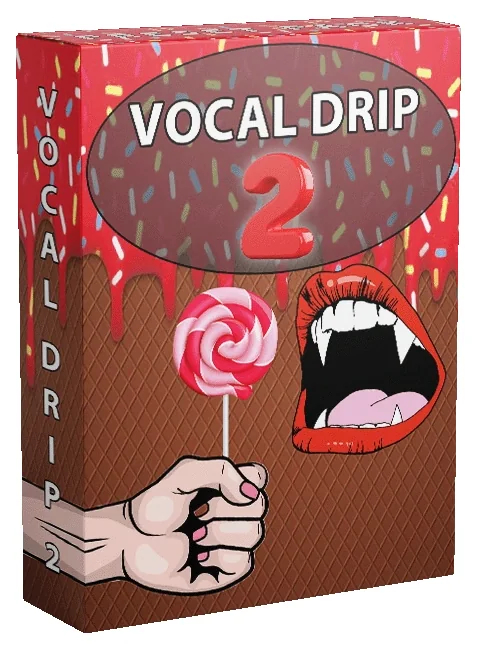
Rys Up Audio makes vocal presets for most DAWs. Vocal Drip 2 is its bigger pack: 25 presets for lead vocals, adlibs, doubles and vocal effects, with macro knobs that move several effects at once. The FL Studio version runs on stock plugins, and the pack is $49.99. Rys Up also sells single presets styled after famous artists for $24.99 each.
Vocal Sauce 3 by Baywood Audio
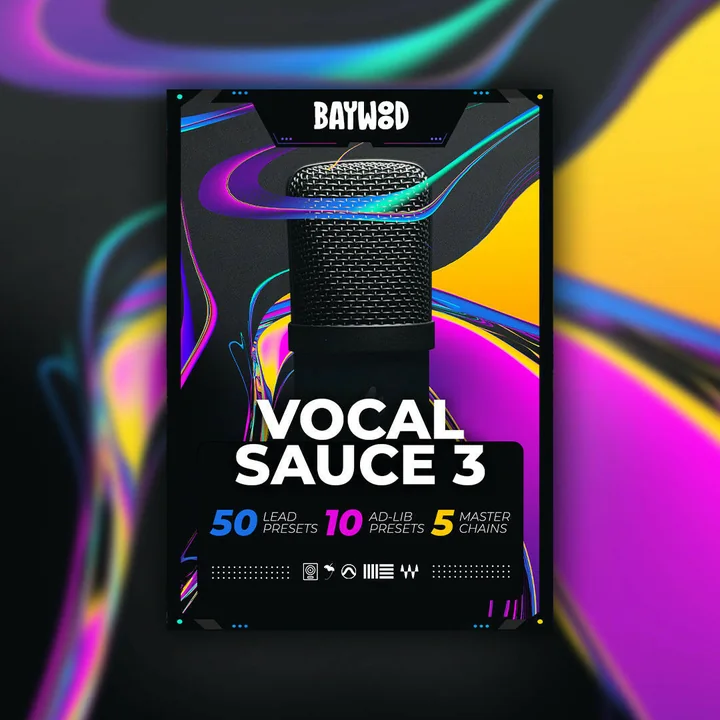
Vocal Sauce 3 is Baywood Audio’s main pack. Its cover lists 50 lead vocal presets, 10 adlib presets and 5 mastering chains, 65 in all, for FL Studio, Logic Pro, Ableton Live, Pro Tools and Studio One. Baywood says every preset uses stock plugins only, and it offers a 30-day guarantee.
Vocal Genie by WavMonopoly
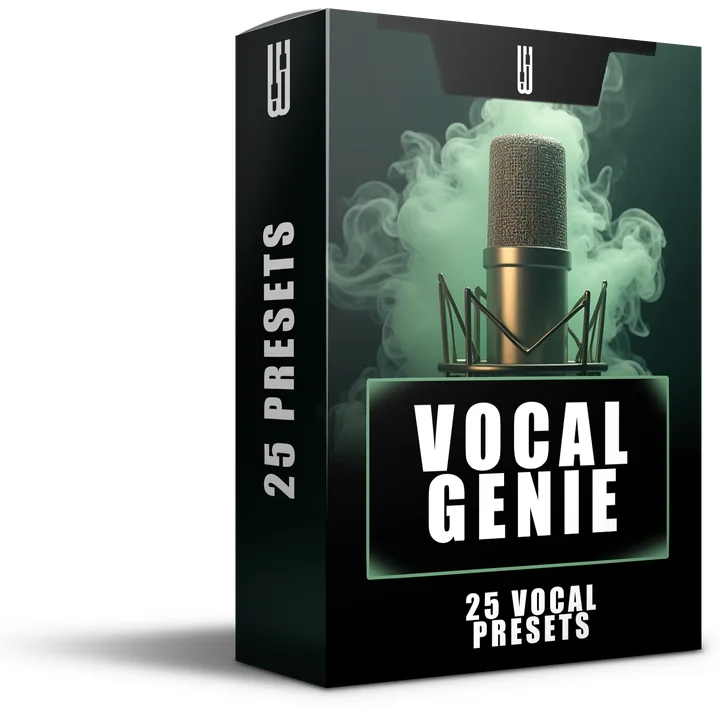
WavMonopoly sells dozens of vocal chains styled after famous artists, most of them $49.99 each. Vocal Genie is its bigger pack: 25 vocal chains for $99.99, with one FL Studio version on stock plugins and another on Waves StudioRack. WavMonopoly says its FL Studio packs come as FLP project files, and some of its chains use Antares Auto-Tune, which you’d need to own or swap for FL Studio’s own Pitcher.
VocalPresets.com works differently. It’s a marketplace where many sellers list presets for FL Studio, Ableton, Logic Pro and other DAWs, mostly $14.99 to $24.99 each. Read each listing’s plugin list, because some need third-party plugins like Waves StudioRack.
Which vocal presets work best for rap and for singing?
Pick a preset made for the vocal you recorded, not one for everything. Rap presets keep more body and control the loud accents so every word lands. Singing presets add tuning, smoother compression and more space, while adlibs and doubles get thinner chains that sit behind the lead.
- Rap: keep some body in the low mids. In the vocal mistakes video, Max explains that hip-hop vocals want a little more body, so they sit right in front of the listener. Cut below about 100 Hz and compress hard enough to catch the accents. He goes up to 20:1 when a rapper hits a lot of them.
- Singing: start with tuning. In the melodic trap tutorial, Max sets the retune speed of his pitch correction around 5 to 10, picks the song’s scale and compresses at about 8:1. He also tries a slower attack, around 25 to 40 ms, so the start of each word cuts through the mix.
- Adlibs: make them smaller than the lead. Cut more of the lows, push the tuning harder if you want an effect, and let the reverb wash over them. Max doesn’t sidechain the reverb on adlibs, because washing them out is fine.
- Doubles: compress them hard, de-ess them more than the lead, and keep them about 10 dB under the main vocal, with one panned left and one right.
Spirits is sorted the same way, with separate presets for rap, singing, adlibs and vocal effects, so each layer gets its own chain. Our guide to mixing hip-hop and R&B vocals goes deeper on rap, and the one on how to mix background vocals covers doubles and harmonies.
What is a vocal preset in FL Studio?

A vocal preset in FL Studio is a saved mixer track: a full chain of effects, like EQ, compression, de-essing and reverb, with every setting dialed in. FL Studio calls it a mixer track state and saves it as an .fst file. Drop one on your vocal’s mixer track, and the whole chain loads at once.
You’ll run into a few kinds of preset files, and they’re not the same thing:
- Mixer track states (.fst) hold a whole mixer track, with every effect in order. Most vocal preset packs for FL Studio are these.
- Patcher presets (also .fst) pack a chain into one effect slot with Patcher, which comes with every edition of FL Studio.
- Plugin presets hold the settings of one effect, like a single reverb.
- FLP project files hold a whole project. Some sellers ship their vocal chains inside a template project instead of a preset.
- Ableton racks (.adg) and Logic channel strips (.cst) are the same idea for other DAWs. They don’t load in FL Studio.
A preset never changes your recording. The effects run live on the mixer track, so you can swap presets, switch a plugin off or delete the whole chain, and the original vocal stays the same.
Are vocal presets worth it, or should you build your own chain?
Yes, as a starting point. A good preset gets you most of the way in one drag and shows you how a pro chain is built, but no preset knows your voice, your mic or your room. Plan on a few adjustments.
Start with the recording, because no chain can fix it. Max’s first rule in the stock plugin video is simple: “the very first thing in high quality vocal mix is high quality recording.” A preset can’t remove a noisy room, a clipped take or the drop in level when a singer leans away from the mic.
Presets also teach. Open one, switch each plugin off and on, and listen to what it changes. That’s how you learn to build your own chain, and it’s why presets with labeled steps are the easiest ones to learn from.
DAY 5 OF THE 7-DAY MUSIC PRODUCER COURSE
Get 10 ready-made vocal chains and learn what each step does
Day 5 of Mix Elite’s 7-Day Music Producer Course is all about vocals: recording great vocals at home, the V.O.C.A.L. mixing formula and the vocal mistakes even advanced producers make. You download 10 copy-and-paste vocal chains, practice acapellas and free vocal plugins, and the course comes with a bonus set of drag-and-drop vocal mixing presets. It’s taught in FL Studio (the free trial works), about 45 minutes a day, and on day 7 our team gives you personal feedback on your track. It’s $27, and you get 60 days to decide if it was worth it.
How do you install vocal presets in FL Studio?
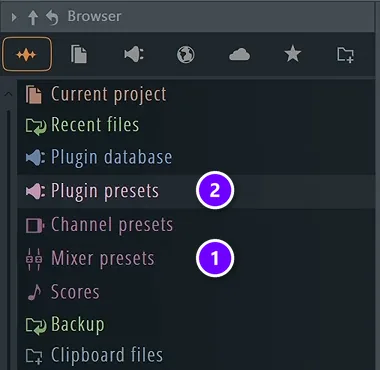
Unzip the pack, drag its FL Studio folder onto the Browser or copy the .fst files into your Mixer presets folder, then drag a preset onto your vocal’s mixer track. The whole chain loads in one go.
- Unzip it. FL Studio can’t read presets inside a ZIP file. Many packs have one folder per DAW, so keep the FL Studio one.
- Add it to the Browser. Drag the folder onto FL Studio’s Browser, or copy the .fst files into Documents › Image-Line › FL Studio › Presets › Mixer presets, which shows up in the Browser as Mixer presets (1). Don’t mix it up with Plugin presets (2), which holds presets for single effects.
- Route your vocal. Select the vocal’s channel, click an empty mixer track and press Ctrl + L.
- Load the preset. Open the Mixer with F9 and drag a preset from the Browser onto that mixer track.
- Set the level, then adjust. Turn the vocal up to a healthy level before you judge the sound, then tweak the steps that need it, as shown below.
Presets not showing up? Choose Refresh content in the Browser’s menu. The full walkthrough, with saving and copying chains, is in our guide on how to install FL Studio mixer presets.
How do you make a vocal preset fit your voice?
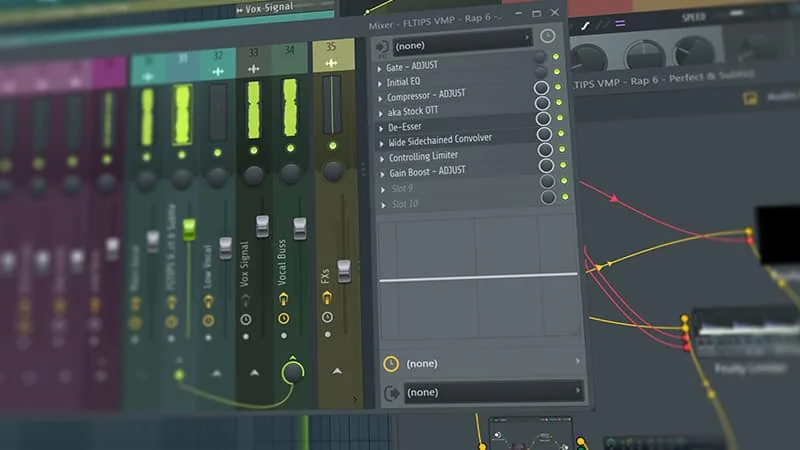
Set the input level first, because a preset’s compressor and de-esser react to how loud your vocal is. Then set the compressor for your quietest words, shape the EQ for your mic, move the de-esser to your singer’s harsh sounds and set the reverb to taste.
In the picture, a Spirits rap preset sits on an FL Studio mixer track, and the steps that depend on your recording, like the gate, the compressor and the gain boost, are marked ADJUST. Look there first in any preset, then work down the chain:
- Fix the level going in. Consolidate the vocal and normalize it, or simply turn it up, before any preset. Max’s advice is to do this first, so the compressor has room to work.
- Set the compressor for the quietest word. Max’s rule of thumb is to put the threshold about as low as the quietest word in your lyrics. Start gently, around 2:1 to 4:1, and raise the ratio only if it sounds better.
- Match the EQ to your mic. A condenser mic records more highs, a dynamic mic more lows, and a singer far from the mic loses body. Keep the cut below about 100 Hz, then add or remove body until the vocal sits in the beat.
- Move the de-esser to your singer. Every voice has its own harsh range, so sweep the frequency until it catches the S sounds. Set the threshold so it grabs only those, never normal words.
- Make room in the beat. Even a perfect chain can sound pasted on top. Duck the instruments about 2 dB while the vocal plays, the last step of the stock chain above.
Why does my vocal still sound quiet or muddy with a preset?
Quiet usually means your vocal reaches the chain too quietly, so the compressor barely works. Turn the vocal up before the chain, not with the fader after it. Muddy usually means the EQ doesn’t match your mic or room. Singing close to the mic adds a lot of body, so dip the low mids a little more. And if the beat fills the same range, duck it under the vocal.
How do you fix a harsh or bright vocal after loading a preset?
Check the de-esser first. Move its frequency to where your singer’s S sounds live, usually somewhere between 4 and 8 kHz, and lower its threshold a little. Then turn down any high boost in the EQ. Maximus also has a de-esser preset, and Max suggests trying it.
Go easy, though. De-ess too much and the vocal loses its brightness. Max even points out that if you want a clearer, brighter vocal, you often need less de-essing, not more.
So pick one preset for the vocal you have tonight, set the level, and adjust only the steps that need it. For the full picture of what each plugin does, our guide on how to mix vocals walks through the whole process, step by step.
Frequently asked questions
What are the best free FL Studio vocal presets?
The best free one is a chain you build from FL Studio’s own plugins and save as a mixer preset: EQ, Fruity Limiter as a compressor, Maximus as a de-esser and a reverb that ducks under the voice. Free starter packs, like Music By Mattie’s Vocal Magic Lite and Baywood Audio’s free pack, are good for hearing a finished chain first.
Do vocal presets work in every edition of FL Studio?
Only if your edition has the plugins the preset uses. Fruity Limiter, Fruity Parametric EQ 2, Fruity Reeverb 2 and Patcher come with every edition. Maximus needs Producer Edition or higher, NewTone needs Signature Bundle or higher, and recording audio needs Producer Edition too. The free trial has every plugin, so you can test a preset before you buy.
Do I need third-party plugins for FL Studio vocal presets?
Not always, so check each pack’s plugin list. Many are built only from FL Studio’s stock plugins. Mix Elite’s Spirits presets mostly use FL Studio’s own plugins, and a few use free ones like OTT and free MeldaProduction plugins. Some other packs need paid plugins, like Antares Auto-Tune or Waves, which you’d have to own.
Can I use vocal presets on songs I release?
Yes. A preset only processes your own recording, so the song is still yours. The license covers the preset files themselves: Mix Elite’s Spirits presets are royalty-free for your own tracks, so you keep 100% of your royalties, but you can’t resell or share the files. Check the license of any other pack before you release.
Where are mixer presets saved in FL Studio?
In Documents › Image-Line › FL Studio › Presets › Mixer presets, inside FL Studio’s user data folder. To find it fast, right-click Mixer presets in FL Studio’s Browser and choose Open. You can also keep a pack anywhere you like and drag its folder onto the Browser once.