



“What I loved about background singing, and still do, is vibrating sound with people.”
To mix background vocals, put each one on its own mixer track and keep it clearly quieter than the lead. Cut its lows and highs with EQ, compress it hard, remove the S sounds, pan the pairs left and right, and give it a little more reverb, so it fills out the song without drowning out the lead.
You stack three harmonies under the chorus, hit play, and the song gets worse. The lead sounds smaller, the S sounds hiss, and the whole vocal turns to mush. That’s not a talent problem. It’s a mixing problem, and it has a clear fix.
This guide follows Mix Elite’s vocal layering tutorial on YouTube, where Max, the founder of Mix Elite, turns one lead vocal into harmonies in FL Studio and then mixes them so you feel them more than you hear them. Every setting has a screenshot from the video, and the same moves work in any DAW.
Table of Contents
What are background vocals?

Background vocals, also called backing vocals or BGVs, are all the voices in a song that support the lead singer. They don’t tell the story. Their job is to make the lead sound bigger, richer and more emotional, most of all in the chorus.
Most songs use a mix of these:
- Harmonies: the same words sung on different notes, often a third or a fifth above the lead, so the vocal sounds like a chord.
- Doubles: the lead part sung a second time on the same notes, which makes it thicker. Our guide to double tracking explains why that works.
- Stacks and pads: several takes of “ooh” or “aah” layered into a soft cushion under the chorus.
- Call and response: a group that answers the lead’s line, like a choir in gospel or a crowd shout in pop.
- Ad-libs: short shouts, echoes and runs between the lines. They get a few extra tricks, covered in how to mix hip hop vocals.
The people who sing them are called backing singers or background singers. In a home studio, that’s usually you or your artist singing the parts again. Or it’s a copy of the lead that you turn into new notes, which is exactly what the video below does.
How to make harmonies from one vocal in FL Studio
Sung harmonies are the best kind. If you can record them, do it: recording each part on its own keeps phasing to a minimum. Phasing is the hollow, swirly sound you get when two copies of the same take play on top of each other. Our vocal recording tips cover the room, the mic and how many takes to record.
No singer? You can build the harmonies from the lead itself. The video does it with Newtone, the pitch editor inside FL Studio:
- Copy the lead vocal clip onto a new track in the Playlist.
- Click the copy’s clip menu and choose Pitch-correct sample. It opens in Newtone.
- Press Ctrl + A to select every note, then set the three knobs (screenshot below).
- Drag the selected notes up to a new pitch. Four semitones up gives a major third and seven semitones up gives a fifth.
- Turn on Slave playback to host so the harmony plays along with your song while you work, and mute the untouched copy in the Playlist.
- When it sounds right, send it back to the Playlist with Send to playlist as audio clip in Newtone’s edit menu (the scissors icon).
Turn a copy into a harmony in Newtone
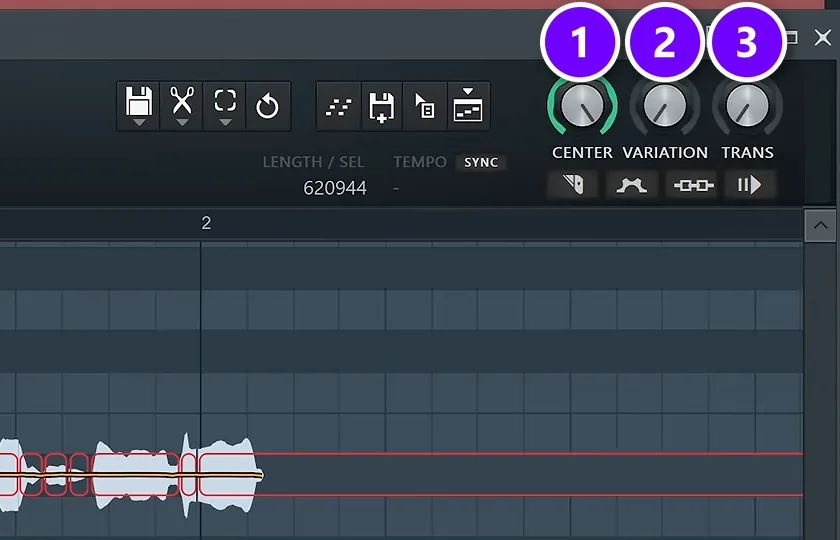
Turn Center all the way up (1), Variation down to zero (2) and Trans all the way down (3). Now every syllable sits exactly on its note and jumps straight to the next one. On its own that sounds a little robotic. Tucked behind a lead, it sounds tight and clean. For the full tuning workflow, see how to tune vocals in FL Studio.
Which notes should you pick? A third (three or four semitones up, depending on your scale) and a fifth (seven semitones up) are the safe choices. You can also move single notes up or down so the harmony follows the chords. And if you don’t know any theory, Max’s advice is refreshingly honest: “If you have completely no idea where to put it, you just try different notes, and if it doesn’t sound like crap, then it works.”
Shift the formant so it sounds like a new singer
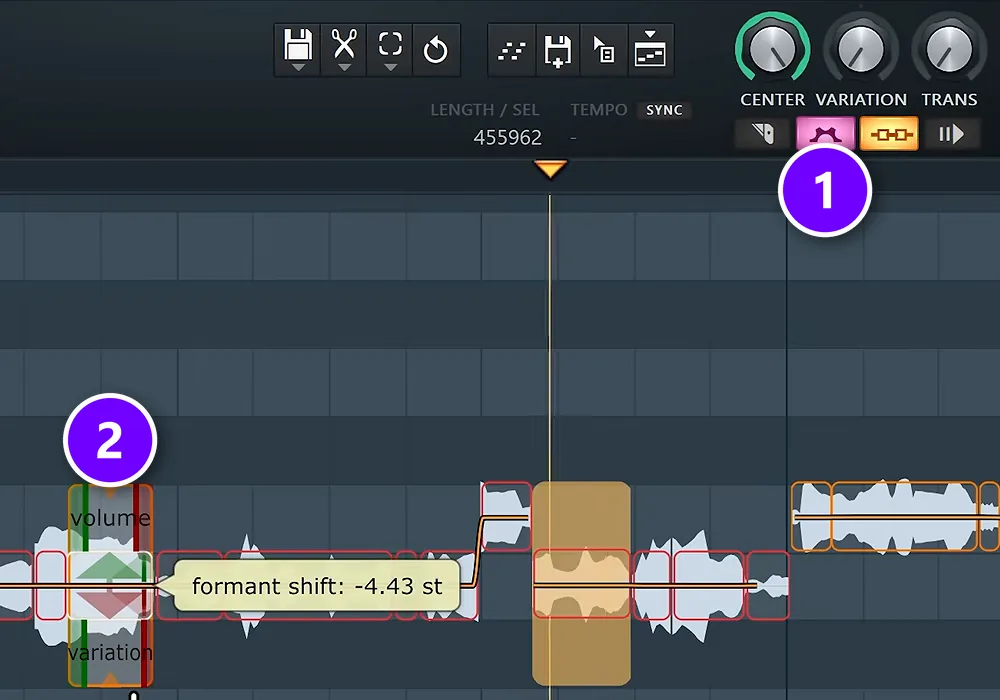
A copy of the lead still sounds like the same person, even on new notes. That’s what gives you away. Click the advanced edit button (1), hover over the right edge of a note and drag the formant down (2). Formant is the tone color of a voice, the part that makes it sound male, female, young or old. In the screenshot, one note is pulled down to -4.43 semitones, and the copy now sounds like a deeper, different singer.
You can repeat the whole trick as often as you like. Copy the lead again, open the new copy in Newtone and pick different notes. Do it a few times and you can build a full chord out of a single vocal.
Why do background vocals drown out the lead?
Because they compete with the lead for the same things: level, frequencies, the center of the stereo field, and the sharp starts and S sounds of every word. When a harmony is as loud, full, central and crisp as the lead, your ear can’t tell which voice to follow, so the two fight.
The fix is to make every background part quieter, thinner, wider and softer than the lead. Each of those moves is a step below, and the most common ways it still goes wrong are in the mistakes list at the end.
How do you make backing vocals wide and push them behind the lead?
EQ them thinner than the lead, with a low cut between 150 and 300 Hz and a high cut from about 5 to 8 kHz. Pan pairs hard left and right, or widen a single harmony with a stereo imager. Then soften the start of each word and give them a little more reverb than the lead.
That’s step 4 and step 7 below, plus steps 8 and 9 for the depth. The other steps, from timing to compression, make the harmonies blend once they’re in place.
How to mix background vocals, step by step
Work through these nine steps in order. Together they make every background part quieter, thinner, wider and softer than the lead, and the video shows all of them on a real song.
- Line up the timing.
- Give each layer its own mixer track.
- Set the volume under the lead.
- EQ out the lows and the highs.
- Compress them hard.
- De-ess them.
- Pan them or widen them.
- Soften the attack.
- Add the same reverb as the lead.
Step 1: Line up the timing
Timing matters more for background vocals than for anything else in the mix. With harmonies, every word has to be as close to perfectly in time as possible. When two voices start a word at slightly different moments, you hear a blurry double start instead of one strong word.
In Newtone, hold Alt and drag the edge of a note left or right to nudge it. In the Playlist, you can also cut a clip with the Slice tool and slide the pieces into place. Line up the starts of words and the hard sounds like T, K and P first. Long vowels can be a little loose.
Step 2: Give each layer its own mixer track
Every background part needs its own mixer track, so it gets its own volume, pan and effects. Double-click a clip and pick a free mixer track in its settings, or select its channel and press Ctrl + L. Name the tracks (Harmony 1, Harmony 2 and so on), because you’ll be jumping between them a lot.
Got lots of layers? Send all the harmony tracks into one more track, a bus, and you can turn the whole group up or down with one fader.
Step 3: Set the volume under the lead
Volume comes first. The first move is to set the harmonies a little under the main vocal. Background vocals should always be quieter than the lead, because the lead carries the words.
There’s no magic number, since it depends on how many layers you have and how loud they were recorded. Here’s a simple way to find it: pull the harmony faders all the way down, play the chorus, and raise them until you can just hear the chord behind the lead. Then back off a little. Doubles can go even lower: in Mix Elite’s trap vocal tutorial they sit around 10 dB under the main vocal.
Check the balance at a low volume. If you can still understand every word of the lead while the harmonies play, the level is right.
Step 4: EQ background vocals: cut the lows and the highs
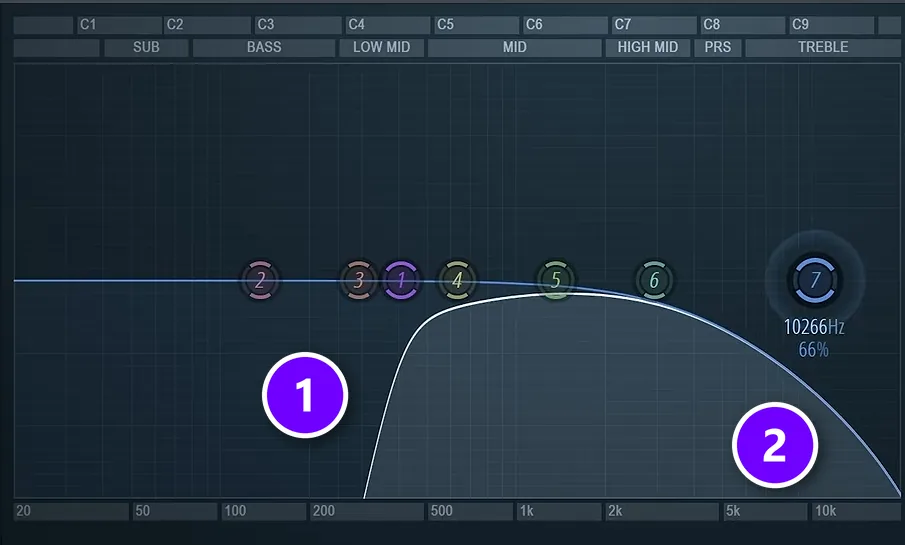
Open Fruity Parametric EQ 2 on each harmony. Cut the low end with a steep low cut (1) and soften the top with a wide high cut (2). In the video’s EQ, the low cut removes everything up to a few hundred hertz.
Why cut so much? The lead needs its body (the low mids that make a voice sound full) and its presence (the upper mids and highs that make it sound clear and close). The harmonies don’t. As Max puts it, “we take the body, take the presence, it’s basically not there anymore, but you will feel it and that’s what matters.” Mix Elite’s video on vocal mixing mistakes makes the same point: a thin sound would hurt a lead, but backing vocals and ad-libs don’t need that body at all.
A good place to start is a low cut a bit higher than the one on your lead, somewhere between 150 and 300 Hz, and a high cut starting around 5 to 8 kHz. If a harmony still fights the lead, find the spot where the lead is clearest (often between 2 and 5 kHz) and cut a few dB there on the harmony only.
Step 5: Compress them hard
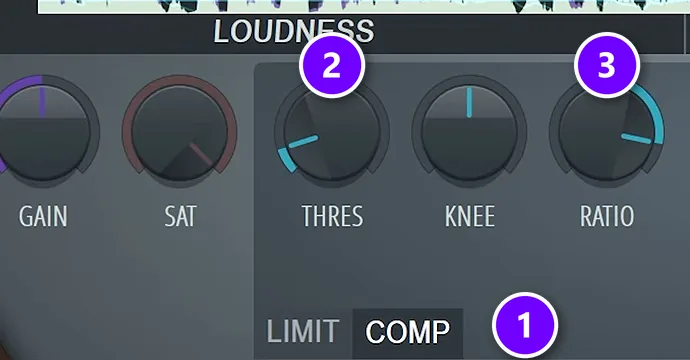
Background vocals should be flat and steady, so no single word jumps out. Compress them hard with Fruity Limiter: switch it to COMP mode (1), lower the threshold (2) until only the very quietest words slip under it, and set the ratio to 8:1 (3). That’s heavy compression, and it’s fine here, because these parts are meant to blend in, not stand out.
Then add OTT, a free multiband compressor from Xfer, at about 20%. It brings up a little grit, so the harmonies add texture instead of volume. New to compressors? Our guide to compressing vocals explains threshold and ratio in plain words.
Step 6: De-ess them so the S sounds don’t stack
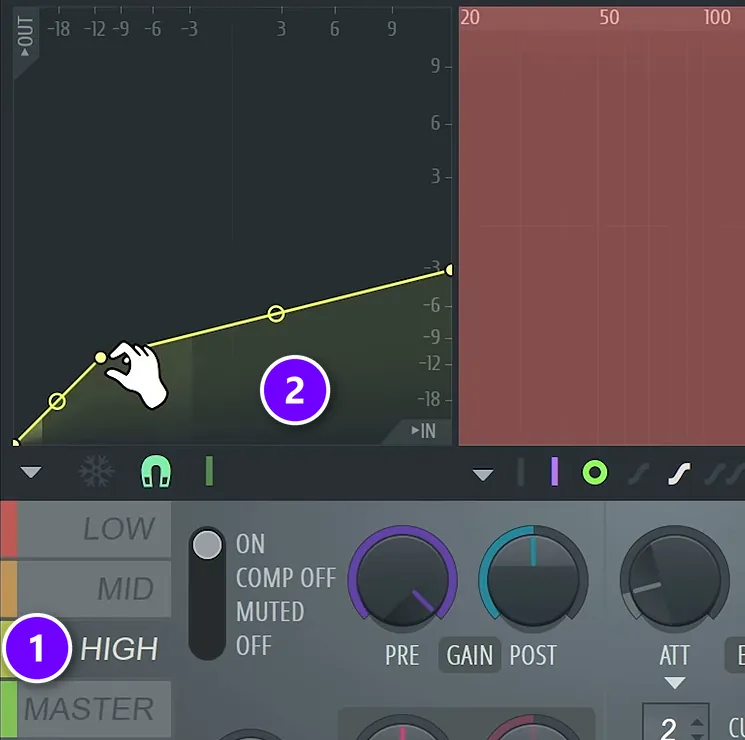
S, T and SH sounds are loud and sharp. One set of them in a song is fine. Five sets, all a little out of time, sound like a snake in your speakers. Max’s pro tip: “Never layer S’s in your harmonies or doubles.” The S sounds of the lead are enough.
To take them out, open Maximus, click the HIGH band (1) and pull its curve down (2) so it squashes only the loud S sounds. If you can’t hear what the band is doing, boost it until you can, then bring it back down. Any S that still pokes through can be cut out of the clip by hand or turned down with the clip’s volume.
Step 7: Pan backing vocals, or widen them
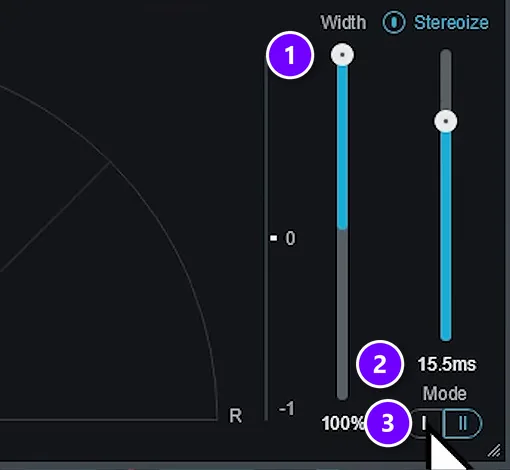
The lead lives in the center. Background vocals belong on the sides. The first option is simple panning: one harmony to the left, the other to the right. A pair of doubles goes hard left and hard right, so the two frame the lead like brackets.
The other option is a stereo imager. In the free iZotope Ozone Imager, set Width to 100% (1), turn on Stereoize at about 15 to 20 ms (2) and pick Mode I (3). That spreads one harmony across both speakers without pushing it to one side. The mix in the video does a bit of both: each harmony leans slightly left or right with Fruity Balance, placed before the imager, and then gets less imager.
Keep the left and right sides even, so the mix doesn’t lean. Then check the song in mono now and then. Wide harmonies can get thinner in mono, so make sure they still back up the lead.
Step 8: Soften the attack with a transient shaper
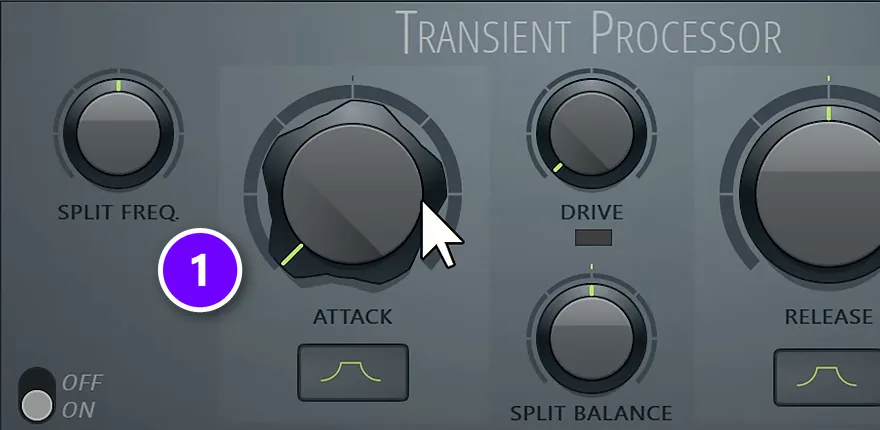
Few guides mention this step. A transient is the sharp start of a sound, like the first split second of each word. Sharp starts poke through a mix. Put FL Studio’s Transient Processor on each harmony and turn Attack all the way down (1). Now the words fade in softly and tuck under the lead. No Transient Processor? The free pick in the video is Couture by Auburn Sounds.
Step 9: Put them in the same room as the lead
Reverb makes a sound feel further away, and that’s where background vocals belong. Send the lead and the harmonies to the same reverb track, so they sound like they were sung in one room, and give the harmonies a bit more of it. In Mix Elite’s trap vocal tutorial, the doubles get a little room reverb.
Cut the low end of the reverb too, or it brings back the mud you just removed. Our vocal mixing guide shows how to set up the reverb send so it never washes out the lead.
Mix Elite’s background vocal chain in FL Studio
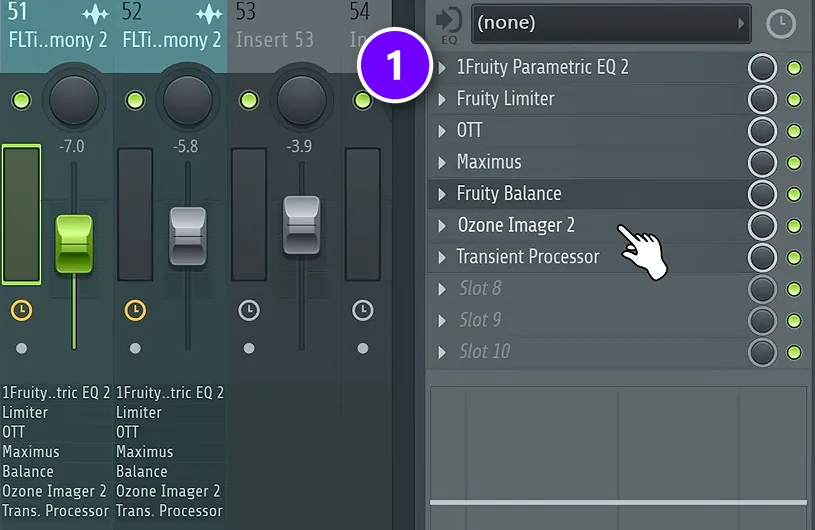
Here’s the full chain on one harmony track from the video, top to bottom, as it sits in the mixer’s effect slots (1):
- Fruity Parametric EQ 2: a low cut and a high cut.
- Fruity Limiter in COMP mode at 8:1.
- OTT at about 20%.
- Maximus with the HIGH band set up as a de-esser.
- Fruity Balance: a small lean to the left or right.
- Ozone Imager 2: Width 100%, Stereoize at 15 to 20 ms, Mode I.
- Transient Processor: Attack all the way down.
Build it once, then copy it. Right-click the finished mixer track, open File and drag Save mixer track state onto the next harmony track. Flip the balance to the other side, so the two harmonies mirror each other, and you’re done.
Common background vocal mixing mistakes
Most bad background vocals come down to a few mistakes:
- Too loud. If the lead gets harder to understand when the harmonies come in, turn them down.
- Stacked S sounds. Every layer adds another hiss. De-ess the harmonies hard.
- Copies that sound like copies. A copy of the lead can phase against it. Shift the notes and the formant, or record a new take.
- Sloppy timing. Words that start at different times blur the lyrics.
- Full-range harmonies. Keeping all the lows and highs makes the vocal muddy and harsh.
- Everything in the middle. Harmonies panned to the center crowd the lead.
- Too many layers. After building a whole chord out of one vocal, the video keeps just two harmonies in the final mix. Simpler is often better.
Want the bigger picture? Our guide to mixing vocals walks through the lead vocal that these harmonies support, from the first EQ move to the final reverb.
DAY 5 OF THE 7-DAY MUSIC PRODUCER COURSE
Harmonies are one part of the vocal. Day 5 covers all of it.
Day 5 of the 7-Day course is about recording and mixing vocals: setting up your room, the best recording equipment for every budget, the V.O.C.A.L. mixing formula and 10 copy-and-paste vocal processing chains, plus practice acapellas if you don’t have a singer yet. It’s taught in FL Studio (the free trial works), about 45 minutes a day, and on day 7 a pro gives you personal feedback on your finished track. It’s $27, and you get 60 days to decide if it was worth it.
Frequently asked questions
How do I stop background vocals from drowning out the lead?
Make them quieter, thinner, wider and softer than the lead. Turn them down until every word of the lead stays clear, cut their lows and highs with EQ, pan pairs left and right, de-ess them hard and soften the start of each word with a transient shaper. A little more reverb than the lead also pushes them back.
How do you EQ background vocals?
Cut more than you would on the lead. Use a low cut a bit higher than the lead’s, somewhere between 150 and 300 Hz, and roll off the highs from around 5 to 8 kHz. That takes away the body and presence the lead needs, so the harmonies stay behind it. If one still clashes, cut a few dB where the lead is clearest, often between 2 and 5 kHz.
Should background vocals be panned?
Yes, in most songs. Pan a pair of harmonies or doubles left and right so the lead keeps the center. A single harmony shouldn’t sit alone on one side; widen it with a stereo imager, such as the free iZotope Ozone Imager, instead. Keep both sides equally loud, and check the mix in mono to make sure the harmonies don’t disappear.
How loud should background vocals be?
Always quieter than the lead. There’s no fixed number: raise the harmony faders until you can just hear the chord behind the lead, then pull them back a little. In Mix Elite’s trap vocal tutorial, the doubles sit around 10 dB under the main vocal. Turn them up in the chorus and down in the verses, and check that every word of the lead is still easy to understand.
What’s the difference between backing vocals and background vocals?
There’s no difference. Backing vocals, background vocals, BGVs and backup vocals all mean the voices that support the lead singer: harmonies, doubles, ad-libs and soft “ooh” and “aah” pads. The singers who record them are called backing singers or background singers.





