



“I always encourage people not to think that they have to spend a lot of money on gear. The less stuff you have, the easier it is to make music.”
The best free vocal plugins in 2026 are Graillon 3 for tuning, TDR Nova for EQ, LALA for compression, Xfer OTT for presence, T-De-Esser 2 for harsh S sounds and Valhalla Supermassive for reverb. Load them on the vocal in that order and you have a full vocal chain for $0, on Windows or Mac. In FL Studio Producer Edition and up, the stock plugins cover most of that chain too.
You record a vocal, drop it on the beat, and it sounds thin and harsh, like it’s sitting on top of the music instead of inside it. Then every plugin list tells you the fix costs a few hundred dollars.
It doesn’t. Max, the founder of Mix Elite, proves it in a tutorial on mixing vocals with only stock plugins: he takes a raw rap vocal to a finished sound with tools that come free with FL Studio. The secret isn’t the plugin. It’s the order, the settings, and knowing when to stop.
So every plugin below was checked on its maker’s site on October 12, 2026, and sorted by its job in a vocal chain, with settings from Mix Elite’s tutorials.
Table of Contents
Which free plugins do you need to clean up and mix vocals?
Four plugins cover the jobs in the V.O.C.A.L. formula, Mix Elite’s vocal mixing method: an EQ, a compressor, a de-esser and a reverb. The free picks are TDR Nova, LALA, T-De-Esser 2 and Valhalla Supermassive. Add Graillon 3 if the singing needs tuning and Denoiser Classic if the recording hisses.
Everything else on this list is a useful extra, like OTT for shine or Vocal Doubler for width. And if you use FL Studio Producer Edition or higher, you already own a stock version of most of these jobs, as the stock chain further down shows.
What order do free vocal plugins go in?
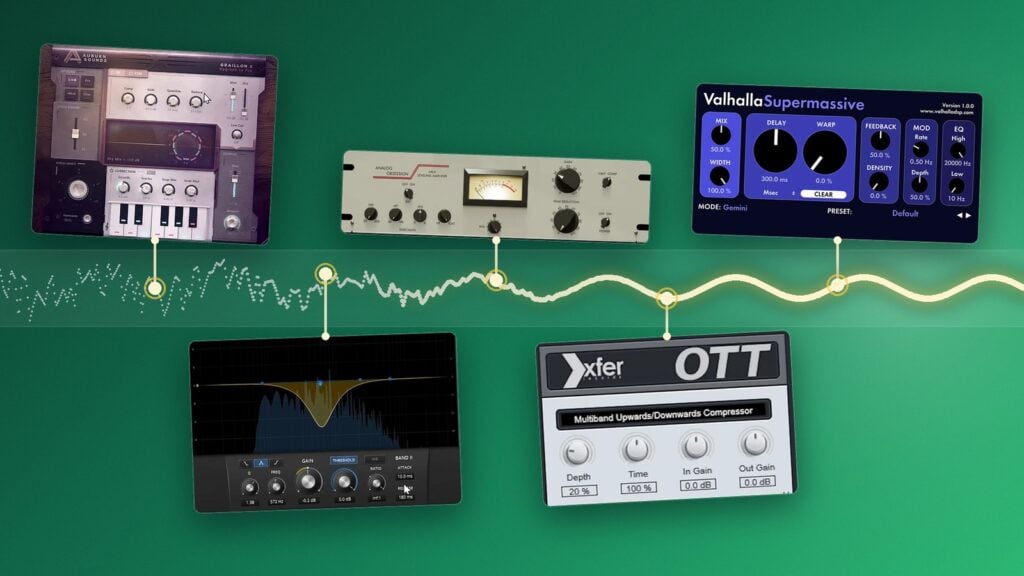
Clean up and tune first, then EQ, compress, add color and de-ess, and put reverb and delay last. That’s the order of Mix Elite’s V.O.C.A.L. formula, taught in its free 4.5-hour FL Studio course: volume first, then EQ, then compression, then taming harsh sounds, and the wet effects like reverb last. Tuning and noise cleanup come before all of it.
Why the order matters: every plugin reacts to what comes in. A compressor that gets a noisy, out-of-tune voice squeezes the noise up along with the words. A reverb that comes too early smears problems you still have to fix. Clean, then shape, then decorate.
You don’t need all seven slots on every song. A good recording might only need EQ, a compressor and reverb. Add the others when you hear the problem they fix.
What is the best free vocal cleaner plugin?
Bertom Audio’s Denoiser Classic is the best free pick. It turns down steady hiss, hum and fan noise, runs on Windows, Mac and Linux, and is pay-what-you-want, so it can cost $0. A vocal cleaner like this can’t fix a bad room, but it can rescue a take that’s almost there. Use it first, before any compressor turns the noise up.
Mix Elite’s own fix costs nothing. In its free 4.5-hour FL Studio course, the silent gaps between lines get sliced out and the edges of each clip faded, so nothing is left to hiss when nobody sings. Noise under the words is different. That’s a job for a plugin.
What about room echo? A denoiser won’t remove it, so fix it where you record. The same course says the space doesn’t have to be big, just quiet, with little to no echo, and it can even be your closet. No space like that? A vocal booth, a small cube that goes around the microphone, isolates it from the room.
1. Denoiser Classic (Bertom Audio)
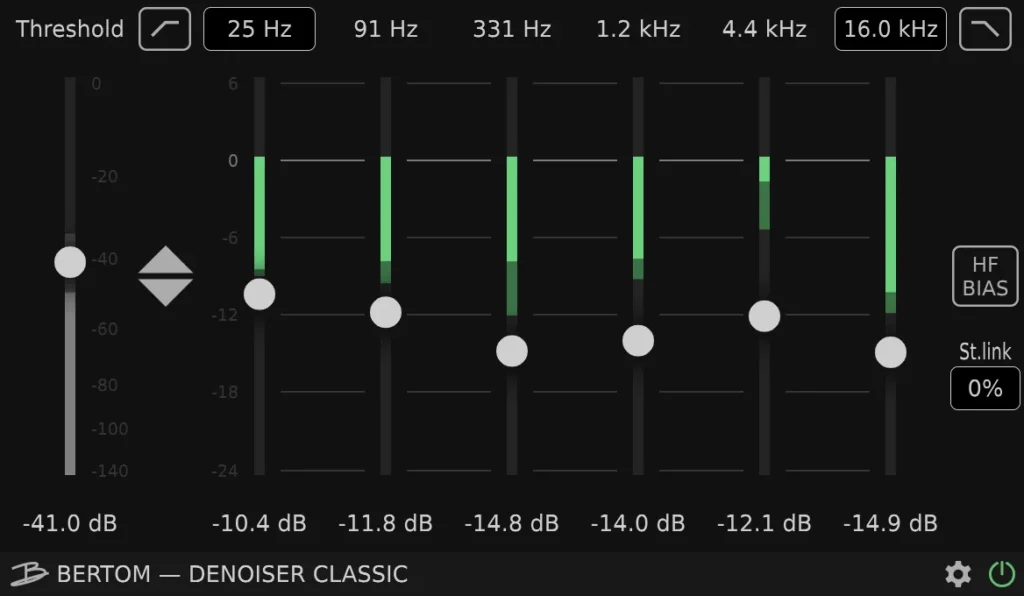
Denoiser Classic by Bertom Audio turns down hiss, hum and other steady noise. It has zero latency, meaning no delay, and uses very little CPU, so you can even leave it on while you record. Bertom sells it as pay what you want: type 0 in the price box at checkout and it’s free.
Version 3.0.11 runs on Windows 7 or newer, macOS 10.13 or newer (Intel and Apple Silicon) and Linux. It comes as VST3, AU and AAX. There’s no old VST2 version, which doesn’t matter in FL Studio, since it loads VST3 plugins.
In FL Studio: load it in the first slot of the vocal’s mixer track, before the tuner and the compressor, so they never hear the noise or turn it up.
Best free autotune plugins for vocals
Graillon 3 Free Edition by Auburn Sounds is the best free autotune for vocals. It does natural or hard-tuned correction, needs no account, and runs on Windows, Mac and Linux. An autotune plugin pulls each sung note to the nearest note in your song’s key. For a deeper list of tuners, see our best free autotune plugins. The two below are the ones worth knowing first.
2. Graillon 3 Free Edition (Auburn Sounds)
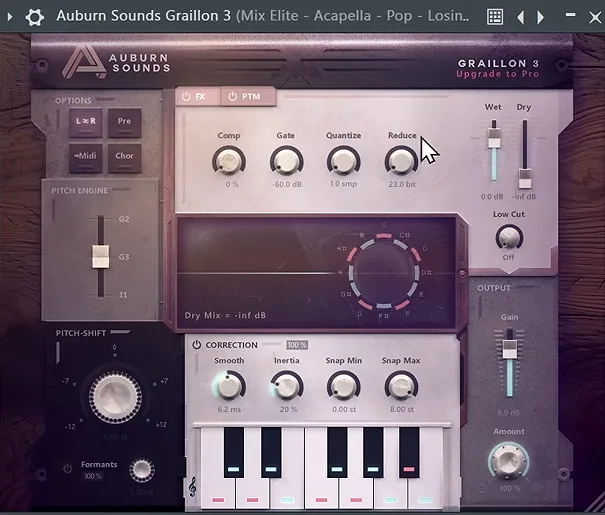
Graillon is the free tuner Mix Elite recommends. In a video on recording vocals, Max says: “An actual really good free autotune is from Auburn Sounds.” Mix Elite’s free 4.5-hour FL Studio course also installs it and tunes a pop vocal with it on camera.
The free edition, version 3.2, does natural and hard-tuned correction, pitch and formant shifting, and has three pitch engines plus a compressor, gate, chorus, preamp and bitcrusher. The Full Edition ($29 on sale when we checked on October 12, 2026, normally $38.67) adds pitch-tracking modulation, microtonal tuning and a vocal doubler. You don’t need those to tune a vocal.
It’s a plain zip download with no account or email, for Windows, macOS (including Apple Silicon) and Linux, in VST3, AU, AAX and LV2 formats.
In FL Studio: install the VST3, not the FL Studio version, so friends without it can still open your projects. Load it on the vocal’s mixer track, click the clef to pick your song’s scale, then set Smooth. Mix Elite’s course uses about 10 ms for a natural pop vocal. Around 1 ms sounds robotic, the hard autotune effect.
3. MAutoPitch (MeldaProduction)
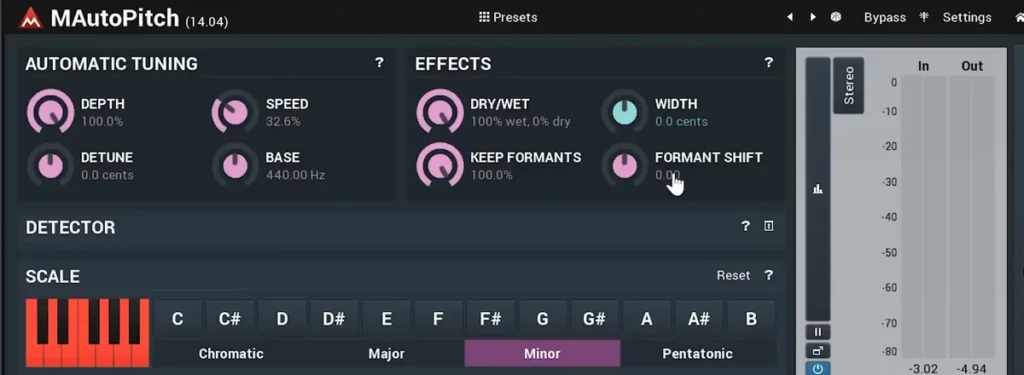
MAutoPitch is on nearly every free vocal list, so here’s Mix Elite’s honest take from a 2024 video: it’s good for formant shifting, but its autotune does something strange to the waveform. So tune with Graillon and keep MAutoPitch for what it does well.
That’s character. Formant Shift makes a voice sound bigger or smaller without changing its notes, and Width spreads it out in stereo. In Mix Elite’s first free plugins video, the vocal gets duplicated, its formant moved a little and its width turned up, and that copy is blended under the lead.
It’s free inside Melda’s MFreeFXBundle. Since version 17 you install Melda plugins with the MPluginManager app and a free Melda account. It runs on Windows 10 and 11 (VST, VST3, AAX) and macOS 10.14 or newer, Intel or Apple Silicon (VST, VST3, AU, AAX).
Best free vocal EQ plugin
TDR Nova is the best free EQ for vocals, because it’s a dynamic EQ: it only cuts a harsh or boomy spot when it pops out. EQ (short for equalizer) turns chosen frequencies up or down. On vocals it mostly removes things: the rumble below the voice, the muddy low mids that make it sound boxy, and one or two harsh spots.
4. TDR Nova (Tokyo Dawn Labs)
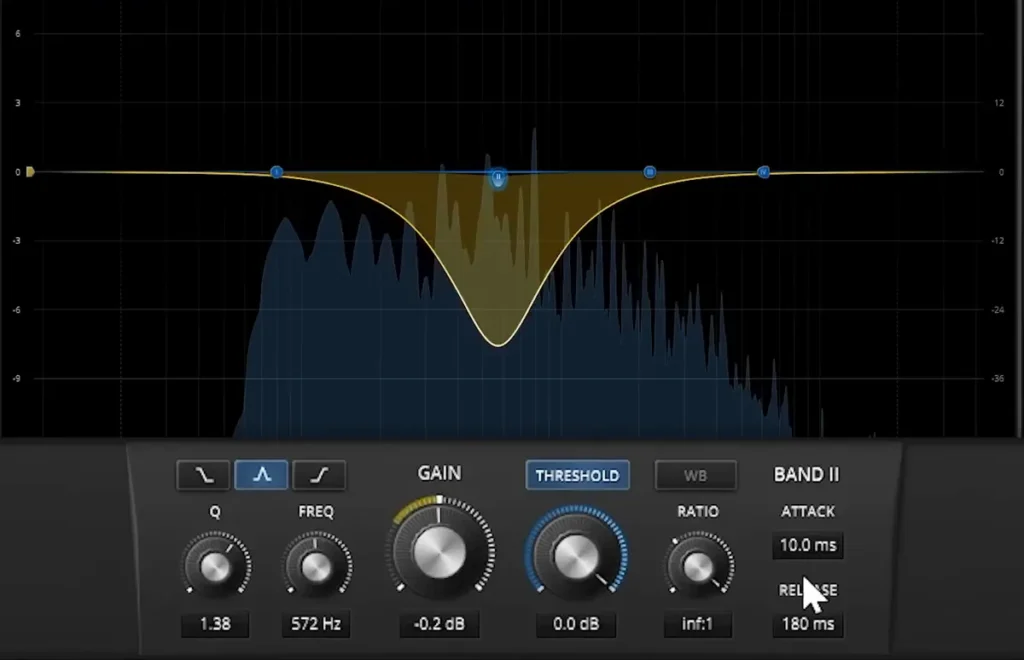
TDR Nova is a free dynamic EQ. Each of its four bands can cut or boost only when that frequency gets too loud. That’s ideal for vocals, where a harsh note or a boomy word only pops out now and then.
Mix Elite’s videos like FL Studio’s own EQ, but still say to get this one, because it’s a dynamic equalizer, and they call its de-essing preset incredibly useful on vocals. Tokyo Dawn even says it can fix “a sibilance problem in your perfect take,” the job a de-esser usually does.
Version 2.2.2 is a direct download with no account, for Windows 7 or newer and Mac OS X 10.9 or newer, with native Apple Silicon support, as VST2, VST3, AU and AAX. A paid GE version (€60.00 on Tokyo Dawn’s site, October 12, 2026) has six bands instead of four.
In FL Studio: turn on the high-pass filter to clear the rumble, then set one dynamic band on the harsh or muddy spot, so it only dips when the singer hits it.
Best free vocal compressor plugins
LALA by Analog Obsession is the best free vocal compressor: a smooth LA-2A-style leveler with two main knobs. For a gentler second stage, add Klanghelm’s DC1A. A compressor turns the loud words down so the quiet ones stay audible. That’s what makes a vocal sit steady on top of a beat instead of jumping out and then disappearing.
5. LALA (Analog Obsession)
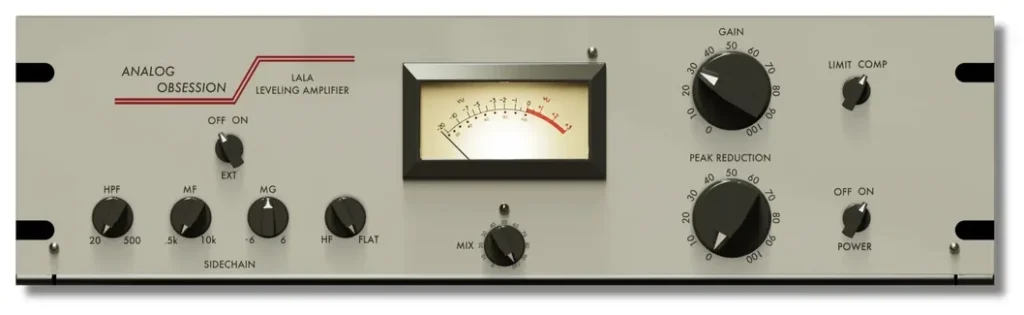
LALA is a free take on the LA-2A, the famously smooth vocal compressor. Analog Obsession calls it “the go-to vocal compressor.” You mostly use two knobs: Peak Reduction sets how much it squeezes, and Gain brings the level back up. A Limit switch makes it grab harder.
Every Analog Obsession plugin is free; their FAQ says the plugins are “totally free!” and you can support the developer on Patreon if you like. The download links sit in a public Patreon post, and you don’t need a membership to use them.
Analog Obsession’s FAQ lists 64-bit VST3, AU and AAX versions for Windows 10 and 11 and Mac 10.11 to 13. There’s no VST2 version.
In FL Studio: raise Peak Reduction until the loudest words drop a few dB on the meter, then use Gain so the level matches when you switch the plugin off and on.
6. DC1A (Klanghelm)
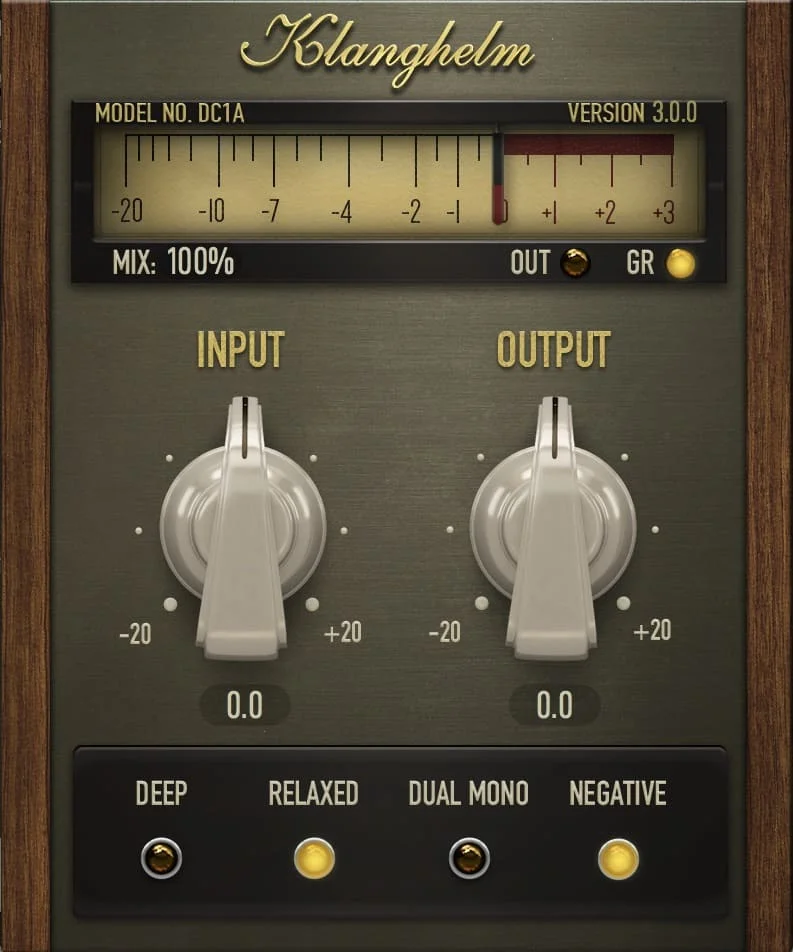
DC1A is the simplest compressor here: two knobs, Input and Output. Turn Input up for more compression and use Output to set the level. Klanghelm calls it an “effortless character comp.” Small switches add options like Relaxed for a smoother response and Deep, which stops the low end from pushing the compressor around.
It’s freeware with no account. The current DC1A3 installers, version 3.5.0, are for Windows 10 or newer and macOS 10.13 or newer with native Apple Silicon support, as VST, VST3, AU and AAX.
In FL Studio: use it as a gentle second compressor after LALA or Fruity Limiter, so neither one has to work hard. Our guide on how to compress vocals covers the full settings from Mix Elite’s tutorials.
Free plugins for vocal presence and warmth
OTT and Saturation Knob are the free picks for presence, which is how close and clear a vocal feels. OTT, a multiband compressor, adds sparkle and detail, and Saturation Knob adds warmth. Both are easy to overdo, so start low and turn them up slowly.
7. OTT (Xfer Records)
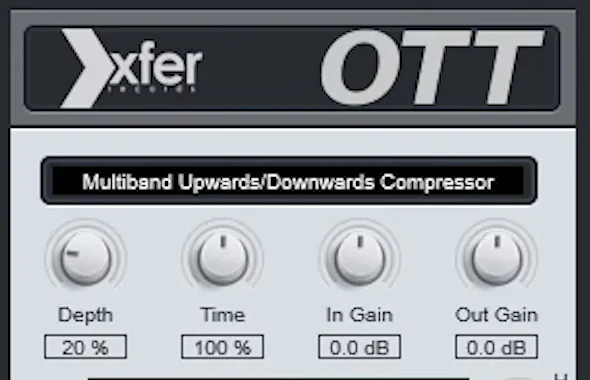
OTT is a free multiband compressor from Xfer Records, the company behind Serum. It lifts the quiet detail and pulls down the loud parts in three bands at once. That’s the bright, upfront sound of a lot of modern vocals. At full strength it’s far too much, so on a vocal you use a small amount.
In Mix Elite’s stock plugin vocal tutorial, Depth sits at 20%, which adds a nice color to the vocal. Mix Elite’s free 4.5-hour FL Studio course gives a range of 7 to 20% and uses 15%. Our stock plugin vocal guide walks through that whole chain.
Version 1.37 is a direct download from Xfer’s freeware page with no account, for Windows and Mac, as VST, VST3 and AAX, plus AU on Mac.
8. Saturation Knob (Softube)
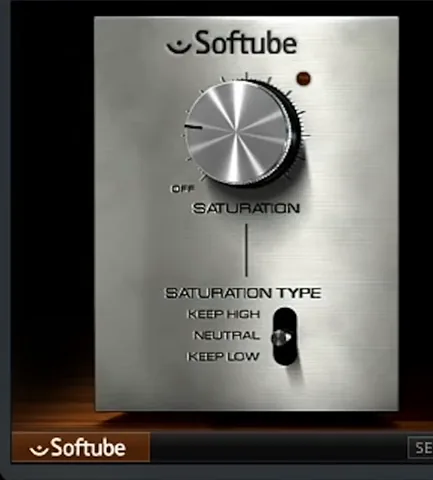
Saturation Knob is one knob of free warmth from Softube. Saturation adds soft harmonics, extra overtones that make a sound feel thicker and closer, and a little of it helps a thin home recording cut through a beat.
Mix Elite’s trap mixing tutorial uses it as the free distortion option, and its vocal effects video adds it to a vocal for smoother, richer harmonics. On a vocal, keep the knob low. The switch picks which part of the sound stays cleaner: Keep High, Neutral or Keep Low.
It asks for the most sign-ups of anything here: a Softube account, the Softube Central installer app and an iLok account for the license. It runs on Windows 10 and 11 and macOS 14 (Sonoma) or newer, with native Apple Silicon support, as AU, VST, VST3 and AAX.
Best free de-esser plugin
Techivation’s T-De-Esser 2 is the best free de-esser, with one main knob that does most of the work. A de-esser turns down harsh S and T sounds, which engineers call sibilance. EQ boosts, compression and OTT all make them louder, so the de-esser comes after them in the chain.
Max’s view, from Mix Elite’s stock plugin vocal tutorial: “You definitely don’t need any third-party de-esser. Greatest of them all is always the custom one you make.” In FL Studio he builds it from Maximus, as shown below. Outside FL Studio, or if you want a one-knob fix, this free plugin is the pick.
9. T-De-Esser 2 (Techivation)
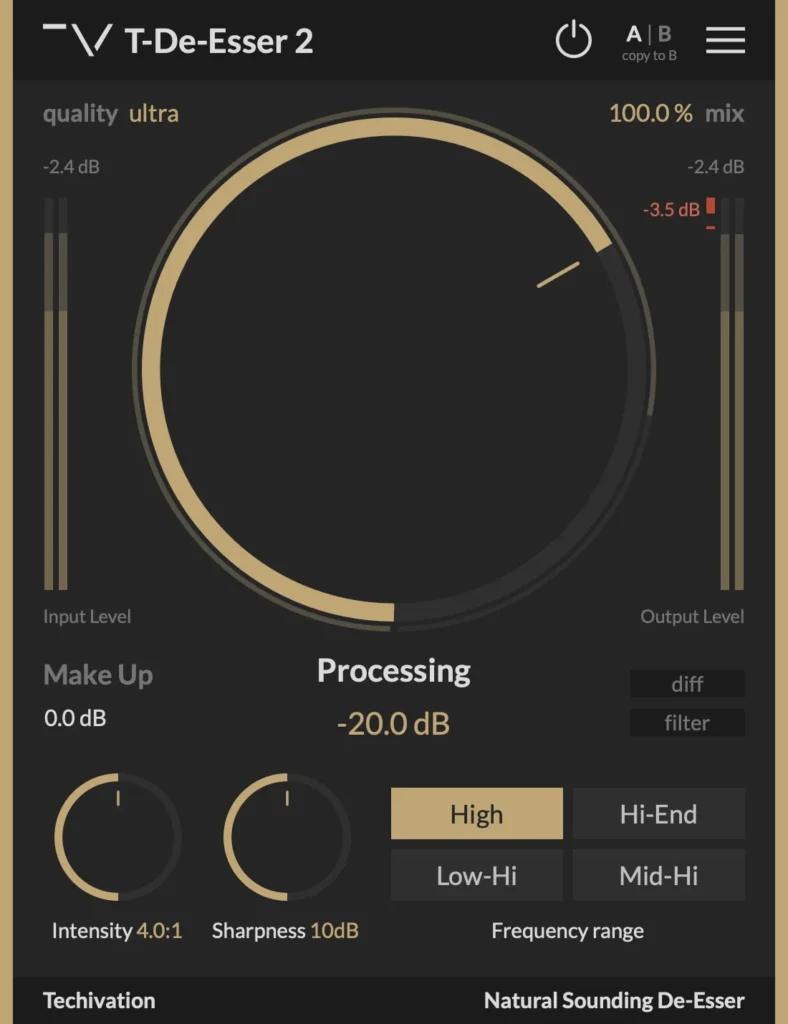
T-De-Esser 2 is Techivation’s free de-esser, and the newer version of the T-De-Esser that older lists still name. One Processing knob sets how much it removes. Intensity and Sharpness shape how it reacts, four buttons aim it at the right range, and a Diff mode lets you hear only what it takes out.
Its Download FREE button takes you to a free Techivation sign-up first, and there’s now an iPad version too. It runs on 64-bit Windows 7 or newer (VST, VST3, AAX) and Mac OS 10.11 or newer, Intel or Apple Silicon (adds AU). Techivation allows commercial use.
In FL Studio: put it after OTT. Switch on Diff and raise Processing until you hear only the S sounds, then switch Diff off and check that the words still sound bright and clear.
Free vocal reverb, delay and width plugins
Valhalla Supermassive is the best free reverb and delay for vocals, with TAL-Reverb-4 as a classic plate and iZotope’s Vocal Doubler for width. Reverb makes a vocal sound like it’s in a room, and delay adds echoes. “The worst thing that you could do to your vocal is just put the reverb on it,” Max says in Mix Elite’s stock plugin tutorial. It blurs the words. Put reverb and delay on their own mixer track instead, cut their low end, and let them duck while the singer sings.
10. Supermassive (Valhalla DSP)
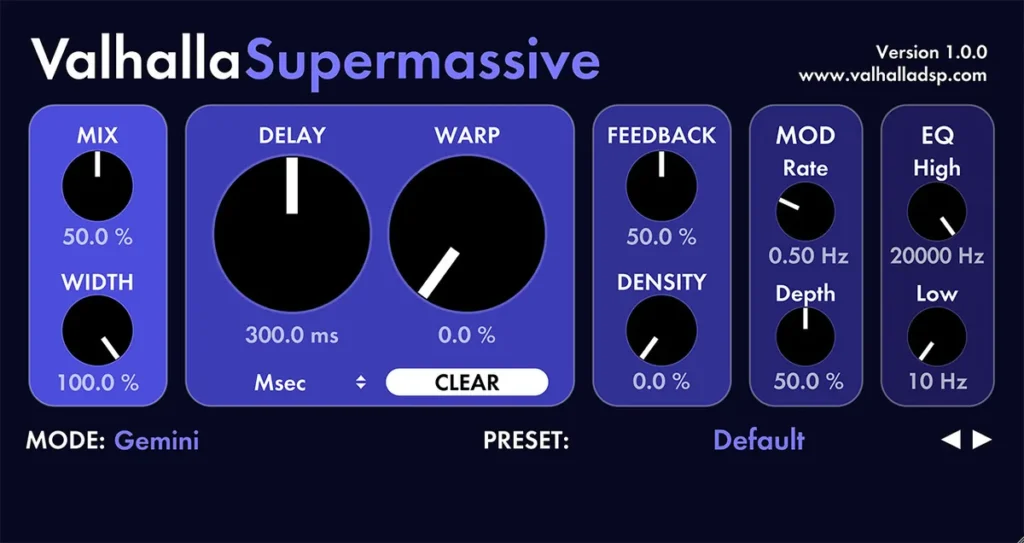
Supermassive is the free reverb and delay from Valhalla DSP, a company famous for its paid reverbs. Version 5.0 has 22 modes, from short echoes to huge, washy spaces. Valhalla’s own words: “And it’s free. No strings attached.”
Get the installer from Valhalla’s demos and downloads page, with no account. It runs on 64-bit Windows 7 to 11 (VST2, VST3, AAX) and Mac OS X 10.9 through macOS Tahoe, Intel or Apple Silicon (adds AU).
In FL Studio: put it on its own mixer track, not on the vocal. Mix Elite’s rule for third-party reverbs like Valhalla: set the plugin’s mix to 100% wet, then send the vocal to that track and set the amount with the track’s fader.
11. TAL-Reverb-4 (TAL Software)
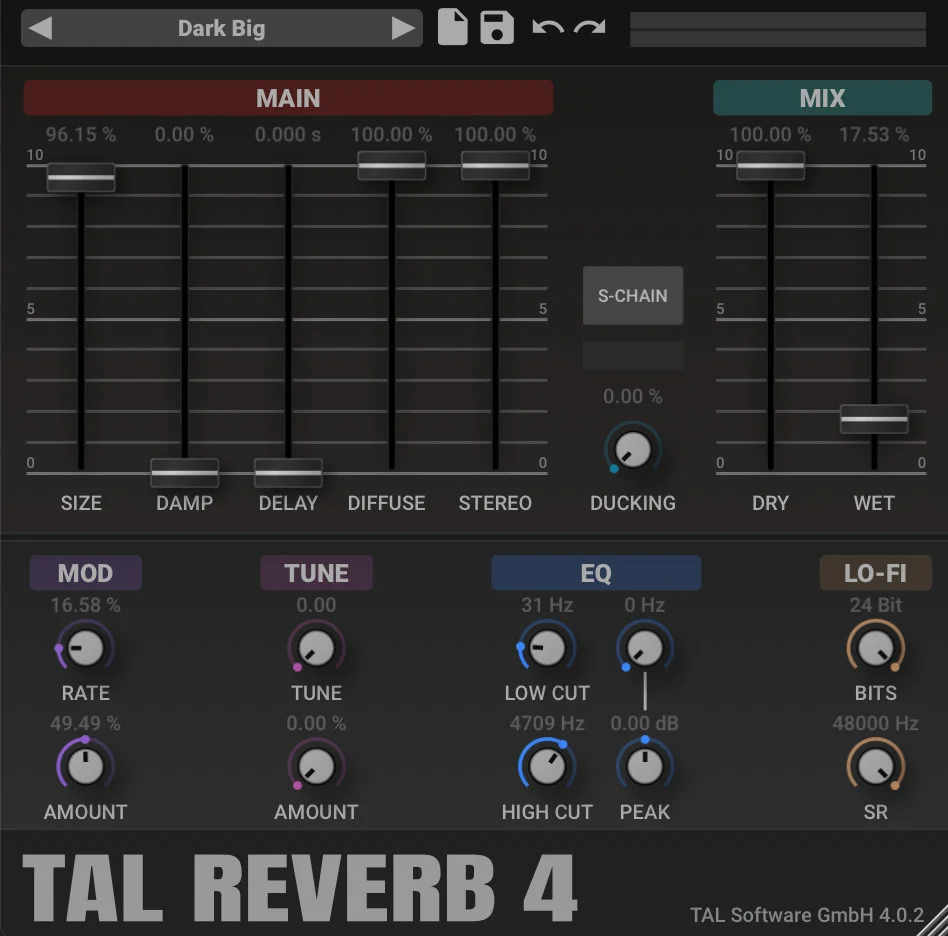
TAL-Reverb-4 is a free plate reverb with a vintage 1980s character: smooth, very diffuse and quick to build. A plate is a classic sound on vocals, because it adds shine without sounding like a big room.
It’s a direct download with no account. Version 4.0.4 runs on Windows 7 or newer, macOS 10.9 or newer with native Apple Silicon support, and Linux, as VST, VST3, AU, AAX and CLAP. Its last update was in August 2023.
12. Vocal Doubler (iZotope)
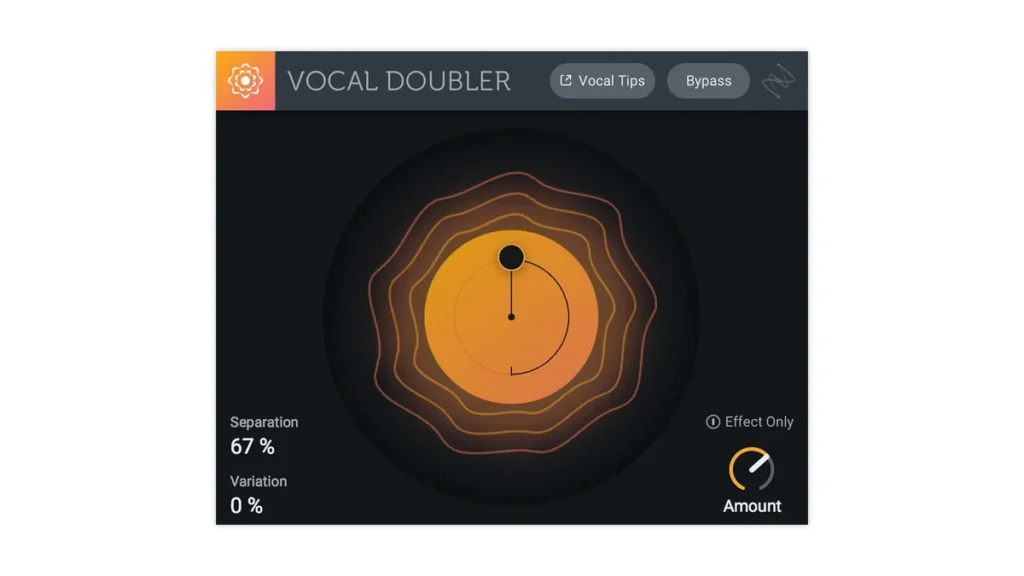
Vocal Doubler makes one vocal sound like two takes sung together, so it feels wider and fuller. iZotope rebuilt it around one simple screen: drag up and down for more stereo spread, and left and right for more human variation.
It’s a free download from iZotope’s own store. It runs on Windows 10 and 11 and macOS 14 (Sonoma) or newer, Intel or Apple Silicon, as VST2, VST3, AU and AAX.
Use it on backing vocals and choruses. A lead vocal usually sounds strongest in the center, and too much width can make it sound smaller when someone plays your song on one phone speaker.
Do you need third-party vocal plugins in FL Studio?
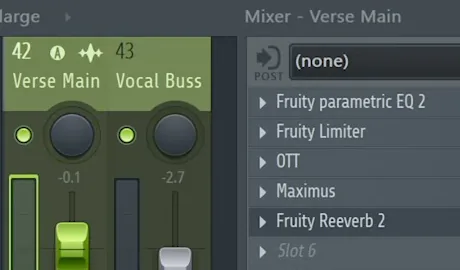
Not to get a finished vocal. Mix Elite’s stock plugin vocal tutorial mixes a rap vocal with four plugins that come with FL Studio plus the free OTT. The screenshot above shows them in the mixer. Here’s what each one does.
Mix Elite’s stock FL Studio vocal chain, in slot order. Settings from its stock plugin vocal tutorial and free FL Studio course.
The EQ is Fruity Parametric EQ 2: the lows get cut around 100 Hz and the low mids dipped, so the vocal stops sounding like a podcast recording. Next comes Fruity Limiter switched to COMP mode, at about 5:1, and up to 20:1 when a rapper’s accents spike. Mix Elite’s free course starts at 4:1 and raises the gain 1 dB at a time until the vocal sits just above the beat.
Then OTT for color, and Maximus as the de-esser. Only its high band gets compressed, set around 6 kHz, or one of its built-in de-esser presets does the job. Last comes Fruity Reeverb 2, set to duck every time the singer sings. The tutorial links it to Fruity Peak Controller; the course moves it to its own mixer track instead. Our complete guide to mixing vocals shows that setup step by step.
One catch: the stock tools depend on your FL Studio edition. Image-Line’s edition comparison lists Parametric EQ 2, Fruity Limiter and Fruity Reeverb 2 in every edition. Maximus and Edison come with Producer Edition and up, and the tuners, Pitcher and Newtone, only with the Signature Bundle and up. Recording audio also needs Producer Edition or higher.
That’s where the free picks fill real gaps:
- Tuning on any edition: Graillon 3.
- De-essing without Maximus: T-De-Esser 2, or a dynamic band in TDR Nova.
- Noise cleanup: Denoiser Classic. On Producer Edition and up, Edison also has a built-in Clean up (denoise) tool and a vocal denoise option.
Want to fix notes by hand instead? Our guide on how to tune vocals in FL Studio covers Newtone step by step.
Turn each plugin off and on while the beat plays, at the same volume. If you can’t hear it helping, take it out. Mix Elite’s whole stock chain is five plugins, and OTT sits at just 20%.
How do you make home-recorded vocals sound professional with free plugins?
Start with a clean recording, then follow the chain in order. Cut the silent gaps, tune lightly, cut the lows around 100 Hz and compress about 4:1. Add a little OTT for shine, de-ess, and send the reverb to its own track so it ducks while the singer sings.
- Record it clean. Pick a quiet spot with little to no echo, even a closet, with no fan or air conditioner blowing into the mic.
- Cut the gaps. Slice out the silence between lines and fade each clip’s edges, or use Denoiser Classic for noise under the words.
- Tune it lightly. Graillon 3 with Smooth around 10 ms sounds natural on a pop vocal.
- Clean the lows. In TDR Nova or Fruity Parametric EQ 2, cut around 100 Hz and dip the boxy low mids.
- Even it out. Use LALA, or Fruity Limiter in COMP mode at about 4:1, and raise the vocal 1 dB at a time until it sits just above the beat.
- Add shine, then de-ess. Put OTT at 7 to 20% Depth, then T-De-Esser 2 or a Maximus de-esser preset after it.
- Add space on a send. Put Supermassive or Fruity Reeverb 2 on its own mixer track, 100% wet, and let it duck while the singer sings.
That’s the same order as the chain at the top of this page. Every step uses a plugin from this list or one that comes with FL Studio.
Why do vocals sound buried in the mix?
Usually because the vocal’s level jumps around, its low mids blend into the beat, or reverb sits right on the vocal and blurs the words. Compress it so every word is equally audible, cut the lows and low mids, and move the reverb to its own ducked track.
Then set the level the way Mix Elite’s free course does: raise the vocal 1 dB at a time until it sits just above the beat. A slower compressor attack can help too. In Mix Elite’s video on vocal mixing mistakes, an attack of 30 to 40 ms helps the vocal cut through the mix.
For free effects that make it stand out, use LALA or DC1A to even it out and TDR Nova to clear the mud. A little OTT or Saturation Knob adds presence, and T-De-Esser 2 keeps that extra brightness from turning harsh.
How do you install free vocal plugins in FL Studio?
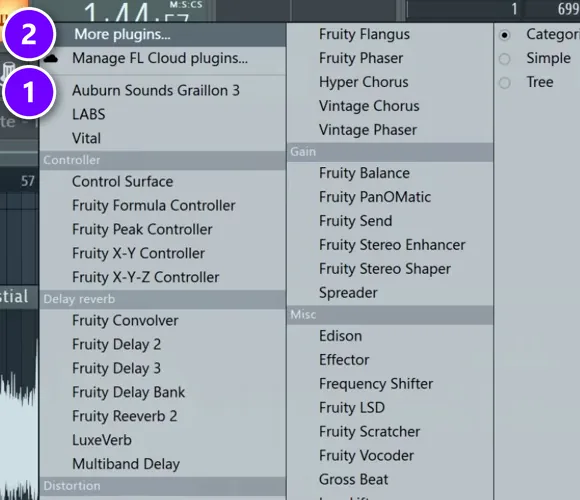
The same five steps work for every plugin on this list. Our guide on how to install VST plugins in FL Studio covers plugin folders and what to do when one doesn’t show up.
- Download the installer from the maker’s page, linked in each pick above. On Windows, choose the 64-bit VST3. On a Mac, VST3 or AU both work.
- Run the installer and keep its default plugin folders.
- In FL Studio, open Options > Manage plugins and click Find installed plugins.
- Give the vocal its own mixer track: select its channel and press Ctrl + L.
- Click an empty slot on that mixer track and pick the plugin. Starred plugins show at the top (1); everything else is under More plugins (2).
Using another DAW? Logic Pro and GarageBand only load AU plugins, Pro Tools needs AAX, and Ableton Live, Cubase and Reaper use VST3. Check the formats under each pick before you download.
What happened to the free vocal plugins on older lists?
Free plugins come and go. Here’s what we found on the makers’ sites on October 12, 2026, for the ones older lists still recommend.
- Voloco: the plugin is now a subscription at $14.99 a month after a 14-day trial. Use Graillon 3 for free tuning.
- VladG Nova-67P: Tokyo Dawn Labs lists it under discontinued products, kept online only so old projects still open. TDR Nova replaced it.
- Analog Obsession FETish: still free, and a good pick if you want a faster, more aggressive 1176-style compressor than LALA. It’s on the same Analog Obsession page.
- Ignite Amps PTEq-X: still free, version 1.1.1, as VST, VST3 and AU. It copies classic passive EQs for warmth. Get it from the Ignite Amps site.
- Dragonfly Reverb: still free and open source for Windows, Mac and Linux, though its latest release, 3.2.10, dates from April 2023. It’s on the Dragonfly Reverb site.
Only download free plugins from the maker’s own site, like the links in this guide. Sites that offer paid plugins for free are handing out cracked copies, which can carry malware and break your projects.
When is a paid vocal plugin worth it?
Free plugins cover every job in the chain. Paid ones mostly save time, and two come up in Mix Elite’s own videos:
- Antares Auto-Tune: Mix Elite’s videos call it the industry-standard autotune. Worth it if you tune vocals every day and want that exact sound.
- Waves Vocal Rider: it rides the vocal’s volume up and down for you, so quiet words don’t get lost. Mix Elite’s videos call the Waves one the best and most popular.
- Newtone in FL Studio: for fixing single notes by hand. It comes with the Signature Bundle and up.
Start free. Pay only when a free plugin on this list can’t do a job you need on every song.
DAY 5 OF THE 7-DAY MUSIC PRODUCER COURSE
Free plugins are the easy part. Day 5 shows you the chain.
Day 5 of the 7-Day course is all about recording and mixing vocals: setting up your room, the V.O.C.A.L. mixing formula, and the mistakes even advanced producers make with vocals. You also get 10 copy-and-paste vocal processing chains, practice acapellas, and a list of the best free VST plugins for mixing vocals. It’s taught in FL Studio (the free trial works), about 45 minutes a day, and on day 7 a pro gives you feedback on your finished track. It’s $27, and you get 60 days to decide if it was worth it.
Frequently asked questions
What is the best free vocal plugin?
If you only get one, get Graillon 3 Free Edition by Auburn Sounds. It’s the free autotune Mix Elite recommends, it runs on Windows, Mac and Linux, and it needs no account. For mixing, TDR Nova (EQ), LALA (compression) and Valhalla Supermassive (reverb and delay) are the free picks that cover the most ground.
What is the best free vocal cleaner plugin?
Denoiser Classic by Bertom Audio. It’s pay what you want, so you can type 0 at checkout, and it turns down hiss and hum with zero latency on Windows, Mac and Linux. In FL Studio Producer Edition and up, Edison also has a built-in Clean up (denoise) tool and a vocal denoise option.
How do you make vocals sound professional with free plugins?
Record somewhere quiet with little echo, then use a free chain in order: tune lightly with Graillon 3, cut the lows around 100 Hz with TDR Nova, compress about 4:1 with LALA, add a touch of OTT, de-ess with T-De-Esser 2, and put Valhalla Supermassive on its own track so it ducks while the singer sings.
Why do my vocals sound buried in the mix?
Usually the vocal’s level jumps around, its low mids blend into the beat, or reverb sits right on it and blurs the words. Compress it so every word is equally audible, cut the lows and low mids, move the reverb to its own ducked track, and raise the vocal 1 dB at a time until it sits just above the beat.
Are free vocal plugins safe to download?
Yes, when you get them from the maker’s own site, like the links in this guide. Avoid sites that offer paid plugins for free: those are cracked copies and can carry malware. Some free plugins ask for an email address or a free account before the download, which is normal.





