“If you want to be a writer, you must do two things above all others: read a lot and write a lot.”
The best beat making course online is Mix Elite Academy. It pairs 600+ trainings, including start-to-finish Hard Trap and Drill courses, with weekly live coaching calls and unlimited 1:1 feedback from a pro on your own beats, for 3 payments of $137 with lifetime access. On a budget, the $47 FL Studio Beginner Accelerator builds a full song with you, beat first, and the best free option is Max’s 4.5-hour FL Studio course on YouTube.
You made a loop you like. Eight bars of drums, a melody that sticks, maybe an 808 that actually hits in your headphones. Then it joins the other loops in a folder, because turning it into a full beat is the part most tutorials skip.
That’s when people start shopping for a beat making course online, and the choice gets confusing fast. Some are a famous producer talking about his process. Others are university classes with a start date, or subscriptions with one beat class buried inside. We checked every course and price below on October 11, 2026, and judged each one by a single test: will it get you from loops to finished beats you’d happily play for someone?
Table of Contents
What is the best beat making course online?
Mix Elite Academy is our pick for the best beat making course online. It’s made by Mix Elite, the school behind the Mix Elite | FL Studio Tips YouTube channel, and it gives you two things a video course can’t: a pro who listens to your own beats, and live calls where you can ask about them.
Full disclosure: Mix Elite makes this page and the Academy. That’s why every other course here was checked on its own site, on the same day, with the price exactly as the seller shows it.
Best for: anyone who has tried YouTube tutorials, has a few loops saved, and wants a clear path plus honest feedback until the beats sound finished.
What you learn about beats inside the Academy
The Academy has 600+ trainings, and you keep all of them for life. These are the ones that matter most when you’re learning to make beats:
- Hard Trap from Start to Finish: a full trap track built from nothing, from melody loops and hard-hitting drums to chords, FX, rap vocals and the arrangement, then mixed and mastered. It runs 4+ hours, with all the project files.
- Drill from Start to Finish: choosing the instruments, writing the melodies and programming the drums of a drill track, plus clean, punchy drill vocals. It’s over 4 hours, in 30 lessons.
- FL Studio Beginner to Advanced: 50+ lessons that start from zero, in case you’ve never opened FL Studio. There’s a Logic Pro X course for beginners too.
- Music Theory: Harmony & Chord Progressions: 30+ lessons on writing your own chords, the part of a beat that sets its mood.
A separate course on arrangements shows how to turn a loop into a full song that keeps people listening. Every course is designed so you can follow along in any DAW (the program you make music in), and the page says you can finish everything with $0 in software and the trial version of your DAW. You also get every sample and preset pack in the Mix Elite store, including the SUPREME trap drum pack, MIDI packs and 30+ song-starter templates.
Weekly coaching and feedback on your own beats
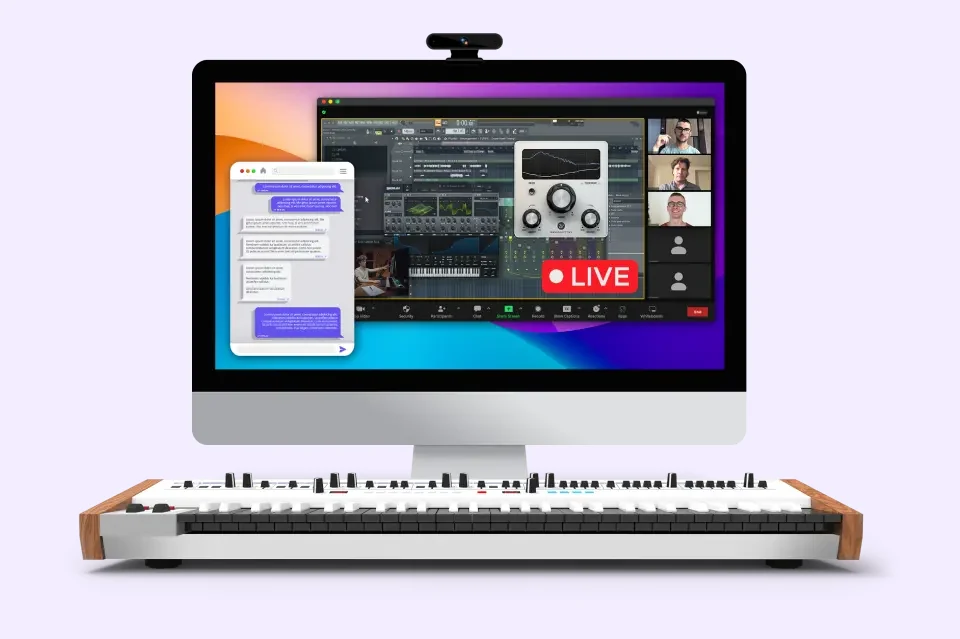
Videos can’t give you this part. You can join live coaching calls 1-3 times a week in a small group with industry pros, as a hot seat, a Q&A, a masterclass or a Fix-Your-Mix session where a pro works on a real project while you watch. Every call is recorded, so missing an evening isn’t a problem.
You also get unlimited 1:1 feedback on your music. You send a beat in through the feedback portal, and a pro writes back an in-depth review of 500+ words with personal homework, so you always know what to fix next. Then you make the next beat, send it in, and the loop starts again. That’s how beats get better.
What you get for 3 payments of $137
- 600+ trainings with lifetime access, 100% self-paced
- Weekly live coaching calls, with every recording yours for life
- Unlimited 1:1 feedback on your beats from a pro
- Every sample, preset and MIDI pack in the store, plus 30+ song-starter templates
- Unlimited mastering of your finished tracks by the team: upload a WAV and get it back in 2-5 days
- A private community, and discounts of up to 50% off on plugins
- A 60-day money-back guarantee: one short email gets you a refund
You pay $137 today, then two more monthly payments of $137, and the access is yours for life. It isn’t a subscription. Already bought a Mix Elite course? The course pages say to ask support for your personal discount on the Academy.
What’s the best FL Studio beat making course under $50?
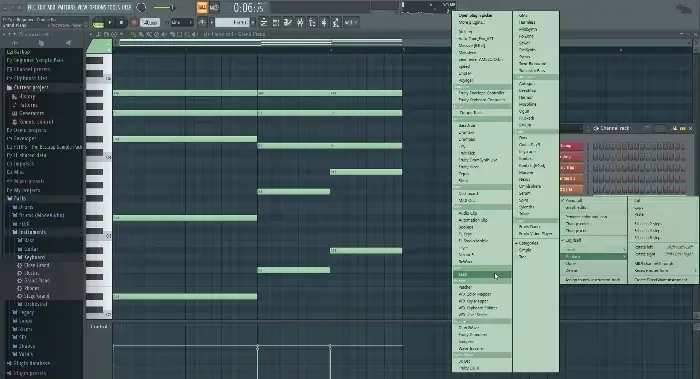
Mix Elite’s FL Studio Beginner Accelerator is the best FL Studio beat making course under $50 that we found. It’s $47, paid once, with lifetime access and a 60-day money-back guarantee. There’s no subscription. The whole course is built around one goal: you finish your first full song in FL Studio, and the beat is where it starts.
Across 52 video lessons (4.5+ hours) and 16 short quizzes, you build one track from an empty project. First you learn the main windows, the Channel Rack, the Piano Roll and the Playlist. Then you write the beat, with drums, piano and plucks, before adding the bass and your first arrangement. After that come the mix with stock plugins, the vocals and the master.
It also comes with a 14-night finish plan of about 45 minutes a night, which fits around a job. Night 3 is your first beat and melody. The downloads include everything from the lessons:
- FLPThe finished trackFL Studio project
- WAVThe sounds from the lessonssamples
- MIDThe MIDI from the lessonsnotes
You also get an e-book and infographics with a producer dictionary. You need FL Studio 20 or newer, its stock plugins and a couple of free ones, and nothing else to buy. If you make beats in another DAW, the Academy is the better fit, because its courses are designed to follow along in any DAW, and this course is included in it.
Best for: FL Studio beginners on a budget who want one guided project from the first beat to the final master. Set on FL Studio? Compare the best FL Studio courses too.
What’s the best free beat making course?
Max, the founder of Mix Elite, teaches a free course on YouTube called Complete Music Producer 4h+ Course. It’s the best free beat making course we know of. It’s a real course rather than a teaser, split into days that build on each other, and you can watch it right here.
Day 1 sets up FL Studio and its windows. Day 2 covers chords, melodies and a bassline, and Day 3 is drums and arranging: trap and house drum patterns, hi-hat rolls, 808s, sample packs and turning a loop into a song. Days 4 to 6 move on to mixing, vocals and mastering. Here’s how Max builds the beat, in three steps.
Step 1: Write a four-chord loop in the Piano Roll
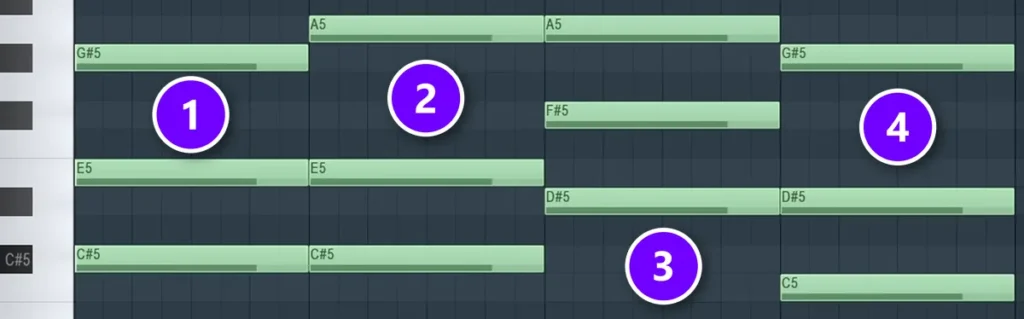
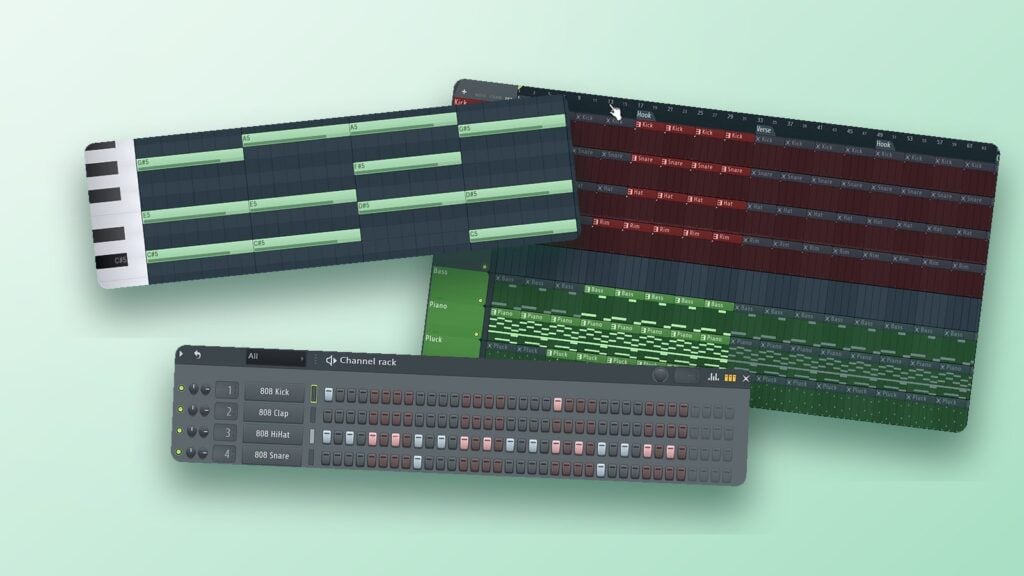
In the course, Max starts with the chords, played on a plain piano sound so they’re easy to hear. Right-click the instrument in the Channel Rack and choose Piano roll, place one root note per bar, then stack every other note of the scale on top of each root. His loop is in C# harmonic minor, with one chord in each bar (1 to 4).
“The chord progression is the backbone of your song. Most songs have just four chords in their progression, and they just repeat and repeat through the whole song,” Max says. That’s why the chords come first: once they loop, the melody and the bass simply follow them.
Step 2: Program the drums in the Channel Rack
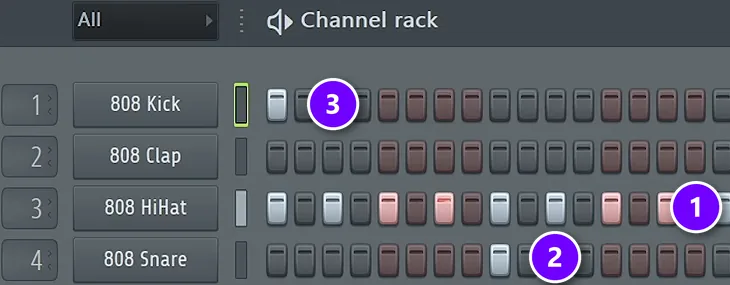
The Channel Rack is FL Studio’s step sequencer, where each row is a sound and each button is one sixteenth of a bar. Right-click the hi-hat and choose Fill each 2 steps (1), put the snare on beat 3 (2), and keep a kick on beat 1 (3) so you always hear where the bar starts. Then make the pattern at least two bars long and change the kicks in the second bar. Keep it simple at first.
Hi-hat rolls come next. Open the graph editor under the Channel Rack and raise a step in its Repeat lane. Max’s rule of thumb is to change something every four beats, and to lower the velocity (how hard a note hits) of every other hat so the groove sounds human. For trap he sets the tempo to 140 BPM, and the 808 follows the chord roots and the kick rhythm. Our trap beat guide walks through each of these moves.
Step 3: Arrange the loop into a beat in the Playlist
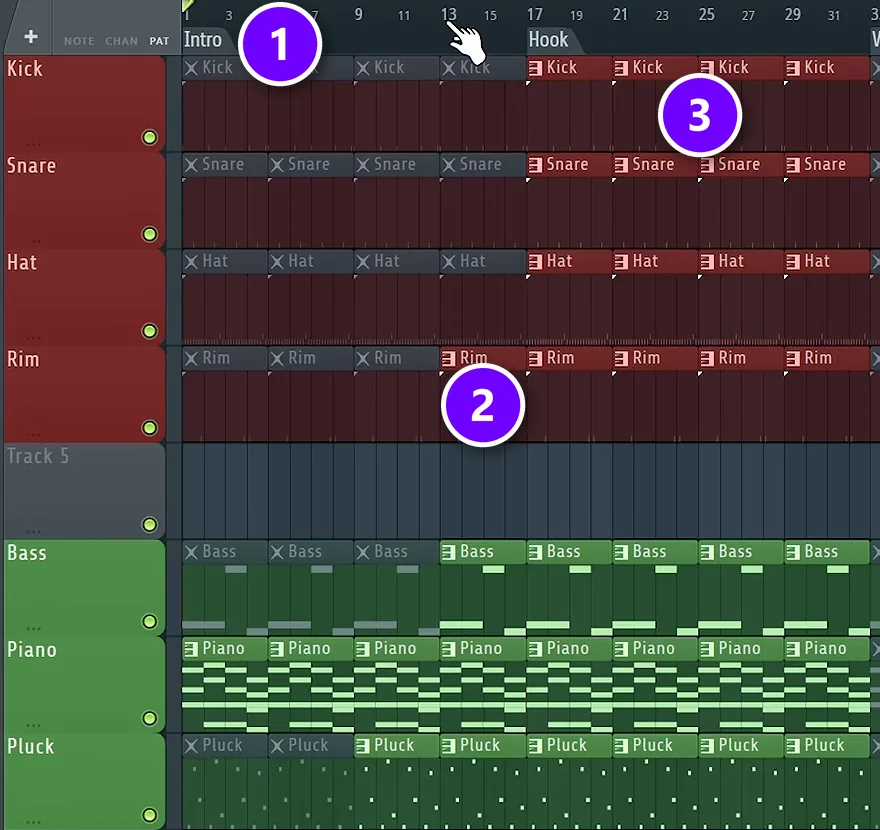
The Playlist is where your loop turns into a song. Max puts every sound in its own pattern, colours the drums red and the instruments green, then selects everything and presses Ctrl + B to duplicate it until the beat is about two minutes long. Next he mutes everything and brings parts back in, one by one, a method he calls additive arrangement.
He adds a marker for each 16-bar section: Intro (1), Hook, Verse, Hook and Outro. The intro starts with the piano and slowly adds the pluck and the bass. Just before the hook, one drum sound, here the rim (2), teases what’s coming, and then everything plays at once (3).
In Max’s words, if you build it this way, “you will definitely get pretty cool results, and this will also be unique to you.” For the full walk-through with every click, read our guide on how to make a beat from scratch.
The free course gives you the lessons. When you want a pro to listen to your own beats and tell you what to fix next, that’s what the Academy adds.
Other beat making courses worth a look
Here’s what else is worth your time, from a university course to a famous producer’s class. Read the price lines closely, because several of these are subscriptions or semesters, and the full cost matters more than the monthly number. For music schools and full production courses, see our guide to the best online music production courses.
Berklee Online: Programming and Producing Drum Beats
Best for: people who want a graded, university-level course with a set start date.
Berklee Online’s Programming and Producing Drum Beats is a 12-week course written by producer and author Erik Hawkins. Its 12 lessons cover drum kits, programming, percussion, samples, loops, groove, song structure and mixing, and you produce beats in different styles, ending with a final project. Berklee rates it Level 3, Intermediate Plus, so it isn’t a day-one course. You need a full DAW (FL Studio Producer or Signature works, GarageBand doesn’t), and a MIDI controller with pads is recommended.
Price: $1,575 in tuition, for credit or not, plus a $75 registration and technology fee. The next semester starts January 11.
A cheaper Berklee route is the Electronic Music Production specialization on Coursera. It’s taught in Ableton Live at an intermediate level, and its performance course starts by building drum beats on a pad controller. It’s included in Coursera Plus, which costs $59 a month or $399 a year.
Udemy: Making Beats in FL Studio
Best for: a long, low-cost FL Studio course you own.
Benjamin Lynott’s Making Beats in FL Studio: THE Music Production Masterclass has 52 lectures and runs 9 hours 42 minutes. It covers drum programming and hi-hats, melodies, chords, basslines and 808s, sampling, arrangement, mixing and mastering, mostly in trap and hip-hop. It’s rated 4.3 from 93 ratings and was last updated in April 2026.
Price: $19.99 on October 11, 2026, with no sale running, paid once. Udemy’s refund policy gives you 30 days on eligible courses.
Skillshare: Curtiss King’s Beat Making 101
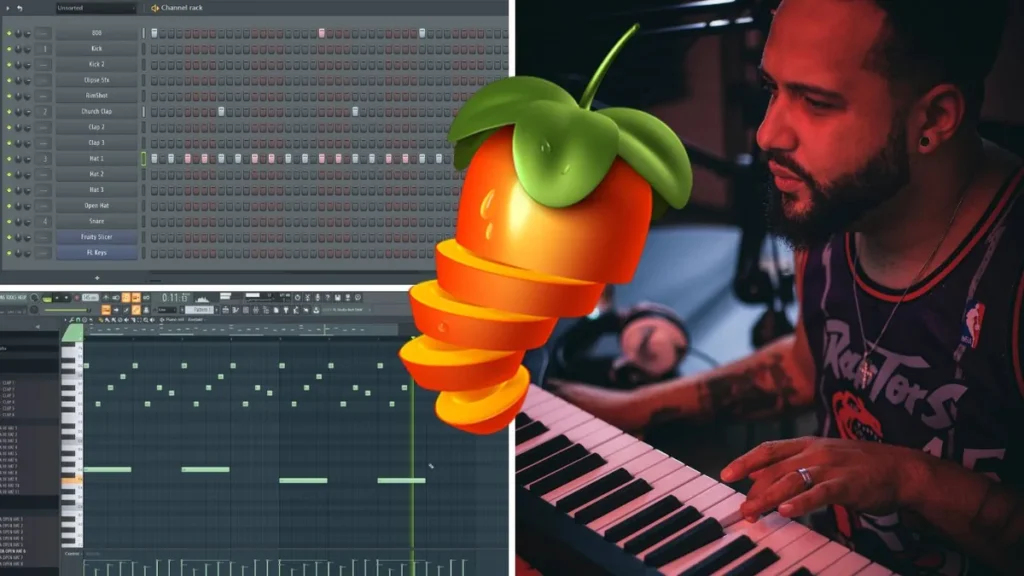
Best for: a short, friendly first beat in FL Studio.
Beat Making 101: FL Studio 20 Beginners Guide is taught by Curtiss King, an independent artist, producer and author. Its 11 lessons, about four hours in all, tour FL Studio, build a drum pattern, explain the Piano Roll, melodies, sampling and the Mixer, and arrange a beat in the Playlist. A bonus lesson makes a full beat from scratch, and your class project is to create, arrange and export your first beat.
Price: a Skillshare membership is $167.88 a year ($13.99 a month, billed for the year up front), and it opens every class on the site.
Studio.com: KC Supreme’s Making Beats in FL Studio
Best for: FL Studio users who want to watch a chart-topping producer’s whole process.
On Studio.com, KC Supreme of Internet Money teaches Making Beats in FL Studio. Its 10 lessons, 5 hours 36 minutes in all, cover chords and melodies, sound selection, drums with bounce, loops and arrangement, mixing, making beats loud enough, and preparing beat packs to send to artists. The class page calls him a multi-platinum, Billboard #1 producer.
Price: $219.99 for lifetime access, at your own pace.
MasterClass: Timbaland Teaches Producing and Beatmaking
Best for: fans who want to see how a famous producer thinks.
Timbaland Teaches Producing and Beatmaking is Timbaland’s first online class: 13 lessons and 2 hours 48 minutes on his own process for creating beats in the studio. It’s an inside look at how he works, so it makes the most sense once you can already build a beat yourself. Think of it as inspiration.
Price: MasterClass plans start at $10 a month, billed once a year ($120 up front), and include 200+ other classes. There’s a 30-day money-back guarantee.
Soundfly: The Art of Hip-Hop Production
Best for: hip-hop fans who like weekly challenges and a community.
Charles Burchell’s The Art of Hip-Hop Production runs six weeks, each with practice tasks and a challenge, and it ends with a final project. It covers writing beats and bass lines, creative sampling (including how sampling works legally), arranging and songwriting, with a Discord community for help. You can also request a 1-on-1 mentor as an extra.
Price: a Soundfly subscription is $12 a month or $96 a year and opens all its courses. You can cancel anytime.
Point Blank Los Angeles: Beatmaking (in person)
Best for: people near Los Angeles who want a classroom and a teacher in the room.
Point Blank Music School’s Beatmaking course meets for one 3-hour class a week for 10 weeks at its Hollywood campus, with daytime, evening and weekend slots. You work in Ableton Live or Logic Pro on beats from house and hip-hop to indie and pop, and you learn kit-building, sampling, EQ and dynamics. It isn’t online, but it’s the one class here where the teacher sits next to you.
Price: $2,545 paid in full, or a $100 registration fee plus $895 a month. The start date was still to be announced on October 11, 2026.
Is a beat making course worth it, or is YouTube enough?
YouTube is enough to learn what each tool does, and Max’s free course proves it. Where free videos fall short is order and feedback. One video shows a hi-hat trick, the next one a vocal chain, and nobody tells you why your own beat still sounds like a demo.
A good course gives you three things a playlist doesn’t: a set order, sounds and project files to follow along with, and someone who checks your work. The first two make you faster. The third is what gets you unstuck, because it’s hard to hear your own mistakes after you’ve looped the same eight bars all evening.
Like learning by copying? Our guide to making type beats shows how to use a song you love as a map, the same reference track trick Max teaches in his free course.
What do you need to start making beats?
Less than most people think. In his free course, Max says the only gear you really need is a computer and a pair of headphones, and everything else is optional.
- A computer: the one you have is probably fine for your first months.
- Headphones: look for a flat sound, with no boosted bass or treble, so your beats sound right on other speakers too.
- A DAW: Max teaches in FL Studio, whose free trial is fully working, except that you can’t reopen saved projects until you buy it.
- Good sounds: a quality drum pack makes even a simple pattern sound finished, and the Academy includes every pack in the Mix Elite store.
You don’t need a MIDI keyboard either, because your computer keyboard can play notes and tap in drums. As Max puts it: “Spoiler alert: you also don’t need any real instrument. Every instrument you can think of and more you can find in the form of a virtual instrument.”
How to choose a beat making course: 7 checks
Before you pay for a beat making course, run it through these seven checks.
- Do you finish whole beats? Loops are easy. The real skill is turning one into a full beat with an intro, a hook and an ending.
- Is it made for your DAW? Drums and chords work the same everywhere, but it’s easier when the teacher uses your program, or when the course is built to follow along in any DAW.
- Do you get the sounds and project files? Making the same beat as the teacher, with the same sounds, lets you compare yours with theirs.
- Can a pro listen to your own beats? Lessons teach the steps. A trained ear tells you what to fix next.
- What’s the full cost? Add up a year of a monthly plan, or a semester’s fees, before you compare it with a one-time price.
- Does it fit your evenings? Self-paced lessons work around a job, while a semester has start dates and deadlines.
- How long is the refund window? Look for enough time to make a few beats with it first.
Watch the billing, not just the monthly price. MasterClass starts at $10 a month, but you pay for the whole year at once.
Every beat making course side by side
Here’s the whole price check in one place, as of October 11, 2026.
| Course | Best for | Price | How you pay |
|---|---|---|---|
| Mix Elite Academy. | Lessons plus coaching and feedback on your beats. | 3 payments of $137. | Lifetime access. |
| Mix Elite FL Studio Beginner Accelerator. | FL Studio beginners on a budget. | $47. | Once, lifetime access. |
| Max’s free FL Studio course on YouTube. | A free first course. | Free. | Free. |
| Berklee Online: Programming and Producing Drum Beats. | A graded university course. | $1,575 plus a $75 fee. | Per course, 12 weeks. |
| Coursera: Berklee Electronic Music Production. | Ableton users. | $59 a month or $399 a year. | Coursera Plus. |
| Udemy: Making Beats in FL Studio. | A long, low-cost course. | $19.99 with no sale on. | Once. |
| Skillshare: Beat Making 101. | A short first beat. | $167.88 a year. | Yearly, paid up front. |
| Studio.com: KC Supreme. | A chart-topping producer’s process. | $219.99. | Once, lifetime access. |
| MasterClass: Timbaland. | Seeing how a star works. | From $10 a month. | Billed yearly. |
| Soundfly: The Art of Hip-Hop Production. | Weekly challenges and a community. | $12 a month or $96 a year. | Monthly or yearly. |
| Point Blank Los Angeles: Beatmaking. | A classroom in Los Angeles. | $2,545. | In full, or monthly. |
MIX ELITE ACADEMY
Get a pro’s ears on your beats
600+ trainings, including start-to-finish Hard Trap and Drill courses, plus weekly live coaching calls and unlimited 1:1 feedback on your own music. Lifetime access for 3 payments of $137, with a 60-day money-back guarantee.
Frequently asked questions
What is the best online beat making class for beginners?
Mix Elite Academy is our pick. It pairs 600+ trainings, including start-to-finish trap and drill courses, with weekly live coaching and unlimited 1:1 feedback from a pro on your own beats, for 3 payments of $137 with lifetime access. If you want one guided FL Studio project for less, the $47 FL Studio Beginner Accelerator builds a full song with you, beat first.
Can you learn to make beats for free?
Yes. Max’s free 4.5-hour FL Studio course on YouTube teaches chords, melodies and a bassline on Day 2, then drums, hi-hat rolls, 808s and arranging on Day 3. You can follow along with FL Studio’s free trial. A paid course adds project files, a set path through every step and, in the Academy, a pro’s feedback on your own beats.
What’s the best hip-hop beat making course online?
For trap and hip-hop, Mix Elite Academy is our pick: its Hard Trap and Drill courses build full tracks from scratch, and a pro gives feedback on your own beats, for 3 payments of $137. Cheaper hip-hop options include Curtiss King’s Beat Making 101 on Skillshare, KC Supreme’s Making Beats in FL Studio on Studio.com and Soundfly’s The Art of Hip-Hop Production.
Is Timbaland’s MasterClass good for beginners?
It’s an inspiring look at how a famous producer works: 13 lessons and 2 hours 48 minutes built around his own process. MasterClass plans start at $10 a month, billed yearly. Most beginners get more from a step-by-step course first, because once you can build a beat yourself, a pro’s choices make much more sense.
Do you need to play an instrument to make beats?
No. In his free course, Max says you don’t need any real instrument, because every instrument you can think of exists as a virtual instrument. You can tap drums into the Channel Rack and play notes on your computer keyboard. A MIDI keyboard is nice to have, but it’s optional.