


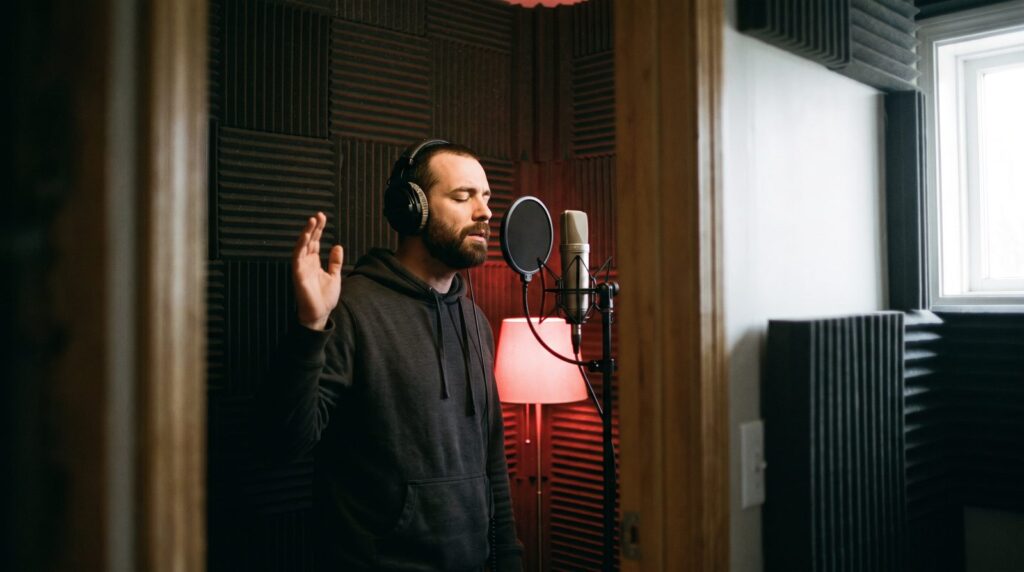
“Copy elements — not the whole thing — then transform them and combine them with other elements.”
A type beat is an instrumental made in the style of a well-known artist and named after them, so rappers who search “[artist] type beat” can find it. To make one, study two or three of the artist’s songs, match their tempo, key, sounds and drum pattern with your own parts, arrange it with room for vocals, then add your producer tag and upload it with a clear “Artist Type Beat” title.
Somewhere right now, a rapper is typing an artist’s name into YouTube, hunting for something to write to tonight. If your beat sounds right and is named right, it can be the one that gets picked. Plenty of beats miss on one of those two jobs. Some copy so much that nobody needs them. Others nail the sound and then hide behind a messy title. This guide covers both halves, from studying the artist to the upload, with real FL Studio screenshots from Mix Elite’s videos.
Table of Contents
What is a type beat?
A type beat is a beat made to sound like the style of a known artist and titled with their name, such as “Drake type beat”. The artist didn’t make it and didn’t order it. The name is a search term. Rappers and singers who want that sound type the artist’s name plus “type beat”, and producers name their beats so they show up in those searches.
Producers post type beats on YouTube and sell the right to use them on beat stores like BeatStars and Airbit, where each purchase comes with written terms. An artist picks a beat, gets the rights, and records a song over it.
So a good type beat has two jobs. It has to sound close enough to the artist that a fan hears the connection right away. It also has to be different enough that it’s clearly yours.
Why are type beats so popular, and is it OK to use an artist’s name?
Type beats are popular because that’s how artists shop for beats: they search an artist’s name plus “type beat”, and a beat titled that way gets found. Using the name to describe a style is the whole idea. The line is suggesting the artist is involved, so never claim they made, feature on or endorse your beat.
For a new producer, that search term does the marketing. Nobody searches for your name yet, but artists already search for a sound they love, and a well-named beat meets them there.
The rules are about not misleading anyone. YouTube’s spam policy, covered in the title section below, bans titles and thumbnails that trick people. So keep “type beat” in the title, use your own artwork instead of a photo of the artist, and never make the beat look official. This isn’t legal advice, and samples are a separate question, covered further down.
How to make a type beat, step by step
Pick one artist and two or three reference songs, and study their tempo, drums, 808, sounds and arrangement. Match the tempo and the mood, build your own chords, melody, drums and 808, structure the beat for a rapper, add your producer tag, then mix it and export an MP3 and a WAV.
Here’s the whole process. The first three steps are research, and they matter more than any plugin you could buy.
Step 1: Pick one artist and three reference songs

Choose an artist whose sound you like and know well. Then pick two or three of their songs that sound alike, ideally from the same album or era. These are your reference tracks. Max, the founder of Mix Elite, calls this one of the best habits a producer can build: “Having a reference track is one of the most powerful strategies to level up quickly. A reference track can be any track that you like a lot that’s in the same style as the track you’re making.”
Start with one artist and stay with them for a few beats. The biggest names have the most competition, so a rising artist with a clear sound can be an easier place to stand out.
Step 2: Analyze the reference songs without copying them
Listen to one part at a time and write down the tempo, the drum pattern, the 808, the main sound, the mood and the arrangement. Rebuild the groove only to learn from it, then write your own notes: borrow the feel, never the melody.
Listen to each song several times. Here’s what to write down:
- Tempo and feel. Fast, slow, or half-time, where the snare lands on beat 3 instead of 2 and 4.
- Drums. Where the kick, snare and hi-hats land, and whether there are hi-hat rolls.
- The 808 or bass. Long and sliding, or short and punchy.
- The main sound. Piano, guitar, bells, strings or a sampled loop.
- The mood. Dark, sad, bouncy, calm or aggressive.
- The arrangement. How long the intro is, where the drums drop out, what changes in the hook.
Let FL Studio pull the song apart
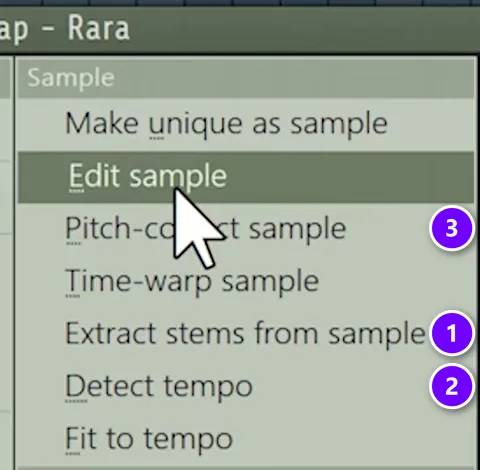
Recent versions of FL Studio can do part of this for you. Drag the song into the Playlist, click the clip’s name and open its Sample menu. Extract stems from sample splits the song into drums, bass, instruments and vocals (1). Detect tempo finds the BPM (2). Pitch-correct sample opens Newtone, which shows the notes of a melody or an 808 and can send them to the Piano Roll (3).
Copy the drum pattern, not the sounds
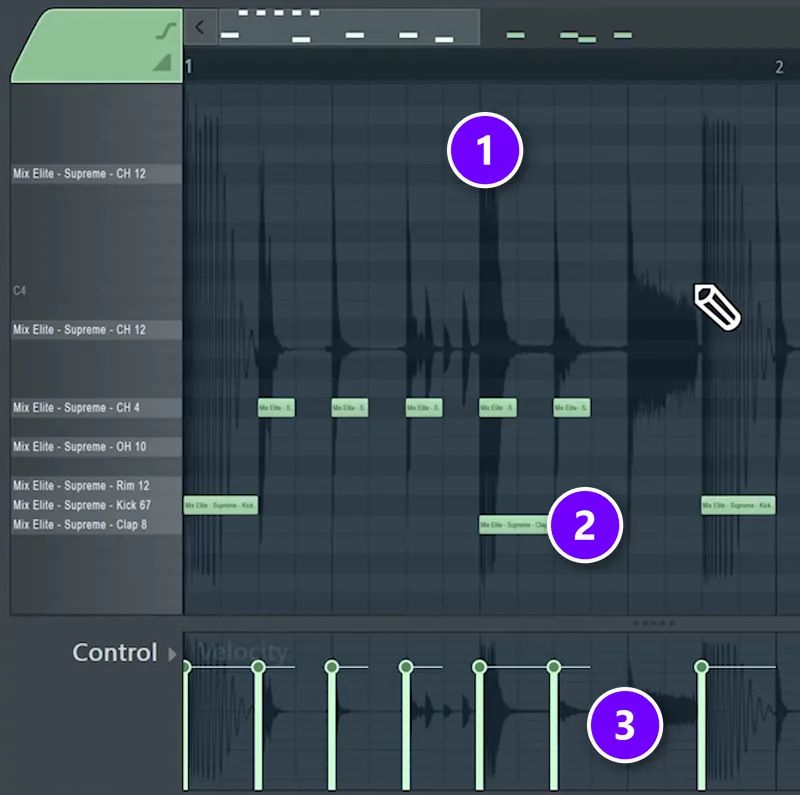
The fastest way to learn a groove is to rebuild it. In the Mix Elite video below, the drum stem is dragged into the Piano Roll of FPC, FL Studio’s drum machine, as a guide. Every spike in the waveform is a hit (1). You put a note on the matching pad under each spike (2), copy how loud each hit is in the velocity lane (3), then play it back with your own samples.
As the video puts it, “doing remakes and recreating tracks is actually one of the best ways to learn quick.” Use a remake to understand why the groove works, then write your own beat. The remake itself stays in your practice folder.
Step 3: Match the tempo and the key
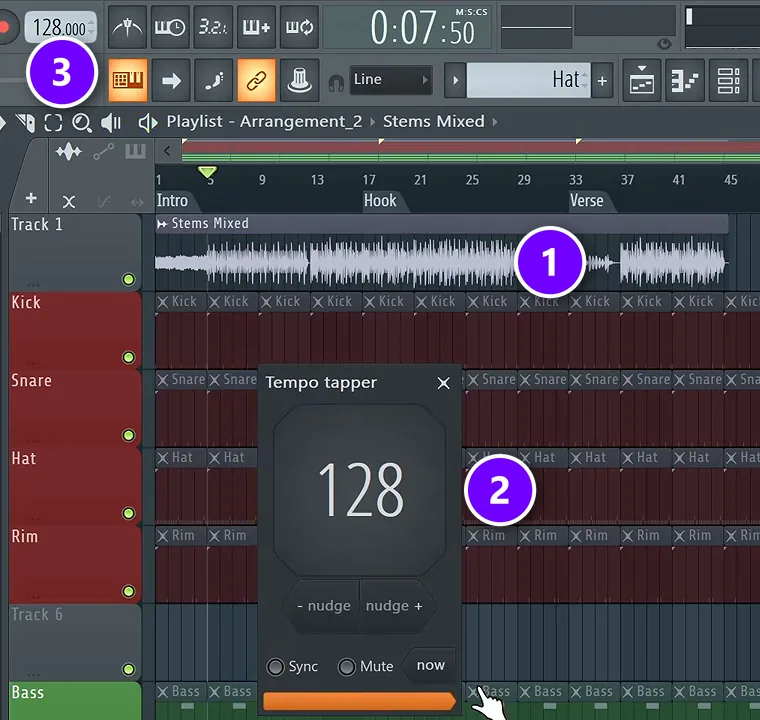
Your beat should sit at the same tempo as the artist’s songs, or very close. Max keeps it simple: “If you’ve taken a popular track, you can just Google what’s the BPM of XYZ, or you can also tap the tempo.” To tap it in FL Studio, drag the reference into the Playlist (1) and play it. Then right-click the tempo display at the top, choose Tap, and click along with the beat until the number settles (2). The project tempo follows (3). Then play the song with the metronome to check that every hit lines up.
For the key, Tunebat shows the key and BPM of many popular songs, and Mix Elite’s free FL Studio course uses its analyzer to find the key of a vocal. You don’t have to copy the exact key. Matching the mood matters more, and Mix Elite’s music theory crash course points out that minor scales are more popular in today’s pop, hip-hop, R&B and electronic music.
Step 4: Pick sounds that fit the artist
Sound choice is most of the “type” in a type beat. Match the drum kit to your references, whether it’s crisp and modern or dusty and sampled. Match the 808 and the main melody sound too. Use a few great sounds instead of lots of okay ones, and keep comparing your track with the reference as you choose.
Only use sounds you’re allowed to use in a beat you sell. A sample pack comes with a license that says what you can do with it, so read it before you release a beat made with it.
Step 5: Build the beat: chords, melody, drums and 808
Now make it. Write a short chord loop in the artist’s mood, put a simple melody on top, then add the drums and the 808. Make the 808 follow the kick and the root notes of your chords, the way Mix Elite’s FL Studio course does it. Keep every part your own. Borrow the feel and the drum layout, never the notes of their melody.
If you’re new to these steps, Mix Elite’s first-beat walkthrough builds a whole trap beat in FL Studio, and the trap production guide covers melodies, hi-hat rolls and 808s in more depth.
Step 6: Structure the beat for a rapper
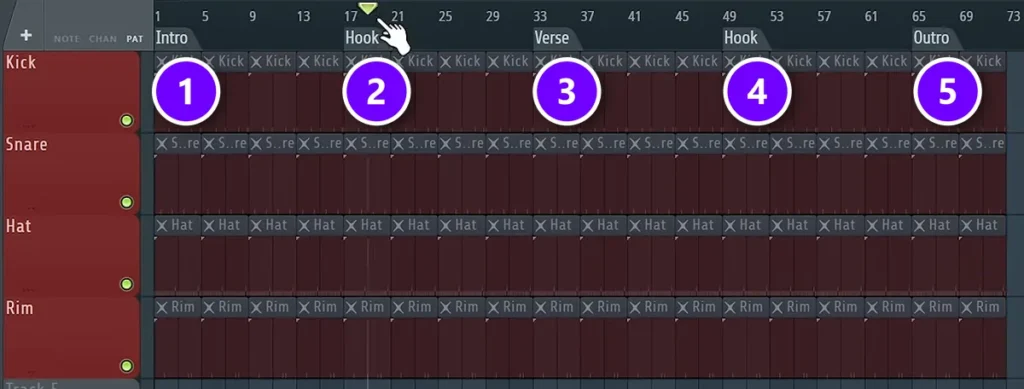
Use a simple structure: intro, hook, verse, hook and outro, about two minutes long. Keep the intro short (4 or 8 bars), so an artist skipping through beats hears the main idea fast, change something every 4 to 8 bars, and leave the verses open for the vocal.
A type beat isn’t a finished song. It’s a track for someone else to write on, so leave room for the vocal. Max explains why he keeps a trap arrangement rough: “It’s vocal focused, right? So it will be up to the person who would be singing or rapping over this beat to decide how long they want to be.”
The layout in Mix Elite’s free 4.5-hour FL Studio course is an intro (1), a hook (2), a verse (3), a second hook (4) and an outro (5). It aims for about two minutes, adds something new every 4 to 8 bars, and teases the drums just before the hook. The guide on how to structure a beat goes deeper.
Step 7: Add your producer tag
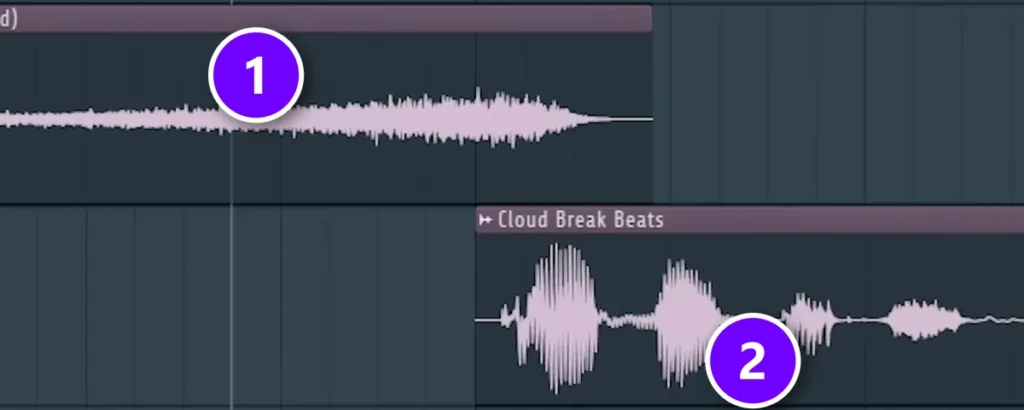
A producer tag is a short voice clip with your name, so people know who made the beat even when it travels without your title. In Mix Elite’s producer tag tutorial, Max records the voice himself and recommends recording your own samples. Here’s the recipe:
- Record a short line, like your producer name, and even out its level with a limiter.
- Tame harsh S sounds with a de-esser and cut the low end with an EQ.
- Copy the first word, put a big reverb on it, render it and reverse it. Place that swell so it rises right into the start of the tag (1), with the clean tag on top (2).
- Add one effect that makes it yours, like a pitched-down copy or a little distortion. Keep the whole tag short.
Put the tag near the start of the beat. Some producers repeat it once or twice later, so a beat that gets shared without its title still carries their name.
Step 8: Mix it and export two versions
Give the beat a clean mix. Balance the kick and the 808 first, because they fight for the same low end, and the guide to mixing the kick and the 808 shows how to make them sit together. Then export two files: an MP3 with your tag for YouTube and previews, and a high-quality WAV for the artists who buy it.
What sounds and drums work for a chill, melodic type beat?
Pick soft, warm melodic sounds and give the drums space. A soft piano, a clean guitar, bells, strings or a harp work well over a slower or half-time groove, where the snare lands on beat 3. Keep the melody simple, because the vocal is the star.
- Melodic sounds: soft piano, clean guitar, bells, strings or harp. Mix Elite’s video on free instruments for trap, drill and hip-hop adds that there’s always room for a harp in these styles.
- Drums: a half-time groove feels calmer than its tempo number. Trap usually sits around 140 BPM, and in Mix Elite’s FL Studio course the beat already sounds good with just three drum elements.
- Space: a chill beat needs room more than layers. Leave gaps in the melody and keep the drum pattern light, so the vocal can sit on top.
How do you make a type beat less repetitive?
Change something every 4 to 8 bars. Bring parts in one at a time, tease the drums before the hook and bring everything in on the hook, vary the hi-hats, and change the melody in its fourth bar. The loop can stay the same; what plays around it shouldn’t.
Here’s how the arrangement in Mix Elite’s free FL Studio course keeps a trap beat moving:
- Build the intro in layers. Start with the main sound alone, then add a part every few bars. In the course, the pluck comes in at bar 8 and the bass at bar 13.
- Tease the drums. Bring in one hat, rim, kick or snare just before the hook, then hit the hook with all the drums.
- Make the verse move. Change something after 8 bars, or leave one part out of the second half of the verse for contrast.
- Loosen the hi-hats. Lower the velocity of every other hat and change a few rolls, so the pattern doesn’t sound robotic.
- Answer your own melody. Repeat the idea two or three times and change the fourth bar.
- Ease out. Strip the outro down to a couple of parts instead of stopping dead.
How to title and tag a type beat: the keywords that matter
This is the part that’s easy to rush, and it decides who finds the beat. Put the most important words first. A clear title has three parts:
- One artist, two at most. “Artist x Artist Type Beat” is common. Five names in one title look like spam.
- Genre or mood, if there’s room. Words like dark, melodic, drill or R&B help the right artist find it.
- A useful description. The BPM, the key, how to buy or download the beat, your contact, and credits if someone else worked on it.
- Tags. A few accurate ones are enough. YouTube’s help page says tags play “a minimal role in your video’s discovery,” and warns that “adding excessive tags to your video description is against our policies on spam, deceptive practices, and scams.”
- No tricks. YouTube’s spam policy bans titles, thumbnails and descriptions that trick people into clicking a video that doesn’t deliver what was promised. Keep “type beat” in the title, and never suggest the artist is on the track.
How to make a type beat video and upload it
Most type beat videos are one still image, or a simple moving visual, with the beat playing underneath. You don’t need a video editor for that. FL Studio’s ZGameEditor Visualizer can turn your track and an image into a video file with its Export to Video option.
Before you hit upload, check this list:
- Artwork you made yourself or have the right to use.
- The title format above, with the BPM and the key in the description.
- A link where artists can download or license the beat, such as your BeatStars or Airbit store.
- The same visual style on every upload, so people recognize your beats in a crowded search.
Then keep going. Upload on a steady schedule and share your beats where artists already hang out. The guide to free music promotion has more ways to get your music heard without paying for ads.
Is it legal to make type beats?
This isn’t legal advice, but a few facts from official sources are worth knowing before you sell anything. A type beat is your own instrumental. Trouble starts when a beat copies someone else’s recording or song.
- Every record holds two copyrights. In the words of the US Copyright Office, “Sound recordings and musical compositions are considered two separate works for copyright purposes.” One covers the recording itself. The other covers the song, meaning its music and lyrics.
- Samples need permission. If your beat uses a piece of someone else’s record, get permission first. The Copyright Office’s FAQ says that “in cases of doubt, the Copyright Office recommends that permission be obtained.” The guide on how to clear a sample walks you through it.
- Rebuilding a sound is not the same as sampling it. US law says a recording’s owner can’t stop a completely new recording that only imitates its sounds (17 U.S.C. § 114(b)). That rule covers the recording only. The melody and lyrics still belong to the songwriters, so write your own.
That’s why the remake trick above is for learning. Rebuild the drums with your own samples, work out why they hit, then write new parts. The Mix Elite video says it plainly: use it to understand the music, and never to steal anything from anyone.
Type beat mistakes to avoid
- Copying the artist’s melody note for note.
- Using a sample you haven’t cleared, or one whose license doesn’t allow selling.
- A long, empty intro before anything happens.
- Five artist names in the title, or a wall of tags in the description.
- No producer tag, or a tag so loud it ruins the beat.
- A beat that sounds nothing like the artist in its title.
- Studying the artist once and never again. Fresh references keep every beat sharp.
DAY 3 OF THE 7-DAY MUSIC PRODUCER COURSE
Build the drums, then arrange the beat
Day 3 of the 7-Day course is about drums and arranging: how to choose sounds that work, how to build drum patterns fast even if you have no feel for rhythm, and one simple tactic for turning an idea into a full song. You get the 2025 Producer Toolkit sound pack to work with. It’s taught in FL Studio (the free trial works), about 45 minutes a day, and on day 7 a pro gives you personal feedback on your finished track. It’s $27, with 60 days to decide if it was worth it.
Frequently asked questions
What does type beat mean?
A type beat is an instrumental made in the style of a known artist and named after them, for example “Travis Scott type beat”. The artist had nothing to do with it. The name works like a search term, so rappers and singers looking for that sound can find the beat on YouTube or a beat store and use it for their own song.
Is it legal to name a beat after an artist?
Using an artist’s name to describe a style is the whole idea of a type beat. Just never suggest the artist made, features on or endorses the beat, and use your own artwork. YouTube’s spam policy bans misleading titles and thumbnails. Samples are a separate issue, because they need permission. This isn’t legal advice.
What BPM should a type beat be?
Use the tempo of the artist you’re studying. Search for the BPM of two or three of their songs or tap it in FL Studio, then set your project to match. Mix Elite’s free FL Studio course puts most styles between 90 and 160 BPM and sets trap beats to 140. Half-time grooves can feel slower than the number suggests.
How long should a type beat be?
About two minutes is a good target. Mix Elite’s free FL Studio course builds a rough trap arrangement of about that length, because the rapper or singer decides the final length of the song. Keep the intro short, bring in the hook early, and leave clear space for verses.
Can you use samples in a type beat?
Yes, if you have the right to. Royalty-free sample packs come with a license that tells you what you can do, so read it before you sell the beat. A piece of someone else’s record carries two copyrights, one for the recording and one for the song, so get permission before you use it. If you’re not sure, rebuild the part yourself or leave it out.





