



“Whatever you now find weird, ugly, uncomfortable and nasty about a new medium will surely become its signature.”
The best saturation plugins in 2026 are Soundtoys Decapitator ($199) for all-round analog warmth and FabFilter Saturn 2 ($149) for precise multiband control. The best free one is Softube’s Saturation Knob, and FL Studio users already have three: Fruity Blood Overdrive, Fruity Soft Clipper and Fruity Fast Dist.
Your beat is clean, but it sounds flat. The kick doesn’t hit, the 808 disappears on phone speakers, and next to a real record your mix sounds like a demo. Max, the founder of Mix Elite, knows the feeling. He’s all about hard-hitting drums, and a little saturation is usually what gets them there.
Below are 11 saturation plugins worth your time, starting with the three already inside FL Studio. We checked every price, free or paid status, platform and version on the maker’s own website in October 2026. You’ll also learn Mix Elite’s trick for adding warmth without killing your punch, the mistake almost everyone makes with these plugins, and where saturation fits in mixing a song.
Table of Contents
What does a saturation plugin do?
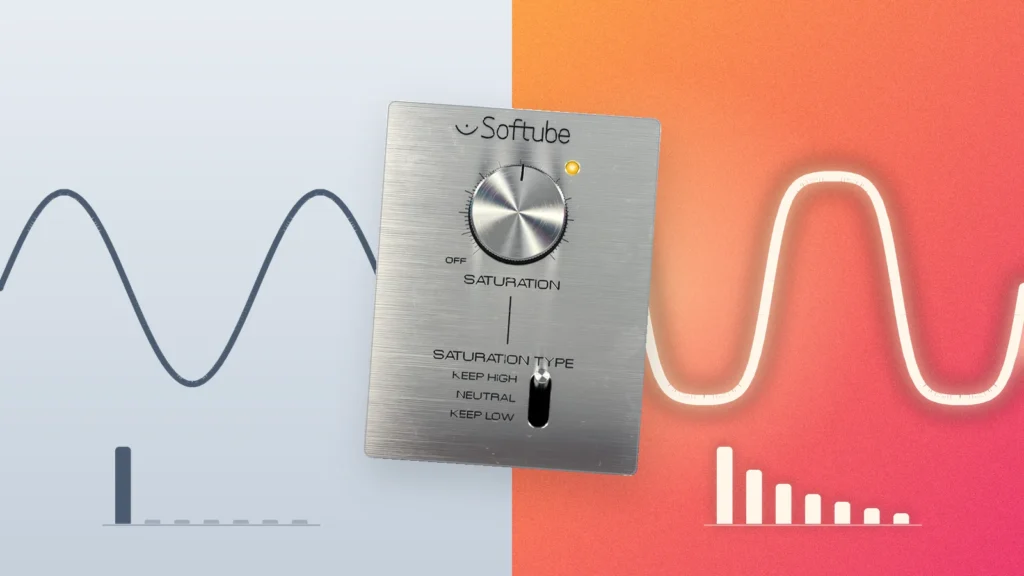
Saturation is gentle distortion. It adds new, quieter tones on top of your sound, called harmonics, so the sound feels fuller and warmer and is easier to hear on small speakers like a phone. Back when every song went through tape machines and tube gear, engineers got this sound by pushing the machines a little too hard. A saturation plugin copies that on purpose.
Max explains it with a photo app. Putting saturation on the kick and 808 together, he says, is “like an Instagram filter on top of your kick and 808” (Mix Elite’s kick and 808 video). It gives both sounds the same color, so they blend into one low end instead of fighting.
There’s a catch. To create those harmonics, saturation shaves the tops off your loudest peaks, so it squeezes the sound a bit like a compressor. That glues sounds together, but it can also steal the punch from your drums. The fix is further down.
Why do producers use saturation on almost every track?
Because a little saturation makes almost any sound easier to hear and easier to mix. It adds harmonics, so a sound feels fuller and still comes through on phone speakers. It rounds off the loudest peaks, which glues sounds together, and it gives different sounds one shared color, so they blend instead of fighting.
Tube, tape or transistor: which type should you choose?
Choose by the job. Tube is the safe, warm choice for vocals and bass, tape gives drums and whole mixes a soft squeeze, transistor or console adds punch and bite, and a clipper makes a master louder. Reach for distortion or lo-fi only when you want the effect to be heard.
You’ll meet six flavors of saturation in the plugins below:
- Tube: smooth and warm, like old valve gear. Great on vocals, bass and the whole mix.
- Tape: soft and round, with a gentle squeeze, like a song bounced to a tape machine.
- Transistor or console: brighter and punchier, the sound of a vintage mixing desk.
- Clipping: cuts off the tops of loud peaks. A soft clipper rounds them off, so it stays clean until you push it.
- Distortion: the loud, dirty end, for 808s, guitars and sound design.
- Lo-fi: vinyl crackle, cassette wobble and noise, for an old, worn-in sound.
How we picked the best saturation plugins
We started with the saturators already in FL Studio, because that’s what Mix Elite’s lessons use. Then we added the free and paid plugins that come up again and again in the top-ranking saturation guides, plus the ones used in Mix Elite’s own videos, and kept only those their makers still sell or give away. We checked each one on the maker’s own website in October 2026. When you choose, look at four things:
- The flavor you want: tube, tape, clipping or dirty distortion.
- How much control: one knob is faster, while a multiband plugin like Saturn 2 lets you saturate only part of the sound.
- Your setup: Windows or Mac, and a plugin format your music app loads. VST3 works almost everywhere, FL Studio included.
- Price: start free, and buy a paid plugin only when you can name what the free ones can’t do.
The saturation plugins already in FL Studio
You don’t need to buy anything to start. Image-Line’s edition comparison lists all three of these in every FL Studio edition, from the cheapest Fruity Edition up, and the free trial has them too. They only run inside FL Studio, on Windows and Mac. Everything here was checked against FL Studio 26.1.7, the current version.
1. Fruity Blood Overdrive (FL Studio)
Price: included in every FL Studio edition. Works on: Windows and macOS, inside FL Studio.
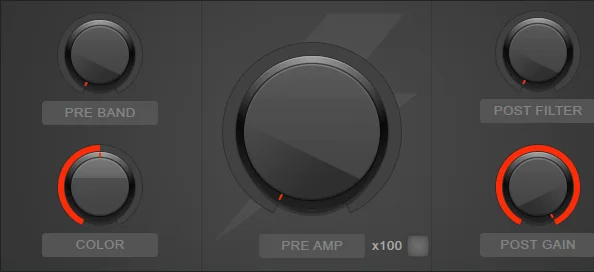
Blood Overdrive is FL Studio’s classic overdrive. Image-Line says it uses “classic techniques that give compressed and soft sounds,” instead of the harsh sound of cheap digital distortion. Pre Amp sets how hard you drive it, and the x100 switch pushes it a lot harder. Pre Band and Color filter the highs before the distortion, Post Filter cleans up after it, and Post Gain brings the volume back down.
Image-Line’s own tip: if it gets too loud, turn down Post Gain, not the sound going in, or you lose the distortion. Even with no drive at all, it gently compresses a whole mix, a bit like a tube compressor.
Best for: guitars, synths and bass that need warm grit. Read Image-Line’s manual.
2. Fruity Soft Clipper (FL Studio)
Price: included in every FL Studio edition. Works on: Windows and macOS, inside FL Studio.
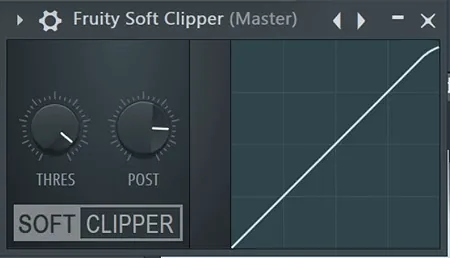
Soft Clipper is a light, CPU-friendly limiter with just two knobs: Threshold and Post Gain. Above the threshold it rounds off the peaks instead of chopping them flat, and Image-Line’s manual notes that this gives a little saturation: “a little saturation brings ‘warmth’, too much can sound distorted.”
It’s the clipper Mix Elite’s free 4.5-hour FL Studio course uses to make a finished song louder. Max has yet to find a free maximizer that beats a simple soft clipper, and FL Studio has one built in. Set the threshold to about -0.3 dB and push the level into it with a gain plugin placed before it.
Why is a clipper on a saturation list? Because clipping is just a style of saturation: it shaves off the peaks, the same way saturation does. Best for: getting a finished song louder on the master, and taming drum peaks. Read Image-Line’s manual.
3. Fruity Fast Dist (FL Studio)
Price: included in every FL Studio edition. Works on: Windows and macOS, inside FL Studio.
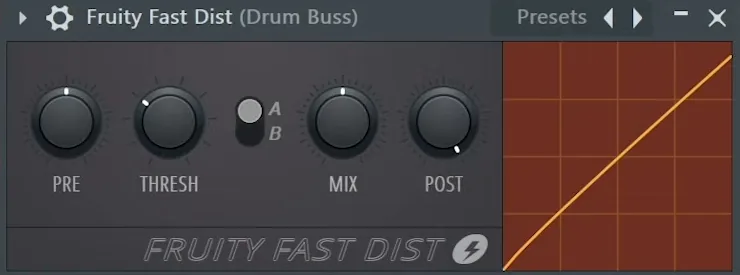
Fast Dist is a simple, CPU-friendly distortion. Image-Line suggests it on “bass and kick drum sounds for a gritty and punchier effect.” Pre drives the sound in, Thres sets how hard it gets shaped, the A/B switch picks one of two distortion types, Mix blends the clean and distorted sound, and Post sets the volume out.
Mix Elite’s trap mixing tutorial suggests it on a trap drum bus, and the hard-hitting drums video runs it before the compressor with the mix knob around halfway. That gives the whole kit the same color, a bit like one photo filter on every drum.
Best for: kicks, 808s and drum buses, with the mix knob doing most of the work. Read Image-Line’s manual.
Pro tip: FL Studio hides two more saturators. Fruity WaveShaper (every edition) lets you draw your own distortion curve, and Maximus (Producer Edition and up) has a soft clipper built in that Mix Elite’s lessons use on the master.
The best free saturation plugins
The best free saturation plugins are Softube’s Saturation Knob, for one-knob warmth, and Klanghelm’s IVGI, when you want more control. Both cost nothing and work in any music app, FL Studio included. If you’ve never installed a plugin, our guide to installing VST plugins in FL Studio takes about five minutes. Want tape instead? CHOW Tape Model, an open-source emulation of a reel-to-reel tape machine from Chowdhury DSP, is also free to download for Windows, Mac and Linux.
4. Softube Saturation Knob
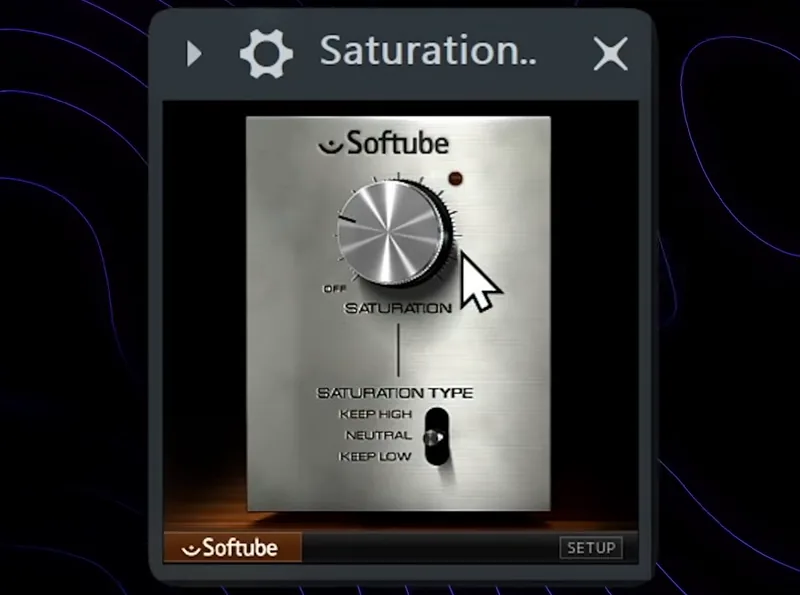
Price: free. You need a free Softube account and the Softube Central app to install it. Works on: Windows 10/11 and macOS 14 or newer, Apple silicon native (VST2, VST3, AU, AAX). Version: not listed on Softube’s page.
One knob sets how much saturation you add, and a three-way switch picks the flavor: Keep High keeps the top end clean, Keep Low protects the bass, and Neutral saturates everything evenly. That’s the whole plugin, which is exactly why it’s easy to use well.
It’s the free saturator Mix Elite’s videos reach for most. In the vocal reverb video, it goes on the reverb track, just before the reverb, for smoother, richer harmonics. In the kick and 808 video, it sits on a group with the kick and 808, so both share one color.
Best for: kick and 808 groups, vocals and reverb sends, and anyone who wants good saturation without menus. Get it from Softube.
5. Klanghelm IVGI
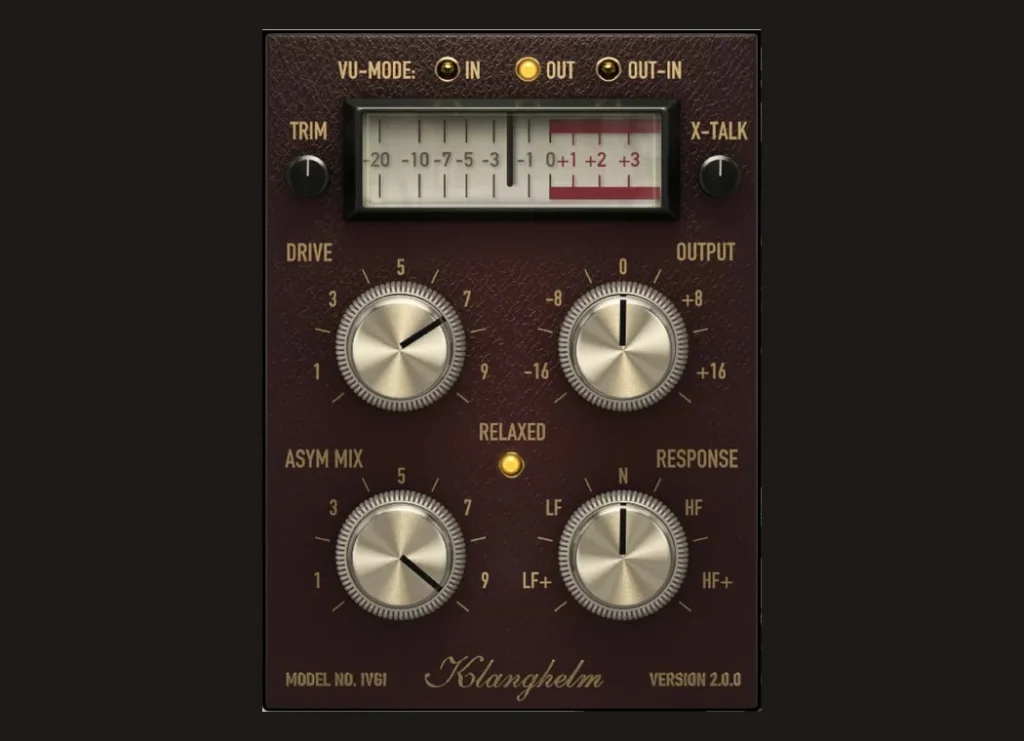
Price: free, no account or email needed. Works on: Windows 10 or newer and macOS 10.13 or newer, Apple silicon native (VST2, VST3, AU, AAX). Version: 2.5.0.
Klanghelm says IVGI can be “very soft and subtle” on the master bus or “very dense and dirty” on single tracks. It gives you more control than the Saturation Knob: Drive and Output, Asym Mix (which changes the shape of the wave), Response (which part of the frequency range it reacts to most), Trim and X-Talk. A built-in bit of random drift makes it behave like real analog gear.
Best for: gentle glue on buses and the master, and learning how saturation changes a sound. Get it from Klanghelm.
The best paid saturation plugins
If you buy one paid saturator, make it Soundtoys Decapitator ($199) for drums and all-round color, or FabFilter Saturn 2 ($149) if you want to saturate only part of a sound. Every price below is the maker’s own price, checked in October 2026. Most of these makers run sales often, so it can pay to wait for one.
6. Soundtoys Decapitator
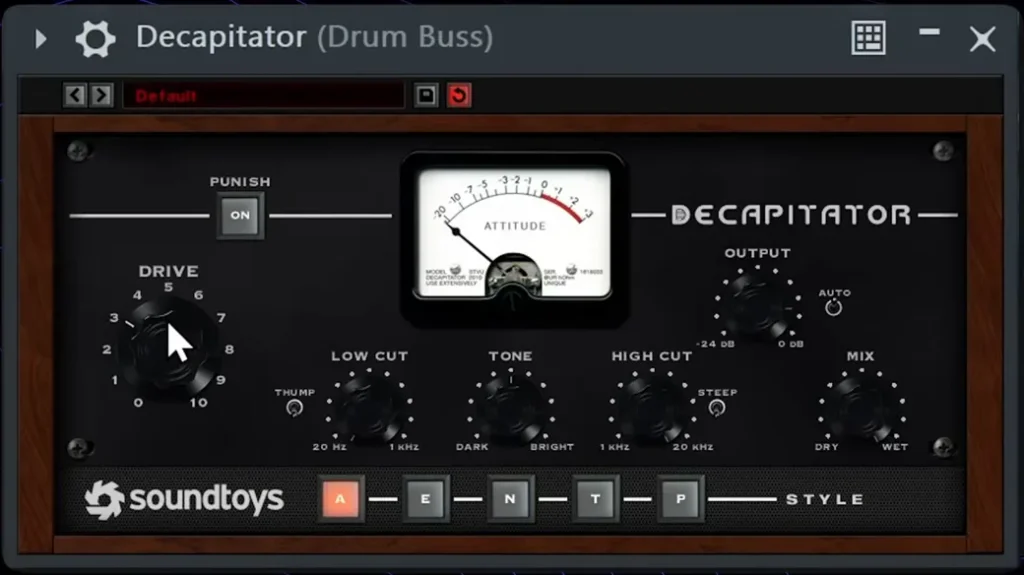
Price: $199 (also in the Soundtoys 5 bundle). Works on: Windows 10 or newer and macOS 10.15 or newer, Apple silicon compatible (VST2, VST3, AU, AAX). Version: 5.5.
Decapitator models five pieces of classic hardware, picked with the A, E, N, T and P style buttons, from tape and console warmth to tube grit. Drive sets the amount, Tone tilts it darker or brighter, Low Cut and High Cut keep the bass and highs in check, and the Punish button adds a lot of extra gain when you want it loud and dirty. Soundtoys offers a free trial.
Decapitator is Mix Elite’s go-to for gluing drums. The trap mixing tutorial puts it on the drum bus with the Drive at about 3, or until the kick starts to go wild. It’s also the plugin in Saturation Is Killing Your Mix.
Best for: drum buses, bass and vocals that need attitude. See Decapitator at Soundtoys.
7. FabFilter Saturn 2
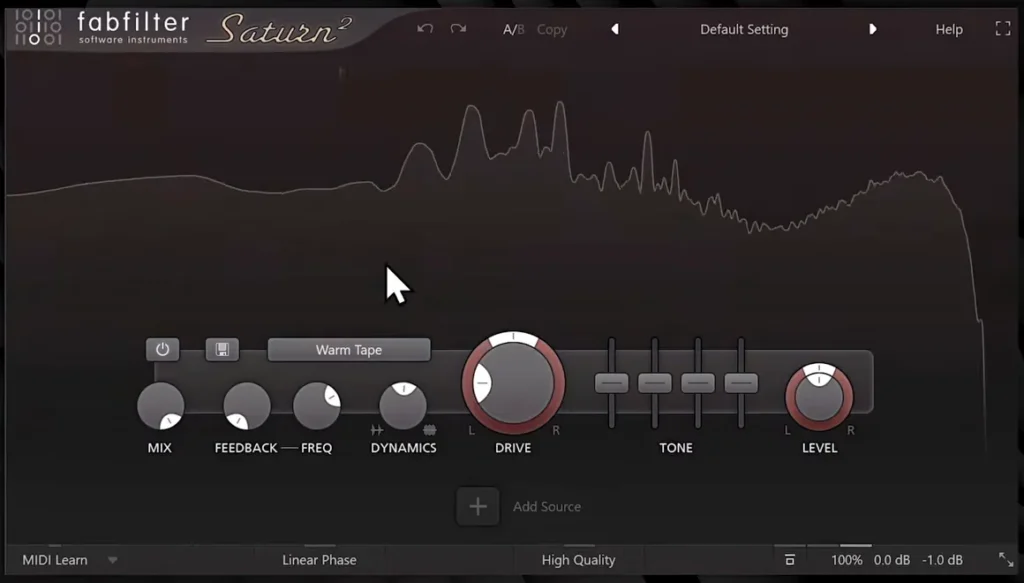
Price: $149. Works on: Windows and macOS, Apple silicon included, plus iPad (VST2, VST3, AU, AAX, CLAP). Version: 2.13 (April 2026).
Saturn 2 has 28 distortion styles, from clean tube and tape to amps and bit crushing, and can split your sound into up to six bands, each with its own style and drive. That’s the big trick: warm up the low mids of a vocal while the highs stay clean. You can also move any knob over time with LFOs and envelope followers. FabFilter gives you a 30-day trial.
Mix Elite’s saturation video opens with Saturn 2 on screen. Best for: vocals, mix buses and anyone who wants precise control over where the saturation goes. See Saturn 2 at FabFilter.
8. XLN Audio RC-20 Retro Color
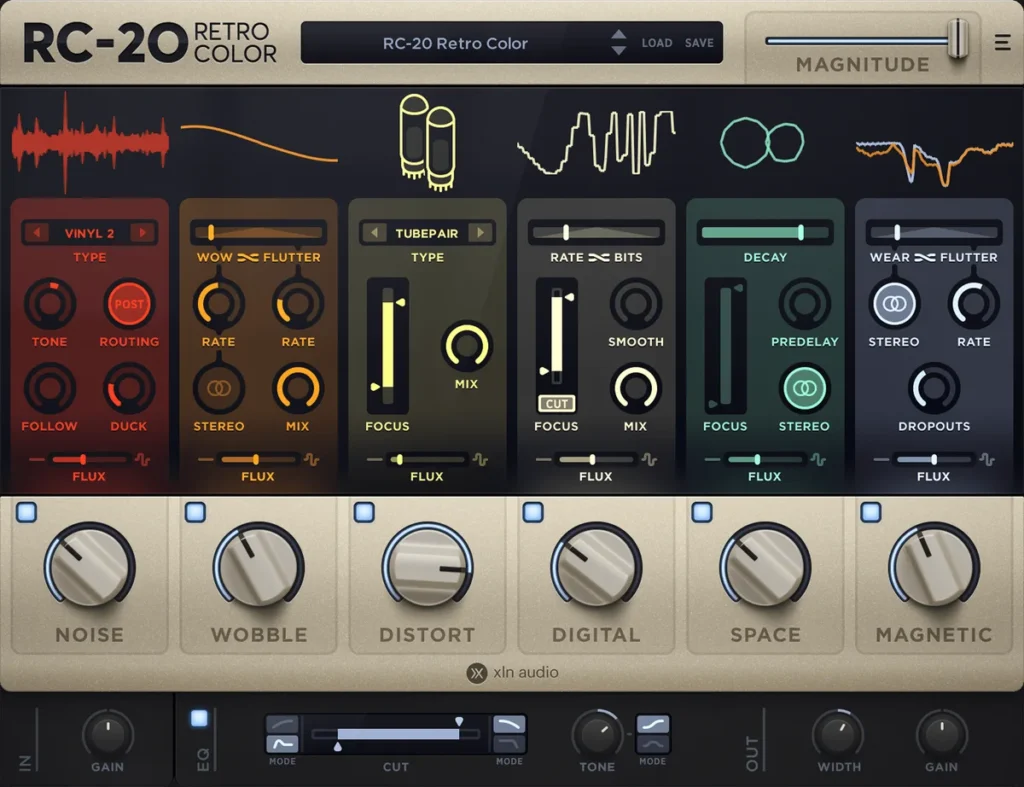
Price: $99, on sale for $29 at XLN Audio when we checked in October 2026, or $4.99 a month for 20 months. Works on: Windows 10/11 and macOS 10.13 or newer (VST2, VST3, AU, AAX); XLN’s page doesn’t say if it runs natively on Apple silicon. Version: 1.5.1 (January 2026).
RC-20 is a lo-fi color box with six modules you can switch on: Noise, Wobble, Distort, Digital, Space and Magnetic. One Magnitude slider turns them all up or down together, so you can go from a hint of vinyl warmth to a worn-out cassette in one move. There’s a 10-day free trial.
Mix Elite’s vocal reverb video suggests it on the vocal delay, for a little extra saturation and color. Best for: lo-fi beats, vocal effects, keys and samples that should sound old. See RC-20 at XLN Audio.
9. Black Box Analog Design HG-2
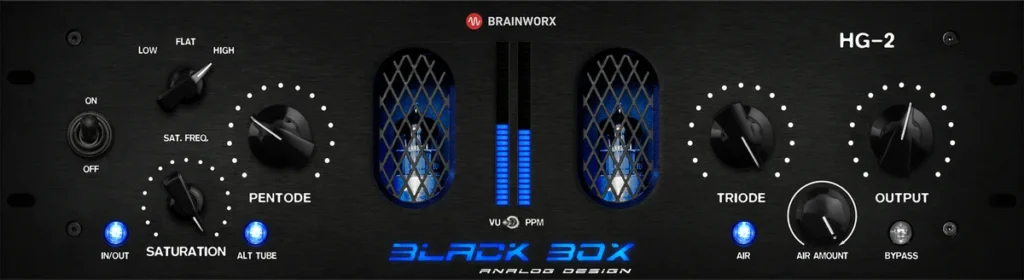
Price: $125, on sale for $29.99 on Plugin Alliance when we checked. Works on: Windows 10/11 and macOS 13 or newer, Apple silicon native (VST2, VST3, AU, AAX). Version: 1.10.0.
The HG-2 copies a boutique hardware tube box. It runs your sound through two tube stages, Pentode and Triode, plus a separate saturation circuit you can tilt toward the lows or highs or leave flat, with Air and Density controls and a Mix knob. It’s built for the mix bus and master, where a little of it adds weight and shine.
Best for: the mix bus and master, and vocals that need tube warmth. See HG-2 at Plugin Alliance.
10. iZotope Trash
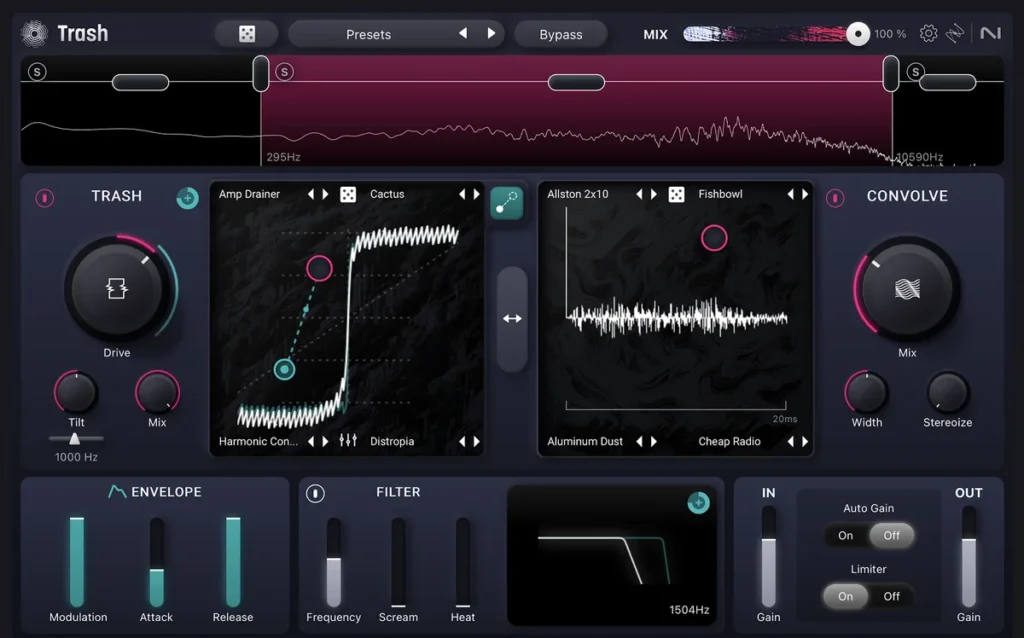
Price: $99. Works on: Windows 10/11, macOS 14 or newer (Apple silicon native) and iPad (VST3, AU, AAX; no VST2). Version: 1.3.0 (September 2025).
This is the new Trash. iZotope says Trash 2 is a legacy product and no longer sold, so older lists that name it are out of date. It has more than 60 distortion types you blend on an XY pad, up to three bands, and a Convolve module with over 600 impulse responses for speaker and room sounds. There’s a free trial.
Best for: sound design, aggressive 808s and anything that should sound broken on purpose. See Trash at iZotope.
11. Baby Audio TAIP
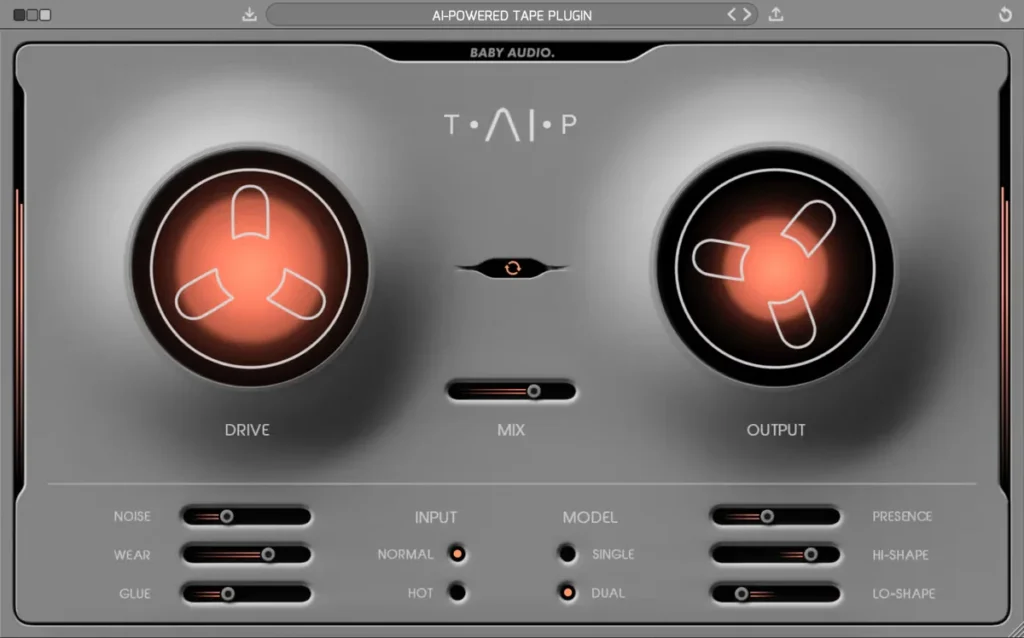
Price: $99. Works on: Windows 10 or newer and macOS 10.11 or newer, Apple silicon native (VST2, VST3, AU, AAX). Version: 1.6.
TAIP uses an AI model of a 1970s tape machine to give you tape saturation without the fuss. Drive and Mix are the big knobs, and Noise, Wear and Glue add hiss, age and tape-style compression. It comes with 135 presets.
Best for: warming up drums, buses and whole mixes with tape color. See TAIP at Baby Audio.
What is the best analog saturation plugin?
For analog warmth, Soundtoys Decapitator is the best all-rounder: it models five pieces of classic hardware, from tape to tubes. For the mix bus, the Black Box HG-2 copies a boutique tube box, and Baby Audio’s TAIP models a 1970s tape machine. The best free analog-style picks are Klanghelm IVGI and CHOW Tape Model.
Analog here means the plugin copies real gear that adds warmth when you push it: tape machines, tubes and old mixing desks. Saturn 2 and Trash can sound analog too, but their strength is range, with 28 styles in Saturn 2 and more than 60 distortion types in Trash.
How to use saturation without killing your punch
Here’s the problem nobody warns you about. In Mix Elite’s video Saturation Is Killing Your Mix, Max puts Decapitator on a drum loop and plays it in the beat. His verdict: “Yes, we got the warmth from the distortion plugin. We lost the whole punch from the drums.” The saturation flattened the gap between the quiet and loud parts of the drums, which producers call dynamic range.
The goal is to add warmth without changing the sound’s levels and dynamic range. The fix uses Patcher, FL Studio’s plugin for wiring other plugins together. One chain reads how hard your drums hit. A second chain saturates them, and the first chain then turns the second one up and down with every hit, so the punch comes back.
Build the two chains in Patcher
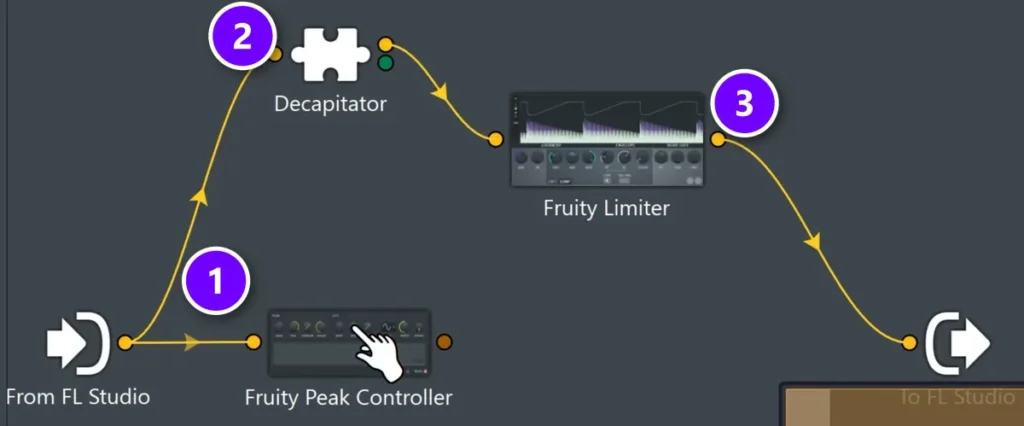
- On your drum track in the Mixer, click an empty slot and load Patcher.
- Add Fruity Peak Controller (1) and connect From FL Studio to it. It only measures the drums, and no sound passes through it.
- In a second chain, add your saturation plugin (2), Decapitator in the video, and right after it Fruity Limiter (3), which you’ll use only as a volume knob. Connect that chain to To FL Studio.
- Link the two chains. Right-click Fruity Peak Controller and pick Outputs > Controllers > Peak. Then right-click Fruity Limiter, pick Inputs > Parameters > Gain, and connect the two.
Set Fruity Peak Controller
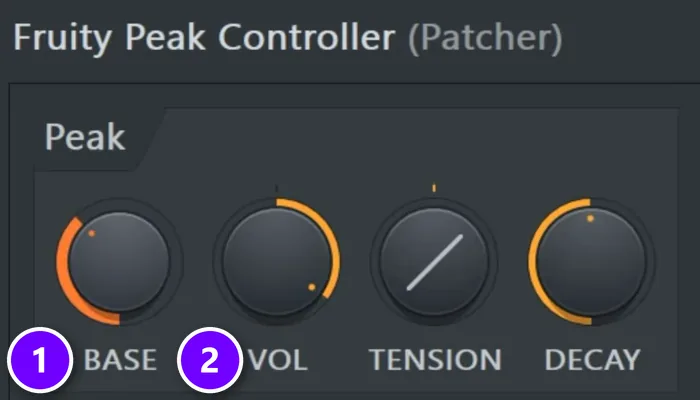
Open Fruity Peak Controller and turn Base (1) to about 30-40% and Vol (2) to about 60-70%, the settings from the video. Then play the beat with Patcher on and off and listen to the kick. With it on, you keep the warmth and get the hit back. It works on melody loops too.
No time for Patcher? Then keep it subtle. Put the distortion before the compressor on your drum bus. As Mix Elite’s hard-hitting drums video puts it, any type of distortion works there, in really subtle settings. Our FL Studio compressor guide shows what to put after it.
Watch out: saturation makes things louder, and louder almost always sounds better at first. Before you decide a plugin helps, match the volume with it on and off. Almost every plugin here has an output or level knob for exactly that.
Will saturation fix a thin, digital-sounding mix?
Often, yes. Saturation adds new harmonics, so thin sounds get fuller and warmer and come through better on small speakers. Start with a free one, like Softube’s Saturation Knob or FL Studio’s Fruity Blood Overdrive, on the thin sound or its bus at a low setting, and match the volume before you decide it helps.
That’s also why saturation often beats EQ for warmth. In Mix Elite’s EQ video, Max says: “try adding saturation because it adds new harmonics. EQ only boosts what’s already there.” In the same video, he saturates only the highs and mids of a pluck with a multiband distortion. The pluck gets more presence and warmth, and the low end doesn’t get muddy.
Which saturation plugin is best for vocals, drums, 808s and mastering?
Pick by the job, not by the hype. Here’s where each plugin earns its place:
- Drum bus: Soundtoys Decapitator with the Drive around 3 to glue the kit. Free option: Fruity Fast Dist with the mix at half.
- Kick and 808: Softube Saturation Knob on a group with both, so they share one color and blend.
- Master: Fruity Soft Clipper, which catches peaks just under 0 dB so the song gets louder without a limiter squashing it.
- Vocals: FabFilter Saturn 2 in a gentle tape or tube style, split into bands so the highs stay smooth.
- Lo-fi texture: XLN Audio RC-20 for wobble, noise and tape color on vocal effects, keys and samples.
- Synths and guitars: Fruity Blood Overdrive, warm grit that’s already in FL Studio. Turn it up for real overdrive.
On the master, less is more. Mix Elite’s loud-master video uses a clipper, not a color box: the free GClip right after the EQ, pushed until you just barely hear it change the knock of your drums, then backed off 10%. Max puts it simply: “clipper is dumb, and that’s why we love it. It just chops off the waveform.”
Saturation is one step of a mix, not the whole thing. For where it fits next to EQ, compression and reverb, follow our step-by-step guide to how to mix a song, and for warmth through EQ instead, see our picks for the best EQ plugins.
How to add a saturation plugin in FL Studio
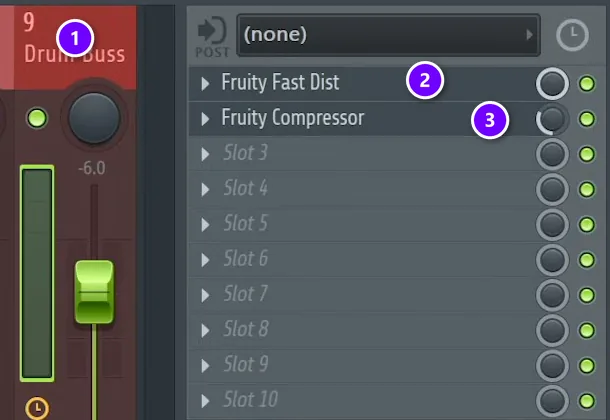
Open the Mixer with F9. These steps follow the drum bus from Mix Elite’s hard-hitting drums video:
- Click the Mixer track you want to warm up, like the drum bus (1).
- Click an empty slot on the right and pick your saturation plugin, here Fruity Fast Dist (2).
- Put the compressor in the slot below it (3), so the saturation comes first.
- Start with the drive or mix low, then turn it up until you hear it, and back off a little.
- Click the green light next to the slot to switch the plugin off and on, and compare at the same volume.
Bought or downloaded a plugin and it isn’t in the list? Follow our guide to installing VST plugins in FL Studio, then rescan. And for five creative ways to use saturation once it’s installed, read how to use saturation in a mix.
DAY 4 OF THE 7-DAY MUSIC PRODUCER COURSE
Saturation is one tool. Day 4 shows you the whole mix.
Day 4 of the 7-Day Music Producer Course is the mixing day: the simple ‘Holy-Quad’ mixing formula, the ‘Mix Murdering’ mistakes most beginners make, a one-click setting that makes your song wider with no new plugins, and the volume mistake that quietly caps how good a mix can sound. You also get a mixing checklist and a mixing and production template. It’s taught in FL Studio (the free trial works), about 45 minutes a day, and at the end a pro gives you personal feedback on your finished track. It’s $27, and you get 60 days to decide if it was worth it.
Frequently asked questions
What is the best saturation plugin?
Soundtoys Decapitator ($199) is the best all-round paid pick, and FabFilter Saturn 2 ($149) is the most flexible, with up to six bands. If you use FL Studio, start with the ones you already have: Fruity Blood Overdrive, Fruity Soft Clipper and Fruity Fast Dist.
What is the best free saturation plugin?
Softube’s Saturation Knob is the easiest: one knob plus a Keep High, Neutral or Keep Low switch, and it needs a free Softube account. Klanghelm’s IVGI gives you more control with no account, and CHOW Tape Model is a free, open-source tape option. In FL Studio, try the built-in Fruity Blood Overdrive first.
Why do producers use saturation on everything?
Saturation adds harmonics that make sounds fuller and easier to hear on small speakers, rounds off peaks so sounds glue together, and gives a mix one shared color. Used lightly, you feel it more than you hear it, which is why it ends up on drums, bass, vocals and buses.
Will saturation make a thin mix sound fuller?
Usually, yes, because it adds new harmonics, while EQ can only boost what’s already there. Put a light saturator on the thin sounds or their bus, keep the master to a clipper, and match the volume with the plugin on and off. Softube’s free Saturation Knob and FL Studio’s Fruity Blood Overdrive are good first tries.
What is the best analog saturation plugin?
Soundtoys Decapitator, which models five classic hardware units, is the best all-rounder for analog warmth. For the mix bus, the Black Box HG-2 copies a boutique tube box, and Baby Audio’s TAIP models a 1970s tape machine. The best free analog-style options are Klanghelm IVGI and CHOW Tape Model.





