“All things are poison, and nothing is without poison. Solely the dose determines that a thing is not a poison.”
Saturation in mixing is gentle distortion that adds new harmonics to a sound, so it feels warmer, fuller and a bit louder. EQ can only boost frequencies that are already there and gain only turns everything up, while saturation creates new overtones and rounds off the peaks. Use a little on the drum bus, the kick and 808, melodies and the master, and stop before the drums lose their punch.
Your beat sounds fine, but flat. The drums don’t hit, the 808 feels stuck on top instead of part of the track, and turning things up only makes everything bigger, not better. Saturation is the tool most producers reach for at this point. It’s also the one beginners overdo fastest, because a little sounds amazing and a lot quietly kills your drums.
This guide covers saturation in mixing the way Max, the founder of Mix Elite, uses it in FL Studio: what it does, where it goes, the settings from his own sessions, and the Patcher trick he uses to keep the punch after saturating.
Table of Contents
What is saturation in mixing?
Saturation in mixing is gentle distortion. It adds harmonics, quiet extra tones above each note, which make a sound warmer, thicker and easier to hear, and it rounds off the loudest peaks. A little feels like warmth. A lot sounds like obvious grit.
Saturation started as a side effect of analog gear. Push a signal hard into tape, a tube or a transistor circuit and it doesn’t just get louder. It bends a little, and that bending adds extra sound. Plugins now copy those circuits, so you get the same effect inside FL Studio.
The extra sound is harmonics: quiet, higher tones that sit on top of the note you played. You don’t hear them as separate notes. You hear them as warmth, thickness and presence, which is why a saturated bass is easier to hear on phone speakers.
Saturation and distortion are one family. Saturation is the gentle end, where things just sound fuller, and distortion is the obvious end, where you clearly hear grit. In Mix Elite’s free 4.5-hour FL Studio course, clipping is called just another style of saturation, because both work by reshaping the waveform.
What does saturation do to a sound?
Saturation adds harmonics and squeezes the loudest peaks a little. You hear that as warmth, thickness and glue, and the sound seems louder at the same peak level. Push it too far and the hits lose their punch.
Mix Elite’s kick and 808 video sums it up as two jobs at once. First, it lowers the dynamic range, which is the gap between the quietest and loudest parts of a sound. In plain words, it compresses a little. Second, it gives every sound that goes through it the same color, so separate parts start to sound like one.
Here’s what you actually hear when it’s working:
- Warmth and richness. The new harmonics fill out thin, clean sounds.
- Presence. Harmonics in the upper mids help a bass or 808 show up on small speakers.
- Glue. Parts that share one saturator sound like they belong together.
- Loudness. The peaks get rounded off, so the sound feels louder at the same peak level.
- Less punch, if you overdo it. Rounded peaks also mean softer hits. More on that below.
Why use saturation instead of EQ or turning up the gain?
Because saturation does something neither one can. An EQ boost only raises frequencies that are already in the sound, and more gain only makes everything louder. Saturation creates new harmonics and rounds off the peaks, so a sound gets richer and denser, not just louder.
That’s the advice in Mix Elite’s EQ video: when you want a richer sound, try saturation before you boost the low mids for warmth or the highs for brightness, because EQ only boosts what’s already there. The same video adds presence with a multiband distortion on the mids and highs instead of an EQ boost, a trick you’ll find further down.
Gain has its own trap. In the video behind this guide, turning the drums up, or the melody down, still doesn’t make the drums hit. And a louder version always sounds better for a moment, which is why every move below gets judged at matched volume.
What are the types of saturation?
Five types cover almost every saturation plugin: tape, tube, transistor, clipping and multiband. Tape and tube sound smooth and warm, transistor and clipping sound edgier, and multiband saturates only the frequency range you pick.
Each type adds its own mix of harmonics. Even harmonics sound smooth and musical. Odd harmonics sound edgier and grittier.
- Tape: soft and smooth. It rounds off peaks gently and takes a little edge off the top, which makes it great for gluing a drum bus or a whole mix.
- Tube: warm and thick, with mostly even harmonics. It suits vocals, bass and keys.
- Transistor: brighter and grittier, with more odd harmonics. Use it when drums, guitars or synths need bite.
- Clipping and waveshaping: digital tools that flatten the top of the waveform. A soft clipper rounds it off, and a hard clipper chops it.
- Multiband saturation: saturates only one frequency range, like the mids and highs, and leaves the low end clean.
You don’t need to collect all of them. Mix Elite’s tutorials mostly use the same few: FL Studio’s stock plugins, the free Softube Saturation Knob and Soundtoys Decapitator. For more options, see our list of the best saturation plugins.
How to use saturation in mixing, step by step
Put one saturator where it has a clear job, like the drum bus, drive it until you hear distortion, then back it off and match its volume to the dry sound. Judge it in the full mix, and check that the drums still punch.
- Pick a spot with a job. The drum bus, the kick and 808 group, a melody that needs presence, or the master. A group of sounds gets one shared color, which is where the glue comes from.
- Drive it until you hear it. Turn up the drive until the distortion is obvious, then back off. On a soft clipper, Mix Elite’s mastering tutorial takes it down 1 to 2 dB from there.
- Match the volume. Use the output or POST knob so switching the plugin off and on doesn’t change the level.
- Listen in the mix. A saturated sound can seem rough on its own and perfect in the beat, so decide with everything playing, at a loud, a normal and a quiet volume.
- Check the punch. If the drum hits came out flattened, blend the clean sound back in with the Mix knob or use the Patcher trick below.
How do you add saturation in FL Studio?
You don’t need to buy a plugin. Load Fruity Waveshaper on a mixer track and pick its Soft saturation preset for the quickest start. FL Studio’s other stock saturators are worth knowing too:
- Fruity Soft Clipper for gently rounding peaks on a bus or the master.
- Fruity Fast Dist and Fruity Blood Overdrive when you want obvious grit.
- The saturation knob in Fruity Limiter and the soft saturation in Maximus, which are both soft clippers.
Quick start: soft saturation with Fruity Waveshaper
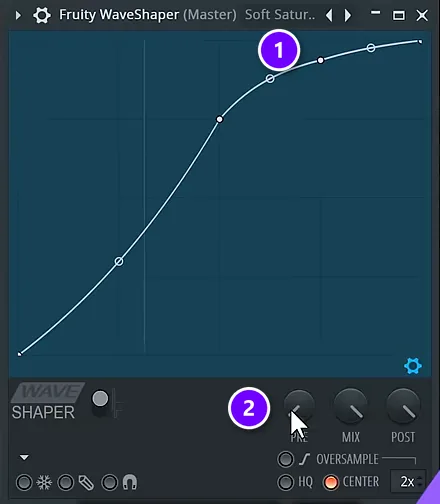
A short on the Mix Elite channel shows the fastest way to try it with no extra plugins:
- Load Fruity Waveshaper on a mixer track. The short puts it on the master.
- Open the presets and pick Soft saturation. The curve (1) bends over near the top, and that bend is what rounds off the peaks.
- Turn up PRE (2), the preamp gain, to drive more of the signal into the curve.
- Stop at the sweet spot. Too much gain and it starts to sound distorted.
- Turn POST down until the level matches the bypassed sound, then compare the two.
Where should you use saturation in a mix?
The best places are the drum bus, the kick and 808 together, the main melody or synth layer, a lead vocal (lightly) and the master (very lightly). Saturating a group of sounds instead of each one gives them the same color, so they glue together.
Max uses saturation in a few specific places, and often on a group of sounds instead of one sound, so everything in the group gets the same color. Saturation is one step of a full mix, and our guide on how to mix a song walks through the rest.
On the drum bus
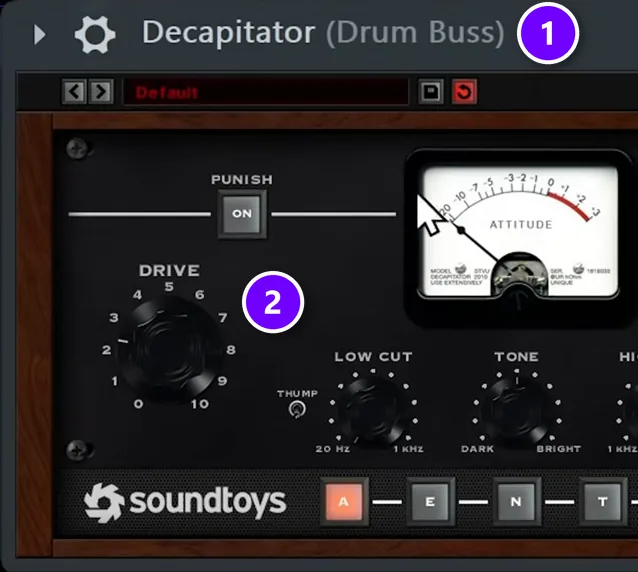
When Max sets up a mix in Mix Elite’s start-to-finish trap mixing tutorial, he routes all the drums to one bus and makes that bus a little more saturated right away.
His usual pick is Decapitator on the Drum Buss (1), with Drive (2) at about 3, or pushed until he hears the kick go really wild. Fruity Fast Dist or the free Saturation Knob do a similar job if you don’t own Decapitator.
Give dry drums something to grab
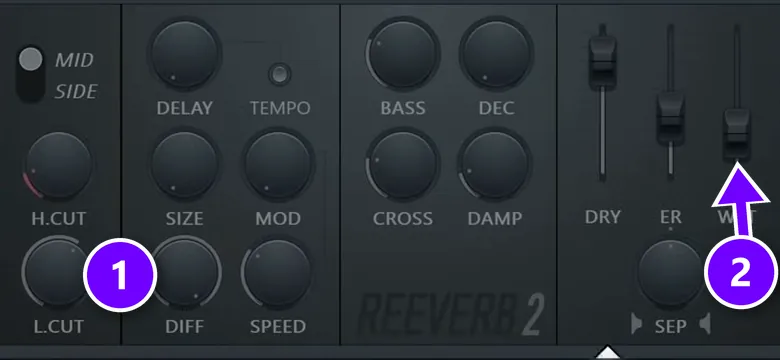
Saturation brings up the quiet parts of a sound, like room tone and tails. If your samples are bone dry, there’s nothing there to bring out. “There’s nothing underneath, so our saturation will not have anything to pick up,” Max says about the dry hi-hats in his trap mix.
His fix is a tiny room reverb on the dry sounds before they reach the saturated drum bus:
- Load Fruity Reeverb 2 on the dry sound.
- Turn the low cut (1) up to about 1 to 2 kHz, so the reverb adds no mud.
- Use the shortest decay you can.
- Keep the wet fader (2) very low. You should feel it more than hear it.
The drum bus saturation then pulls some low harmonics out of the hats too. You could clean that up with EQ, but Max doesn’t bother, because nobody listens to the hi-hats on their own in a finished mix.
On the kick and 808 together
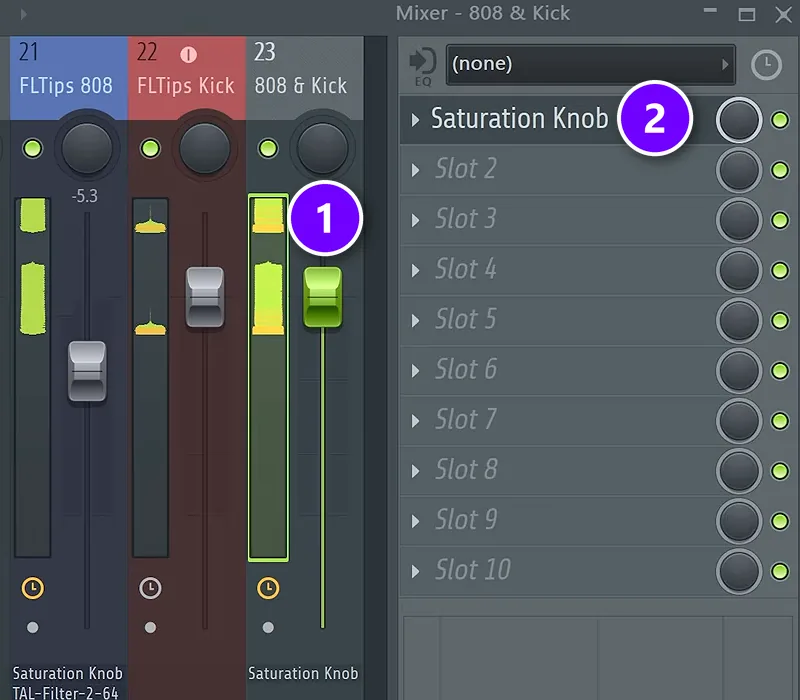
Max also groups the kick and the 808 on their own mixer track and saturates them together, which blends them into one low end instead of two layers fighting:
- Select the kick and 808 tracks in the Mixer.
- Hold Ctrl and click the routing arrow at the bottom of an empty track to send both there. In his video it’s named 808 & Kick (1).
- Load a saturator on that group track. Max uses the free Saturation Knob (2).
- If your saturator doesn’t compress much, add a little compression on the group as well.
That last step matters with stock tools. Fruity Waveshaper adds very little compression, so Max recommends some compression on top of the 808 and kick group whenever you use it. Our guides to using a compressor in FL Studio and to a clean, punchy low end cover the rest of that chain.
On melodies and synths
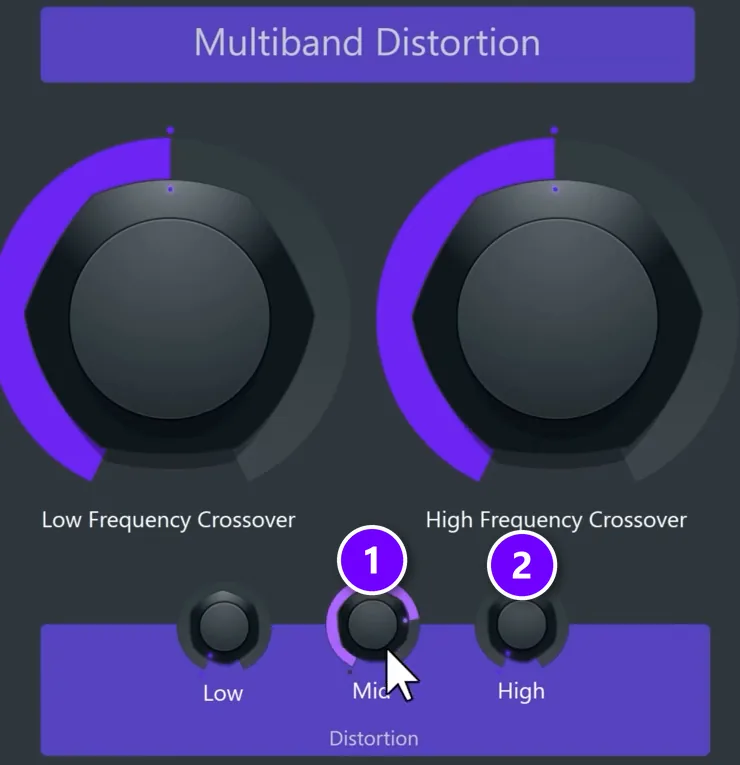
In the same trap mix, Max takes the mid layer of the melody, the part that carries the meat of the track, and distorts it before the EQ. He pushes Decapitator’s Drive to about 4, listens for harsh ringing tones called resonances, and then cleans them up with EQ afterward.
For brightness he has a second move. Instead of boosting the highs with an EQ, he drives the Mid (1) and High (2) bands of a multiband distortion preset in Patcher and leaves Low alone. “Instead of adding presence in the EQ, we are adding multiband distortion on the highs and mids to not muddy it up with the lows,” Max explains. If you’re still learning what each EQ band does, start with our guide on how to use EQ in mixing.
On vocals
Vocals need the lightest touch. In Mix Elite’s vocal effects video, Max suggests the free Saturation Knob as one way to add warmth to a vocal. Keep it subtle. If you can clearly hear grit on a lead vocal, it’s usually too much.
On the master
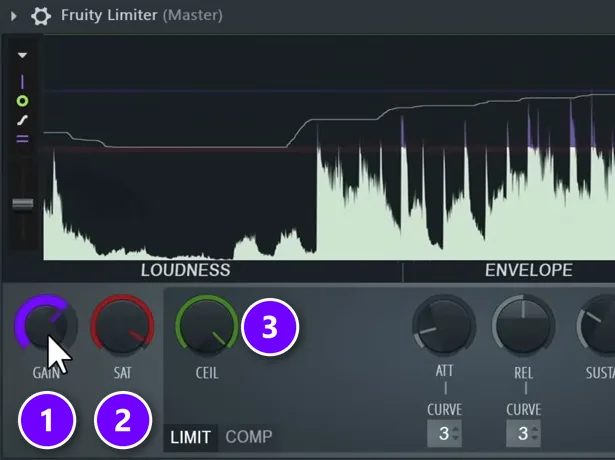
Max uses saturation on the master in two ways. While mixing, he soft-clips the master so he can hear the track at a louder, more finished level. In Fruity Limiter he takes CEIL (3) all the way up, turns SAT (2) down and pushes GAIN (1) up. Hearing the mix at a higher volume helps him make better mixing decisions.
When mastering, he keeps it almost invisible. In Mix Elite’s free FL Studio course he uses the soft clipper in Maximus, called soft saturation there, with the threshold turned only slightly and the ceiling around -0.3 dB. It catches stray peaks without changing the sound. For the difference between these tools, see compression vs clipping vs limiting.
Why can saturation kill your punch?
Because a saturator shaves off the peaks, the loudest moment of each hit, to make its sound. That shrinks the dynamic range, the jump from quiet to loud that you feel as punch, so the drums get warmer but hit softer.
This is the part most tutorials skip, and it’s the whole point of Mix Elite’s video Saturation Is Killing Your Mix. As Max puts it, “the loudest part of your samples will get saturated much more.” The quiet tails may barely change.
You can hear it in the video’s before and after: the saturated drums have all the warmth and almost none of the hit.
Watch the waveform the next time you saturate drums. If the spikes that used to stick out come out flattened, you’ve traded punch for warmth.
How do you saturate without losing punch?
Put the dynamics back after the saturator. In FL Studio, a Patcher chain with Fruity Peak Controller and Fruity Limiter turns each hit back up, and the quick alternatives are the saturator’s Mix knob or a transient shaper on the kick.
Max builds that fix in FL Studio’s Patcher, a plugin that lets you wire other plugins together, and uses it on drums and on melody loops. The video also offers a free ready-made version of the patch, and in Ableton Live the same idea works with an Envelope Follower and a Utility.
Build the patch in Patcher
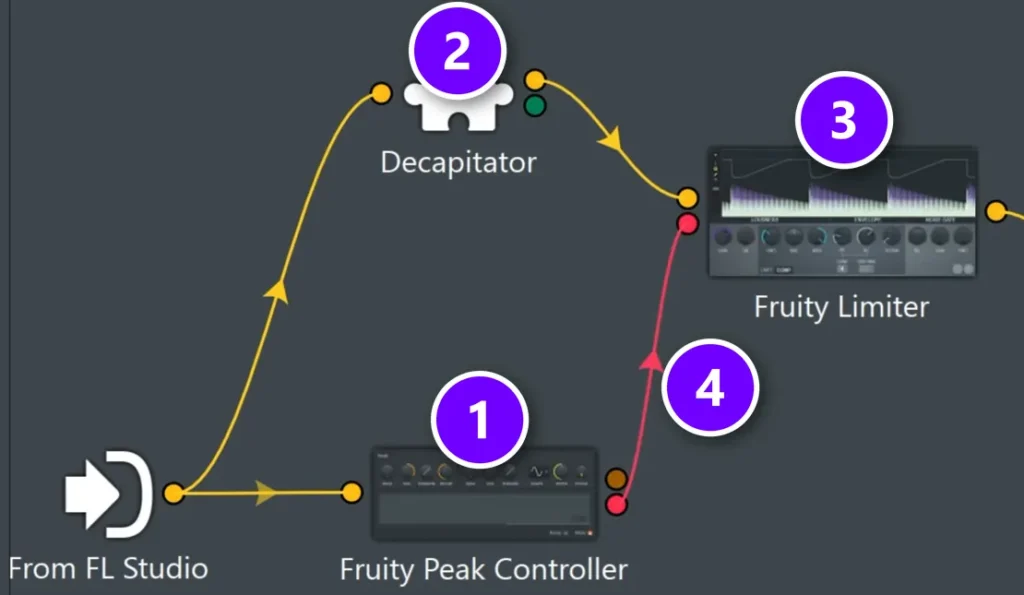
- Load Patcher on the track you want to saturate.
- Add Fruity Peak Controller (1) and connect it to From FL Studio only. It passes no sound. It just measures how loud the track is.
- In a second chain, run From FL Studio into your saturator (2), then into Fruity Limiter (3), then out to FL Studio. The limiter is only a volume control here, so make sure nothing else in it changes the sound.
- Right-click the Peak Controller and enable Outputs > Controllers > Peak. Right-click Fruity Limiter and enable Inputs > Parameters > Gain. Then drag a wire between the two new dots (4).
Set the Peak Controller
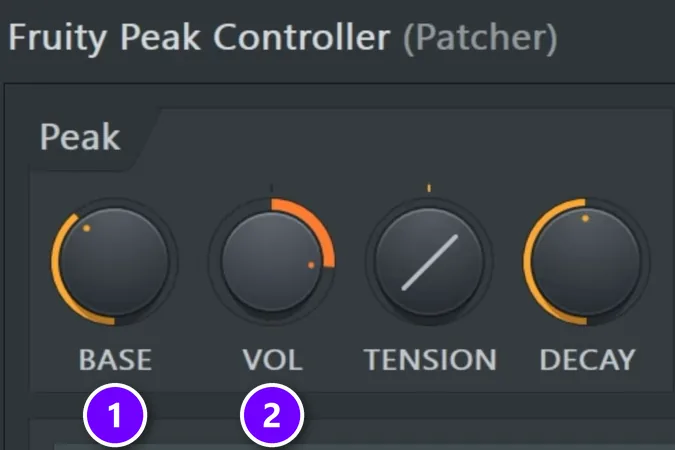
Open the Peak Controller and set BASE (1) to about 30 to 40% and VOL (2) to about 60 to 70%. Now the saturator adds its warmth, and the limiter’s gain follows the original hits, pushing the loud moments back up so the punch returns.
Not into wiring? Turn down the saturator’s Mix knob to blend in the clean signal, or do what Max does in his trap mix: put a transient shaper on the kick so it cuts through the saturated drum bus again.
What is parallel saturation?
Parallel saturation means blending a saturated copy with the clean original. The clean part keeps the transients, the sharp first hit of each sound, and the saturated part adds warmth underneath.
Most saturators have a Mix or Dry/Wet knob that does this inside one plugin. Decapitator’s MIX knob, for example, runs from DRY to WET. You can also send the drums to a separate mixer track, saturate that one hard and turn it down until you just feel it.
How do you saturate drums and vocals without distorting them?
Drive the saturator until you clearly hear distortion, then back it off a step and match its output to the dry sound. On drums, blend some clean signal back in so the hits survive. On a lead vocal, stay lighter still: if you can clearly hear grit, it’s too much.
- Drums: saturate the drum bus a little (Decapitator’s Drive sits around 3 in Mix Elite’s trap mix tutorial), give bone-dry samples a tiny room reverb first, and watch the waveform. Flattened spikes mean lost punch.
- Vocals: use a gentle saturator such as the free Saturation Knob with the knob low, and judge it with the beat playing. A touch adds warmth and richness. Fuzz you can hear on the words means it’s too much.
- Both: the Mix or Dry/Wet knob is your safety net. A hard-saturated copy blended in low adds thickness while the clean signal keeps the hits on top.
How much saturation should you use?
Less than you think: drive it until you hear distortion, back off a little, and always judge it at the same volume as the dry sound. These habits keep you honest:
- Push it too far first. In Mix Elite’s FL Studio mastering tutorial, Max raises a soft clipper’s gain until he hears clear distortion, then takes it down 1 to 2 dB.
- Match the volume. Louder always sounds better for a second. Use the output or POST knob so bypassing the plugin doesn’t change the level.
- Listen in the mix, not solo. A saturated hat can sound rough alone and perfect in the beat.
- Check at three volumes. Mix Elite’s EQ video checks big changes at club level, normal level and late-night quiet, because your ears hear lows and highs differently at each one.
- Watch the drums. Flattened spikes on the waveform mean lost punch.
Should saturation go before or after EQ?
Either can work, and there’s no fixed rule. A good default is saturation first, so the EQ after it can clean up any harsh or muddy harmonics the saturator adds. That’s Max’s habit on his melody layer. On the kick and 808 group, saturation comes first too, and a little compression follows if the saturator didn’t squash enough on its own.
Common saturation mistakes
- Saturating everything. Every saturator adds harmonics. Stack too many and the mix turns harsh and crowded.
- Trusting the louder version. If you didn’t match the level, you’re judging volume, not tone.
- Flattening the drums. Warm drums with no hit are worse than clean drums. Use the Patcher trick, the Mix knob or a transient shaper.
- Muddying the low end. Saturation adds low harmonics too, as Max hears on his hats. Clean them up with EQ if the bottom gets crowded.
- Saturating bone-dry sounds. Give them a touch of short room reverb first, so there’s something to bring out.
Start with one saturator on your drum bus tonight. Set it by ear, match the volume and listen for the punch. If the hits are still there and the beat feels fuller, you’ve got it.
DAY 4 OF THE 7-DAY MUSIC PRODUCER COURSE
Learn the whole mix, not just the warmth
Day 4 of the 7-Day course is the mixing day: the simple Holy-Quad mixing formula, the “Mix Murdering” mistakes most beginners make, a one-click setting that makes your song wider with no new plugins, and the volume mistake that quietly caps how good a mix can sound. You also get a mixing checklist and a mixing and production template. It’s taught in FL Studio (the free trial works), about 45 minutes a day, and it’s $27 with 60 days to decide if it was worth it.
Frequently asked questions
What is saturation in mixing?
Saturation is gentle distortion. It started as the sound of tape, tubes and transistors pushed hard, and plugins now copy it. It adds harmonics, quiet higher tones above each note, which make sounds warmer, fuller and a little louder and help separate parts blend. Used lightly, you feel it more than you hear it.
Is saturation the same as distortion?
They’re the same process at different strengths. Saturation is the subtle end, where a sound just gets warmer and fuller. Distortion is the obvious end, where you clearly hear grit or fuzz. Clipping belongs to the same family, since it also reshapes the waveform. Most saturation plugins can do both, depending on how hard you drive them.
Why use saturation instead of EQ or gain?
EQ can only boost frequencies that are already in a sound, and gain only makes everything louder. Saturation creates new harmonics and rounds off the peaks, so a sound gets richer and denser instead of just louder. That’s why Mix Elite’s EQ video suggests trying saturation before you boost the low mids for warmth or the highs for brightness.
Where should you use saturation in a mix?
Where it has a clear job: the drum bus, the kick and 808 together, the main melody or synth layer, a lead vocal (lightly) and the master (very lightly). Saturating a group of sounds gives them one shared color, which glues them together. Leave it off everything else unless a sound feels thin.
How do you use saturation in mastering?
Very gently. In mastering, saturation is mostly a soft clipper that catches peaks. In Mix Elite’s free FL Studio course, Max uses the soft saturation in Maximus with the threshold turned only slightly and the ceiling around -0.3 dB, so it controls peaks without changing the sound. If you can clearly hear it working, it’s probably too much for the master.