



“I’m an engineer. I see myself as a toolmaker and the musicians are my customers.”
The best MIDI controller for most beginners is a 25-key mini keyboard with pads, like the Akai MPK Mini IV ($95 at Thomann’s US store, October 2026). If you make music in FL Studio, the Novation FLkey Mini 25 MK2 ($139.99) comes mapped to it, and the FLkey 49 MK2 ($289.99) gives you full-size keys. You don’t need one to start, though: FL Studio can turn your computer keyboard into a piano.
Buying a MIDI keyboard feels like the moment you become a real producer. Then it sits on the desk, the box goes in a closet, and the songs still don’t get finished.
Max, the founder of Mix Elite, is honest about this in Mix Elite’s free 4.5-hour FL Studio course. In his words, a MIDI keyboard is “cool, but definitely optional.” So this guide starts with whether you need one at all. Then you get the 20 best MIDI controllers for 2026, grouped by size and type, with every price checked and dated. You also get the exact FL Studio steps to make one work without hours of mapping.
Table of Contents
Do you need a MIDI controller to make music?
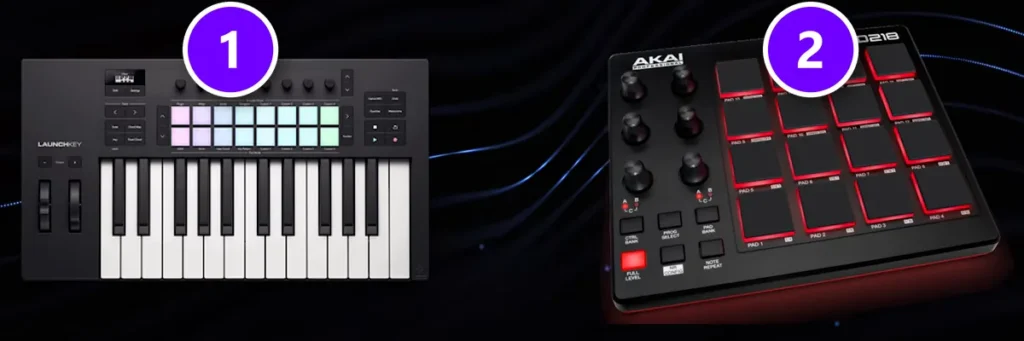
No. A MIDI controller makes no sound by itself. It sends notes to the instruments inside your music software, which is why Max describes them like this: “These just control the virtual instruments we’ll install. You don’t need any controller at all.”
Mix Elite’s gear video shows the two main kinds: a keyboard controller (1) and a pad controller (2). Keys are for chords, melodies and bass lines. Pads are for tapping in drums.
Your computer keyboard can play notes too. FL Studio turns it into a small piano, and one of the melodies in Mix Elite’s free course was written that way. Max says: “This is something I played by accident on a typing keyboard.” The steps are near the end of this guide.
So when is a controller worth it? When you want to play chords with your fingers instead of clicking them in. When you want to finger-drum a beat. When you’d rather turn a real knob than drag one with a mouse. It makes writing faster and more fun. It won’t write the song for you, though.
On a tight budget, good headphones matter more, then studio monitors. Our home studio setup guide shows what to buy first. This short Mix Elite video covers all of it:
What features does a beginner MIDI controller need?
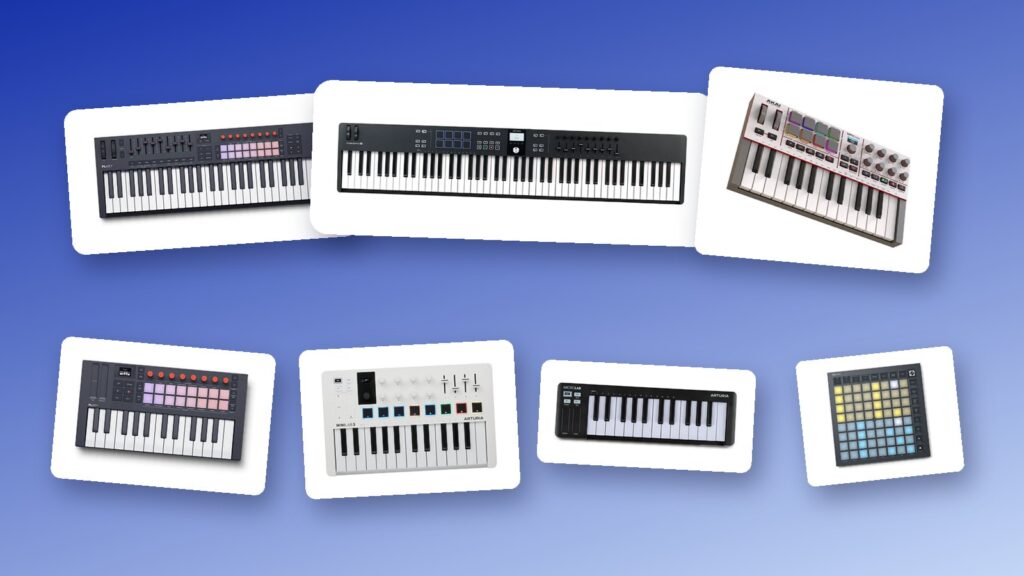
Fewer than the price tags suggest. For beats and melodies, 25 velocity-sensitive keys, a few pads and a few knobs cover almost everything. Pick one that runs on a single USB-C cable and comes mapped to your music software, and skip 88 keys or weighted keys unless you already play piano.
Here’s what actually changes how a controller feels in your hands:
- Number of keys. 25 keys, two octaves, fit on any desk and cover most beats. 37 or 49 keys let you play chords with one hand and bass with the other. 61 or 88 keys are for piano players.
- Key size and feel. Mini keys are small and light. Full-size keys are the size of a piano’s. Semi-weighted keys push back a little, but only hammer-action keys feel like a real piano.
- Pads. Rubber pads for finger drumming. Velocity-sensitive pads play louder when you hit harder.
- Knobs and faders. For turning filters, volumes and effects by hand.
- FL Studio support. Some controllers have an FL Studio script, so their buttons control the Channel Rack, the Mixer and play and record right away.
- Connections. USB-C for power and data in one cable, a sustain pedal input, and a MIDI out if you own hardware synths.
- Bundled software. Most come with sounds, apps or lessons. Novation’s FL Studio controllers include six months of FL Studio Producer Edition.
What is the best MIDI controller for beginners?
For most beginners making beats, the Akai MPK Mini IV: 25 keys, 8 MPC pads, 8 knobs and a color screen for $95 at Thomann’s US store (October 2026). If you make music in FL Studio, the Novation FLkey Mini 25 MK2 ($139.99) is the better value, because its pads and knobs come mapped to FL Studio.
Below are all 20 picks in five groups: small 25-key controllers, controllers made for FL Studio, 49-key keyboards, 61- and 88-key keyboards, and pad controllers with no keys at all. Each one sits in the group where it fits best. Inside each group, they’re ranked by how well they serve someone making music at home.
Arturia, Novation and Ableton prices come from the makers’ own US stores on October 21, 2026. Akai, M-Audio, Native Instruments, Nektar and Roland show no price on their own product pages, so those prices come from a US store, linked, with the month: Thomann’s US store for most of them and Guitar Center for the Akai Fire. Store prices change often. Compare two shops before you buy.
The best mini MIDI controllers (25 keys)
These four fit on any desk and in a laptop bag. Two octaves cover beats, bass lines and simple chords, so this is where most beginners should start.
1. Akai Professional MPK Mini IV
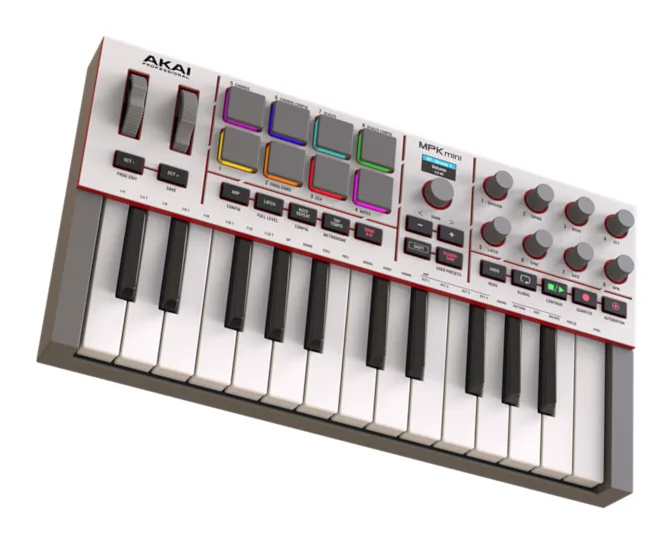
Price: $95 at Thomann’s US store (October 2026). Akai shows no price on its own site.
The MPK Mini IV is the newest version of Akai’s best-known mini controller, and it replaces the MPK Mini MK3 from our original list. It packs 25 velocity-sensitive mini keys, 8 MPC pads that react to how hard you hit and press, 8 knobs, a full-color screen and real pitch and mod wheels into one small box.
It also has Scale and Chord modes, an arpeggiator and a full-size MIDI out for hardware synths, and one USB-C cable powers it all. Akai includes more than 1,000 sounds in its Studio Instrument Collection, plus Ableton Live Lite 12, a 30-day Melodics trial and two months of Splice.
Who it’s for: most beginners who want keys, pads and knobs in one small box. See it on Akai’s site.
2. Arturia MiniLab 3
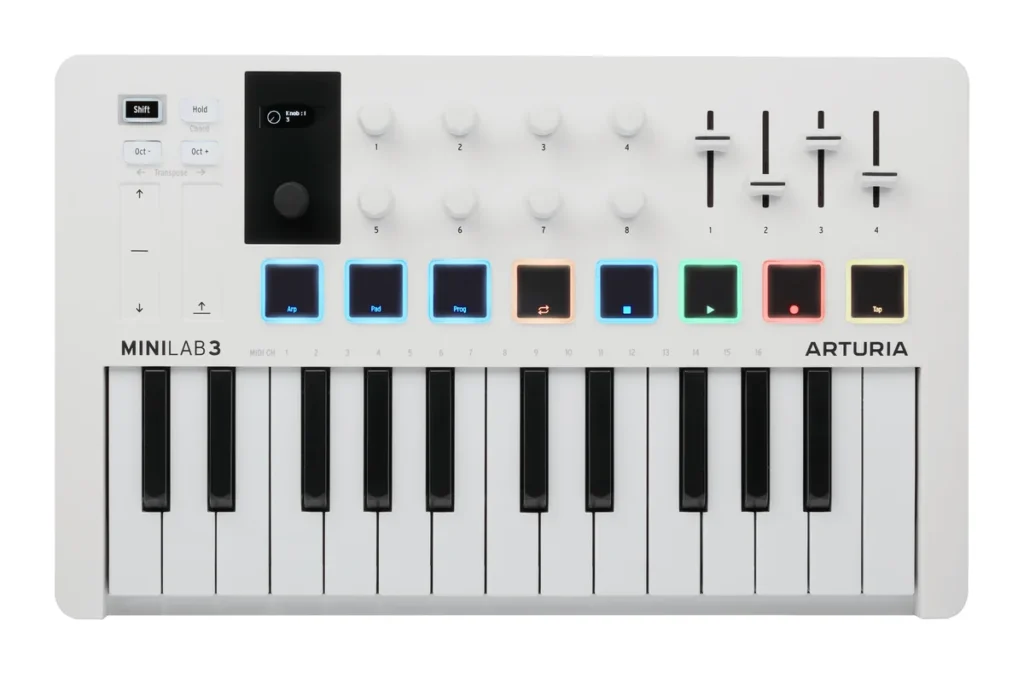
Price: $149 on Arturia’s US store (October 21, 2026).
The MiniLab 3 is the most hands-on of the small ones. You get 25 slim keys, 8 pads that react to how hard you hit and press, 8 knobs, 4 faders and a small screen with a browse knob.
Arturia makes custom scripts for FL Studio, Ableton Live, Logic Pro, Cubase and Bitwig, so it fits whatever you use. Pitch and mod touch strips, a MIDI out and a pedal input round it out. It comes with Analog Lab Intro, Ableton Live Lite and Melodics. Want more keys? Arturia’s MiniLab 37 has 37 of them, at the same $149.
Who it’s for: anyone who wants the most knobs and faders in a small controller. See it on Arturia’s site.
3. Novation Launchkey Mini 25 MK4
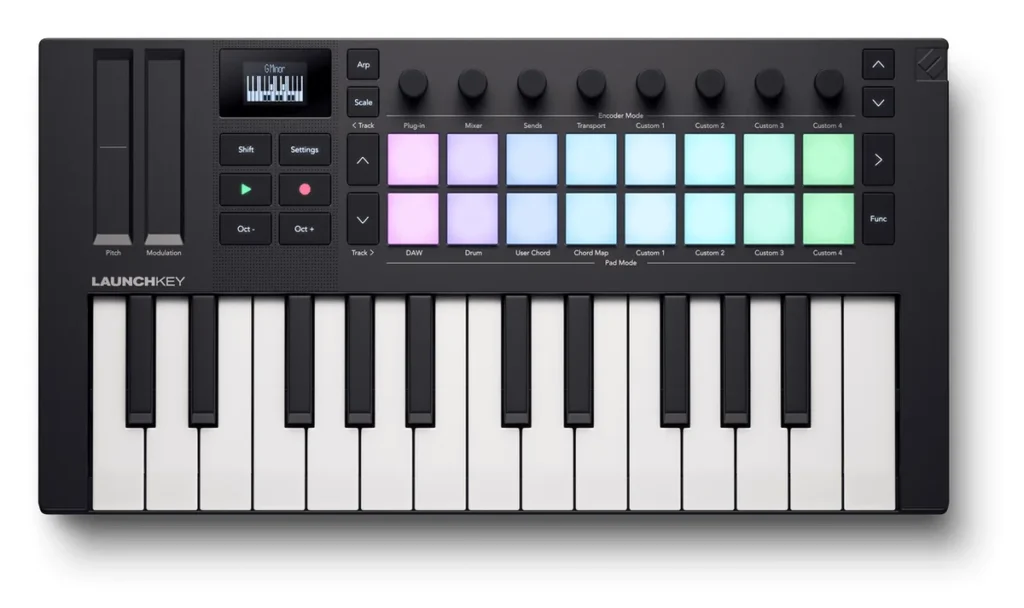
Price: $139.99 on Novation’s US store (October 21, 2026).
The Launchkey Mini 25 is Novation’s all-round mini controller. It has 25 synth-action mini keys, 16 velocity-sensitive pads, eight endless knobs and a small OLED screen that shows what each control is doing. Scale and Chord modes keep you in key, and a generative arpeggiator turns a held chord into a moving pattern.
Novation lists ready-made control for FL Studio, Ableton Live, Logic Pro, Cubase and Reason. It has a 3.5 mm MIDI out, a sustain pedal input and USB-C power, and it weighs 0.78 kg. The bundle includes Ableton Live Lite, Cubase LE, Novation Play sounds and Melodics lessons. Want more keys? The Launchkey Mini 37 is $169.99.
Who it’s for: producers who might switch music software later, because it isn’t tied to one program. See it on Novation’s site.
4. Arturia MicroLab mk3
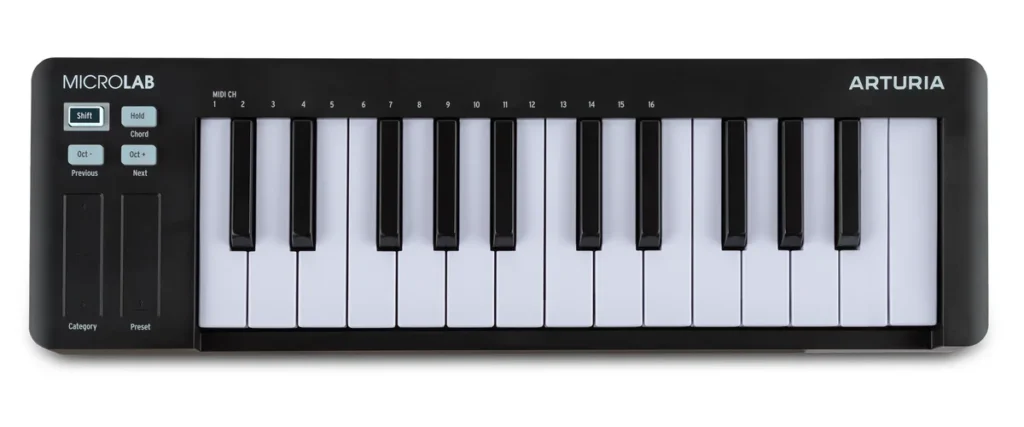
Price: $99 on Arturia’s US store (October 21, 2026).
The MicroLab mk3 is the simplest pick here. You get 25 slim, velocity-sensitive keys and two touch strips for pitch and modulation. That’s about it.
That’s the point. It’s small and light enough to live in a laptop bag, and it runs on one USB-C cable. A chord mode and a hold button help you play bigger parts. It comes with Analog Lab Intro, with 500 synth and keys sounds, plus Ableton Live music software.
Who it’s for: anyone who wants to play melodies on the go and doesn’t need pads. See it on Arturia’s site.
The best MIDI controllers for FL Studio
Most of our readers make music in FL Studio. These four were built with Image-Line, the company behind FL Studio, so their buttons run the Channel Rack, the Mixer and the step sequencer the moment you plug them in. Any controller on this page plays notes in FL Studio. These just do a lot more without any setup.
5. Novation FLkey Mini 25 MK2
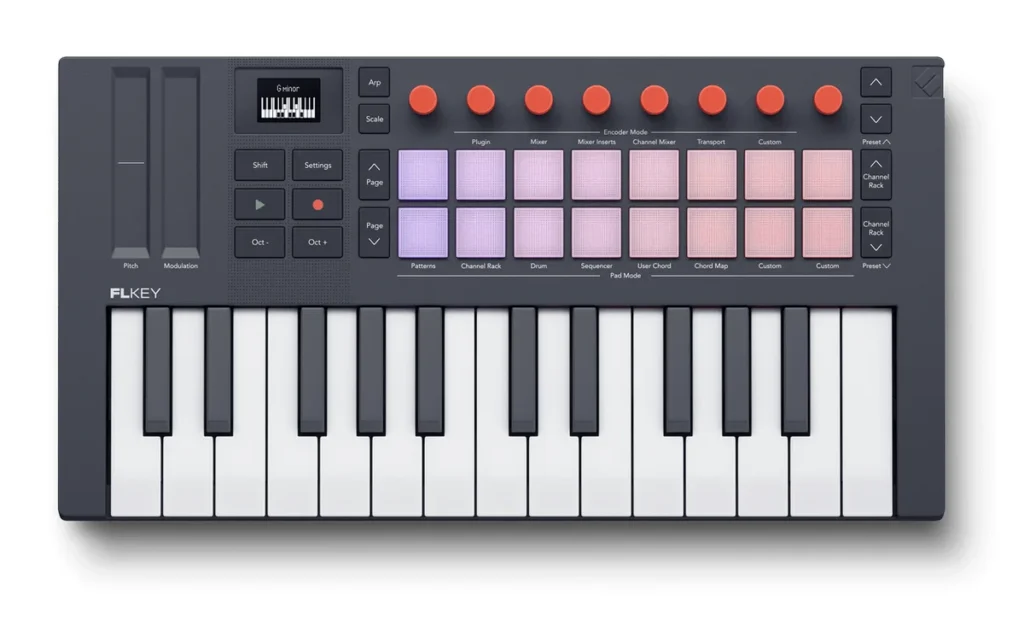
Price: $139.99 on Novation’s US store (October 21, 2026).
The FLkey Mini 25 MK2 is the one to get if you make music in FL Studio on a small desk. Novation calls FLkey the only keyboard controller made for FL Studio, and Image-Line officially supports it.
Its 16 pads step-sequence drums right in the Channel Rack and play FPC, Slicex and Fruity Slicer. The 8 knobs come mapped to FL Studio, and Scale and Chord modes with 30 scales keep you in key. Add 25 mini keys, a MIDI out, a sustain pedal input and USB-C power, all in 0.78 kg.
It also comes with six months of FL Studio Producer Edition. That’s the edition Mix Elite’s free FL Studio course tells beginners to buy.
Who it’s for: FL Studio users on a small budget. See it on Novation’s site.
6. Novation FLkey 49 MK2
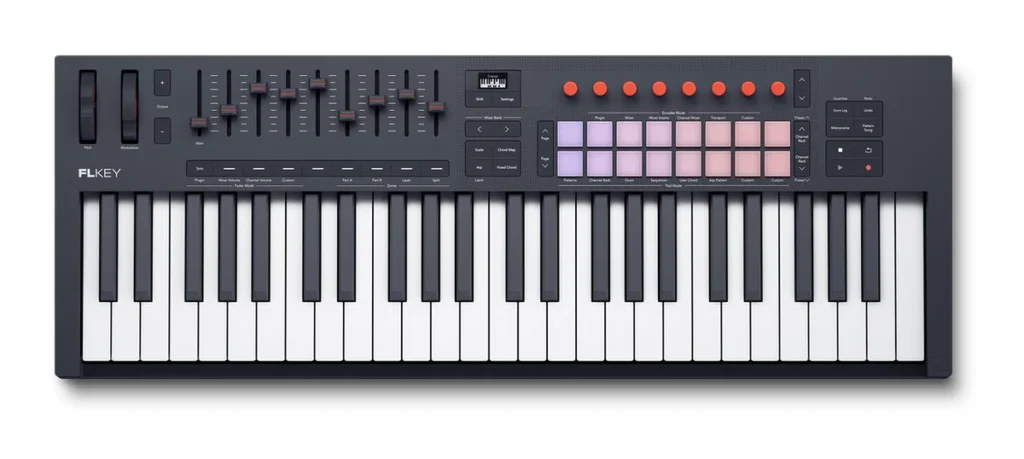
Price: $289.99 on Novation’s US store (October 21, 2026).
The FLkey 49 MK2 is the big brother of the FLkey Mini, with 49 full-size, semi-weighted keys, 16 pads, 8 knobs and 9 faders.
You get the same FL Studio control, Scale and Chord modes and arpeggiator, plus a full 5-pin MIDI out and a sustain pedal input. It also includes six months of FL Studio Producer Edition. Novation sells a 37-key version for $239.99 and a 61-key one for $339.99.
Who it’s for: FL Studio users who want to play with both hands. See it on Novation’s site.
7. Novation FLpad
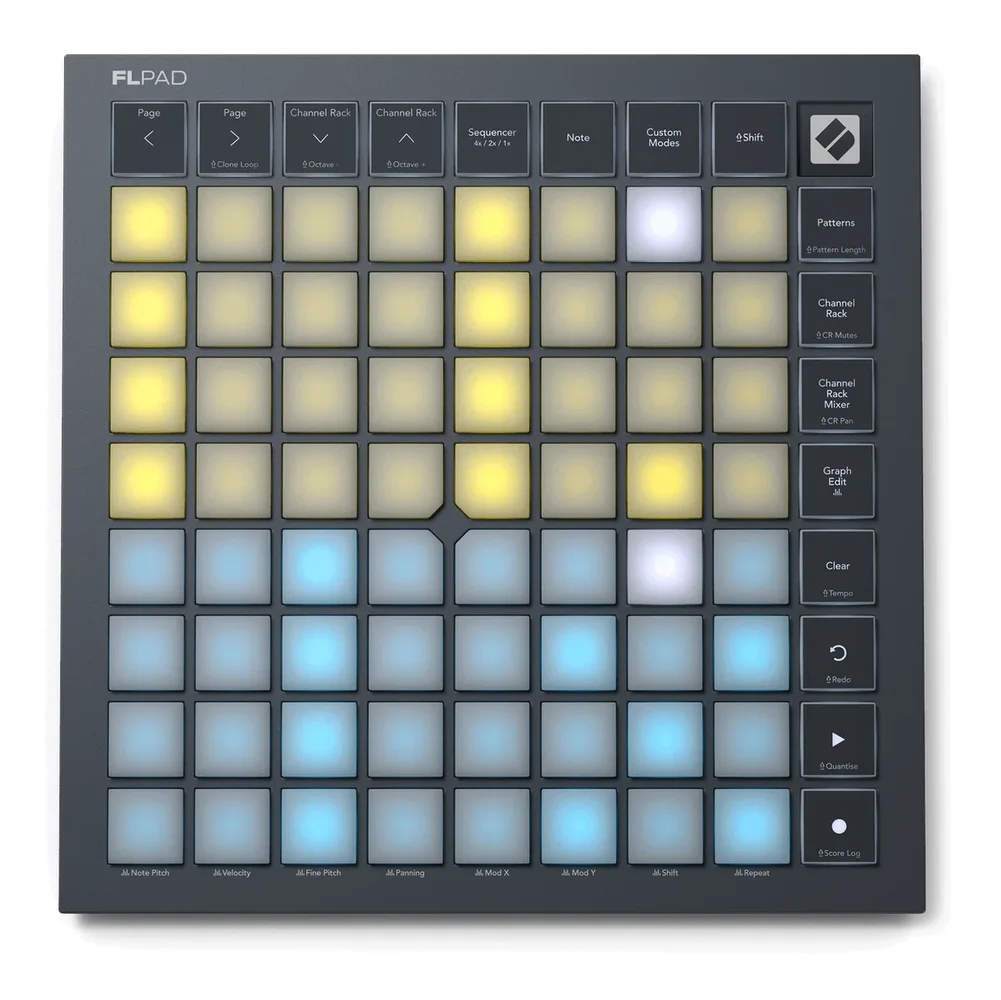
Price: $229.99 on Novation’s US store (October 21, 2026), where it’s taking pre-orders.
The FLpad is a grid of 64 velocity-sensitive pads, 8 by 8, made with Image-Line for FL Studio’s Channel Rack.
You can step-sequence melodies, bass lines and drums for up to four instruments at once. Then you can tap beats in live with layouts for FPC, Slicex and Fruity Slicer. Its 16 buttons handle play, record and moving around the Channel Rack, and one USB-C cable powers it. Like the FLkey, it comes with six months of FL Studio Producer Edition.
Who it’s for: beatmakers who live in the Channel Rack. See it on Novation’s site.
8. Akai Fire
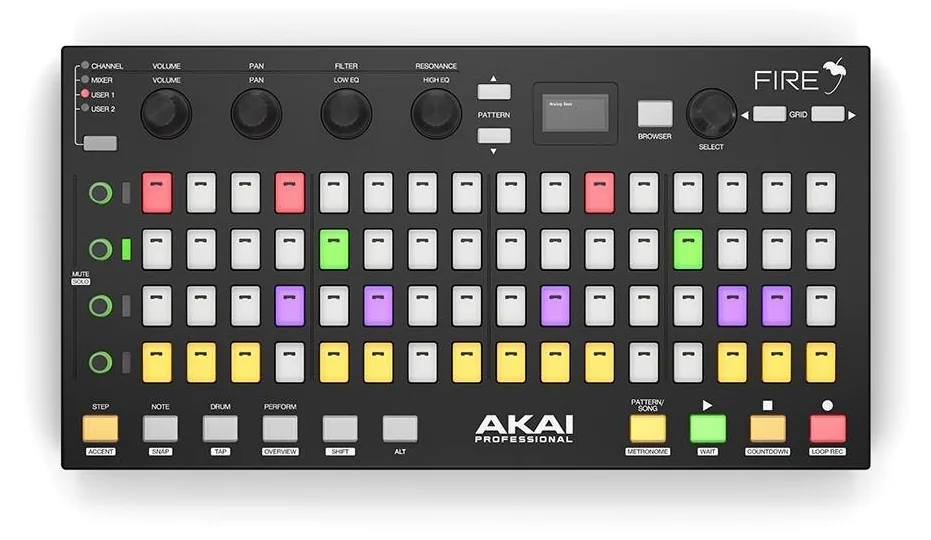
Price: $229 at Guitar Center with FL Studio Fruity Fire Edition included (October 2026). Akai shows no price on its own site. Stock has been thin at US stores this fall, so check a couple of dealers.
The Fire was the first hardware controller made just for FL Studio, built by Akai together with Image-Line. Its 64 velocity-sensitive RGB pads sit in a 4 by 16 grid. That matches FL Studio’s step sequencer: one row per sound, 16 steps per bar.
Press Note, and the pads turn into a three-octave keyboard. Drum mode gives you an MPC-style 16-pad layout for FPC and Slicex, and Performance mode launches clips. Four touch-sensitive knobs, a small OLED screen and 20 lit buttons handle the rest, all over one USB cable.
Who it’s for: beatmakers who program drums step by step in the Channel Rack. See it on Akai’s site.
The best 49-key MIDI controllers
Four octaves let you play chords with your left hand and a melody or bass line with your right. Most of these are about 73 to 80 cm wide, so measure your desk first. It’s the size many producers end up with.
9. Novation Launchkey 49 MK4
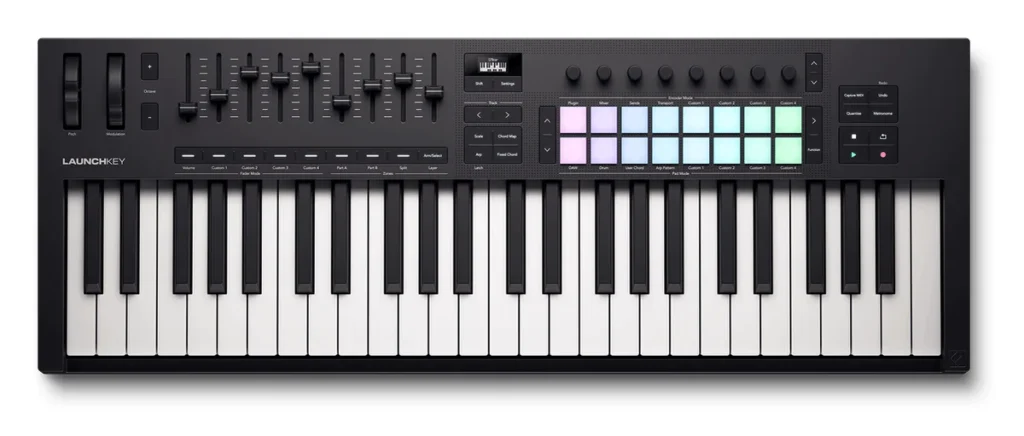
Price: $289.99 on Novation’s US store (October 21, 2026).
The Launchkey 49 has 49 semi-weighted keys, eight endless knobs, nine faders and 16 velocity-sensitive pads. The OLED screen, the Scale and Chord modes and the arpeggiator work like the Mini’s, and it adds a full-size 5-pin MIDI out and a sustain pedal input.
It controls FL Studio, Ableton Live, Logic Pro, Cubase and Reason out of the box, and it comes with the same software bundle as the Mini. Novation also makes it with 25 keys ($209.99), 37 keys ($239.99), 61 keys ($339.99) and 88 keys ($489.99).
Who it’s for: producers who switch between FL Studio and another program, like Ableton Live. See it on Novation’s site.
10. Arturia KeyLab Essential 49 mk3
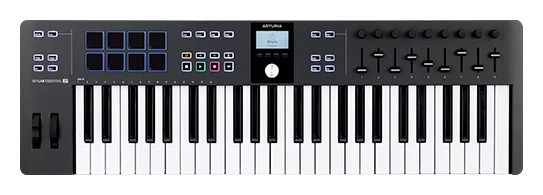
Price: $299 on Arturia’s US store (October 21, 2026).
The KeyLab Essential 49 mk3 gives you 49 velocity-sensitive keys, 8 pads that react to touch and pressure, 9 knobs, 9 faders and a 2.5-inch screen. Arturia writes its own scripts for FL Studio, Logic Pro, Ableton Live, Cubase and Bitwig. It also has Chord and Scale modes, an arpeggiator, a MIDI out and a pedal input.
The bundle is the big draw. You get Analog Lab V with more than 2,000 sounds, Ableton Live Lite, Native Instruments’ Komplete Select, the UVI Model D piano and Melodics lessons. The 61-key version is $349.
Who it’s for: FL Studio users who want full-size keys and a big pack of sounds for under $300. See it on Arturia’s site.
11. M-Audio Oxygen Pro 49
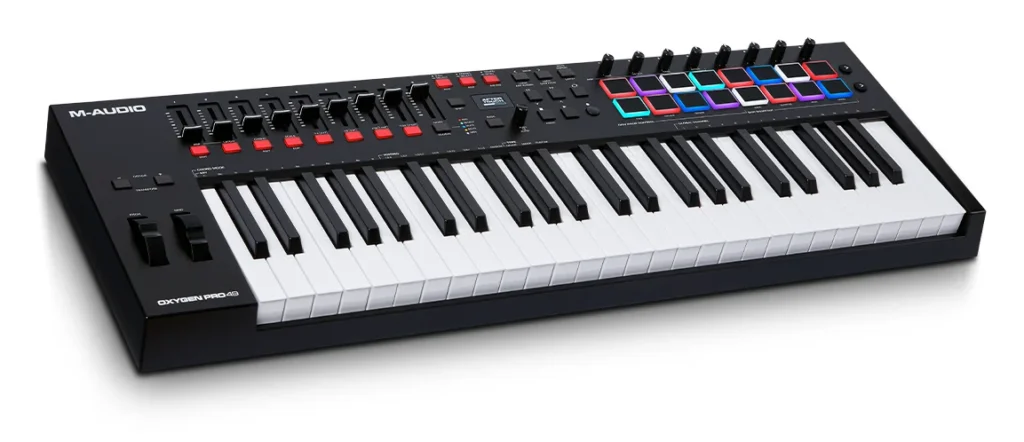
Price: $177 at Thomann’s US store (October 2026). M-Audio shows no price on its own site.
The Oxygen Pro 49 packs the most controls per dollar in this group. Its 49 semi-weighted keys have aftertouch, which means pressing harder on a key you’re already holding can change the sound. Add 16 RGB pads with Note Repeat, 8 knobs, 9 faders and an OLED screen.
Smart Chord plays a full chord from one key, and Smart Scale stops wrong notes. There’s an arpeggiator, a 5-pin MIDI out and a sustain input. M-Audio lists auto-mapping for Ableton Live, Pro Tools, MPC Beats, Cubase, Logic Pro and Studio One, and the box includes Ableton Live Lite, MPC Beats and six AIR instrument plugins.
Who it’s for: beatmakers who want 49 keys, 16 pads and faders on a tight budget. See it on M-Audio’s site.
12. Arturia KeyLab 49 mk3
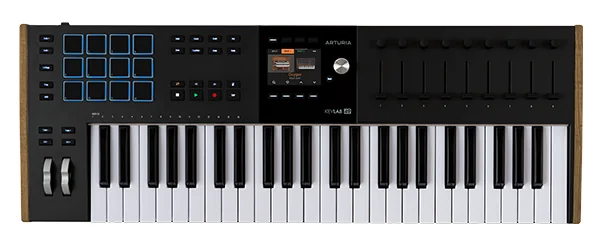
Price: $529 on Arturia’s US store (October 21, 2026).
The KeyLab 49 mk3 is the newer version of the KeyLab MkII from our original list. Its semi-weighted keys have aftertouch, and it adds 12 pads that react to touch and pressure, 9 knobs, 9 faders and a 3.5-inch color screen. It’s built to last, with wooden end panels, and weighs 6.1 kg.
Arturia’s scripts cover FL Studio, Ableton Live, Logic Pro, Cubase and Bitwig, and it works with Native Instruments’ NKS sounds too. It ships with Analog Lab Pro and Ableton Live Lite, and it has Chord, Scale and arpeggiator modes, a 5-pin MIDI out and a pedal input. The 61-key version is $649.
Who it’s for: producers who want a keyboard that feels like an instrument and will last for years. See it on Arturia’s site.
13. Native Instruments Kontrol S49 MK3
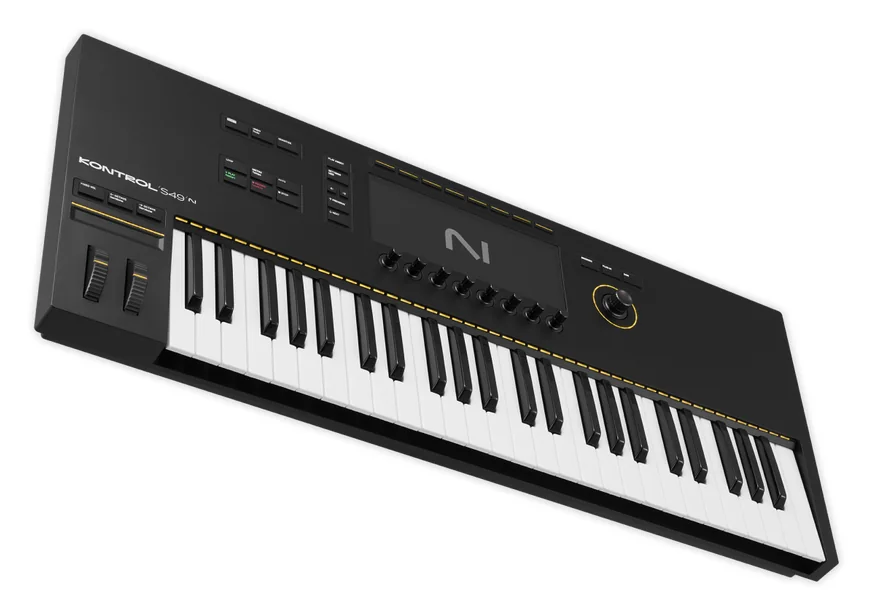
Price: $466 at Thomann’s US store (October 2026). Native Instruments shows no US price on its product page.
The Kontrol S49 MK3 is the newest version of the Komplete Kontrol S49 from our original list. Its 49 semi-weighted keys come from Fatar, a well-known Italian keybed maker. Every key sends its own aftertouch, which is called polyphonic aftertouch, and a light above each key shows which keys a sound uses.
The large color screen and eight knobs let you browse and tweak Native Instruments sounds, and NKS plugins from other makers, without touching the mouse. It has MIDI in and out, four pedal inputs and USB-C power. The box includes Komplete Select, a Kontakt instrument voucher, iZotope Elements Suite, Ableton Live Lite and Guitar Rig 7 LE.
Who it’s for: players who use a lot of Native Instruments sounds and want the best keys in this group. See it on Native Instruments’ site.
The best 61- and 88-key MIDI keyboards
Get 61 keys if you play with both hands and want room for a split. Get 88 if you play piano or want to learn properly, because that’s the full range of a real piano.
14. Nektar Impact LX61 mk3
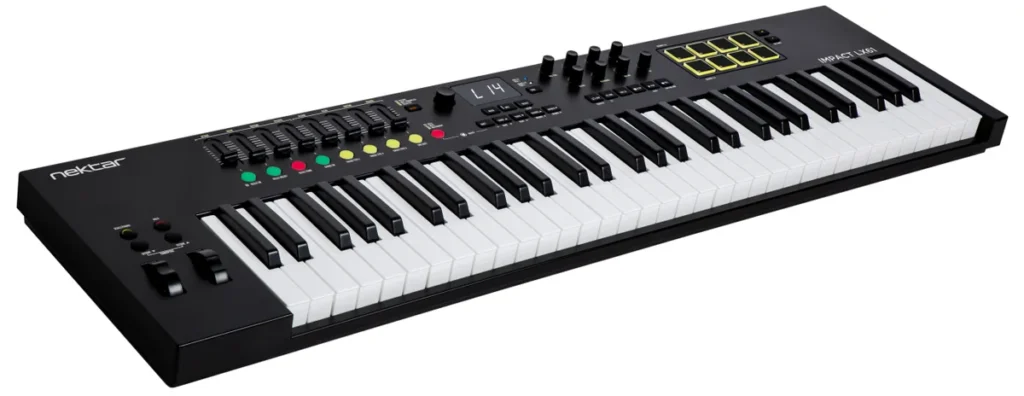
Price: $187 at Thomann’s US store (October 2026). Nektar shows no price on its own site.
Nektar’s newest keyboard has 61 synth-style keys, 9 knobs, 8 faders and 8 velocity-sensitive pads. Scale, Chord and Hold modes help with harmony, and it has a footswitch jack and USB-C power.
Nektar writes its own DAW integration for FL Studio, Ableton Live, Logic Pro, Cubase, Bitwig, Reason, Reaper and more, and it supports NKS for thousands of plugins. The bundle has Native Instruments’ Komplete Select 15, an 8-track version of Bitwig Studio and the MOK Miniraze synth. It also comes with 25, 49 or 88 keys.
Who it’s for: FL Studio users who want 61 keys and real FL Studio control for under $200. See it on Nektar’s site.
15. M-Audio Keystation 61 MK3
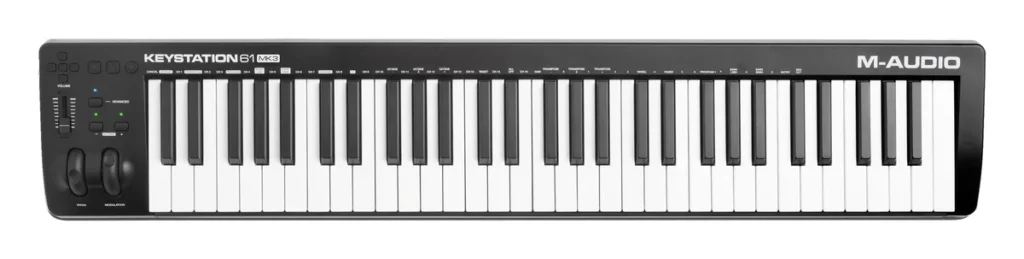
Price: $119 at Thomann’s US store (October 2026). M-Audio shows no price on its own site.
The Keystation 61 MK3 keeps things simple. You get 61 full-size, semi-weighted, velocity-sensitive keys, pitch and mod wheels, one volume fader and buttons to play, stop and record. That’s the whole panel.
It runs on USB power with no driver, has a 5-pin MIDI out and a sustain pedal input, and comes with Ableton Live Lite, MPC Beats and AIR’s piano, electric piano and synth plugins. Our original list named it the best 61-key controller under $200, and it’s still the cheapest 61-key keyboard on this page.
Who it’s for: players who want lots of keys and nothing extra to learn. See it on M-Audio’s site.
16. Arturia KeyLab Essential 88 mk3
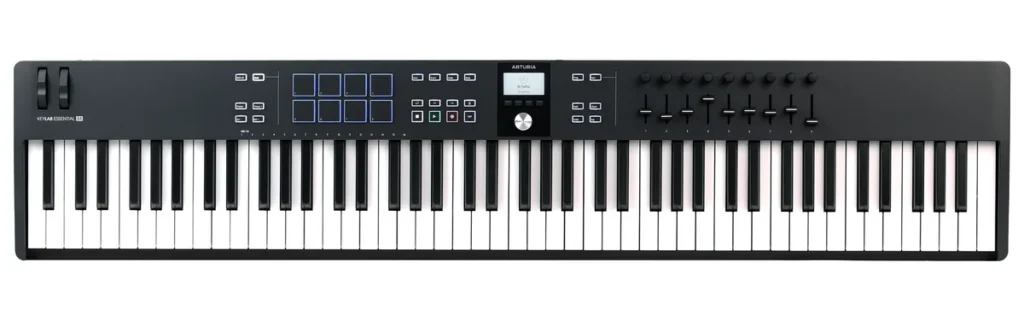
Price: $449 on Arturia’s US store (October 21, 2026).
This is the cheapest way on this list to get all 88 keys. They’re velocity-sensitive and semi-weighted, so they feel closer to a piano than mini keys do, but not like a real hammer-action piano.
It has 8 pads that react to touch and pressure, 9 knobs, 9 faders, a pedal input and Arturia’s custom script for FL Studio. If 88 keys won’t fit your desk, the 61-key version is $349, and the 49-key one is pick 10.
Who it’s for: piano players on a budget, or anyone who wants the full range of keys. See it on Arturia’s site.
17. Roland A-88MKII
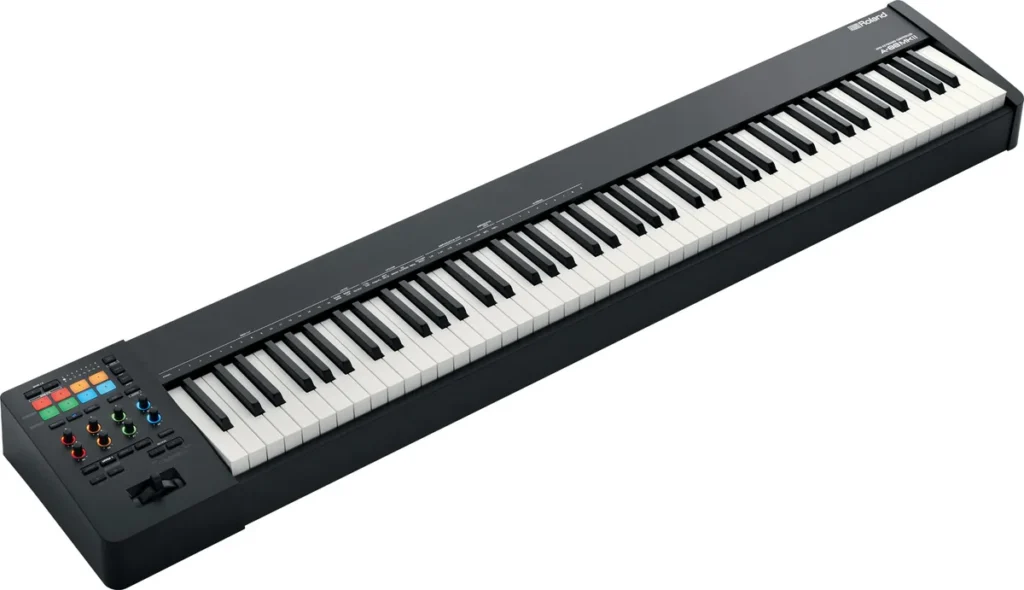
Price: $1,029 at Thomann’s US store (October 2026). Roland shows no price on its own site.
The A-88MKII is the one for real piano players. Its PHA-4 Standard keys use hammers, like an acoustic piano, with escapement (the small notch you feel when you press a grand piano key slowly) and a textured ivory-feel surface.
Above the keys sit 8 lit pads and 8 lit knobs. You can split the keyboard into three zones, for example bass on the left and piano on the right, and save 8 setups. It has MIDI in and out, three pedal inputs, USB-C and MIDI 2.0 support. It weighs 17.5 kg, so it needs a sturdy stand.
Who it’s for: pianists, and anyone who wants to learn piano properly on their controller. See it on Roland’s site.
The best pad controllers
If you mostly make beats, you might not need keys at all. Pads are easier for finger drumming, and they take up less room. The FLpad and the Akai Fire above are pad controllers too, made just for FL Studio.
18. Akai MPD218
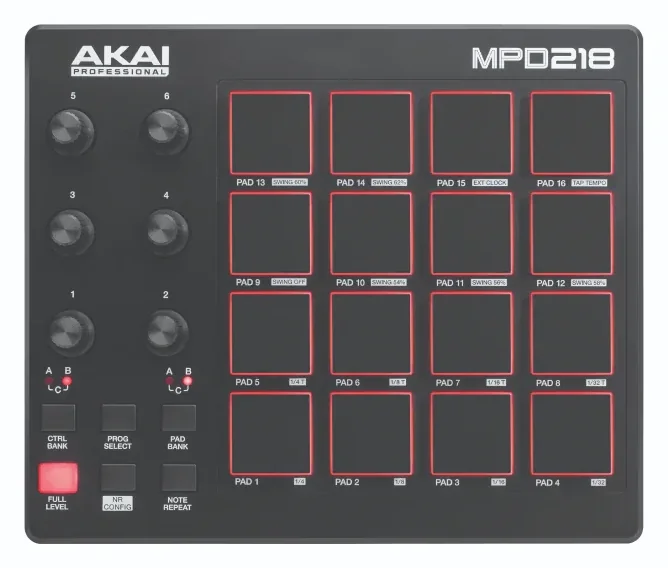
Price: $81 at Thomann’s US store (October 2026). Akai shows no price on its own site.
The MPD218 is the pad controller you see in Mix Elite’s gear video, and it’s the cheapest pick on this page. It has 16 thick MPC pads that react to how hard you hit and press, with three banks for 48 sounds, plus six knobs, also in three banks.
Note Repeat plays fast hi-hat rolls while you hold a pad, and Full Level makes every hit full volume. It runs on one USB cable with no driver and includes MPC Beats, two AIR plugins and Ableton Live Lite. In FL Studio, its pads can play the FPC drum plugin.
Who it’s for: beatmakers who want to finger-drum on a small budget, next to the keyboard they already have. See it on Akai’s site.
19. Novation Launchpad X
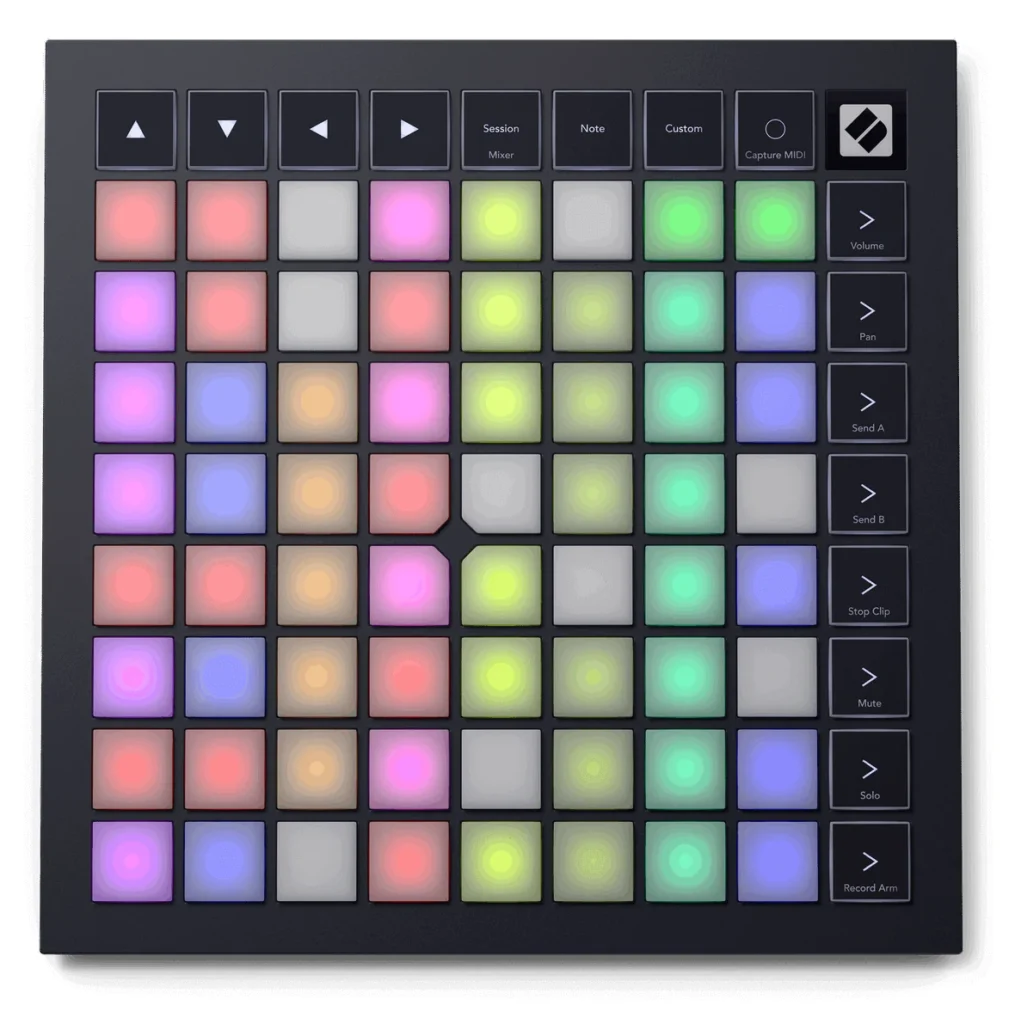
Price: $229.99 on Novation’s US store (October 21, 2026).
The Launchpad X from our original list is still one of the best grid controllers you can buy. Its 64 velocity-sensitive RGB pads also respond to pressure. Note and Scale modes turn the grid into an instrument where every pad plays a note in your key.
It’s made for Ableton Live’s Session View and Logic Pro’s Live Loops, and four Custom Modes let you map it to anything that speaks MIDI. It runs on USB-C power, is less than 2 cm thin and comes with Ableton Live Lite.
Who it’s for: Ableton Live and Logic Pro users who launch clips and play on a grid. In FL Studio, look at the FLpad first. See it on Novation’s site.
20. Ableton Push 3
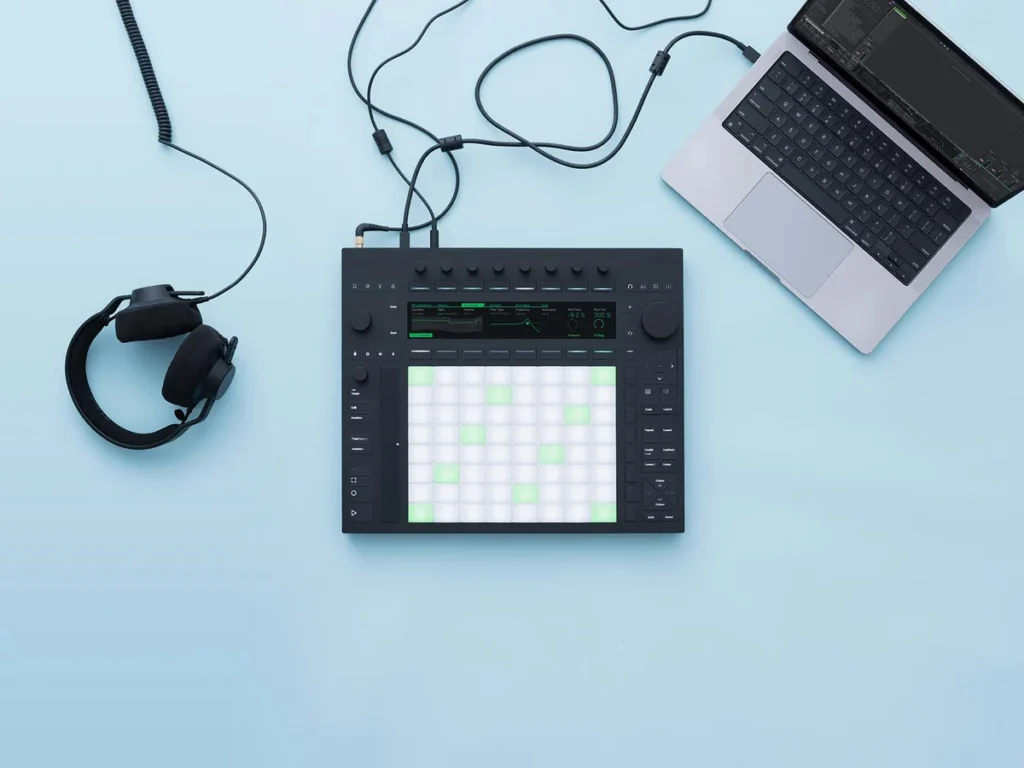
Price: $999 on Ableton’s store (October 21, 2026). The standalone version, with its own computer and battery, is $1,799.
Push 3 is the newer version of the Ableton Push 2 from our original list. Its 64 pads support MPE, short for MIDI Polyphonic Expression: each pad reads pitch, slide and pressure as your finger moves, so a held note can bend and swell like a real instrument. It also has a built-in audio interface.
It needs Ableton Live 11.3 or later and comes with Live Intro. The standalone version runs without a laptop for up to 2.5 hours on its battery.
Who it’s for: Ableton Live users only. If you make music in FL Studio, the FLpad or the Akai Fire does this job for less than a quarter of the price. See it on Ableton’s site.
Why do MIDI keyboard prices vary so much?
Mostly because of the keys: how many, how big and how they feel. On this list, 25 small keys cost $95 to $149, 49 keys cost $177 to $529, and 88 hammer-action keys cost $1,029. Pads, screens, aftertouch and bundled software add the rest. For a beginner making beats, a bigger budget mostly buys keys you won’t use yet.
Novation’s own prices show it clearly. On October 21, 2026, the same FLkey design cost $139.99 with 25 mini keys, $239.99 with 37 keys, $289.99 with 49 and $339.99 with 61, and the 49 and 61 also switch to semi-weighted keys. So is a higher budget worth it? Only once you want to play with both hands. Until then, a $95 to $149 controller does everything this guide covers.
Do you need weighted keys or aftertouch?
Not for making beats. Weighted keys matter if you play piano: semi-weighted keys push back a little, and hammer-action keys like the Roland A-88MKII’s feel like a real piano. Aftertouch changes a sound when you press harder on a key you’re already holding. It’s nice for strings and pads, but easy to live without.
On this list, the Oxygen Pro 49, the KeyLab 49 mk3 and the Kontrol S49 MK3 have aftertouch on their keys. The Kontrol S49 MK3 sends it per key, and the Launchpad X and Push 3 do something similar on their pads.
Which Akai MIDI controller should you buy?
For most people, the MPK Mini IV, Akai’s newest mini controller, with 25 keys, 8 MPC pads, 8 knobs and a color screen. Choose the MPK Mini Plus for 37 keys, the MPD218 if you only want pads, or the Fire if you make beats in FL Studio’s Channel Rack.
Akai’s range is big, so here’s how the current controllers on Akai’s site compare:
- MPK Mini IV: our pick, with 25 keys, 8 pads and a color screen.
- MPK Mini Plus: 37 keys and a step sequencer, for more room to play.
- MPK Mini Play MK3: runs on batteries, so you can play away from your desk.
- LPK25 MK2: 25 slim keys and nothing else, for the smallest bag.
- MPK249 and MPK261: 49 or 61 semi-weighted keys with pads, for a bigger desk.
- Fire: 64 pads in a 4 by 16 grid, made for FL Studio.
- MPD218: 16 pads and no keys, for finger drumming.
Akai doesn’t show prices on its own product pages (checked October 21, 2026), so check a dealer for these. The MPK249, MPK261 and the older MPK Mini MK3 are marked as limited stock on Akai’s site.
How do you avoid a MIDI controller that needs hours of mapping?
Buy one that comes mapped to your music software. For FL Studio, that means Novation’s FLkey and FLpad, the Akai Fire, or a controller with an FL Studio script, like Arturia’s MiniLab 3 and KeyLab models, Novation’s Launchkey MK4 and Nektar’s Impact LX mk3. The keys on any controller play notes with no setup at all.
Mapping means telling your software which knob or button moves which control. A ready-made script does that for you. In FL Studio it’s one setting: pick the script under Controller type in MIDI settings, as the steps below show. On the generic setting, the keys still play notes, but most knobs and buttons won’t do anything until you link them yourself.
How to set up a MIDI controller in FL Studio
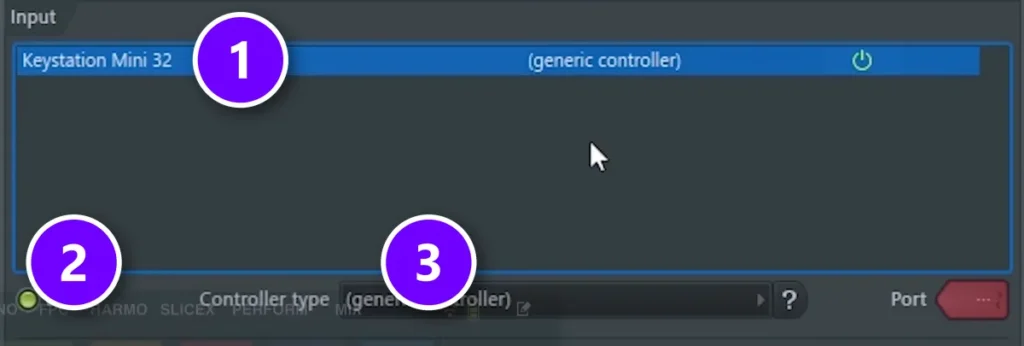
Most controllers work the moment you plug them in. Here’s how to check, step by step:
- Plug the controller into your computer with its USB cable. Most new controllers need no driver.
- Open FL Studio and go to Options > MIDI settings, or press F10.
- In the Input list, click your controller (1) and make sure Enable is switched on (2).
- Under Controller type (3), pick your controller’s FL Studio script if it has one. Otherwise, leave it on generic controller.
- Close the window, click an instrument in the Channel Rack and play a few keys.
In the screenshot from Mix Elite’s video, a Keystation Mini 32 shows up as a generic controller. That’s all a basic keyboard needs. If your controller isn’t in the list, click Refresh device list or try another USB port. New to FL Studio itself? Start with our beginner guide to FL Studio.
How to record with a MIDI controller in FL Studio
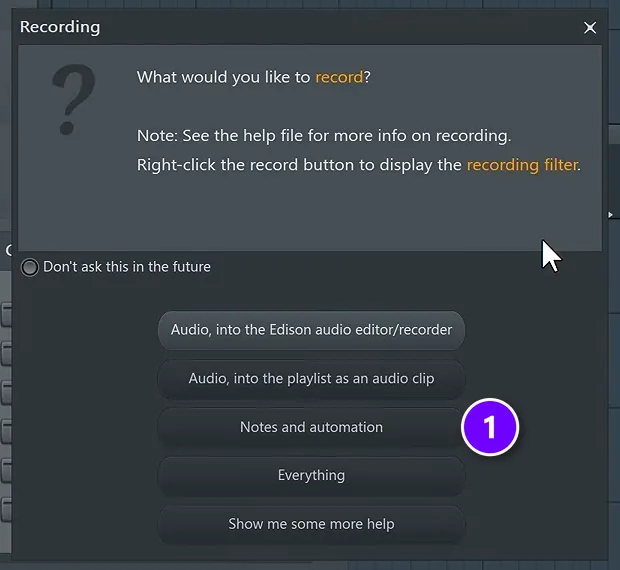
Recording takes a few clicks. FL Studio records what you play as notes, so you can fix any of them later.
- Pick the instrument you want to play in the Channel Rack.
- Click the record button in the top bar. FL Studio asks what you’d like to record.
- Choose Notes and automation (1).
- Press play, or the space bar, and play your part. Press stop, and your notes are in the pattern.
Mix Elite’s free FL Studio course uses the same steps with no controller at all, tapping a kick drum rhythm on the typing keyboard. Want a count-in first? Turn on Recording precount in the Options menu, or press Ctrl + P.
Forgot to hit record? FL Studio remembers what you played. Go to Tools > Dump score log to selected pattern and choose how far back to go. The course picks the last 2 minutes.
Our beginner guide to MIDI shows how to edit those notes in the Piano roll.
How to stay in key on a MIDI keyboard
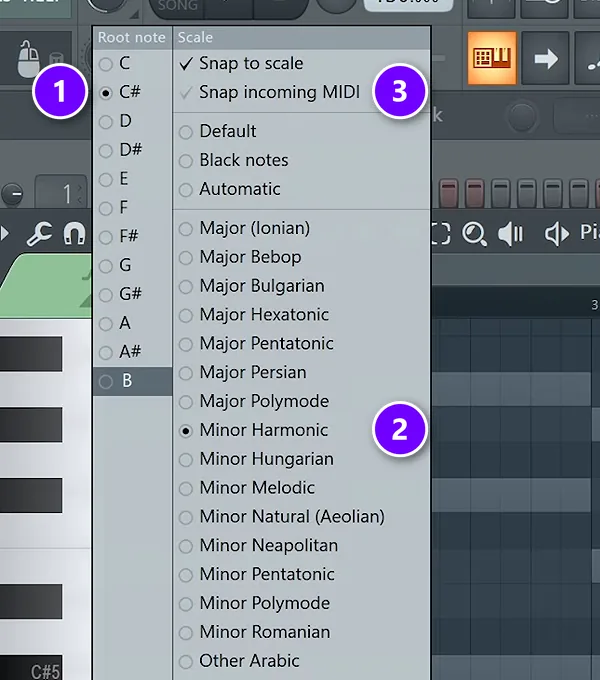
Hitting a wrong note is the fastest way to feel like you can’t play. FL Studio can fix that for you.
In the Piano roll, click the scale button next to the magnet icon. Pick your song’s root note (1) and scale (2), then turn on Snap incoming MIDI (3). Now every key you press lands on a note in that scale. In the course project, that’s C# and Minor Harmonic, the same scale as the chords.
Many controllers can do this on their own, too. The MPK Mini IV and the FLkey models have Scale and Chord modes, so one finger can play a whole chord. If scales are new to you, our music theory guide for producers explains them in plain words.
No MIDI controller yet? Use your computer keyboard
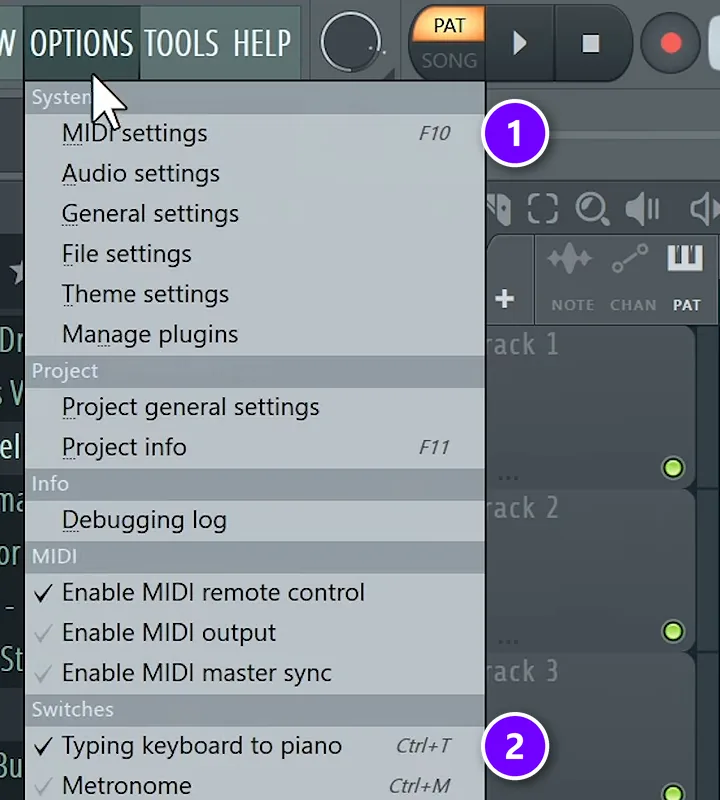
Until you buy one, your computer keyboard works as a small piano. Turn on Typing keyboard to piano (2) in the Options menu, or press Ctrl + T. The same menu holds the MIDI settings (1) you’ll use when you plug in a real controller.
Next, right-click the typing keyboard button in the toolbar and pick a scale, just like Mix Elite’s free FL Studio course does. Every key now plays a note in that scale, with the root note on Z, A, Q and 1.
That’s how the course’s melody was found by accident, and it’s why a MIDI keyboard is optional at the start. Buy one when you want to play more than you click. Gear only gets you started, though. Our step-by-step guide on how to produce music takes you from here to a finished song.
The 20 MIDI controllers side by side
Prices are from each maker’s own US store on October 21, 2026. Where a maker shows no price, it’s a US store’s price from October 2026, named in brackets.
| Controller | Keys | Pads | Price |
|---|---|---|---|
| Akai MPK Mini IV | 25 mini | 8 | $95 (Thomann US). |
| Arturia MiniLab 3 | 25 slim | 8 | $149. |
| Novation Launchkey Mini 25 MK4 | 25 mini | 16 | $139.99. |
| Arturia MicroLab mk3 | 25 slim | None | $99. |
| Novation FLkey Mini 25 MK2 | 25 mini | 16 | $139.99. |
| Novation FLkey 49 MK2 | 49 full-size | 16 | $289.99. |
| Novation FLpad | None | 64 | $229.99. |
| Akai Fire | None | 64 | $229 (Guitar Center). |
| Novation Launchkey 49 MK4 | 49 full-size | 16 | $289.99. |
| Arturia KeyLab Essential 49 mk3 | 49 full-size | 8 | $299. |
| M-Audio Oxygen Pro 49 | 49 full-size | 16 | $177 (Thomann US). |
| Arturia KeyLab 49 mk3 | 49 full-size | 12 | $529. |
| Native Instruments Kontrol S49 MK3 | 49 full-size | None | $466 (Thomann US). |
| Nektar Impact LX61 mk3 | 61 full-size | 8 | $187 (Thomann US). |
| M-Audio Keystation 61 MK3 | 61 full-size | None | $119 (Thomann US). |
| Arturia KeyLab Essential 88 mk3 | 88 full-size | 8 | $449. |
| Roland A-88MKII | 88 hammer-action | 8 | $1,029 (Thomann US). |
| Akai MPD218 | None | 16 | $81 (Thomann US). |
| Novation Launchpad X | None | 64 | $229.99. |
| Ableton Push 3 | None | 64 | $999. |
What happened to the controllers on our old list?
This page first listed seven controllers, and its FAQ named an eighth. Three are still sold new and are back on the list. The rest have newer versions or are gone. Here’s where each one stands on October 21, 2026:
- Akai MPK Mini MK3: replaced by the MPK Mini IV (pick 1). Akai still lists it as limited stock, but Guitar Center shows it sold out and B&H lists it as no longer available.
- Arturia KeyLab MkII: replaced by the KeyLab mk3 (pick 12). Arturia no longer lists the MkII.
- Native Instruments Komplete Kontrol S49 (MK2): replaced by the Kontrol S49 MK3 (pick 13).
- Ableton Push 2: replaced by Push 3 (pick 20), which came out in 2023.
- Nektar Panorama P6: discontinued. Nektar no longer lists it, and US and UK stores show it as no longer available. Nektar’s closest keyboard today is the Impact LX61 mk3 (pick 14).
- Novation Launchpad X, Roland A-88MKII and M-Audio Keystation 61 MK3: still sold new, and back on this list as picks 19, 17 and 15.
Whichever one you choose, the controller is the easy part. Finishing songs is the real skill, and you build it by making lots of them.
DAY 1 OF THE 7-DAY MUSIC PRODUCER COURSE
Got your controller? Day 1 gets the rest of your setup working
Day 1 of Mix Elite’s 7-Day Music Producer Course is all about your setup and workflow: choosing the music hardware and software that suit you, the ‘Perfect Triangle’ formula for setting up a home studio on any budget, and finding your way around FL Studio. It’s taught in FL Studio (the free trial works), about 45 minutes a day, and at the end a pro gives you personal feedback on your finished track. It’s $27, and you get 60 days to decide if it was worth it.
Frequently asked questions
What is the best MIDI controller for beginners?
For most beginners, a 25-key controller with pads is the best start. The Akai MPK Mini IV is small, has keys, pads and knobs, and Thomann’s US store lists it at $95 (October 2026). If you use FL Studio, the Novation FLkey Mini 25 MK2 ($139.99) adds FL Studio controls. Just remember that a controller is optional when you start.
Is an expensive MIDI keyboard worth it for a beginner?
Usually not. Most of the price goes into more and bigger keys: on this list, 25 small keys cost $95 to $149 and 88 semi-weighted keys cost $449. If you make beats and simple melodies, a 25-key controller with pads does the job. Spend more once you want to play chords and bass with both hands.
How many keys should a MIDI controller have?
25 keys are enough for most beats, melodies and bass lines, and they fit on any desk. Choose 37 or 49 keys if you want to play chords with one hand and bass with the other. Only go for 61 or 88 keys if you play piano or want to learn properly.
Do you have to map a MIDI controller to make it work?
No. The keys of any MIDI controller play notes as soon as FL Studio sees it. Mapping only matters for knobs and buttons, and controllers with a ready-made script, like Novation’s FLkey, the Akai Fire or Arturia’s MiniLab 3, handle that for you. Just pick the script under Controller type in FL Studio’s MIDI settings.
What is the best MIDI controller for FL Studio?
Novation’s FLkey range is made for FL Studio and officially supported by Image-Line. Get the FLkey Mini 25 MK2 ($139.99) for a small desk, or the FLkey 37, 49 or 61 MK2 for more keys. For beats, the Novation FLpad ($229.99) or the Akai Fire puts 64 pads on the Channel Rack.





