


“Immature poets imitate; mature poets steal; bad poets deface what they take, and good poets make it into something better, or at least something different.”
To find your signature sound as a beginner, don’t try to invent a style first. Remake the songs you love to learn how they work, keep the parts that feel like you, reuse a small palette of go-to sounds, and finish lots of songs. Your sound is the set of habits that shows up in all of them.
You load the same packs everyone uses, pick a preset, and the beat comes out fine. It even sounds clean. But play it next to ten other beats on YouTube and nobody could tell which one is yours. That’s the feeling this guide fixes. Below is how producers build a sound that’s really theirs: the method Max, the founder of Mix Elite, teaches on the Mix Elite YouTube channel, real FL Studio screenshots from Mix Elite’s videos, and what producers you already know have said about their own.
Table of Contents
What is a signature sound?
In music, a signature sound is the mix of choices that shows up in every song you make. It’s the drums you keep reaching for, the way your beats swing, the chords you fall back on, the effect on your main sound, maybe even a short voice tag at the start. One choice on its own isn’t a signature. The same handful of choices, made again and again, is.
So your sound is less about being strange and more about being consistent. People know a friend’s voice on the phone because it sounds the same every time, not because it’s the oddest voice they know.
When Max explains where to put your focus in a mix, he names the two places a signature usually lives: “The most important parts are always your drums and your main sound, or like main lead, whatever makes your track your track.” Get those two right, repeat them on purpose, and people start to know it’s you.
The producers you already know got there the same way, with habits more than gear. You’ll see how J Dilla, FINNEAS and Metro Boomin built theirs in the steps below.
Can you develop a signature sound as a beginner?
Yes, but don’t try to invent a style before you know the basics. Remake songs you love to learn how they work, reuse a small palette of sounds and effect chains, and finish short songs. Your sound is the set of habits that repeats across them, so it grows while you learn.
You don’t need to pick a lane on day one either. Each finished song teaches you a little more about what you like. If you’re still learning FL Studio itself, Mix Elite’s free 4.5-hour FL Studio course covers the basics, including the reference track method from step 2.
How do you find your signature sound as a producer?
Finding your sound works like a loop. You study the music you love, copy pieces of it to learn how they work, keep what feels like you, and repeat it until it turns into a habit. Here are the seven steps in the order that works best:
- Collect the songs that move you.
- Remake one of them in FL Studio to learn how it works.
- Build a small palette of go-to sounds.
- Record sounds that nobody else has.
- Bend stock sounds until they’re yours.
- Give your drums your own groove.
- Finish lots of songs and ask people what they hear.
Each step is explained below, with the FL Studio clicks from Mix Elite’s videos. The ideas work in any DAW, the program you make music in.
1. Collect the songs that move you
Make a playlist of 10 to 20 songs you never skip. Don’t pick what you think you should like. Pick what you actually play when nobody’s around, from any genre.
Then listen on headphones and write down what grabs you in each song. Keep the notes short:
- The drums: punchy and dry, or soft and roomy?
- The bass: a deep 808, a bass guitar or a synth?
- The main sound: piano, guitar, a synth lead, chopped vocals?
- The space: close and dry, or big and full of reverb?
- The groove: tight on the grid, or loose and swinging?
- The feeling: dark, warm, hopeful, angry?
Do the same with two or three songs you can’t stand. Knowing what you’ll never do shapes your sound as much as what you love. After a few songs, the same answers start to repeat. That repeat is the first sketch of your sound.
Keep one of these songs open while you produce. That’s called a reference track, and it’s one of the most powerful ways to level up quickly.
2. Remake one song you love, on purpose
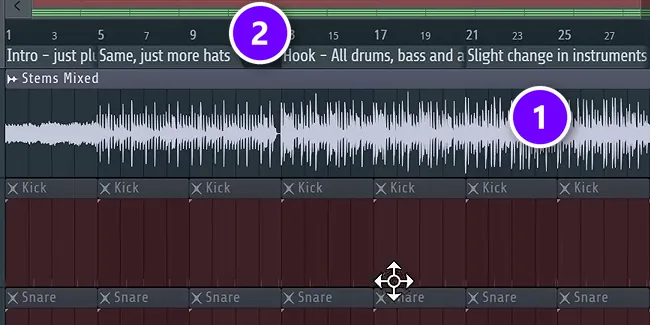
Copying a song to learn from it isn’t cheating. It’s how painters, writers and producers have always learned. Mix Elite’s arrangement video makes the point that the fastest way to get better is to learn straight from the artists you love. The best way to do that is to rebuild one of their songs inside your own project.
In the screenshot, the reference song sits on the top track (1). The markers above it (2) name every part: the intro pluck, more hats, then the hook with all the drums and bass. Here’s how to set it up in FL Studio:
- Drag the song from your computer into the Playlist, on its own track.
- Make a new arrangement so your own project stays safe, and mute your own parts.
- Match the tempo. If you don’t know the song’s BPM, tap along with FL Studio’s tempo tapper to find it.
- Play the song and add a marker everywhere something changes. Press Alt + T to add one, then type what you hear, like “Hook: all drums and bass”.
- Delete the reference song, set your tempo back and build your own version, following your markers.
Use your own sounds for the remake, and never release it as your song. It’s practice. The goal is to learn why the song works: how long the intro is, when the drums come in, what changes in the hook. The reference track chapter of Mix Elite’s free 4.5-hour FL Studio course shows the whole method, and our guide on how to arrange loops into a full song takes it further.
Then make it yours. Swap the drums for a kit you love, change the chords, slow it down or flip the order of the parts. Keep what feels like you and drop the rest. One arrangement method helps here: copy every part and mute it all, then add parts back in real time as you hear what should come next. Max says this way “will also be unique to you and you will not be influenced by any other tracks and maybe define your unique style.”
3. Build a small palette of go-to sounds
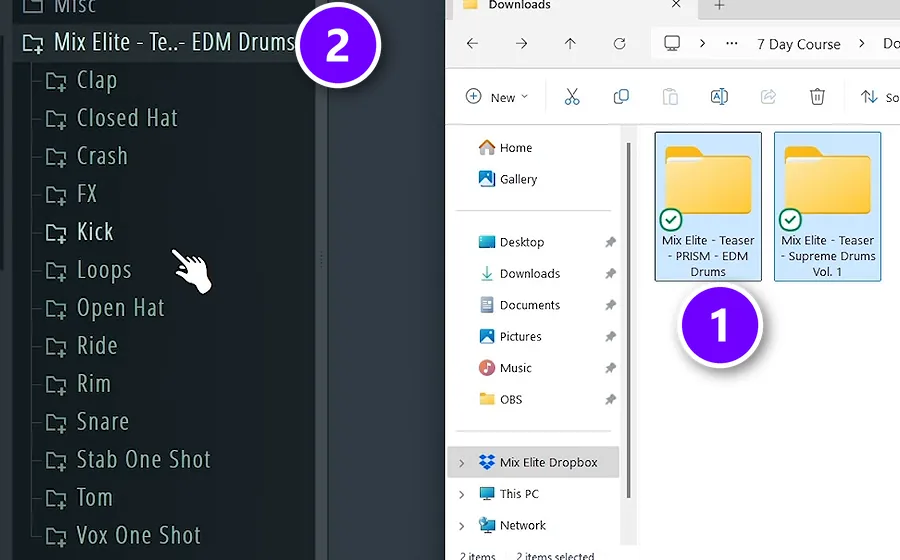
A palette is a small set of sounds you know inside out: a few kicks, snares and hats, an 808 or bass, two or three instruments and a few effects. You don’t need a new sound for every track. Plenty of producers reuse the same drum samples across whole albums, and that’s not a bad habit.
So make one folder called something like “My sounds”, with a subfolder for each type, and put it where you’ll see it every session. In the screenshot, two pack folders go from Windows Explorer (1) straight into FL Studio’s Browser (2), where they show up with all their subfolders. Our guide to installing sample packs in FL Studio covers the details.
To try sounds fast, drag a sample from the Browser onto a channel. Then, while the beat plays, press Shift + the up or down arrow in the Browser, and FL Studio swaps the next sample straight into that channel. Over time, cut the folder down. When a sound shows up in three or four of your songs, it’s part of your sound. When you never touch one, delete it. In FL Studio’s plugin manager, click the star next to the plugins you use most to add them to your favorites.
Save your favorite effect chains too. Right-click a mixer track you love, open File, and drag Save mixer track state onto another track. The whole chain comes with it, so your sound is one drag away in every project.
4. Record sounds nobody else has

Every pack you buy, thousands of other producers own too. A sound you record yourself, nobody else has. Max’s advice in Mix Elite’s producer tag tutorial is simple: “I encourage you to record your own samples, it’s always better.”
You don’t need a studio for this. Tap a bottle with a pencil, hit a pot lid, drag a chair across the floor, snap your fingers in the bathroom or record your own voice. Even a phone recording works for a short hit or a texture.
Then treat those sounds like any other sample. Cut the start tight, layer the snap under your snare, or pitch the bottle into a little melody. Small sounds like these end up in song after song, and that’s exactly the point.
5. Bend stock sounds until they’re yours
You don’t need rare plugins either. FINNEAS, who produces Billie Eilish, told Sound On Sound that all of the sounds on “Ocean Eyes” were stock Logic sounds that he tweaked with EQ and layered. What you do to a sound is what makes it yours.
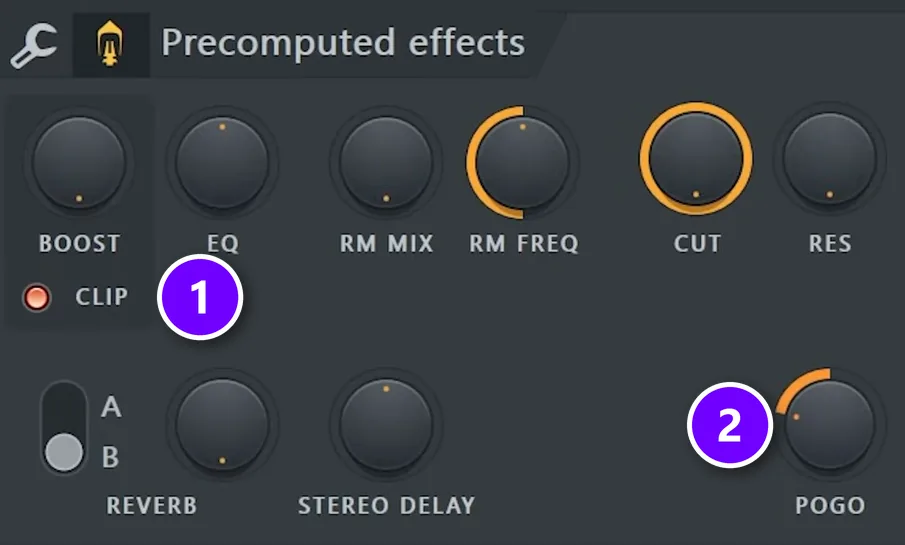
FL Studio hides a lot of this inside the sampler. Double-click any sample to open its settings and find Precomputed effects. In the knob view, turn up BOOST and switch on CLIP (1) for grit, or turn POGO (2) to bend the start of the sound. Mix Elite’s hidden FL Studio features video calls Pogo a favorite that works extremely well on kicks. One drum sample can give you a whole set of new colors this way.
Synths work the same way. Start from a preset you like and change two or three things, like the waveform, the filter or how fast the sound fades out. Then save it under your own name. Our guide to sound design basics explains each part, and Mix Elite’s sound design tutorial for Serum builds sounds from scratch.
6. Give your drums your own groove
Groove is the hardest part of a sound to copy, which makes it one of the best ways to sound like you. In his Red Bull Music Academy lecture, Questlove explained that J Dilla programmed his drums with no quantize, the feature that snaps every hit to the grid. That loose, slightly off feel became his signature.
You don’t have to throw out the grid to get there. Program your drums by hand instead of dragging in loops, and change the velocity, which is how hard each hit plays, on some notes. The free course does this with hi-hats, because a groove that isn’t perfect sounds more human.
- Turn down the velocity of every other hi-hat.
- Move a few hats or a snare slightly early or late, and trust your ears.
- Try the swing knob at the top of FL Studio’s Channel rack on your hats.
7. Finish lots of songs and ask what people hear
A signature only shows up across many songs. One loop can’t show a pattern, and neither can a folder full of half-done ideas. Finished songs can. That’s why the fastest way to find your sound is to finish more songs, even short and imperfect ones. Our guide on how to finish a song walks you through it.
When you have three or four finished songs, play them for a friend and ask one question: what sounds the same in all of them? People hear your habits long before you do. Write the answers down, then do more of what they noticed, on purpose.
There’s no shortcut here. The more you practice and compare your songs with professional ones, the better you get at choosing the right sounds. Every song you finish trains that ear a little more.
What are the best exercises to build your own sound?
Short ones you can repeat. Remake 8 bars of a song you love, make a few beats from one small palette, record a sound of your own, and listen back for what repeats. Each exercise fits in one evening, so a part-time producer can do one or two a week.
- The 8-bar remake. Rebuild the first 8 bars of a song you love with your own sounds (step 2), then change the drums and the chords.
- The palette week. Make three short beats using only your “My sounds” folder. Play them back to back and write down what repeats.
- The homemade sound. Record one sound at home, like a bottle, a pot lid or your voice, and put it in every beat you make this month.
- The preset tweak. Open a synth preset you like, change only two or three things, and save it under your own name.
- The groove pass. Take a finished loop and change only the velocity and timing of the hats and snare. No new sounds allowed.
After a month, play the results to a friend and ask what sounds the same. That answer is the start of your sound.
How do you make a producer tag?
A producer tag is a short sound, usually a voice saying a name or a phrase, that plays at the start of your beats. It’s the most literal part of a signature sound, and people learn it fast.
Metro Boomin’s famous tag started as a line Future said during a studio session. In a 2016 interview, reported by XXL, Metro explained that he pulled out a muted take of the line and started putting it on his beats. Now that one line tells you who made the beat before the drums even start.
Mix Elite’s producer tag recipe in FL Studio
Mix Elite’s producer tag tutorial builds a tag from one short, self-recorded phrase. Here are the steps:
- Record a short phrase in your own voice, or ask a friend to say it.
- Even it out with a limiter so every word is the same volume, then tame sharp S sounds with a de-esser preset in Maximus.
- Cut the low end with an EQ and lift a little of the highs.
- Add a big reverb with the wet up, the dry down and a long decay (about 4 seconds in the tutorial). Select the first word and press Ctrl + Alt + C to turn it and its reverb tail into a new clip.
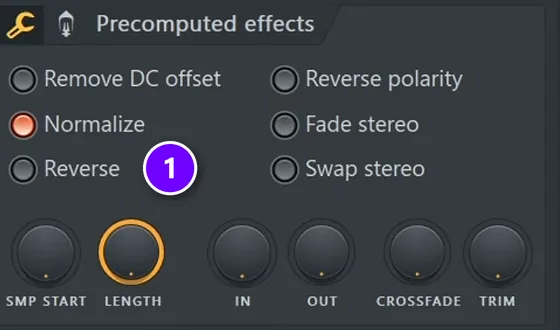
- Double-click that new clip, tick Reverse (1) in Precomputed effects, and place it right before the first word, so the reverb swells into the tag.
- Copy the phrase, pitch the copy down about 5 semitones and layer it under the original. A little distortion finishes it off.
Keep your tag short so it never gets in the way of the beat, and put the same one on every track. That repeat is the whole point. Watch the whole tag come together step by step:
How long does it take to find your sound?
There’s no set number of weeks. Most producers only notice their sound after they’ve finished a stack of songs, because a pattern needs more than one example. If you finish songs often, it shows up much sooner than if you keep starting new loops.
It also keeps changing. Your sound five years from now will be different, and that’s healthy. The core habits tend to stay, though: the drums you trust, the way you swing, the sounds you can’t stop using.
So don’t wait for it. You don’t find your sound first and then start making music. You make music, and your sound is what’s left when you look back.
Why do my beats sound like copies of my favorite artists?
Because you’re starting from the same packs, presets and patterns as everyone else who loves those artists, and copying their sounds instead of their choices. Keep studying them, but copy the structure, not the sounds: map the song with markers, then fill it with your own drums, your own recordings and ideas from other music you love.
Sounding like your heroes is a normal stage, not a dead end. The T. S. Eliot line at the top of this page is about exactly this: good poets take from others and make it “into something better, or at least something different.” The habits below are how you do that.
Mistakes that make you sound like everyone else
- Using presets and loops exactly as they load, with nothing changed.
- Switching packs every session, so nothing repeats from song to song.
- Chasing whatever sound is trending this month instead of what you love.
- Copying someone’s settings instead of using your ears. What works on someone else’s track won’t work on yours.
- Piling on layers until nothing stands out. Over-producing is a common beginner mistake.
- Starting loops and never finishing them, so there’s no pattern to find.
Start tonight with step 2. Pick one song you love, drop it into FL Studio, add your markers and rebuild the first eight bars with your own sounds. It’s the quickest way to hear where someone else’s taste ends and yours begins. If you’re new to all of this, our guide to producing music starts from zero.
THE 7-DAY MUSIC PRODUCER COURSE
Your sound shows up in finished songs. Start with one.
The 7-Day Music Producer Course walks you through one full song, one step a day: setup, chords and melodies, drums and arranging, mixing, vocals, mastering and release. Each day takes about 45 minutes, it’s taught in FL Studio (the free trial works), and on day 7 a pro gives you personal feedback on your track. It’s $27, and you get 60 days to decide if it was worth it.
Frequently asked questions
What is a signature sound in music?
A signature sound is the set of choices that makes your songs recognizable: the drums you reuse, your groove, your go-to chords and instruments, and the effects on your main sound. It isn’t one rare plugin. It’s the same few choices made on purpose in song after song, until listeners can tell it’s you before they see your name.
How do I start developing a signature sound as a beginner?
Don’t try to invent a style first. Remake a few songs you love to learn how they work, keep a small folder of go-to sounds and effect chains, and finish short songs often. Then ask a friend what sounds the same across them. Those repeated habits are your sound, and they grow while you learn the basics.
Why do my beats sound like copies of my favorite artists?
Usually because you’re using the same packs, presets and patterns as everyone who loves those artists. Copy the structure of their songs instead of their sounds: map a song with markers, then fill it with your own drums, your own recordings and ideas from other music you love.
What exercises help you build a unique style?
Remake 8 bars of a song you love with your own sounds, make three beats from one small palette and compare them, record one sound at home and use it in every beat for a month, and tweak a preset before saving it under your own name. Each one fits in an evening.
Do I need expensive plugins to have a unique sound?
No. FINNEAS told Sound On Sound that all of the sounds on Billie Eilish’s “Ocean Eyes” were stock Logic sounds he tweaked and layered. FL Studio’s own sampler can reverse, distort and bend any sample, and sounds you record yourself are unique from the start. Your habits matter more than your gear.





