



“…songs are unlike literature. They’re meant to be sung, not read.”
The best Waves plugins for vocals are Vocal Rider for steady levels, Waves Tune Real-Time for pitch, CLA-2A or CLA-76 for compression, F6 for EQ fixes, Sibilance for harsh S sounds and Abbey Road Reverb Plates for space. Buy the one that fixes your vocal’s biggest problem first.
Waves sells hundreds of plugins, and sales come around often. That makes it easy to own five compressors and still have a vocal that sounds thin, harsh or buried. This guide sorts Waves’ best vocal tools by the job they do, in the order Max, the founder of Mix Elite, processes a vocal in his videos, so you buy only what fixes your problem. We checked every list price and every FL Studio listing on Waves’ own product pages again in October 2026.
Table of Contents
Which Waves plugins do you actually need for vocals?

The essential Waves vocal plugins each do one job: Clarity Vx, NS1 and DeBreath clean the recording, Vocal Rider evens the level, Waves Tune Real-Time fixes pitch, F6 and PuigTec EQs shape the tone, CLA-2A or CLA-76 compress, J37 Tape adds warmth, Sibilance de-esses, and Abbey Road Reverb Plates and H-Delay add space. Few vocals need all of them.
What order should a vocal chain go in?
Clean first, then level, tune, EQ, compress, add warmth if you want it, and de-ess. Reverb and delay go last, on their own mixer tracks. Fixing problems early means every later plugin works on a cleaner, steadier vocal. Antares, the maker of Auto-Tune, also says pitch correction works best early, on a clean, dry signal.
Every Waves plugin on this list fits one step of that chain:
- Clean: remove background noise and loud breaths (Clarity Vx, NS1, DeBreath).
- Level: even out loud and quiet words (Vocal Rider).
- Tune: fix the pitch (Waves Tune Real-Time).
- EQ: cut the rumble and shape the tone (F6, PuigTec EQs).
- Compress: keep every word easy to hear (Renaissance Vox, CLA-76, CLA-2A).
- Warm (optional): add tape color (J37 Tape).
- De-ess: tame sharp S sounds (Sibilance).
- Space: add reverb and delay on their own mixer tracks (Abbey Road Reverb Plates, H-Delay).
Max’s first rule comes before any plugin: “gold in equals gold out.” A clean recording, with the singer at a steady distance from the mic, needs far less fixing. Two picks come straight from Mix Elite’s videos: the vocal mixing video recommends Vocal Rider, and the recording video uses Waves Tune Real-Time. The rest are the standard Waves tools for each job. For the full method, read our guide to mixing vocals, or watch Mix Elite’s video on the vocal mixing mistakes that ruin a mix below.
Clean up and level the vocal
These four fix the raw recording before any EQ or compression touches it. Do this part first. Every later plugin works better on a clean, even vocal.
1. Clarity Vx: remove background noise

Clarity Vx removes background noise from a vocal, like a fan, traffic or a noisy room. It uses a neural network, a kind of trained AI, to tell the voice apart from the noise. You choose how much noise goes with one big knob in the middle.
It’s the plugin to reach for when a great take was recorded in a bad room. Go easy, though. Too much cleaning makes a voice sound thin and processed. List price: $199.
2. NS1 Noise Suppressor: one-fader noise cleanup
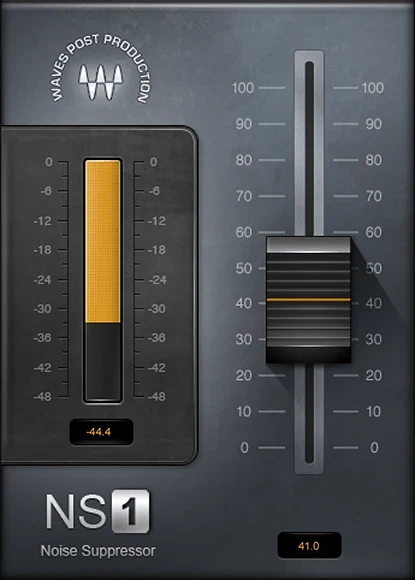
NS1 is the simplest way to clean up a noisy vocal. It has a single fader: push it up and it turns down the background noise while keeping the voice, analyzing the audio as it plays. A meter shows how much noise it’s taking out at each moment. Waves made it for video dialog and voiceover as well as music tracks.
Push the fader only as far as you need. Too much, and the voice starts to sound thin and processed. List price: $149.
3. DeBreath: control loud breaths
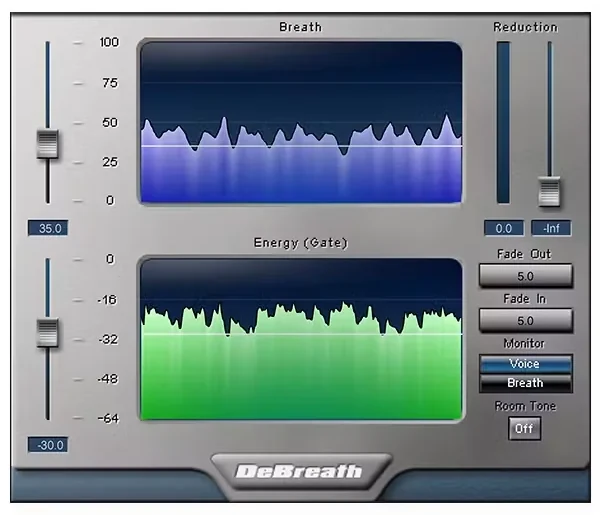
DeBreath finds the breaths between your lines and turns them down for you, without cutting them out by hand. You decide how much breath stays, and it can even add room tone where breaths were lowered, so the gaps don’t sound dead. If you want a dedicated de-breath plugin, this is Waves’ answer.
Breaths get loud after compression, which squashes the words and lifts everything quiet. Keep a little breath for a natural sound. List price: $99.
4. Vocal Rider: automatic volume riding
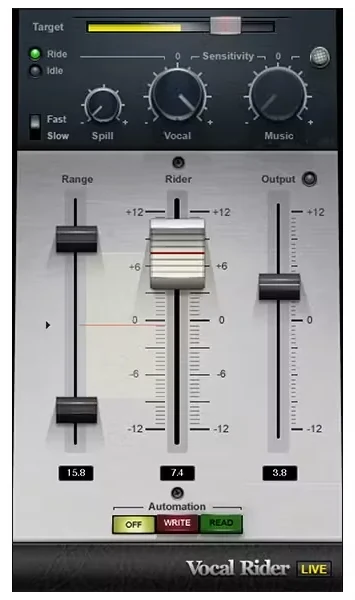
Vocal levels jump around because singers move toward and away from the mic. A vocal rider turns quiet words up and loud words down for you, like an engineer riding the fader. Max’s take on the Waves version: “the best and the most popular one is from Waves.” Vocal Rider has a Target setting for the level you want and a Range for how far it can move. List price: $199.
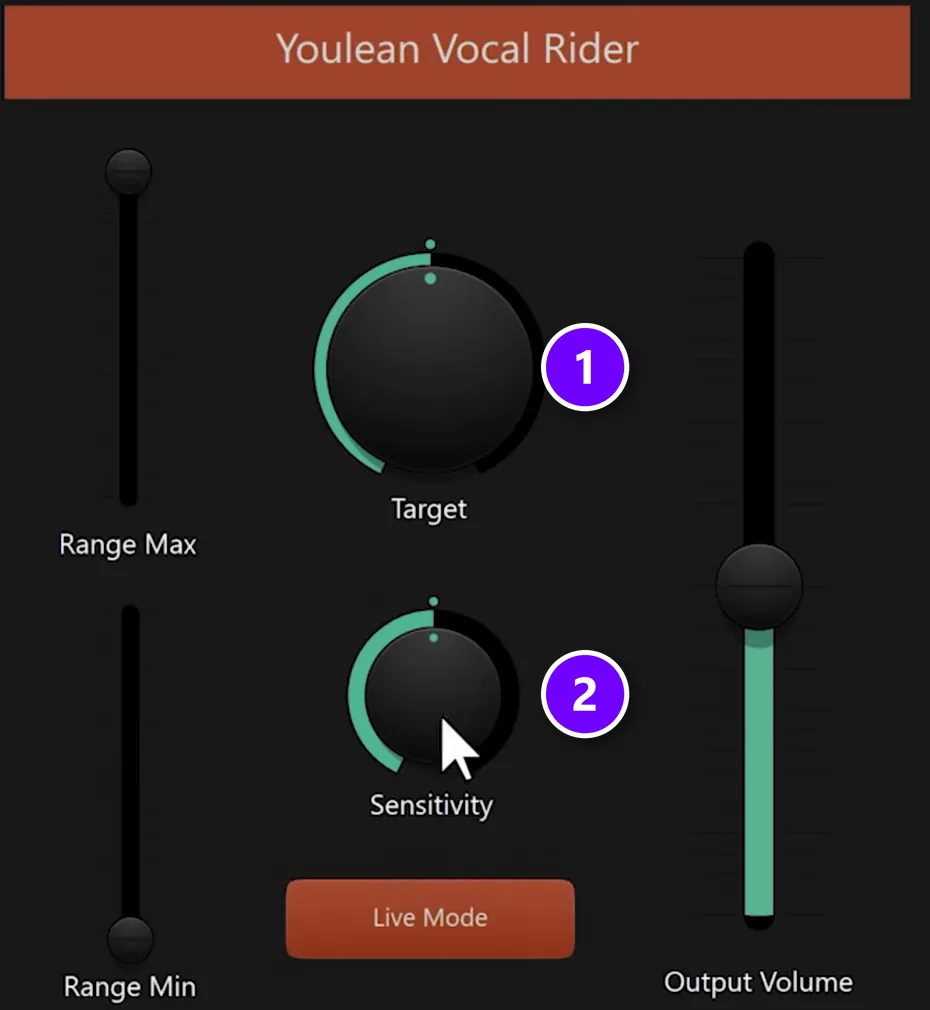
In FL Studio, the same video shows a free option: a Patcher preset called Youlean Vocal Rider, which Youlean shared on the Image-Line forum. The second screenshot shows it:
- Load it on the vocal and leave Target (1) and Sensitivity (2) at their defaults.
- Select the vocal clip and press Ctrl + Alt + C to consolidate it, which prints the effect into a new audio clip.
- Normalize the new clip and compare it with the old one. Turn up Sensitivity (2) for an even straighter result.
Tune the vocal
5. Waves Tune Real-Time: pitch correction you can hear live
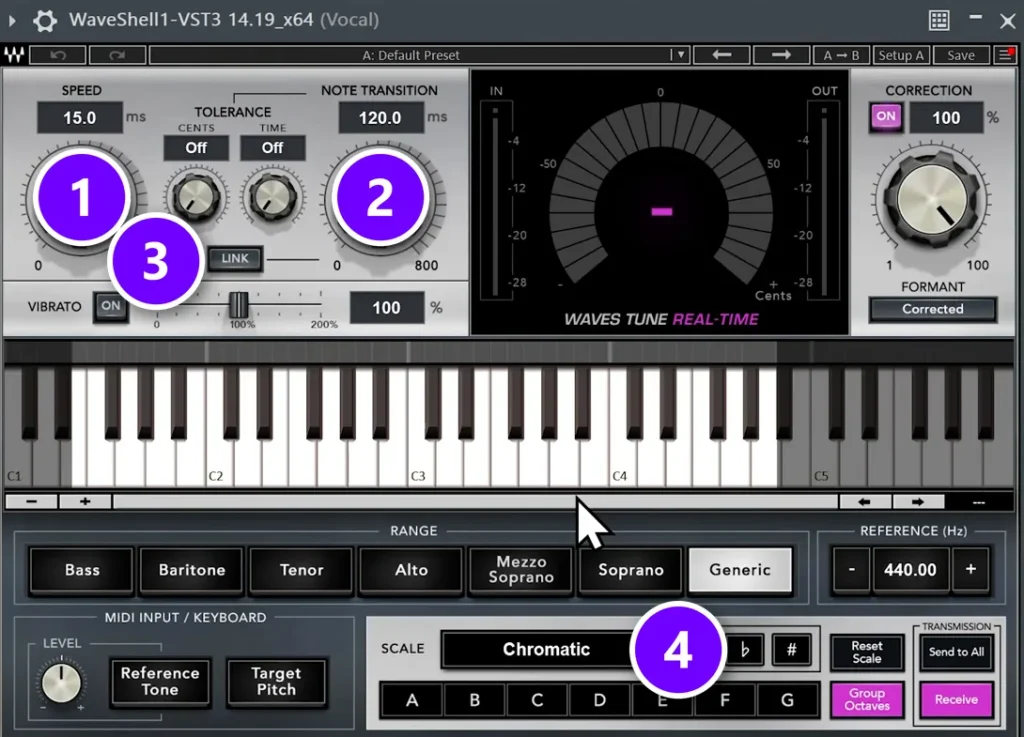
Waves Tune Real-Time corrects pitch in real time, so a singer can hear the tuned voice while recording or on stage. In Mix Elite’s recording video, Max compares it with Antares Auto-Tune and says “it’s also really really good and much cheaper autotune.” Here’s how the controls in his screenshot match the Auto-Tune words you may know:
- SPEED (1) is the retune speed: how fast a note snaps to the right pitch. Lower is faster and more robotic.
- NOTE TRANSITION (2) works like Flex-Tune. It lets quick slides between notes through, so the vocal sounds less robotic.
- LINK (3) gives you a very fast speed with a higher note transition, which the video compares to retune speed 0 with Flex-Tune at 50.
- SCALE (4) sets the key and scale. Set the key first, before anything else.
To hide the tuning, let it correct more slowly (a higher SPEED value) and raises the note transition. Our guide on how to tune vocals like a pro shows the whole process in FL Studio. List price: $199.
What’s the best Waves EQ for vocals?
F6 Floating-Band Dynamic EQ is the best Waves EQ for fixing vocals, because its bands cut only when a harsh frequency gets too loud. PuigTec EQs are better for broad, flattering moves like a little air or warmth. Both had a list price of $149 on Waves’ site on October 12, 2026.
The EQ rule from Mix Elite’s vocal mixing video: cut the low rumble you don’t need, but not so high that the voice loses its body. A main vocal needs its body; backing vocals and ad-libs can be thinner. After that, listen to the vocal with the beat playing, not on its own.
6. F6 Floating-Band Dynamic EQ: fix harsh spots
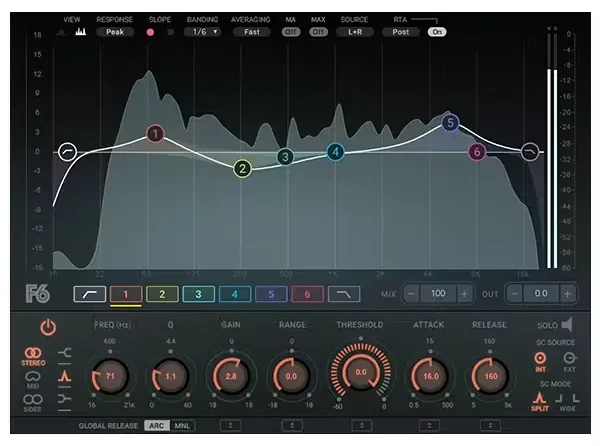
F6 is a dynamic EQ with six bands. A dynamic band only cuts when a frequency gets too loud, so it can tame a harsh note in the chorus without dulling the soft verse. Each band can also compress or expand, and it can work on mid and side separately.
For fixing problems, this is the best Waves EQ for vocals. It looks busy at first, but you only need one or two bands. List price: $149.
7. PuigTec EQs: add air and body
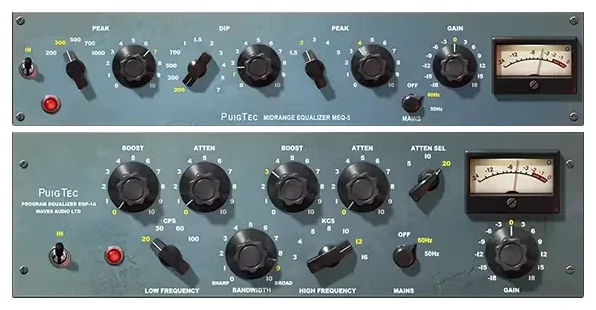
PuigTec EQs are two EQs (the EQP-1A and the MEQ-5) modeled on vintage Pultec hardware. They’re for broad tone moves rather than fixes: a little air on top or a little warmth in the body. The knobs are big and simple, and these EQs are known for smooth, gentle boosts.
Use F6 to fix and PuigTec to flatter. List price: $149.
What’s the best Waves compressor for vocals?
CLA-2A is the best all-round Waves compressor for sung vocals, because it’s smooth and simple. CLA-76 is faster and punchier for rap and rock vocals, and Renaissance Vox is the easiest to learn. Start at about a 2:1 ratio with the threshold near your quietest word.
A compressor keeps the loud and quiet words closer together, so every word is easy to hear. The starting rules from Mix Elite’s vocal mixing video apply to any of the three below. Start soft, at about a 2:1 ratio, and raise it only if it sounds better. For the threshold, a good rule of thumb is to set it as low as the quietest word in your lyrics. A fast attack of 0 to 2 ms works for most vocals, but also try a slower 30 to 40 ms, which can help a vocal cut through the mix. Our guide on how to compress vocals goes deeper.
8. Renaissance Vox: the simplest vocal compressor
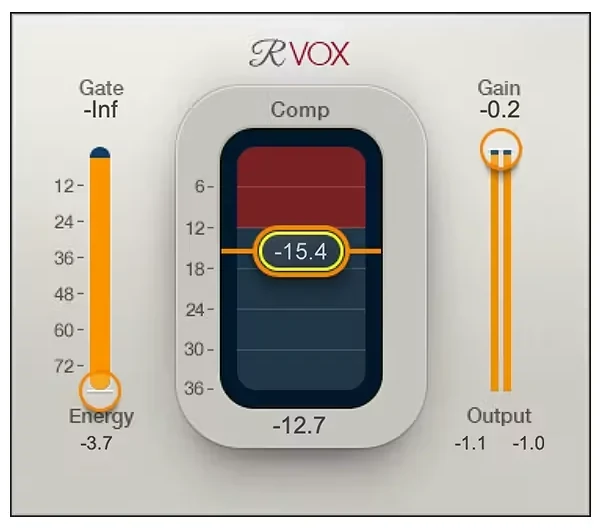
Renaissance Vox has just three controls: a gate, the amount of compression and the output gain. Turn up the compression until the vocal sits steady, then match the volume. It’s the easiest Waves compressor to learn on. List price: $129.
9. CLA-76: fast, punchy compression
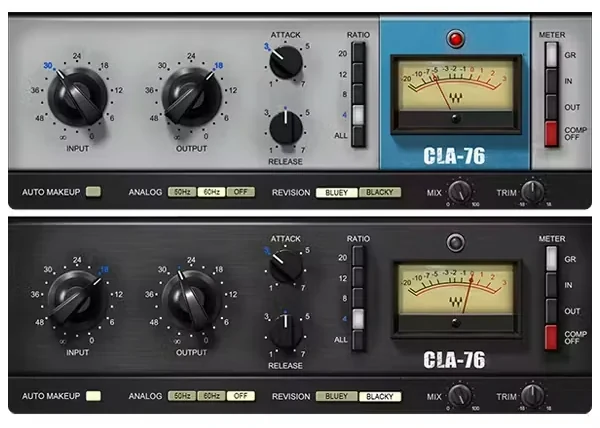
CLA-76 is based on a famous mid-’60s limiting amplifier with a very fast attack. It grabs sharp peaks right away and adds bite, which suits loud rap, rock and pop vocals. It can get aggressive fast, so watch the gain reduction meter. List price: $149.
10. CLA-2A: smooth, even compression
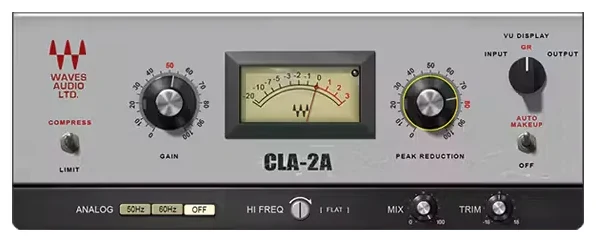
CLA-2A models a classic optical tube compressor that reacts slowly and smoothly. It evens out a sung vocal without making it sound squashed, and it has only a couple of knobs. A classic combo is CLA-76 first for peaks, then CLA-2A for smooth leveling. List price: $149.
How do you add warmth to a vocal?
Add gentle saturation, the soft distortion that old tape machines and analog gear put on a sound. It makes a vocal feel warmer and thicker. Waves’ J37 Tape does it with the sound of a classic tape machine. Put it after your compressor and before the de-esser, because saturation can make S sounds sharper.
11. J37 Tape: warm analog tape color
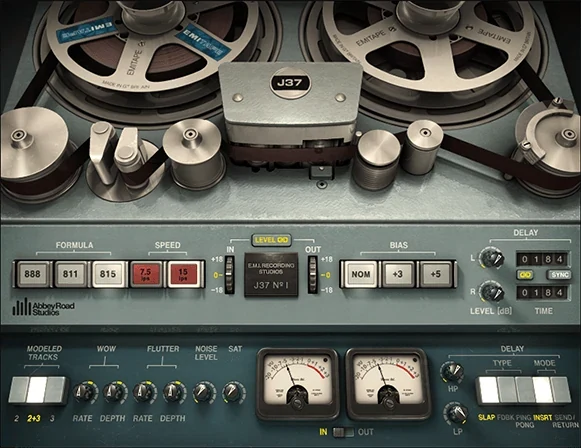
Abbey Road J37 Tape models the all-valve Studer tape machine at Abbey Road Studios, which recorded classics by the Beatles and Pink Floyd, and Waves made it together with the studio. You pick one of three EMI tape formulas from the ’60s and ’70s and a tape speed, then dial in the saturation, plus wow, flutter and hiss if you want that old-tape wobble.
It also has a built-in tape delay for slapback and ping-pong echoes. On a lead vocal, start subtle: you should feel the warmth more than hear distortion. List price: $149.
How do you tame harsh S sounds?
Use a de-esser after your compressor. It turns down only the sharp S, T and SH sounds and leaves the rest of the voice alone, which matters because compression makes those sounds louder. Waves’ simplest one is Sibilance: lower the threshold until the S sounds stop poking out.
12. Sibilance: a clean de-esser
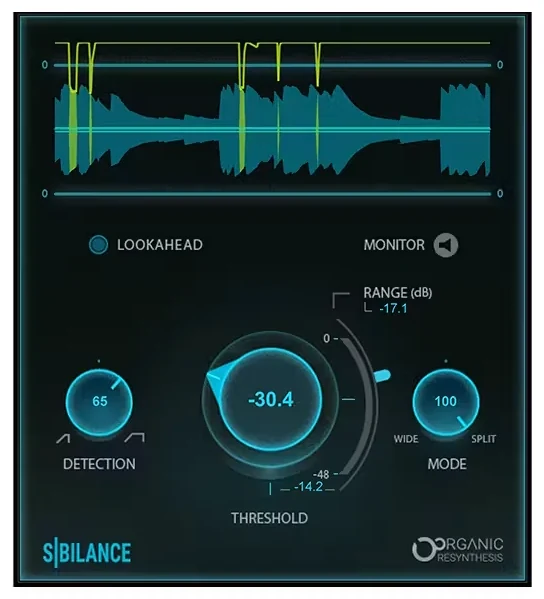
Sibilance is the sharp hiss of S, T and SH sounds. Waves’ plugin of the same name, Sibilance, detects those sounds and turns down only them. Put it after your compressor, then lower the threshold until the S sounds sit back in the vocal.
Waves’ older Renaissance DeEsser ($99 list) does the same job with more classic controls. List price: $79.
What’s the best Waves reverb for vocals?
Abbey Road Reverb Plates is the best Waves reverb for most vocals: a bright, smooth plate sound that has flattered vocals for decades. For echoes, use H-Delay. Put either one on its own mixer track and send the vocal to it, instead of loading it on the vocal itself.
That routing is the most important reverb rule in Mix Elite’s vocal mixing video, and it isn’t about which plugin you use. Put the reverb on its own mixer track, send the vocal to it, and add a low cut to the reverb. After the reverb, add a compressor in sidechain mode triggered by the vocal, at about 6:1. The reverb ducks while the singer sings and blooms in the gaps, so the words stay clear.
13. Abbey Road Reverb Plates: classic plate reverb
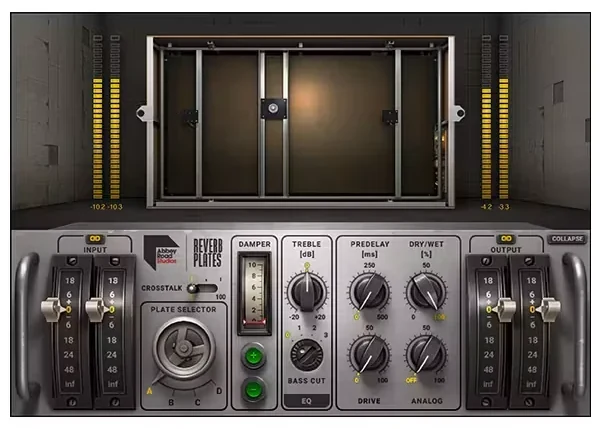
Abbey Road Reverb Plates models the four reverb plates at Abbey Road Studios. A plate reverb is bright and smooth, and it has flattered vocals for decades. If you buy one Waves reverb for vocals, this is it. For bigger, more modern spaces, look at H-Reverb ($149 list). List price: $149.
14. H-Delay: slapback and echo throws
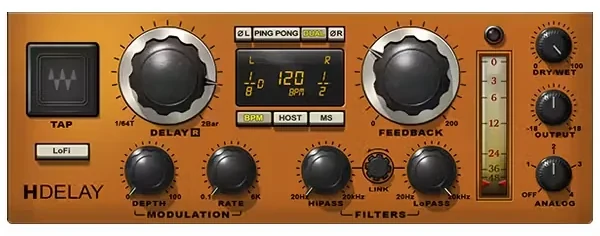
H-Delay does it all for vocal echoes: a short slapback to thicken a line, ping-pong repeats, and echoes that lock to your song’s tempo. It has filters to keep the repeats from getting muddy. Use it the same way as reverb, on its own mixer track. List price: $149.
Why use separate plugins for tuning, compression and reverb?
Because each one fixes a different problem. Tuning changes the pitch, compression evens out the volume, and reverb and delay add space. Keeping them separate lets you run them in the right order and send reverb to its own track, where you can EQ and duck it without touching the voice.
Order matters for tuning in particular. Background noise and heavy reverb make it harder for a pitch corrector to track the notes, Antares explains, so tune the clean vocal before the effects. If you’d rather turn a few knobs than build a chain, an all-in-one plugin is the shortcut.
Is there an all-in-one Waves vocal plugin?
Yes. Butch Vig Vocals, CLA Vocals and the SSL EV2 Channel each put a whole vocal chain in one window, and all three had a list price of $149 on Waves’ site on October 12, 2026. They’re made for speed rather than fine control.
15. Butch Vig Vocals: a whole chain in one plugin

Butch Vig Vocals puts a full vocal chain in one window, built with the producer Butch Vig. It’s made for vocals that need to cut through a busy, loud mix, like rock and pop. If you’d rather turn a few knobs than build a chain, it’s a good shortcut. It isn’t part of the Free Plugin Pack, so the demo or the 7-day free period is the official way to try it. List price: $149.
Another all-in-one is CLA Vocals, also $149 list.
16. SSL EV2 Channel: an SSL console strip in one plugin
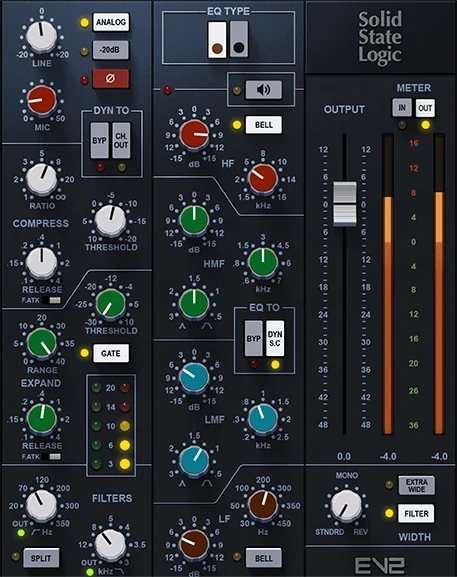
SSL EV2 Channel recreates a channel of the classic SSL 4000 E console, and Solid State Logic authorized it. One window gives you a mic preamp you can drive for saturation, filters, a choice of two EQs (the gritty Brown or the clean Black), a compressor and a gate/expander. You can put the dynamics before or after the EQ.
It suits you if you like to shape a vocal the way engineers do on a big console, one strip from top to bottom. It also comes with over 600 presets from well-known engineers such as Dave Pensado and Tony Maserati. List price: $149.
Can you download Waves vocal plugins for free?
Some, yes. Waves’ official Free Plugin Pack is free with a Waves account and includes AudioTrack, V-EQ3, V-Comp, IR-Live Convolution Reverb and Magma Lil Tube, which all work on vocals. The 16 plugins on this list aren’t in it. You can try those free in demo mode or for 7 days, and free downloads of them on other sites aren’t official.
The Free Plugin Pack costs $0, its future updates are free too, and it gives one license for one computer at a time. You install it with Waves Central, Waves’ installer app. AudioTrack alone covers a basic vocal chain: an EQ, a compressor and a gate in one window, like a mixing console’s channel strip.
To try the paid plugins on this list first, Waves gives you two official ways, both described on its demo page:
- Demo mode: install a plugin with Waves Central and it runs, but the audio mutes every so often until you buy a license.
- A 7-day free subscription period: sign up for Waves Creative Access with your payment details. The first charge comes after 7 days, and if you cancel before then, you aren’t charged.
If you want many Waves plugins, the Creative Access subscriptions can cost less than buying them one by one. On October 12, 2026, Waves Essential (120+ plugins) was $14.99 a month or $149.99 a year, and Waves Ultimate (240+ plugins) was $24.99 a month or $249.99 a year. Check which one includes the plugins you want.
For a truly free vocal chain, FL Studio already has one. Fruity Parametric EQ 2, Fruity Compressor, Fruity Reeverb 2 and Fruity Delay 3 come with every edition, says Image-Line’s edition list. Our guide to mixing vocals with only stock FL Studio plugins shows the whole chain, and our list of free vocal plugins covers the best free downloads.
How do you use Waves plugins in FL Studio?
Install the plugin with Waves Central, then in FL Studio open OPTIONS > Manage plugins and click Find installed plugins. Waves lists FL Studio 25 as a supported host, in VST3 format, on every product page we checked, on 64-bit Windows 10 and 11 and macOS Sonoma 14 or newer. Step by step:
- Install the plugin with Waves Central and sign in to activate your license.
- In FL Studio, open OPTIONS and click Manage plugins.
- Click Find installed plugins and wait for the scan.
- Load the plugin on your vocal’s mixer track. Waves plugins open inside a WaveShell, which is why the window title in the Waves Tune screenshot says WaveShell.
If a plugin doesn’t show up, our guide to installing VST plugins in FL Studio covers the fixes.
Which of the best Waves plugins for vocals should you buy first?
Buy for the problem you hear most. If your vocal jumps between loud and quiet, start with Vocal Rider. If the pitch wanders, start with Waves Tune Real-Time. Those are the two Mix Elite’s videos recommend. If the vocal is already steady and in tune, one compressor and Sibilance will do more than any shiny bundle.
Waves runs sales very often. In October 2026, all 16 plugins on this list were on sale on Waves’ site for $29.99 to $49.99. So treat the list prices in this guide as a ceiling, and check the current price on Waves’ site before you buy.
DAY 5 OF THE 7-DAY MUSIC PRODUCER COURSE
Plugins are tools. Day 5 shows you the vocal chain.
Day 5 of the 7-Day course is all about recording and mixing vocals: setting up your room, the best recording equipment for every budget, the V.O.C.A.L. mixing formula and the mistakes even advanced producers make with vocals. You also get 10 copy-and-paste vocal processing chains, practice acapellas and a list of the best free VST plugins for mixing vocals. It’s taught in FL Studio (the free trial works), about 45 minutes a day, and on day 7 a pro gives you feedback on your finished track. It’s $27, and you get 60 days to decide if it was worth it.
Frequently asked questions
What is the best Waves plugin for vocals?
It depends on the job. Vocal Rider is the best for uneven levels, and Mix Elite’s vocal mixing video calls it the best and most popular vocal rider. Waves Tune Real-Time is the pick for pitch correction in Mix Elite’s recording video. For compression, CLA-2A and CLA-76 are the classics, and Sibilance is a clean, simple de-esser.
What order should vocal plugins go in?
Clean up noise and breaths first, then even out the level, tune, EQ and compress, add tape warmth if you want it, and de-ess. Add reverb and delay last, on their own mixer tracks, and send the vocal to them. Each plugin then works on a cleaner, steadier vocal than the one before it, and the pitch corrector gets a clean, dry signal to track.
Why use separate plugins for tuning, compression and reverb?
Because they fix different problems: pitch, volume and space. Separate plugins let you put them in the right order, with tuning early on the clean vocal, and keep reverb on its own track where you can EQ and duck it. All-in-one vocal plugins like Butch Vig Vocals or CLA Vocals trade that control for speed.
Can you get Waves plugins for free?
Some, yes. Waves’ official Free Plugin Pack costs nothing with a Waves account and includes AudioTrack, V-EQ3, V-Comp and IR-Live Convolution Reverb, which work on vocals. The paid vocal plugins in this guide aren’t in it, but you can try them in demo mode or with a 7-day free Creative Access period. Free downloads of paid Waves plugins on other sites aren’t official.
Do Waves plugins work in FL Studio?
Yes. Waves lists FL Studio 25 as a supported host in VST3 format. Install the plugin with Waves Central, then in FL Studio open OPTIONS, click Manage plugins and choose Find installed plugins. Waves plugins open inside a WaveShell window.





