



“You put water into a cup, it becomes the cup.”
A dynamic EQ only cuts or boosts a frequency range while it’s louder than a threshold you set, so it fixes problems that come and go. To use one, put a narrow band on the problem frequency and lower the threshold until it cuts only the loud moments. In FL Studio, use the free TDR Nova or link an EQ band to Fruity Peak Controller.
You cut the harsh spot out of a vocal. Now the quiet lines sound dull. Or the bass sounds great until the kick lands on top of it, and then the low end turns to mud. A normal EQ can’t fix either one. It does the same thing every second of the song.
Dynamic EQ was made for this. Below is how to use dynamic EQ in plain words: what it does, when it’s worth it, the settings to start with, and the exact clicks in FL Studio, with screenshots from Mix Elite’s own videos.
Table of Contents
What is a dynamic EQ?
A dynamic EQ is an equalizer whose bands react to volume. Each band cuts or boosts its frequency range only while that range is louder than a threshold you set, and does nothing the rest of the time. That makes it the tool for problems that come and go, like a vocal that turns harsh only on loud notes.
A normal EQ, also called a static EQ, turns a range of frequencies up or down by the same amount all the time. Cut 4 dB at 3 kHz, and it stays cut on every word, loud or quiet. It never changes its mind.
A dynamic EQ band listens to its own slice of the sound. While that slice stays below the threshold, the band sits still. When the slice gets louder than the threshold, the band cuts. Then it lets go. Think of it as a compressor that only hears one narrow range of frequencies.
Max, the founder of Mix Elite, shows the idea in his free plugins video. He plays a sample where one note rings too loud. A normal cut would take those frequencies out of the whole sample, but as Max puts it, “the problem appears only when the note is played.” A dynamic band fixes that one note. Everything else stays the same.
Every dynamic EQ band has the same few controls:
- Frequency: where the band sits, in hertz (Hz).
- Q, or width: how wide the band is. A high Q is narrow and precise.
- Threshold: how loud that range must get before the band reacts. This is the control that makes the EQ dynamic.
- Ratio or range: how hard the band cuts once it reacts.
- Attack: how fast it reacts, in milliseconds (ms).
- Release: how fast it lets go again.
- Sidechain: an optional trigger from another sound, like a kick that tells the bass when to duck.
Most dynamic EQs can also boost instead of cut. Then the band lifts its range only while that range plays. It’s less common, but handy.
When should you use dynamic EQ instead of a normal EQ?
Use a dynamic EQ when a problem comes and goes: harsh loud notes, sharp “s” sounds, one boomy bass note, or two sounds that clash only while both play. If the problem is there all the time, a normal EQ cut is simpler and sounds just as good.
Mix Elite’s own approach is to use FL Studio’s stock EQ for most jobs and save a dynamic EQ for the problems a normal one can’t fix. These are the jobs where it earns its place:
- A vocal that turns harsh on loud notes. The singer pushes, and a sharp ring shows up in the upper mids, often somewhere between 2 and 5 kHz. Cut only those moments, and the soft lines keep their bite.
- Loud “s” sounds. These sit higher, roughly 5 to 10 kHz. A narrow dynamic cut works as a de-esser, a tool that tames hissy “s” and “t” sounds.
- One note that booms or rings. A bass line with one boomy note, or a loop where one note resonates. It may happen only once in a whole song, and fixing it can still change a lot.
- The kick and the bass fighting. Mix Elite’s rule for the low end is simple: only one sound should own it at any moment. A dynamic band on the bass, triggered by the kick, ducks the bass’s low end only while the kick hits.
- A vocal buried by the beat. The vocal becomes the trigger, and the instruments dip only in the vocal’s range, only while it sings.
- Mastering. One gentle band can calm a harsh cymbal or a boomy kick in a finished song without dulling everything else.
When is a normal EQ the better tool?
When the job never changes. A low cut that clears rumble from a pad, a boost that adds air to a vocal, or a cut on a ring that never goes away should work on every note, so a threshold has nothing to do.
Step one in Mix Elite’s EQ masterclass is exactly that kind of static move. If a sound doesn’t need low end, put a low cut at 120 Hz, sweep it up until the sound gets too thin, then back it off a little. Only the problems that come and go are left for a dynamic band.
How to use dynamic EQ, step by step
The steps are the same in every dynamic EQ, whether it’s a free plugin or FL Studio’s stock trick. Loop the problem part first. Then work through this list:
- Find the problem frequency with a boost and a sweep (more on that below).
- Put a band there and make it narrow. Widen it only if the problem spreads.
- Turn on the band’s threshold, or its dynamic mode, so it can react.
- Lower the threshold until the band moves only on the bad moments. Watch the curve: it should dip on the harsh note and sit still the rest of the time.
- Set how far it may cut. A few dB is usually enough, and if you can clearly hear the band working, back it off.
- Switch the plugin off and on at the same volume, with the whole mix playing, not just the one track.
Find the problem frequency first
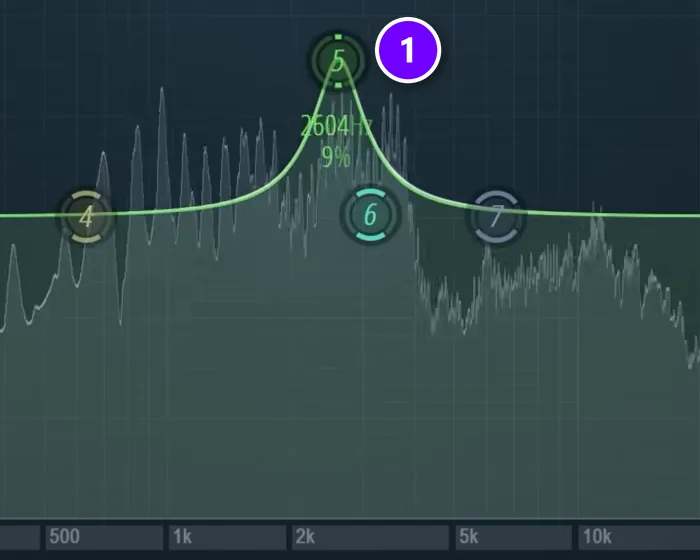
The sweep from the same masterclass, at 6:28, works for any dynamic band. “We take a small bell up, sweep through to find the one that’s overly harsh, and take it down,” Max explains. Boost a narrow band (1) by a lot, slide it slowly across the frequencies while the part plays, and stop where it hurts your ears. On the vocal in that video, the ugly ring sat near 3.5 kHz. Your dynamic band goes right there.
Don’t cut too deep, even with a dynamic band. Big cuts in the upper mids can take away the nice grit that makes a vocal exciting.
How do you fix harsh frequencies that only happen sometimes?
Put a narrow dynamic band right on the harsh frequency and lower its threshold until it cuts only on the loud, harsh moments. Give it a fast attack so it catches the spike, a release of about 100 to 200 ms so it lets go before the next soft note, and cut just a few dB.
Then watch the band while the part plays. It should dip on the harsh word and sit flat the rest of the time. If it moves on every note, the threshold is too low. If it never moves, it’s too high.
Width matters too. A narrow band fits one ringing note or one cymbal tone. If the whole upper mids get hard every time the singer belts the chorus, widen the band a little and keep the cut gentle. And if the harsh sound is a sharp “s” or “t”, look higher, roughly 5 to 10 kHz, where a narrow, fast band works as a de-esser.
How do you use dynamic EQ to make room for vocals without making the beat thin?
Put the dynamic EQ on the instrument that fights the vocal, not on the whole beat, and let the vocal trigger it through a sidechain. Set one wide band where the vocal’s body sits in the mids and cut only a little. The instrument dips only while the vocal sings, so the beat stays full in every gap.
Mix Elite’s frequency masking video does exactly this with the free TDR Nova. A normal EQ cut on the instrument made room for the lead line, but it also kept those frequencies out while the lead was silent, so the track lost them for nothing. A sidechained dynamic band fixes that:
- Route the vocal’s mixer track to the instrument’s track as a sidechain.
- Load TDR Nova on the instrument. In its settings (the gear icon), open Processing, choose Auto map inputs, and set Nova to its external sidechain, so the vocal is what it listens to.
- Place one band where the vocal is strongest. In the video, that’s the mids, and the flute line it also cleared sat around 1.5 kHz.
- Click THRESHOLD and lower it until the band dips only while the vocal sings.
- Keep the cut small. You want a little room, not a hole.
Leave the drums and the 808 alone, because ducking them with every word costs the beat its punch. The clash is usually with the keys, synths, guitars or pads that share the vocal’s range. If your beat is a single stereo file, the same trick still works on it. Just keep the cut gentle.
How to use dynamic EQ in FL Studio with stock plugins
FL Studio has no single dynamic EQ. Fruity Parametric EQ 2 has seven bands and no threshold, so every cut it makes is static. The stock fix is to let Fruity Peak Controller move one EQ band for you. The Peak Controller follows the volume of a trigger sound, and the EQ band follows the Peak Controller.
The video below shows the classic version on a kick and an 808, and why sidechain compression is the wrong tool there: “we should not use sidechain compression, because it will duck down the whole volume of the 808,” Max says. The EQ way ducks only the low end. The 808’s higher tones stay put.
The screenshots below come from a newer Mix Elite short that does the same thing with a melody and a hi-hat.
1. Put Fruity Peak Controller on the trigger track
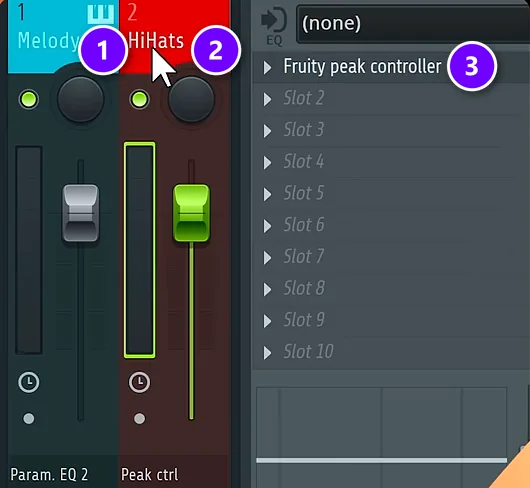
Open the Mixer with F9. Here the melody (1) is the sound that should duck, and the hi-hats (2) are the trigger. Load Fruity Peak Controller in the first effect slot of the hi-hat track (3), and put Fruity Parametric EQ 2 on the melody track. The Peak Controller’s Mute switch must stay off, so the hi-hats still play through.
2. Link an EQ band to the Peak Controller
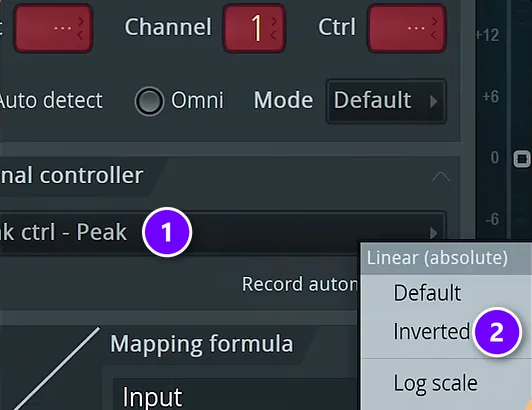
In the EQ, right-click the level slider of the band that covers the clash and choose Link to controller. In the window that opens, set Internal controller to Peak ctrl – Peak (1). Then open the mapping formula menu and pick Inverted (2). Click Accept. Inverted means louder hi-hats push the band down instead of up. In the 808 version from the video, this is the EQ’s first band, dragged to about 200 Hz.
3. Set Base and Volume to choose how far it ducks
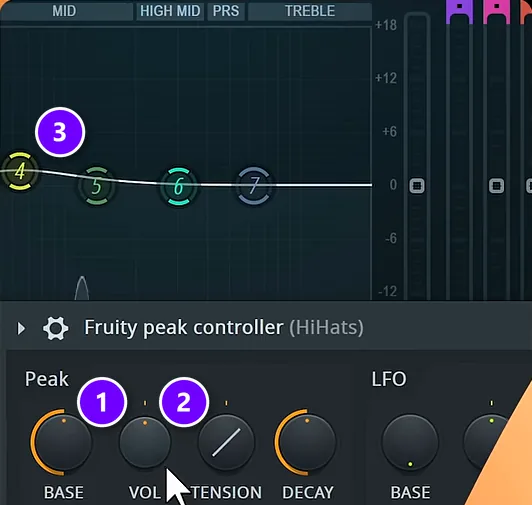
Open the Peak Controller and set BASE to about 50% (1), the value both videos use. VOL (2) sets how deep the dip goes, so turn it up until the band (3) drops as far as you want while the hi-hats play. DECAY sets how fast the band comes back. Now play the loop. The band should dip on every hit. In between, it rises back up.
There’s one limit. The Peak Controller follows the whole trigger sound’s volume, not one frequency. That’s perfect when one sound has to make room for another, like kick and bass or vocal and synths. To tame a harsh ring inside the same sound, a real dynamic EQ band that listens to that one frequency does a better job.
FL Studio has two more stock tools for broad jobs. Maximus splits a sound into low, mid and high bands with a compressor on each, and Frequency Splitter splits it into two or three bands that you can send to their own mixer tracks. Both are great for broad jobs. Neither one is narrow enough for a single ringing note.
How to use TDR Nova, the free dynamic EQ
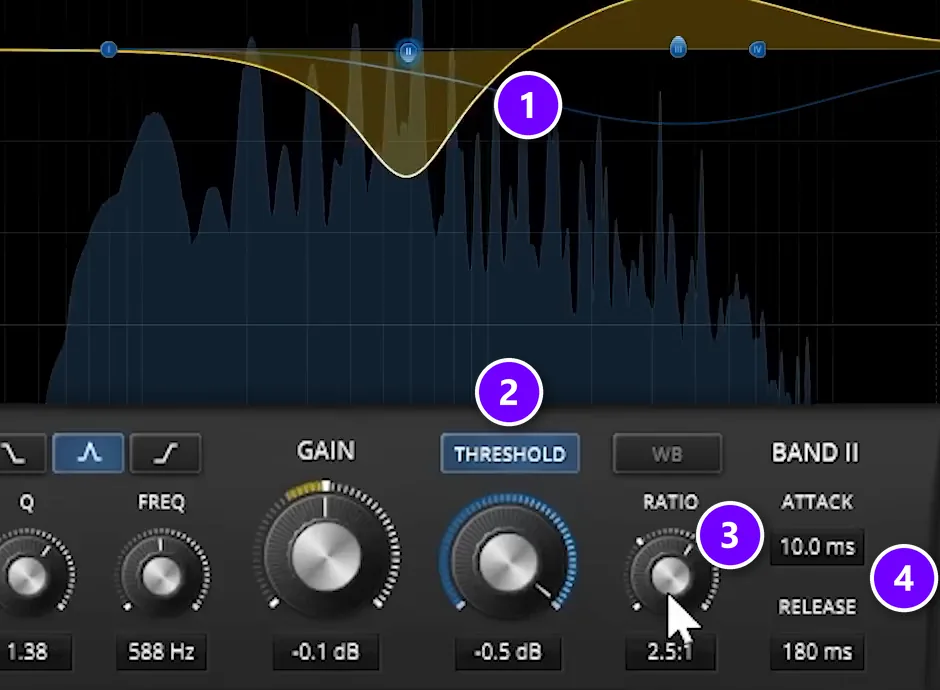
TDR Nova by Tokyo Dawn Labs costs nothing. It runs on Windows and Mac and has four dynamic EQ bands plus a high-pass and a low-pass filter, and every band has its own threshold, ratio, attack and release. It also accepts an outside trigger, called a sidechain. The screenshot is from the same free plugins video. Load Nova in an empty Mixer slot on the track, then:
- Drag a band onto the problem (1). In the video it sits near 590 Hz, right on the note that rings.
- Click THRESHOLD (2) to make the band dynamic, then lower it until the band dips only on the loud note. The threshold is the most important control in the whole plugin.
- Turn up the RATIO (3) for a harder cut. The band in the video runs at 2.5:1.
- Leave ATTACK and RELEASE (4) at 10 ms and 180 ms to start, the values in the video. A faster attack catches quick “s” sounds. A slower one lets a drum hit through before the band reacts.
- To boost instead of cut, pull the band’s gain up. The band then lifts its range only while those frequencies play.
Nova also comes with a de-essing preset, which is very handy on vocals. For a kick-and-bass duck, the kick has to reach Nova as a sidechain. Route the kick’s mixer track to the bass track as a sidechain, then open Nova’s plugin settings (the gear icon), go to Processing and pick the sidechain input. Our guide to sidechaining in FL Studio shows that routing step by step.
Paid plugins do the same job with more bands and bigger displays. FabFilter Pro-Q 4 can make any band dynamic, and oeksound soothe3 hunts for harsh spots on its own, so it does the find-and-cut job for you. Our list of the best EQ plugins compares them.
Dynamic EQ settings: where to start
There are no magic dynamic equalizer settings, but these starting points get you close fast. Then trust your ears.
- Harsh vocal: a narrow cut wherever the sweep finds the ring, often 2 to 5 kHz. Use a fast attack and a release around 100 to 200 ms, and aim for a few dB of cut on the loudest notes only.
- De-essing: a narrow cut somewhere between 5 and 10 kHz with a fast attack and release, so only the “s” gets caught. Or start from Nova’s de-essing preset.
- A boomy bass note: a wider band in the 80 to 250 Hz range, with a slower attack so the start of each note keeps its punch.
- Kick and bass or 808: trigger it from the kick, put a low band under about 200 Hz on the bass, and keep the release short so the bass is back before the next kick. The stock FL Studio version above uses a band near 200 Hz and a Peak Controller base of 50%.
- Vocal and the beat: trigger it from the vocal, put a wide band on the instrument bus around the vocal’s main range, roughly 1 to 4 kHz, and dip only a little.
Set the threshold while the loudest part plays. If the band moves all the time, the threshold is too low, and you’re back to a static cut.
What’s the difference between dynamic EQ and multiband compression?
Both turn down a frequency range when it gets loud. A multiband compressor splits the sound into a few wide bands at fixed points and compresses each one, which suits a whole low end or a whole mix. A dynamic EQ uses EQ-shaped bands that can be as narrow as one ringing note.
So for broad control, use multiband. For one problem at one frequency, use a dynamic EQ. And if the whole track jumps around in volume, that’s a job for a regular compressor, which our FL Studio compressor guide covers knob by knob.
Common dynamic EQ mistakes
- Cutting too deep. A dynamic cut can still make a vocal dull, so keep it small.
- Setting it up on a solo track. Clashes between sounds only show up when the whole mix plays.
- Using it where a normal cut works. If the harshness never goes away, a static cut is simpler. Our guide on how to use EQ shows that first.
- A super-fast attack on drums. It can shave off the hit itself. Let the first few milliseconds through.
Dynamic EQ is one small tool in a full mix. For the order to do everything in, from levels to EQ to compression, follow our step-by-step guide on how to mix a song. For the kick-and-808 version of this trick with every setting, see how to mix kick and 808.
DAY 4 OF THE 7-DAY MUSIC PRODUCER COURSE
Fix the whole mix, not just one frequency
Knowing one tool is a start. Day 4 of the 7-Day course is all about mixing: the simple Holy-Quad mixing formula, the “Mix Murdering” mistakes most beginners make, and the volume mistake people make in the first 5 minutes of every mix. You also get a mixing checklist and a mixing and production template. It’s taught in FL Studio (the free trial works), about 45 minutes a day, and on day 7 a pro gives you feedback on your finished track. It’s $27, and you get 60 days to decide if it was worth it.
Frequently asked questions
What is a dynamic equalizer used for?
Dynamic EQ fixes problems that come and go. It tames a vocal that turns harsh on loud notes, catches loud “s” sounds, calms one boomy bass note and makes the bass duck only while the kick hits. Because the band only moves when its frequency range gets loud, the rest of the sound stays untouched, which a normal EQ cut can’t do.
Does FL Studio have a dynamic EQ?
Not as one plugin. Fruity Parametric EQ 2 has no threshold. You can build a dynamic band by linking an EQ band’s level to Fruity Peak Controller with the Inverted mapping formula, so a trigger sound pushes the band down. Maximus and Frequency Splitter handle broad multiband jobs, and free plugins like TDR Nova add real dynamic EQ bands.
Should dynamic EQ go before or after compression?
Usually before. A dynamic EQ that fixes a booming note or a harsh ring works best early, so the compressor doesn’t react to the problem. FL Studio runs a track’s effect slots from top to bottom, so put it in a slot above the compressor. If the compressor brings out new harshness, add a light dynamic cut after it.
What is the best free dynamic EQ?
TDR Nova by Tokyo Dawn Labs is the go-to free choice. It works on Windows and Mac, has four dynamic bands plus high-pass and low-pass filters, and takes a sidechain from another track. Mix Elite’s free plugins video uses it to tame a single ringing note, and its de-essing preset is handy for vocals.
Should Dynamic EQ be on or off on a TV or receiver?
That’s a different feature with the same name. On many home theater receivers, Dynamic EQ raises the bass and surround levels as you turn the volume down, so movies sound full when played quietly. Turn it off when you check your own mixes, so you hear the music the way it really is.





