“Apart from the kick drum and the bass, there’s generally not much going on below 120-150Hz.”
A high-pass filter, or low cut, removes everything below a cutoff you choose. In mixing, put one on every sound that doesn’t need low end: start at 120 Hz, sweep up until it sounds thin, then back off about 10%. Vocals land near 150 Hz, pads and synths at 200 to 250 Hz and reverbs at 700 to 800 Hz, while the kick and main bass stay uncut.
You turn every track up, and the mix just gets thicker and blurrier. The kick loses its punch and the vocal hides behind a wall of fog. Most of the time, the problem is sound you can’t even hear on its own: low rumble from pads, guitars, vocals and reverb, piling up under the kick and bass. Here’s where Max, the founder of Mix Elite, sets the filter on each part of a song, with real screenshots from FL Studio.
Table of Contents
What is a high-pass filter, and what does it do?
A high-pass filter (HPF), also called a low cut, lets the high frequencies pass and turns down everything below a point you choose, the cutoff. In mixing, it clears rumble and mud out of sounds that don’t need bass, so the kick and bass get the low end to themselves.
Same filter, two names. In FL Studio’s built-in EQ, Fruity Parametric EQ 2, you’ll find it in each band’s menu as High pass.
Frequency just means how low or high a sound is, measured in hertz (Hz). Low numbers are the deep stuff you feel, like the boom of an 808. High numbers are the air and sizzle of a hi-hat. A high-pass filter has two settings that matter. The cutoff is the frequency where the cut starts. The slope is how fast the sound fades out below it, from a gentle hill to a steep cliff.
High pass is one of the band shapes in every parametric EQ, next to bells, shelves and the low pass. If EQ itself is still new to you, start with Mix Elite’s full method in how to use EQ in mixing, then come back here for the low end.
Why do high-pass filters make a mix clearer?
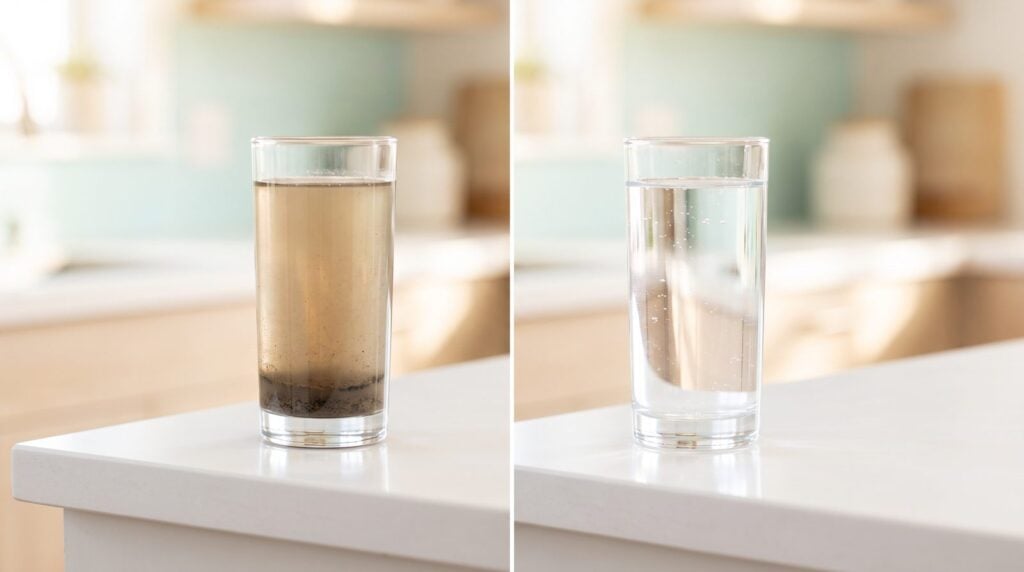
Because almost every sound carries some low end, even when you can’t hear it on its own. A pad adds a little rumble, and so do a guitar, a vocal mic and every reverb tail. Stacked together, it piles up in the same small space as your kick and bass, and the bottom of the mix turns to mud.
The kick loses its punch, the bass gets blurry, and you keep turning things up to hear them. That’s the trap. Max explains what happens when you skip the low cut: “If you don’t do it, your instruments will blend with your kick and bass, creating a muddy and unclear mix.” The fix isn’t a new plugin. It’s taking away the low end nobody needed, so the kick and one bass get the bottom of the mix to themselves.
The low end gets its own full guide: Mix Elite’s four steps to a clean, punchy low end cover the kick and bass clash, mono lows and making the bass cut through.
How do you add a high-pass filter in FL Studio?
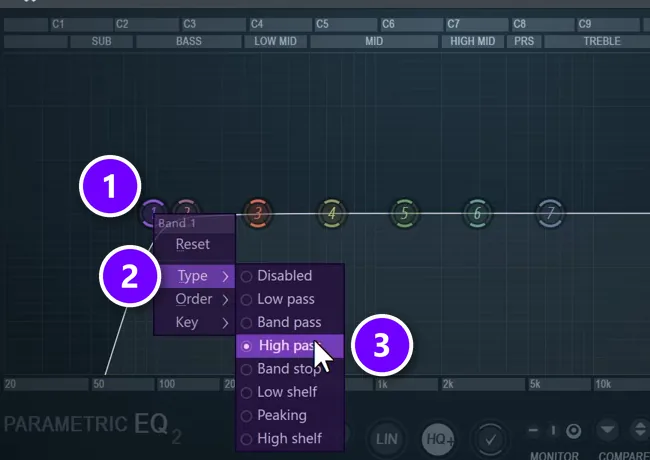
Load Fruity Parametric EQ 2 on the sound’s mixer track, right-click band 1 (the far-left dot) and choose Type > High pass. Drag the dot to set the cutoff, then pick the slope under Order: Steep 4, which cuts 24 dB per octave, is a safe start.
You don’t need a special plugin. Every DAW has an EQ with a high-pass band. The screenshot from Mix Elite’s free 1-hour mixing course shows it on a second bass layer:
- Send the sound to its own mixer track and load Fruity Parametric EQ 2 in an empty effect slot.
- Right-click band 1, the dot furthest to the left (1).
- Open Type (2) and choose High pass (3).
- Drag the dot left or right to move the cutoff. The hint bar in the top-left corner shows the exact frequency.
- Adjust it while the whole song plays, not just the one sound.
That’s the whole move. The hard part is knowing where to stop.
How do you automate a high-pass filter sweep in FL Studio?
Right-click the knob that moves the band and choose Create automation clip, then draw the curve in the Playlist. In Parametric EQ 2 that’s the band’s frequency knob. For a quick build-up sweep, FL Studio’s Fruity Filter has a High Pass knob and is made for automation.
Mix Elite’s 1-hour mixing course does exactly this with a high cut, the opposite filter, on a bass that plays alone. You can also move the knob and go to Tools > Last tweaked > Create automation clip, which works on third-party plugins too.
What frequency should you set a high-pass filter to?
Start at 120 Hz and sweep up until the sound turns thin, then back off about 10%. In Mix Elite’s tutorials that lands around 100 Hz on extra bass layers, 150 Hz on vocals, 200 to 250 Hz on pads, synths and guitars, and 700 to 800 Hz on reverbs. The kick and main bass stay uncut.
Don’t pick a number from a chart and walk away. Max runs the same quick test on every sound: “Step one is, does this element need low end? If not, you apply a low cut starting at 120 hertz and sweep up until it sounds too thin, and then back it up 10%.”
- Ask if the sound needs low end. The kick, the 808 and your main bass do. Most other sounds don’t.
- Set the high-pass cutoff to 120 Hz.
- Slowly drag it to the right until the sound turns thin and small.
- Back it off by about 10%.
- Listen to it soloed and then with the full mix playing.
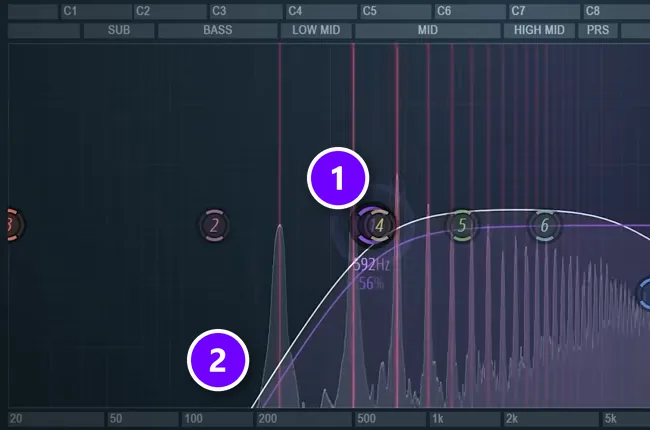
On a soft pad in Mix Elite’s EQ video, the sweep ends at 592 Hz (1). Most beginners would never go that high. This pad doesn’t need any low end, so everything left of the slope (2) goes. Other sounds thin out much sooner, which is why you sweep instead of copying one number. Your ears pick it, and 120 Hz is just where the search starts.
The video above shows the full sweep at 9:12, with the before and after.
High-pass filter settings for vocals, guitars, drums and more
Here’s where the cut ends up on the parts most beginner songs have, from Mix Elite’s tutorials. Use them as starting points for the sweep, not as rules.
Kick, 808 and your main bass
Leave these alone, or nearly. They’re the sounds that should own the low end, and Mix Elite’s free 1-hour mixing course is firm on the kick: never remove its sub. The kick masterclass on Mix Elite’s channel covers one exception: some kicks leak extra sub (deep rumble) after the hit as their pitch drops. A low cut under the kick’s main thump removes it, but it can add unwanted artifacts and make the kick weak. The safer fix is a low shelf, which turns the very bottom down instead of cutting it off. Low shelf sits in the same Type menu as High pass.
Bass guitar
A bass guitar is usually the main bass, so it keeps its low end too. Use the rule from the master section below: cut only below the lowest note it plays, and don’t set the cut under 30 Hz. On a four-string bass in standard tuning, the lowest note is the open E at about 41 Hz, so a cut around 35 Hz removes only the rumble underneath.
Extra bass layers
If two basses play at the same time, only one gets the sub. Pick your main one. In Mix Elite’s beginner mixing mistakes video, every other bass layer then gets a low cut at 100 Hz. The FL Studio screenshot above shows exactly that: band 1 set to High pass on a second bass layer, called bass shot 2.
Snares, claps and hi-hats
Snares and claps get the sweep from 120 Hz, too. Just stop sooner. As the 1-hour mixing course puts it, their punch lives in the low mids, so end the sweep before that punch goes. Hi-hats and cymbals sit in the highs, so the sweep can go much higher before they thin out. If a hat or a pre-made loop already sounds clean, leave it alone: you don’t have to EQ everything.
Pads, chords, synths and guitars
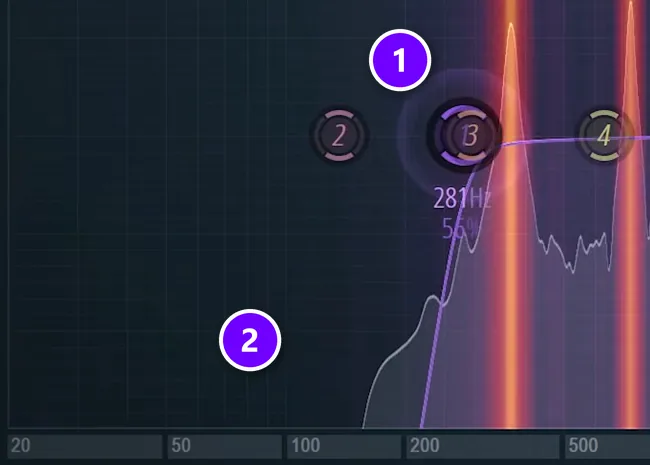
These get the full sweep from 120 Hz. For a really clean mix, let almost nothing below 200 to 250 Hz through on these sounds. In Mix Elite’s mixing mistakes video, the low cut on an arp goes from 100 Hz to just past 250 Hz (1), so nothing is left under 200 Hz (2). There’s one exception: a sound with lovely warmth between 100 and 250 Hz that the song needs. Keep that one, and push the cut up to 250 Hz on the sounds that only add mud there.
Vocals
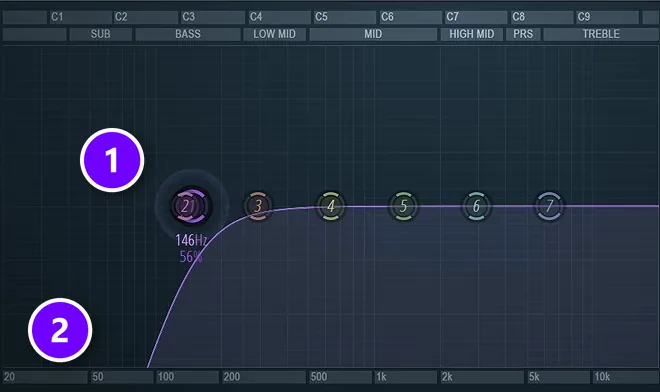
Vocals get a slightly steeper low cut. In Mix Elite’s free 4.5-hour FL Studio course, it’s described as cutting everything under about 200 Hz, so nothing under 100 Hz gets through (2). In the screenshot, band 1 sits at 146 Hz (1). A really deep voice can carry a lot of useful low-mid body, though, so don’t cut that one too much.
Reverb
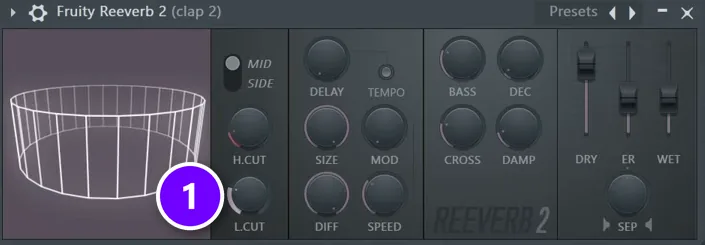
Reverb is the sneakiest source of mud, because its long tail smears low end under everything else. Every reverb has a low cut. In Fruity Reeverb 2 it’s the L.CUT knob (1), and on the clap in the 1-hour mixing course it sits at 813 Hz. The rule in the mixing mistakes video: always raise a reverb’s low cut to at least 700 to 800 Hz. There’s more on setting up space in reverb vs delay.
The master
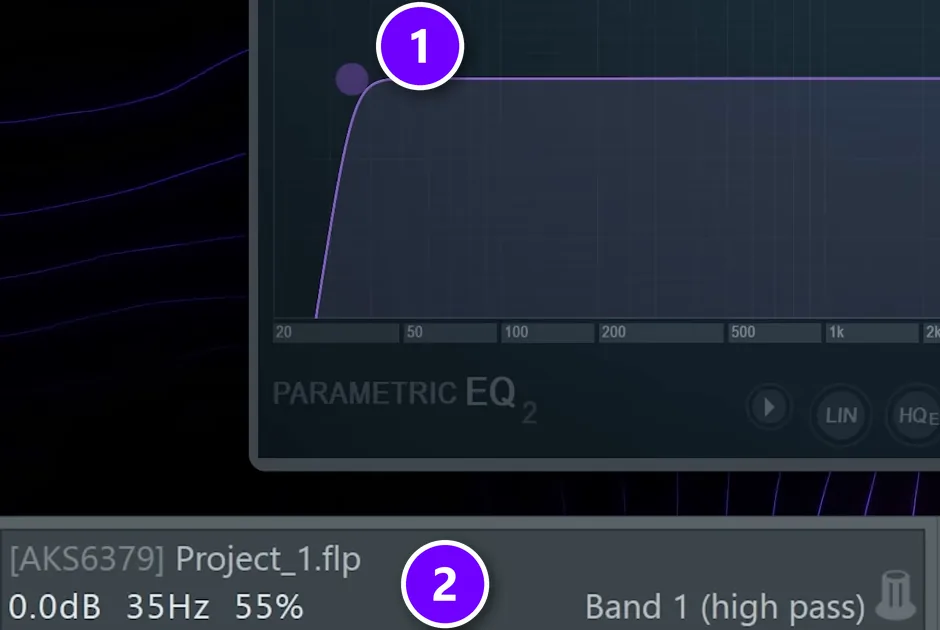
The master gets a much lower cut. Load Parametric EQ 2’s 30Hz + 18kHz cut preset, then move band 1 to just under the lowest note in the song, never below 30 Hz. In Mix Elite’s mastering video the track is in E, which hits around 41 Hz, so the band sits at 35 Hz (1), and the hint bar confirms it’s a high pass (2). Anything lower than 30 Hz is basically clutter.
How steep should a high-pass filter be?
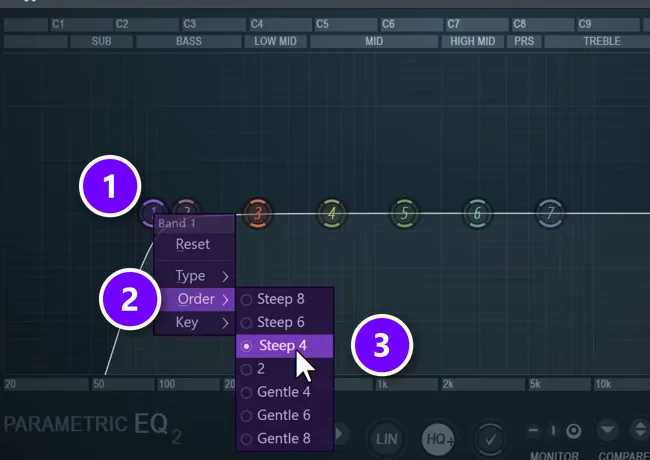
Start with a 24 dB per octave slope, which Parametric EQ 2 calls Steep 4. It clears the rumble without the side effects of the steepest settings, like Steep 8 at 48 dB per octave.
The slope sets how fast the sound fades out below the cutoff. FL Studio calls it Order. Right-click the band (1), open Order (2) and pick a setting. Mix Elite’s courses use Steep 4 (3).
An octave down means half the frequency, so with Steep 4 and a cutoff at 120 Hz, the sound at 60 Hz ends up roughly 24 dB quieter. Steeper can look cleaner on the screen, but Max warns that “the steeper you go, the more artifacts and less natural your signal will sound.” Artifacts are small unwanted side effects, like a smeared or hollow tone.
You can also scroll the mouse wheel over the band to change its resonance, a small bump right at the cutoff. Keep it low unless you want that bump on purpose.
High pass vs low shelf vs low pass: which one do you need?
Use a high pass to remove the lows from sounds that don’t need them, a low shelf to turn the lows down without removing them, and a low pass to do the opposite: remove the highs and keep the lows.
- High pass (low cut): removes everything below the cutoff. Use it to clean up sounds that don’t need low end.
- Low shelf: turns the lows down by a set amount instead of removing them, down to -18 dB in Parametric EQ 2. Use it when a low cut makes a kick sound weak, or when the master sounds boomy after the low cut.
- Low pass (high cut): the opposite of a high pass. It removes the highs and keeps the lows. Rolling the highs off gently pushes a sound into the background.
Should you high-pass every track?
No. High-pass the tracks that don’t need low end, not every track by default. Leave the kick and the main bass alone, sweep each other sound on its own instead of using one number, and skip anything that already sounds clean.
Mix Elite’s 27 mixing tricks video says to high-pass everything that doesn’t need bass frequencies. That leaves out the kick and whatever carries your bass line. It also doesn’t mean the same cutoff on every track: a setting that cleans up a hi-hat would gut a piano, so sweep each one.
If you’re mixing a whole song for the first time, the low cuts are part of the EQ step in Mix Elite’s mixing order: balance, EQ, compression, then space. See it step by step in how to mix a song.
How do you clean up a muddy mix without making it thin?
Sweep each low cut with the whole mix playing, stop as soon as a sound turns thin and back off about 10%, and keep a gentle slope like Steep 4. Still muddy? Then the problem usually sits higher, in the low mids around 250 to 500 Hz, where pushing every low cut up would only thin things out.
Mix Elite’s 27 mixing tricks video puts the muddiness in that 250 to 500 Hz zone and keeps the fix small: find the one element that has the most of it and cut it there, instead of raising every low cut. If one sound’s warmth is what the song needs, give it a lower cut or a low shelf. Our guide on how to use EQ in mixing shows how to find that spot.
Common high-pass filter mistakes
Most low-cut problems come from the same six habits:
- Cutting with the sound soloed. A sound can seem perfect on its own and still not sound any better in the mix. Check with everything playing.
- Going too high. If the sound turns thin and small, back the cutoff off by about 10%.
- Choosing the steepest slope. Steep 8 looks tidy and adds artifacts. Stay around Steep 4.
- Filtering the kick and main bass like everything else. They need their lows.
- Forgetting the reverb. One reverb without a low cut can undo every other cut you made.
- Letting two sounds share the sub. Pick one bass for it, and low cut the other layers at about 100 Hz.
Try it on tonight’s song. Put a low cut on everything except the kick and the main bass, sweep each one from 120 Hz, and compare the mix before and after. Listen to what happens to the kick and the vocal.
DAY 4 OF THE 7-DAY MUSIC PRODUCER COURSE
Low cuts are one step. Day 4 teaches the whole mix.
Day 4 of the 7-Day course is all about mixing: the simple Holy-Quad mixing formula, the “Mix Murdering” mistakes most beginners make, and the volume mistake people make in the first 5 minutes of every mix. You also get a mixing checklist and a mixing and production template. It’s taught in FL Studio (the free trial works), about 45 minutes a day, and on day 7 a pro gives you feedback on your finished track. It’s $27, and you get 60 days to decide if it was worth it.
Frequently asked questions
What frequency should you high-pass vocals at?
Mix Elite’s course uses a fairly steep low cut on vocals that removes everything under about 200 Hz, so nothing below 100 Hz gets through. In the course example the cutoff sits at 146 Hz. A very deep voice can need a lower setting, so sweep up until the vocal starts to thin out, then back it off a little.
Should you high-pass every track?
No. High-pass the sounds that don’t need low end, and leave the kick and the main bass or 808 alone. Sweep each track on its own instead of using one number, and skip sounds that already sound clean, like a finished pre-made loop.
Where is the high-pass filter in FL Studio?
In Fruity Parametric EQ 2, which comes with every edition: right-click band 1 and choose Type > High pass, then drag it to set the cutoff. Fruity Filter also has a High Pass knob for sweeps, and Fruity Reeverb 2 has its own low cut, the L.CUT knob.
What is the best high-pass filter setting?
There isn’t one number for every sound. Start at 120 Hz with the Steep 4 slope, sweep up until the sound gets thin, then back off about 10%. In Mix Elite’s videos a pad lands near 600 Hz, a vocal around 150 Hz, reverbs at 700 to 800 Hz or more, and the master just above 30 Hz.
Should you put a high-pass filter on the master?
Yes, a very low one. Load Parametric EQ 2’s 30Hz + 18kHz cut preset on the master and move the high-pass band to just under the lowest note in the song, never below 30 Hz. In Mix Elite’s example the song is in E, so the cut sits at about 35 Hz.