


“I only solo if I’m hearing a problem or searching for a different frequency.”
To use EQ in mixing, go sound by sound and cut before you boost: remove low end the sound doesn’t need, carve space where two sounds clash, and pull down harsh peaks. Then add small, wide boosts for presence, under about 6 dB, and check every move with the full mix playing, not in solo.
A muddy mix usually isn’t missing anything, and that’s the first thing to understand about how to use EQ in mixing. It has too much of the same thing piled up in the same place, so every sound blurs into the next and turning things up only makes it worse. Below is the method Max, the founder of Mix Elite, teaches on the Mix Elite channel: five quick questions you ask about every sound, shown in FL Studio’s free Parametric EQ 2 with screenshots from his video. You’ll also get the frequency ranges, three golden rules and the mistakes that make beginner mixes muddy.
Table of Contents
What does EQ do in mixing?
EQ, short for equalizer, turns specific frequencies up or down, like a volume knob for one slice of a sound. In mixing it does three jobs: it removes what a sound doesn’t need, gives every sound its own space so they don’t cover each other up, and shapes the tone.
A frequency is how high or low a sound is, measured in hertz (Hz). Humans hear from about 20 Hz, a deep rumble, up to 20,000 Hz (20 kHz), a thin hiss.
In a mix, every sound fights for room inside that same range. EQ lets you trim each one so they fit together like puzzle pieces instead of piling on top of each other. That’s why Mix Elite’s EQ video calls EQ the most important part of the holy trinity of mixing, next to compression and reverb. It’s usually the first effect to go on a sound.
Most knobs on a big studio mixing desk are EQ controls. Today you use a plugin called a parametric EQ instead, which gives you more control and shows you exactly what you’re doing. Every DAW has one built in. You may also see graphic EQs, with a row of fixed sliders, and dynamic EQs, which only cut when a frequency gets too loud. For mixing, a parametric EQ does almost everything you need.
How to use Parametric EQ 2 in FL Studio
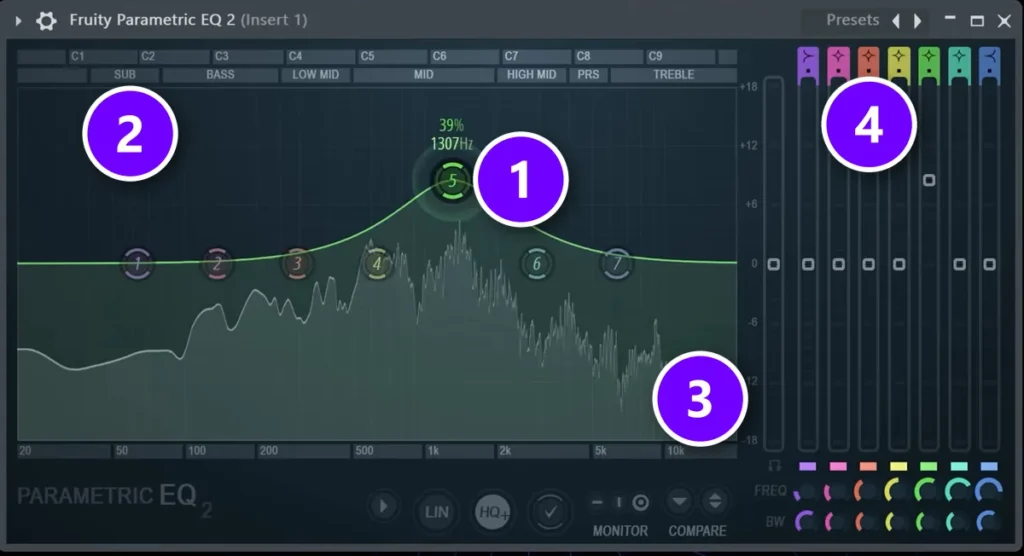
In FL Studio the built-in parametric EQ is Fruity Parametric EQ 2. Open the Mixer with F9, click an empty effect slot on the sound’s mixer track and choose it from the list. If the sound isn’t on its own mixer track yet, select it in the Channel rack and press Ctrl + L first. Nothing changes until you move a band. Here’s what you’re looking at:
- The bands (1): seven numbered dots. Drag one up to boost or down to cut, and drag it left or right to change its frequency.
- The range labels (2): Sub, Bass, Low mid, Mid, High mid, PRS (presence) and Treble run across the top, so you always know which part of the sound you’re touching.
- The frequency scale (3): hertz along the bottom, from 20 Hz on the left to 20 kHz on the right. The numbers on the right edge show how many decibels (dB) you boost or cut.
- The shape buttons (4): one per band. Click one to change that band’s shape.
Every band has three settings: its frequency (drag it left or right), its gain in dB (drag it up or down) and its width, which other EQs call Q or bandwidth. Scroll the mouse wheel over a band to change the width. Scrolling down makes it narrower, for surgical changes like taking out one harsh frequency. Scrolling up makes it wider, so you can shape the overall tone of the sound. The BW (bandwidth) knobs at the bottom right do the same job.
The EQ shapes and when to use them
Out of the box, band 1 is a low shelf, band 7 is a high shelf and the five in between are bells. You can switch any band to another shape:
- Bell: a hill or a dip around one frequency. Your everyday tool.
- Low cut (also called high pass): removes everything below a point. The go-to for cleaning mud out of sounds that don’t need low end.
- High cut (also called low pass): removes everything above a point. Scroll over it to raise the resonance and it gets a talking, mouth-like sound that’s fun for sound design.
- Low shelf and high shelf: lower or lift everything below or above a point without removing it completely, by up to 18 dB.
- Notch: a very narrow, deep cut, mostly for sound design effects.
- Band pass: keeps only a slice of the sound. The EQ video uses it least and combines a low cut with a high cut instead.
Drag the dot of a low cut or high cut up or down to change how steep it is. Avoid the steepest settings: the steeper the slope, the more artifacts you get and the less natural the sound.
EQ frequency ranges: what lives where
Think of the range in six zones, from the sub you feel (20 to 80 Hz) to the air on top (6 to 20 kHz). Mud usually builds up in the low mids, about 250 to 500 Hz, and harshness in the high mids, about 2 to 6 kHz, so those are the first places to check.
Mix Elite’s EQ video compares a mix to drawing a rainbow. The colors are your instruments and the width of the rainbow is the frequency range. If every color takes the whole width, it’s a mess. Carve the colors too little and it looks muddy; cut them too hard and it looks fake. You want each color in its own place, with a little overlap. Here’s roughly where each range sits:
- Sub, about 20 to 80 Hz: power you feel more than hear. Only one sound at a time, usually the kick or the bass.
- Bass, about 80 to 250 Hz: warmth, fullness and punch. The sub should never overpower the bass.
- Low mids, about 250 to 500 Hz: body, the zone between the low end and the rest. Too much makes a mix muddy.
- Mids, about 500 Hz to 2 kHz: the meat, where vocals, piano, guitar, chords and melodies live. Most beginner mixes have too little.
- High mids, about 2 to 6 kHz: presence and bite. Your ears are most sensitive here. Too much sounds harsh.
- Highs, about 6 to 20 kHz: sparkle, air and shine. Boost gently, or add saturation.
These are rough borders, not laws. One rule is firm, though: the sub should never overpower the bass, however much beginners love a big sub. Electronic music is called bass-heavy for a reason, not sub-heavy.
What are the golden rules of EQ?
Three rules: EQ makes good sounds great but can’t rescue a bad one, cut before you boost, and judge every move with the full mix playing, not in solo. Together they decide whether EQ fixes your mix or makes it worse.
Rule 1: EQ makes good sounds great
“EQ makes good sounds great. It doesn’t magically turn bad sounds into good ones,” Max says. Start with a good sample or a clean recording. In the video, boosting the lows on a badly recorded vocal leaves it thin and muddy at the same time, fighting with everything else in the mix.
Rule 2: Cut before you boost
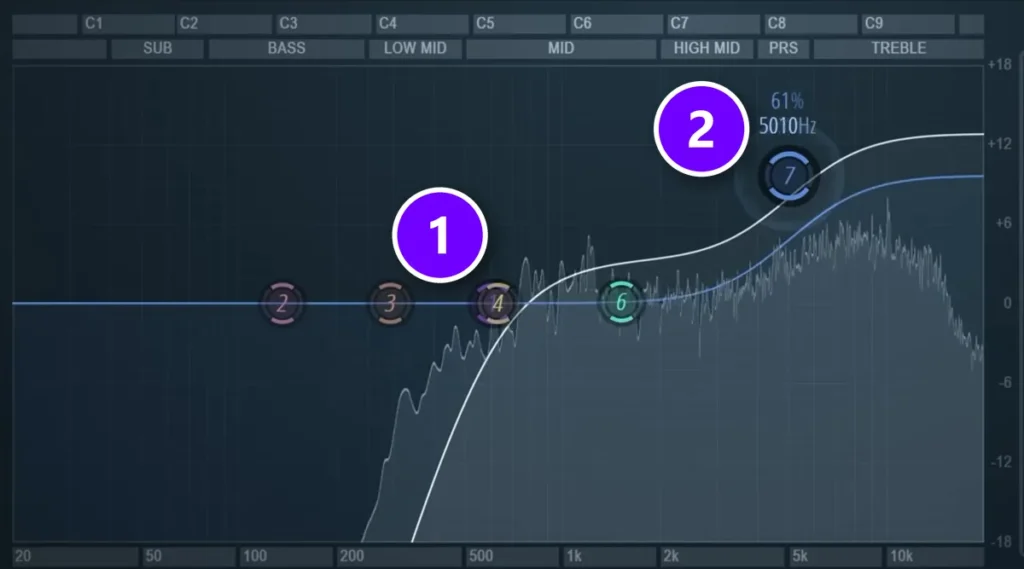
A boost raises everything in that range, including the parts you don’t want. So to brighten a top loop, first cut its low end (1), which other sounds already use, and only then lift the highs with a shelf (2). Cut what you don’t want before you boost what you do want.
Rule 3: Judge it with the full mix playing
A sound you EQ in solo can sound perfect on its own and still not fit, so check every change with the full mix playing. As Max says in Mix Elite’s free FL Studio course, “People will never be listening to your elements soloed.” Solo a sound to find a problem. Then unsolo it to decide how much to fix.
How to use EQ in mixing, step by step
Go sound by sound and ask five questions, in this order: does it need low end, is it fighting with another sound, does it sound harsh, does it need less presence, and does it need more? Fix only what needs fixing, then move on to the next sound.
Set rough volume levels with the faders before the first question. In Mix Elite’s free FL Studio course, the volumes get set before any EQ goes on. You won’t need all five questions on every sound, and the video below walks through each one:
Step 1: Does this sound need low end?
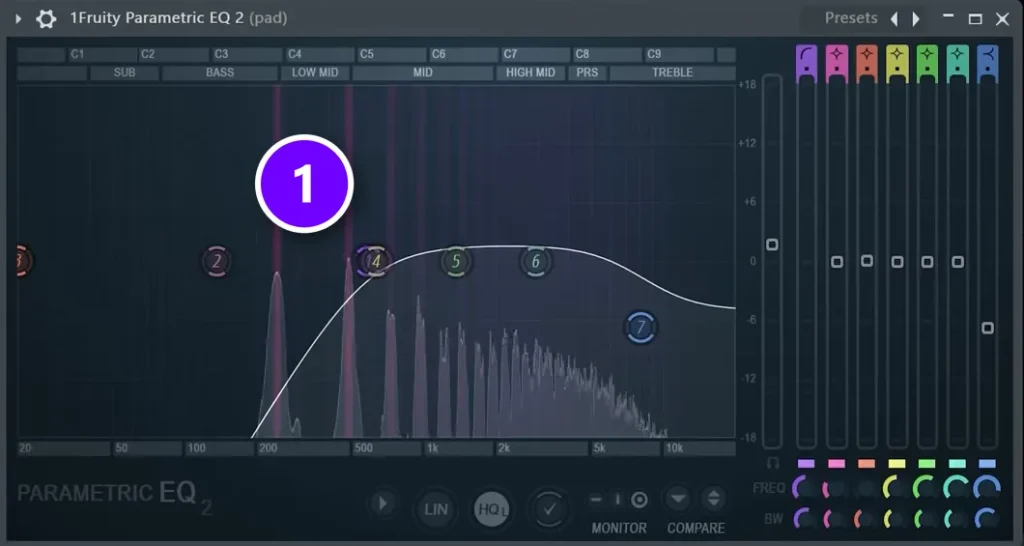
If a sound doesn’t need low end, like a pad, a pluck or a hi-hat, it shouldn’t take room from the kick and bass. Here’s how to clean it up:
- Switch a band to low cut and set it at 120 Hz.
- Sweep it up slowly until the sound gets too thin.
- Back it off by about 10%, so the sound keeps its body.
- Compare before and after, both in solo and with the full mix playing.
On the pad in the video, the low cut (1) ends up well above 120 Hz, because a pad needs very little bottom. For a really clear mix, cut everything below about 200 to 250 Hz from every sound except the kick and the bass-focused sounds. Skip this step and your instruments blend into the kick and bass, which makes the whole mix muddy.
Don’t low-cut the kick or the bass, and don’t push a low cut so far that the sound turns thin. In Mix Elite’s free FL Studio course, the kick keeps all of its sub, and kick and bass clashes get fixed with sidechain instead.
Step 2: Is it fighting with another sound?
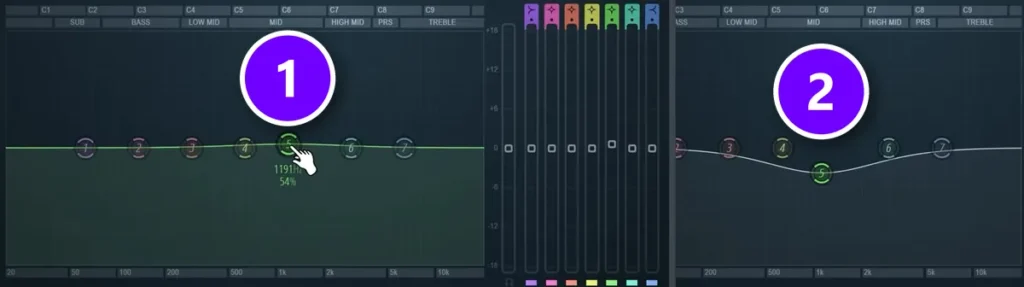
When two sounds play in the same range, they cover each other up. That’s called frequency masking. In the video’s example, the pluck fights with the chords, and the pluck should win. So both get an EQ: the chords dip (2) right where the pluck plays, around 1 kHz, and the pluck gets a small lift at that same spot (1).
Pick a winner for each range. The sound that matters most at that moment gets the space, and the other one makes room. For the low end, where the kick and the bass fight, see our guide on how to mix kick and 808.
Step 3: Does it sound harsh, cheap or nasal?
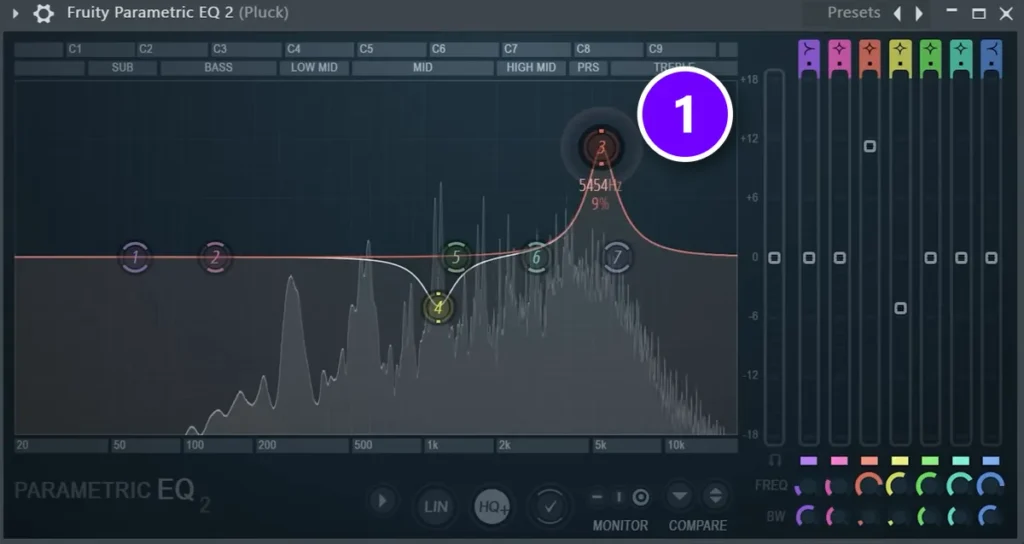
Listen for a sharp, piercing frequency. To find it, use a trick called surgical EQ, also known as boost and sweep:
- Boost a narrow bell a lot (1). Scroll down over the band to make it thin.
- Sweep it slowly left and right while the sound plays. When you hit the harsh spot, it jumps out, often in the high mids.
- Pull that band below zero until the harshness is gone.
- Do it once or twice more if you hear another harsh spot.
Don’t overdo it. The video shows that if a sound has no piercing frequency, cutting the high mids anyway just loses its nice presence and grit. Every instrument and vocal rings at a different spot, so never copy a cut from one sound to another. If you end up with lots of narrow cuts on one sound, the sample or the recording is the real problem.
A plugin called soothe2 does this search-and-cut job for you, automatically and only when the harsh frequency shows up. It’s paid. The manual sweep above costs nothing and teaches your ears.
Step 4: Does it need less presence?
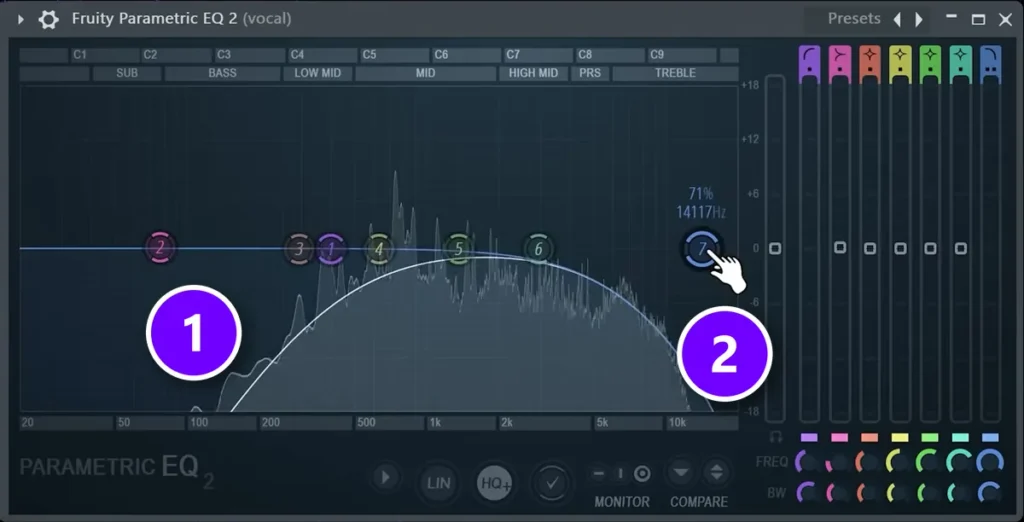
Sometimes a sound is simply too much in your face. In the video it’s a vocal that sounds way too full next to the drop and takes away its power. Turning it down a couple of dB helps, but it still doesn’t sit in the track.
So push it back with EQ: cut or lower the lows (1) with a low cut or a low shelf, and gently roll off the highs with a high cut (2). Cutting a little of the lows and a little of the highs works on any sound you want further in the background.
Step 5: Does it need more presence?
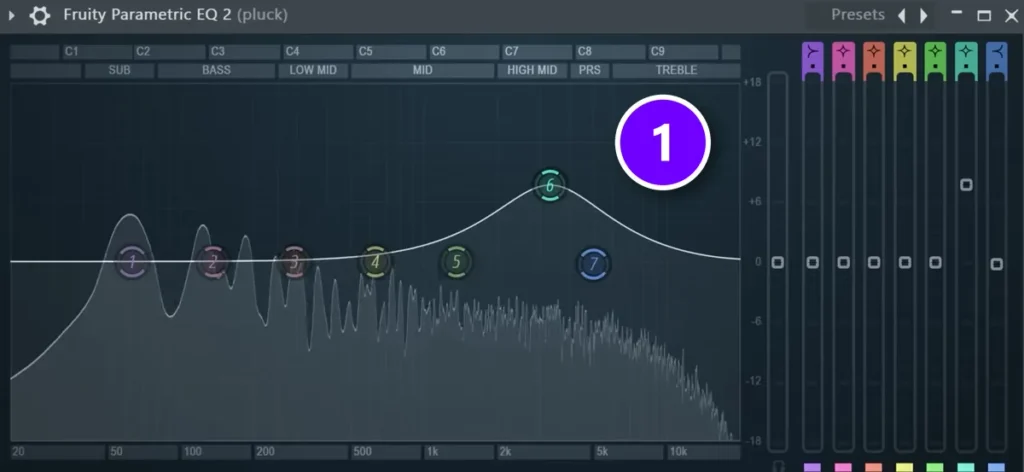
Now the opposite. Here the pluck needs to come forward. Boost the high mids with a wide bell (1), around 3 kHz, and leave the treble alone, because the pluck needs presence, not sparkle. It instantly sounds more present and a little grittier, without muddying the mix or getting too bright.
Why does my mix sound muddy?
Because too many sounds pile up in the same low range, roughly below 500 Hz, where they cover each other up. EQ fixes it in three moves: low-cut every sound that doesn’t need low end, make small cuts in the low mids (about 250 to 500 Hz) on the pads and chords that stack up there, and carve space where two sounds still clash.
These are the usual causes, and where this guide fixes each one:
- Low end on sounds that don’t need it, like pads, plucks, hi-hats and vocals. Step 1 fixes it.
- Too much in the low mids. Pads, chords, guitars and the bottom of vocals all stack up between about 250 and 500 Hz.
- Two sounds in the same range, like a kick and a bass, or a pluck and chords. Step 2 fixes it.
- Reverb full of low end. A reverb picks up the lows you send into it, so cut them before the reverb.
- EQ in solo. Every sound gets big and full on its own, and then they pile up when they all play together.
How much should you boost or cut with EQ?
Cut first and boost small. Keep boosts under about 6 dB and make them wide and gentle, while cuts can go deeper as long as the sound still sounds natural. Removing what’s wrong gives a cleaner mix than boosting what’s good.
Max puts it this way in Mix Elite’s free FL Studio course: “I would never suggest boosting anything over about 6 dB, since it’s much better and you’ll end up with a cleaner mix if you instead attenuate and remove what’s wrong instead of trying to boost what’s good.” Attenuate just means turn down.
A few more habits that keep EQ clean:
- Make a big move to find a problem, then pull it back until the change is small.
- Use narrow bands for cutting problems and wide bands for shaping tone.
- Bypass the EQ now and then. If you can’t hear a difference, you don’t need the move.
- Not every sound needs EQ. Use it mainly to fix problems, and if a sound already sits well, leave it alone.
Should EQ go before or after compression?
Usually before. The slot plan in Mix Elite’s free FL Studio course is simple: EQ in slot 1, compressor in slot 2, reverb in slot 3, and each one only if the sound needs it. Sound flows through the slots from top to bottom, so the EQ cleans up the sound before the compressor reacts to it.
You can add a second EQ after the compressor if compression brings out something harsh. Using more than one EQ on a track is normal; the pad in the EQ video runs two Parametric EQ 2s. Our Fruity Limiter compressor guide covers the next step in the chain.
EQ matters on effects too. A reverb picks up the lows and highs you send into it, so cut them before the reverb or it will muddy the mix. Our guide on reverb vs delay shows that setup.
What to do when an EQ boost isn’t enough
Add saturation or layer another sound. EQ can only boost what’s already there, so if a sound has hardly any highs, turning them up mostly raises noise. The EQ video ends with these two better tricks:
- Add saturation instead. Saturation adds new harmonics, so the sound gets richer and warmer. The video puts a multiband distortion preset in FL Studio’s Patcher on just the mids and highs of the pluck, which adds presence without muddying the lows.
- Layer another sound. To make the pluck brighter, layer a second sound on top and low-cut the layer, so it only adds air and grain. On its own the layer sounds odd. In the full track it works.
After changes like these, check the mix at three volumes: club-level loud, normal, and late-night quiet. Our ears hear bass and treble differently at different volumes, so a mix that sounds balanced at one volume can sound off at another. That’s also why a mix can sound wrong in the car. Our guide on how to balance a mix goes deeper on checking that.
Common EQ mistakes to avoid
- Boosting first. Cut what you don’t want, then boost.
- EQing only in solo. It can sound perfect alone and still not fit the mix.
- Sub in everything. Only one sound at a time should play in the sub. Low-cut the rest.
- Too little mids. The most common mid-range mistake: bass and highs sound exciting, so the mids get lost.
- Cutting grit you need. Only cut the high mids when something really pierces.
- Copying EQ presets. What works on someone else’s track won’t necessarily work on yours.
- Mixing into a limiter. FL Studio’s default template puts a limiter on the Master, which hides what your EQ moves really do. Keep the Master empty while you mix.
More traps like these, and where EQ fits in the whole mix, are in our guide on how to mix a song.
Next time you open a mix, go sound by sound and ask the five questions: low end, clashes, harshness, too much presence, too little. Cut first. Boost small, and listen with everything playing. That’s most of EQ.
DAY 4 OF THE 7-DAY MUSIC PRODUCER COURSE
EQ is one tool. Day 4 shows you the whole mix.
Day 4 of the 7-Day course is all about mixing: the simple Holy-Quad mixing formula, the “Mix Murdering” mistakes most beginners make, and the volume mistake people make in the first 5 minutes of every mix. You also get a mixing checklist and a mixing and production template. It’s taught in FL Studio (the free trial works), about 45 minutes a day, and on day 7 a pro gives you feedback on your finished track. It’s $27, and you get 60 days to decide if it was worth it.
Frequently asked questions
How do you use EQ as a beginner?
Put a parametric EQ, like FL Studio’s Fruity Parametric EQ 2, on one sound at a time and ask five questions in order: does it need low end, is it clashing with another sound, is it harsh, does it need less presence, does it need more? Cut first, keep boosts small and wide, and check each move with the full mix playing.
Why does my mix sound muddy?
Too many sounds share the same low range, usually below about 500 Hz, so they blur together. Low-cut every sound that doesn’t need low end, make small cuts in the low mids (about 250 to 500 Hz) where pads and chords stack up, cut the lows going into your reverbs, and stop EQing in solo.
Is it better to cut or boost with EQ?
Cut first. A boost raises everything in that range, including mud and harshness, so remove what you don’t want before you add anything. Boosting is still fine when a sound needs more presence: keep boosts under about 6 dB, make them wide, and try saturation when a boost isn’t enough.
How do you EQ vocals in a mix?
Start with a low cut to remove rumble the vocal doesn’t need, then sweep for a harsh or nasal spot and cut it gently. If the vocal sounds too close, lower its lows and roll off a little of its highs. If it gets lost, lift the high mids a touch. Always EQ it with the beat playing. Our vocal mixing guide covers the full chain.
What is the best EQ setting for mixing?
There isn’t one, because every sound and every mix is different. Good starting points: a low cut from about 120 Hz on sounds that don’t need low end, small cuts between 250 and 500 Hz where a mix gets muddy, a narrow sweep to find harsh spots, and a wide lift around 3 kHz for presence. Keep boosts under about 6 dB.





