



“Miles didn’t hear it as a mistake. He heard it as something that happened.”
The best DAW for live performance is FL Studio or Ableton Live. FL Studio’s Performance Mode turns the Playlist into a clip launcher you play from pads or your computer keyboard, and Ableton Live’s Session View is the stage standard. Keyboard players and singers should look at MainStage ($29.99, Mac only).
Playing your own songs in front of people is a different kind of scary. In the studio, a crash costs you a few minutes. On stage, it costs you the room.
That’s why picking the best DAW for live performance comes down to three things: it can’t freeze, it lets you fire parts of your song on cue, and you can set it up without a manual the size of a phone book. Below you’ll see how to do it in FL Studio first, with real screenshots, and then the seven DAWs worth your money, each price checked on the maker’s own site.
Table of Contents
Can you perform live with FL Studio?
Yes. FL Studio has a Performance Mode that turns the Playlist into a live clip launcher. Instead of playing your song from left to right, you trigger each clip whenever you want, in any order. You can use your mouse, a touch screen, your computer keyboard or a pad controller, as Image-Line’s manual explains.
So you can take the exact project you made at home, split it into parts and remix it live. Here’s the setup, with real screenshots from Mix Elite’s free 4.5-hour FL Studio course. If you use another DAW, skip ahead to the list.
What Performance Mode looks like
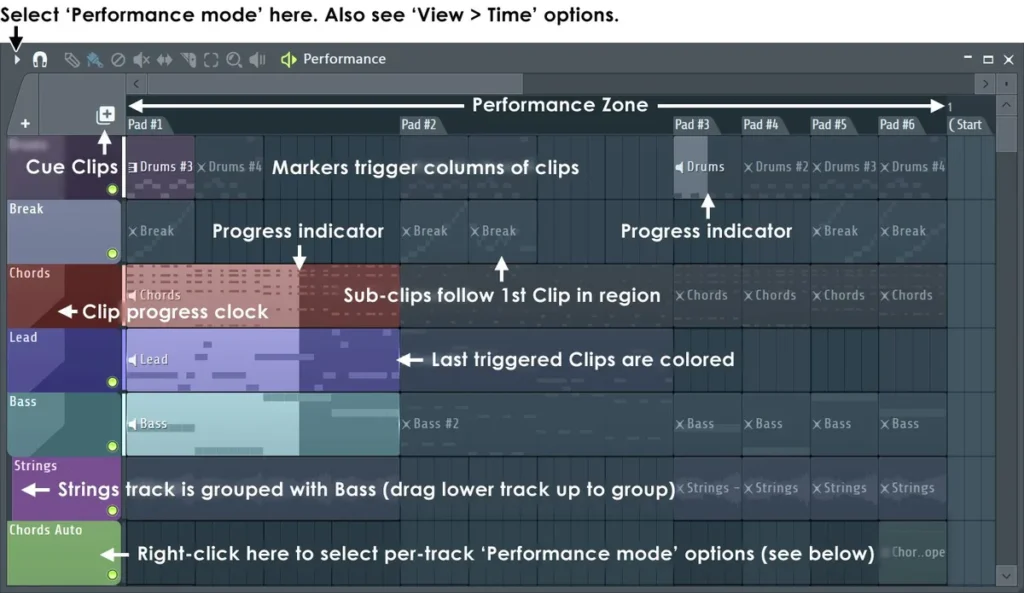
Each Playlist track becomes a row of clips, and the time markers you place, like Intro or Hook, become the columns. The last clip you triggered on each track lights up, and a small clock shows how far it has played. Clips on the same track replace each other, so one press swaps the drums from the verse beat to the hook beat.
Step 1: Pick a low-latency audio driver
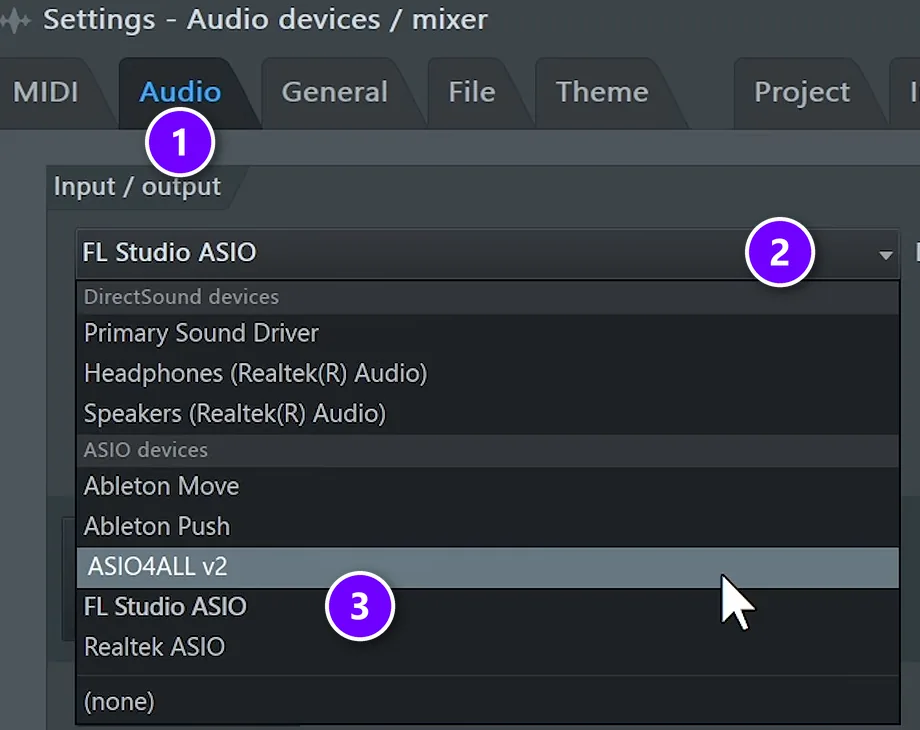
Open Options > Audio settings and stay on the Audio tab (1). In the Device list (2), pick the ASIO driver with your audio interface’s name in it. No interface yet? Use FL Studio ASIO (3), which installs with FL Studio.
Latency is the delay between hitting a pad and hearing the sound. Image-Line’s live guidelines suggest a buffer of 10 ms or more. That’s safe from crackles, and it still feels instant when you play.
Step 2: Turn on Performance Mode
- Save a copy of your project first. The next step moves things around.
- Go to Tools > Misc macros > Prepare for performance mode.
- Open the Playlist menu and click Performance mode.
- Add or move time markers. Each marker starts a new column of clip buttons.
- Right-click a track name and open Performance settings to choose how its clips start and stop.
- Plug in your pad controller. FL Studio sets up many clip-launching controllers for you. If yours isn’t one of them, turn it on in Options > MIDI settings (F10).
Step 3: Play clips or melodies from your computer keyboard
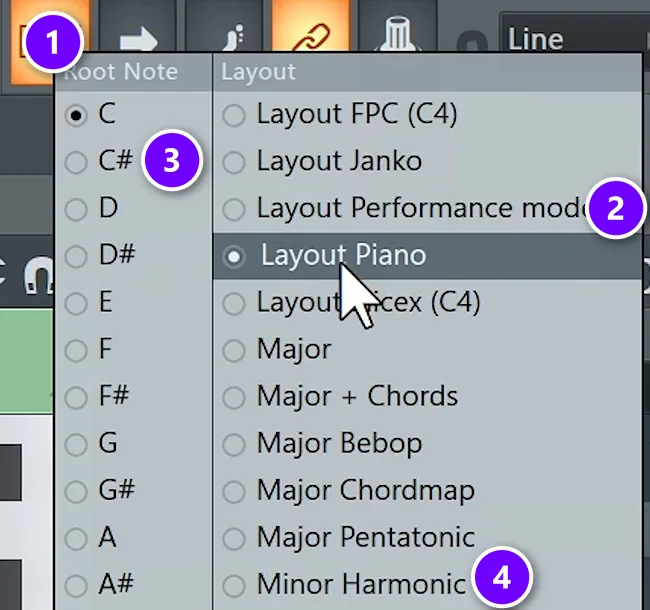
No pad controller? Right-click the typing keyboard to piano keyboard button (1) and pick Layout Performance mode (2). Now the keys on your computer launch clips.
The same menu can also lock your keys to a scale. Pick your song’s root note (3) and its scale (4), and every key plays a note that fits. In the course’s melody lesson, C# and Minor Harmonic match the trap chords, so no key can play a note outside the scale.
Step 4: Record what you play
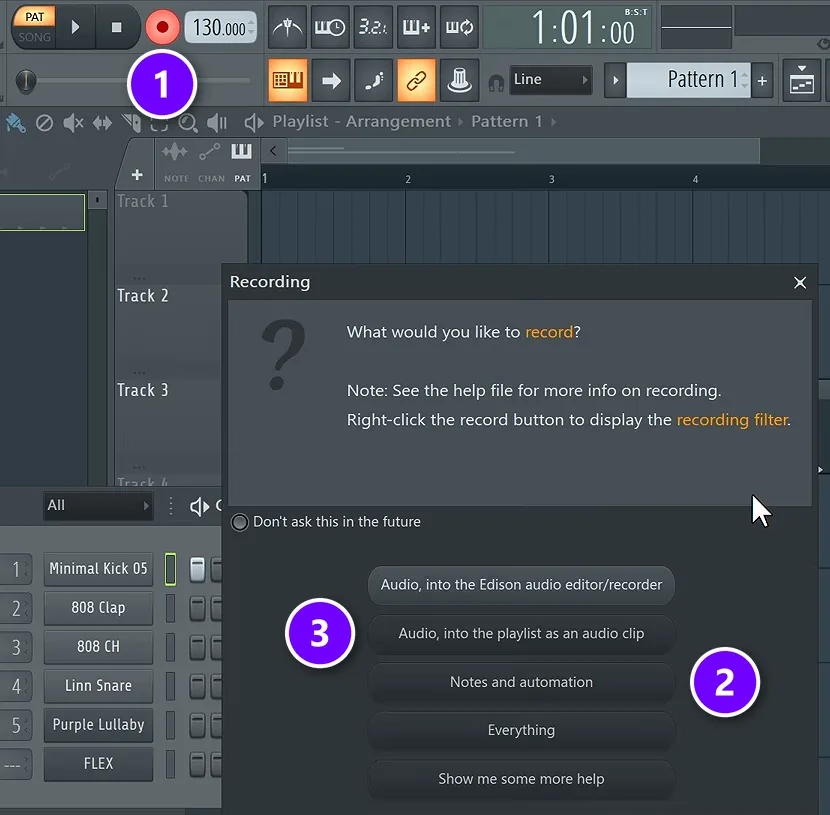
Click the record button (1). FL Studio asks what you want to record. Choose Notes and automation (2) for keys and pads, or Audio, into the playlist as an audio clip (3) for a mic or a guitar. Recording audio needs Producer Edition or higher.
Next to the record button sit the extra modes the course walks through in its setup lesson: a countdown before recording, overdub, blend and loop recording. Turn on loop recording with blend, and FL Studio keeps cycling the same bars while you add notes on each pass. That’s live looping, inside your project.
Step 5: Forgot to hit record? Dump the score log
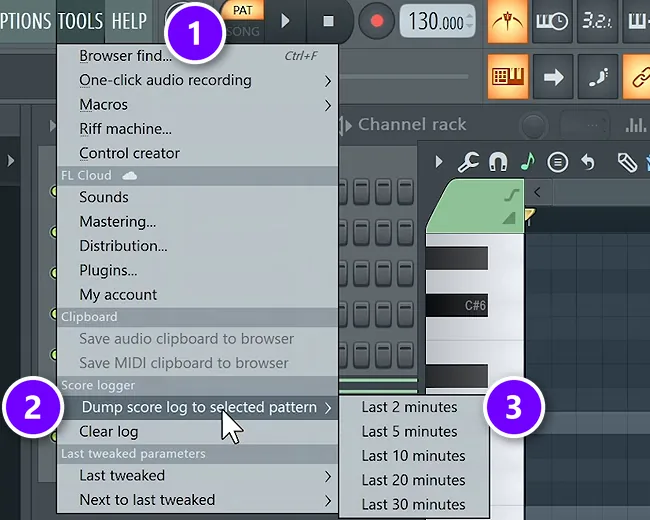
This one saves jams. Max, the founder of Mix Elite, puts it simply: “Fortunately, FL Studio always records your MIDI, even if you’re not recording.” Open Tools (1), choose Dump score log to selected pattern (2) and pick how far back to go (3), from the last 2 minutes up to 30.
Practice your set with the score log in mind. If you play something great by accident, stop, dump the log and keep it. You don’t have to remember to press record first.
What makes a DAW good for live performance?
A studio DAW and a stage DAW need different things. On stage, nobody cares how many plugins you own. They care that the music never stops. Look for these six things:
- Stability. It has to run for an hour without a crash or a crackle.
- Low latency. When you hit a pad, you should hear it right away.
- Clip launching. A grid of loops and song parts you can start in any order, like FL Studio’s Performance Mode or Ableton’s Session View.
- Controller support. Pads, keys and knobs should work the moment you plug them in.
- Set lists and backing tracks. A way to line up songs and play stems under your live parts.
- Looping. Record a phrase, loop it, then play on top of it.
Price and platform matter too. Two of the picks below only run on a Mac, and two of them also run on Linux.
Why do producers use a different DAW for live shows?
Because a studio DAW plays a song from left to right on a timeline, while a show needs parts you can start in any order, instant response and no crashes. Clip launchers like Ableton’s Session View and FL Studio’s Performance Mode were built for that, so many producers write in one program and perform in another.
Is it worth learning a new one? If you make your music in FL Studio, start with Performance Mode, because it plays the projects you already have. A second DAW pays off when your whole show is built around clips you improvise with, which is Ableton Live’s and Bitwig Studio’s home turf. If you play keys, sing or play guitar over your own sounds, a live app like MainStage is simpler than any DAW.
The 7 best DAWs for live performance in 2026
We checked every price, edition and system on the maker’s own website on October 12, 2026. Prices are in US dollars and can change, and every link goes straight to the maker. FL Studio comes first because it’s the DAW Mix Elite teaches and the one most of our readers already use.
1. FL Studio (Image-Line)
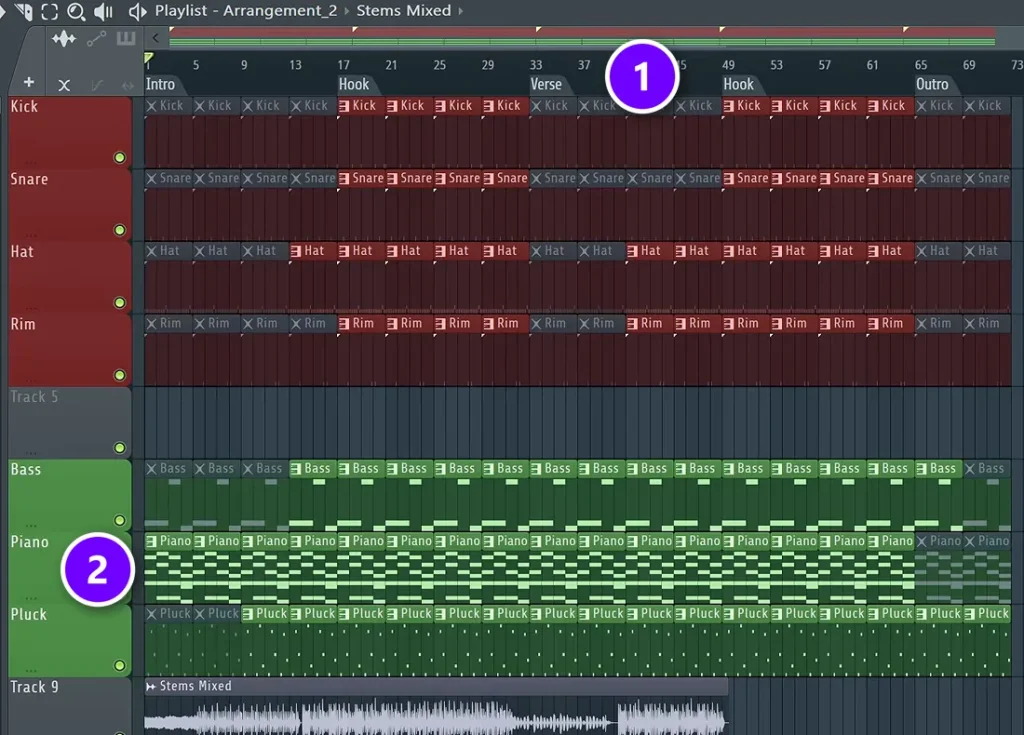
FL Studio is famous for fast beat-making, and Performance Mode makes it a real live tool. The time markers (1) you already use to lay out a song become the columns of your live grid. Each track (2) becomes a row of clips you can fire.
The typing keyboard trick is handy at small gigs, because you can launch clips with no controller at all. And thanks to the score log, a great idea you played by accident is never lost.
Price: Fruity Edition $99, Producer Edition $179, Signature Bundle $269 and All Plugins Edition $449, on Image-Line’s pricing page. You pay once and get lifetime free updates.
Runs on: Windows and macOS.
Best for: beatmakers who want to play their own tracks live without learning a second DAW.
2. Ableton Live 12
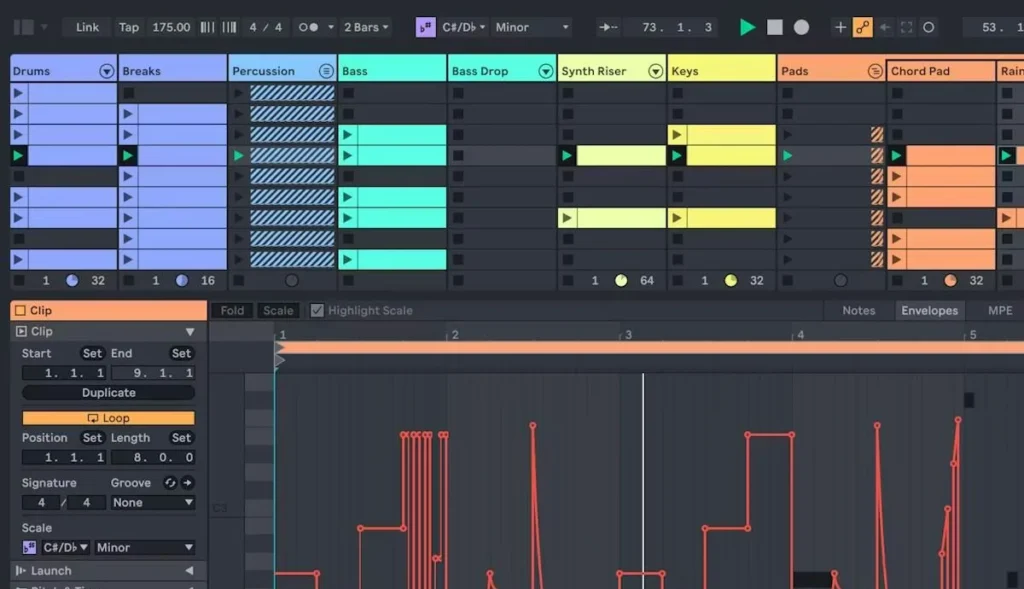
Ableton Live is the DAW most people picture when they think of laptop sets. Its Session View is a grid of clips and scenes made for the stage, and Ableton builds its own controller, Push, to play it. Max sums it up in Mix Elite’s gear video: “Ableton Live is for tech lovers, geeks, and live performances.”
Live 12 Intro is cheap, but it stops at 16 tracks, and a full live set can outgrow that fast. Standard and Suite have unlimited tracks, and Suite adds Max for Live and every instrument and effect.
Price: Intro $99, Standard $349 and Suite $749 on Ableton’s shop, or Suite rent-to-own at $31.21 a month for 24 months. There’s a free 30-day trial of Suite.
Runs on: Windows and macOS.
Best for: electronic acts and DJs who build the whole show around clips.
3. Bitwig Studio 6
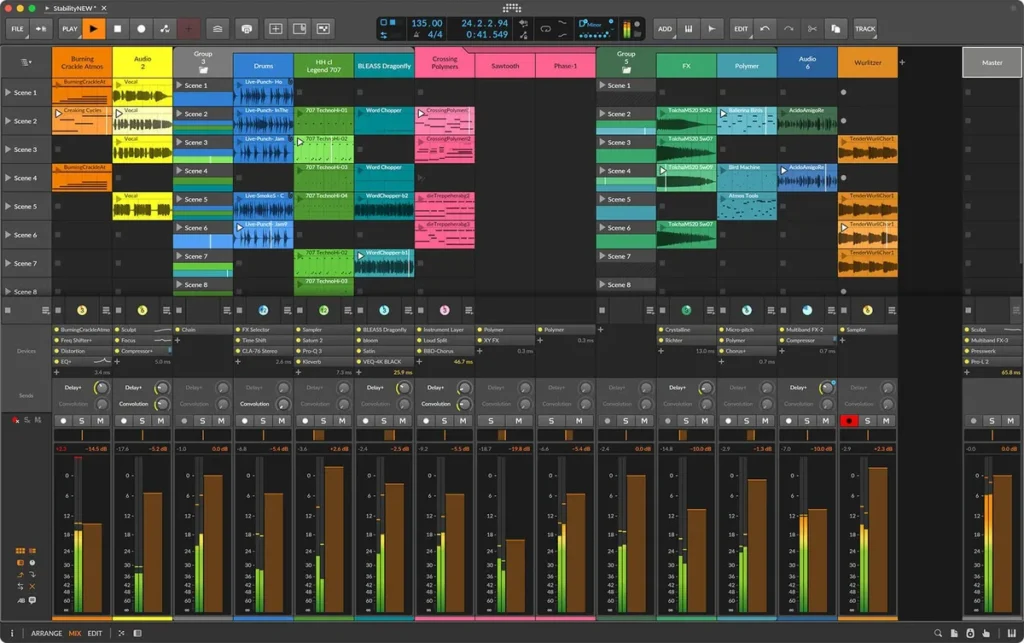
Bitwig Studio puts a Clip Launcher for live sets right next to a normal timeline, so you can jam and arrange in the same window. It’s one of only two DAWs on this list that also run on Linux. The full edition adds The Grid, a modular toolkit for building your own instruments and effects.
Price: Essentials $99, Producer $199 and Bitwig Studio $399 on Bitwig’s shop, each with 12 months of free upgrades.
Runs on: Windows, macOS and Linux.
Best for: sound designers and Linux users who want clip launching.
4. MainStage (Apple)
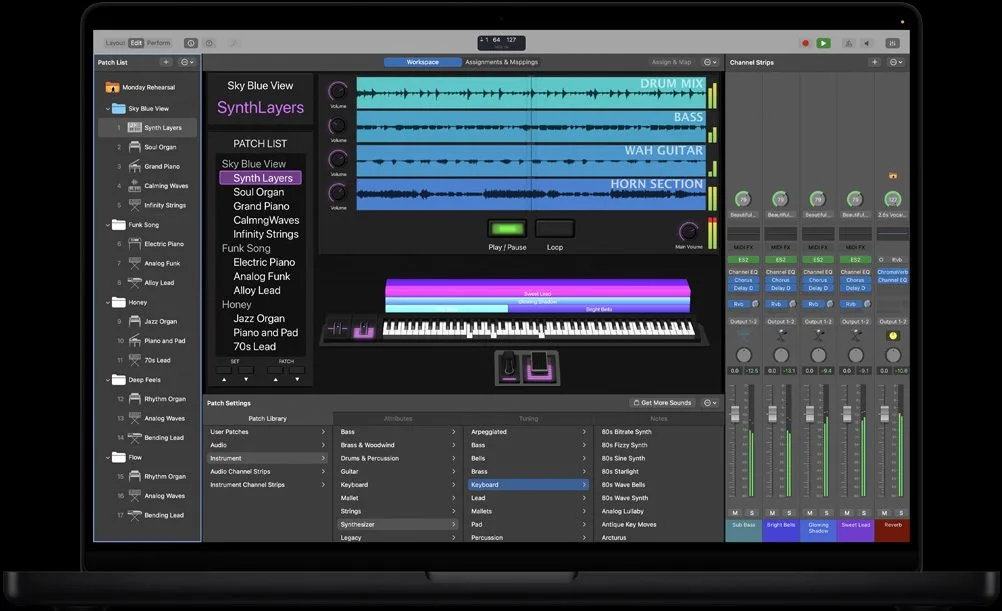
MainStage isn’t a DAW for writing songs. It’s Apple’s live app, and it turns your Mac into an instrument, a vocal processor or a guitar rig. You set up the sounds for each song ahead of time, then step through them during the show.
It plays backing tracks with its Playback plug-in and has a looper called Loopback. It also works with the knobs, buttons and faders you already own.
Price: $29.99 on the Mac App Store, and it’s also part of Apple Creator Studio.
Runs on: Mac only.
Best for: keyboard players, singers and guitarists in a band.
5. Logic Pro (Apple)
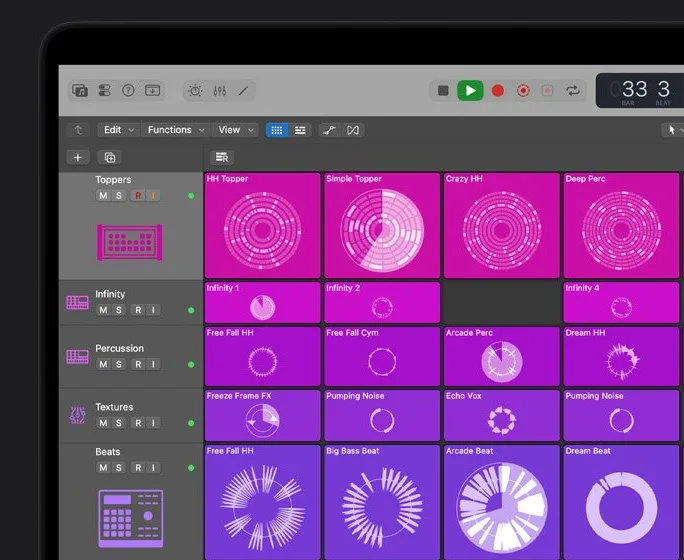
Logic Pro is Apple’s full studio DAW, and its Live Loops grid lets you trigger loops and phrases in any order, a lot like Session View. With Apple’s free Logic Remote app, your iPhone or iPad becomes a controller for Live Loops and Remix FX from anywhere in the room.
If you write in Logic and play keys or sing, MainStage is the natural partner for the gig.
Price: $199.99 once on the Mac App Store, or inside Apple Creator Studio for $12.99 a month or $129 a year after a 30-day free trial.
Runs on: Mac only, and Apple lists a Mac with Apple silicon for the current version.
Best for: Mac songwriters who want to jam ideas live.
6. Fender Studio Pro (formerly Studio One)
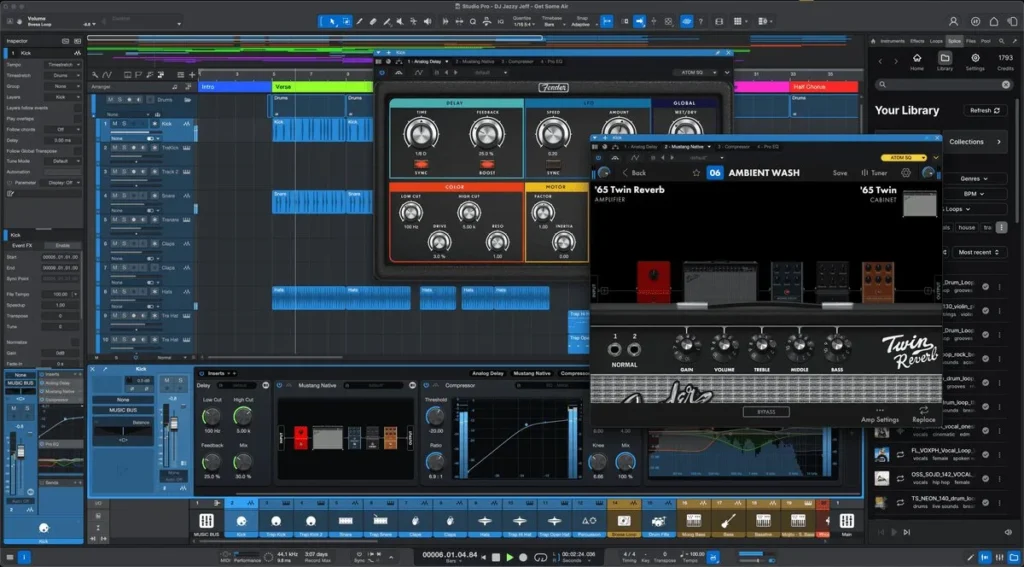
PreSonus Studio One is now Fender Studio Pro, and it keeps the feature that made it a live favorite: the Show Page. You line up a setlist, then add backing tracks, virtual instruments and your real guitar, bass or voice as “players” for each song. The current version can also play video with the show.
Price: $199.99 once, or Pro+ at $19.99 a month, with a free 30-day demo.
Runs on: Windows and macOS.
Best for: bands and solo players who run backing tracks under live instruments.
7. REAPER (Cockos)
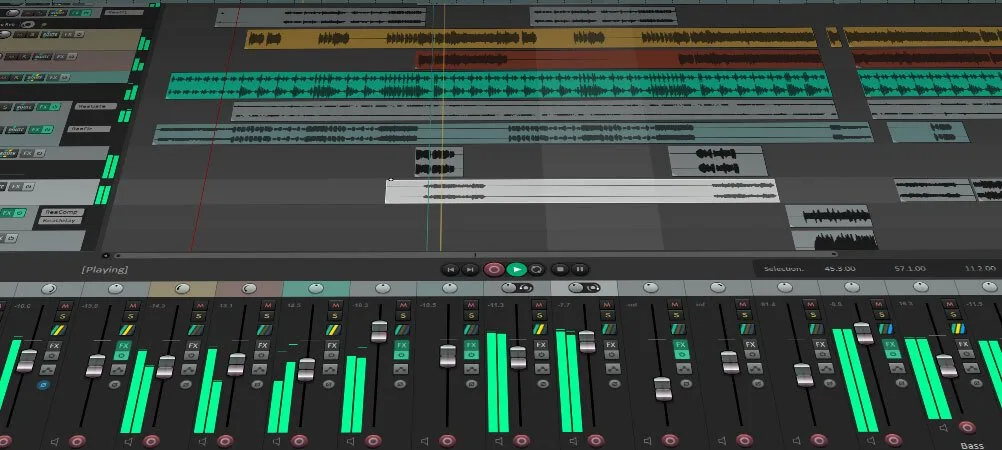
REAPER is the budget pick, and it’s no toy. Cockos calls it “efficient, fast to load, and tightly coded,” and you can run it from a portable drive, which makes a handy backup rig.
It doesn’t come with a clip grid like Ableton’s, so it suits shows that run start to finish: backing tracks, a click for the drummer, and recording every mic at the gig.
Price: $60 for a discounted license (personal use, or a business earning under $20,000 a year) or $225 for a commercial one, on REAPER’s purchase page. The 60-day trial has every feature.
Runs on: Windows, macOS and Linux.
Best for: recording a live show and running backing tracks on a budget.
Which DAW is best for backing tracks on stage?
Backing tracks are the parts you can’t play live, like extra synths or harmonies, played from your laptop under the band. Four of the picks handle them well:
- Fender Studio Pro: the Show Page is a setlist with backing tracks built in.
- MainStage: the Playback plug-in plays stems right next to your live sounds.
- Ableton Live: put each song’s stems in one scene and launch the whole row at once.
- FL Studio: place the stems as audio clips and fire them in Performance Mode.
Whatever you use, send the click to the drummer’s headphones on its own output, so the crowd never hears it. That needs an interface with more than two outputs, so check before you buy one. Our guide to audio interfaces for every budget lists the outputs of each.
How do you turn your studio projects into a live set?
Bounce each song into a few stems, such as drums, bass, music and vocals, and leave out the parts you’ll play live. Then load every song into one set project in the order you’ll play them, with the click on its own output. Playing audio stems instead of live plugins also takes load off your laptop.
- Export stems. In FL Studio, export a WAV from the File menu and tick Split mixer tracks, so every mixer track becomes its own file. Muted mixer tracks are skipped, so mute the parts you’ll play live first (Image-Line’s export guide).
- Keep the tails. Leave the tail setting on Leave remainder, the default, so reverb and delay ring out instead of getting chopped off.
- Use the same tracks for every song. Drums, bass, music, vocals and click in the same order make each song easy to find on a dark stage.
- Line up the set. In Ableton Live, put each song’s stems in one scene and launch the whole row at once. In FL Studio, place the stems as audio clips and fire them in Performance Mode.
- Play it through. Rehearse the whole set in order at home, including the moments between songs.
What’s the best DAW for live looping?
Live looping means recording a phrase, looping it right away and playing on top. Ableton Live is the classic pick, with a Looper effect and recording straight into Session View clips. MainStage has its own looper, Loopback. In FL Studio, loop recording with blend adds new notes to the pattern on every pass.
If the loop is the whole show, keep it simple. Fewer tracks and fewer plugins mean less that can go wrong in the middle of a phrase.
What’s the best DAW for recording a live show?
Recording a gig is a different job. Here you want lots of inputs and a DAW that never drops a take. Mix Elite’s gear video calls Pro Tools the standard for people recording live instruments, and REAPER does the same job for a lot less money.
In truth, any DAW on this list can record a show if your audio interface has enough inputs. Give every mic its own track, so you can fix the balance later. When you can, record more than one take and keep the best parts, the same advice Mix Elite gives for vocals.
Is there a free DAW for live performance?
Not a full one with no catch, but there are good free and cheap ways in:
- Ableton Live 12 Lite comes free with many controllers and audio interfaces, and its license never expires. It isn’t sold on its own.
- FL Studio’s free trial has every feature with no time limit, but it can’t reopen saved projects. Use it to practice, not for gigs.
- Free trials: Ableton Live Suite for 30 days, REAPER for 60 days and Fender Studio Pro for 30 days.
- MainStage is $29.99, the cheapest full live rig if you already own a Mac.
What gear do you need to play live with a DAW?
Less than you think. The video above covers the gear you need to start, and for live use the computer matters most. Max’s rule: “What I need you to look for is CPU with highest single processor core speed and amount of RAM.” The video suggests at least an Intel 13th gen i5 and 16 GB of RAM, or any Mac with an M-series chip.
- A laptop with a fast processor and 16 GB of RAM or more.
- An audio interface with enough outputs for the PA and your click track.
- A controller: a pad grid for clips and keys for melodies. FL Studio’s typing keyboard works in a pinch.
- Closed headphones or in-ear monitors, so you hear your cues over a loud room.
- Spare cables and a backup of your set on a USB stick.
Setting up at home first? Our home studio setup guide covers the same gear for writing.
What’s the easiest live software that won’t freeze?
The most stable set is the one that asks the least of your laptop: audio stems, few plugins and nothing loaded mid-show. For beats you made in FL Studio, that’s Performance Mode; for a clip-based electronic set, Ableton Live; for keys and vocals on a Mac, MainStage. Bitwig Studio adds a safety net, because its plugins run in a separate process.
With Bitwig’s crash protection, a plugin that crashes shows a notice you can reload, while the rest of the program keeps going. If you only play instruments and effects and never arrange on stage, you may not need a DAW at all. Gig Performer is a live plugin host built around setlists, for Mac and Windows. Gig Performer Pro is $169 for Mac or Windows on gigperformer.com (checked October 12, 2026), with a cheaper Essentials version and a 14-day free trial.
How do you keep a laptop set from crashing?
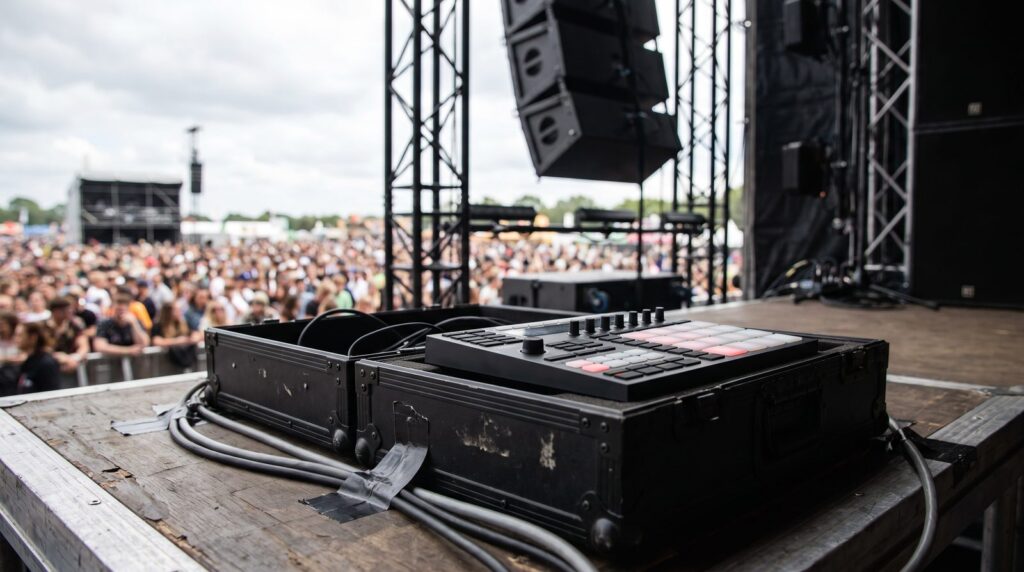
Most live crashes come from asking the computer for too much at the wrong moment. Image-Line’s guidelines for Performance Mode boil down to a short routine you can run before every show:
- Never load a plugin or change a preset during the set.
- Set the audio buffer to 10 ms or more, then test it at full volume.
- Turn on multithreading and Smart disable in FL Studio’s audio settings.
- Render heavy synths to audio clips before the gig.
- Switch off Wi-Fi, updates and notifications on the laptop.
- Save your set twice: on the laptop and on a USB stick.
- Play the whole set once at home, from the first song to the last.
Don’t change your setup on the day of the show. A new plugin or an update that worked fine at home can behave differently on stage, with no time left to fix it.
If FL Studio still crackles, our guide to fixing FL Studio crackling and CPU problems goes through every setting.
Can you live stream your DAW on Twitch or YouTube?
Yes. Free software like OBS Studio streams your screen and your DAW’s sound to Twitch or YouTube. The sound is the tricky part: send your DAW’s output into OBS with a virtual audio cable, a small app that passes sound from one program to another, such as VB-CABLE. Or use an audio interface with a loopback feature, which feeds your computer’s sound back in as an input, like Focusrite’s Scarlett range.
Do a short private test stream before you go live and listen back to it, so you know viewers hear your music at the right level.
So which is the best DAW for live performance for you?
- You make beats in FL Studio: stay there and learn Performance Mode.
- You want the classic laptop clip set: Ableton Live.
- You’re on Linux, or you love building sounds: Bitwig Studio.
- You play keys, sing or play guitar in a band on a Mac: MainStage.
- You run backing tracks under a live band: Fender Studio Pro or MainStage.
- You need to record the gig on a budget: REAPER.
Still choosing a DAW to make music in? Read our FL Studio vs Ableton comparison, or start with what FL Studio is and how it works.
THE 7-DAY MUSIC PRODUCER COURSE
Learn your DAW before you take it on stage
Day 1 of the 7-Day course covers setup and workflow: choosing the music software and hardware that suit you, the ‘Perfect Triangle’ for setting up a home studio on any budget, and the top 4 features of any DAW you need to understand to find your way around. It’s taught in FL Studio (the free trial works). The course is $27, and you have 60 days to decide if it was worth it.
Frequently asked questions
What is the best DAW for live performance?
Ableton Live is the best-known stage DAW, thanks to its Session View clip grid and Ableton’s own Push controller. Keyboard players and singers in bands often use MainStage on a Mac instead, because it’s built around switching sounds, not launching clips. Beatmakers can play live in FL Studio with Performance Mode, so they don’t have to rebuild their tracks in a second DAW.
Is FL Studio good for live performance?
Yes. FL Studio’s Performance Mode turns the Playlist into a clip launcher, so you can trigger parts of your track in any order with a mouse, a touch screen, your computer keyboard or a pad controller. Use an ASIO driver with a buffer of 10 ms or more, don’t load plugins during the set, and use Tools > Dump score log if you forget to record a jam.
What is the most stable software for a live set?
The one that asks the least of your laptop. Play audio stems instead of live plugins, never load a plugin mid-set, and set your audio buffer to 10 ms or more. Bitwig Studio runs plugins in a separate process, so one crashing plugin doesn’t stop the program, and MainStage or Gig Performer are lighter than a full DAW if you only play instruments.
Do you need a different DAW to play live?
Not if you make your music in FL Studio: Performance Mode plays the projects you already have as a clip launcher. A second DAW like Ableton Live is worth learning when your whole show is built around improvising with clips. Keyboard players and singers on a Mac usually do better with MainStage.
How do I turn my studio projects into a live set?
Export each song as a few stems (drums, bass, music, vocals), leaving out what you’ll play live. In FL Studio, tick Split mixer tracks when you export a WAV. Load every song into one set project in playing order, give the click its own output, and rehearse the whole set.





