



“When you come to a fork in the road, take it.”
Choose FL Studio if you mainly make beats and want to pay once with free updates for life; choose Ableton Live if you want to perform live or record and warp a lot of audio. The main difference is the workflow: FL Studio builds songs from patterns, while Ableton adds Session View for launching clips live. Both have free trials.
The FL Studio vs Ableton question can stall you for weeks. You watch comparison videos, read forum arguments and install both trials, and meanwhile no music gets made. That’s the real cost of choosing wrong: not choosing at all.
Below is a fair side by side of FL Studio (once called FruityLoops) and Ableton Live, with every price and policy checked on image-line.com and ableton.com on 12 October 2026, plus a clear pick from Max, the founder of Mix Elite, on which one to start with.
Table of Contents
What is the main difference between FL Studio and Ableton Live?
The main difference is how you build a song. FL Studio has you program patterns in the Channel Rack and Piano Roll and place them in the Playlist, which makes beats fast. Ableton Live adds Session View, where you launch loops live, next to a classic timeline. FL Studio also gives free lifetime updates; Ableton charges for new major versions.
Every DAW, the program you make music in, has the same basic parts: a place to write notes, a timeline to arrange them on and a mixer. The difference is how you move between them.
FL Studio: patterns, the Channel Rack and the Playlist
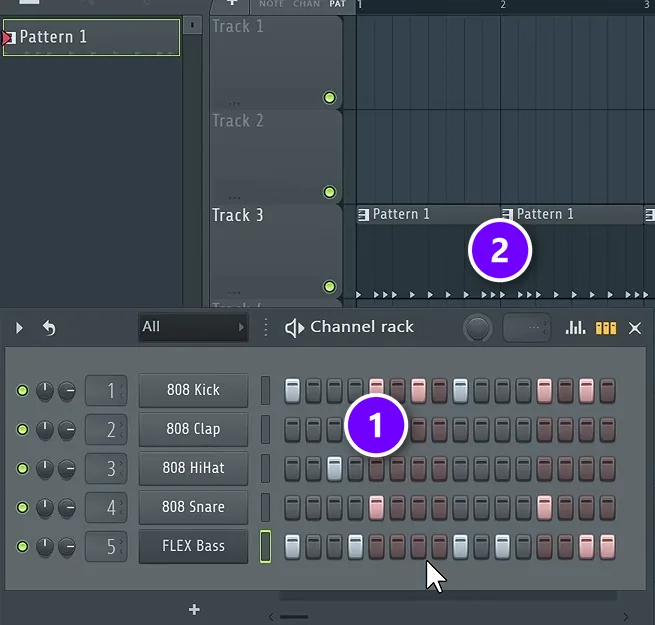
In FL Studio, you build songs from patterns. You load sounds into the Channel Rack and tap out a beat on its step sequencer (1), a row of buttons where each button is one step of the beat. Each idea is saved as a pattern, and you drop patterns into the Playlist (2), FL Studio’s timeline, as many times as you like.
It’s a very visual way to work. You see the whole song as blocks, and when you change a pattern, every copy of it in the Playlist changes too. Our beginner’s guide to what FL Studio is walks through each window.
Ableton Live: Session View and Arrangement View
Ableton Live gives you two views. In Session View, you put ideas into clips, which are short loops of audio or MIDI. You can start them in any order without stopping the music, and Ableton describes it as made “for quick, intuitive composition, flexible performance and improvisation.” When you like what you hear, you record it into the Arrangement View, Live’s timeline, and shape it into a full song.
Max sums up each one by the people it draws in. In his view, Ableton Live “is for tech lovers, geeks, and live performances,” while FL Studio is “easy to start, hard to master, popular with beginners and pros.” That’s one producer’s opinion, not a rule. You can make any style of music in either.
Which is easier for beginners?
For a beginner making beats in an hour or two a night, FL Studio is usually the faster start. You can click a drum pattern into its step sequencer in seconds, the free trial never runs out, and Producer Edition covers everything you need. Ableton Live is just as capable, but its trial lasts 30 days.
Both take some learning, because a DAW has a lot of buttons. Ableton keeps everything in one main window, while FL Studio uses floating windows. Ableton also has free lessons that run in your web browser, called Learning Music and Learning Synths. Weighing up Logic Pro or Pro Tools too? See our guide to the best DAW for beginners.
Max’s advice is not to overthink it: “Each DAW is made out of the same elements that just basically look different.” Learn one well, and the next one comes fast. If you pick FL Studio, our guide to how long it takes to learn FL Studio lays out a plan you can stick to.
Is FL Studio’s piano roll better than Ableton’s?
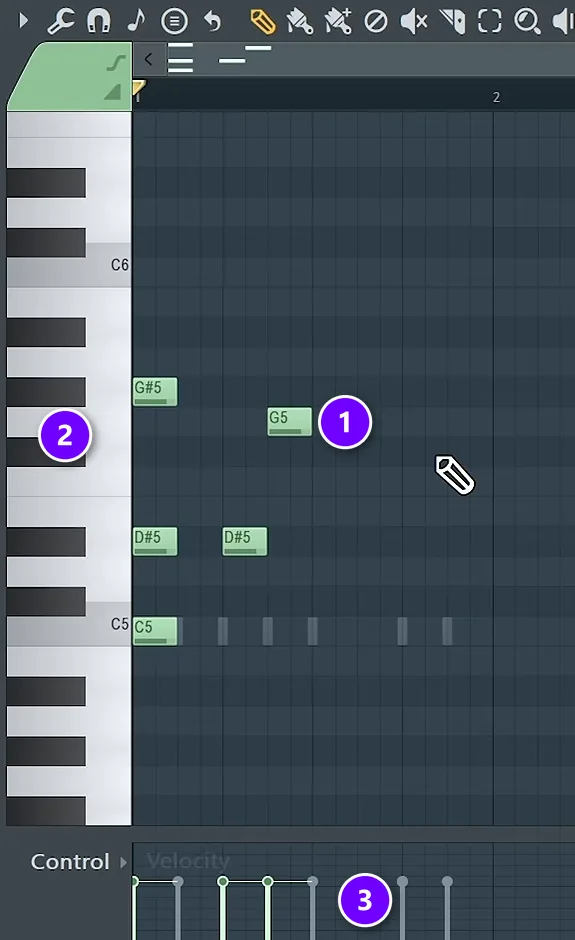
FL Studio’s Piano Roll is one of its best-known features, and it comes with every edition. It’s where melodies, chords and basslines take shape.
You draw notes (1) against a piano keyboard (2), and the lane underneath (3) sets how hard each note plays, called velocity. You can do all of it with a mouse, so you don’t need to play keys to write music.
Ableton’s MIDI editor looks simpler, and Live 12 Standard and Suite include MIDI Transformations and MIDI Generators. These reshape a clip or create new melodies, chords and rhythms for you to build on. If you play your parts in from a keyboard, both work well. If you draw everything with a mouse, FL Studio’s Channel Rack and Piano Roll were built for exactly that.
Why do producers switch DAWs to record live instruments or perform?
Because each DAW grew up around a different job. Pro Tools became the standard for recording live instruments, Ableton Live for performing on stage, and FL Studio for building beats from patterns in a step sequencer. You don’t have to switch just to record, though: FL Studio’s Producer Edition records audio too.
So the advice to switch usually comes down to one feature you need. Want to launch clips on stage? Ableton’s Session View was built for it. Want to program beats with a mouse? FL Studio’s Channel Rack and Piano Roll were built for that. The next two sections compare both jobs.
Which is better for recording and editing audio?
Ableton, if you record a lot. Every edition of Live records audio, warps it to your tempo in real time and has comping built in. FL Studio records audio well too, but only from Producer Edition up, so check your edition before you plug in a mic.
Warping changes the tempo and timing of any audio in real time, without stopping the music, so loops and samples fit your song. Comping means recording several takes and stitching the best parts together. Standard and Suite add Audio to MIDI, and Suite adds stem separation.
From Producer Edition up, FL Studio also gives you Edison, an audio editor, and Newtime, which stretches audio in time. You get stem separation too, which splits a song into parts like vocals and drums.
Fruity Edition can’t record audio, and it allows only 8 audio clips in the Playlist. If you’ll record a lot of vocals or guitar, check the edition before you buy.
Which is better for live performance?
Ableton, clearly. Session View lets you launch clips and change the song on stage without stopping. Ableton also makes its own hardware, like the Push controller, and Ableton Link keeps Live in time with other apps and devices over a network. Want to play your songs live? This is Ableton’s home turf.
How much do FL Studio and Ableton Live cost?
FL Studio costs $99 to $449 as a one-time purchase with free lifetime updates, and Image-Line says most new producers choose Producer Edition, at $179. Ableton Live 12 costs $99 for Intro, $349 for Standard and $749 for Suite, and new major versions are paid upgrades. These US dollar prices for new licenses were checked on both official sites on 12 October 2026.
- FL Studio Fruity Edition, $99: 23 instruments and 53 effects. No audio recording, and only 8 audio clips in the Playlist.
- FL Studio Producer Edition, $179: 27 instruments and 59 effects, plus audio recording, the Edison audio editor and stem separation.
- FL Studio Signature Bundle, $269: 29 instruments and 65 effects.
- FL Studio All Plugins Edition, $449: 39 instruments and 71 effects.
- Ableton Live 12 Intro, $99: 16 tracks and 5+ GB of sounds.
- Ableton Live 12 Standard, $349: unlimited tracks and 38+ GB of sounds.
- Ableton Live 12 Suite, $749: 71+ GB of sounds, every instrument and effect, and Max for Live.
Both sites show local prices in other countries, so yours may differ.
Image-Line also has a rent-to-own plan: after 12 monthly payments, FL Studio is yours, with lifetime free updates. Ableton sells Live 12 Suite rent-to-own for $31.21 a month over 24 months, and people studying or teaching at a school, college or university can get 50% off a new Live license.
Max’s advice on FL Studio: “If you’re looking to purchase the full version, get the producer edition. It’s the best bang for your buck.” Image-Line’s own pricing page agrees. It calls Producer Edition the best choice for beginners. Check the FL Studio pricing page and Ableton’s shop for today’s prices.
Free updates vs paid upgrades
This is the biggest long-term difference. Image-Line promises that when you buy FL Studio, you get all future updates to your edition free, forever. You only pay to move up to a bigger edition, and then just the price difference.
Ableton’s updates within a version are free, like Live 12.3 to 12.4. A new major version, like Live 11 to Live 12, is a paid upgrade, though owners get upgrade pricing. Over many years, that adds up.
Free trials: what can you do before you pay?
FL Studio’s trial is the full program with no time limit and no audio watermarks. You can export finished songs as WAV or MP3. The catch is that once you close a project, the trial can’t reopen it until you buy an edition.
Ableton’s trial gives you the full Live 12 Suite for 30 days, saving and exporting included. After 30 days, you can still open your sets, but you can’t save or export them. Ableton also has Live 12 Lite, a smaller edition that comes free with many hardware products.
Does it matter if you use a Mac or Windows?
Not much. FL Studio runs on Windows 10 and 11 and on macOS 10.15.7 or newer, natively on both Intel and Apple Silicon Macs, and one license covers both systems. It doesn’t support Windows on ARM. Live 12 needs macOS 11 Big Sur or newer, or Windows 10 (version 22H2) or Windows 11, and one license can be installed on up to two of your computers.
Which one should you choose?
Pick FL Studio if:
- You mainly want to make beats, hip-hop, trap, house or EDM.
- You like building songs from patterns you can see.
- You want to pay once and never pay for an update.
- You want a trial with no time limit to learn on.
Pick Ableton Live if:
- You want to perform live or jam with clips and hardware.
- You record a lot of audio or work mostly with samples.
- You prefer one clean window to floating ones.
Still torn? Install both trials and make the same short beat in each. The one you want to open again tomorrow is your answer.
Should you switch DAWs or keep learning the one you have?
Keep learning the one you have, unless it truly can’t do something you need, like launching clips on stage or recording audio in your edition. Every DAW is built from the same basic parts, so a slow, clunky workflow is usually a skill gap that shortcuts and practice fix. If you do switch later, the skills carry over.
Ask one question: what can’t my DAW do? If the honest answer is nothing, and you’re just slow, learn its shortcuts and keep going. Our list of FL Studio shortcuts is a good place to start. If the answer is a real feature, like clip launching for live shows, make one short beat in the other DAW’s trial before you buy.
FL Studio vs Ableton at a glance
Here are the main differences side by side. Every price and policy comes from the two companies’ own websites.
| FL Studio | Ableton Live 12 | |
|---|---|---|
| Price (USD) | $99 to $449. | $99 to $749. |
| Editions | Fruity, Producer, Signature Bundle, All Plugins. | Intro, Standard, Suite. |
| Updates | Free for life. | Free within a version. New versions are paid upgrades. |
| Free trial | No time limit, but it can’t reopen saved projects. | The full Suite for 30 days. |
| Systems | Windows 10 and 11, macOS 10.15.7 or newer. | Windows 10 and 11, macOS 11 or newer. |
| Main workflow | Patterns in the Channel Rack, placed in the Playlist. | Clips in Session View, placed in Arrangement View. |
| Best known for | Fast beat making and its Piano Roll. | Live shows and warping audio. |
| Records audio in the cheapest edition? | No. You need Producer Edition or higher. | Yes. Intro has up to 16 audio and MIDI tracks. |
Why Mix Elite teaches in FL Studio
FL Studio is the DAW Mix Elite teaches in, and the one it recommends to beginners. The reasons are simple. It’s easy to start, it covers every genre from hip-hop to film music, the trial has no time limit, and Producer Edition gives you everything you need. The choice isn’t forever, either. The skills carry over, and switching later is just a matter of days. To try it for free, Mix Elite’s free 4.5-hour FL Studio course walks you from setup to mixing and mastering your first track.
Already own Ableton? Keep it. Most of what you learn, from chords to mixing, works in any DAW. Starting fresh? Our FL Studio tips for beginners and home studio setup guide will get you going.
In the video below, Max covers the gear you actually need to start making music. From about 4:50, he walks through the four big DAWs and explains why Mix Elite starts beginners on FL Studio.
THE 7-DAY MUSIC PRODUCER COURSE
Set up your DAW the right way
Day 1 of the 7-Day course covers setup and workflow: choosing the music software and hardware that suit you, and the top 4 features of any DAW you need to understand to find your way around, even the first time you open it. It’s taught in FL Studio, and the techniques apply in any DAW. The course is $27, and you have 60 days to decide if it was worth it.
Frequently asked questions
Is Ableton better than FL Studio?
Neither is better overall. Ableton Live is stronger for live performance, recording and warping audio, and jamming with clips. FL Studio is faster for building beats with patterns and its Piano Roll, and it comes with lifetime free updates. Both make professional music, so the better one is the one whose workflow you enjoy. Try both trials before you buy.
Which is better for beginners making beats, FL Studio or Ableton?
For most beginners making beats in an hour or two a night, FL Studio is the quicker start. Drum patterns go into the step sequencer in seconds, the Piano Roll is easy to draw in with a mouse, and the free trial has no time limit. Ableton Live is just as capable, and its 30-day trial of Live 12 Suite is worth a try too.
Should I switch from FL Studio to Ableton?
Only if Ableton does something you’ll really use, like launching clips live on stage. Every DAW is made of the same basic parts, so chords, drums, arrangement and mixing carry over, and switching takes days, not a fresh start. Project files don’t open in the other program, so export stems, separate audio files for each part, of any song you want to keep.
Is FL Studio a one-time purchase?
Yes. You pay once for an edition and get lifetime free updates, which Image-Line describes as all future updates to your edition, free, forever. If you want more plugins later, you can move up to a bigger edition by paying the price difference. There’s also a rent-to-own plan where FL Studio is yours after 12 monthly payments.
Is Ableton free?
No, but you can try it for free. Ableton’s trial gives you the full Live 12 Suite for 30 days, and Live 12 Lite comes free with many hardware products, with a license that never expires. To keep using the full program, you buy Live 12 Intro, Standard or Suite.





