



“All models are wrong but some are useful.”
The best amp simulator plugins in 2026 are Neural DSP’s Archetype series and IK Multimedia’s TONEX 2 for realistic tone, and AmpliTube 5 or Guitar Rig 7 Pro for the most amps and effects in one plugin. The best free ones are Neural Amp Modeler and GENOME Intro, and FL Studio already has two built in: Distructor and Hardcore.
You’ve got a guitar part in your head and a beat waiting in FL Studio. The problem is the amp. It’s too loud for the house at 10 p.m., or you don’t own one, and plugging the guitar straight into your interface sounds thin and buzzy, like a cheap demo.
An amp sim fixes that inside your computer. We checked every plugin below on its maker’s own website in October 2026, including the current version and what it runs on, and checked every price again on October 12, 2026, or on October 21 for the newest picks. Then we added the part most lists skip: how to actually record through one in FL Studio, with screenshots.
Table of Contents
What is an amp simulator?
An amp simulator, or amp sim, is a plugin that makes a clean guitar sound like it was played through a real amplifier and recorded with a microphone in front of the speaker. You plug your guitar into an audio interface, load the plugin in your music software, and hear the amp in your headphones. No loud amp, no microphone and no angry neighbors.
Most amp sims copy the chain a guitarist plays through on stage. Pedals come first. Next is the amp, where the gain knob decides how much distortion you get. Last come the speaker cabinet and the mic in front of it, and they shape the sound more than most beginners expect. A great amp through the wrong cabinet still sounds fizzy.
Why not just use a real amp? At home, a plugin wins on almost everything that matters at 10 p.m. It’s quiet in headphones. One plugin can hold dozens of amps. The tone saves with your song, so it sounds the same next week. And if you record the clean guitar, you can change the amp after you’ve played the part.
How do amp simulators work?
They all try to sound like real gear, but they get there in three different ways. Knowing which kind you’re looking at tells you a lot about how it will behave.
- Modeling: the software copies how a real amp behaves, part by part, so every knob reacts the way the real one does. AmpliTube, Guitar Rig, Helix Stadium Native and BIAS X are built this way.
- Captures: instead of copying the circuit, the software listens to a real amp and learns its sound with machine learning. Neural Amp Modeler and IK Multimedia’s TONEX work like this. A capture is a snapshot of one amp at one setting, so different settings need different captures.
- Impulse responses (IRs): an IR is a tiny recording of how one speaker cabinet and one mic sound. An IR loader plays your amp sound through that recording, which is how most amp sims handle the cabinet, FL Studio’s Distructor included.
You’ll see the word DI a lot, too. It stands for direct input, and it means the clean guitar signal before any amp. Record the DI, and you keep every option open for later.
Why does guitar sound thin and buzzy straight into an interface?
Because you’re hearing the raw pickup signal, with no amp and no speaker cabinet. The cabinet decides how much harsh top end gets through, so even an amp sound without one comes out thin, harsh and fizzy. An amp sim puts the amp’s drive and the cabinet back, in software.
TONE3000’s beginner guide to IRs calls a missing cabinet the single most common mistake with amp captures. Three checks fix most of it:
- Use the right input. Plug into the Instrument or Hi-Z input, which is made for guitar pickups (Step 1 below).
- Make sure a cabinet is on. If your amp sim or capture is only the amp, add a cabinet IR right after it.
- Keep the input level out of the red. Clipping at the input can’t be fixed later.
How to choose an amp sim plugin
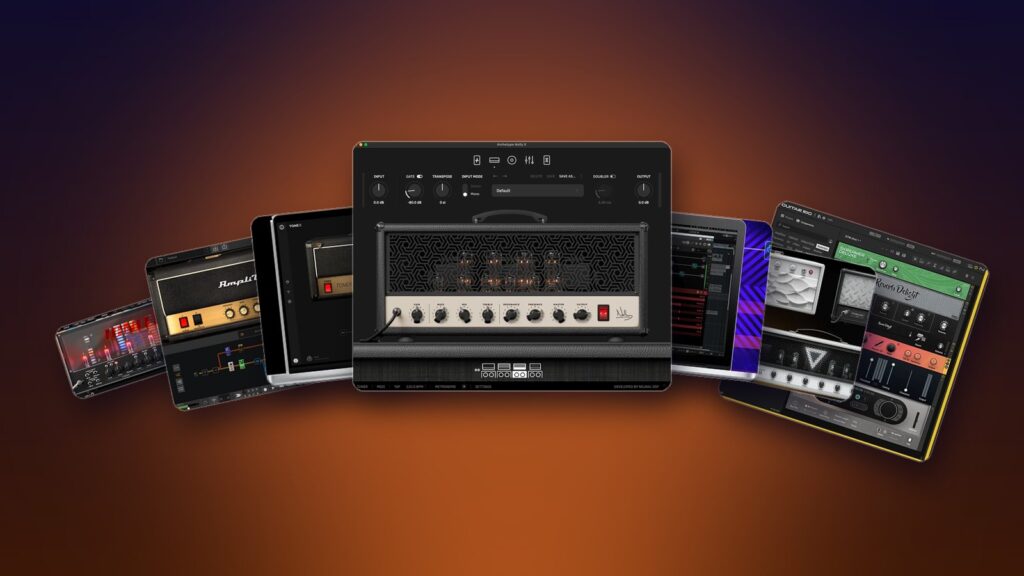
Price matters less than you’d think, because almost every plugin here has a free version or a free trial. Try a few with your own guitar before you pay. Here’s what to look for while you do:
- How it feels to play. A good sim reacts to how hard you pick. If it feels stiff, you’ll fight it every time you record.
- What’s inside. Some plugins do three amps really well. Others give you a whole store of amps, cabinets and pedals.
- The cabinets. More cabinet and mic choices, or your own IRs, make it easier to fix a fizzy tone.
- Your computer. Check Windows or Mac and the plugin format. FL Studio loads VST3 plugins on both, and Audio Units (AU) on a Mac. AAX is only for Pro Tools.
- Extra apps. Some plugins only install through the maker’s own app or an iLok account, which is a free license manager.
- What you’ll use it for. Clean funk, classic rock and modern metal each have a favorite here. For other gear guides, browse our plugins and gear articles.
We checked every version, system and plugin format below on each maker’s own website in October 2026, and every price again on October 12, 2026, or on October 21 for the newest picks. Prices are in US dollars unless a maker only sells in euros. Where a plugin was on sale that day, we say so, but sales come and go, so check the maker’s page before you buy.
Does FL Studio have a built-in amp sim?
Yes, two. Distructor comes with every FL Studio edition and has an AMP/CAB module that simulates amp and speaker cabinet combinations. Hardcore, a guitar pedalboard with cabinet models, comes with Signature Bundle and up.
Check what you already own before you buy anything. FL Studio has no plugin with “amp” in its name, but two of its effects do the job. Image-Line’s edition comparison lists Distructor in every edition, from the cheapest Fruity Edition up, and Hardcore in Signature Bundle and up. Both run inside FL Studio 26.1.7, the current version on October 12, 2026, on Windows and Mac.
1. Distructor (FL Studio)
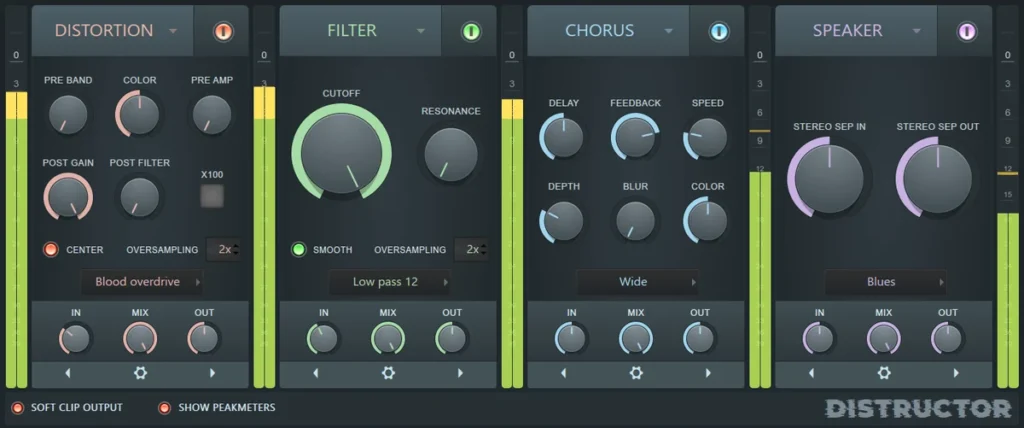
Distructor is a multi-effect with four slots, and any slot can hold any module. Its distortion module borrows the drive from Blood Overdrive, Fast Dist and Soft Clipper. Its AMP/CAB module, says Image-Line’s manual, simulates amp and speaker cabinet combinations with impulse responses, the same method as Fruity Convolver. The sound flows from left to right, just like a pedalboard.
For a quick guitar tone, put a distortion module first, a filter second to tame the harsh top end, and AMP/CAB last. The controls on a module change with the model you pick from its menu, so try a few. In Image-Line’s picture above, that last stage is the module on the right, labeled Speaker.
Best for: getting a usable guitar sound tonight for free, without installing anything.
2. Hardcore (FL Studio)
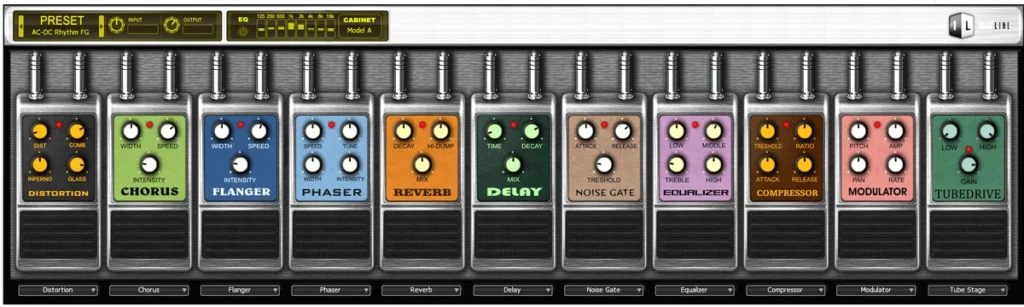
Hardcore is Image-Line’s virtual pedalboard for guitar. It has 11 stomp-box pedals, including distortion, a tube drive, a noise gate, chorus, delay and reverb, and you can run up to 5 at a time. Need more? Load a second Hardcore right after the first.
Across the top sit an 8-band graphic EQ and a cabinet section. According to Image-Line’s manual, cabinet models A to E are algorithmic, and the rest use impulse responses based on recordings of real cabinets. Your choice of cabinet changes the tone as much as the pedals do.
Best for: a fast pedals-plus-cabinet chain if you own Signature Bundle or the All Plugins Edition.
What are the best paid amp sim plugins?
For the most realistic tone, get Neural DSP’s Archetype: Nolly X or IK Multimedia’s TONEX 2. For the most amps and effects in one plugin, get AmpliTube 5 or Guitar Rig 7 Pro. BIAS X builds a rig from a text description, and Helix Stadium Native shares its presets with Line 6’s Helix Stadium hardware. For one classic amp done in great detail, try Neural DSP’s Soldano SLO-100 X or UA’s Dream ’65, and for bass, Kuassa’s Cerberus.
These are the paid amp sims that are worth your money in 2026. All of them come with a free trial or a free version you can test first, so you can hear them with your own guitar before you pay.
3. Archetype: Nolly X (Neural DSP)
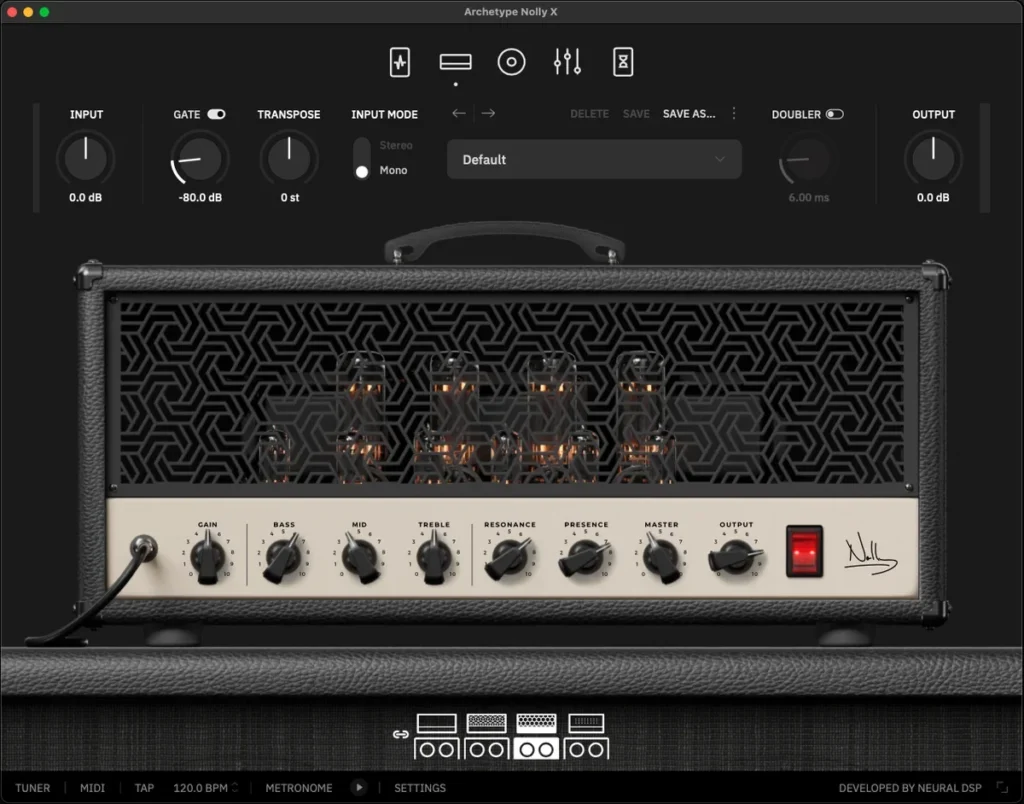
Neural DSP’s Archetype plugins are a favorite for realistic amp tones, and Archetype: Nolly X is one of the most flexible. It’s built around the custom-modded amps of Adam “Nolly” Getgood, and it gives you four of them: Clean, Crunch, Rhythm and Lead, each with a matching cabinet. You also get 640 impulse responses he captured, and you can load your own.
A compressor, two overdrives and a delay sit before the amps. After them come a 9-band graphic EQ, reverb and delay, plus a tuner, a metronome and a doubler that makes one take sound like two. Neural DSP makes more Archetype suites, each built around one artist’s sound, like Plini X and Gojira X.
You activate it with a free iLok account, and the same license also runs on Neural DSP’s Quad Cortex hardware. Neural DSP sells in euros, so your card converts the price.
Best for: a few amps that sound and feel like the real thing, from clean to metal.
4. TONEX 2 (IK Multimedia)
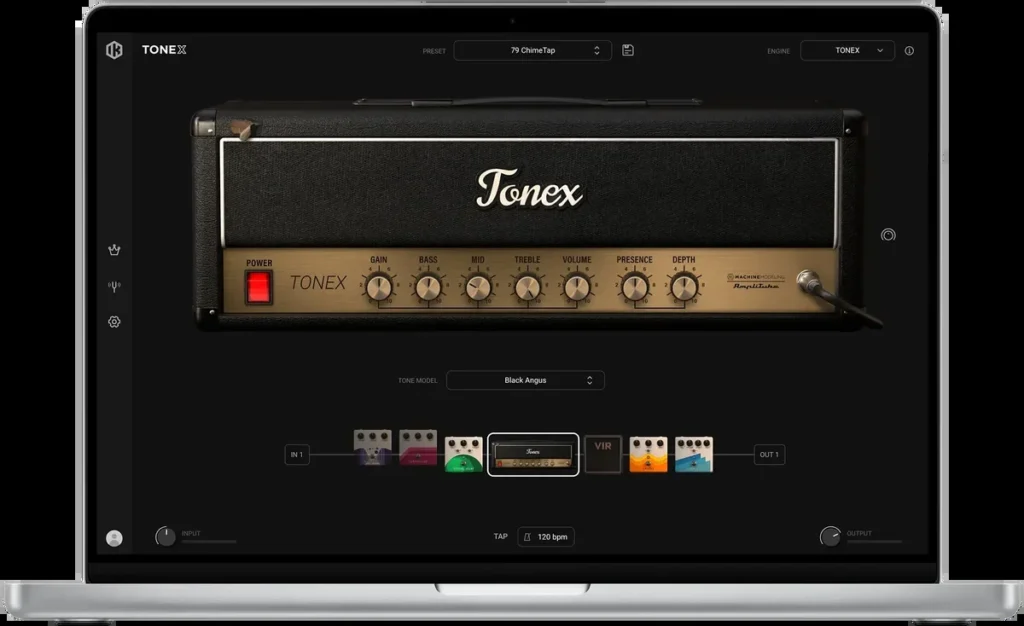
TONEX 2 plays Tone Models, which are AI captures of real amps, cabinets and pedals. IK Multimedia calls the technology AI Machine Modeling. Instead of a list of amp models, you browse a library of real rigs, and each Tone Model is a snapshot of one rig at one setting.
Every paid version also includes the Modeler, which captures your own gear. Got an old amp you love but can’t play loud at home? Capture it once, then play it through headphones whenever you want.
The versions differ in how many Premium Tone Models come with them, and MAX has the most: over 1,250, according to IK’s page. On October 12, 2026, IK’s US store listed SE at $99.99 and TONEX 2 at $199.99, and MAX, normally $299.99, was on sale for $99.99. Paid versions can also download unlimited user-made Tone Models from ToneNET, IK’s sharing site. To try it first, get the free TONEX 2 CS. It installs through IK Product Manager and needs an internet connection to authorize.
Best for: the most real-sounding tones, and capturing your own amp.
5. AmpliTube 5 (IK Multimedia)
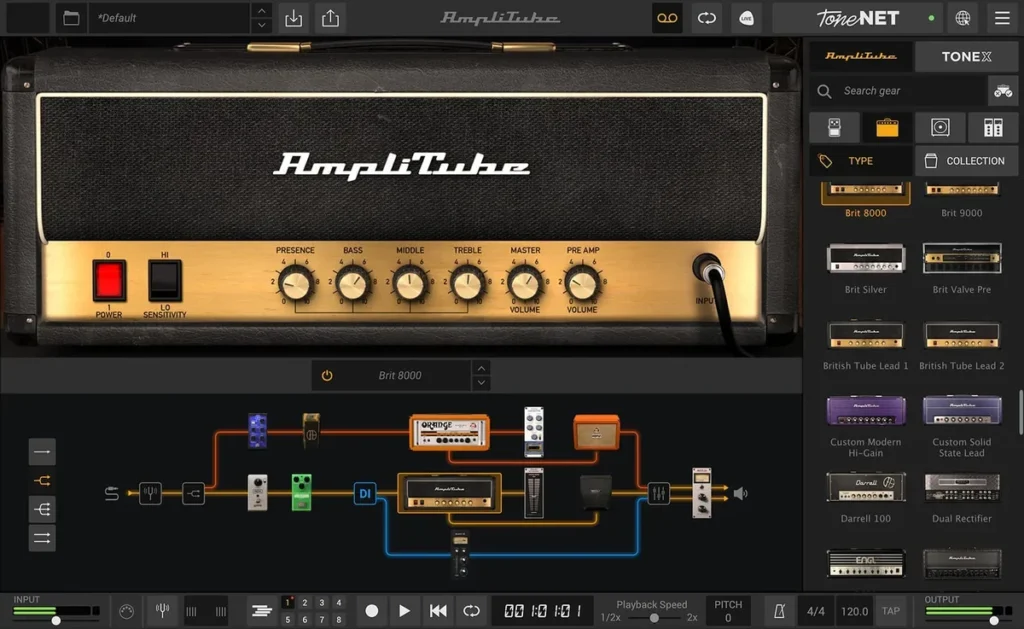
AmpliTube 5 is the biggest gear store on this list. It has stomp boxes, amps, cabinets, speakers, mics, rooms and rack effects, and you can wire them up however you like. Its VIR cabinets give every speaker 600 IRs, so you can move the mic around. The standalone app adds a looper and an 8-track recorder, and AmpliTube 5 now plays TONEX Tone Models too.
The versions mostly differ in how much gear you get, up to 435 models in MAX v2, which includes all of IK’s Artist Collections. IK developed its gear with brands like Fender, Mesa/Boogie and Orange. Regular prices on IK’s US store are $99.99 for SE, $199.99 for AmpliTube 5 and $299.99 for MAX v2, and on October 12, 2026, AmpliTube 5 was on sale for $29.99 and MAX v2 for $99.99. The free AmpliTube 5 CS starts with about 40 models, and any model in its Custom Shop can be tried for 72 hours before you buy it.
Best for: the most amps, cabinets and pedals in one plugin.
6. Guitar Rig 7 Pro (Native Instruments)
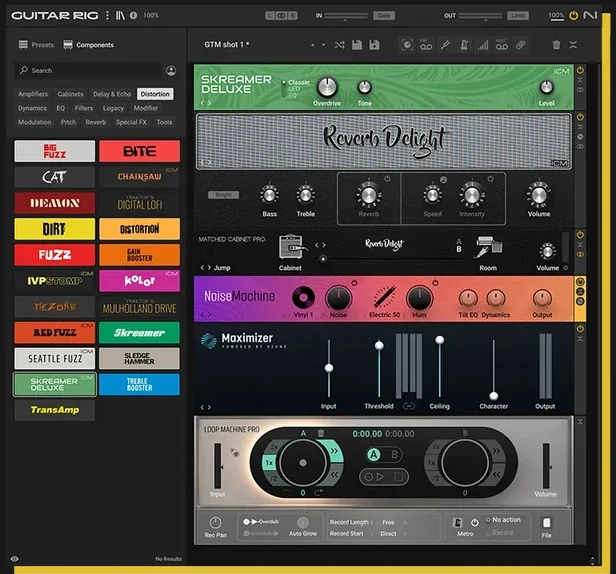
Guitar Rig 7 Pro is a drag-and-drop rack of amps and effects. You get 26 guitar and bass amps with matching cabinets, 27 cabinets with up to 16 mics in Control Room Pro, and 115 effects and tools. Version 7 added four amps made with ICM, Native Instruments’ machine-learning way of modeling real circuits, plus an IR loader and a looper.
It’s the most creative pick here. The pedals, filters and modulation effects are just as much fun on drums, synths and vocals as on guitar, so it earns its place even in a beat with no guitar at all. It installs through Native Access, Native Instruments’ free installer app, and there’s a free demo plus the free Guitar Rig 7 Player below.
Best for: one rack for guitar and for sound design.
7. Soldano SLO-100 X (Neural DSP)
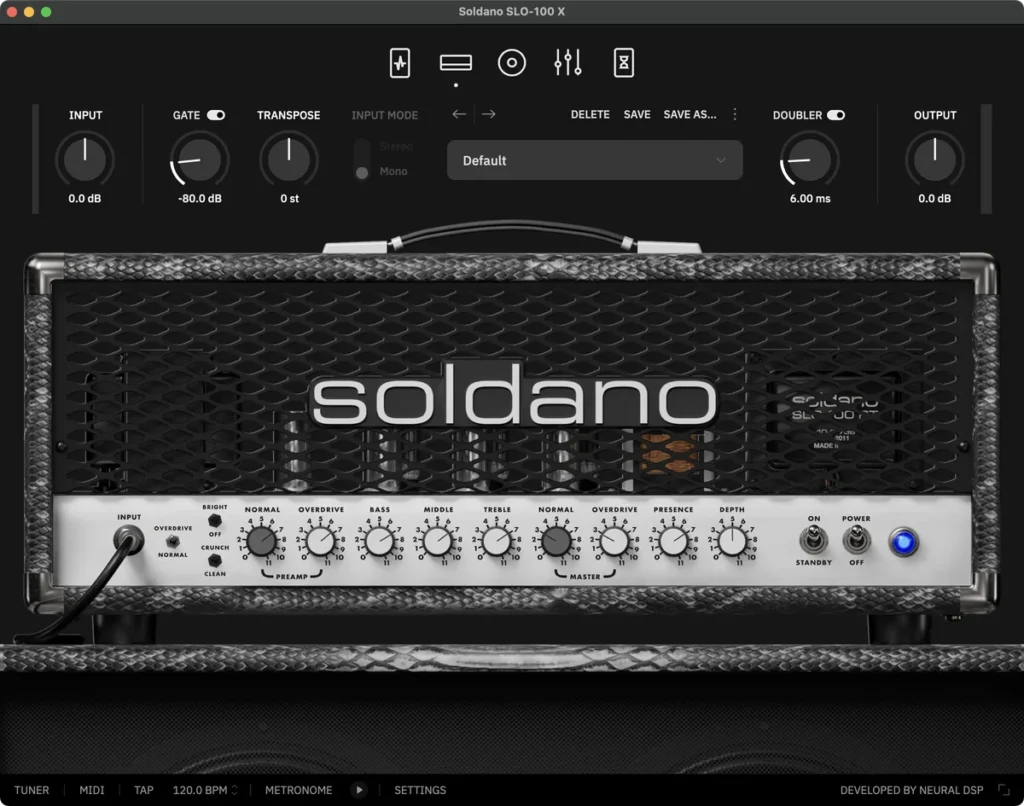
Soldano SLO-100 X is one amp done in great detail. It’s Neural DSP’s model of the Soldano SLO-100, the head Mike Soldano designed, which Neural DSP calls the origin of the American high-gain sound. The Normal channel is clean, with Bright and Crunch switches, and the Overdrive channel brings the gain for heavy rhythm parts and leads.
A compressor, a boost, an overdrive and a vintage chorus sit before the amp. After it come a 9-band graphic EQ, a cabinet section with hundreds of IRs by Adam “Nolly” Getgood and six mics you can move, plus delay, reverb, a doubler and a tuner. Like Nolly X, it needs a free iLok account, also runs on Neural DSP’s Quad Cortex, and is billed in euros.
Best for: classic high-gain rock and metal from one legendary amp.
8. UAD Dream ’65 Reverb Amplifier (Universal Audio)
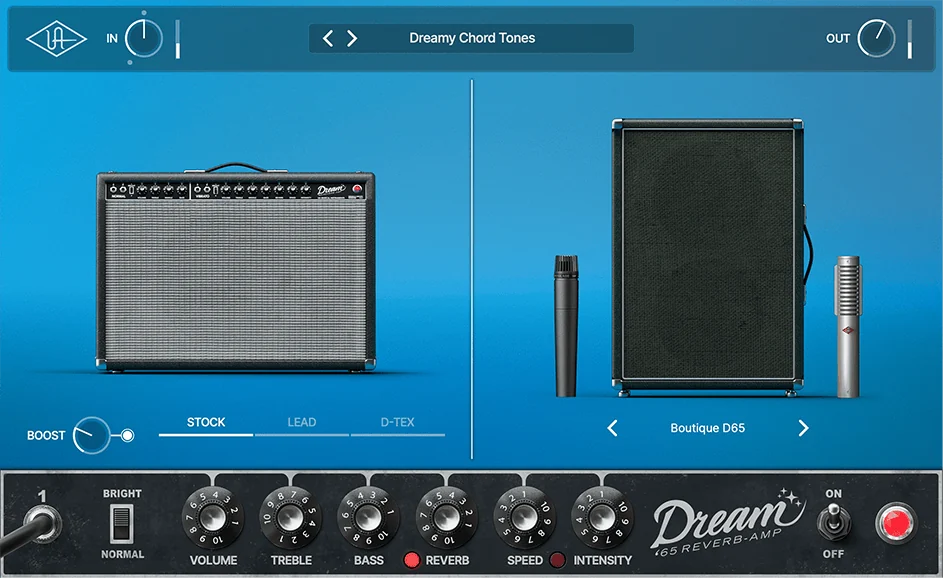
Some of Universal Audio’s amp plugins only run on UA’s Apollo interfaces or UAD-2 hardware, but UAD Dream ’65 Reverb Amplifier is a native plugin that runs on any Windows or Mac computer. It models a 1965 American tube combo, with its spring reverb and vibrato, and adds two modded versions, a clean boost and six speaker cabinet setups with studio mic pairings.
It costs $99 on UA’s store, and you can try it free first. UA’s other native amps cost the same: Ruby ’63 Top Boost, Woodrow ’55, a ’50s tweed amp, and Lion ’68 Super Lead. UA’s Fender ’55 Tweed Deluxe ($149) still needs an Apollo interface or UAD-2 hardware. The native ones install through UA Connect, UA’s free installer app.
Best for: vintage clean tones with real spring reverb.
9. BIAS X (Positive Grid)
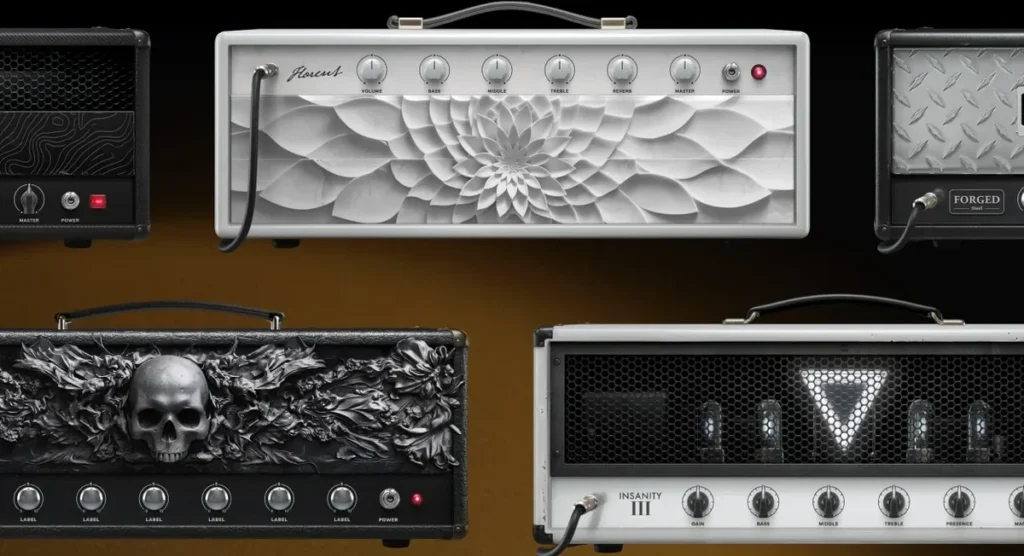
BIAS X is Positive Grid’s newest amp sim. Its older BIAS FX 2 is no longer for sale, and there’s a $99 upgrade price for eligible owners of older Positive Grid software. Its big idea is AI tone building. Type the sound you want into Text to Tone, or give Music to Tone an audio file, and it builds a rig for you.
Under the AI, it’s a full amp sim with clean, crunch, high-gain, acoustic and bass amps, cabinets (some made with Spectre Digital) and a long list of effects, so you can tweak whatever it builds. Both AI features need an internet connection. You also need a Positive Grid account and internet once to activate it, and after that it works offline.
Best for: getting close to a tone you hear in your head, fast.
10. Helix Stadium Native (Line 6)
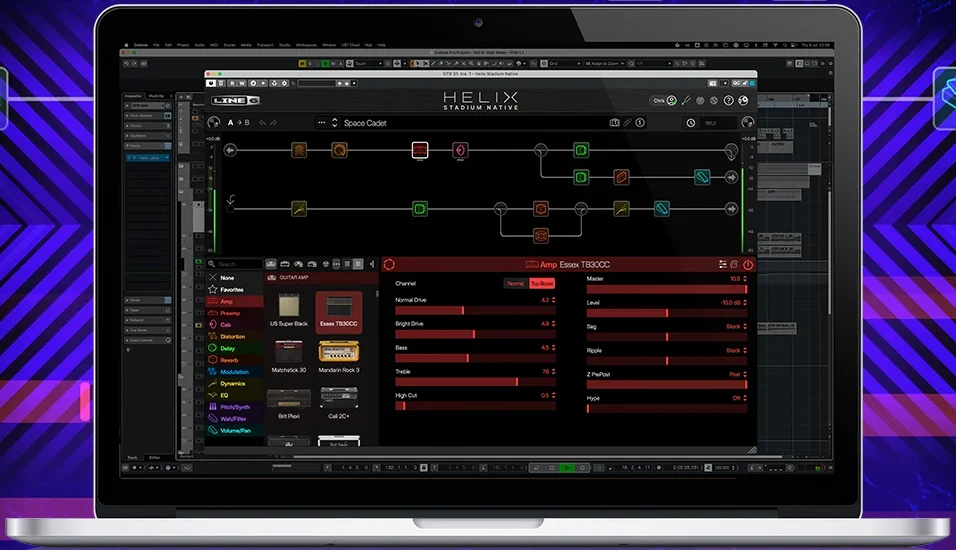
Helix Stadium Native is the plugin version of Line 6’s Helix Stadium amp and effects processor. The full license has 27 amps built with Line 6’s new Agoura modeling, plus 111 classic HX amps, 46 cabinets and 274 effects. It also loads cabinet IRs and Proxy clones, which are captures made with Line 6’s Proxy engine and Helix Stadium hardware.
At $399.99 it’s the most expensive plugin here, but there are two free ways in. The full version has a 15-day trial, and the free Helix Stadium Native Intro never runs out: 5 amps, including a bass amp, 5 cabinets and more than a dozen effects. Presets you build can also move to Helix Stadium hardware if you ever play live. The original Helix Native is now only sold to registered owners of Line 6’s older Helix and HX hardware.
Best for: the biggest choice of amps and effects, and the same tones on stage.
11. S-Gear (Scuffham Amps)
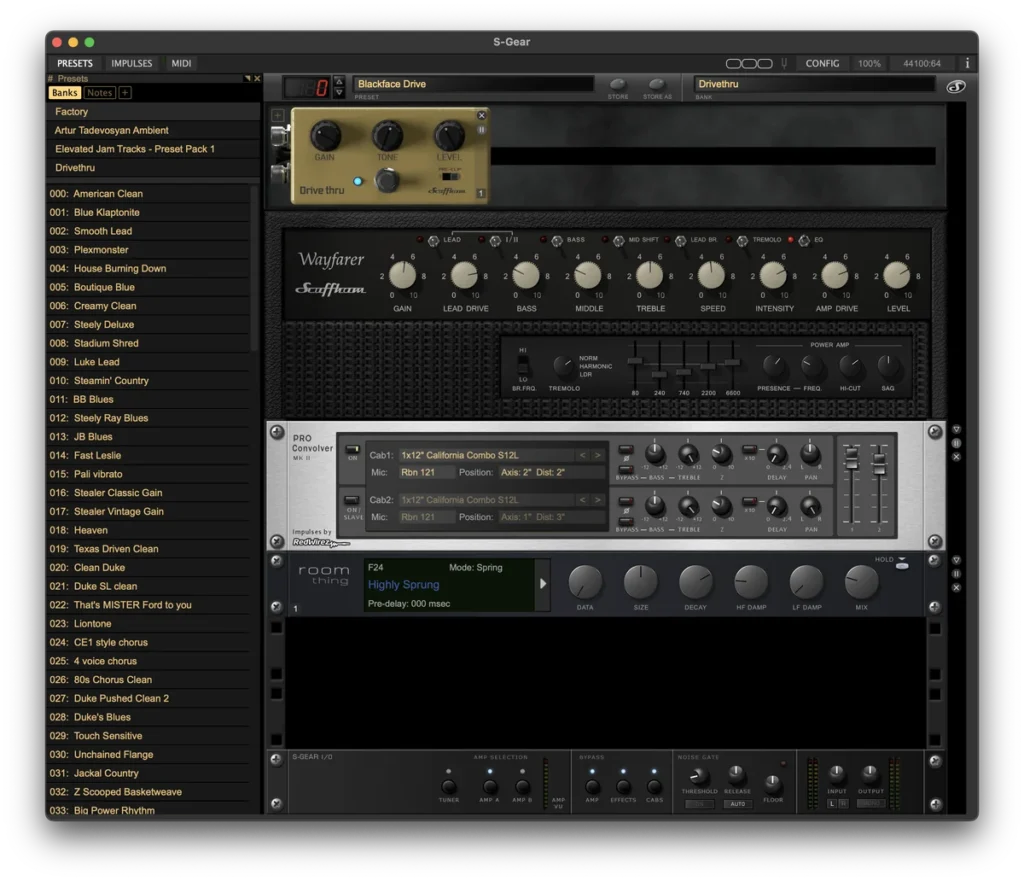
S-Gear is a small set of boutique-style amps, cabinets and effects designed by Mike Scuffham, a former product designer for Marshall. Scuffham’s idea is quality over quantity. You get a few amps built to sound like a great tube amp turned up loud and recorded with a good mic, instead of a giant list of models.
The amps run into a cabinet section that uses impulse responses, and a drag-and-drop rack adds delay, modulation and a studio reverb. The pedalboard has a wah, a compressor and a drive pedal, and version 3.2.2 dropped the need for FL Studio’s fixed-size buffer setting. It costs $129, and on October 21, 2026, Scuffham’s site had it for $119. The full download works as a 10-day trial, and one license runs on up to three computers.
Best for: a few amps that feel like a real tube amp.
12. GTR3 (Waves)
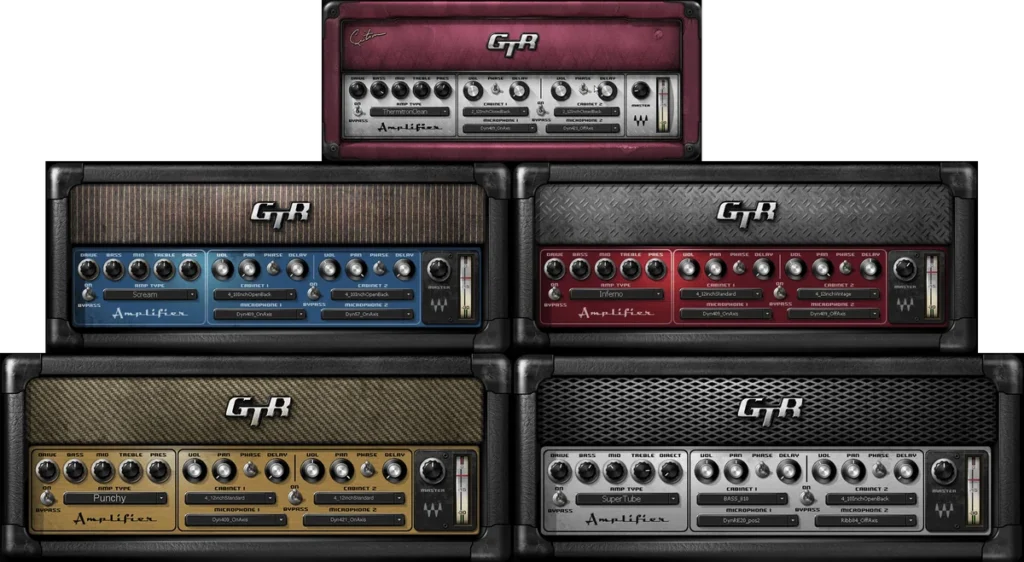
GTR3 came out in 2007, and Waves still sells it. You get 30 guitar amps and 7 bass amps, 16 guitar cabinets and 6 bass cabinets with 12 mic options, and 25 stomp-box effects based on Waves’ studio plugins. You can also stack two amps, in series or in parallel.
It comes as four plugins: Amps, Stomps, ToolRack and a tuner. It lists at $129, and on October 21, 2026, Waves’ site had it on sale for $34.99. It installs through Waves Central, Waves’ free installer app, and there’s a free demo.
Best for: lots of guitar and bass amps on a small budget.
13. Cerberus Bass Amp (Kuassa)
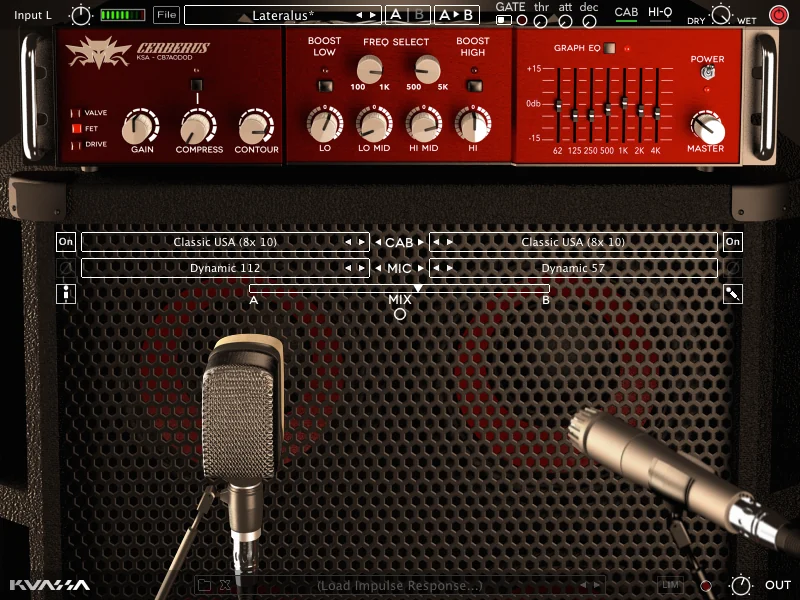
Playing bass? Cerberus Bass Amplifikation is an amp sim made just for bass, with three amps in one: a warm Valve amp, a punchy solid-state FET amp and a Drive amp for distorted bass. Around them you get a compressor, a contour control, a semi-parametric EQ, a 7-band graphic EQ, a noise gate and a limiter.
Three cabinets and six mics let you blend two mic positions, a Direct Mix control blends in the clean DI, and you can load your own IRs. It costs $49 plus VAT. The demo never runs out, but it adds a burst of noise every 40 seconds until you buy a license.
Best for: bass guitar, from clean and warm to distorted.
What are the best free amp sim plugins for beginners?
GENOME Intro and Guitar Rig 7 Player are the easiest free amp sims for beginners, because the cabinet is built in and there’s nothing else to set up. Amped Roots Free is the simplest for metal. Neural Amp Modeler sounds the most real, but you have to find captures and add a cabinet IR yourself.
Free doesn’t mean a toy anymore. These five were free on their makers’ sites when we checked on October 12, 2026, they run on Windows and Mac, and each one sounds miles better than a guitar plugged straight into your interface.
14. Neural Amp Modeler (Gateway)
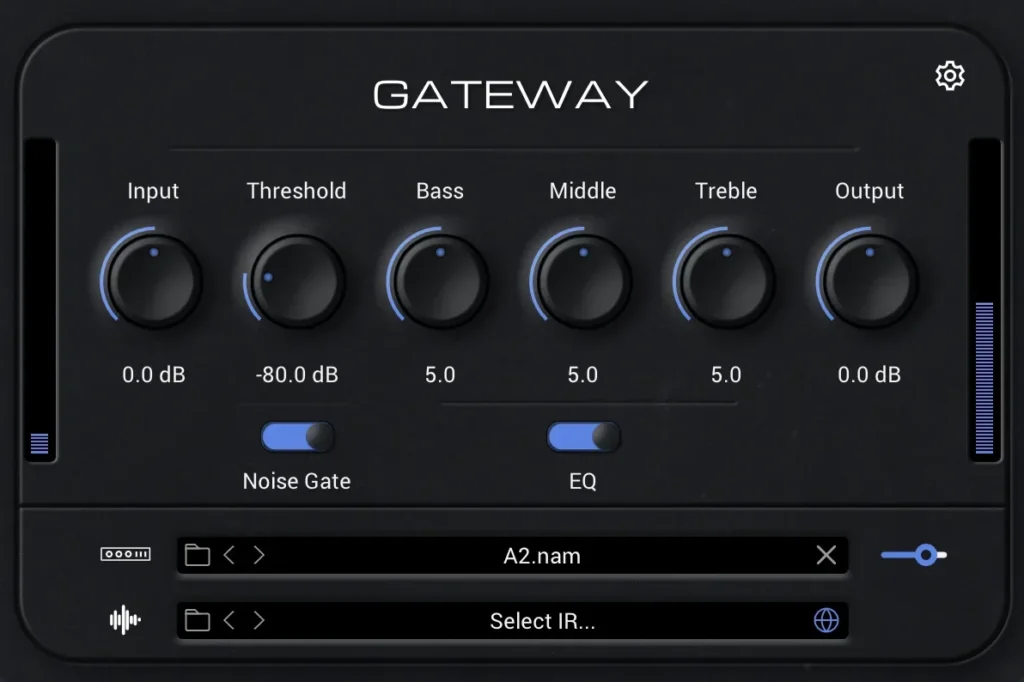
Neural Amp Modeler, or NAM, is the free, open-source project behind a huge library of amp captures. Its player plugin is now called Gateway, and you download it from the NAM website. The plugin itself is an empty amp with Input, Bass, Middle, Treble and Output knobs, a noise gate, a slot for a capture and a slot for a cabinet IR.
The sound comes from the captures, called models, which players make from their own amps and pedals and share on TONE3000, a community library the NAM site points to. That’s why NAM can sound so real: you’re playing a snapshot of an actual amp. The catch is the hunt. You’ll try a lot of captures before you find a favorite, and a capture of just the amp needs a cabinet IR in the second slot.
Best for: the most realistic free tone, if you don’t mind digging.
15. GENOME Intro (Two notes)
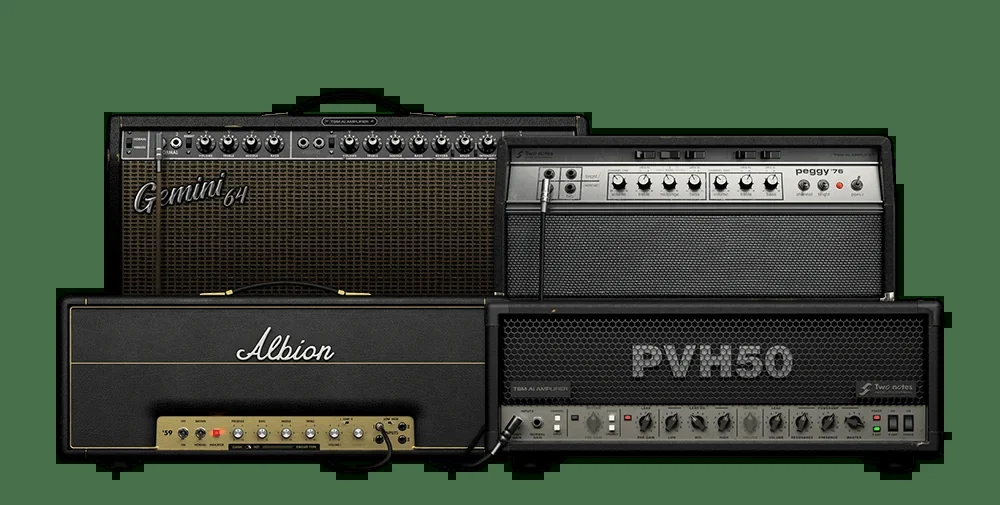
GENOME Intro is the free version of Two notes’ GENOME, and it’s the most complete free rig on this list. You get 4 amps (Albion ’59, Gemini ’64, Peggy ’76 and PVH50), 14 pedals, virtual cabinets with two mics you can place, and 4 studio effects. No extra IR needed.
It can also play captures. Its CODEX engine loads Neural Amp Modeler, AIDA-X and Proteus files, and it comes with more than 40 AI amp captures. So you get modeled amps and captured amps in one free plugin. The download is big, around 500 MB, and you need a free Two notes account.
Best for: one free plugin that does a bit of everything.
16. Emissary (STL Tones and Ignite Amps)
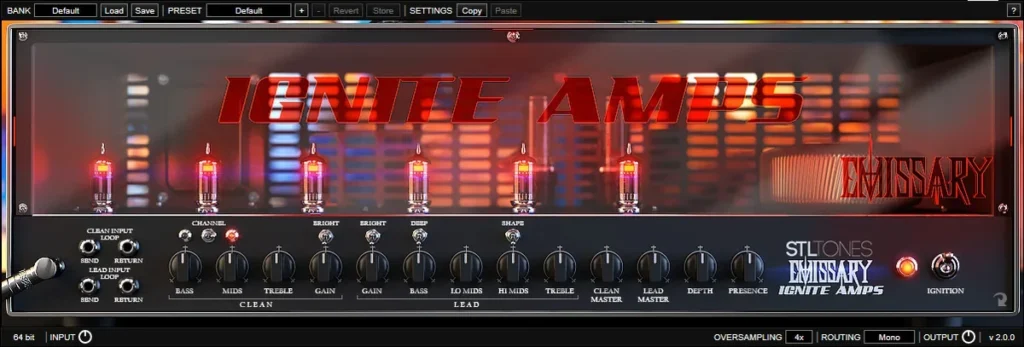
Emissary is a free high-gain amp from Ignite Amps. It models a custom two-channel tube head they built in 2014 for guitarist Ryan Huthnance. The clean and lead channels each have their own EQ, and you can switch the power tubes between EL34, 6L6GC and KT88, which changes how it breaks up.
Emissary is only the amp, so it needs a cabinet. It now comes in a free bundle from STL Tones together with NadIR, Ignite’s free cabinet loader that blends two IRs. Download the bundle, put NadIR right after Emissary on the same mixer track, and load a cabinet IR.
Best for: metal and hard rock on a $0 budget.
17. Amped Roots Free (ML Sound Lab)
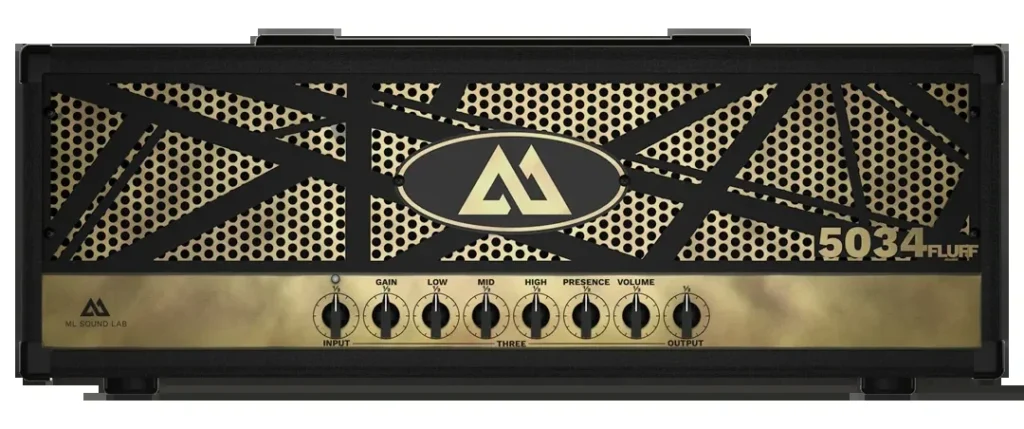
Amped Roots Free is a metal amp sim made with YouTuber Ryan “Fluff” Bruce. The free version gives you one amp, the 5034 Fluff, tuned for tight modern metal chugs without a pedal in front. Unlike Emissary, it comes with everything built in: a cabinet section with 3 cabinets and 4 mics you can move, a noise gate, compressor, drive, chorus, delay, reverb and a tuner.
You check out for EUR 0 in ML Sound Lab’s shop with your email address. The paid full version adds three more amps.
Best for: heavy rhythm guitars with zero setup.
18. Guitar Rig 7 Player (Native Instruments)
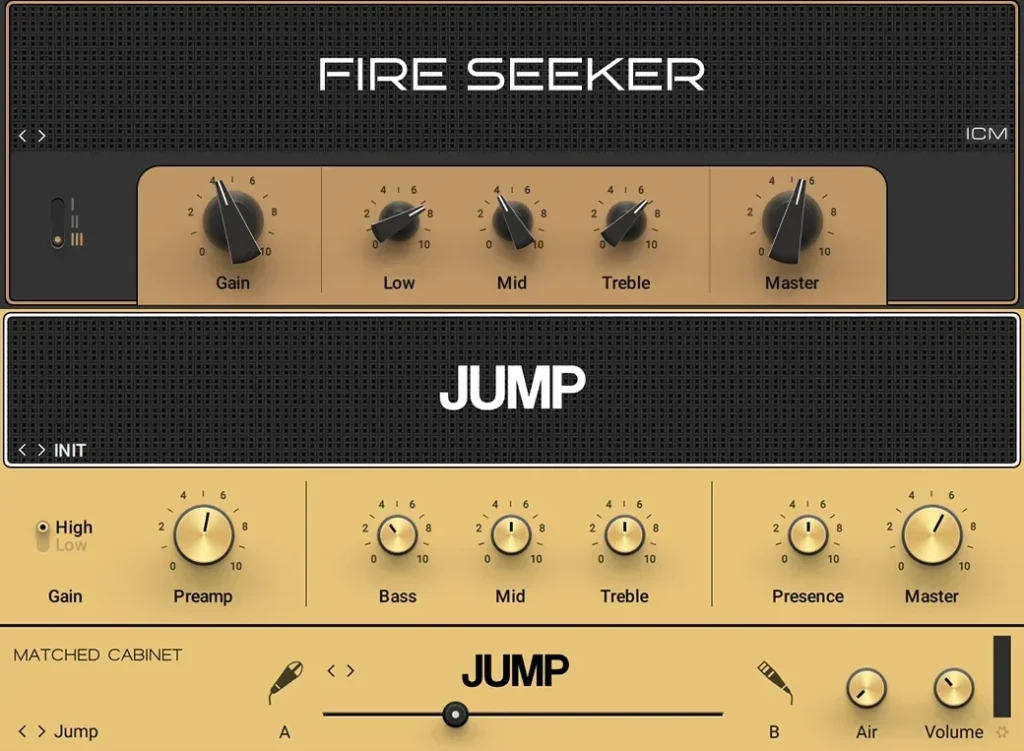
Guitar Rig 7 Player is the free, cut-down version of Guitar Rig 7 Pro. You get two amps with matched cabinets, 26 effects and tools, and 60 presets. One amp, Fire Seeker, is a machine-learning model of what Native Instruments calls a hand-wired American boutique amp. The other, Jump, is made for smooth leads.
You install it through Native Access, Native Instruments’ free installer app. Like the Pro version, it isn’t only for guitar, so try it on drums, synths and vocals too.
Best for: a clean, simple free rig with effects that are useful on everything.
IK Multimedia’s AmpliTube 5 CS is free too: about 40 starter models, from pedals and amps to cabinets, mics and rooms, and you can buy more gear one piece at a time. It installs through IK Product Manager and needs an internet connection for its Custom Shop. See AmpliTube 5 CS.
Which amp sim sounds the most realistic?
In 2026, the most realistic tones come from two places. The first is captures. NAM and TONEX learn the sound of one real amp from recordings, so a good capture can sound very close to the amp it came from. The second is plugins that focus on a few amps done in great detail instead of hundreds, like Neural DSP’s Archetype series.
But realism isn’t only about the plugin. The cabinet IR, the level going in and the way you play matter just as much. A sim that sounds fake on its own often sits perfectly in a song once the gain comes down and the cabinet fits. Judge every amp sim in a mix with drums and bass, never alone.
So are they as good as a real amp? For home recording, the best ones get very close, and they’re quiet, affordable and saved with your song. A real amp still feels different in the room, which is why some players keep one for the stage.
How to use an amp sim in FL Studio
Here’s the whole setup, from the cable to the finished take. The screenshots come from Mix Elite’s vocal recording tutorial, presented by Max, the founder of Mix Elite, because recording a guitar works exactly the same way. Only the source changes.
Step 1: Plug your guitar into an audio interface
The headphone or mic jack on your computer isn’t built for a guitar. You need an audio interface, a small box that connects to your computer by USB and turns sound into data. Plug the guitar into the input marked Instrument, Inst or Hi-Z, or flip that input’s switch. It’s made for the weak signal that comes from guitar pickups. Don’t have one yet? Here are the best audio interfaces for every budget. Recording bass? It works the same way, and our guide to recording bass guitar covers the rest.
Set the input level while you play your loudest part. The level light should stay green and never turn red, because clipping at the input can’t be fixed later.
Step 2: Choose your interface’s driver and a low buffer
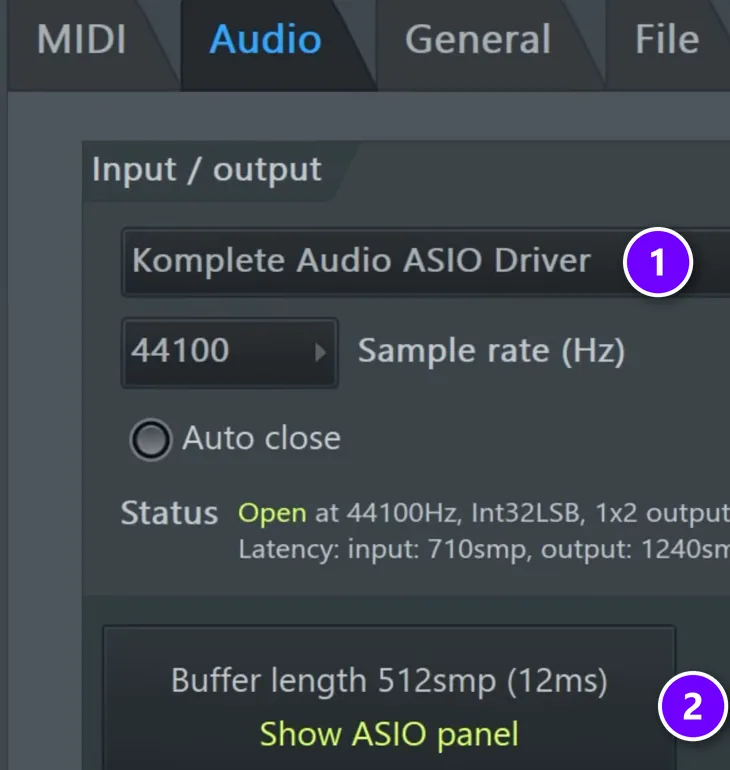
Press F10 to open the settings and click Audio. Under Device, pick your interface’s own ASIO driver (1). In the screenshot, it’s the driver for the interface used in the video. Image-Line’s manual recommends the driver made for your interface over the general FL Studio ASIO driver. Then lower the Buffer length (2). Show ASIO panel opens your interface’s own buffer setting.
The buffer decides your latency, the small delay between hitting a string and hearing it. Max’s advice is to “make sure that the buffer length is set to the lowest amount.” Go as low as you can without clicks or crackles. In a big project, Max warns, “you probably won’t be able to achieve very low latency,” so record your guitar in a new, empty project and bring the audio back later.
Step 3: Load the amp sim on a mixer track
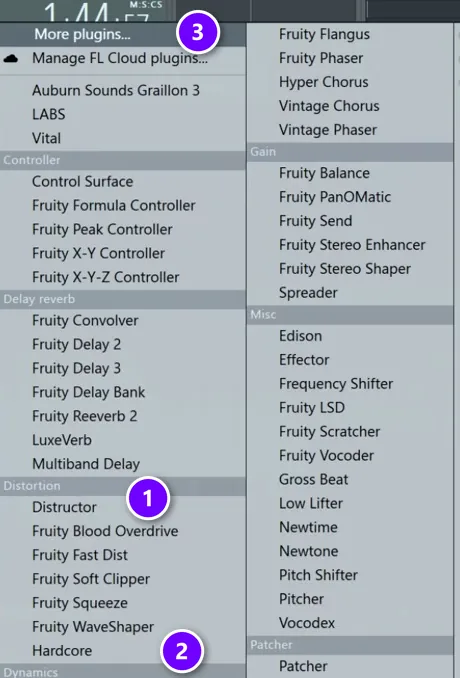
Press F9 to open the Mixer and pick an empty track for your guitar. Click an empty effect slot, or right-click one and hover over Select. FL Studio’s own amp sims sit under Distortion: Distructor (1) and Hardcore (2). Plugins you installed yourself, like Gateway or Guitar Rig, are under More plugins… (3).
If a new plugin doesn’t show up, follow our guide on how to install VST plugins in FL Studio. It’s usually a missing VST3 folder or a plugin scan you haven’t run yet.
Step 4: Pick the input and record the clean signal
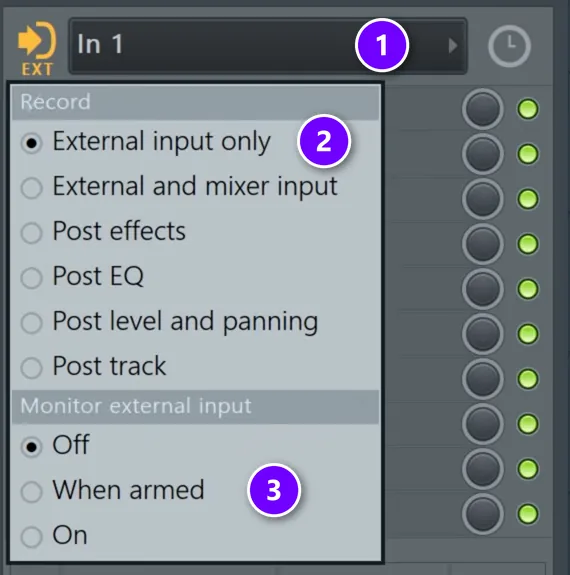
At the top of the same mixer track’s effects list, set the input to your guitar (1). Pick the mono input your guitar is plugged into, like In 1. If FL Studio asks whether to switch to External input only, click Yes. You can also set it yourself with the small EXT button next to the input (2). Then set Monitor external input to When armed (3), so you hear yourself whenever the track is ready to record.
External input only is the setting that makes amp sims so easy. Image-Line’s manual says the audio is recorded straight from the interface, before any effects, and the new clip plays back through the same mixer track. You hear the amp sim the whole time, but the file you record is the clean DI.
Vocals get recorded the same way, and in the tutorial Max says “99% of the time you will want to record dry vocals.” Dry means no effects baked into the file. For guitar, that’s a big deal. You can switch amps, turn down the gain or try a different plugin next month, and you never have to play the part again.
Step 5: Arm the track and hit record
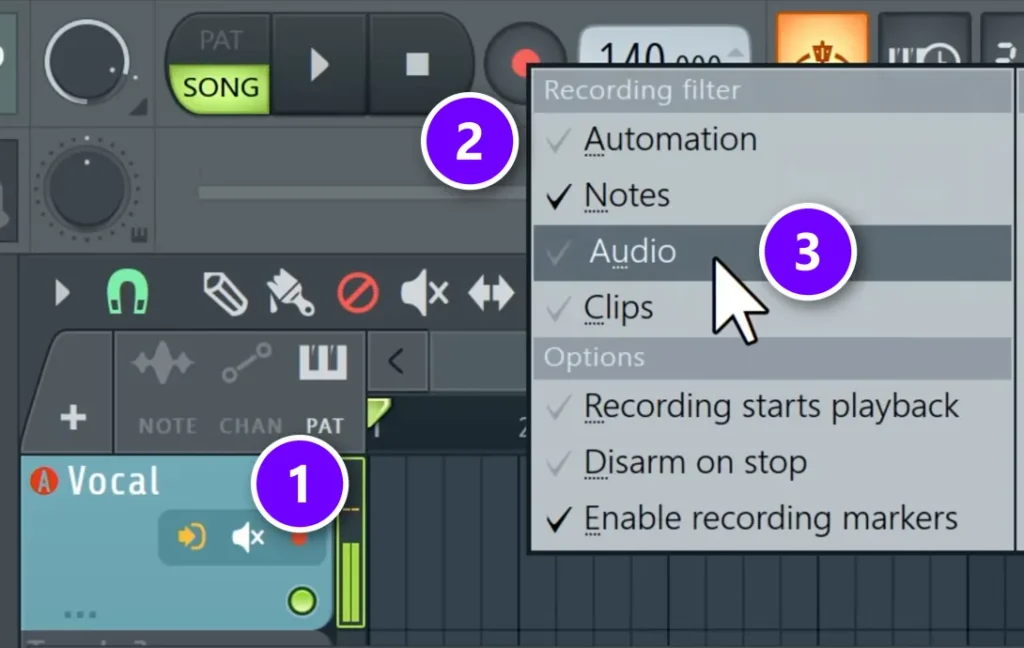
Arm the track with its record button (1); in the Playlist, it’s the small red dot on the track. Then right-click the big record button at the top (2) and make sure Audio (3) is ticked. Click record, press play and play your part.
Messed up? Just play it again. You don’t have to delete anything. New takes stack on top of each other, so you can cut together the best parts afterwards.
In what order should you chain an amp sim, IR and effects?
Copy a real rig: pedals like a noise gate or an overdrive first, then the amp, then one cabinet IR, then studio effects like EQ, delay and reverb. If your amp sim already has its cabinet switched on, don’t add a second IR, because two cabinets in a row dull the tone.
On the guitar’s mixer track in FL Studio, the slots run from top to bottom like this:
- Pedals: a noise gate or a drive in the first slot, or the pedals built into your amp sim.
- The amp sim: in the next slot. If you’ll use your own IR, switch off its built-in cabinet.
- One cabinet IR: in an IR loader right after the amp, like NadIR from the free Emissary bundle, or the IR slot in Neural Amp Modeler’s Gateway.
- EQ and compression: roll off the deep lows and soften the very top, as in the fizz fixes below.
- Delay and reverb: last, just as you’d add them after a real amp and cabinet.
How to make any amp sim sound less fizzy
Fizz is that thin, buzzy hiss on top of a distorted guitar, and it’s a big reason amp sims can sound fake. These fixes work on every plugin in this list:
- Turn the gain down. Less gain often sounds heavier in a mix, because the notes stay clear.
- Swap the cabinet before you swap the amp. The speaker cabinet or IR decides how much harsh top end gets through.
- Move the mic. Many sims let you move the virtual mic. Away from the center of the speaker sounds darker and softer.
- Cut the extremes with an EQ. Put an EQ after the amp sim, roll off the deep low end that fights your kick and bass, and soften the very top.
- Check the input level. A signal that’s too hot going in makes everything harsher.
- Record the part twice. Pan one take left and the other right for a wide, full rock sound.
- Listen in the song. A guitar that sounds a little thin alone often fits perfectly with drums and bass.
The gain on an amp is just distortion pushed hard. If you want gentle warmth on other sounds, like vocals, drums or synths, our guide to the best saturation plugins is the better place to start.
Which amp sim should you get?
Still not sure? Match the plugin to what you need right now. You can always add more later.
If you don’t play guitar at all, you want a guitar VST instrument instead, which plays guitar sounds from MIDI notes. Here are the best guitar VSTs.
DAY 5 OF THE 7-DAY MUSIC PRODUCER COURSE
Your amp sim is ready. Day 5 gets your recording setup right.
Day 5 of the 7-Day course covers recording: the best recording setup, setting up your room and the best recording equipment for every budget, then recording and mixing vocals. It’s taught in FL Studio (the free trial works), about 45 minutes a day, and on day 7 a pro gives you feedback on your finished track. It’s $27, and you get 60 days to decide if it was worth it.
Frequently asked questions
What is the best VST amp simulator?
For the most realistic tone, start with Neural DSP’s Archetype plugins or IK Multimedia’s TONEX 2. If you want the most amps, cabinets and pedals in one plugin, get AmpliTube 5 or Guitar Rig 7 Pro. On a $0 budget, try Neural Amp Modeler, GENOME Intro or Emissary, and if you make music in FL Studio, test the built-in Distructor first. All of these except Distructor run as VST3 plugins on Windows and Mac. For bass guitar, get Kuassa’s Cerberus Bass Amp, which is built just for bass.
What is the best free amp sim for beginners?
GENOME Intro and Guitar Rig 7 Player are the easiest, because the cabinet is built in and nothing else needs setting up. Amped Roots Free is the simplest for metal. Neural Amp Modeler sounds the most real, but you’ll hunt for captures and add a cabinet IR yourself. In FL Studio, Distructor is already installed.
Why does my guitar sound thin and buzzy straight into my interface?
Because a direct guitar signal has no amp and no speaker cabinet, and the cabinet is what tames the harsh top end. Plug into the Instrument or Hi-Z input, load an amp sim with its cabinet switched on (or add a cabinet IR after an amp-only capture), and keep the input level out of the red.
What order do the amp sim, cabinet IR and effects go in?
Pedals such as a noise gate or an overdrive first, then the amp sim, then one cabinet IR, then EQ, delay and reverb. If the amp sim’s own cabinet is on, skip the extra IR, because two cabinets in a row dull the tone.
Is there a free amp simulator in FL Studio?
Yes. Distructor comes with every FL Studio edition, and its AMP/CAB module simulates amp and speaker cabinet combinations. Hardcore, a guitar pedalboard with cabinet models, is included in Signature Bundle and up. You can also load free amp sims as VST3 plugins in FL Studio, such as Neural Amp Modeler’s Gateway, Emissary, Amped Roots Free and Guitar Rig 7 Player.





