



“…he has to understand how to handle all kinds of different instruments together, blend them, and balance and mix them.”
To balance a mix, set the volumes first: loop the busiest section, turn down anything that’s too loud, keep the drums and the main sound loudest, and mute-test every element. Then pan sounds apart, check your tonal balance with an analyzer or a reference track, and listen at quiet, medium and loud volumes.
Learning how to balance a mix matters because every sound in your song can be great on its own and the mix can still feel like a crowded room where everyone talks at once. That isn’t a plugin problem; it’s a balance problem, and it’s the first thing a mix has to get right. This guide walks through it step by step in FL Studio, with screenshots from Mix Elite’s videos. You’ll also learn why a mix can sound crowded even after you turn things down, how to make a vocal stand out and how to check the tonal balance of the whole song.
Table of Contents
What is balance in music (and in a mix)?

Balance in music is how loud each part is compared to the others, so every sound can be heard and the most important part leads. In a band or an orchestra, the players balance themselves by playing louder or softer. In a recording, you set it with the volume faders, panning and EQ of your mix.
Max, the founder of Mix Elite, sums it up in Mix Elite’s free 4.5-hour FL Studio course: “Mixing is about managing focus. That means whatever is the loudest, most in the front, is in the focus, and we cannot have everything in the focus, right. Volume is what drives the focus.”
When producers talk about balance, they mean three things:
- Volume balance: the level of each sound. This is most of the job.
- Left-right balance: where each sound sits between the left and right speaker, set with panning.
- Tonal balance: how the lows, mids and highs of the whole song compare. You shape it with EQ.
The Holy Quad, Mix Elite’s mixing formula, has four steps: volume, EQ, dynamics and space. Volume comes first for a reason. If your production is good, you may not need any effects at all once the volumes are right.
What does audio balance mean?
Audio balance usually means one of two things. On a stereo, phone or computer, the balance control shifts the sound between the left and right speakers. In studio gear, balanced audio is a cable type, usually XLR or TRS, that cancels hum and noise on long cable runs. In a mix, balance means the levels of all the parts.
What is a static mix?
A static mix is your first balance: only faders and pan knobs, set once for the whole song, before any effects or automation. Static means nothing moves. You set the levels, and they stay put.
Get it right and everything after it gets easier. Get it wrong and you end up using EQ and compression to fix what is really a volume problem. So get the static mix close first, add effects next, and add automation last, when you want sections to rise and fall.
Prep the session before you start. Name your tracks, color-code them and delete parts you aren’t using. Mix Elite’s course asks every student to color-code, because it makes a big project much less overwhelming.
How to balance a mix in FL Studio, step by step
Start with a static mix: no effects, only volume and panning. Loop the busiest section, turn down whatever is too loud, make the drums and the main sound the loudest parts, and mute-test every element. Then pan the supporting sounds away from the center, and keep the kick, bass and lead in the middle.
Here is the volume method from Mix Elite’s free course, where a simple EDM track gets balanced. The same steps work for trap, hip-hop, house or pop.
Step 1: Empty the Master and keep the volume moderate
FL Studio’s default template puts a limiter on the Master track. A limiter squashes the loudest moments, so it hides the real balance and can trick you into pushing sounds too hard. So keep the Master track completely empty while you mix, especially with no limiter at the end.
Keep your speakers or headphones at a moderate level, too. Loud listening tires your ears fast, and long, loud sessions can damage your hearing.
Step 2: Loop the part where everything plays
Balance the busiest section first, usually the drop or the chorus. If the mix works when every sound plays at once, the quieter parts are easy. Play that section on repeat while you work.
Step 3: Turn down what’s too loud first
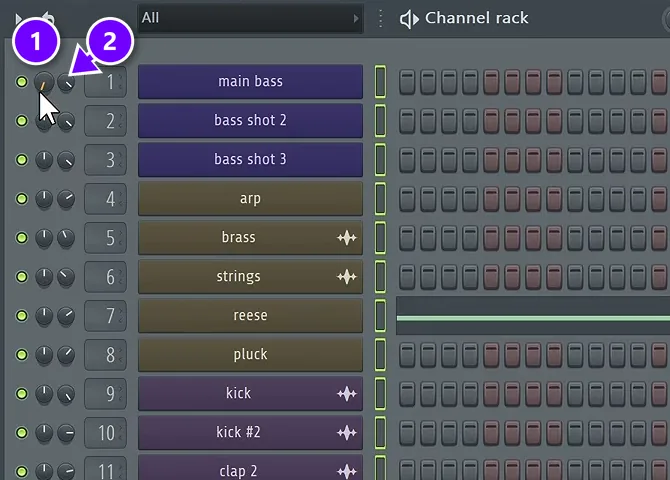
Max’s first move is always down, not up: “I always start with attenuating sounds that feel way too loud.” Attenuate just means turn down. In the course example, the strings, the brass, the crash and the effects were all too loud for background sounds, so they came down first.
Set these rough levels in the Channel rack, where every channel has a pan knob (1) and a volume knob (2). While you turn a knob, FL Studio shows the new level in dB at the top left. Set volume here while you produce, then fine-tune on the mixer later.
Step 4: Put the drums and the main sound on top
Decide what leads. Max’s rule: “The most important parts are always your drums and your main sound, or like main lead, whatever makes your track your track.” In the EDM example that’s the kick and the bass, so the kick goes up a little. In a song with vocals, the lead vocal sits on top with the drums.
Everything else supports those parts. Pads, strings and effects can sit lower than you’d expect and still fill out the track.
Step 5: Close your eyes and do the mute test
Now stop looking at the screen. Close your eyes and listen for the one thing that bothers you most in the track. Fix it, then listen again.
Then mute each element, one at a time. If the track sounds better without it, delete it. It’s hard. You get attached to a sound after hours of work, but sometimes it has to go.
Step 6: Fine-tune with the mixer faders
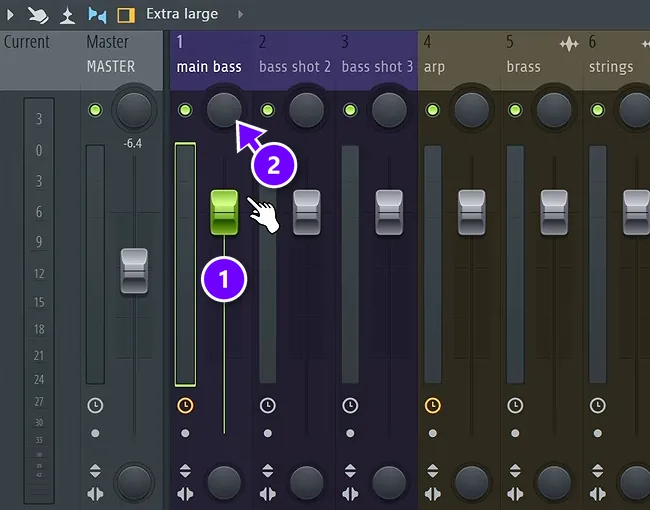
Give every channel its own mixer track: select them in the Channel rack and press Ctrl + L. Then open the Mixer with F9. Each track has a volume fader (1) and a pan knob (2), and both work separately from the knobs in the Channel rack.
Use the faders for small moves while the busy section loops. Volumes shift again after EQ and compression, so re-check the balance after every big step. Volume is still the biggest factor in how your mix sounds.
Hover over a mixer track and use Shift + scroll to move it left or right. Keep sounds that belong together side by side, like all your drums, so the mix is easier to read.
How to gain stage so your balance holds
Gain staging means feeding each plugin a healthy level, not too quiet and not too loud. It starts to matter once you add compressors. Beginners often set their channel volumes too low, so they either over-compress or skip compression altogether.
The fix keeps the balance you already set. Turn the sound up on its channel volume knob, then turn its mixer fader down by the same amount. The compressor now gets a strong signal to work with, and the sound plays just as loud in the mix as before. Our compressor guide shows what to do next.
How to use panning to balance a mix
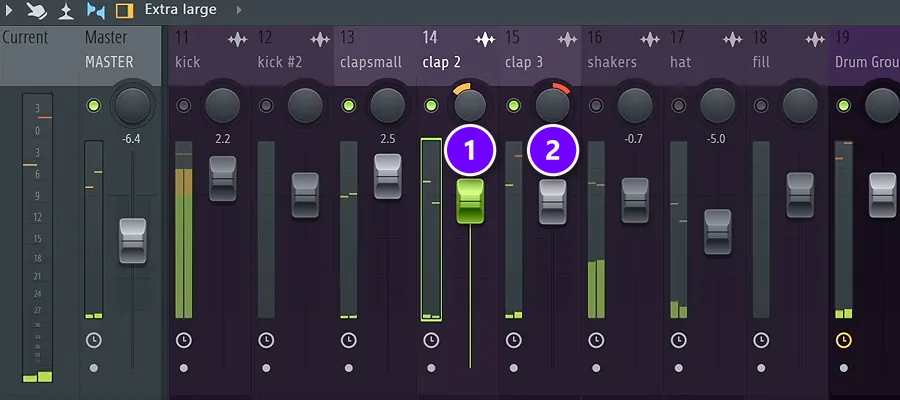
Panning moves a sound left or right. It gives each part its own spot, so sounds stop piling up in the middle. A common starting point is to keep the kick, the bass and the lead vocal in the center and spread the supporting sounds around them.
Pan drums with small moves. In the course example, the clap is built from three layers, so one layer goes slightly left (1) and another slightly right (2). The shaker sits about 10% left and the hi-hat about 10% right. Watch for samples that are already panned, so you don’t push them even further out.
Each mixer track also has a stereo separation knob. Turned one way it makes a sound wider; turned the other way it pulls it toward mono, which is how the course mostly uses it. Check your levels again after panning, because a sound can feel quieter once it moves off center.
Why does my mix sound muddy and crowded even when I turn things down?
Because the problem isn’t volume. When several sounds share the same frequencies, they cover each other up at any level, so turning them down only makes the whole mix quieter. Give each sound its own space instead: low-cut what doesn’t need bass, cut the range where a more important sound lives, and delete parts that double each other.
That covering-up is called frequency masking. It’s about density as much as loudness: a few quiet sounds in the same range still blur into one. These five fixes come from Mix Elite’s low-end and frequency masking videos:
- Low-cut everything that isn’t bass. Remove everything under about 250 Hz from every part except the kick and the bass. The mix gets clearer, and you can even turn it up without making it muddier.
- Low-cut your reverbs. Reverb quietly fills the low end, so cut it to at least 800 Hz.
- Carve room for the lead. Boost the most important part where it shines and cut that range in the parts that fight it. In Mix Elite’s example, the pluck melody gets a boost around 4 kHz and the chords get a cut there.
- Take the highs out of the bass. In a busy track, the bass doesn’t need much top end, so a high cut frees room for everything above it. You can always bring the highs back.
- Cut parts that double each other. Mute-test every element. If two parts do the same job in the same range, keep the better one.
How to check the tonal balance of your mix
A mix can have good levels and still sound boomy, harsh or thin, because its lows, mids and highs are out of balance. Your ears get used to that fast. These checks catch it.
Use a tonal balance meter or a reference track
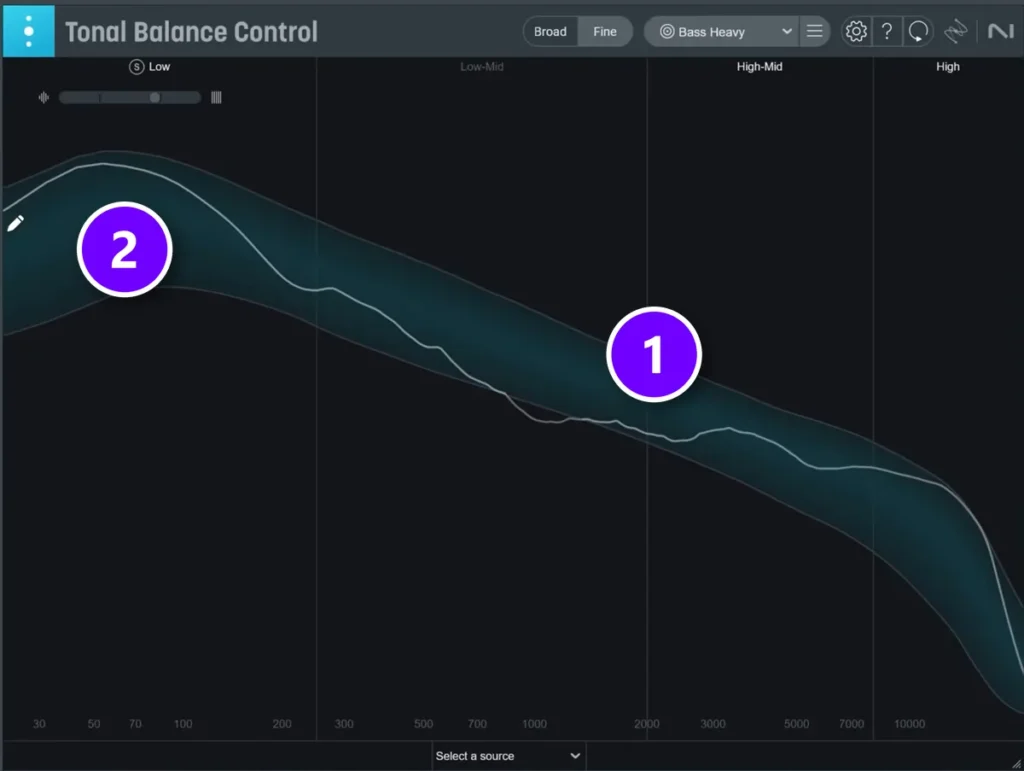
In Mix Elite’s EQ video, the whole mix gets checked with iZotope’s Tonal Balance Control, a paid plugin, on the Master. The white line (1) is your mix. The blue band (2) shows where professional tracks in the style you pick usually sit; here the target is Bass Heavy. The mix sits well inside the band.
The video’s warning about the mids is worth remembering. The most common mistake is a mix without enough mids, because bass and highs sound so exciting. A free analyzer such as Voxengo’s SPAN, used in Mix Elite’s vocal video, lets you compare the shape of your mix with a song you like. A reference track like that is one of the fastest ways to get better.
Try the Human Hearing Balance preset
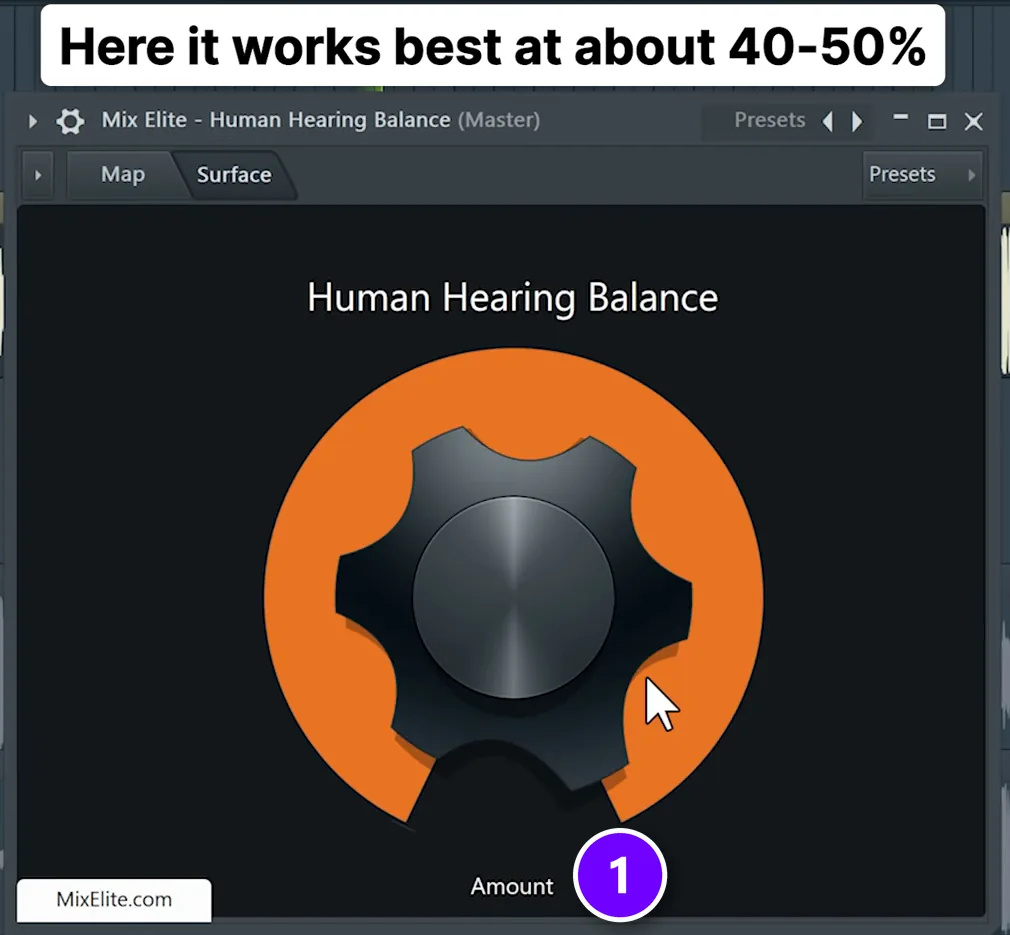
Our ears don’t hear all frequencies equally. Low notes need much more volume to sound as loud as high ones, and the ear is most sensitive in the high mids. The graph of those differences is called the equal-loudness curve.
Mix Elite turned that curve into a free preset for FL Studio’s Patcher, with an Ableton version, called Human Hearing Balance. It makes the frequencies your ears are most sensitive to a little quieter, which evens out the mix. Put it on the Master and set Amount (1). The on-screen tip in the video says it works best at about 40-50%.
Treat it as a check, not a fix. As the video puts it: “This is a quick mixing tool that can help you get better in some mixes. It’s not a way to get a better mix.” If your mix sounds better with it, you can leave it on. If it doesn’t, your mix is probably already well balanced. Here’s the full video:
Check at three volumes and on other speakers
Because of that same curve, a mix sounds different at different volumes. Check yours at three: club-level loud, normal medium and late-night quiet. Then play the track on different headphones, laptops, cars and Bluetooth speakers before calling it done.
The Human Hearing Balance video also pushes back on the advice to just trust your ears: “If it sounds good right now it doesn’t mean that it will sound good everywhere.” Your ears are fine. They just haven’t heard the mix everywhere yet.
How do you use panning and EQ so the vocal and melody stand out?
Keep the lead vocal or main melody in the center, pan the supporting parts like chords, pads and percussion to the sides, then EQ those parts out of the lead’s way. If they still fight, duck the instruments a little only while the vocal plays, with a sidechain.
Panning clears the middle, and EQ clears the frequencies. You need both, because a part panned to the side still plays in the same frequencies, and on a mono speaker it’s right back in the middle. Mix Elite’s video on six vocal mixing mistakes names the most common one: a vocal that doesn’t sit in the beat. Three moves fix it:
- Pan the support, not the lead. The kick, the bass and the lead vocal stay centered. Spread chords, pads and percussion left and right, with small moves at first.
- EQ the support out of the way. Find the range where the vocal or melody lives and cut it a little in the parts that fight it, the same carving trick as above.
- Duck only while the vocal sings. Send the vocal to the instrument bus as a sidechain. A compressor in sidechain mode works, and a plugin like Trackspacer, set to about 8 to 20%, dips only the frequencies the vocal uses.
How to balance vocals in a mix
Vocals are the hardest part to balance, because every microphone, room and singer changes the sound. Balance starts at the recording. Stay about a fist’s width from the mic, use a pop filter and keep the same distance the whole time. The closer you get, the more low end the mic picks up.
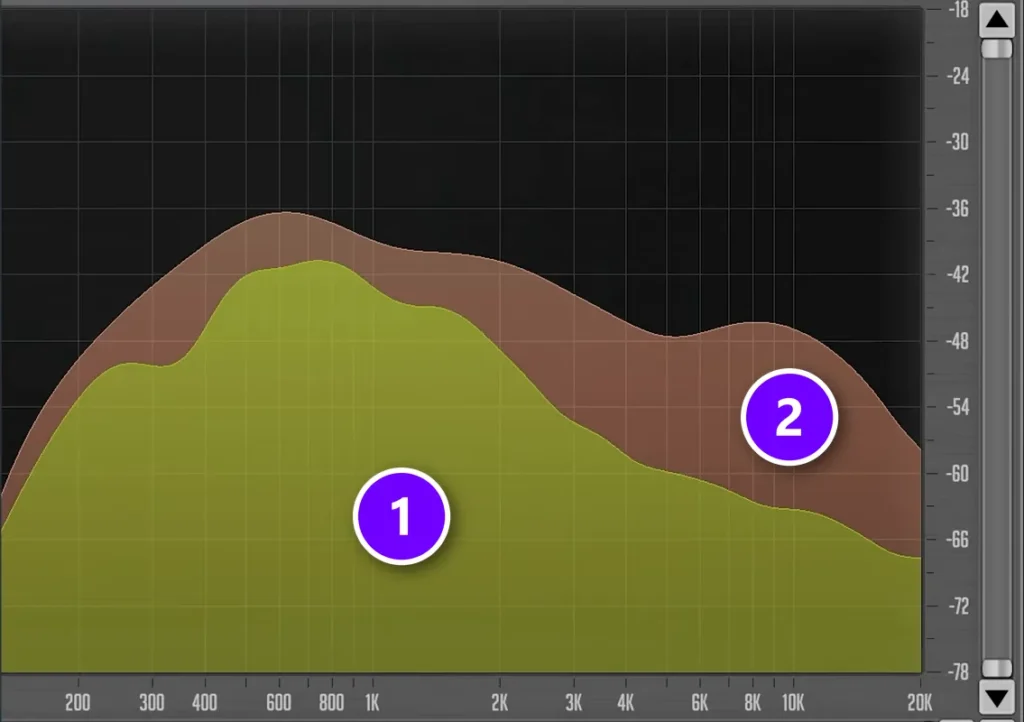
To EQ the vocal, Mix Elite’s vocal video compares it with a reference made for the job: a Perfect Balance Noise. It’s pink noise shaped to match the average tone of dozens of studio-quality acapellas from hit songs. Here’s how to use it:
- Put an EQ on the vocal and a compressor after it. For this check, set the ratio to about 8:1 and shave off the peaks, because the noise was modeled on compressed vocals.
- Load the balance noise on its own mixer track.
- Put SPAN, a free analyzer, on the Master. Feed the vocal into one input and the noise into the other, and show the noise as the underlay.
- Switch SPAN to an average spectrum mode with about half-octave smoothing, and match the level of the noise to the vocal.
- EQ the vocal until its curve (1) follows the noise (2) on average. In the video’s example that meant a low cut, a big lift in the highs and a small dip around 600 to 800 Hz.
Then fit the vocal to the beat. The noise is only an average, so don’t chase a perfect match. Check the vocal with the instrumental playing. The video walks through the whole method:
For the full vocal chain, from EQ to reverb, see our guide on how to mix vocals.
Mix balance mistakes to avoid
- Turning everything up. You run out of room and the Master clips. Turn down instead.
- Balancing a quiet section. Start where everything plays, or the busy part falls apart.
- A limiter on the Master. It hides the real balance. Keep the Master empty while you mix.
- Too many sounds. Over-producing is a common beginner mistake. More elements, more mess. Mute-test and cut.
- Mixing loud for hours. Your ears tire and the balance drifts. Take breaks and keep the volume moderate.
- Trusting one pair of headphones. Check on other speakers and at other volumes.
- Fixing volume with EQ. If a sound is simply too loud, move the fader first.
The kick and the bass need extra care, because they share the low end. Our guide on how to mix kick and 808 covers that balance, and our list of beginner mixing mistakes has more traps to avoid. Once your levels work, EQ is the next step; see how to use EQ in mixing.
Tonight, open your latest beat and loop its busiest eight bars. Spend ten minutes only turning things down. Let the drums and your main sound lead. You’ll hear how much of a good mix is simply volume.
DAY 4 OF THE 7-DAY MUSIC PRODUCER COURSE
Balance is where Day 4 starts. Get the whole mix.
Day 4 of the 7-Day course is all about mixing: the simple Holy-Quad mixing formula, the volume mistake people make in the first 5 minutes of every mix, and the “Mix Murdering” mistakes most beginners make. You also get a mixing checklist and a mixing and production template. It’s taught in FL Studio (the free trial works), about 45 minutes a day, and on day 7 a pro gives you feedback on your finished track. It’s $27, and you get 60 days to decide if it was worth it.
Frequently asked questions
Where do I start when balancing a mix?
Start with a static mix: no effects, just volume and panning. Loop the busiest section, turn down whatever is too loud, and make the drums and the main sound the loudest parts. Then mute-test every element, pan supporting sounds off-center, and keep the kick, bass and lead vocal in the middle.
Why does my mix sound muddy even when I turn things down?
Because sounds that share the same frequencies cover each other at any volume. Low-cut everything that doesn’t need bass below about 250 Hz, low-cut your reverbs to at least 800 Hz, and cut a little of the lead’s range in the parts that fight it. Then delete parts that double each other.
What should be the loudest in a mix?
Usually the drums and the main sound, meaning the lead vocal, the lead synth or whatever makes the track recognizable. The rule in Mix Elite’s course is that the drums and your main sound come first and everything else supports them. In its EDM example that meant the kick and the bass. Pads, strings and effects sit lower.
How do you make vocals stand out in a mix?
Keep the lead vocal centered and pan chords, pads and percussion to the sides. Cut a little of the vocal’s range in the instruments that fight it, and add a sidechain so the instrument bus dips slightly whenever the vocal plays. Then check the vocal with the whole beat playing, not soloed.
What does audio balance mean?
It depends on where you see it. A balance control shifts sound between the left and right speakers. Balanced audio is a cable type, usually XLR or TRS, that cancels hum on long runs. In mixing, balance means the level of each sound, where it’s panned, and how the lows, mids and highs of the song compare.





