



“MIDI 1.0 has been around for 30 years and it still works! You connect an instrument that was built back then into one built today and it works.”
MIDI stands for Musical Instrument Digital Interface. It’s the standard language, first shown in 1983, that lets keyboards, computers and music apps talk to each other. MIDI carries no sound: it sends instructions like which note to play, how hard and for how long, and an instrument or plugin turns them into sound.
Plug in a new MIDI keyboard, press a key, and you often hear nothing at all. No piano, no beep, nothing. So what is MIDI, if it isn’t sound?
Once that clicks, MIDI turns into one of the most useful ideas in music production. You can record a part once and change almost everything about it later: the instrument, the notes, the timing and how hard each note hits. This guide explains how MIDI works in plain words, what a MIDI file is, which gear uses it, and how to use it in FL Studio, with screenshots from Mix Elite’s FL Studio videos.
Table of Contents
What is MIDI in music?
In music production, MIDI is the note data behind almost every beat: the notes you play on a keyboard, click into a piano roll or load from a MIDI file. Your DAW stores which note, when and how hard, and a synth or plugin plays it. Change the instrument, and the same notes play a new sound.
Here’s what happens under the hood. When you press a key on a MIDI keyboard, it doesn’t send a sound. It sends a short message that says, more or less: play this note, this hard, starting now. When you let go, it sends another one: stop that note.
Something else has to turn those messages into sound. That can be a hardware synth, a drum machine or, most often today, a plugin inside your DAW (the music program on your computer, like FL Studio). That’s why a keyboard on its own stays silent. It’s the remote control, not the TV.
It’s also why you don’t need real instruments to make music. As Max, the founder of Mix Elite, says in Mix Elite’s free 4.5-hour FL Studio course: “Every instrument you can think of and more you can find in the form of a virtual instrument.”
What does MIDI stand for?
MIDI stands for Musical Instrument Digital Interface. An interface is just a connection, a shared way for two things to talk. Before MIDI, a synth from one company usually couldn’t control a synth from another, because every brand used its own plugs and signals.
Synth makers agreed on MIDI in the early 1980s to fix that. It was first shown at the NAMM show in January 1983, when a Sequential Circuits Prophet-600 and a Roland Jupiter-6 played together over one cable. The same MIDI 1.0 is still the standard today. Gear from the 1980s can still talk to a new laptop with the right cable.
How does MIDI work?
MIDI sends small messages, one after another, many times a second. These are the ones you’ll meet most:
- Note on and note off: start and stop a note. Each note has a number from 0 to 127, and middle C is note 60.
- Velocity: how hard you hit the key, also from 0 to 127. Most instruments play louder or brighter when it’s higher.
- Control change (CC): knob, slider and pedal moves, like the mod wheel (CC 1), volume (CC 7) and the sustain pedal (CC 64).
- Pitch bend: the wheel that slides a note up or down.
- Program change: switches the sound or preset an instrument uses.
What MIDI looks like in FL Studio
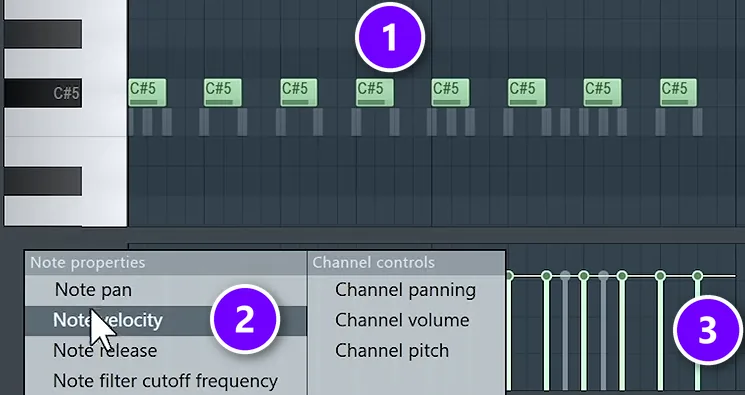
In FL Studio, you almost never see these messages as numbers. Every note block in the Piano Roll (1) is a note on and a note off. The Control lane at the bottom shows the rest of each note’s data. Choose Note velocity (2) and each note gets a stem (3) that shows how hard it plays. Mix Elite’s free course keeps it simple: the only lanes it uses are note velocity and note pan.
What are MIDI channels?
One MIDI connection carries 16 channels, like 16 lanes on one road. Each instrument can listen to its own channel, so one keyboard or one file can play 16 different sounds at once. By tradition, drums sit on channel 10.
MIDI vs audio: what’s the difference?

Audio is recorded sound, like a WAV or MP3 of a voice or a guitar. MIDI is only the instructions for a performance: which notes were played, when and how hard. Audio captures how something sounded; MIDI captures what was played, so you can still change it.
MIDI is closer to sheet music than to a recording. Think of an old player piano. Its paper roll holds no sound, only holes that tell the piano which keys to press. MIDI works the same way.
Why use MIDI instead of recording real sound?
Use MIDI when you want to keep shaping a part after you play it. You can swap the instrument, fix one wrong note, tighten the timing or change the tempo, and nothing gets glitchy. Record audio when the sound itself is the point, like a voice or a real guitar. Here’s what MIDI lets you change later:
- Swap the sound. Record a part on piano, then play the same notes with strings or an 808.
- Fix single notes. Move a wrong note, shorten it or make it softer, without playing it again.
- Change the tempo freely. MIDI follows your project’s tempo with no stretching or glitches.
- Tiny files. A MIDI file for a whole song is usually only a few kilobytes.
What MIDI can’t do is capture a real sound. You can’t record a voice or a guitar as MIDI. That’s audio. And to share a finished song, you export your MIDI parts to audio first.
What is a MIDI file?
A MIDI file is a song’s notes saved as instructions, with the extension .mid. It stores which notes play, when, for how long and how hard, plus the tempo, but no sound. Open the same file in two programs and it can sound completely different, because each one plays it with its own instruments.
There are two common kinds. A type 0 file squeezes every part into one track. A type 1 file keeps each part on its own track, which is easier to edit. Producers use MIDI files to share parts, to load chord and melody packs, and to study how a song is built.
How to open a MIDI file in FL Studio
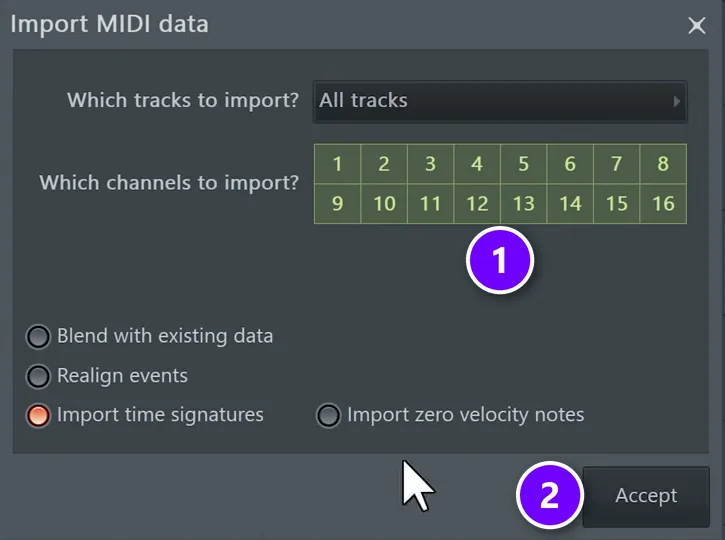
Drag the .mid file from your folder or from FL Studio’s Browser onto an instrument in the Channel Rack. FL Studio then asks what to import: which tracks, and which of the 16 MIDI channels (1). Leave them all on and click Accept (2). The notes land in that instrument’s Piano Roll.
How to export MIDI from FL Studio
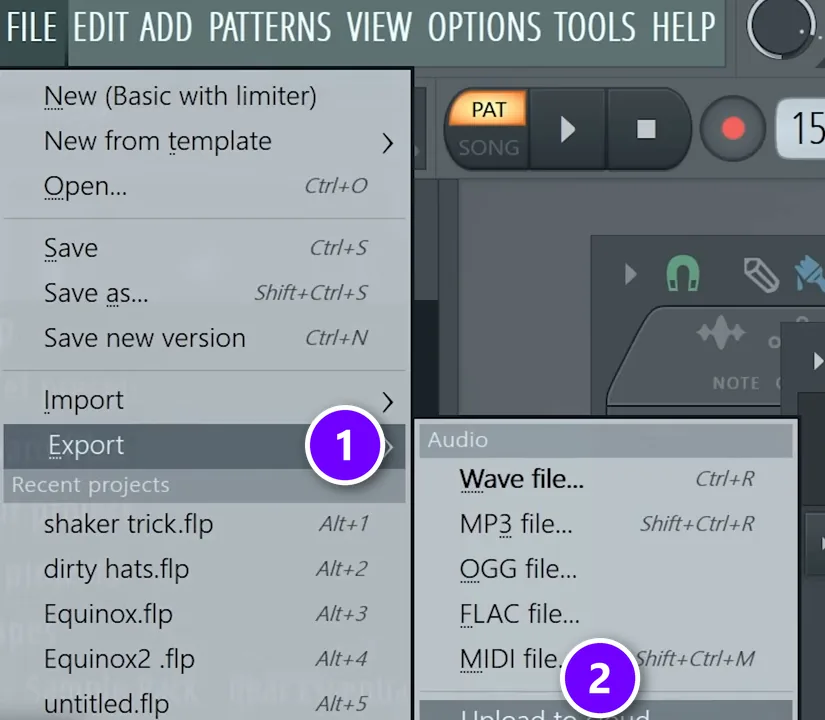
Open the File menu, go to Export (1) and choose MIDI file (2), or press Shift + Ctrl + M. FL Studio saves your notes as a .mid file that any other DAW can open. It’s the easiest way to send a melody to a friend who uses a different program.
Can you turn audio into MIDI?
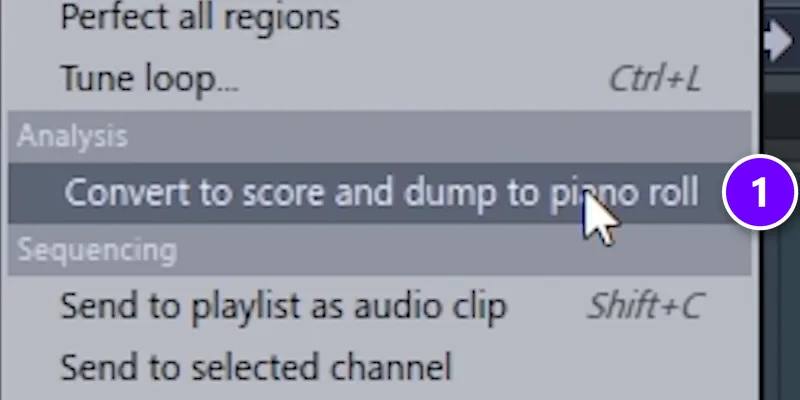
Yes, with some cleanup. Open a melody sample in Edison, FL Studio’s audio editor, and pick Convert to score and dump to piano roll (1) from its tools menu, as one of Mix Elite’s FL Studio trick videos shows. The notes land in the Piano Roll, ready for a new instrument. It isn’t perfectly accurate, so select everything and press Alt + Q to quantize (snap the notes to the grid), then fix the odd note by ear. Mix Elite also has a short video on converting any audio to MIDI.
What are MIDI instruments and devices?
A MIDI instrument is any instrument that sends or plays MIDI. Controllers, like MIDI keyboards and drum pads, send the notes. Sound sources, like synths, drum machines and plugins, turn them into sound. Here’s what’s in each group:
- Controllers send MIDI. MIDI keyboards, drum pad controllers, boxes of faders and knobs, electronic drum kits and wind controllers. Most make no sound of their own.
- Sound sources play MIDI. Hardware synths, drum machines and sound modules, plus software instruments (plugins) like FL Studio’s FL Keys or the free synth Vital.
Many keyboards with built-in sounds do both. So a MIDI instrument can mean either the controller you play or the plugin that makes the sound. For picks, see our list of the best MIDI controllers, and here’s how to install VST plugins in FL Studio when you want more sounds.
You may also see General MIDI, or GM, a standard first published in 1991. Every GM device supports the same list of 128 instrument sounds, plus 47 drum sounds on channel 10, so a GM song file calls up the same kinds of sounds on any GM device.
What is MPE?
MPE (MIDI Polyphonic Expression) lets expressive controllers bend, slide and swell each note on its own, instead of the whole keyboard at once. The MIDI Manufacturers Association adopted it in January 2018. You don’t need it to start.
How do you connect a MIDI keyboard to FL Studio?
Most new MIDI keyboards plug in with a USB cable and usually need no driver. Older gear uses round 5-pin MIDI cables, MIDI In and MIDI Out, which go into an audio interface or a small MIDI-to-USB adapter. Then:
- Plug in the keyboard, then open FL Studio.
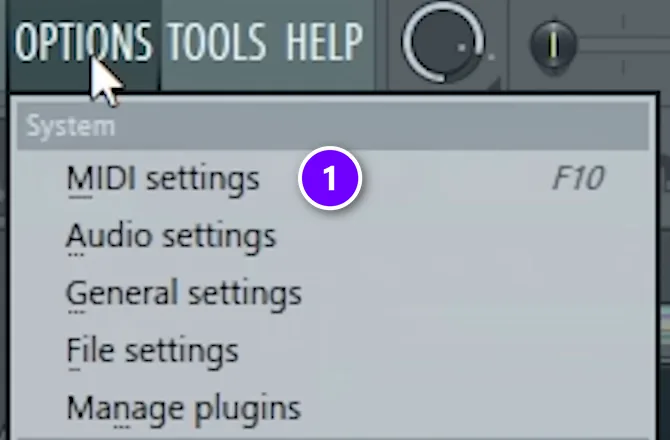
- Open Options > MIDI settings (1), or press F10.
- In the Input list, click your keyboard and make sure Enable is switched on. For most keyboards, the controller type can stay on generic controller.
- Close the window, select an instrument in the Channel Rack and play.
Why is my MIDI keyboard not making any sound?
Because a MIDI keyboard usually makes no sound of its own: it only sends notes. Your DAW has to receive them and play an instrument. In FL Studio, enable the keyboard under Options > MIDI settings, select an instrument channel in the Channel Rack, and make sure your audio device is set in the audio settings.
- Is it in the Input list? If your keyboard isn’t there, click Refresh device list or try another USB port.
- Is it enabled? Click it in the Input list and switch Enable on.
- Is an instrument selected? Click a channel that holds an instrument, like FL Keys, in the Channel Rack. The keyboard plays the channel you select.
- Can FL Studio play sound at all? In Options > Audio settings, choose your audio interface’s driver, or FL Studio ASIO, and check that your speakers or headphones are on.
Do you need a MIDI keyboard?
No. Max is direct about it in Mix Elite’s free course: “Having a [MIDI] keyboard is cool but definitely optional.” You can draw every note with the mouse, or play your computer keyboard like a piano.
Play MIDI with your computer keyboard
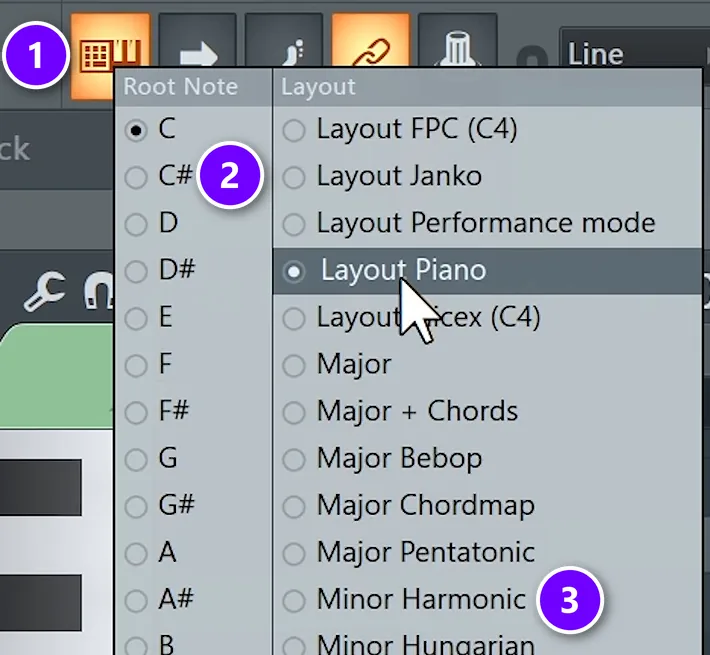
Turn on Typing keyboard to piano in the Options menu, or press Ctrl + T. Mix Elite’s course goes one step further. Right-click the typing keyboard button in the toolbar (1), pick your root note (2) and a scale (3), and every key you press stays in that scale. One of the course’s melodies started that way, played by accident on the typing keyboard.
Mix Elite’s free 4.5-hour FL Studio course, below, covers the gear you need (and don’t) in its first ten minutes, and gets to the typing keyboard and the Piano Roll in its first two days.
How to record and edit MIDI in FL Studio
To record, turn on recording, choose to record notes, and switch on the countdown so you get a moment to get ready. Play, stop, and your notes land in the Piano Roll of the selected instrument.
Forgot to hit record? Dump the score log
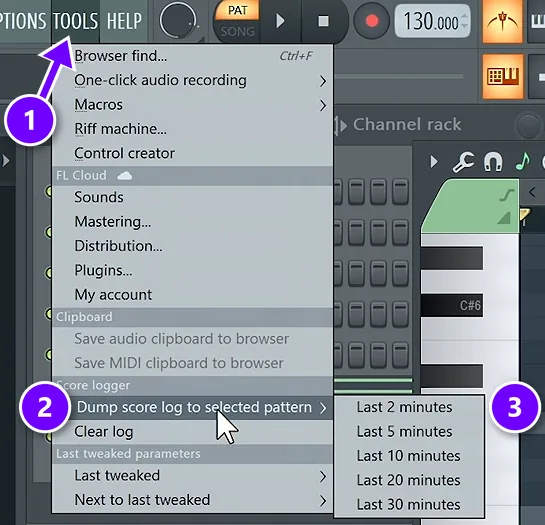
It happens to everyone. You play something great, and nothing was recording. As Max puts it: “Fortunately, [FL Studio] always records your MIDI, even if you’re not recording.” Open Tools (1), choose Dump score log to selected pattern (2), and pick how far back to go, from the last 2 to the last 30 minutes (3).
How do you fix off-beat MIDI notes?
Quantize them. Select the notes with Ctrl + A and press Ctrl + Q, FL Studio’s quick quantize, to snap them to the grid of your snap setting. For more control, Alt + Q opens the Quantizer. Then fix any odd note by hand.
After that, vary the velocities so the part doesn’t sound like a machine: select a few notes and hold Alt while you scroll to lower them. For drums, our guide to humanizing MIDI drums shows how to keep them tight without sounding robotic. These FL Studio shortcuts save time in the Piano Roll too.
How do you change the sound of a MIDI part you already recorded?
Give the notes a new instrument. In FL Studio, right-click the channel button in the Channel Rack and choose Replace to swap its plugin, or copy the notes into another instrument’s Piano Roll. The notes, timing and velocities stay exactly as you played them.
That’s how Mix Elite’s free course writes chords: find the idea on a piano first, then swap in any synth you like. You can also just load a new preset inside the same plugin.
What is MIDI 2.0?
MIDI 2.0 is the first new version of MIDI since 1983. The MIDI Manufacturers Association adopted its core specifications in February 2020. It adds much finer detail for velocity and knob moves, and it lets devices ask each other what they can do and set themselves up. It’s backward compatible, so your MIDI 1.0 gear keeps working. As a beginner, you don’t need to think about it yet.
Start simple. Open FL Studio, turn on the typing keyboard and write one melody in the Piano Roll. Everything in this guide builds on those notes. For the rest of the program, start with our beginner guide to FL Studio.
DAY 1 OF THE 7-DAY MUSIC PRODUCER COURSE
Know exactly what gear you need, and what you can skip
Day 1 of the 7-Day Music Producer Course covers setup, workflow and navigation: what you need to start (and what you don’t), how to choose the right hardware and software for you, and the four features of any DAW you need to understand to find your way around. You also get the ‘Producer Bible 101’, with every music production concept explained in plain English. It’s taught in FL Studio, and the free trial works. It’s $27, a pro gives you feedback on your finished track on Day 7, and you get 60 days to decide if it was worth it.
Frequently asked questions
What does MIDI stand for?
MIDI stands for Musical Instrument Digital Interface. It’s a standard that lets electronic instruments, computers and music software send each other performance data, such as which note to play, how hard and for how long. It was first shown in 1983, and MIDI 1.0 is still the standard today.
What is the difference between MIDI and audio?
Audio is recorded sound, like a WAV or MP3 of a voice or a guitar. MIDI holds no sound at all, only instructions: which notes, when, for how long and how hard. That’s why you can change a MIDI part’s instrument, notes and timing after you record it, while audio stays the sound you captured.
Why is my MIDI keyboard not making any sound?
A MIDI keyboard usually has no sounds of its own; it only sends notes. Open your DAW, enable the keyboard in its MIDI settings (F10 in FL Studio), select an instrument such as a piano or synth plugin, and check that the audio settings use a working audio device. Then the instrument plays what you press.
What are MIDI instruments?
A MIDI instrument is any instrument that sends or plays MIDI. Controllers such as MIDI keyboards, drum pads and wind controllers send notes, usually without making a sound. Synths, drum machines, sound modules and software plugins receive those notes and play them. Keyboards with built-in sounds do both.
Do I need a MIDI keyboard to make music?
No. You can draw notes with the mouse in the Piano Roll, or play your computer keyboard like a piano with FL Studio’s typing keyboard feature. A MIDI keyboard helps once you want to play chords and parts by hand, but you can finish whole songs without one.





